
I still remember the Monday a manager asked me, “We ran the survey, so are we done?” She wasn’t being lazy. She genuinely thought collecting the answers was the finish line. That moment taught me that listening is only half the job, and it’s often why teams start looking at Peakon alternatives. The survey works, and the “now what?” part is where they want more help.
I’ve helped teams pick, launch, and switch engagement tools for years, and I’ve seen the same pattern many times. Peakon, now called Workday Peakon Employee Voice, is a well-loved listening tool with a clean experience and strong support. But every team has its own size, budget, and tech stack, so it’s smart to know what else fits.
So I wrote this guide the way I’d explain it to a friend. I compared pricing, walked through how each tool is set up, and thought about what it’s really like for HR teams and managers week after week. By the end, you’ll know which Peakon competitor deserves your free trial.
Why Switch From Workday Peakon?
A study by Gallup in 2026 shows that manager engagement has dropped by nine points since 2022, which makes it harder for managers to act on what employees tell them. Peakon holds a strong 4.6 out of 5 on G2 across about 118 reviews, and reviewers love its insights and support. Still, a few things come up when teams compare it with other options:
- Pricing isn’t public. G2 shows no pricing for Peakon, so you’ll need a sales conversation to get a quote, which makes quick comparisons harder.
- It lives inside the Workday world. Peakon is now part of Workday, so it fits best for teams already using Workday.
- Turning data into action takes effort. A Capterra reviewer said the volume of data was helpful but took extra effort to turn into clear priorities, and another said the action planning functionality is a bit lacking.
- Customization has limits. Some reviewers say they’d like more customized features, and one found the scoring system confusing at times.
- The review base is smaller. With about 118 reviews on G2, there’s less feedback to read than for larger tools, which have thousands.
- It’s a listening tool first. Peakon’s strength is employee voice, so if you also want goals, reviews, and development plans in one place, you’ll likely need other tools alongside it.
None of this makes Peakon a bad choice. It makes it a strong pick for teams that want clean, simple listening, especially inside the Workday world. If you want a clearer price, more customization, or tools that help managers act, one of the tools below is worth a look.
12 Best Workday Peakon Alternatives
Here’s a quick side-by-side of how each Peakon alternative stacks up on use case and pricing, before we get into the details.
| Tool | Best For | Starting Price | G2 Rating |
| PeopleGoal | Best fully customizable platform for performance reviews, OKRs & employee development | Free plan available. Paid plans start at $4/user/month. | 4.5/5 |
| Culture Amp | People-science-backed engagement analytics | Custom quote | 4.5/5 |
| Leapsome | All-in-one performance, learning & engagement | Custom quote | 4.8/5 |
| 15Five | Continuous check-ins and manager coaching | $4/user/month | 4.6/5 |
| Lattice | Connecting performance reviews directly to OKRs | Starts at $11/seat/month | 4.7/5 |
| Officevibe | Budget-friendly pulse surveys | Starts at $5/user/month | 4.3/5 |
| WorkTango | Employee voice and lifecycle surveys at scale | Custom quote | 4.7/5 |
| Quantum Workplace | Combining engagement surveys with performance data | Custom quote | 4.3/5 |
| Viva Glint | Employee listening inside Microsoft 365 | Contact for pricing | 4.6/5 |
| Winningtemp | Simple pulse surveys with clear pricing | Starts at about €400/year | 4.6/5 |
| Qualtrics Employee Experience | Enterprise survey benchmarking | Custom quote | 4.3/5 |
| HiBob | Culture-first HR with performance built in | Custom quote | 4.5/5 |
1. PeopleGoal – Fully Customizable Platform for Performance Reviews, OKRs & Employee Development
Honestly, what hooked me on PeopleGoal was a single screen. I had just closed an engagement survey, and right beside the low scores I could create a goal and assign it to a manager. No exporting, no copying numbers into another tool.
Before that, I built the survey from a template. It had Likert questions and an eNPS score, and I chose whether answers would be fully anonymous or not. I also set up a 360 feedback round using the no-login forms, so even people who never open HR software gave their input.
The feature I played with the most was the no-code app builder. I took a basic review form and changed the questions, the rating scale, and who had to approve it, just by dragging things around. I didn’t need IT for any of it. Slack and Teams reminders did the nudging for me after that.
Pros:
- Run pulse surveys, in-depth engagement surveys, and eNPS with configurable anonymity, polls, and an anonymous feedback channel.
- Turn results into action with OKRs, SMART goals, and cascading tasks tracked in real time.
- Collect 360-degree feedback, including anonymous no-login forms, and run structured 1-to-1 meetings.
- Link results to development plans, skills tracking, career pathing, and succession planning.
- Build custom forms and HR apps with the no-code builder, sync with Slack, Teams, Workday, and ADP, and see all features.
Cons:
- No downloadable or on-premise version
- Dark user interface option is not available
G2 Rating: 4.5/5
Pricing:
Free plan available. Paid plans start at $4/user/month.
2. Culture Amp – Best for People-Science-Backed Engagement Analytics
The first thing I noticed in Culture Amp was how much data it had to compare against. I ran a survey, and instead of just a score, I saw how we stacked up against companies in our industry and region. That one view changed how seriously leadership took the results.

I used the onboarding and exit survey templates, which were already written, so I skipped the blank-page struggle. For the open-text answers, the comment summaries grouped everything into themes. I read maybe ten lines instead of three hundred.
The storyboard feature was my go-to for sharing. I stitched charts and notes into one simple page and sent it to the executives. Goals were the weak spot, so I tracked those somewhere else.
Pros:
- Survey design backed by an in-house team of people scientists.
- Large benchmark data lets you compare scores by industry and region.
- Ready-made onboarding, exit, and DEI surveys.
- Storyboards and Slack shoutouts turn data into a clear story, as we explain in our guide to employee engagement survey questions.
Cons:
- Admin customization can feel limited at scale.
- Review and OKR features are lighter than in dedicated performance tools.
G2 Rating: 4.5/5
Pricing:
Custom quote.
3. Leapsome – Best for All-in-One Performance, Learning and Engagement
Leapsome made sense to me the day I finished a review and saw it suggest what the person should learn next. I had marked a skills gap in the review, and I could attach a learning path to it in a few clicks. Before that, I had never seen feedback and training sit in the same place.
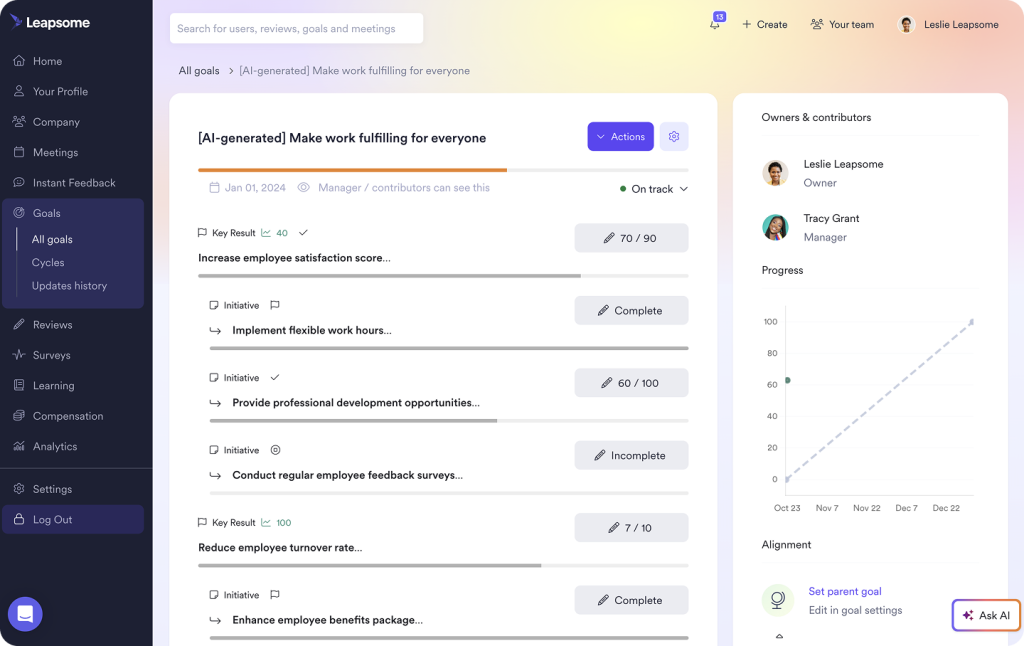
I used the AI assistant while writing reviews. I typed rough notes, got a clean first draft, and then added my own touches. It also boiled down the survey comments into short summaries, which saved me an afternoon.
I’ll be honest, the setup took a while. I spent time building review cycles and templates until they matched how we worked. After that, running OKRs, 360 feedback, and surveys from one login felt easy.
Pros:
- Reviews, 360 feedback, OKRs, surveys, and learning live in one platform.
- Learning paths link directly to review results.
- AI drafts review language and summarizes open-text survey answers.
- A modern interface that new admins pick up quickly.
Cons:
- Initial setup takes real configuration time.
- Per-module costs can climb as your team grows.
G2 Rating: 4.8/5
Pricing:
Custom quote.
4. 15Five – Best for Continuous Check-Ins and Manager Coaching
My time with 15Five came down to one small form. Every Friday, employees answered a few quick questions about their week, and it took them around five minutes. Managers got the answers in a simple feed and could reply right there.
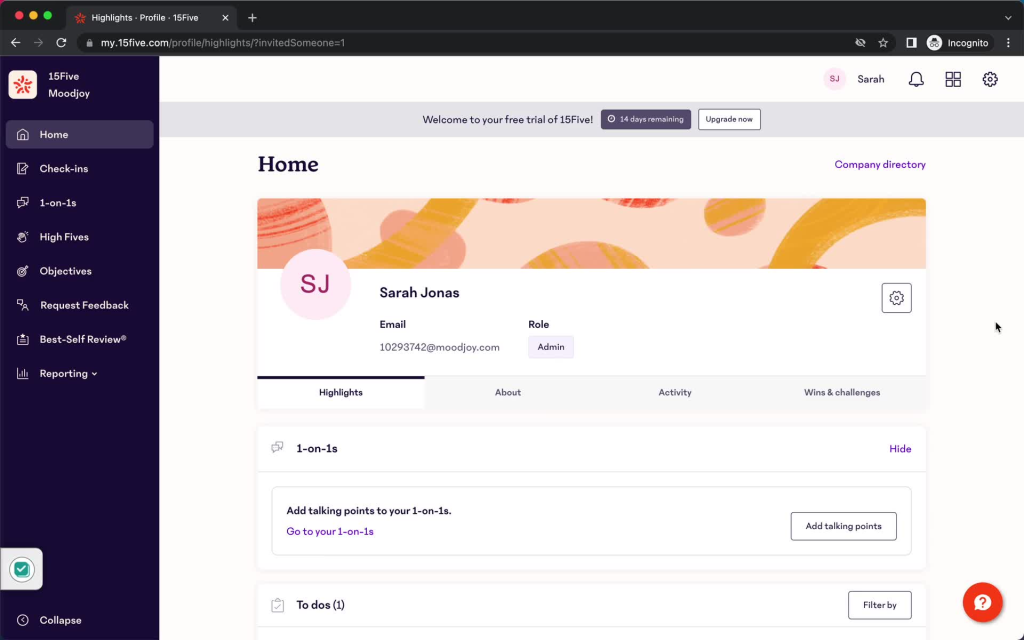
The pulse surveys were part of the starter plan, so I used them to get a quick read on how people were feeling. What I liked was the coaching tips. When a result looked rough, the tool gave the manager a suggestion for what to say or ask next, so nobody was left guessing.
I also tried the Best-Self Review. It asks people to look back at their own growth instead of just handing out a number, which felt odd to my managers at first. After a couple of rounds, they warmed up to it.
Pros:
- Short weekly check-ins keep managers and employees talking between reviews.
- Pulse surveys are included in the entry plan.
- Built-in coaching prompts help managers act on feedback.
- The Best-Self Review framework supports continuous feedback and growth.
Cons:
- Advanced reporting and configuration sit in higher tiers.
- It can feel pricey for very small teams.
G2 Rating: 4.6/5
Pricing:
Starts at $4 per user per month, billed annually.
5. Lattice – Best for Connecting Performance Reviews Directly to OKRs
Lattice and I got along because of one tab. When I opened a person’s review, their goals and how far they’d gotten were already sitting there. I didn’t have to ask anyone what they had worked on or dig through old files.
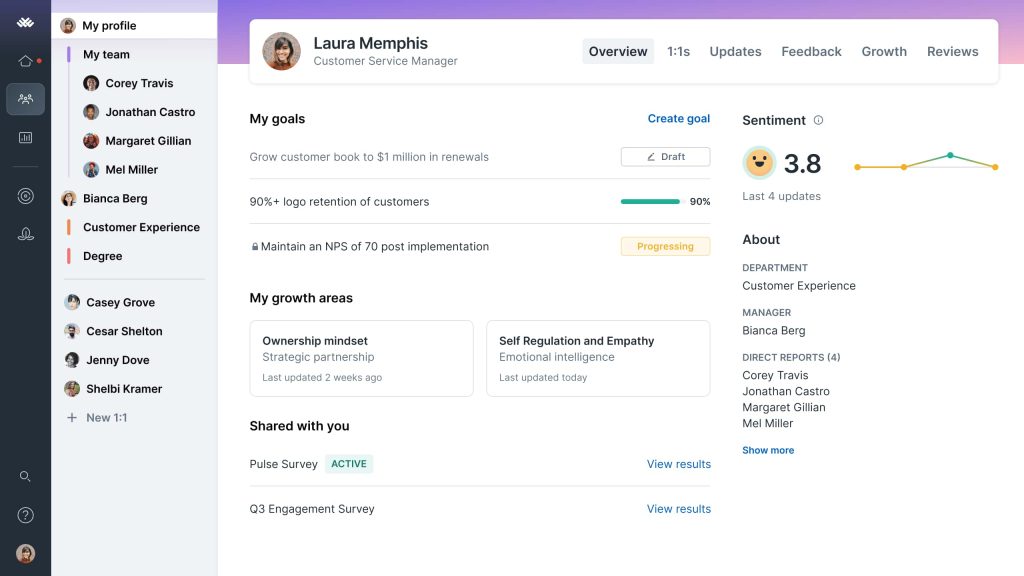
I built a custom review template and ran a calibration session, where managers compared ratings side by side. It felt a lot fairer than guessing. The 1:1 agendas were handy too, since they filled themselves with past notes and current goals.
One thing caught me off guard. I started on the basic plan and later switched on engagement and growth features. Each one was useful, but the bill grew with every add-on, so plan for that early.
Pros:
- Goal progress shows inside each review, a link explained in our guide to OKR software.
- Start with core performance and add engagement, growth, or compensation later.
- Built-in 1:1 agendas pull in goals and past notes.
- Custom review templates, calibration, and sentiment analysis on comments.
Cons:
- Contracts are mostly annual with limited monthly flexibility.
- Costs climb as you add engagement, growth, and compensation modules.
G2 Rating: 4.7/5
Pricing:
Starts at $11 per seat per month.
6. Officevibe – Best for Budget-Friendly Pulse Surveys
Officevibe was the easiest tool on this list to start. I picked a few questions, hit send, and my team answered in under two minutes. The surveys were anonymous, so the replies were more honest than I expected.
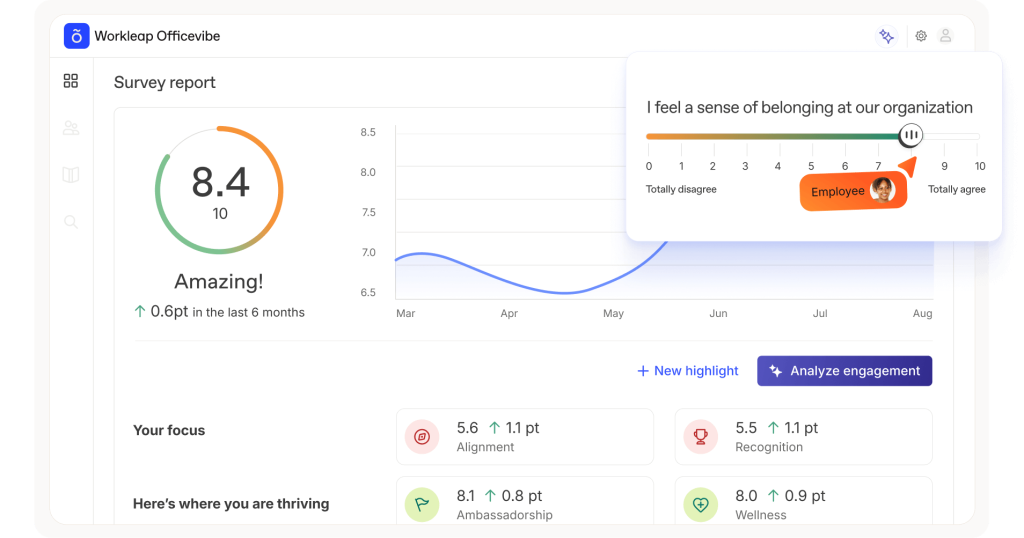
The feature I kept coming back to was the manager tips. Under each result, there was a short idea about what to try, like changing how stand-ups worked. I tested one of them, and it worked.
I also used the 1:1 planner to turn a survey topic into a talking point, and Good Vibes to let coworkers send quick thank-yous. Reports stayed pretty basic, so I never used it for deep analysis.
Pros:
- Short, anonymous pulse surveys encourage honest answers.
- Gives managers practical next-step suggestions, not just scores.
- Good Vibes lets colleagues send quick thank-yous, which supports an employee recognition habit.
- A built-in 1:1 planner turns survey results into conversations.
Cons:
- Reporting is fairly basic.
- Survey customization is limited.
G2 Rating: 4.3/5
Pricing:
Starts at $5 per user per month for a minimum of 10 users, billed annually.
7. WorkTango – Best for Employee Voice and Lifecycle Surveys at Scale
With WorkTango, the mobile app did most of the work for me. My team spent their days on the move, and when I sent a survey to their phones, replies poured in. The same survey by email had barely been touched.
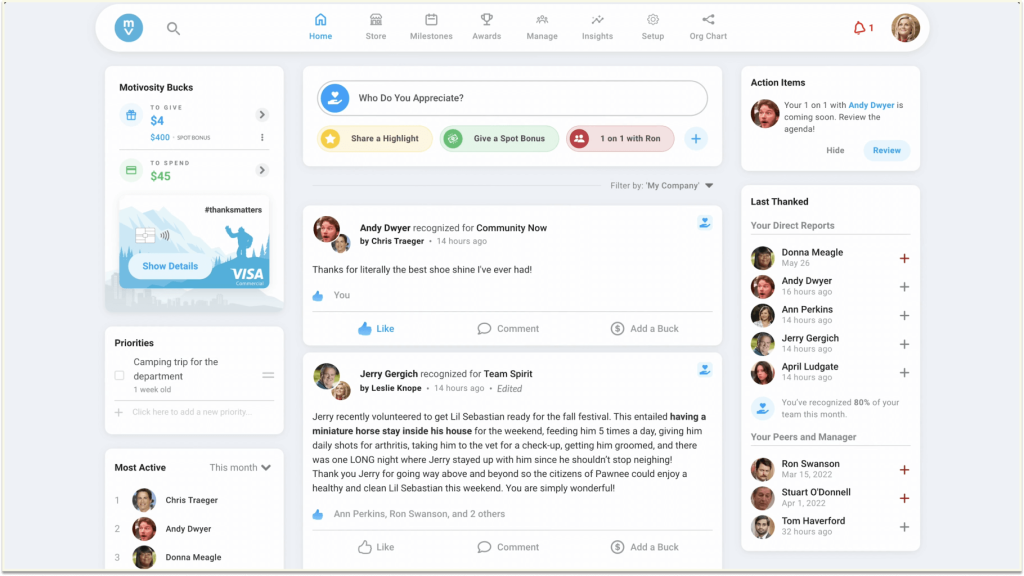
I ran lifecycle surveys too, which check in with people at moments like their first weeks or when they leave. That gave me a picture of the whole journey, not just one snapshot. The DEI dashboards let me split results by group without building anything by hand.
The recognition feature was a nice surprise. Shoutouts linked to company values showed up next to the engagement scores. I did need extra help from the vendor during setup, since the recognition part felt newer.
Pros:
- Deep employee voice and lifecycle surveys.
- Strong DEI analytics and dashboards for HR and managers.
- Recognition data feeds into engagement dashboards.
- A mobile app that works well for frontline and distributed teams.
Cons:
- Recognition features are newer than the survey tools.
- Implementation can need more hands-on guidance.
G2 Rating: 4.7/5
Pricing:
Custom quote.
8. Quantum Workplace – Best for Combining Engagement Surveys With Performance Data
The moment Quantum Workplace clicked for me was when I put survey results and review scores on the same screen. Before that, I’d been juggling two spreadsheets and guessing which teams were both happy and doing well.
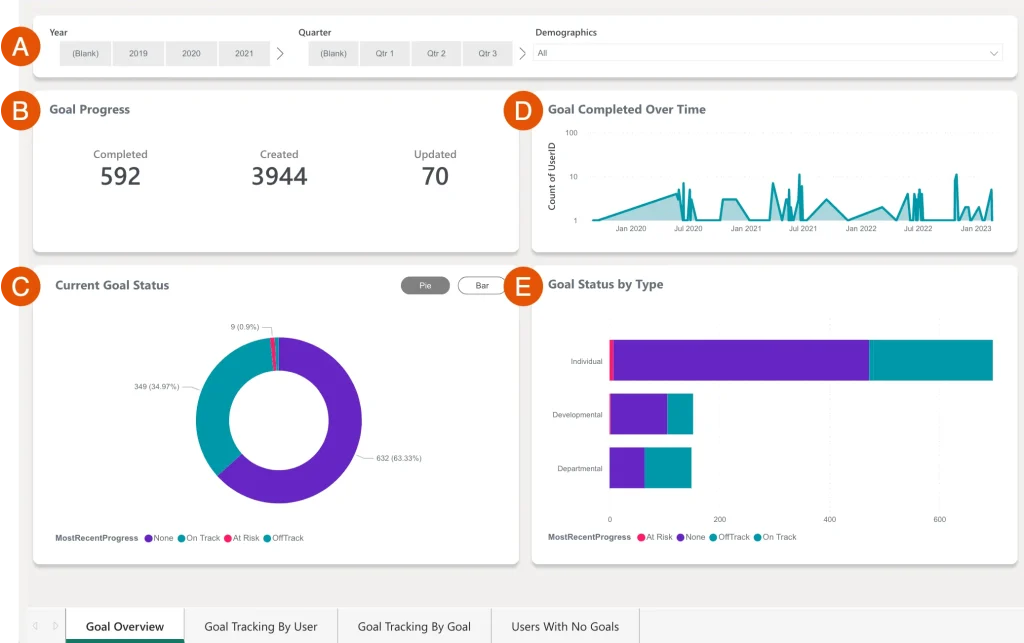
I also liked seeing recognition and check-ins in that same view. I could tell which teams were cheering each other on, and I compared that to their engagement numbers. The writing suggestions came in handy when I was setting goals or typing out review comments.
I connected it to BambooHR so employee details came over on their own. Setup took more planning than I thought, and the options felt a bit stiff, so I gave myself extra time at the start.
Pros:
- Engagement surveys, reviews, goals, and recognition in one view.
- Writing suggestions during reviews and goal setting.
- Benchmarks backed by years of workplace research.
- Integrations with BambooHR, Workday, and SAP SuccessFactors.
Cons:
- No published starting price for the full bundle.
- Needs more planning during setup.
G2 Rating: 4.3/5
Pricing:
Custom quote.
9. Viva Glint – Best for Employee Listening Inside Microsoft 365
Viva Glint felt like part of the furniture, and I mean that as a compliment. My team already lived in Microsoft apps, so the survey showed up where they were working. Nobody had to learn a new login or hunt for a link.
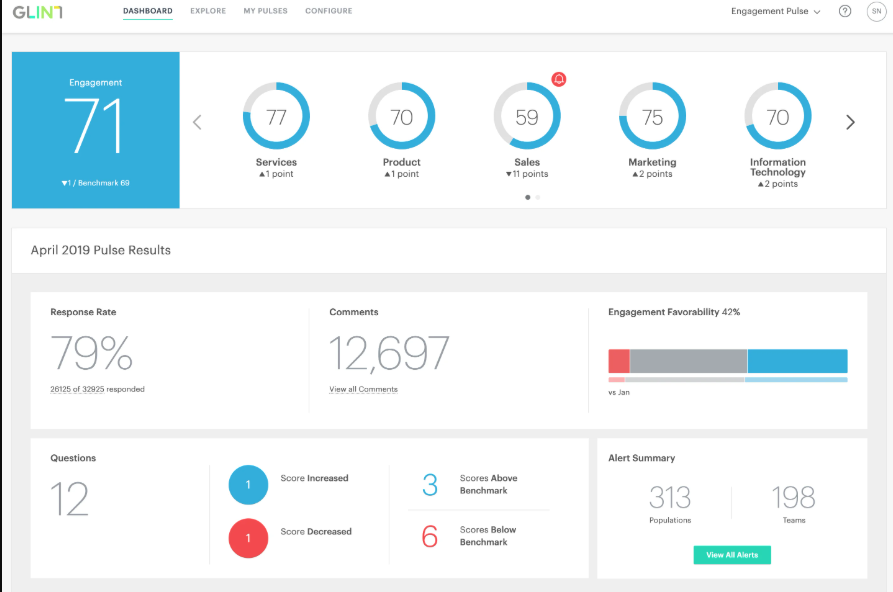
The reports were what I used most. They were tidy and easy to read, so I could hand them to a manager and they’d understand them in a minute. I didn’t have to write a long explanation.
It only does listening, so I used another tool for goals and reviews. I’d also test how well it fits your Microsoft setup before you sign anything.
Pros:
- Built to work with the Microsoft 365 and Viva ecosystem.
- Clear, leader-friendly survey reports.
- Strong 4.6 star rating from reviewers.
- Suited to larger organizations that want employee listening at scale.
Cons:
- Performance reviews and goals aren’t the focus.
- Pricing is by request only, so you need a sales call to budget for it.
G2 Rating: 4.6/5
Pricing:
Contact for pricing.
10. Winningtemp – Best for Simple Pulse Surveys With Clear Pricing
I had Winningtemp running in a couple of days, which is rare for this kind of tool. I picked a short set of questions, invited my team, and got my first results before the week was over.
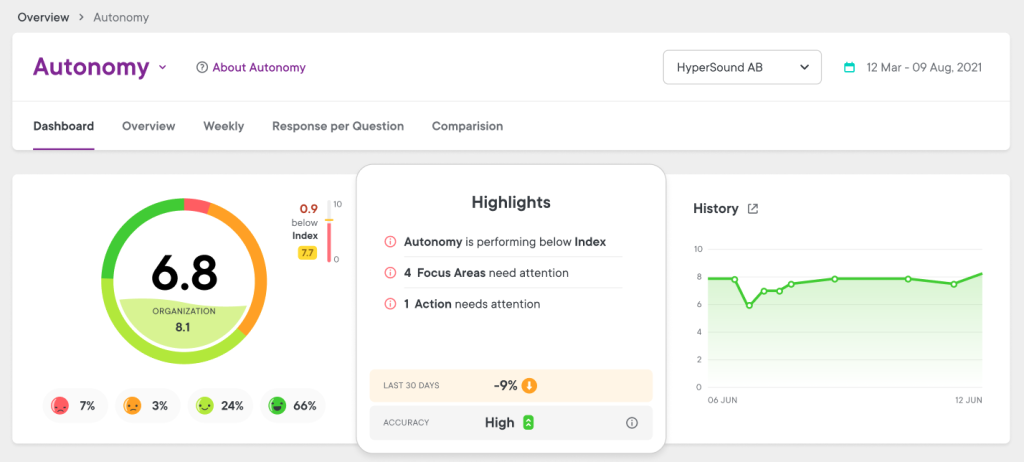
The dashboard was my favorite feature. It showed team mood in plain colors and numbers, split by group, so I could spot a cooling-off team in seconds. No custom reports needed.
Being able to see the price on the website before I talked to anyone also saved me a headache. The trade-off was lighter reporting and no goals or reviews, so I used a separate tool for those. Winningtemp is simpler and shows its pricing, while Peakon goes deeper on insights and reporting. Choose Winningtemp if you want quick pulse surveys with a clear price.
Pros:
- Simple pulse surveys that are quick to launch.
- Published pricing that starts at about €400 per year.
- Dashboards that show team mood at a glance.
- Strong 4.6 star rating from reviewers.
Cons:
- Reporting is lighter than in larger platforms.
- Performance reviews and goals aren’t part of the platform.
G2 Rating: 4.6/5
Pricing:
Starts at about €400 per year.
11. Qualtrics Employee Experience – Best for Enterprise Survey Benchmarking
Qualtrics was the biggest tool I tried in this list, and it felt like it. I set up surveys across several business units, and each division got its own report. For a large company, that was exactly the point.
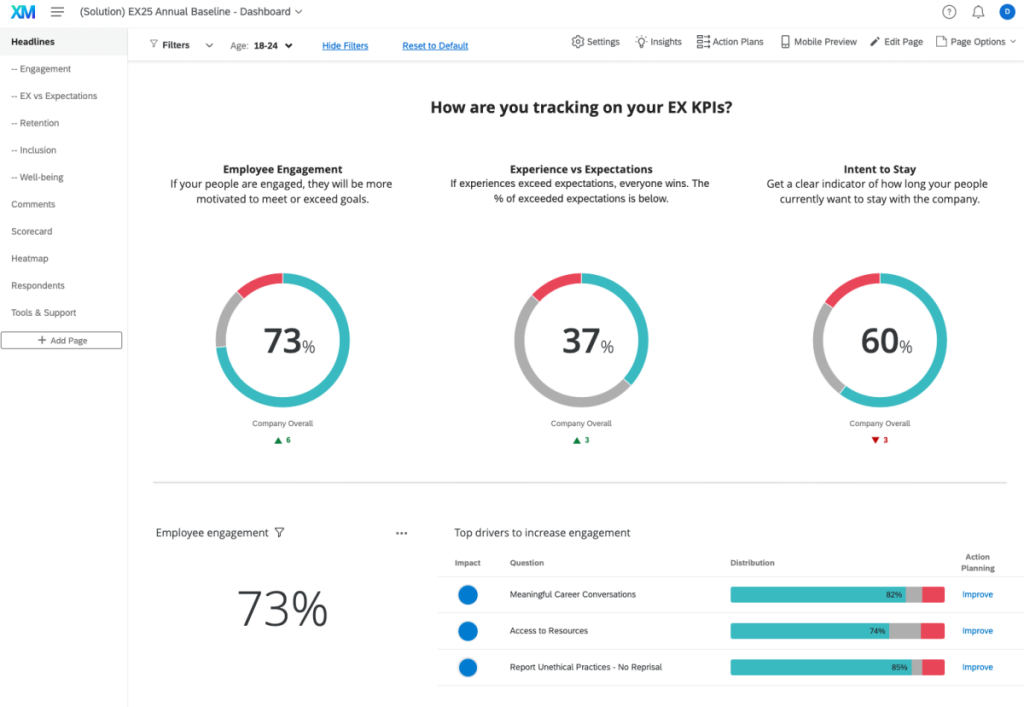
The benchmark data was the feature that impressed me. A score of 72 means little on its own, but seeing it next to industry numbers told leaders whether to worry. I also ran thousands of open-text answers through the sentiment tool, and it sorted them into clear topics for me.
It wasn’t a quick start. I spent real time setting up the workflow, and there’s a learning curve. I’d only pick it if someone on your team will own it full-time. Qualtrics goes bigger on benchmark data and custom analysis, while Peakon is known for its quicker setup and responsive support. Peakon feels lighter to run, and Qualtrics offers more flexibility for complex needs. Choose Qualtrics if survey science at enterprise scale is your priority.
Pros:
- A very large benchmarking dataset for context.
- Sentiment analysis and comment theming save manual work.
- Strong reporting across many business units.
- Enterprise-grade security and compliance.
Cons:
- Pricing is custom, so upfront budgeting is hard.
- It’s heavier than most mid-sized teams need.
G2 Rating: 4.3/5
Pricing:
Custom quote.
12. HiBob – Best for Culture-First HR With Performance Built In
HiBob surprised me because people used it without being asked. They checked time off and looked up coworkers in it, so when a survey arrived, the tool already felt familiar.
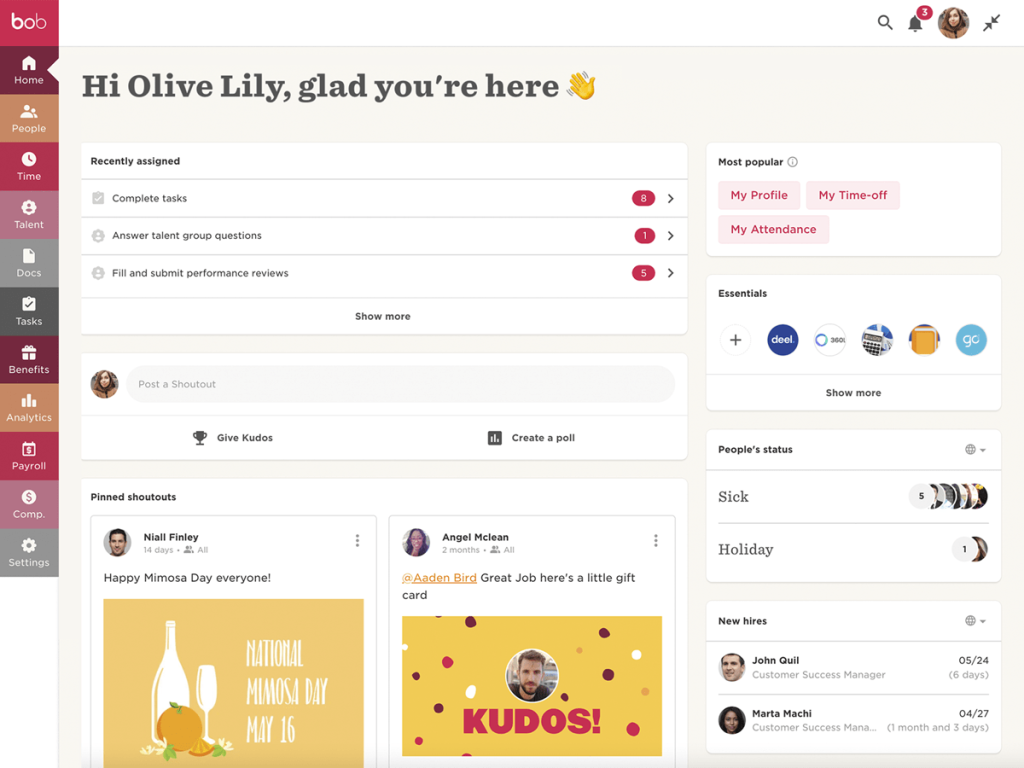
The Slack connection was a big part of that. My team could request time off from chat, and I didn’t have to chase anyone to log in. I also set up onboarding workflows, so new hires got their tasks automatically.
Performance reviews were there, but they felt like a bonus feature. They worked for simple cycles, and I’d add a dedicated tool for anything more detailed. HiBob gives you records, onboarding, and reviews, with lighter survey depth. Choose HiBob if you want to consolidate HR and culture tools. Choose Peakon if survey depth is the priority.
Pros:
- A modern HRIS with performance and engagement built in.
- Slack integration for everyday HR tasks like time off.
- Easy for non-HR people to pick up.
- Automated onboarding workflows, as covered in our guide to employee onboarding software.
Cons:
- No free trial is listed.
- Less flexible for niche review workflows.
G2 Rating: 4.5/5
Pricing:
Custom quote.
How I Evaluated These Tools
When I put a list like this together, I don’t just skim feature pages. I look at how each tool holds up once real people are using it. I scored every tool against the same six criteria, including PeopleGoal, and all ratings come from G2. Here’s the checklist I used:
- User Reviews / Ratings: I start with real user feedback on G2 to see what teams love and where they get stuck.
- Core Features & Functionality: I check what matters most in engagement software: surveys, reporting, action planning, and integrations. Our guide to how to choose performance management software covers the wider picture.
- Ease of Use: I pay attention to the moments I personally got stuck, like building a first survey or finding a report.
- Customer Support: I think about how helpful support was when I actually needed it, not just what the sales team promised.
- Value for Money: I compare the price with what you really get, and whether the number on the page is close to what you’ll end up paying.
- Personal Experience / Expert Insights: Wherever I can, I lean on my own time with these tools and on chats with HR peers who’ve run real survey cycles.
My Top 3 Picks for Workday Peakon Alternatives
After going through all 12, three stood out as the best Peakon alternatives for most teams. Which one is right for you depends on what you want your survey data to do.
1. PeopleGoal
PeopleGoal is my top pick because it keeps surveys, goals, and feedback in one place, so results lead to action. I ran an engagement survey, turned the answers into goals and check-ins, and never had to ask for a quote to see the price.
2. Culture Amp
Culture Amp earns the second spot for teams that care most about survey quality. The benchmarks and comment summaries solved my “now what?” problem, and its large review base made it easy to trust.
3. Leapsome
Leapsome is my third pick if you want engagement, performance, and learning working together. A survey result or review can turn into a learning path, so insight leads to action.
Stop Collecting Feedback Nobody Acts On
Find a Peakon Alternative That Turns Feedback Into Action
Switching engagement tools isn’t about leaving something behind. It’s about picking a platform where survey answers turn into small, clear actions that managers can take this week, so listening actually changes things.
Think about what happens after a survey closes today. If managers feel stuck, a tool that connects results to goals and check-ins can help. If you need deep benchmarks or live inside a big software ecosystem, a survey-first platform may fit better. For ideas on better surveys, see our list of employee engagement survey questions.
Whatever you choose, run one real survey and follow-up cycle before you commit for the year. If you want a tool that bends around the way your team already works, PeopleGoal‘s free trial is a low-effort way to see if it fits.
Frequently Asked Questions
Is Peakon the same as Workday Peakon Employee Voice?
Yes. Peakon is now part of Workday and is sold as Workday Peakon Employee Voice, a tool for pulse surveys and employee listening.
What is the best free alternative to Peakon?
PeopleGoal offers a 14-day free trial with full access and no credit card required. Small teams can also try 15Five or Winningtemp, which publish their starting prices.
Is PeopleGoal cheaper than Peakon?
Peakon doesn't publish its pricing, so a direct comparison needs a sales call. PeopleGoal charges one flat, published rate of $4 per user per month with surveys, reviews, OKRs, and development plans included.
Can I use PeopleGoal if I'm not a Workday customer?
Yes. PeopleGoal works as a standalone platform and also syncs with Workday, ADP, BambooHR, and other HR systems.
Which Peakon alternative works best for a small team?
PeopleGoal, Officevibe, and Winningtemp have low starting prices and quick setup. Our guide to performance management software for small businesses goes deeper.
What's the difference between engagement and employee experience?
Engagement measures how committed people feel, while employee experience covers everything they go through at work. Our guide to employee experience vs. employee engagement explains how they fit together.
Can I move my survey data to a new platform?
Most vendors support CSV or API-based imports, but depth varies. Ask whether the new tool can bring in past survey results and comments, not just employee profiles. Our employee survey results guide can help you plan what to keep.
How long does it take to set up a Peakon alternative?
PeopleGoal's pricing page says implementation takes about 1 to 6 weeks depending on company size and needs. Lighter tools like Officevibe and Winningtemp can be running in days.
Ready to 3x Your Teams' Performance?
Use the best performance management software to align goals, track progress, and boost employee engagement.