
A few years ago, I watched a manager’s heartfelt thank-you get buried in an email chain. Two weeks later, the teammate said nobody had noticed their work all quarter. That’s why recognition tools like Workhuman exist: it’s an enterprise platform for peer-to-peer recognition and rewards.
That’s also why people ask me about Workhuman alternatives, usually wondering if it fits their size, budget, or goals. The best fit depends on what you want recognition to do: connect to goals and reviews, deliver global rewards, or stay simple and affordable.
I compared pricing, setup, and what each tool is like for HR teams, managers, and employees week after week. Below, 12 options are compared by price, G2 rating, and best-fit use case, so you’ll know which Workhuman competitor deserves your free trial.
Why Switch From Workhuman?
Teams usually look past Workhuman for three reasons: unpublished pricing, an enterprise-first setup, and recognition that sits apart from goals and reviews.
A study by Gallup and Workhuman in 2024 found that employees who get meaningful recognition were 45% less likely to leave their jobs. That’s a strong reason to pick a tool your people will actually use.
Meisha-ann Martin, Workhuman’s senior director of people analytics and research, told NPR that recognition is “about catching good behavior as it happens.”
Workhuman holds a solid 4.7 out of 5 on G2 from more than 2,200 reviews, and reviewers praise its ease of use and polished recognition experience. Still, a few things come up when teams compare it with other options:
- Pricing isn’t public. G2 shows no entry-level pricing for Workhuman, so you’ll need a sales conversation to get a quote. A Capterra reviewer also mentioned that some reward prices felt higher than retail.
- It leans enterprise. Around 79% of its G2 reviews come from enterprise companies, so smaller teams may find the platform and the buying process bigger than they need.
- Reward choices can feel limited. A few Capterra reviewers said they wanted more gift card variety and more points to give to colleagues.
- Recognition comes first. Workhuman is built around social recognition, so if goals, reviews, and development plans are your main need, check how deep its performance features go before you commit.
- Automation can feel light. In one G2 comparison, reviewers said they wanted more automated workflows from Workhuman.
- The interface takes a minute to learn. One Capterra reviewer said it can feel a bit confusing at first.
None of this makes Workhuman a bad choice. It’s a strong pick for large companies that want a polished, well-known employee recognition program. If you want a clearer price, a lighter setup, or recognition that connects to goals and growth, one of the tools below is worth a look.
12 Best Workhuman Alternatives
Here’s a quick side-by-side of how each Workhuman alternative stacks up on use case and pricing, before we get into the details.
| Tool | Best For | Pricing | G2 Rating |
| PeopleGoal | Best fully customizable platform for performance reviews, OKRs & employee development | Free plan available. Paid plans start at $4/user/month. | 4.5/5 |
| Awardco | Global rewards and flexible recognition at scale | Custom quote | 4.9/5 |
| Bonusly | Simple peer-to-peer recognition on a budget | Free plan for up to 8 users. Paid plan starts at $3/seat/month. | 4.7/5 |
| Motivosity | Recognition with real monetary bonuses | Custom quote | 4.7/5 |
| Nectar | Everyday recognition with a flexible rewards store | Custom quote | 4.7/5 |
| Achievers | Enterprise recognition paired with employee listening | Custom quote | 4.6/5 |
| Reward Gateway | Recognition combined with perks and discounts | Custom quote | 4.6/5 |
| Recognize | Low-cost recognition that’s quick to launch | Custom quote. Billed annually. | 4.7/5 |
| Matter | Small teams that live in Slack or Microsoft Teams | Free plan available | 4.7/5 |
| Guusto | Simple digital gift card rewards | Free plan available | 4.9/5 |
| Vantage Circle | Rewards, wellness, and engagement in one suite | Custom quote | 4.7/5 |
| Perkbox | Employee perks bundled with recognition | Custom quote | 4.5/5 |
1. PeopleGoal: Best Fully Customizable Platform for Performance Reviews, OKRs & Employee Development
I moved a team to PeopleGoal when we wanted recognition to sit next to goals and feedback instead of living in a separate tool. Peer recognition, check-ins, OKRs, and reviews all lived in one place, so a thank-you could turn into a real conversation about growth without anyone switching tabs.
Giving recognition took a few minutes. I picked a teammate, wrote a short message, and used the preview step to see exactly what they’d receive before sending it. Our recognition badges added a little fun, and the person on the other end could see who sent the note and why.
The no-code builder surprised me. I reshaped a review form, including its questions, rating scale, and approval flow, by dragging blocks around instead of filing a ticket. I also sent a quick pulse survey with anonymity turned on, then turned the answers into goals and tasks. If you want a feel for the setup first, the admin product tour walks through it.
Pros:
- Send peer-to-peer recognition with a preview step and badges that make appreciation visible.
- Launch pulse surveys, engagement surveys, and eNPS with anonymity settings you control through the engagement survey tools.
- Link feedback to OKRs, SMART goals, and cascading tasks that update in real time.
- Gather 360-degree feedback, including no-login anonymous forms, and run structured 1-to-1 meetings.
- Build custom forms and HR apps with the no-code builder and sync with Slack, Teams, Workday, and ADP through its integrations.
Cons:
- No downloadable or on-premise version.
- No dark mode for the user interface.
G2 Rating: 4.5/5
Pricing:
Free plan available. Paid plans start at $4/user/month.
2. Awardco: Best for Global Rewards and Flexible Recognition at Scale
A company with people spread across several countries was the test case for Awardco, and the rewards network was the first thing I noticed. Employees could choose from a huge catalog, and the vendor says it covers more than 100 million items in over 160 countries.
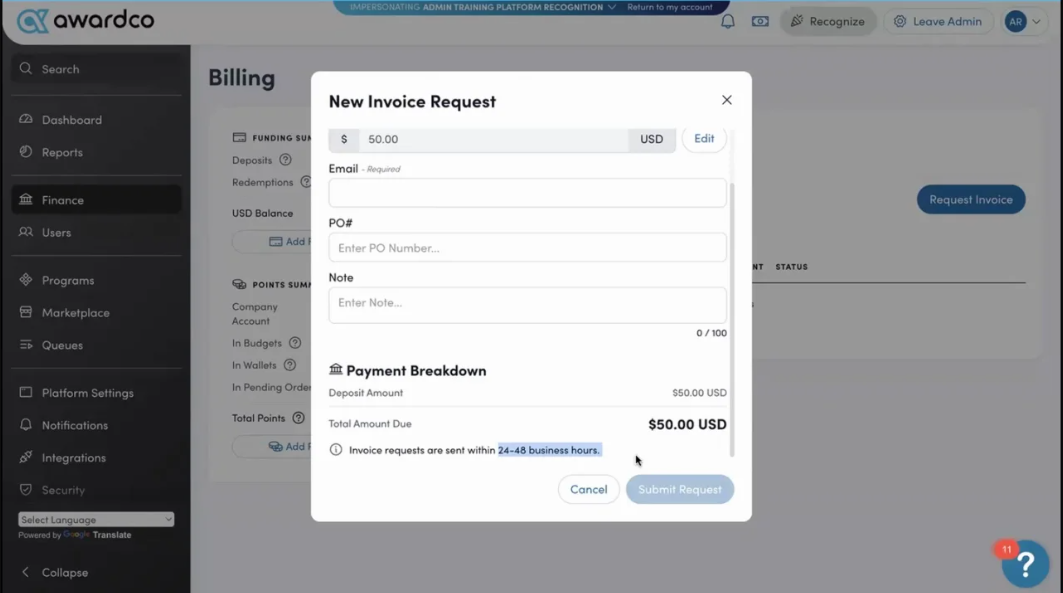
Recognition came in a few flavors. Peers could send quick shoutouts, managers could run nomination-based awards for bigger wins, and milestones like work anniversaries went out automatically, so nobody got missed.
Budget controls were a quiet favorite. I gave each manager a recognition budget and watched spending from one place, which kept the program tidy as it grew. It took me longer to learn than lighter tools, so I blocked out a few hours before launch.
Pros:
- Pick from a very large global rewards network.
- Send peer-to-peer shoutouts that anyone can give.
- Run nomination-based awards for bigger achievements.
- Automate milestone recognition like anniversaries and birthdays.
Cons:
- It takes longer to learn and manage than lighter tools.
- Goals and performance reviews aren’t part of the platform.
G2 Rating: 4.9/5
Pricing:
Custom quote.
3. Bonusly: Best for Simple Peer-to-Peer Recognition on a Budget
I rolled out Bonusly with a fast-moving team that wanted recognition to feel like part of the workday, not another chore. A shoutout took seconds: I picked a teammate, added a few points, wrote a quick note, and tagged a company value with a hashtag.
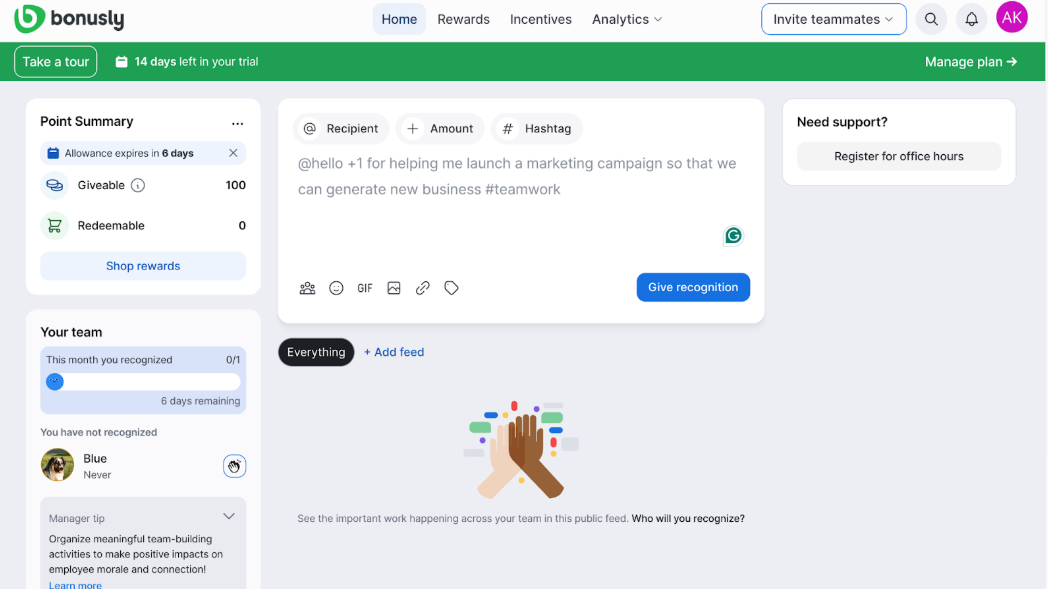
The value hashtags paid off. After a few weeks, I could open the reports and see which values got mentioned most, which teams were giving the most recognition, and who hadn’t been recognized in a while. The emojis and GIFs kept the feed lively and personal. Points turned into gift cards and other rewards, so the thanks felt real, and employees could redeem them whenever they liked.
Slack and Microsoft Teams support meant nobody had to leave their chat to recognize a colleague, and that single feature drove most of our participation. Setup was quick, and the Team plan kept the starting cost low. The thing to plan for is the reward budget, since points need funding on top of the seat price.
Pros:
- Give points with a short message and a company value hashtag.
- Add emojis and GIFs to make recognition feel personal.
- Redeem points for gift cards and other rewards.
- Recognize colleagues inside Slack and Microsoft Teams.
Cons:
- The free plan caps at 8 users, so larger teams need a paid plan.
- It isn’t built for reviews, goals, or development plans.
G2 Rating: 4.7/5
Pricing:
Free plan for up to 8 users. Team plan starts at $3/seat/month.
4. Motivosity: Best for Recognition With Real Monetary Bonuses
I used Motivosity with a team that wanted appreciation to carry real weight. Managers and peers could send a thank-you with a small monetary bonus attached, and people noticed the difference right away. Instead of a generic badge, a teammate got a note and a little extra money, which made recognition feel tangible. I also used gift card options for quick thank-yous when a bonus felt like too much.
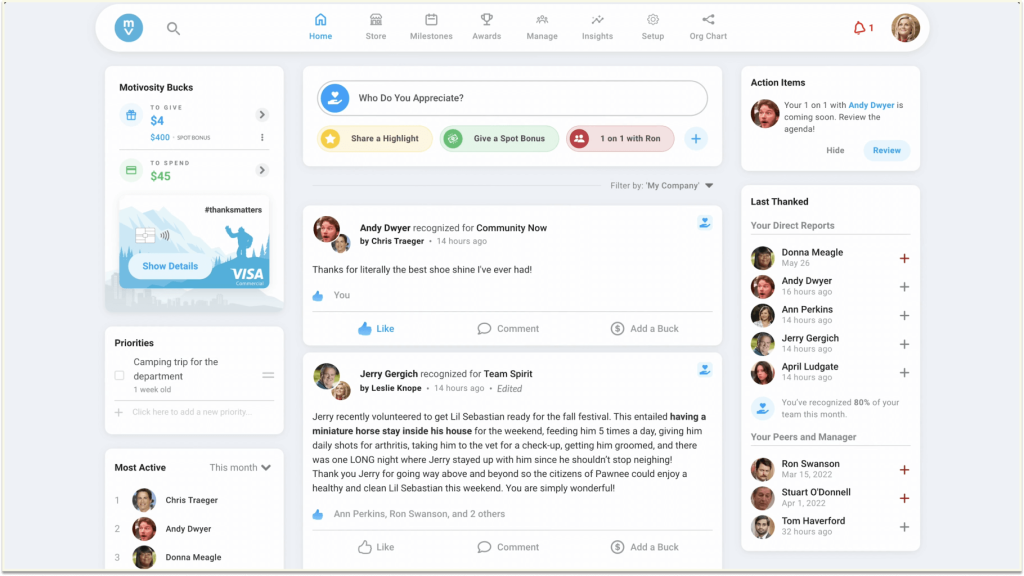
Everything landed in a shared company feed, so wins stayed visible all week, and a social space let employees share interests and connect beyond work. I also liked the leadership tools for 1:1s, goals, and shared to-dos, which gave managers a clear next step after saying thanks. That combination turned the platform into something managers opened for their own work, not just to hand out praise, which helped keep adoption steady.
Engagement surveys came with the package too, and the results linked back to recognition activity, so I could compare how teams felt with how often they were appreciated. Setup took more planning than I expected, especially around bonus budgets and approvals, so I’d start early and involve finance.
Pros:
- Send peer-to-peer recognition with small monetary bonuses attached.
- Scroll a company feed that keeps appreciation visible.
- Use leadership tools for 1:1s, goals, and shared to-dos.
- Send gift cards for quick thank-yous when a bonus feels like too much.
Cons:
- No published pricing.
- Bonus spending adds to the license cost.
G2 Rating: 4.7/5
Pricing:
Custom quote.
5. Nectar: Best for Everyday Recognition With a Flexible Rewards Store
I tried Nectar with a mid-sized team that wanted recognition to feel simple and rewarding. Employees gave and earned points for good work, then spent them in a flexible rewards store on gift cards and other treats. Because people could pick what they wanted, the rewards felt personal instead of generic, and I noticed participation climb once employees saw their points add up.
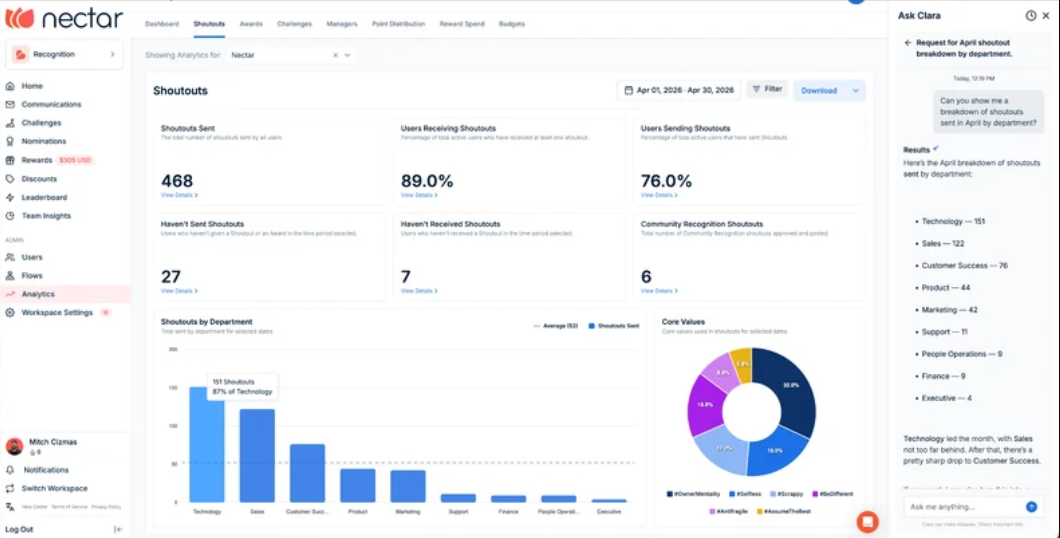
Recognition showed up where people already worked. I connected it to our chat tools so a shoutout took only a few clicks, and custom badges let me tie praise to our company values, like teamwork or customer focus. Simple dashboards showed who was giving and receiving recognition, which helped me spot teams that needed a nudge and managers who were already doing a great job.
Support was strong during rollout. The main thing I planned around was the rewards budget, because the program works best once points are funded and employees can see what they’ve earned.
Pros:
- Give and receive points through peer-to-peer recognition.
- Redeem points in a flexible rewards store.
- Create custom badges that reflect company values.
- Recognize people inside chat tools like Slack and Teams.
Cons:
- Pricing is quote-based, so budgeting starts with a sales call.
- It works best once you’ve funded a rewards budget.
G2 Rating: 4.7/5
Pricing:
Custom quote.
6. Achievers: Best for Enterprise Recognition Paired With Employee Listening
I worked with Achievers at a large company that wanted recognition and employee listening under one roof. People gave recognition, earned points, and redeemed them for rewards, while HR watched participation trends in dashboards.
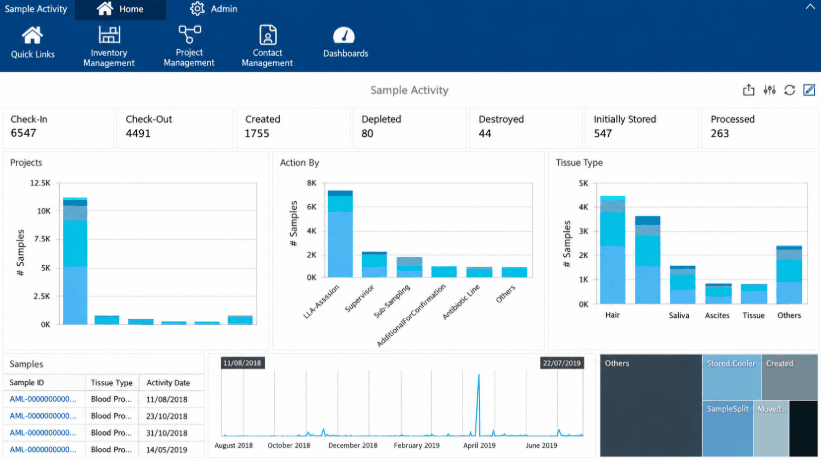
The listening side stood out. Surveys sat next to recognition data, so I could check whether teams that gave more praise also scored higher on engagement. That connection helped me explain the value of the program to leadership with real numbers instead of guesses. It pairs well with a solid set of engagement survey questions, which I wrote before each survey cycle.
Setting up programs by team and region took patience, so I’d call it a better fit for bigger organizations with an admin who can own it. Once it was running, the controls for different groups kept things consistent across locations, but I wouldn’t pick it for a small team that just wants to start sending thank-yous this week.
Pros:
- Combine peer recognition, points, and rewards in one place.
- Pair recognition data with engagement surveys.
- Set up different programs for different teams and regions.
- Support large, distributed workforces with enterprise-ready controls.
Cons:
- It’s heavier than most small teams need.
- Goals and reviews aren’t part of the core platform.
G2 Rating: 4.6/5
Pricing:
Custom quote.
7. Reward Gateway: Best for Recognition Combined With Perks and Discounts
I used Reward Gateway with a team that wanted recognition and everyday employee perks in one place. Alongside peer recognition, employees got access to discounts and savings, so the platform stayed useful even in weeks when nobody was celebrating a big win. That daily pull brought people back to the platform, which meant recognition posts got seen far more often than they would on a tool people only open when they need to thank someone.
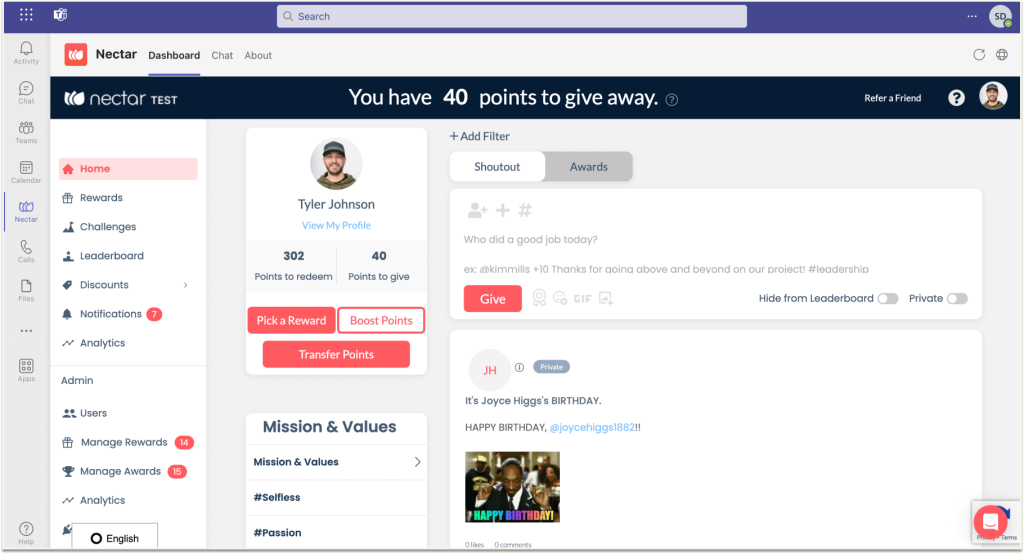
Customization and integrations stood out. I could also share company news and updates through the same platform, so employees had one place to check for announcements, perks, and recognition instead of three separate tools.
It needed more configuration than a simple tool, so I planned extra setup time and a clear checklist for each employee group.
Pros:
- Combine peer recognition with employee discounts and perks.
- Customize branding, rewards, and messaging for different groups.
- Connect it to your HR tools through strong integrations.
- Share company news and updates in the same platform.
Cons:
- Some reviewers say it needs more configuration to fit specific workflows.
- The benefits-style approach may be more than a team that only wants recognition needs.
G2 Rating: 4.6/5
Pricing:
Custom quote.
8. Recognize: Best for Low-Cost Recognition That’s Quick to Launch
I set up Recognize for a small team that wanted something working by the end of the week. Setup was light: I added employees, picked a few badges, and turned on points, and the first recognitions went out the same day. There were no long implementation calls or heavy configuration screens, which made it a good first step for a team that had never run a recognition program before.
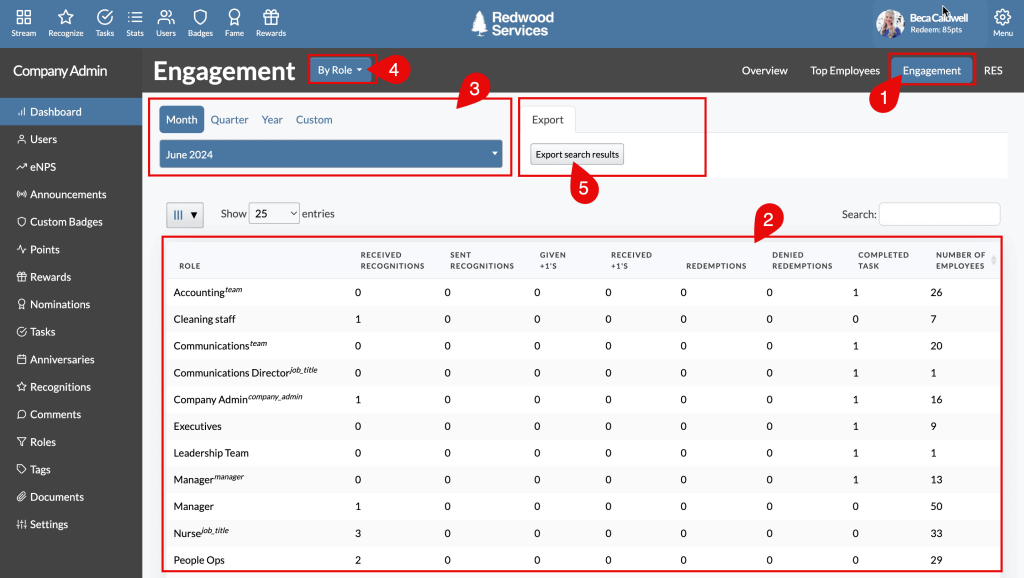
Recognition came as e-cards, badges, and points, and people could send them from the web app or from chat tools like Slack and Teams. I liked creating custom badges that matched our company values, because it kept praise tied to behavior we actually wanted to see more of. Employees could also redeem points for rewards, so a quick thank-you could turn into something they enjoyed. For more ways to use them, check these employee recognition ideas.
A free trial and a low starting price made it easy to test with a couple of teams before rolling it out wider. That kept the risk small and let me gather feedback from real users first. The reward choices felt narrower than the big global networks, which was fine for us, but it’s worth checking the catalog if your team spans many countries.
Pros:
- Send recognition as e-cards, badges, and points.
- Create custom badges that match company values.
- Share appreciation through chat tools like Slack and Teams.
- Test it with a free trial and a low entry price.
Cons:
- Reward choices are narrower than on larger platforms.
- It has a smaller review base than the market leaders.
G2 Rating: 4.7/5
Pricing:
Custom quote. Billed annually.
9. Matter: Best for Small Teams That Live in Slack or Microsoft Teams
I tried Matter with a small team that lived in Slack, and it fit right in. People sent recognition without leaving their chat, so appreciation happened in the flow of work instead of in a separate portal that nobody remembered to open. It pairs nicely with a team that already relies on Slack for communication, and the same idea works in Microsoft Teams for companies on that side.
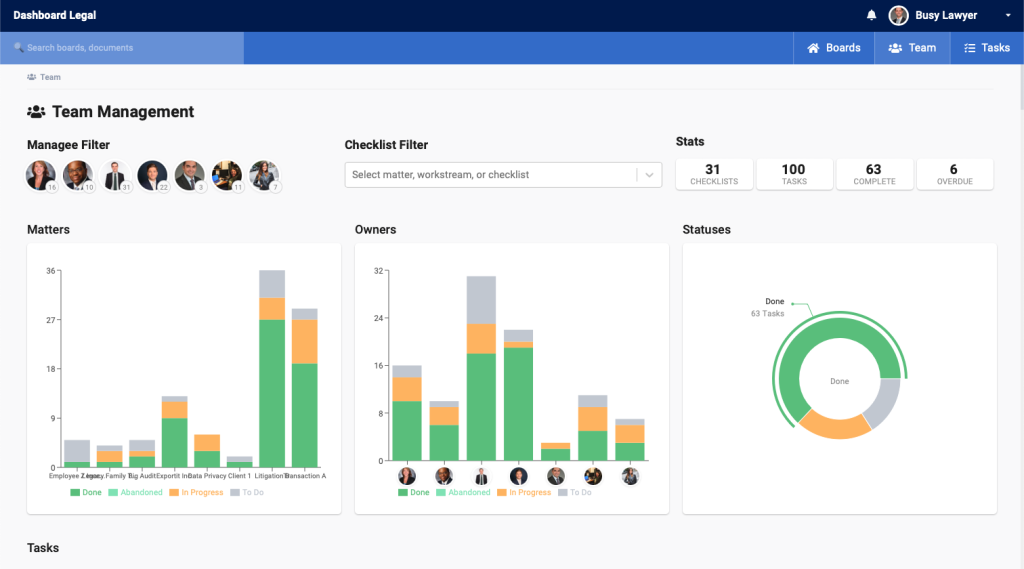
I tagged shoutouts with company values and watched them build a simple record of who was helping whom. Over a few weeks, that record showed me the quiet contributors who kept projects moving but rarely got noticed, and it gave managers real examples to use in performance conversations. The free plan meant I could prove it worked before asking anyone for budget, which made the internal pitch much easier.
The setup was fast, and I didn’t need an admin to babysit it. Because it’s lighter than enterprise platforms, I paired it with a separate tool for reviews and goals, so it’s best when recognition is your main need.
Pros:
- Recognize teammates directly inside Slack and Microsoft Teams.
- Start on a free plan with no budget approval.
- See who’s giving and receiving appreciation.
- Get going in minutes with a light setup.
Cons:
- Admin controls are lighter than on enterprise platforms.
- Goals and performance reviews aren’t included.
G2 Rating: 4.7/5
Pricing:
Free plan available.
10. Guusto: Best for Simple Digital Gift Card Rewards
I used Guusto with a team that wanted every thank-you to come with something tangible. Managers sent a digital gift card in a couple of clicks, and the person receiving it chose where to spend it. That choice made the gift feel thoughtful rather than random, and recipients didn’t need to create accounts or learn a new platform to enjoy it.
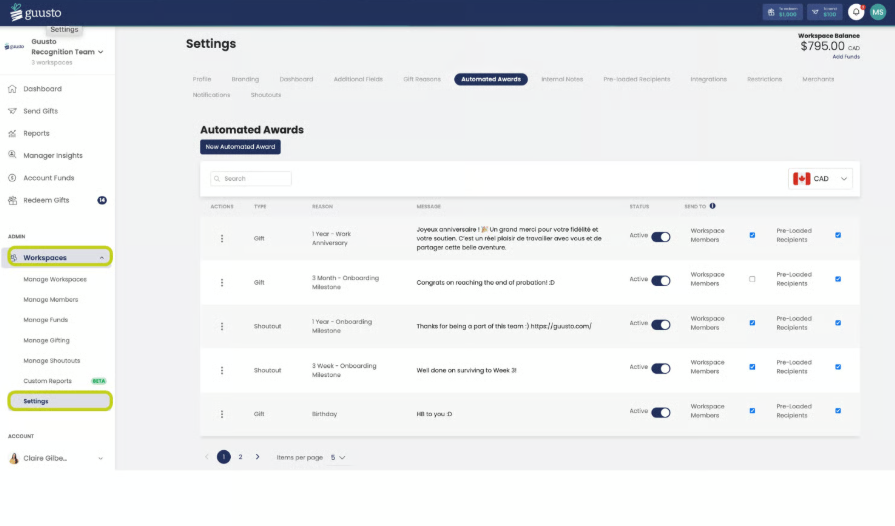
Setup was quick, and the free plan let me test it with a handful of managers first. I could send my first few gift cards on day one and see how people reacted before deciding whether to scale up.
It’s focused on gift cards, so I paired it with a separate tool for recognition feeds, goals, and reviews. That worked well, because Guusto handled the reward and the other tool handled the story behind it. If you’re collecting inspiration for what to write alongside a gift, these employee recognition examples help.
Pros:
- Send digital gift cards in a couple of clicks.
- Let recipients choose where to spend their reward.
- Start with a free plan before committing.
- Get up and running with very little training.
Cons:
- It’s centered on gift cards rather than a full recognition program.
- Social recognition features are lighter than on recognition-first platforms.
G2 Rating: 4.9/5
Pricing:
Free plan available.
11. Vantage Circle: Best for Rewards, Wellness, and Engagement in One Suite
I explored Vantage Circle with a large team that wanted rewards, wellness, and engagement under one login. Alongside recognition and points, it offered wellness and perks features, which made it feel like a full employee experience suite rather than a single-purpose tool. Employees could check one place for recognition, rewards, and benefits, and that cut down on the number of apps HR had to promote.
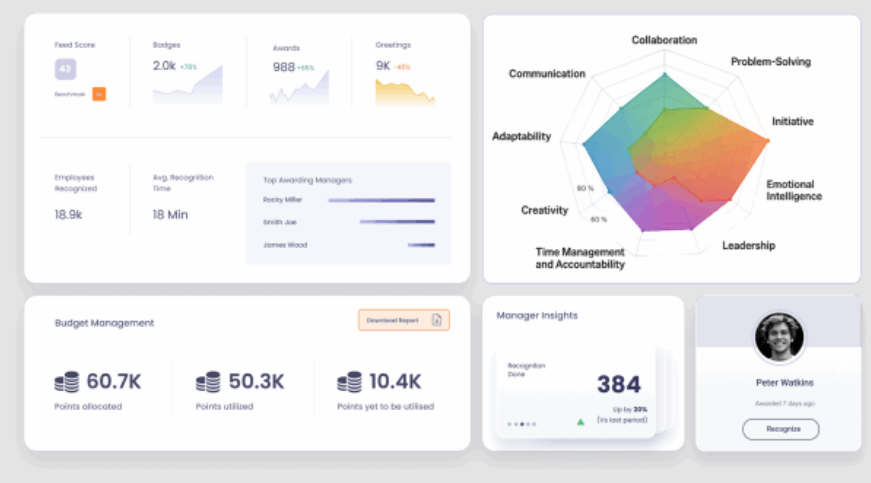
Recognition came as peer shoutouts and manager awards, and a rewards catalog let employees redeem their points for things they wanted. I also ran pulse surveys from the same account, so I didn’t have to juggle another tool or export data between systems. The wellness side pairs well with an employee wellness program, because people could see health and recognition content together.
The wide feature set meant more setup, so I rolled it out in phases, starting with recognition and adding surveys and wellness later. That slower approach kept employees from feeling overwhelmed, and I’d recommend it for any team trying a suite like this.
Pros:
- Give peer recognition and manager awards in one place.
- Let employees redeem points from a rewards catalog.
- Add wellness features alongside recognition.
- Run pulse surveys from the same account.
Cons:
- It leans enterprise, so small teams may find it heavy.
- The wide feature set means more setup.
G2 Rating: 4.7/5
Pricing:
Custom quote.
12. Perkbox: Best for Employee Perks Bundled With Recognition
I used Perkbox with a team that wanted benefits and recognition to feel connected. Employees got a library of perks and discounts, and managers could celebrate good work with a simple thank-you. Because the perks were useful on their own, people had a real reason to log in, and that gave recognition a built-in audience instead of an empty feed.
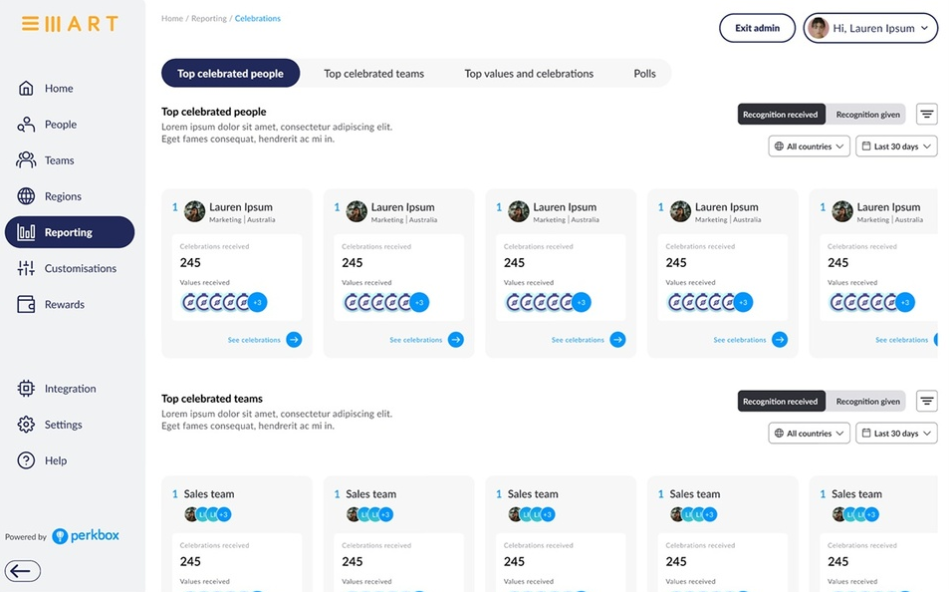
The perks hub was the daily draw. People logged in for savings and ended up seeing recognition posts too, which lifted participation without any extra reminders from me. I also liked having wellbeing content in the same place, which fits neatly with broader employee well-being initiatives. Managers could mark milestones and big wins, so appreciation sat right next to the benefits people already valued.
There was less depth in reporting and fewer ways to customize the recognition flow. I’d pick it when perks are the priority and recognition is a nice addition, and I’d choose a specialist platform if recognition is the main goal.
Pros:
- Offer a library of perks and discounts employees use weekly.
- Send simple thank-yous and recognition posts to colleagues.
- Add wellbeing content in the same platform.
- Give managers an easy way to celebrate milestones and big wins.
Cons:
- It has a smaller review base than most tools on this list.
- Recognition is lighter than on specialist platforms.
G2 Rating: 4.5/5
Pricing:
Custom quote.
How I Evaluated These Tools
When I build a list like this, I don’t stop at feature pages. I look at how each tool behaves once people start sending recognition. Here’s the checklist I used:
- User Reviews / Ratings: I start with G2 feedback to see what teams love and where they get stuck, and I note how many reviews sit behind each score.
- Core Features & Functionality: I check what matters most in recognition software: peer-to-peer recognition, rewards, reporting, and integrations. Our guide on how to choose performance management software covers the wider picture.
- Ease of Use: I pay attention to the moments I personally got stuck, like sending my first recognition or finding a participation report.
- Customer Support: I think about how helpful support was when I needed it, not just what the sales team promised.
- Value for Money: I compare the price with what you really get, including whether reward budgets and add-ons push the total higher than the number on the page.
- Personal Experience / Expert Insights: Wherever I can, I lean on my own time with these tools and on chats with HR peers who’ve run real recognition programs.
My Top 3 Picks for Workhuman Alternatives
After going through all 12, three stood out as the best Workhuman competitors for most teams. Which one is right for you depends on what you want recognition to do once the thank-you is sent.
1. PeopleGoal
PeopleGoal is my top pick because it keeps recognition, goals, and feedback in one place, so appreciation leads to growth. I sent a thank-you, tied it to an OKR, and followed up in a 1-to-1 without leaving the platform. The free plan and the published $4 per user per month price meant I never had to wait on a quote.
2. Awardco
Awardco earns the second spot for teams that care most about rewards. The huge global catalog, nomination-based awards, and automatic milestone recognition made it easy to keep a large, spread-out workforce included.
3. Bonusly
Bonusly is my third pick if you want recognition that people actually use every day. The quick points-and-hashtag flow, the Slack and Teams support, and the $3 per seat starting price made it one of the easiest tools to get a team excited about.
Choose Recognition That Sticks
Switching recognition tools isn’t about leaving something behind. It’s about picking a platform where a thank-you becomes a habit, and where praise connects to the goals and growth people care about.
Think about what happens after someone gets recognized today. If it ends with a nice message, a tool that links appreciation to goals and feedback can help. If you need a huge rewards catalog or perks, a rewards-first platform may fit better. Either way, the best alternatives to Workhuman are the ones your managers and employees will open every week.
Whatever you choose, run one real recognition cycle before you commit for the year. If you want a tool that bends around the way your team already works, PeopleGoal‘s free plan is a low-effort way to see if it fits, and the pricing page shows exactly what you’d pay as you grow.
Frequently Asked Questions
Is Workhuman the Same as Work Human?
Yes. Workhuman is sometimes written as Work Human, and both names refer to the same employee recognition platform. It is built around peer-to-peer social recognition and rewards, and it is best known among large companies. If you searched for either spelling, the alternatives in this guide apply to both.
Who Are Workhuman's Main Competitors?
Workhuman's main competitors include Awardco, Bonusly, Motivosity, Nectar, Achievers, and Reward Gateway for recognition and rewards. PeopleGoal competes when you want recognition tied to goals, reviews, and development. Each one differs on price, rewards network, and setup effort, as the comparison table above shows.
How Much Does Workhuman Cost?
Workhuman doesn't publish its pricing, and G2 lists no entry-level price, so any budget talk starts with a sales call. If you want a number first, PeopleGoal, Bonusly, Matter, and Guusto list a price or a free plan. Compare those against the quote you get.
What Is the Best Workhuman Alternative Overall?
For teams that want recognition connected to goals, reviews, and development, PeopleGoal is my top pick. For global rewards, Awardco is a strong choice, and for everyday peer recognition, Bonusly is hard to beat. All three are covered in the top picks above, with pricing and G2 ratings for each.
What Is the Best Free Alternative to Workhuman?
PeopleGoal, Bonusly, Matter, and Guusto all offer free plans. Bonusly's free plan covers up to 8 users, and its Team plan starts at $3 per seat per month. Guusto handles gift card rewards, Matter works inside Slack and Microsoft Teams, and PeopleGoal connects recognition to goals and reviews.
Is PeopleGoal Cheaper Than Workhuman?
Workhuman doesn't publish its pricing, so a direct comparison needs a sales call. PeopleGoal has a free plan, and its paid plans start at $4 per user per month. That makes PeopleGoal easier to budget for, because you can see the starting price before you talk to anyone.
Which Workhuman Competitor Has the Biggest Rewards Network?
Awardco says its network covers more than 100 million items in over 160 countries. Reward Gateway and Vantage Circle also offer large catalogs of rewards and perks. If your team spans many countries, check each catalog by country before you commit, since reward availability varies by region.
Which Alternative Works Best for a Small Team?
PeopleGoal, Bonusly, Matter, and Guusto have free or low starting prices, and Recognize is quick to launch. Matter and Bonusly suit teams that live in Slack or Microsoft Teams. Our guide to performance management software for small business goes deeper.
Can One Tool Handle Recognition and Performance Management?
Yes, but few do both well. PeopleGoal pairs peer recognition with OKRs, reviews, 360-degree feedback, and development plans, while most other tools on this list focus on recognition and rewards. If you only need thank-yous and rewards, a recognition-first tool can be simpler to run and faster to launch.
How Long Does It Take to Set Up a Workhuman Alternative?
PeopleGoal's pricing page says implementation takes about 1 to 6 weeks, depending on company size and needs. Lighter tools like Recognize and Matter can be running in days. Larger suites like Achievers and Vantage Circle took more setup in my experience, so plan extra time for them.
What Should I Look for in a Workhuman Alternative?
Look for clear pricing, a rewards catalog your people will use, easy chat integrations, and reports that show who's taking part. Also check whether recognition connects to goals and feedback, as covered in our look at employee engagement software.
Ready to 3x Your Teams' Performance?
Use the best performance management software to align goals, track progress, and boost employee engagement.