
The first time I was handed an OKR spreadsheet, I nodded as if I understood. To tell you the truth, I had no clue what I was aiming for, let alone how to get there.
According to the Betterworks 2024 State of Performance Enablement Report, 90% of leaders believe their performance management systems work, but only 55% of employees agree, revealing a major disconnect in how goals are understood and executed.
Months later, nothing had changed except the frustration.
That is when it clicked for me. Goals do not fail because teams are lazy. They fail because the system is broken or missing entirely.
No one can see how their work connects to the company’s strategy. Managers spend review meetings chasing data instead of making decisions. Feedback loops do not exist. And by the time anyone checks in on quarterly goals, it is already December.
Here I help fix that, starting with the right OKR software. In this guide, I will help you:
- Understand what OKR software is and why it matters for mid-sized and growing teams
- Compare the 11 best OKR tools with honest pros, cons, and pricing
- Figure out the exact moment to ditch your spreadsheet
- Choose the right tool based on your team size and workflow
- Get a step-by-step implementation plan you can actually follow
What Is OKR Software & What Are Its Benefits?
Now let’s look at the real benefits of OKR software and why teams are moving away from spreadsheets:
- Goal Alignment: Teams move from isolated goals to a connected system where everyone understands how their work contributes to larger business outcomes.
- Real-Time Visibility: Progress is updated continuously, so there are no surprises at the end of the quarter or year. Everyone stays on the same page.
- Scalable Growth: What works for a small team in spreadsheets breaks at scale. OKR software keeps goal-setting structured as teams grow.
- Built-in Accountability: Regular check-ins and dashboards make progress visible without constant follow-ups or micromanagement.
- Better Decisions: Historical OKR data reveals patterns, helping leaders refine strategies and set more realistic, impactful goals.
- Lower Admin Work: Automated tracking and reporting reduce time spent on manual updates, freeing managers to focus on coaching and execution.
11 Best OKR Software to Streamline Your Performance
I have reviewed each of these tools not just by specs, but by how they work in real-world settings. This list combines my hands-on experience with insights from other professionals who have used these platforms to align goals, boost focus, and drive execution.
| Tool | Best for | Pricing | User Rating |
|---|---|---|---|
| PeopleGoal | Fully Customizable Performance Reviews, OKRs & Employee Development | From $4/user/month | 4.5/5 |
| Profit.co | Aligning tasks with strategy | Custom pricing | 4.7/5 |
| Workboard | Real-time performance tracking | Custom pricing | 4.7/5 |
| Weekdone | Weekly OKR check-ins | From $90/month for 10 users | 4.2/5 |
| Worxmate | Automating business operations | Custom pricing | 5/5 (1 review) |
| Synergita | Continuous performance appraisals | From $3/user/month | 4.6/5 |
| Perdoo | Visualizing company-wide OKRs | From €6.40/user/month | 4.4/5 |
| SugarOKR | Simple OKR tracking | Custom pricing | – |
| Simple OKR | Personal goal management | From $49/month | – |
| Mooncamp | Team-driven OKR collaboration | From €6/user/month | 4.8/5 |
| OKRs Tool | Simplicity and AI-powered alignment | From $30/month | 4.5/5 |
1. PeopleGoal
Best for Fully Customizable Performance Reviews, OKRs & Employee Development
I’ve been using PeopleGoal to manage OKRs across my team, and honestly, it changed how we operate. Before, goals were set once and forgotten. Now, every objective cascades from the company level down to individual contributors, so everyone knows exactly how their work connects to the bigger picture.
What I love most is the AI-powered performance management. It summarizes feedback, surfaces performance trends, and combines them with real-time goal tracking, so I can see which goals are on track, which ones are at risk, and step in before things go off course. I can see which goals are on track, which ones are at risk, and step in before things go off course. The automated check-ins alone saved me hours of follow-up emails every week.
It also integrates with tools we already use, like Slack, BambooHR, and Workday, so adoption was seamless. If you want an OKR software that actually keeps your team aligned, accountable, and moving forward on measurable outcomes, PeopleGoal is genuinely worth it.
The reporting features are another standout. Live dashboards give leadership instant visibility into performance across every department, making strategy reviews sharper and faster. We stopped guessing and started deciding based on real data. That shift alone made our quarterly planning significantly more effective.
Pros:
- Supports both OKRs and SMART goals, giving managers flexibility in goal-setting models
- Offers customizable performance workflows for reviews, goals, and approvals.
- Built-in 360-degree feedback tools tied directly to OKR milestones
- Comprehensive performance management module covering goals, behaviors, and competencies
- Real-time dashboards for engagement, completion rates, and workflow progress
- Seamless HRIS integrations for automated goal assignment and employee sync
- Clean interface with 24/7 customer support for fast adoption
- Supports employee development with career plans and skill tracking.
Cons:
- No downloadable or on-premise version
- Dark UI mode is not available
User Rating: 4.5/5 (G2)
Pricing: FREE 14 days trial. Paid starts at $4/user/month.
Check how iQmetrix replaced scattered forms and SharePoint with one transparent, trackable process using PeopleGoal.
2. Profit.co
Best for Aligning Tasks With Strategy
I used Profit.co during a multi-department product launch, and the thing that stuck with me was how cleanly it closed the gap between strategy and daily work. Most tools force you to choose between goal tracking and project management. Profit.co does both inside the same platform.
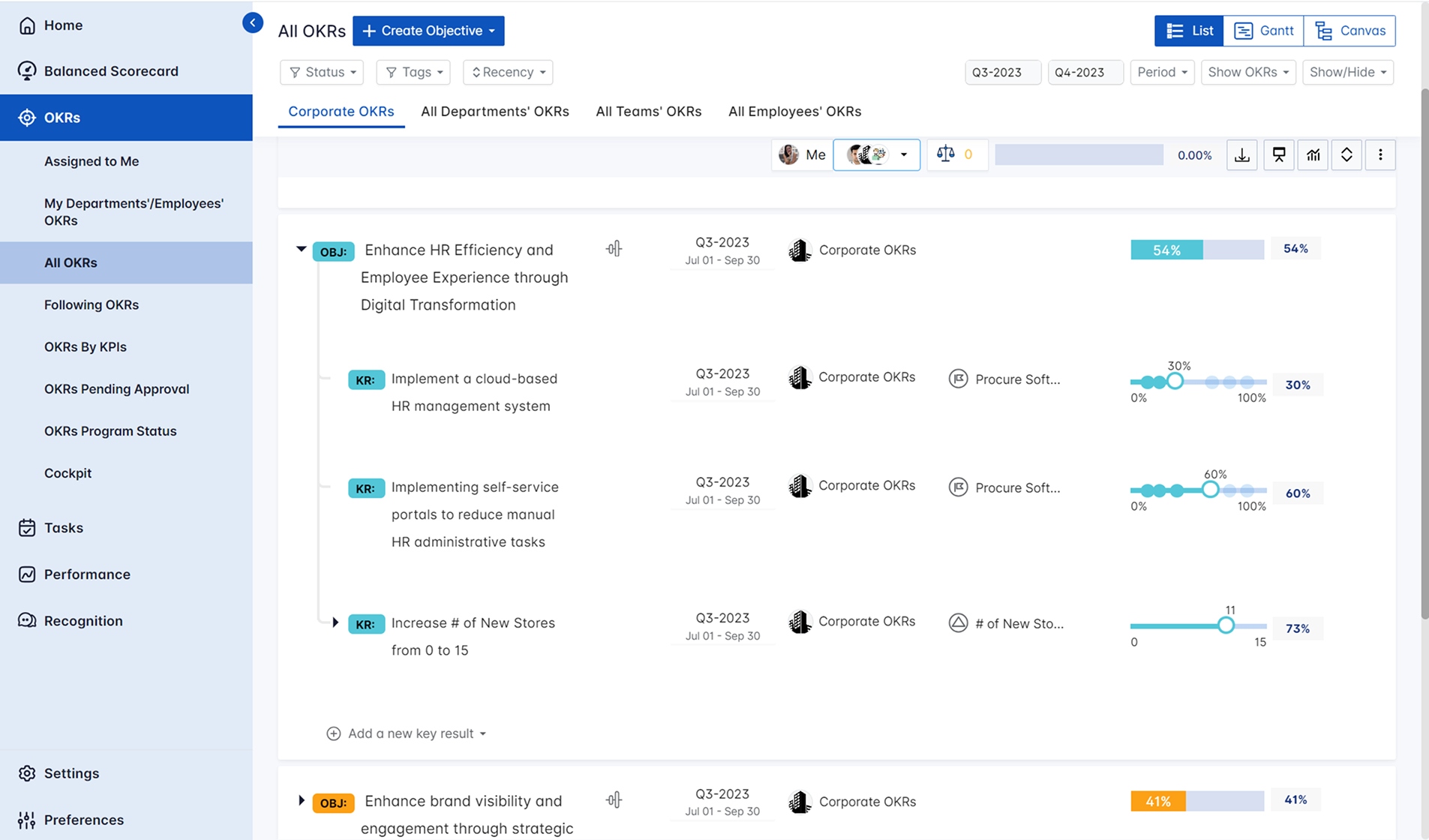
I could take any objective, break it into key results, and map those directly to assignable tasks without switching tools. Executives had a live view of how each function was contributing to the bigger picture. Individual contributors could see exactly where their work fit, which genuinely changed how people prioritized their day.
The built-in performance management layer adds appraisals, scorecards, and one-on-ones so you are not stitching together three different systems. Sprint-based updates work well for agile teams, and the pulse surveys give you early signals on engagement before problems surface.
Pros:
- Maps daily tasks directly to strategic objectives for full execution visibility
- Built-in performance management with appraisals, scorecards, and one-on-ones
- Sprint-based updates for agile teams
- Employee engagement modules, including pulse surveys and recognition
- Centralized role-based dashboards across departments
Cons:
- Custom reports may need admin support to configure
- Mobile app has limited feature parity with desktop
User Rating: 4.7/5 (G2)
Pricing: Custom pricing.
3. Workboard
Best for Real-Time Performance Tracking
I used Workboard with a 40-person distributed team across sales and customer success, and the thing I remember most is that nobody ever had to ask where we stood. The dashboards updated in real time as tasks were completed, so the answer was always visible without a status call.
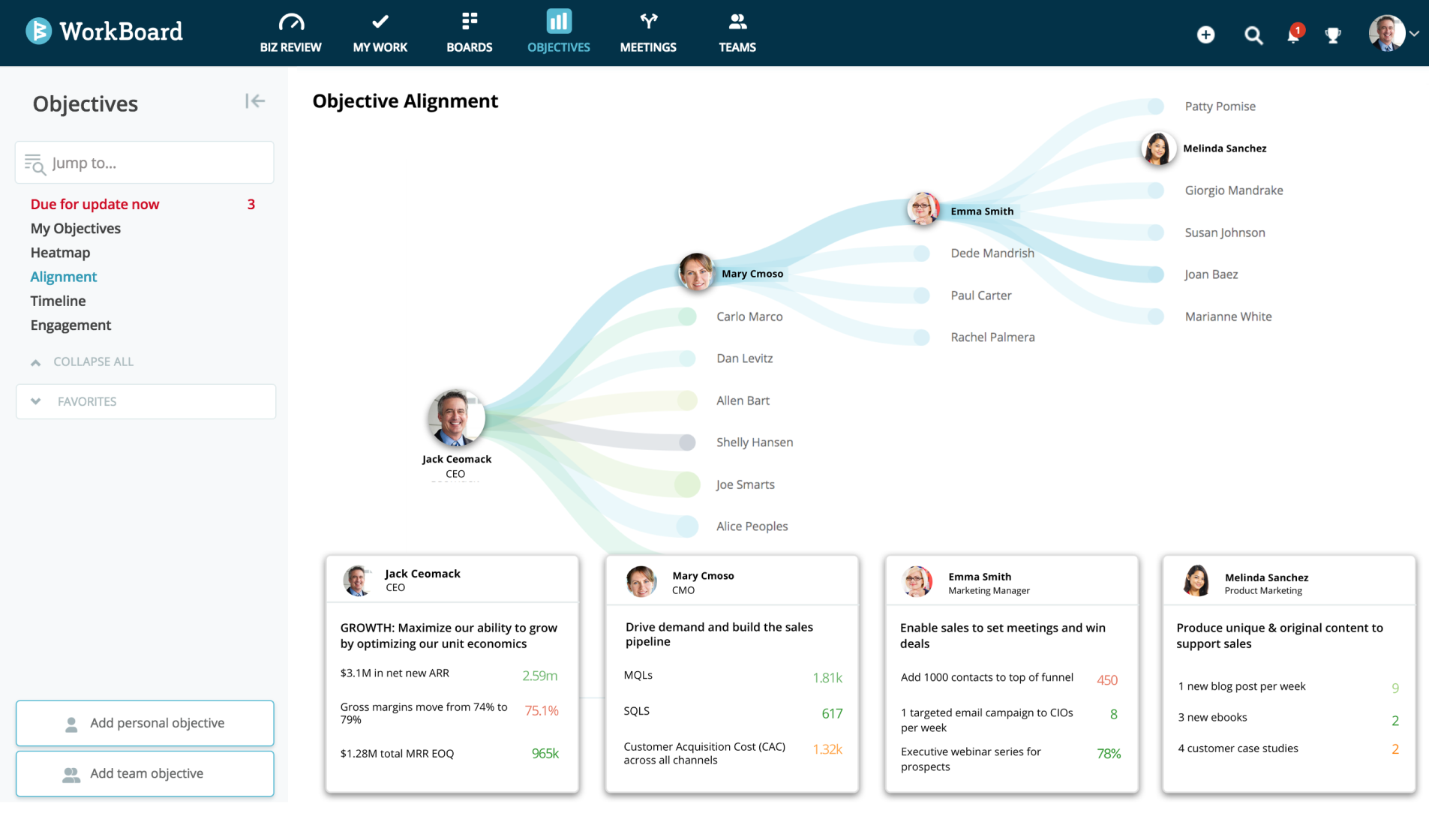
Our targets shifted week to week, and Workboard handled those changes without the confusion that usually follows a mid-quarter pivot. Leadership could spot risk before it became a miss. The integration layer connects with Microsoft Power BI, Workday, and Salesforce, so data flows in rather than getting entered manually.
Reports include trending graphs, dependency maps, and forecast projections that actually help you make decisions. For environments where goals are not static and waiting until the end of the quarter to review progress is simply not an option, this is the tool.
Pros:
- Built for cross-functional enterprise teams with deep accountability controls
- Action Items and Meeting Agendas link OKRs directly to tactical execution
- Flexible role-specific OKR templates for product, sales, marketing, and engineering
- Connects with Microsoft Power BI, Workday, and Salesforce
- Reports include trending graphs, dependency maps, and forecast projections
Cons:
- Interface best suited for enterprise users, not small teams
- Steep learning curve due to deep functionality
User Rating: 4.7/5 (G2)
Pricing: Custom pricing.
4. Weekdone
Best for Weekly OKR Check-ins
I introduced Weekdone at a startup where leadership wanted OKRs but had zero appetite for more meetings. The fix was straightforward. Every Friday, each person spent about 10 minutes logging progress, blockers, and a confidence score. By Monday, leadership had an auto-generated summary waiting without a single status call.
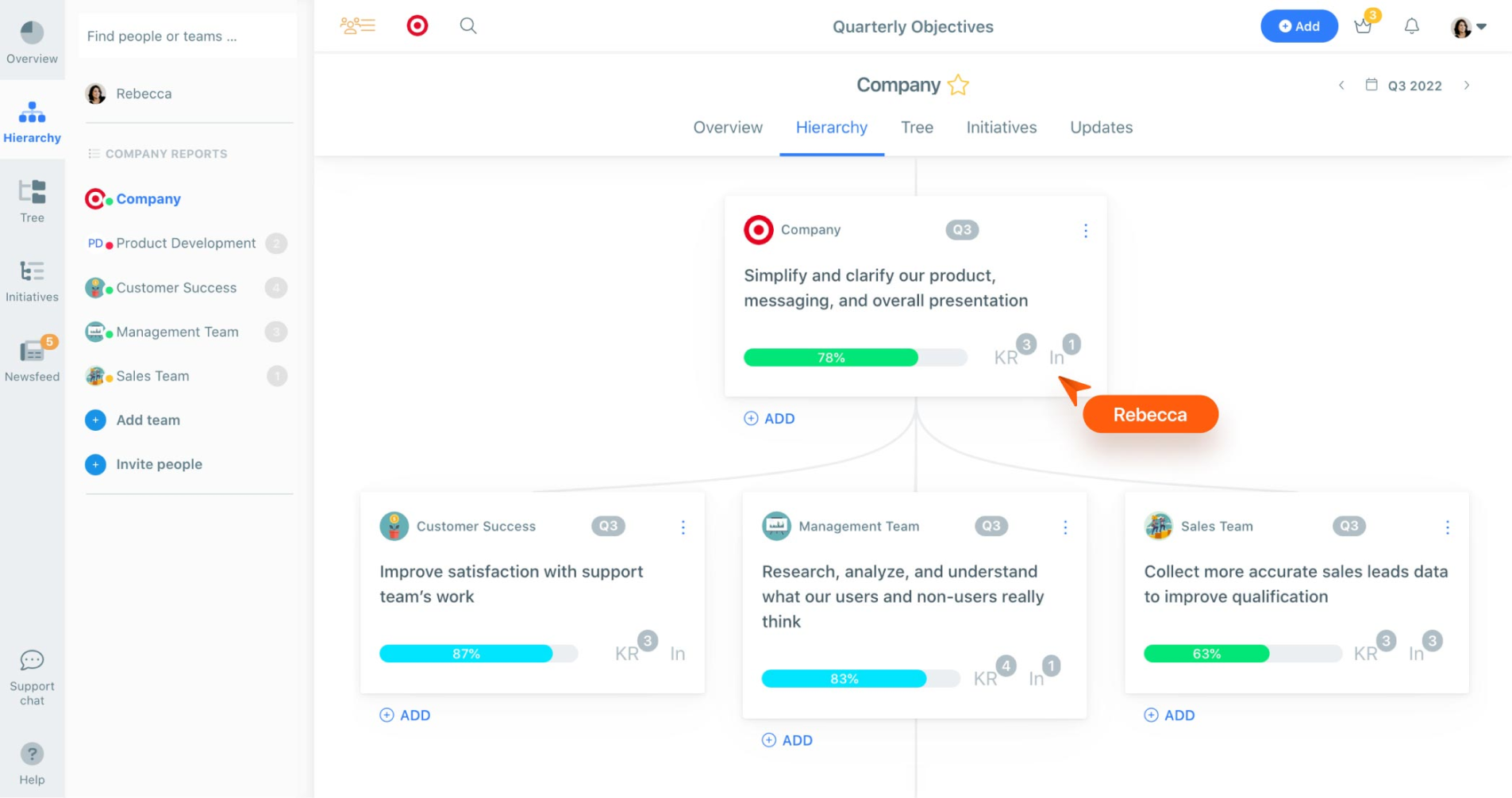
Quarterly goals stayed visible every week instead of quietly fading after January. The goal suggestion tools help first-time OKR users write key results that are actually measurable rather than vague aspirations. Slack integration means reminders show up where people already work, so check-ins do not feel like extra homework.
The mobile app keeps it accessible for teams that are not always at a desk. If your team has tried OKRs before and the follow-through collapsed somewhere around February, the weekly check-in structure Weekdone forces is usually exactly what was missing.
Pros:
- Automatic summary reports based on weekly team updates
- Goal suggestion tools to help first-time OKR users write better key results
- Mobile app for on-the-go check-ins
- Slack integration for reminders inside existing workflows
- Pulse surveys and engagement tracking for early burnout signals
Cons:
- Not ideal for large hierarchical organizations needing deep role mapping
- Limited customization in reporting dashboards
User Rating: 4.2/5 (G2)
Pricing: Starts at $90/month for 10 users, billed annually.
5. Worxmate
Best for Automating Business Operations
At a logistics company I consulted for, every completed milestone used to trigger a chain of manual follow-ups. Someone hit a target, someone else had to notice, and then someone had to figure out what came next. Worxmate cut out that entire loop.
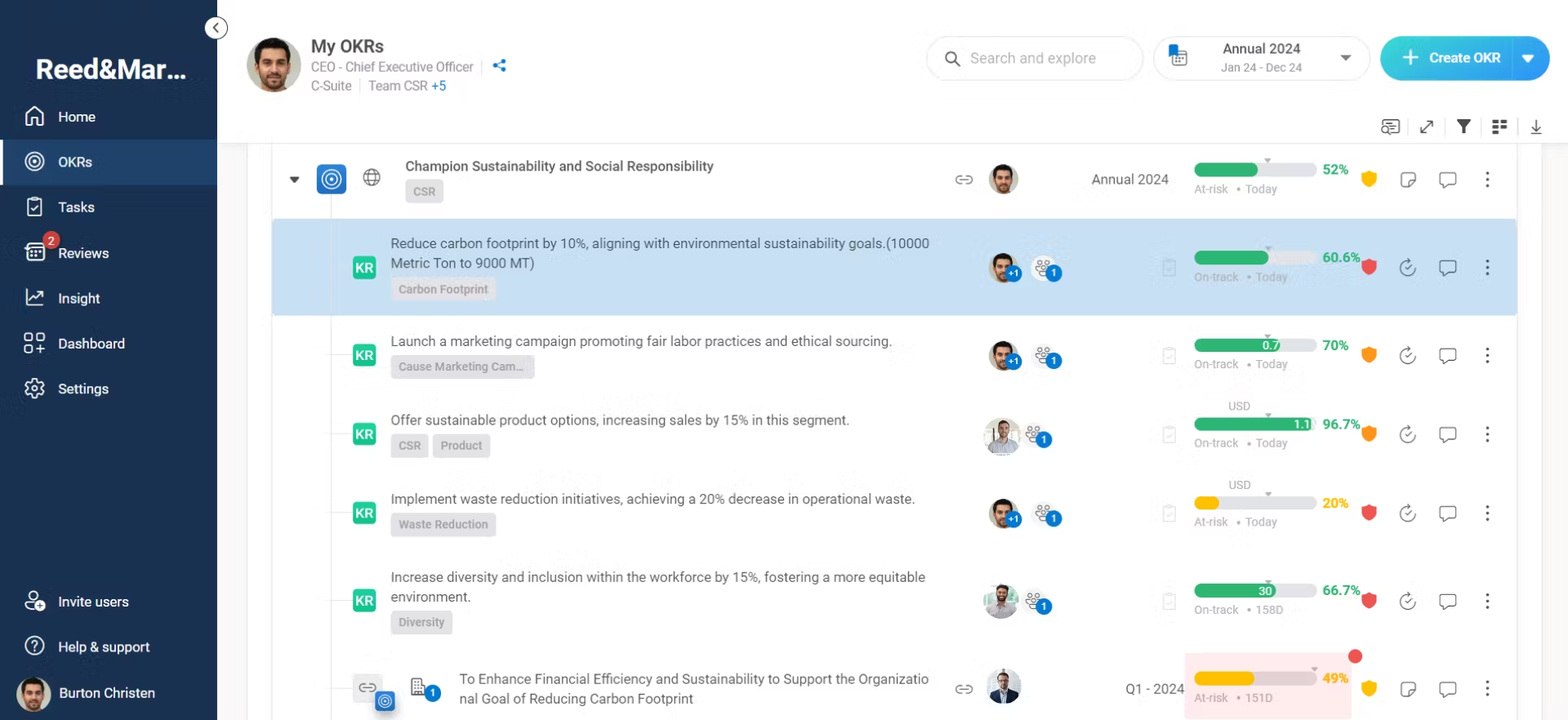
We configured it so that completing a milestone automatically triggered the next task assignment, sent deadline reminders, and escalated alerts when something fell behind schedule. We also built compliance audits directly into OKR timelines. The team stopped spending hours coordinating things the software now handled, and the lag between planning and action basically disappeared.
The project portfolio management layer sits alongside OKRs so you are not context-switching between tools. Role-based access controls keep goal cascading precise, and the auto-generated reports surface risk and success rates without anyone pulling data manually.
Pros:
- Automated OKR progress tracking where goals trigger tasks and checklists without manual effort
- Built-in performance dashboards covering task-level accountability
- Project portfolio management alongside OKRs for a unified view
- Role-based access controls for precise goal cascading
- Auto-generated reports with insights on risk and success rate
Cons:
- Training required for advanced workflow automation
- Integration ecosystem still maturing
User Rating: 5/5 (1 Review on G2)
Pricing: Custom pricing.
6. Synergita
Best for Continuous Performance Appraisals
I worked with an HR team at a 300-person SaaS company where performance reviews had quietly become meaningless. People filled out forms, managers signed off, and nothing changed. Synergita fixed that by connecting OKRs and appraisals inside the same system.
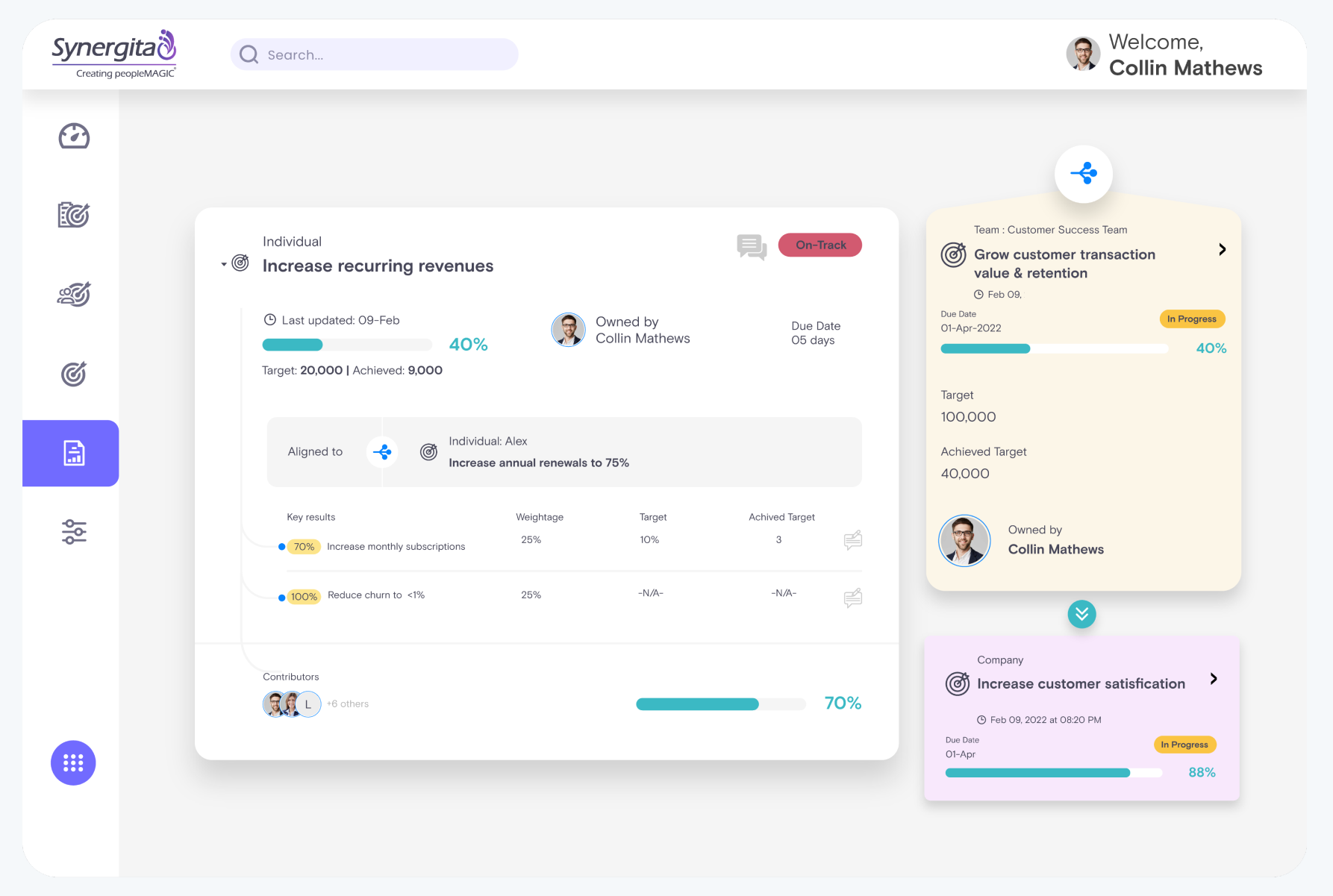
Employees tracked their key results while receiving ongoing feedback from peers, managers, and cross-functional collaborators throughout the quarter. By the time the review arrived, there was actual data to discuss instead of impressions and guesswork. The 360-degree feedback ties directly to OKR milestones, so conversations are grounded in what actually happened.
Customizable review forms and rating scales work across different departments without forcing everyone into the same structure. The calibration sessions help reduce rating bias across managers, and the built-in analytics make it easier to spot high performers and skill gaps before they become retention problems.
Pros:
- 360-degree feedback tied directly to OKR milestones
- Customizable review forms and rating scales across departments
- Team calibration sessions to reduce rating bias
- Built-in analytics highlighting high performers and skill gaps
- Automated review cycles to ensure compliance with performance timelines
Cons:
- UI feels dated compared to newer platforms
- Not ideal for non-HR-led OKR environments
User Rating: 4.6/5 (G2)
Pricing: Starts at $3/user/month, billed annually.
7. Perdoo
Best for Visualizing Company-Wide OKRs
I used Perdoo on a digital transformation project with 12 cross-functional teams running under three strategic pillars. The coordination problem was real: nobody could see how their work connected to what another team was doing. Perdoo’s Strategy Map changed that.
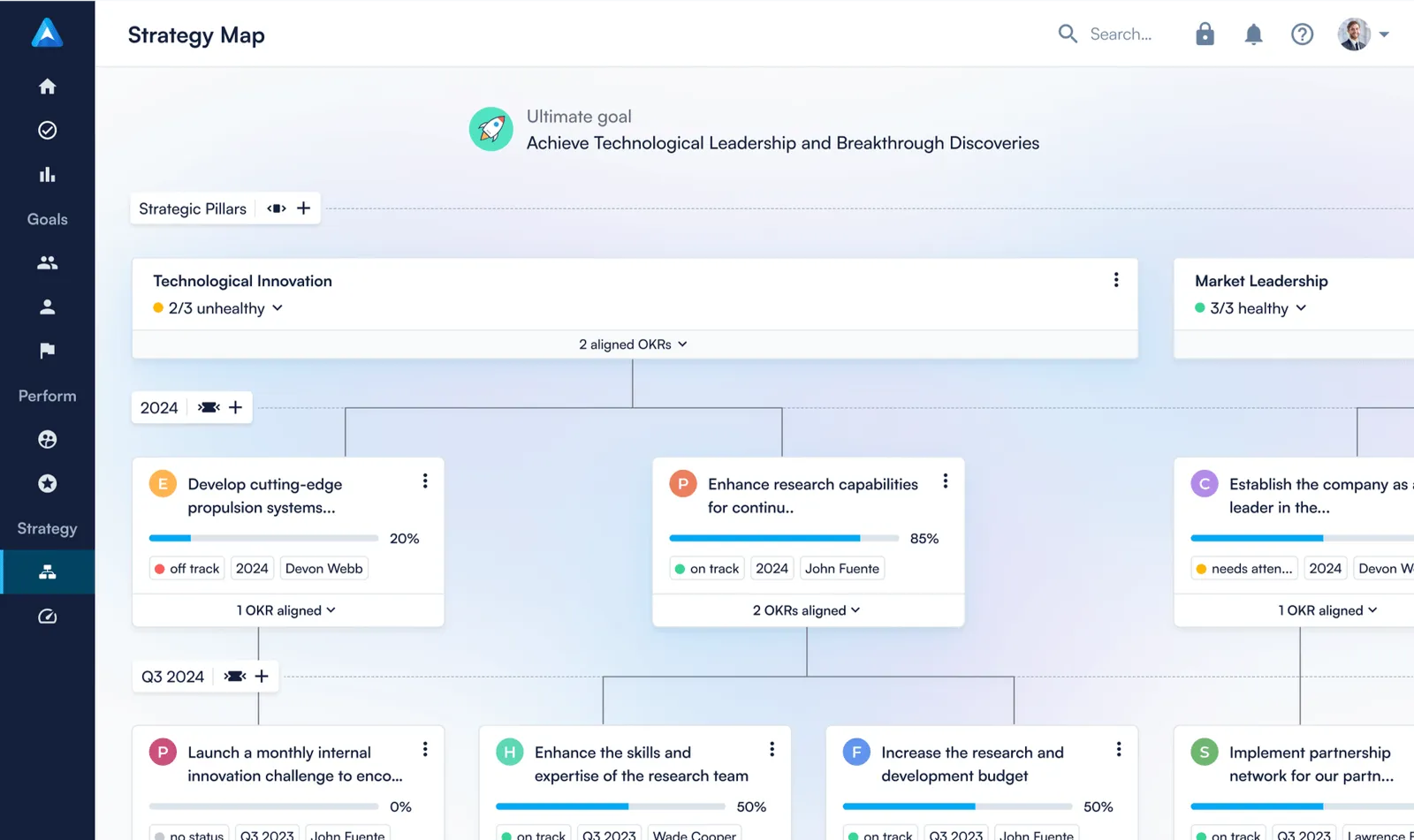
The CEO, department leads, and individual contributors could all open the same view and see exactly how each key result rolled into an objective and how each objective tied back to company vision. Once that connection was visible, teams stopped duplicating effort and started making decisions that supported each other.
The data-driven alerts flag weak alignment and overdue objectives before they quietly derail a quarter. Regular prompts keep check-ins consistent, and the templates for marketing, product, and people teams mean adoption happens faster than a blank-slate setup typically allows.
Pros:
- Strategy Maps visualize goal alignment from company level to individual on one page
- Data-driven alerts for weak alignment and overdue objectives
- Regular prompts for weekly check-ins and confidence ratings
- Templates for marketing, product, and people teams for fast adoption
- Admin controls over visibility, timelines, and scoring standards
Cons:
- Premium insights require an upgraded subscription
- Admin setup could use better onboarding guidance
User Rating: 4.4/5 (G2)
Pricing: Starts at €6.40/user/month for up to 100 users, billed annually.
8. SugarOKR
Best for Simple OKR Tracking Needs
I introduced SugarOKR to a 10-person team that had never used an OKR framework before. I went in prepared for a long onboarding session. It took about an hour. They picked a template, wrote their first objective and key result, and immediately understood the rhythm: set the goal, update it weekly, watch the progress bar move.
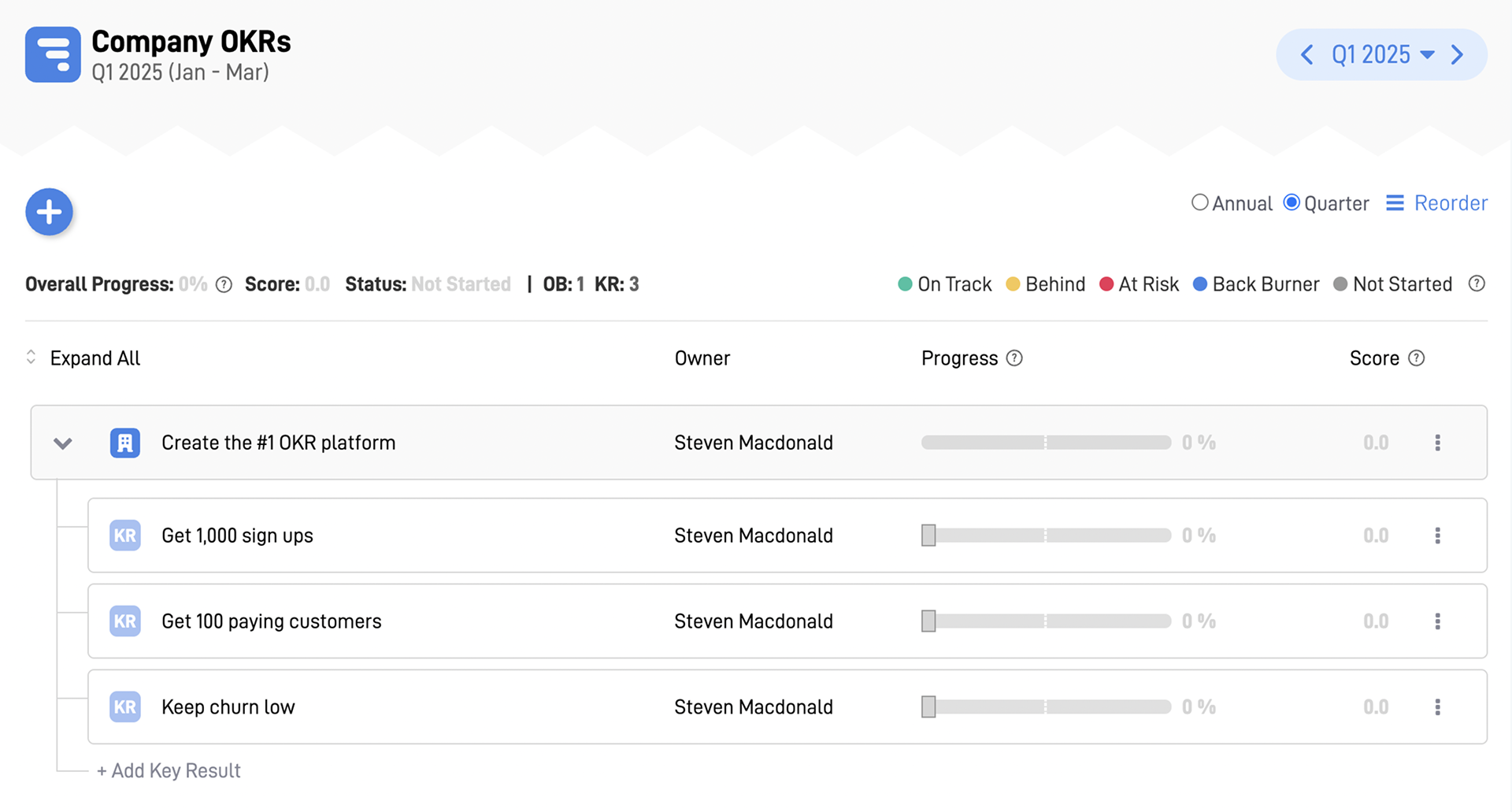
Two quarters later, the team lead told me people were checking their own progress without being reminded. That kind of self-directed habit is hard to build with a complex tool. Progress bars and confidence ratings give quick health checks without requiring anyone to dig into a report. Check-in reminders run in the background without disrupting workflows.
Weekly summary emails auto-populate from individual updates so leadership always has a current picture. For teams starting from zero who want to build the OKR habit before adding complexity, this is the right entry point.
Pros:
- OKR creation in under five minutes using pre-built templates
- Progress bars and confidence ratings for quick health checks
- Check-in reminders and notifications without disrupting workflows
- Department and team-level views in a single dashboard
- Weekly summary emails that auto-populate from individual updates
Cons:
- Lacks deeper reporting or trend visualizations
- No native mobile app currently available
Pricing: Custom pricing.
9. Simple OKR
Best for Personal Goal Management
There was a period when I was juggling several client projects and struggling to keep my own goals from slipping. Most OKR tools I looked at were designed for teams of 50, not for one person trying to stay accountable across different workstreams. Simple OKR was the exception. I set three to five objectives per quarter, broke each into measurable results, and logged progress weekly.
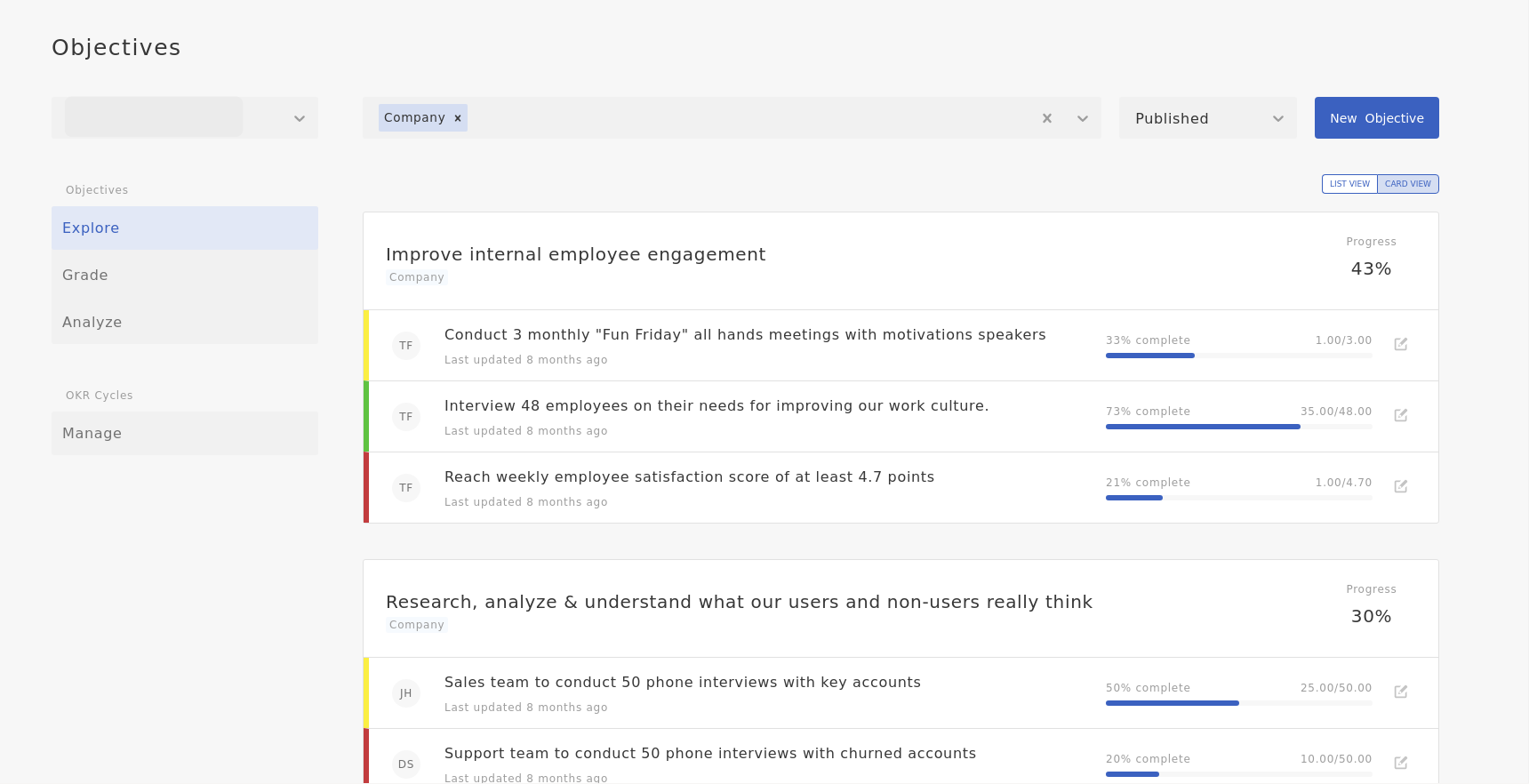
The confidence scoring kept me honest when I was telling myself something was on track but had not actually moved in two weeks. The focus view helps you resist the urge to pile in too many objectives, which is where most personal OKR attempts fall apart.
Weekly reminder notifications maintain the check-in habit without requiring willpower. The PDF export makes it easy to bring your goals into a performance review or a coaching conversation without reformatting anything.
Pros:
- Guided OKR creation with tips and real-world examples
- Weekly reminder notifications to maintain goal engagement
- Focus view for prioritizing 3 to 5 top objectives per quarter
- Progress dashboards with percentage completion and overdue flags
- OKR export to PDF for performance reviews or check-ins
Cons:
- Does not scale well for complex teams
- Analytics are basic and non-customizable
Pricing: Starts at $49/month.
10. Mooncamp
Best for Team-Driven OKR Collaboration
I joined a distributed marketing and product team where everyone was updating their OKRs in isolation and calling it alignment. It was not alignment. It was individual tracking without real connection. When we introduced Mooncamp, the shift was immediate. Check-ins turned into team conversations instead of solo updates.
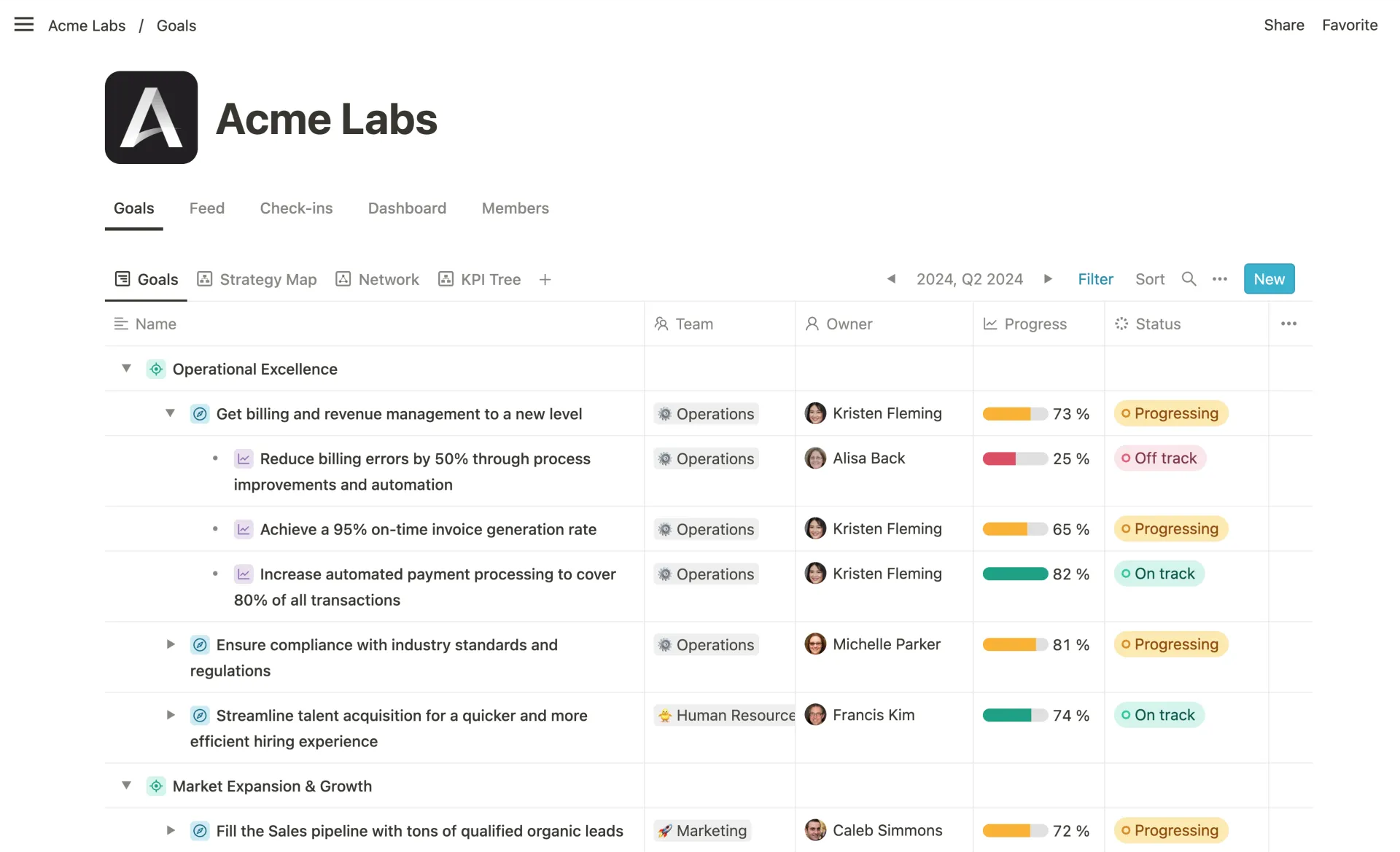
The OKR tree view made cascading alignment hard to miss: you could see exactly how your goal connected to team objectives and how those rolled up to company priorities. The Slack and Microsoft Teams integrations meant updates happened where people were already working, so nothing felt forced.
Custom fields and tagging give you the flexibility to organize goals in ways that match how your team actually operates. After two quarters, we stopped discovering alignment gaps during retrospectives. We started catching them early and fixing them while there was still time to course-correct.
Pros:
- Collaborative check-ins that encourage team discussion rather than isolated updates
- Clean OKR tree view showing full cascading alignment
- Slack and Microsoft Teams integrations for check-ins inside daily workflows
- Custom fields and tagging for flexible goal organization
- Reporting dashboards with filtering by team, owner, and time period
Cons:
- Smaller integration library compared to enterprise platforms
- Some advanced features limited to higher-tier plans
User Rating: 4.8/5 (G2)
Pricing: Starts at €6/user/month, billed annually.
11. OKRs Tool
Best for Simplicity and AI-Powered Alignment
I tested the OKRs Tool with a small ops team that had already walked away from two other OKR platforms because setup felt too complicated. The pattern was familiar: everyone understands OKRs in theory, but when it comes to connecting individual goals to company objectives, no one is sure how to do it, and the rollout stalls.
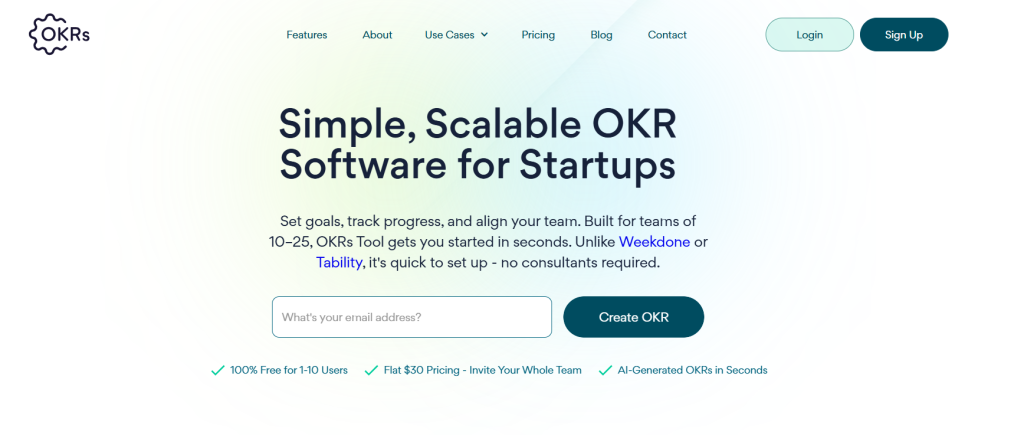
The AI alignment engine handles exactly that bottleneck. It reads your team structure and existing objectives, then recommends how to cascade goals so no one starts from a blank page. The team had an OKR setup that worked in one session.
Weekly nudges kept them checking in without anyone having to follow up manually. The confidence scoring and real-time alignment score give you a quick read on whether individual goals are actually connected to what the company is trying to accomplish or are just floating independently.
Pros:
- AI-generated cascading recommendations based on org structure
- Simple interface that non-technical users can navigate without training
- Built-in OKR templates across common team functions
- Confidence scoring and weekly nudges to maintain check-in cadence
- Real-time alignment score showing how well individual OKRs connect to company goals
Cons:
- Limited integrations compared to more established platforms
- Analytics depth lags behind enterprise tools
User Rating: 4.5/5 (G2)
Pricing: Starts at $30/month for small teams.
Evaluation Criteria
When I evaluate OKR tracking software for this list, I don’t just rely on feature lists or marketing claims. I look at how these tools actually perform in real-world scenarios. Here’s the framework I used to make sure every recommendation is practical, reliable, and worth considering:
- User Reviews / Ratings: I start by looking at real user feedback from platforms like G2. This gives me a clear picture of how teams actually experience the tool day to day, what they love, and where it falls short.
- Core Features & Functionality: I focus on what truly matters in OKR tracking software. This includes goal setting, key result tracking, alignment views, check-ins, reporting, and integrations. If a tool cannot handle these well, it does not make the cut.
- Ease of Use: I pay close attention to how intuitive the platform feels. A tool might be powerful, but if teams struggle to adopt it, it defeats the purpose. Clean interface, simple navigation, and quick onboarding are non-negotiable for me.
- Customer Support: From my experience, implementation is where many tools fail. I evaluate how responsive and helpful the support team is, especially during setup and ongoing use. Fast, reliable support makes a big difference in adoption.
- Value for Money: I compare pricing with what the tool actually delivers. This is not about picking the cheapest option, but about whether the features, flexibility, and performance justify the cost.
- Personal Experience / Expert Insights: Wherever possible, I rely on my own hands-on experience with these tools. I also consider insights from HR leaders, operations teams, and product managers who use OKR systems in real environments. This helps me go beyond surface-level reviews and highlight what actually works.
My Top 3 OKR Software Picks
Choosing the right OKR tracking software can make or break your execution. I have worked with teams that had solid OKR frameworks but failed simply because the tool did not fit how they actually operated. The tools below stand out because they do not just track goals. They help teams follow through consistently.
1. PeopleGoal
PeopleGoal is my go-to for teams that need flexibility without complexity. It lets you build custom OKR workflows, integrate 360-degree feedback, and tie goals to compliance, all without writing code. Ideal for HR-driven environments like healthcare, finance, or manufacturing, it transforms OKRs into a system that fits your process, not the other way around.
2. Profit.co
Profit.co works brilliantly if aligning day-to-day tasks with strategy is your priority. Each objective connects directly to assignable tasks, making execution trackable across departments. It bridges the gap between leadership vision and frontline action in a way that most standalone OKR tools simply do not.
3. Weekdone
Weekdone is built for lean teams that thrive on rhythm. Weekly check-ins, progress summaries, and confidence tracking keep everyone aligned without heavy process overhead. I have seen startups adopt it in under a day and actually stick with it. For small teams that want OKRs without bureaucracy, this is the lowest-friction entry point on this list.
When Should You Move From Spreadsheets to OKR Platforms?
This is the most common question I get. The honest answer: sooner than you think. Spreadsheets are adequate for a founder and two co-founders. They stop working the moment you add complexity, distributed teams, or quarterly OKR cycles.
Here are the clear signals that it is time to move on:
- You have more than 10 people tracking goals in separate files
- Goals get set in January, and nobody looks at them until December
- Your quarterly review meetings are spent gathering data instead of making decisions
- Managers have no visibility into how individual goals connect to team objectives
- You are running biannual reviews, but want to shift to quarterly OKR cycles
- Your HR and performance data live in completely different systems
If three or more of these are true for your organization right now, you are already past the point where a spreadsheet serves you well.
The data backs this shift: according to the McKinsey Performance Management Report in 2024, companies that prioritize employee performance are 4.2 times more likely to outperform competitors, achieve 30% higher revenue growth, and see 5% lower attrition.
Spreadsheets cannot deliver that level of impact. A well-implemented OKR system can.
How Do OKR Tools Work Across Different Departments?
One question I rarely see addressed in OKR software roundups is this: how does the tool actually work for different teams inside the same organization? OKRs are not one-size-fits-all, and the way marketing, product, HR, and operations use them is meaningfully different.
| Department | How They Use OKRs | What They Need in a Tool |
|---|---|---|
| Product Teams | Focus on shipping velocity, feature adoption, and user retention | Integration with Jira/Asana, real-time sync with sprint data, no manual updates |
| Marketing Teams | Track pipeline contribution, lead quality, and brand performance | Campaign-level tracking, team dashboards, collaborative check-ins |
| HR / People Ops | Align goals with performance reviews, 360 feedback, and engagement metrics | Integration with performance management, review cycles, feedback systems |
| Operations / Finance | Monitor execution, efficiency, and goal completion | Automation, alerts, escalation workflows, task reassignment |
The key insight: before selecting an OKR tool, map out which departments will use it and what integration points matter most. A tool that is perfect for a 10-person product team may be inadequate for a 200-person organization running OKRs across HR, sales, and engineering simultaneously.
Now, before we sum it up, here is a quick video for you to learn how to implement your OKRs better:
Choose OKR Software That Reinforces the Mindset
The right OKR software will not save a bad strategy. But it will make a good strategy impossible to ignore. If I had to give you one decision filter: choose the performance management software that your team will actually use every week, not the one with the longest feature list. Adoption beats functionality every time.
Community research across Reddit and Quora consistently confirms this. Tools that are over-engineered become ghost towns within 90 days. Tools that are simple, integrated with daily workflows, and backed by automated nudges sustain execution rhythm.
For most HR-led, mid-sized organizations, PeopleGoal gives you OKRs, performance management, and feedback in one place without needing three separate tools. Start with the 7-day free trial and run one team through one quarter. The data will tell you everything.
Frequently Asked Questions

What are the main implementation challenges of OKR software?
The main challenges are poor goal-writing, lack of leadership participation, inconsistent check-ins, and rolling out company-wide too quickly. The software itself is rarely the problem. Adoption improves significantly when you start with a pilot team, run proper training before launch, and build check-in cadence into the workflow from day one rather than as an optional add-on.
Can OKR software integrate with project management tools like Jira or Asana?
Yes. Most modern OKR platforms integrate with Jira, Asana, Slack, Microsoft Teams, and HRIS systems like Workday and BambooHR. This prevents duplicate data entry and ensures key results reflect real work completed inside your existing workflow tools. PeopleGoal supports over 500 platform integrations, making it a strong choice for organizations with a complex existing tech stack.
Why do companies still not use OKR tools despite knowing their value?
The most common reasons are cost concerns for small teams, fear of adding another tool to an already complex stack, and previous failed OKR implementations using spreadsheets or the wrong software. Community research consistently shows that once teams experience a clean, automated OKR system, adoption rates improve dramatically. The barrier is usually the first rollout, not the ongoing usage.
Is OKR software suitable for remote or distributed teams?
Absolutely. In fact, remote teams benefit the most. OKR software replaces hallway alignment with visible goal dashboards, structured weekly check-ins, and transparent progress tracking across time zones. Distributed teams using tools like Mooncamp and Weekdone report significantly better goal clarity than those relying on Slack threads or quarterly planning documents.
What is the best free OKR tool for startups?
Most enterprise-grade OKR platforms offer free trials rather than permanent free tiers. For early-stage startups, Weekdone and SugarOKR offer accessible entry points. PeopleGoal offers a 7-day free trial, which is enough to run one team through a full OKR setup cycle and validate fit before committing. Community research suggests that startups benefit most from tools with guided onboarding and pre-built templates rather than free tools with no support structure.
Can OKR software support both OKRs and SMART goals simultaneously?
Some platforms, like PeopleGoal, allow both frameworks within the same workflow. This flexibility is particularly useful for organizations transitioning from traditional SMART goal-setting to OKRs without disrupting existing performance processes. HR teams can run OKRs for strategic objectives while maintaining SMART goals for individual development plans.
How long does it take to see results from OKR software?
Most teams begin seeing improved alignment and clearer reporting within the first quarter. Many organizations report measurable improvements in goal clarity and accountability within 60 to 90 days of adoption. The key accelerator is consistent check-in cadence: teams that check in weekly see faster alignment gains than those that check in monthly.
How do OKRs differ from KPIs and why does the distinction matter when choosing software?
KPIs measure ongoing business health. OKRs set ambitious, time-bound objectives with measurable key results that drive progress toward strategic goals. The distinction matters for software selection because KPI dashboards and OKR tracking require different structures. Many HRIS platforms track KPIs well but lack the cascading, check-in, and alignment features that make OKRs work. Choosing an OKR-native platform ensures you get the framework, not just the data storage.
What features should OKR software include to drive real adoption?
The non-negotiables based on community research and my own experience are: automated check-in reminders, cascading goal visibility, simple goal-creation templates, integration with tools teams already use (Slack, Teams, Jira), and dashboards that show progress without requiring manual data pulls. Advanced features matter far less than these fundamentals for first-year adoption.
Can OKR software scale as my company grows from 20 to 500 employees?
Yes, if chosen correctly. The right platform supports multi-level cascading, cross-department reporting, and performance management integration. Scaling from 20 to 500 employees without changing systems is possible with enterprise-capable tools. PeopleGoal is specifically designed for this growth trajectory, supporting complex organizational structures and custom workflows without requiring re-implementation as headcount grows.
What is the ROI of OKR software?
ROI comes from reduced manual reporting time, better goal completion rates, improved cross-team alignment, and data-driven performance insights. For growing organizations, the time saved on manual reporting alone often offsets the subscription cost within months. McKinsey data shows organizations with strong goal-setting practices are 26% more likely to achieve top-quartile financial performance, which represents a revenue impact far exceeding the cost of OKR software.
Who should use OKR software?
OKR software is for any team serious about execution, clarity, and accountability. Startups use it to align early and hit growth milestones faster. HR leaders use it to connect performance data to strategy. Managers use it to prevent silos. Enterprises use it to gain cross-functional visibility. If goals matter beyond January, you likely need it.
How do I migrate from spreadsheets to OKR software without losing historical data?
Start by exporting your current goal data into a structured format (CSV works for most platforms). Before migrating, document your current goal hierarchy: company objectives, team goals, individual targets. Most OKR platforms, including PeopleGoal, allow bulk import of historical data. The more important step is running a brief team training session on the new system before going live, so historical data lands in the right structure from the start.
Ready to 3x Your Teams' Performance?
Use the best performance management software to align goals, track progress, and boost employee engagement.