
A few years ago, I watched an HR manager export review scores from one tool, paste them into a spreadsheet, and rebuild the same goals in a third system. Her HR platform held every employee record she needed, yet the most important conversations of the year lived somewhere else. That gap is the quiet reason many teams start searching for HiBob alternatives, usually right after a renewal quote arrives or a review cycle goes sideways.
HiBob has earned its reputation. It has a clean interface, strong onboarding, and a loyal mid-market following. But it is built as an HR system first, and its pricing is quote-only, which makes it hard to line up against other HiBob competitors. I’ve helped teams shortlist, trial, and switch HR and performance tools for years, and two questions come up every time: what will this really cost, and will managers actually use it?
This guide answers both. I compared pricing, ratings, setup effort, and day-to-day use across 10 options, then sorted them by who they fit best, from small teams to large enterprises. Whether you want a full replacement or a stronger layer for reviews and goals, you will find a clear next step below.
Why Are Teams Looking for HiBob Alternatives?
HR tools rarely fail on features alone. A study by HR.com in 2026 found that 48% of organizations say poor integration between HR tools keeps them from important HR goals a lot, and 57% say substantially reconfiguring their HR tech stack takes high effort. That explains why buyers who bolt outside tools onto an HRIS for reviews or surveys often feel the friction months later.
HiBob does plenty right. Reviewers on G2 rate it 4.5 out of 5 across more than 2,200 reviews and keep praising its modern interface. The reasons people look elsewhere cluster around a few recurring themes:
- Pricing visibility: HiBob does not publish rates, bills per employee, and sells talent, payroll, and planning as separate modules. Buyer data from Vendr shows core platform quotes around $5 to $10 per employee per month, with modules often adding $1 to $4 each. These are third-party figures, not HiBob list prices.
- Performance management depth: Some reviewers on TrustRadius describe the performance module as limited and basic next to specialist tools.
- Reporting and admin effort: Reviewers on Software Advice say settings and reports could be more robust, and that support is sometimes hard to reach.
- Setup time: G2 lists an average implementation time of about two months for HiBob.
These are patterns, not universal facts. One team’s complaint is another team’s non-issue, so match the list above to your own pain point before you shop.
10 Best HiBob Alternatives for HR and Performance Teams
The best HiBob alternatives are HR platforms and performance tools that match your team size, budget, and review needs. I included tools with published pricing or a clear custom-quote model, solid review-site ratings, and real overlap with HiBob’s core HR or talent features. Compare pricing, performance depth, integrations, and setup effort first.
Some of these tools replace HiBob outright as an HRIS. Others, like PeopleGoal and Lattice, focus on reviews, goals, and development. The table shows where each one fits.
| Tool | Best For | Pricing | User Rating |
| PeopleGoal | Fully customizable platform for performance reviews, OKRs & employee development | Free plan available. Paid plans start at $4/user/month. | 4.5/5 |
| BambooHR | Simple core HR and onboarding for small teams | Starts at $10/employee/month | 4.4/5 |
| Rippling | HR, payroll, and IT management in one platform | Starts at $8/user/month | 4.8/5 |
| Personio | European payroll and compliance for mid-sized teams | Custom pricing | 4.4/5 |
| Factorial | Modular HR with payroll and time tracking | Starts at $8/user/month | 4.4/5 |
| Sage HR | Budget core HR with an optional performance add-on | Starts at £4.40/user/month | 4.3/5 |
| PeopleForce | Low-cost HR with pulse surveys and OKR tracking | Starts at $2/employee/month | 4.8/5 |
| Humaans | API-first HRIS for multi-country teams | Custom pricing | 4.8/5 |
| Lattice | Review cycles tied to OKRs on top of an HRIS | Starts at $11/seat/month | 4.7/5 |
| Workday HCM | Enterprise HR for complex org structures | Custom pricing | 4.1/5 |
1. PeopleGoal: Best Fully Customizable Platform for Performance Reviews, OKRs & Employee Development
My review cycles start with a blank template, not a locked one. In PeopleGoal, I pick the rating scale, write the questions, and set the approval steps, then launch the cycle without opening a support ticket. For teams whose HR system never quite matched how they review people, that control is what stands out, and it is why PeopleGoal comes first on this list.
Beyond reviews, the platform keeps goals and conversations in one workflow. I track OKRs and SMART goals with cascading tasks, run 1-to-1 meetings from a structured agenda, and collect 360-degree feedback, including anonymous no-login forms for outside raters. Pulse surveys, engagement surveys, and eNPS use configurable anonymity. A no-code builder lets me create custom forms and HR apps, and the platform syncs with Slack, Teams, Workday, and ADP.
PeopleGoal suits HR managers who want reviews, goals, surveys, and employee development plans in one tool. It also covers employee profiles and onboarding, with implementation typically taking about one to six weeks depending on company size. Teams that need payroll and device management in the same system will connect it to a payroll provider such as ADP.
Pros:
- Review templates use a drag-and-drop builder for questions, rating scales, and approval steps.
- OKRs, SMART goals, and cascading tasks are tracked in real time.
- 360-degree feedback supports anonymous no-login forms for raters outside the system.
- Pulse surveys, engagement surveys, and eNPS offer configurable anonymity.
- Integrations with Slack, Teams, Workday, and ADP connect reviews to existing HR data.
Cons:
- No downloadable or on-premise version
- Dark user interface option not available
G2 Rating: 4.5/5
Pricing:
Free plan available. Paid plans start at $4/user/month.
2. BambooHR: Best for Simple Core HR and Onboarding in Small Teams
BambooHR was the quickest tool I looked at for moving a new hire from signed offer to first-day checklist. The onboarding and offboarding workflows turned scattered steps into one list, and employee self-service let staff update their own details and request time off without messaging HR.
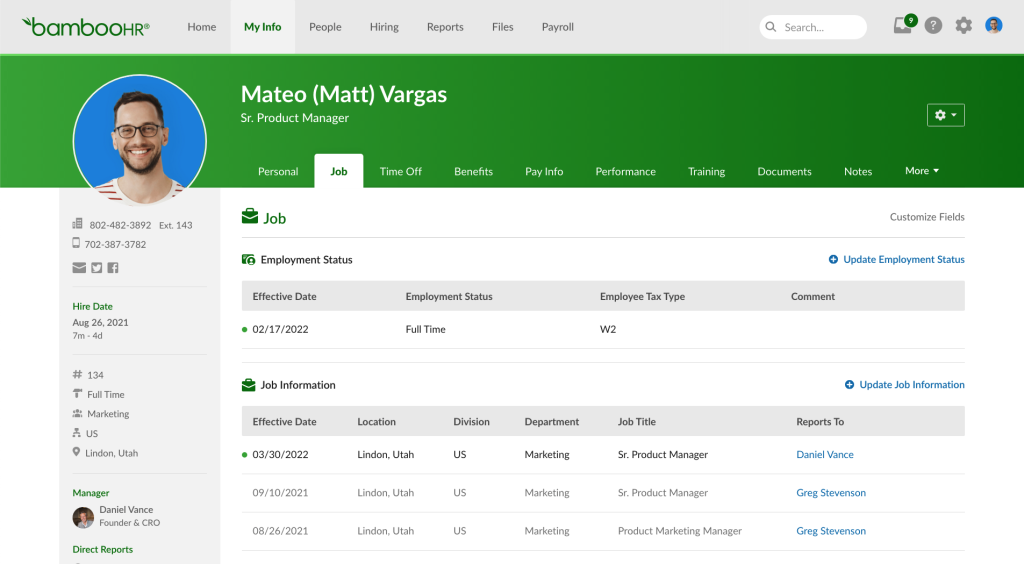
The core of the platform is an employee database with time-off tracking, reporting, and mobile access. Performance management sits on the higher plans, and payroll is a paid add-on with custom pricing.
BambooHR fits small and mid-sized teams that want clean HR records and easy onboarding more than deep review tools. Teams with 25 or fewer employees pay a flat monthly rate starting at $250, which can cost more per person than expected.
Pros:
- Employee self-service lets staff request time off and update their own records.
- Onboarding and offboarding workflows turn new-hire steps into trackable checklists.
- Published starting prices make budgeting easier than quote-only platforms.
- Reporting covers headcount and time-off data without spreadsheet exports.
Cons:
- Performance management sits on higher-priced plans and is lighter than dedicated review tools.
- Teams of 25 or fewer pay a flat monthly rate starting at $250.
G2 Rating: 4.4/5
Pricing:
Starts at $10/employee/month for teams over 25 employees.
3. Rippling: Best for Unifying HR, Payroll, and IT Management
Laptops, logins, and payroll all hang off the same employee record in Rippling. That single record is the whole idea, and it is what makes the platform feel different from an HR-only system. When a new hire is added, HR data, payroll setup, and IT tasks like app access and device provisioning can run from one place.

The core platform covers employee data, payroll, and benefits administration, and teams add modules like time tracking as they grow. Workflow automation can trigger actions across HR and IT when employee data changes. Rippling’s published starting price is $8 per user per month, though some pricing breakdowns also note a flat monthly base fee, so ask for a full quote before comparing.
Rippling suits tech-forward companies of roughly 50 to 500 employees that want HR and IT under one roof. HR-only teams may find it more platform than they need. Its review and engagement tools are lighter than performance-first products, so teams that care most about review depth often pair it with a dedicated tool.
Pros:
- The core platform manages employee data, payroll, and benefits administration together.
- App provisioning and device management connect new-hire records to IT tasks.
- Modules can be bought separately, so teams add only what they need.
- Workflow automation triggers actions across HR and IT from employee data changes.
Cons:
- Modular pricing adds up as payroll, benefits, and time tracking are included.
- Review and engagement features are less deep than in performance-first tools.
G2 Rating: 4.8/5
Pricing:
Starts at $8/user/month.
4. Personio: Best for European Payroll and Compliance
Anyone hiring across Germany, France, and the UK will notice quickly that Personio was built with European rules in mind. It positions itself as an all-in-one HR platform for small and mid-sized businesses, with recruiting, payroll, attendance, and performance management in a single system.
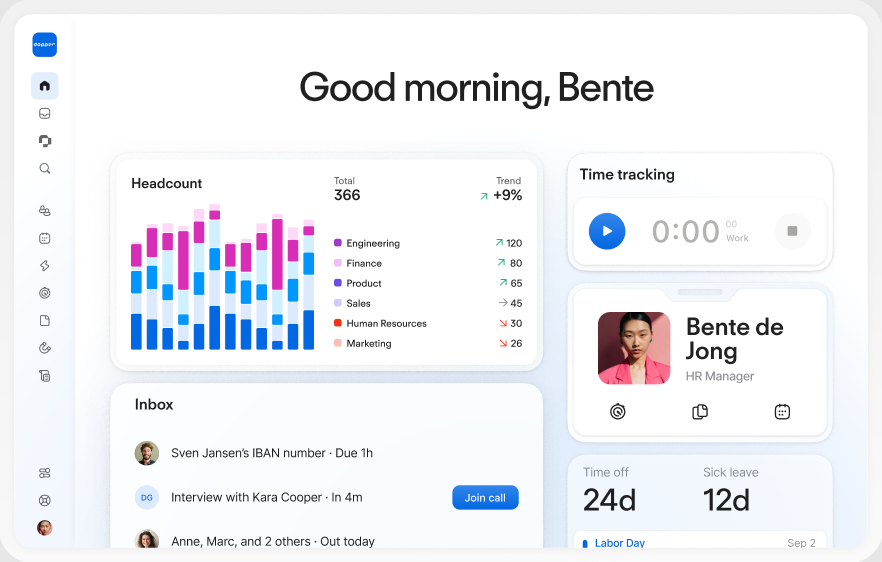
The workflow covers applicant tracking, onboarding, time and attendance, document management, and reporting, plus performance reviews and goal setting. Support also came up often in reviews I read, with users on GetApp describing the support team as fast, friendly, and helpful. Pricing is custom and depends on company size and modules.
Personio fits European mid-market HR teams that want payroll and compliance close to the HR record. It is a weaker match for small teams on a tight budget, since some reviewers find the pricing high for smaller businesses. A Capterra reviewer also noted the product leans toward Germany, which can leave gaps for companies with larger teams in other countries.
Pros:
- Applicant tracking, onboarding, and payroll sit in one European-built system.
- Time and attendance tools cover absence calendars and working hours.
- Performance reviews and goal setting live in the same platform.
- Reviewers on GetApp highlight fast and helpful customer support.
Cons:
- Some reviewers report technical and reporting problems.
- It is strongest in Germany and Europe, with reported gaps in other regions.
G2 Rating: 4.4/5
Pricing:
Custom pricing.
5. Factorial: Best for Modular HR With Low Entry Pricing
Factorial’s entry price looks small until you count the modules, and that is exactly how the platform is meant to be bought. The Basic plan already includes payroll processing, payslips, onboarding, e-signatures, and an employee directory, so teams get a working HR foundation before adding anything else.
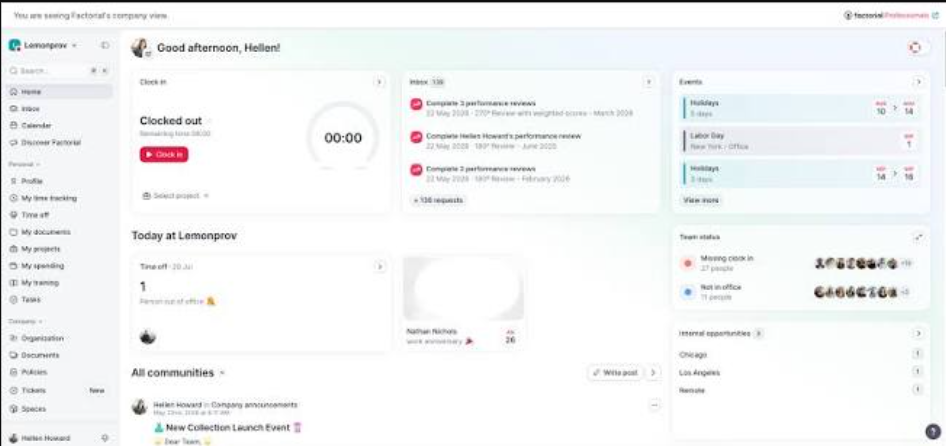
From there, the platform grows by module. I looked at time tracking, document management, and bulk document sending first, since those remove the most manual admin. Performance and compensation tools are available too, and Factorial is listed in both of those categories on Capterra, though they are add-ons rather than the core of the product.
Factorial fits operations-heavy teams that want low-cost HR admin with room to expand. Teams that care most about review depth may find its performance tools less specialized than review-first platforms. Larger plans are quote-based, so costs beyond the entry tier take a conversation.
Pros:
- The Basic plan includes payroll processing, payslips, onboarding, and e-signatures.
- An employee directory and bulk document sending reduce manual HR admin.
- Entry pricing starts at $8 per user per month.
- Modules for time tracking, performance, and compensation can be added later.
Cons:
- Modules beyond the Basic plan are priced separately.
- Performance management is one module among many, so it is less specialized than in review-first tools.
G2 Rating: 4.4/5
Pricing:
Starts at $8/user/month.
Turn Scattered Goals, Check-Ins, and Development Plans Into One Workflow
6. Sage HR: Best for Budget Core HR With a Performance Add-On
The performance add-on was the first thing I priced out in Sage HR, because it costs less than the core plan itself. At £2.20 per user per month, it bundles goals, OKRs, 360 feedback, quick feedback, and surveys on top of the base HR record.
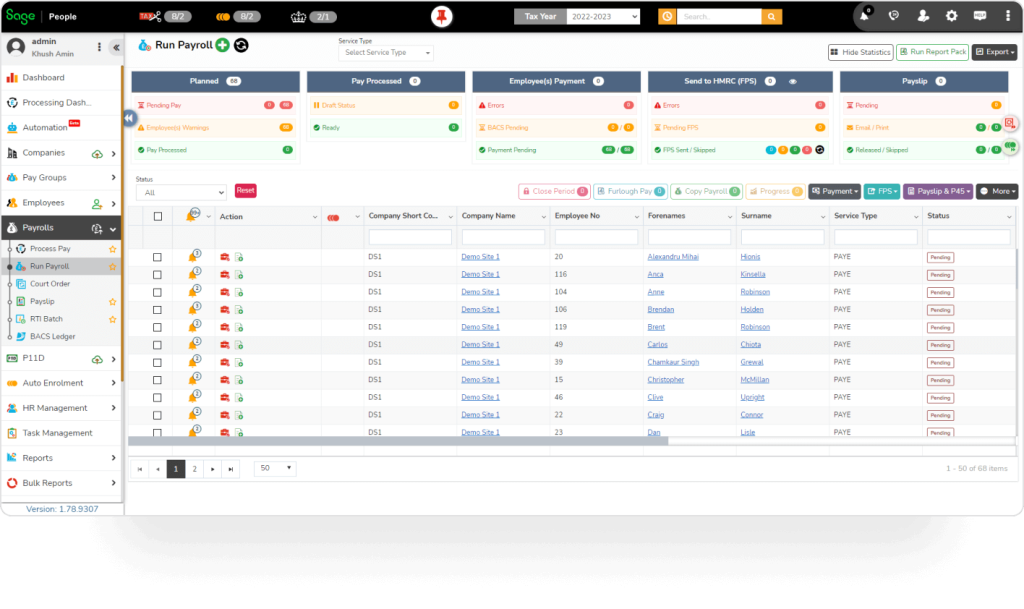
The base plan is Core HR plus leave management at £4.40 per user per month. It brings a workforce database, an org chart, workflow builders, a shared company calendar, announcements, and onboarding workflows, with employee self-service on desktop and mobile. Shift scheduling, timesheets, expenses, and recruitment are separate modules.
Sage HR fits small teams that want a low-cost start and a pay-as-you-add structure. Because every module has its own price, the total grows as you stack features, and some users on GetApp report feeling the effect of price increases. Its public review base is also smaller than those of larger platforms.
Pros:
- Core HR plus leave management starts at £4.40 per user per month.
- A Performance Management add-on bundles goals, OKRs, 360 feedback, quick feedback, and surveys.
- Shift scheduling and timesheets are available as separate modules.
- Workflow builders, onboarding workflows, and a shared calendar come with Core HR.
Cons:
- Every module is priced separately, so the total grows with each addition.
- Some users report that prices rose after increases.
G2 Rating: 4.3/5
Pricing:
Starts at £4.40/user/month.
7. PeopleForce: Best for Low-Cost HR With Pulse Surveys and OKR Tracking
The first number I noticed on PeopleForce was the price, $2 per employee per month for Core HR. That is one of the lowest published entry points on this list, and it comes with a module structure that covers more than basic records.
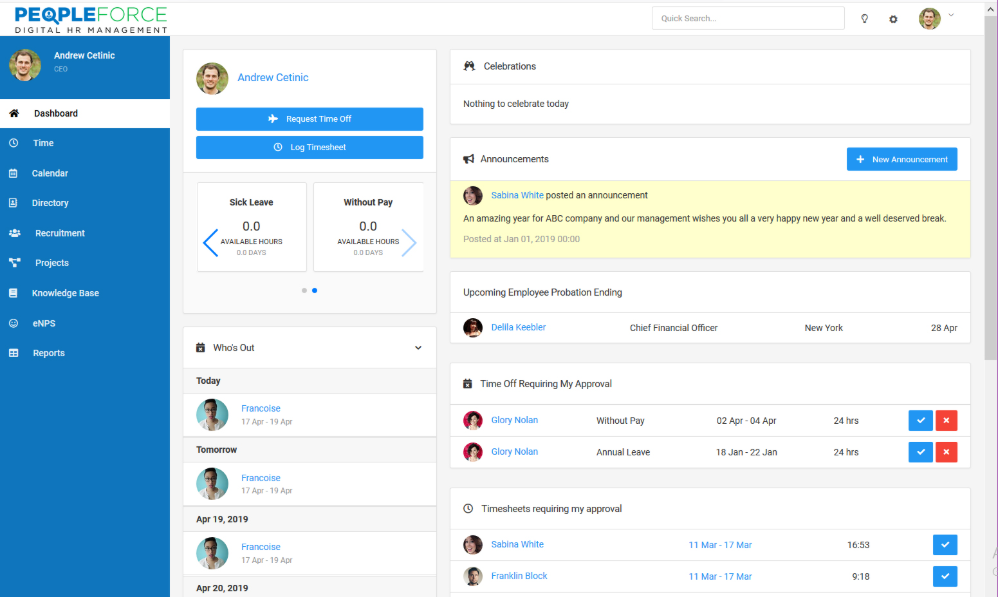
The Perform module handles OKRs, KPIs, 360-degree reviews, and one-on-one meetings, while the Pulse module runs engagement and satisfaction surveys with analytics. Recruit, Time, and Desk modules extend the platform into hiring, attendance, and employee case management. A reviewer who uses the Core HR, Perform, and Pulse modules together said they cover all of their business needs.
PeopleForce suits small and mid-sized teams that want performance and pulse tools without a large budget. Entry plans carry a minimum monthly charge, and prices for add-on modules are not fully public, so expect a sales conversation once you go beyond Core HR. A few reviewers also mention that features they need are still missing.
Pros:
- Core HR starts at $2 per employee per month, one of the lowest published entry prices here.
- The Perform module covers OKRs, KPIs, 360-degree reviews, and one-on-one meetings.
- The Pulse module runs engagement and satisfaction surveys with detailed analytics.
- Recruit, Time, and Desk modules extend the platform into hiring, attendance, and case management.
Cons:
- Add-on module prices are not fully public and need a sales quote.
- Its ecosystem and review base are smaller than those of the market leaders.
G2 Rating: 4.8/5
Pricing:
Starts at $2/employee/month.
8. Humaans: Best for API-First HRIS Across Multiple Countries
Humaans leans on data structure more than most HRIS tools I compared. It is built as the foundation layer of an HR tech stack, keeping multi-country employee data, onboarding, and analytics in one place, and the interface stays clean as the data grows.
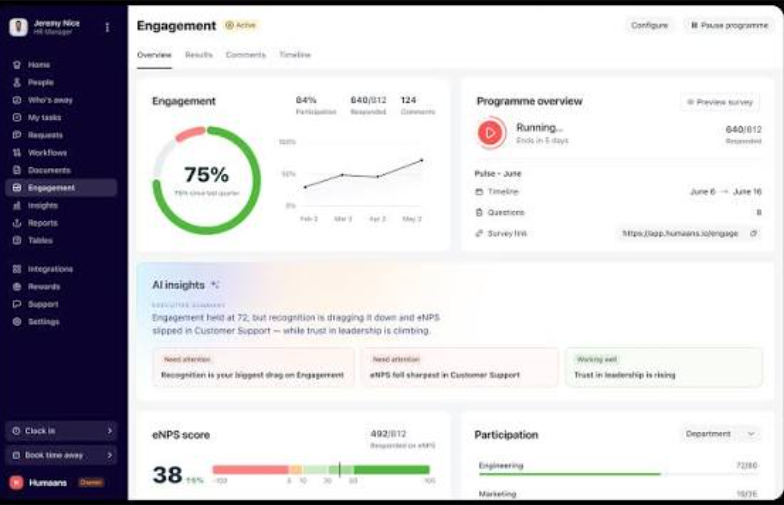
The everyday toolkit includes a people directory, document management, absence tracking, onboarding and offboarding automation, and Slack and Microsoft Teams notifications. Reviewers also point to free API access and flexible tables and workflows. An agentic AI layer named Athena is offered as a custom-priced option for routine People Ops work.
Humaans fits tech-forward startups and scale-ups with employees in several countries and engineers who like to connect systems themselves. Pricing is custom, with no published paid plan, and its performance management is lighter than that of performance-first tools. It is also a newer vendor with a smaller review base than established platforms.
Pros:
- Built as an API-first HRIS, so engineering teams can connect HR data to other systems.
- Employee data covers multiple countries in a single record structure.
- Onboarding and offboarding automation reduce repetitive HR tasks.
- Absence management and a people directory cover everyday HR admin.
Cons:
- Performance management is limited compared with performance-first tools.
- It is a newer vendor with a smaller review base than established platforms.
G2 Rating: 4.8/5
Pricing:
Custom pricing.
9. Lattice: Best for Performance Reviews and OKRs on Top of an HRIS
Lattice does not try to be your HR system of record, and that clarity helps. Its Talent Management plan centers on performance reviews, feedback and praise, talent reviews, and goals and OKRs, which makes it a natural layer for teams that already have employee records somewhere else.
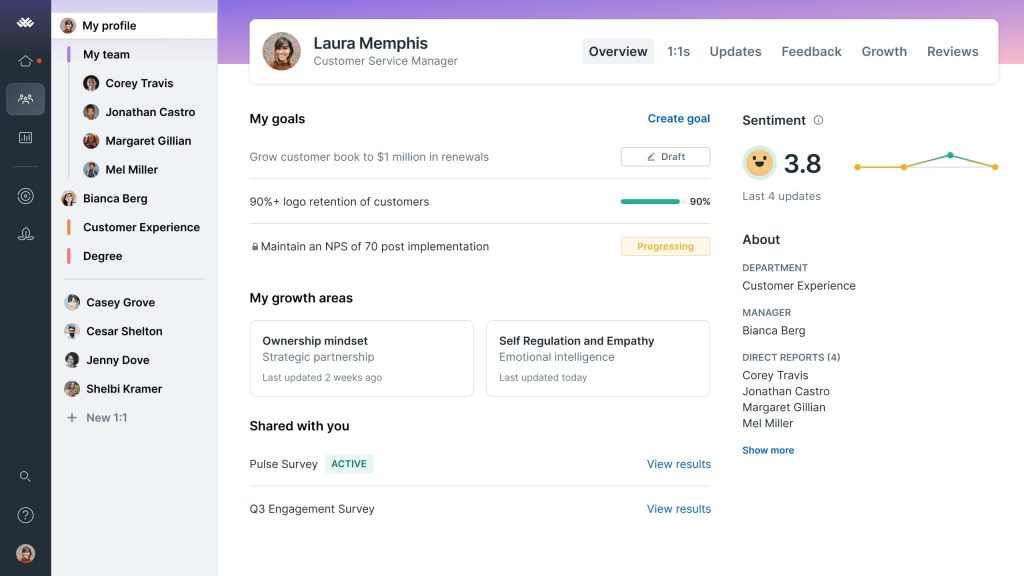
I looked at how it connects to HR data first. Integration listings show it working with BambooHR, Rippling, Namely, and Workday, so employee profiles stay current without manual entry. Engagement, growth, and compensation sit on top as add-ons priced from $4 to $6 per seat per month, and a separate HRIS plan covers records, onboarding, and workflows.
Lattice fits mid-market teams that want strong review and goal workflows and are happy to keep a separate HRIS. Plans are billed annually per seat, and the add-ons raise the total beyond the entry price. If you are weighing it against PeopleGoal, this side-by-side on PeopleGoal vs Lattice covers the differences.
Pros:
- Talent Management includes performance reviews, feedback and praise, talent reviews, and goals and OKRs.
- HRIS integrations cover BambooHR, Rippling, Namely, and Workday, so profiles sync automatically.
- Engagement, growth, and compensation add-ons are priced from $4 to $6 per seat per month.
- Pricing is published and billed per seat, which simplifies budgeting.
Cons:
- Plans are billed annually per seat, which limits month-to-month flexibility.
- The HRIS plan covers records, onboarding, and workflows rather than the depth of a full HR suite.
G2 Rating: 4.7/5
Pricing:
Starts at $11/seat/month.
10. Workday HCM: Best for Enterprise HR With Complex Org Structures
Workday is the outlier on this list, because the question changes from “which tool is cheapest” to “which platform can hold a large, layered organization.” It is an enterprise human capital management suite, and it makes the most sense once headcount, entities, and reporting lines outgrow mid-market tools.
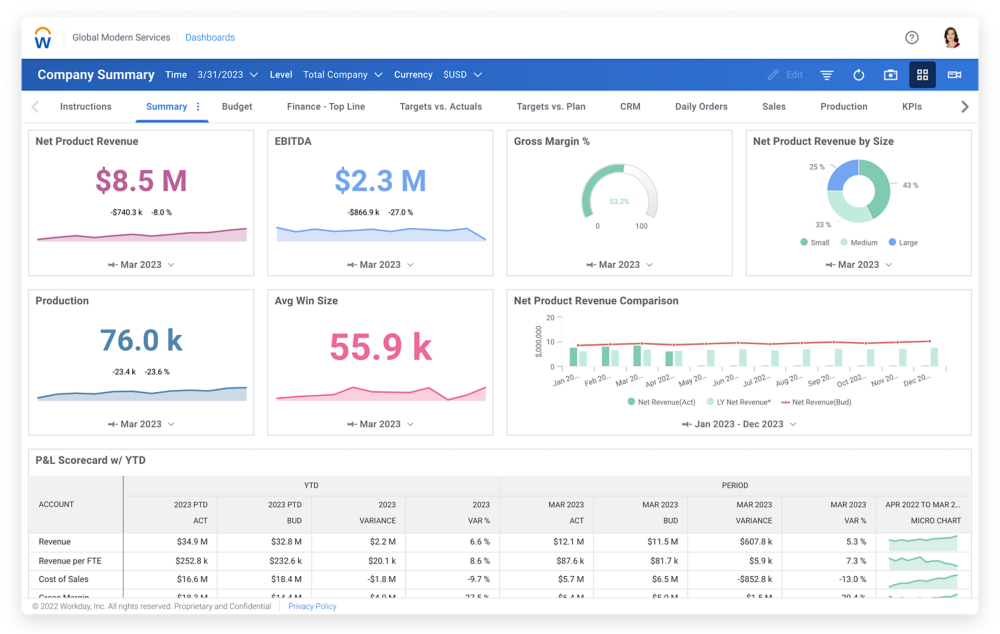
Core HR, talent management, and workforce planning run on one data model, so reporting does not depend on stitching exports together. Teams already on Workday can also pair it with Workday Peakon for employee listening. Pricing is not published and depends on scope, which means budgeting starts with a sales process rather than a price page.
Workday suits large organizations with complex hierarchies and several countries. It is heavy for teams under a few hundred employees, and implementation takes more time and resources than smaller tools.
Pros:
- Core HR, talent management, and workforce planning run on one data model.
- It handles complex hierarchies, multiple entities, and many countries.
- Workday Peakon adds employee listening for teams already on the platform.
- Configurable security roles control who sees which employee data.
Cons:
- Implementation takes more time and resources than smaller tools.
- It is built for large organizations, so it is heavy for teams under a few hundred employees.
G2 Rating: 4.1/5
Pricing:
Custom pricing.
How Did I Evaluate These HiBob Alternatives?
The evaluation of products or tools chosen for this article follows an unbiased, systematic approach that ensures a fair, insightful, and well-rounded review. This method uses six key factors:
- User Reviews / Ratings: Direct experiences from users, including ratings and feedback from reputable sites like G2, provide a ground-level perspective. This feedback helps identify overall satisfaction and recurring problems.
- Essential Features & Functionality: Evaluate the core features and determine how effectively each tool handles the main use cases associated with the target keyword.
- Ease of Use: Assess the interface, navigation, setup requirements, learning curve, and day-to-day usability for the intended audience.
- Customer Support: Examine support channels, documentation, onboarding resources, response options, and assistance during setup and ongoing use.
- Value for Money: Compare pricing with features, limits, scalability, and practical value to determine whether the product offers reasonable value for its intended users.
- Personal Experience / Experts’ Opinions: Include observations from practical evaluation where available, along with credible expert commentary and recurring user feedback.
For a deeper checklist, our guide on how to choose performance management software walks through each factor in more detail.
My Top 3 Picks for the Best HiBob Alternatives
Each of these HiBob competitors fits a different need, so no single tool is the right answer for everyone. Pick based on whether your biggest gap is review depth, simple HR admin, or a unified HR and IT stack.
1. PeopleGoal
PeopleGoal is the best fully customizable platform for performance reviews, OKRs & employee development, and it suits HR managers who want to design their own review cycles instead of adapting to a fixed template. Shortlist it if your reviews, goals, surveys, and development plans live in too many places.
2. BambooHR
BambooHR is the simplest pick for small and mid-sized teams that want clean employee records, onboarding checklists, and self-service time off. Its published starting prices make budgeting easier than with quote-only tools. The tradeoff is lighter performance management, so teams with demanding review needs may outgrow it.
3. Rippling
Rippling is the strongest fit for tech-forward companies that want HR, payroll, and IT management on one employee record. Shortlist it if new-hire setup spans several systems today. The tradeoff is modular pricing that grows as you add modules, plus a broader platform than HR-only teams may need.
Preview a Review Cycle You Can Fully Customize
What Features Should You Look For in a HiBob Alternative?
Look for a HiBob alternative that closes your biggest gap: published pricing, review and goal depth, integration coverage, setup time, or regional compliance. Check what the base price includes, which modules cost extra, and whether the tool syncs cleanly with payroll and the apps your managers already use.
The table maps common HiBob buyer problems to the capability that solves each one.
| Problem | Capability to Look For |
| Quote-only pricing and surprise add-ons | Published plan prices and a clear list of what each module includes |
| Basic performance reviews | Customizable review templates, rating scales, and approval steps |
| Goals disconnected from reviews | OKRs and SMART goals linked to each review cycle |
| Weak survey results | Pulse surveys, eNPS, and anonymity controls |
| Reports that need admin help | Self-serve reporting and exportable data |
| Hiring across countries | Local payroll and compliance coverage by country |
| Slow rollout | Guided setup, templates, and a stated implementation timeline |
How Do You Switch From HiBob Without Losing Data?
Switching from HiBob takes six steps: export your data, map fields, choose a switch date, import a test group, run both systems briefly, and train managers. Most teams need several weeks, so start before your HiBob renewal date and confirm which export formats your contract allows.
- Export employee records, review history, goals, and time-off balances from HiBob, then check that every field came through.
- Map your custom fields and review forms to the new tool.
- Pick a switch date after a review cycle closes or at the start of a quarter.
- Import a small test group first and compare the results against HiBob.
- Run both systems in parallel for a short period to catch gaps.
- Train managers on the new review flow, then retire the old setup.
Pick a HiBob Alternative That Fits Your Reviews, Goals, and Budget
Choosing among HiBob alternatives comes down to one question: do you need a new HR system, or a better way to run reviews, goals, and development? Some teams want a full HRIS replacement. Others keep their HR records and only want to fix the performance side.
The best choice depends on your use case, team size, budget, integrations, and workflow. Small teams often do well with simple, low-cost HR tools, while multi-country companies should weigh payroll and compliance coverage first. Whatever you pick, check published pricing, integration coverage, scalability, and setup time before you commit.
If customization is the gap you feel most, PeopleGoal is worth a look as the best fully customizable platform for performance reviews, OKRs & employee development. A simple next step is to start on the free plan, build one review cycle, and see whether it fits how your managers actually work.
Build Your First Review Cycle Free
Frequently Asked Questions
How Much Does HiBob Cost?
HiBob does not publish pricing, so every quote is custom and billed per employee per month. Buyer data from Vendr shows core platform quotes around $5 to $10 per employee per month, with modules often adding $1 to $4 each. Implementation fees may also apply.
Is There a Free Alternative to HiBob?
PeopleGoal offers a free plan, and PeopleForce starts at $2 per employee per month for Core HR. Neither matches HiBob's full feature range, so check which modules you actually use before switching.
What Are the Best Bob HR Alternatives for Small Businesses?
BambooHR and Sage HR suit small teams that want simple core HR, and PeopleForce has the lowest entry price. Teams that mainly need reviews and goals can look at PeopleGoal, and our guide to performance management software for small business covers more options.
Does HiBob Include Performance Management?
Yes. HiBob offers performance reviews, goal tracking, and engagement tools through its Talent and Performance and Culture offerings, which are sold as add-ons to Core HR. Some reviewers describe the performance features as basic next to dedicated tools, so test your own review process during a trial.
Which HiBob Alternative Works Best for Global Teams?
Rippling, Humaans, and Personio suit multi-country teams in different ways. Rippling unifies HR, payroll, and IT, Humaans offers an API-first HRIS, and Personio is strongest for European compliance. Confirm country coverage for payroll and leave rules before you shortlist.
How Long Does Switching From HiBob Take?
Plan for several weeks. G2 lists an average implementation time of about two months for HiBob, and PeopleGoal's pricing page says implementation takes about one to six weeks depending on company size. Lighter tools can go live faster than full HRIS replacements.
Can I Keep HiBob and Add a Performance Tool?
Yes. Many teams keep an HRIS for employee records and add a performance tool like PeopleGoal or Lattice for reviews, OKRs, and development. Confirm that the tool integrates with your HRIS so employee data syncs automatically.
How Does HiBob Compare With BambooHR?
HiBob uses quote-only pricing and leans toward modern, distributed teams, while BambooHR publishes starting prices and focuses on simple core HR for small and mid-sized teams. Both are well rated on review sites, so the choice comes down to budget visibility and performance needs.
Ready to 3x Your Teams' Performance?
Use the best performance management software to align goals, track progress, and boost employee engagement.