
A few years back, I sat in a renewal meeting where nobody on the call could explain why our HR software bill had jumped, even though our headcount had barely moved. We were paying for the base plan, then a payroll add-on, then a time-tracking add-on, and the final number looked nothing like the one we saw on day one. That meeting is when I started keeping a spreadsheet of what each HR tool really did for us and what it really cost.
That’s also why I’m never surprised when someone asks me about BambooHR alternatives. BambooHR is easy to like. It keeps employee records tidy, handles onboarding and time off without fuss, and most people can learn it in an afternoon. But as a company grows, the questions change. Teams want payroll in the same place, reviews that mean more than a yearly form, reporting they can shape themselves, and a clear idea of what next year’s invoice will look like.
So I wrote this guide. I read through the top-ranking comparison guides, then compared 12 platforms on what they cost, how they feel in everyday use, and what they handle beyond a basic employee record. If you also care about employee engagement surveys, you’ll find a few survey-focused options here too. By the end, you’ll know which BambooHR alternative deserves your demo request and which ones you can safely skip.
Why Switch From BambooHR?
Teams switch from BambooHR mainly because add-on costs pile up, payroll and performance tools run lighter than expected, and hiring abroad needs a second vendor.
A study by HR.com in 2026 found that 61% of HR professionals rate their organization’s HR tech stack as moderately developed or worse. That’s a good reason to look closely at what your current tool covers and what it leaves to other systems. BambooHR is well loved, and plenty of reviewers praise how easy it is to use. Still, a few things come up when teams compare it with other options:
- Add-ons change the real price. BambooHR’s published plan rates are $10, $17, and $25 per employee per month for Core, Pro, and Elite, but payroll is a separate paid add-on. The number on the pricing page is rarely the whole bill.
- Small teams hit a pricing floor. Companies with 25 or fewer employees pay a flat rate that starts at $250 a month, which can work out to more per person than the headline rate suggests.
- Time tracking and benefits cost extra too. Reviewers and comparison guides often point out that these sit outside the base subscription, so budgeting takes a little detective work.
- Performance tools can feel light. Teams that want structured review cycles, goal tracking, and development plans often say they outgrow what the platform offers out of the box.
- Customization has a ceiling. Larger teams, especially past 200 employees, tend to find the workflow builder and reporting depth limiting.
- Global hiring needs another vendor. BambooHR’s global employment option is an add-on powered by a partner, so companies hiring abroad usually bring in a separate service.
None of this makes BambooHR a bad choice. For small teams that mainly want clean records, onboarding, and time-off tracking, it’s still a solid pick. But if you want clearer pricing, deeper performance tools, or help with hiring abroad, one of the tools below is worth a look.
Upgrade Your HR Setup With Reviews, OKRs, and Growth Plans That Actually Work
What Are the 12 Best BambooHR Alternatives?
The 12 best BambooHR alternatives are PeopleGoal, Rippling, Gusto, HiBob, Deel, Zoho People, Personio, CultureMonkey, Paylocity, Factorial, Sage HR, and Workday HCM. Here’s a quick side-by-side of what each one is best for and what it costs, before we get into the details.
| Tool | Best For | Starting Price | G2 Rating |
| PeopleGoal | Best fully customizable platform for performance reviews, OKRs & employee development | Free plan available. Paid plans start at $4/user/month. | 4.5/5 |
| Rippling | HR, payroll, and IT management in one system | From $8/user/month, plus modules | 4.8/5 |
| Gusto | Small US teams that want payroll built in | From $49/month plus $6/employee | 4.6/5 |
| HiBob | Engagement-led HR for mid-sized companies | Custom quote | 4.5/5 |
| Deel | Hiring and paying people in other countries | HR from $5/employee/month | 4.7/5 |
| Zoho People | Tight HR budgets | From $1.50/user/month | 4.4/5 |
| Personio | European teams that want one HR hub | Custom quote | 4.4/5 |
| CultureMonkey | Employee engagement surveys | Custom quote | 4.7/5 |
| Paylocity | Mid-sized US payroll with an employee community feed | Custom quote | 4.4/5 |
| Factorial | Time tracking and HR for growing teams | From about $7/user/month | 4.4/5 |
| Sage HR | Modular HR for small teams | From about $5.50/employee/month | 4.3/5 |
| Workday HCM | Large enterprises that need HR and finance together | Custom quote | 4.1/5 |
1. PeopleGoal: Best Fully Customizable Platform for Performance Reviews, OKRs & Employee Development
BambooHR kept our employee records tidy, but every review season I still ended up stitching together spreadsheets and shared docs. That gap is what pulled me toward PeopleGoal. Instead of settling for a fixed form, I built our cycle in the no-code builder: I picked a template, swapped in our own questions, set a rating scale that matched how our managers actually talk, and added approval steps for each stage. It took an afternoon, and nobody had to file a request with a developer.
Goals were the next thing I tackled. I set company-level OKRs, let each team cascade its own goals underneath, and linked tasks to them so progress moved as people checked things off. When reviews came around, I could see what someone set out to do right beside how it went, which ended most of our “what did we agree in January?” debates. Weekly one-to-one meetings pulled from the same goal data, so managers walked in with context instead of a blank page.
What I appreciated most was everything that came after the review. I connected results to development plans, tracked skills, and mapped career paths, and the 360-degree feedback forms let colleagues respond even without a login. Between cycles, I ran short pulse surveys to check on morale. I kept payroll where it already lived and let PeopleGoal handle performance and growth, and since it connects with BambooHR, Workday, ADP, Slack, and Teams, it fit right alongside our existing setup.
Pros:
- Build review cycles with your own questions, rating scales, and approval steps in a no-code builder.
- Cascade company OKRs and SMART goals down to teams and individuals, with progress tracked in real time.
- Collect 360-degree feedback, including from reviewers who don’t have a login.
- Tie review results to development plans, skills tracking, and career paths.
- Connect with BambooHR, Workday, ADP, Slack, and Teams, and build custom HR apps without code.
Cons:
- No downloadable or on-premise version
- Dark user interface option is not available
G2 Rating: 4.5/5
Pricing:
Free plan available. Paid plans start at $4/user/month.
2. Rippling: Best for HR, Payroll, and IT Management in One System
Onboarding a new hire used to mean three separate to-do lists for me: one for HR paperwork, one for payroll, and one for IT. Rippling was the first tool where I entered a new employee once and watched the rest follow. The employee record drove everything else, from payroll setup to laptop and app access, so nothing slipped between teams.

The workflow automation was where I spent most of my setup time. I built rules that sent equipment requests, granted app access, and kicked off approvals based on role and department. The long list of integrations meant most of our existing tools plugged in without much fuss, and the payroll side handled US pay runs along with options for paying people abroad.
Pricing took some getting used to. Because Rippling is modular, I only paid for the pieces we turned on, but I had to add up the modules myself to predict the invoice. It also asked more of me during setup than a simple HR record would. For a very small team with basic needs, it’s more system than necessary.
Pros:
- HR, payroll, and IT device and app management live in one platform.
- Workflow automation triggers onboarding tasks from a single employee record.
- A large library of integrations connects with the tools you already use.
- Payroll options extend beyond the US for teams with international staff.
Cons:
- Total cost is harder to predict because of module pricing.
- It can be more than a team with simple HR needs requires.
G2 Rating: 4.8/5
Pricing:
Starts at $8 per user per month.
3. Gusto: Best for Small US Teams That Want Payroll Built In
Payroll day used to be the most stressful day of my month, mostly because it lived in a different system from everything else. Gusto flipped that for me. It treats payroll as the main event and adds HR around it, which is a better fit than I expected for a small team that wanted fewer logins and fewer surprises.
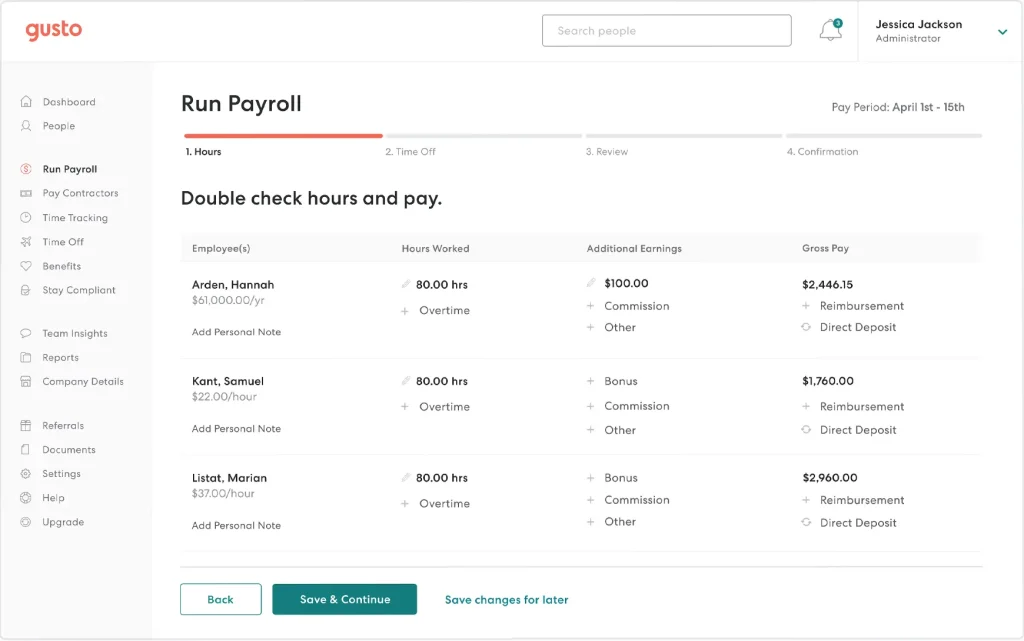
Benefits were the second thing that made life easier. I managed health, dental, vision, and 401(k) plans in the same place where I ran payroll, so when someone joined or changed status, I updated one record instead of two. Onboarding checklists and time-off tracking were simple enough that new managers figured them out without a training session.
The published pricing was the biggest relief. I could add up the cost before talking to anyone, which isn’t something I could say about most HR tools. The trade-off is depth. Once the team grew, I noticed the performance and reporting tools felt lighter than what a dedicated platform offers, so I paired Gusto with a separate tool for reviews.
Pros:
- Full-service payroll for US employees comes included, not as a separate add-on.
- Health, dental, vision, and 401(k) administration sit in the same platform.
- Pricing is published for every plan, so budgeting is straightforward.
- Onboarding checklists and time-off tracking are easy for new managers to pick up.
Cons:
- It is built mainly for US businesses.
- Performance management tools are lighter than dedicated platforms.
G2 Rating: 4.6/5
Pricing:
Starts at $49 per month.
4. HiBob: Best Engagement-Led HR for Mid-Sized Companies
The first thing I noticed about HiBob was that it felt built for people, not paperwork. The profiles, the team pages, and the way company news showed up made the whole thing feel closer to a workplace hub than a database, and my employees opened it without being reminded.
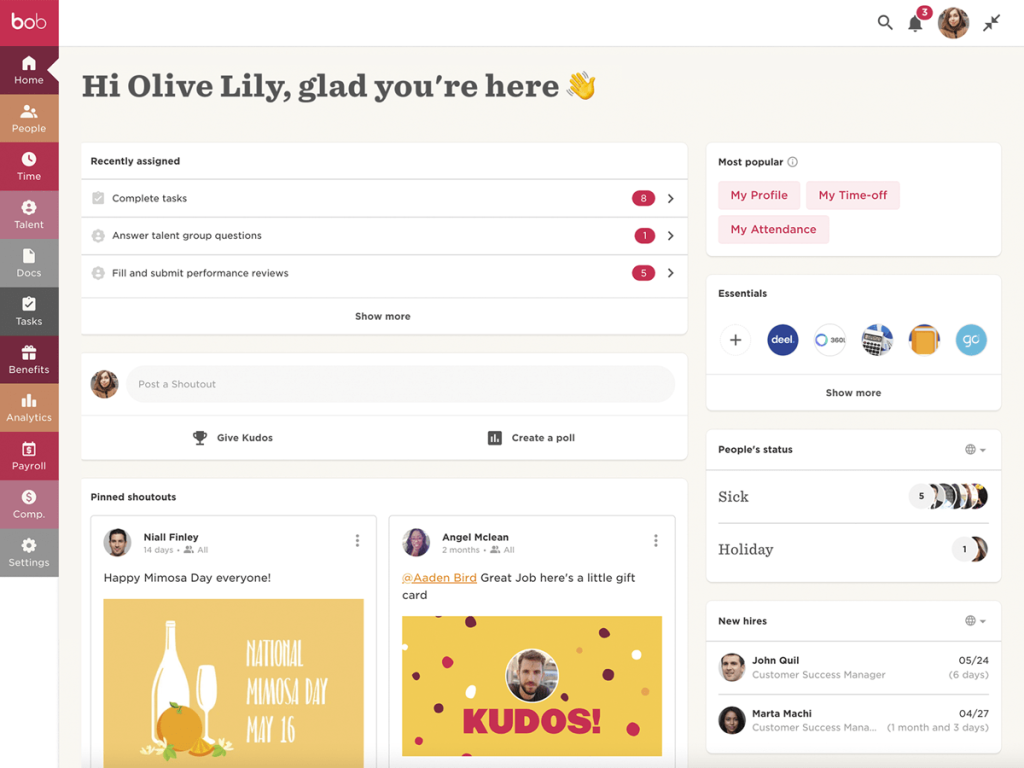
Where it pulled ahead of a basic HR record was the people data. I used the analytics dashboards to spot trends in headcount and turnover, ran engagement surveys inside the same system, and built pay structures in the compensation tools. Because all of that lived next to the employee record, I wasn’t exporting spreadsheets to answer a leadership question.
Getting started took more planning than a lightweight HR tool. Pricing came through a demo and a custom quote, so I couldn’t compare costs quickly, and the platform felt like more than we needed until the company grew. If your team is past 100 people and HR is asked to show engagement and retention data, it’s a strong fit.
Pros:
- People analytics dashboards track headcount, turnover, and engagement trends.
- Engagement surveys are part of the core platform rather than a separate purchase.
- Compensation tools support configurable pay structures.
- Workforce planning helps with headcount modeling and budget forecasting.
Cons:
- Pricing is quote-based, which slows down early cost comparisons.
- It can feel like too much platform for teams under about 100 employees.
G2 Rating: 4.5/5
Pricing:
Custom quote.
5. Deel: Best for Hiring and Paying People in Other Countries
Hiring my first teammate in another country was the moment I realized how little my HR system could do about it. Deel was the tool that closed that gap. I set up the new hire, picked the right contract type, and the platform took care of employing them locally, so I didn’t have to open a legal entity just to say yes to a great candidate.
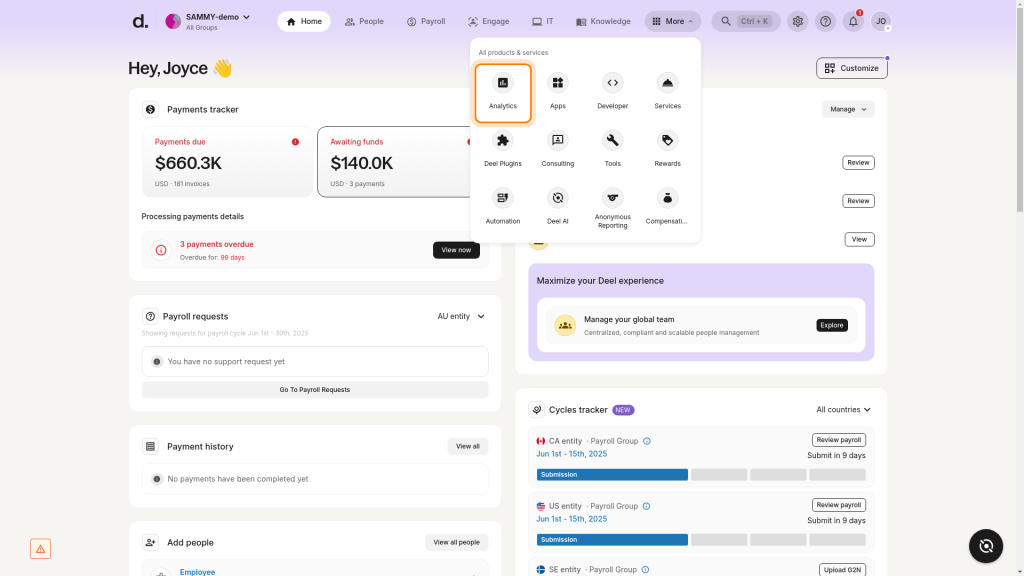
What I liked most was seeing everyone in one place. Employees, contractors, and international hires all lived in the same view, and the contracts were built around local rules instead of a generic template I had to adapt myself. When we later added a few domestic hires, I used the HR tier for records, onboarding, and time off, so we didn’t need a second system for the home team.
Cost was the part I watched closely. The employer of record service is priced per person and sits well above a normal HR subscription, which makes sense given what it covers, but it adds up fast. If everyone on your team sits in one country, you’d be paying for machinery you never turn on.
Pros:
- Hire employees through employer of record services in well over 100 countries.
- Manage contractors and full-time staff side by side in one view.
- Contracts follow local rules instead of a one-size template.
- A lower-cost HR tier covers records, onboarding, and time off for domestic staff.
Cons:
- Employer of record fees are high per person.
- It is overbuilt for single-country teams.
G2 Rating: 4.7/5
Pricing:
Starts at $5 per employee per month.
6. Zoho People: Best for Tight HR Budgets
Budget was the entire conversation when I looked at Zoho People. I had a team that needed real HR structure but couldn’t justify a big monthly bill, and the entry plan answered that right away. Employee records, leave management, and a document library were in place within days, and nobody needed a long training session.
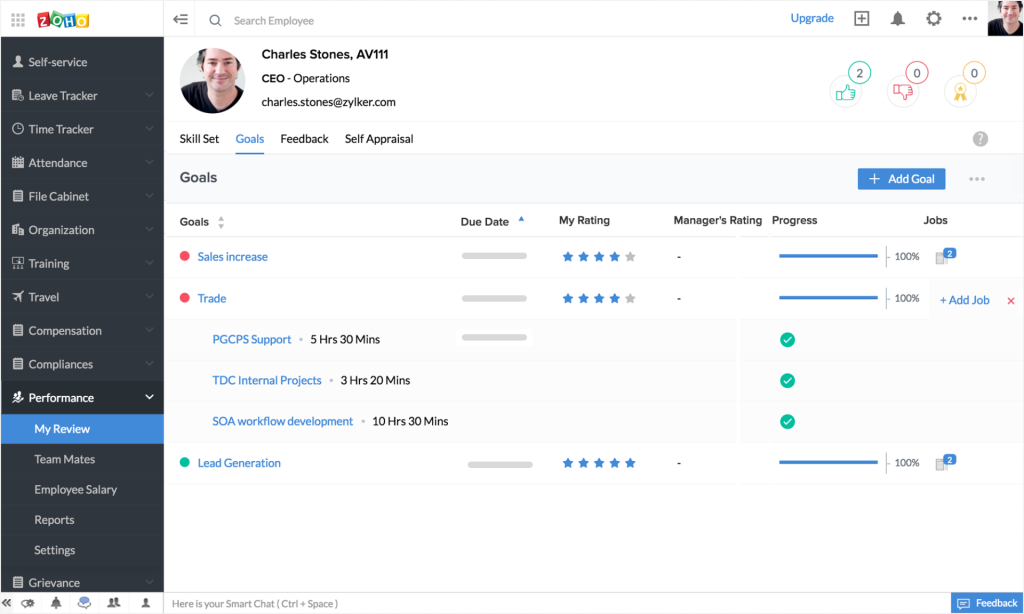
The jump to the Professional plan added attendance tracking and timesheets, which was the upgrade I needed once the team started working different hours. Because it connects natively with other Zoho apps, I linked it to the CRM and the payroll tool without building anything custom. Language support helped too, since some of our people preferred to use the system in their own language.
The trade-off showed up in the polish. Once I started configuring advanced modules, the screens felt busier than I’d like, and the onboarding workflows and e-signing were a step behind the more refined tools I’d tried. If you already use other Zoho products, the value is hard to beat. If you don’t, expect to invest a little time getting comfortable.
Pros:
- Leave management, attendance, and timesheets are covered as you move up the tiers.
- Native connections to other Zoho apps, including payroll, CRM, and recruiting.
- Available in 30+ languages for multilingual teams.
- No flat monthly minimum for very small teams.
Cons:
- Onboarding workflows and e-signing are less polished than in premium tools.
- It works best when you already use other Zoho apps.
G2 Rating: 4.4/5
Pricing:
Starts at $1.50 per user per month.
7. Personio: Best for European Teams That Want One HR Hub
When a colleague in our Berlin office asked why we were still tracking absences in a shared calendar, I knew it was time to try Personio. It pulled employee records, absence management, and onboarding into one hub, and the first thing my European managers noticed was that time-off rules matched how they actually worked.
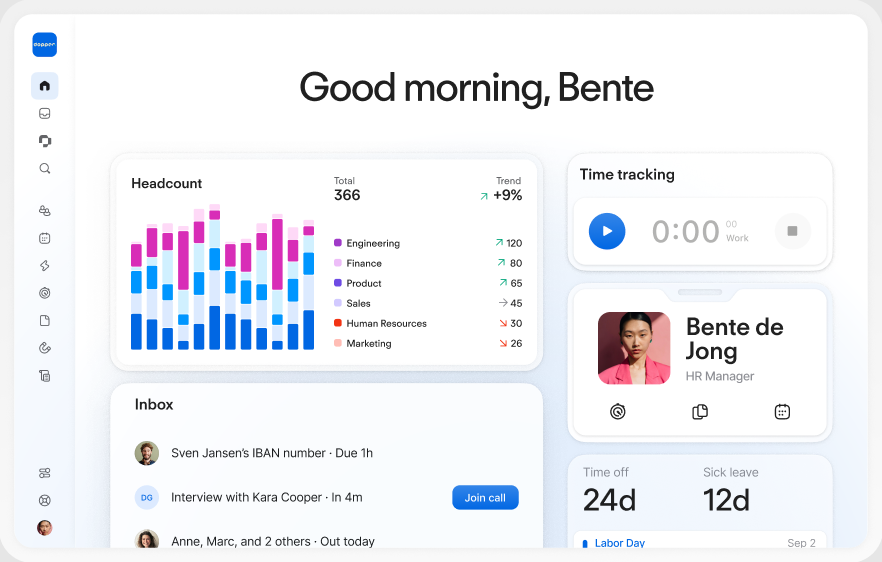
Recruiting was a pleasant surprise. I tracked candidates in the same system that later held their employee profiles, so a hire didn’t mean re-entering the same details in a second tool. The reporting was just as handy: I built views on headcount and absence trends without exporting anything to a spreadsheet, which saved me hours before leadership meetings.
Pricing wasn’t visible upfront, so I had to book a call before I could compare it with other tools, and the cost grew as I added modules. For teams based mainly in Europe, it’s a strong fit. For a US-only company, I found other options felt more natural.
Pros:
- Employee records, absence management, and onboarding in one hub.
- Time-off rules built around European working practices.
- Recruiting connects to the employee record once someone is hired.
- Built-in reporting covers headcount and absence trends.
Cons:
- It is a more natural fit for European teams than US-only companies.
- Extra modules can raise the total as your needs grow.
G2 Rating: 4.4/5
Pricing:
Custom quote.
8. CultureMonkey: Best for Employee Engagement Surveys
This one is a little different from the rest of the list, so here’s why it earned a spot. When I told colleagues I was comparing BambooHR alternatives, a few of them asked whether an engagement tool would solve their real problem, and CultureMonkey was the one I tried to find out. It’s built around surveys, and it does that job without the extra weight of a full HR suite.
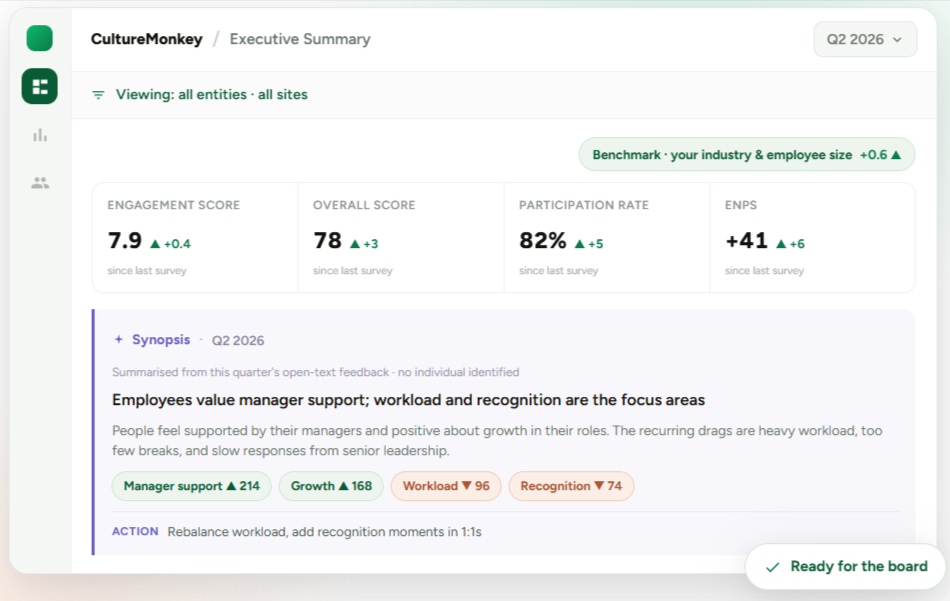
The multilingual survey support stood out. I sent the same survey in several languages to a distributed team, and the response rate improved because people could answer in the language they think in. It also reached employees who rarely check email, which mattered for the frontline staff I wanted to hear from. The driver-level reports then showed what was behind each score, so I knew where to start.
If you landed here looking for alternatives to CultureMonkey, the best CultureMonkey alternatives on this list are PeopleGoal and HiBob, because both pair surveys with goals, reviews, or HR records. Other Culture Monkey alternatives, like Paylocity, add engagement features inside a payroll platform. Among CultureMonkey competitors, this one stays the most survey-focused. It isn’t an HR system, so I paired it with a separate tool for records and payroll.
Pros:
- Run engagement surveys in multiple languages for distributed teams.
- Reach frontline employees who don’t check email.
- Driver-level reports show what sits behind each score.
- A focused survey tool means less setup than a full HR suite.
Cons:
- It isn’t an HR system, so records and payroll need another tool.
- Pricing isn’t published, so you’ll need a sales conversation for a quote.
G2 Rating: 4.7/5
Pricing:
Custom quote.
9. Paylocity: Best for Mid-Sized US Payroll With an Employee Community Feed
Most of the team I was supporting worked hourly shifts, and that changed what I needed from HR software. Paylocity fit that reality better than the desk-job tools I’d tried. Payroll was a core part of the product rather than something I had to bolt on, so pay runs, tax filings, and HR records all pointed to the same employee data.
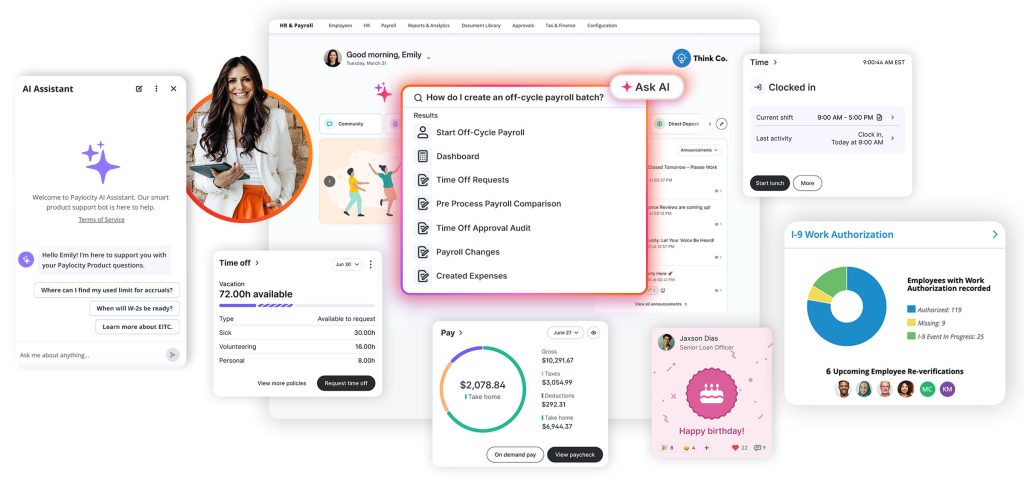
The feature that surprised me was Community, a social-style feed where I posted announcements and employees recognized each other. Hourly staff who never opened a traditional HR portal started checking it, which is not something I expected from a payroll company. On-demand pay also gave employees access to earned wages before payday, and higher tiers added learning tools for training and compliance courses.
Getting set up felt more like a project than a sign-up. Pricing came by quote, and I needed extra time to configure everything, so I’d plan the rollout rather than rushing it. It’s built around the US, so global teams will need a partner for payroll abroad.
Pros:
- Full-service US payroll is a core product, not an add-on.
- Community feed supports announcements and peer recognition.
- On-demand pay lets employees access earned wages before payday.
- Learning tools come with higher tiers for training and compliance.
Cons:
- Setup takes longer than with simple HR tools.
- It is centered on the US, so global payroll relies on a partner.
G2 Rating: 4.4/5
Pricing:
Custom quote.
10. Factorial: Best for Time Tracking and HR in Growing Teams
Time tracking was the problem I needed to solve first, so that’s where I started with Factorial. Employees clocked in and out, managers approved hours, and the data flowed into the same place as time-off requests and shift planning. For the first time, I wasn’t reconciling three spreadsheets at the end of the month.
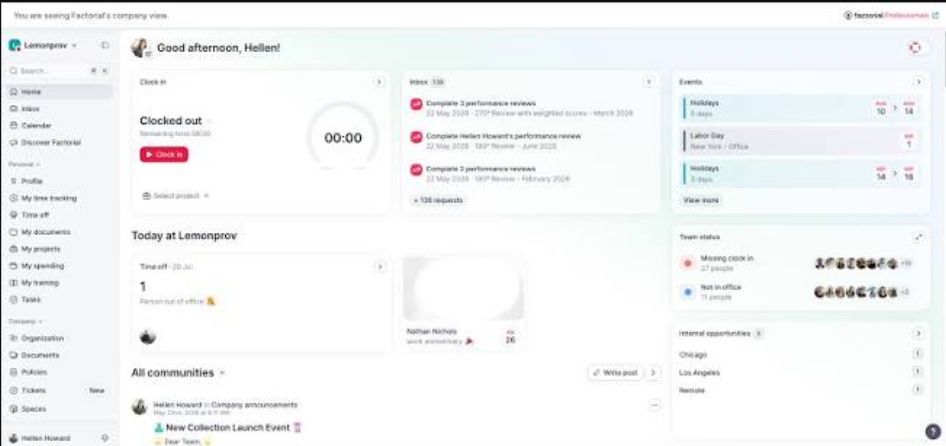
The document side was just as useful. I stored contracts and policies in the employee profile, sent documents for e-signature, and let new hires finish their paperwork before day one. The interface was friendly enough that managers, who normally avoid HR tools, didn’t ask for a walkthrough.
The modular setup meant I could start small and switch on extras as the team grew, though each extra nudged the monthly total upward. I also hit a few spots where I wanted a feature that wasn’t there yet, so I’d suggest listing your must-haves before you commit.
Pros:
- Time tracking, time-off requests, and shift planning share one system.
- Documents and e-signatures live inside each employee profile.
- Onboarding paperwork can be completed before the first day.
- Modular setup lets you start small and add features later.
Cons:
- Add-on modules raise the monthly total.
- Some reviewers mention missing or limited features.
G2 Rating: 4.4/5
Pricing:
Starts at $7 per user per month.
11. Sage HR: Best for Modular HR in Small Teams
I picked Sage HR for a small team that wanted to pay only for what it actually used. The base module covered the essentials: employee database, leave management, and onboarding and offboarding checklists. Anything beyond that, like performance, timesheets, or shift scheduling, was a separate switch I could flip on later.
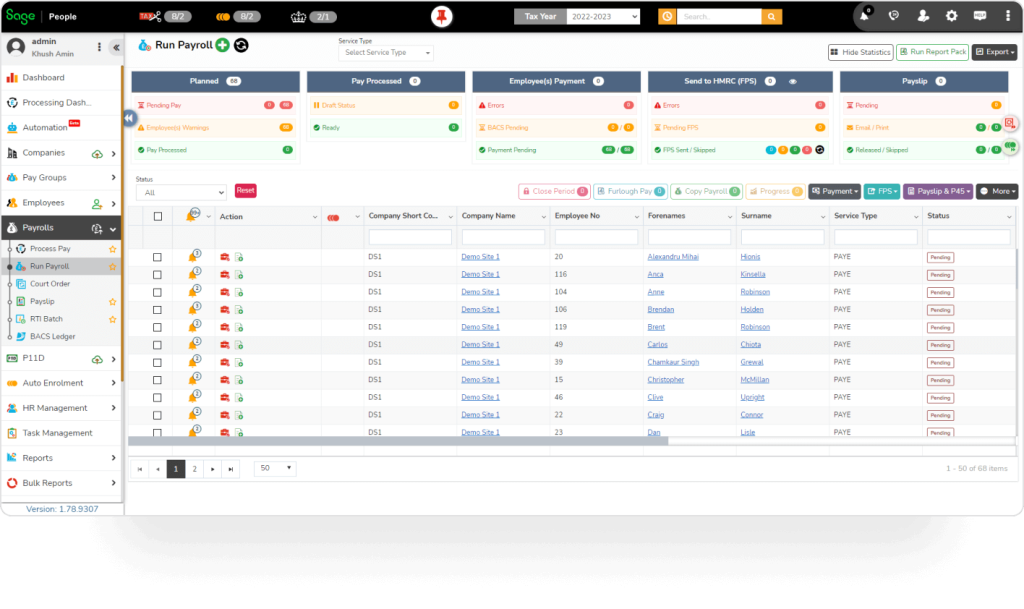
The workflow builder, which Sage HR calls Recipes, was the feature I leaned on most. I automated repetitive steps for new hires and used custom fields to capture details our team cared about, then pulled those into custom reports. It gave me more control than I expected from a tool at this price.
The pay-for-what-you-use model is a strength and a risk at the same time. Each module I added made the bill creep up, and there was no free plan, only a trial. If you know exactly which pieces you need, it’s easy to keep costs lean. If not, price your full wish list first.
Pros:
- Pay only for the modules you need, from core HR to performance and timesheets.
- A workflow builder automates repetitive onboarding steps.
- Custom fields and reports capture details specific to your team.
- Onboarding and offboarding checklists keep new hires and leavers organized.
Cons:
- Add-on modules increase the total cost.
- There is no free plan.
G2 Rating: 4.3/5
Pricing:
Starts at $5.50 per employee per month.
12. Workday HCM: Best for Large Enterprises That Need HR and Finance Together
Workday came up in almost every conversation I had with larger companies, so I wanted to see what the fuss was about. The biggest difference from every other tool here was the single data model. Headcount, compensation, and budget planning all pulled from the same source, so HR and finance weren’t arguing over whose spreadsheet was right.
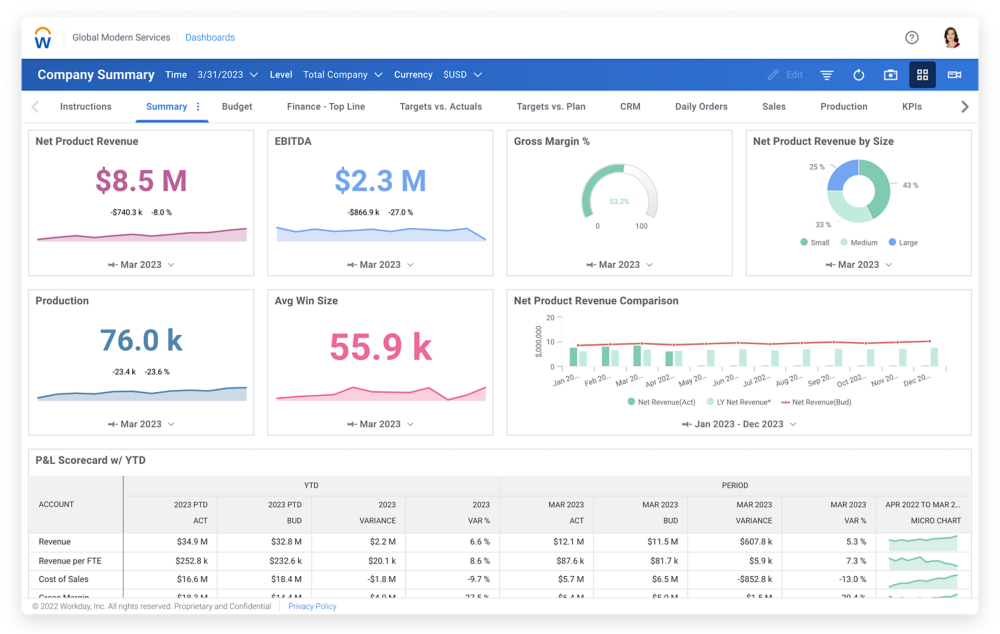
The analytics dashboards were the part I spent the most time in. I could model headcount scenarios, track compensation across entities, and view talent data without asking an analyst to build a report. It also handled multiple countries and legal entities, which is where smaller HR tools start to strain.
The cost of all that power is time and money. Implementation ran for months and needed a dedicated project team, and pricing was entirely quote-based. If your company is under a few hundred employees, I’d look at the lighter options above instead.
Pros:
- HR, finance, and workforce planning share a single data model.
- Analytics dashboards support headcount and compensation modeling.
- Handles multiple countries and legal entities in one system.
- Integrates with finance and identity systems used by large organizations.
Cons:
- Implementation takes months and needs a project team.
- It is far more system than small and mid-sized teams need.
G2 Rating: 4.1/5
Pricing:
Custom quote.
How Did I Evaluate These BambooHR Alternatives?
I judged each tool on user ratings, core features, ease of use, support, pricing clarity, and value for money, and I leaned on my own time with each platform wherever I could. Here’s the checklist I used:
- User Reviews and Ratings: I started with real user feedback on G2 to see what teams love and where they get stuck.
- Core Features and Functionality: I checked how well each tool replaces what BambooHR does and what it adds on top, from performance reviews to payroll. Our guide on how to choose performance management software covers the wider picture.
- Pricing Transparency: I looked at whether the price on the page matches what you’d actually pay once add-ons, modules, and setup are included.
- Ease of Use: I paid attention to the moments I got stuck, like setting up a first workflow or finding a report.
- Customer Support: I considered how helpful support was when I needed it, not just what the sales team promised.
- Value for Money: I compared the cost with what you really get, especially for teams that outgrow a basic HR record.
- Personal Experience and Expert Insights: Wherever I could, I relied on my own hands-on time and on conversations with HR peers who’ve run real review and payroll cycles.
My Top 3 Picks for the Best BambooHR Alternatives
My top three BambooHR alternatives are PeopleGoal, Rippling, and Gusto. Which one fits you depends on what you want your HR software to do beyond storing employee records.
1. PeopleGoal
PeopleGoal is my top pick because it fills the gap BambooHR users mention most: performance. I built review cycles, tied them to OKRs, and connected results to development plans in one place, and because it connects with BambooHR, you can keep your records where they are and still upgrade how you run performance reviews.
2. Rippling
Rippling earns the second spot for teams tired of juggling separate HR, payroll, and IT tools. Entering a new hire once and watching payroll, devices, and app access follow saved me real time, and the modular pricing meant I only paid for what we switched on.
3. Gusto
Gusto takes third place for small US teams that want payroll and HR without a sales call. The published plans made budgeting easy, and having benefits and payroll under one roof ended the double entry I used to do.
Compare BambooHR Alternatives and Pick a Platform That Grows With Your Team
Switching HR tools isn’t about walking away from something that worked. It’s about finding a platform that covers what your team needs next, whether that’s payroll in the same place, reviews that lead to real growth, or a way to hire people in another country without a legal headache.
Start by writing down the one thing BambooHR doesn’t do for you today. If it’s payroll, look at the payroll-first tools. If it’s global hiring, start with an employer of record platform. And if it’s performance, goals, and development, a dedicated platform like PeopleGoal can sit alongside your current records or replace parts of your setup, depending on how much you want to change. For a closer look at how that works, see our guide to performance management software.
Whichever way you lean, run one real review or onboarding cycle before you commit for the year. A free plan or trial makes that easy, and PeopleGoal’s free plan is a low-effort way to see whether it bends around the way your team already works.
Turn Your Next Review Cycle Into a Growth Plan Your Team Will Follow
Frequently Asked Questions
What are the best BambooHR alternatives?
The best BambooHR alternatives are PeopleGoal for performance reviews and development, Rippling for HR, payroll, and IT together, Gusto for small US teams, HiBob for engagement-led HR, and Deel for global hiring. The right pick depends on which gap you want to close.
Is there a cheaper alternative to BambooHR?
Yes. Zoho People starts at $1.50 per user per month, and Sage HR starts at about $5.50 per employee per month. PeopleGoal has a free plan, with paid plans from $4 per user per month, though it focuses on performance and development rather than payroll, so it isn't a like-for-like swap.
Does BambooHR include payroll?
Not in the base plans. Payroll is a separate paid add-on, and the published Core, Pro, and Elite rates cover the HR platform only. Gusto and Paylocity include payroll as part of their core products.
What is the best BambooHR alternative for performance reviews?
PeopleGoal is the strongest option on this list for performance reviews. It offers a no-code review builder, OKRs, 360-degree feedback, and development plans in one platform.
Which BambooHR alternative works best for small teams?
Gusto, Zoho People, and Sage HR suit small teams because they publish starting prices and are quick to set up. PeopleGoal's free plan is another low-risk way to start if reviews and goals are your priority.
Which BambooHR alternative is best for hiring in other countries?
Deel is the most direct option. It acts as the employer of record in well over 100 countries and also manages contractors, so you don't need a local legal entity to hire abroad.
Can I keep BambooHR and add another tool?
Yes. PeopleGoal connects with BambooHR, so you can keep employee records there and add stronger reviews, goals, and development plans on top.
How do I move my data out of BambooHR?
BambooHR lets you export employee records, documents, and time-off balances in bulk. Map each field to the new system before importing, and if payroll is moving, run both systems in parallel for one full pay cycle before you cut over.
Ready to 3x Your Teams' Performance?
Use the best performance management software to align goals, track progress, and boost employee engagement.