
Last year, a colleague showed me her recognition points balance with a big grin. She had been saving for months, only to find that the one thing she wanted cost nearly double what it would in a store. That tiny moment says a lot about recognition software. The idea is simple, but the details, like what rewards cost and how easy they are to find, decide whether people actually care. It’s also why I’m not surprised when someone asks me about Achievers alternatives, usually right after they say the platform looks polished but they keep hitting a wall.
I’ve helped teams compare, launch, and replace recognition tools for years, and the same questions keep coming up. How much will this really cost? Will people use it every week? Can it do more than hand out points? Achievers is a trusted name with plenty going for it, especially for bigger companies, but every team has its own size, budget, and goals, so it’s worth looking around before you commit.
To build this list, I compared pricing, checked user ratings, read what real reviewers complained about, and thought about what each tool feels like for HR teams and managers week after week. By the end, you’ll know which Achievers competitor deserves your free trial.
Why Switch From Achievers?
A study by Gallup in 2026 found that global employee engagement fell to 20% in 2025, costing the world economy an estimated $10 trillion in lost productivity. That’s a strong reason to choose a recognition tool your people will actually enjoy using. Achievers holds a solid 4.6 out of 5 on G2 from thousands of reviews, and reviewers like its ease of use and personalized recognition. Still, a few themes come up again and again when teams look at other options:
- Pricing isn’t public. G2 lists no entry-level pricing for Achievers, and Capterra says to contact the vendor, so getting a number means talking to sales.
- Reward prices can feel high. Capterra’s review summary flags high and inconsistent reward pricing, with some catalog items and gift cards costing more than their market value.
- Spending points takes effort. Limited options for spending points is the most common complaint on G2, and some reviewers say the catalog is hard to search and navigate.
- Point allowances can feel tight. One reviewer said people who aren’t people leaders get fewer points to give, and another said unused points disappear at year end.
- It’s built for bigger companies. About 70% of its G2 reviews come from enterprise teams, and Capterra describes it as a fit for organizations with 500 or more employees.
- Recognition comes first. If you also want goals, reviews, and development plans in one place, you’ll likely need performance management software alongside it.
None of this makes Achievers a bad choice. It’s a strong pick for large companies that want a proven, visible recognition program with a broad rewards marketplace. If you want a clearer price, a simpler catalog, or recognition that connects to employee engagement software you already use, one of the tools below is worth a look.
10 Best Achievers Alternatives
Before we dig into the details, here’s a quick look at how each Achievers competitor compares on use case, price, and rating.
| Tool | Best For | Starting Price | G2 Rating |
| PeopleGoal | Best fully customizable platform for performance reviews, OKRs & employee development | Free plan available. Paid plans start at $4/user/month. | 4.5/5 |
| Awardco | Huge rewards network with flexible budgets | Custom quote | 4.9/5 |
| Bonusly | Easy peer-to-peer recognition on a budget | Starts at $3/seat/month | 4.7/5 |
| Workhuman | Polished social recognition for large companies | Custom quote | 4.7/5 |
| Motivosity | Recognition with real monetary bonuses | Custom quote | 4.7/5 |
| Kudos | Instant peer and manager recognition | Custom quote | 4.8/5 |
| Nectar | Mid-sized teams that want flexible points and rewards | Custom quote | 4.7/5 |
| Workvivo | Recognition inside a social employee app | Custom quote | 4.8/5 |
| WorkTango | Recognition paired with employee surveys | Custom quote | 4.7/5 |
| Reward Gateway | Recognition combined with perks and discounts | Custom quote | 4.6/5 |
1. PeopleGoal: Best Fully Customizable Platform for Performance Reviews, OKRs & Employee Development
Our recognition habit had a problem: praise lived in one app and goal tracking lived in another, so the two never met. PeopleGoal fixed that by putting recognition, check-ins, OKRs, reviews, and feedback under one roof. A kind word from a manager could sit right beside the goal it celebrated. Development plans, skills tracking, career pathing, and succession planning were in there as well, which gave every compliment a clear path forward.
Writing a note of thanks felt easy. I chose the recipient, typed my message, and clicked preview to see how it would look before anything went out. Recognition badges added a splash of color, and whoever received one could tell exactly who sent it and what it was for. Beside that, polls and an anonymous feedback channel let people raise concerns privately, while pulse surveys, deeper engagement surveys, and eNPS measured how everyone was really feeling.
Flexibility turned out to be its biggest strength. In the no-code builder, I took a ready-made review template and edited its questions, rating scale, and approval steps by hand, then built a few custom forms for HR. Goals, SMART objectives, and cascading tasks updated in real time, and syncing with Slack, Teams, Workday, and ADP meant managers rarely had to leave their usual tools. For a quick preview before you sign up, try the admin product tour.
Pros:
- Send peer-to-peer recognition with a preview step and badges that make praise visible.
- Run pulse surveys, in-depth engagement surveys, and eNPS with configurable anonymity through the engagement survey tools.
- Connect feedback to OKRs, SMART goals, and cascading tasks tracked in real time.
- Collect 360-degree feedback, including anonymous no-login forms, and run structured 1-to-1 meetings.
- Build custom forms and HR apps with the no-code builder and sync with Slack, Teams, Workday, and ADP using its integrations.
Cons:
- No downloadable or on-premise version.
- No dark mode for the user interface.
G2 Rating: 4.5/5
Pricing:
Free plan available. Paid plans start at $4/user/month.
2. Awardco: Best for a Huge Rewards Network With Flexible Budgets
Distance was the problem Awardco solved for our group. With teammates scattered across several time zones, a single gift card list never worked, but this platform’s catalog is enormous, and the vendor claims more than 100 million items spanning 160-plus countries. People redeemed points with local options, searched without fuss, and checked out in just a few clicks. Nobody had to settle for a reward that couldn’t be delivered where they lived.
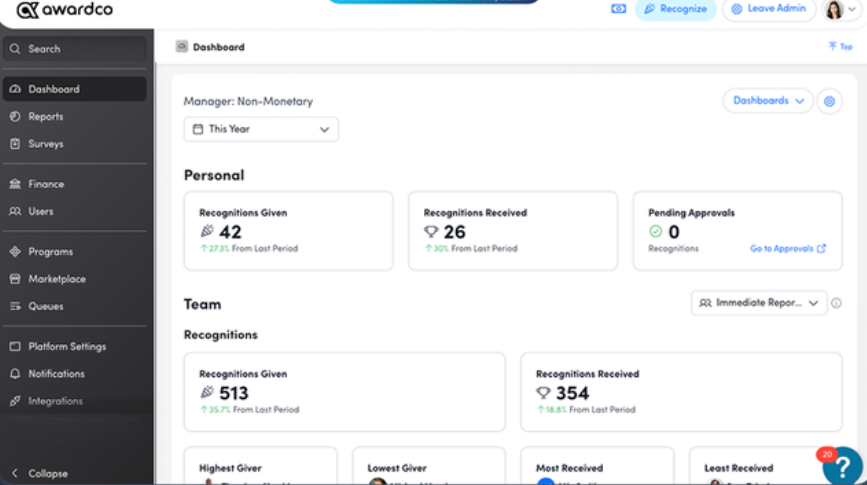
Three kinds of appreciation lived side by side. Anyone could fire off a quick thank-you, leaders could launch nomination-based awards for standout work, and automated moments such as work anniversaries triggered without anyone lifting a finger. I defined those milestone rules a single time and let them run, which meant nobody slipped through the cracks, even during our busiest months.
Money management was the quiet hero. Each manager received an allowance, and I could see every dollar spent on one screen. Connections to Slack, Teams, Workday, and ADP kept employee records current without manual updates. Fair warning, though: the learning curve is steeper than with simpler tools, so I blocked off a few hours to walk managers through the basics before launch.
Pros:
- Choose from a very large global rewards network.
- Send quick peer-to-peer shoutouts that anyone can give.
- Run nomination-based awards for bigger achievements.
- Automate milestone recognition like anniversaries and birthdays.
Cons:
- It takes longer to learn and manage than lighter tools.
- Goals and performance reviews aren’t part of the platform.
G2 Rating: 4.9/5
Pricing:
Custom quote.
3. Bonusly: Best for Easy Peer-to-Peer Recognition on a Budget
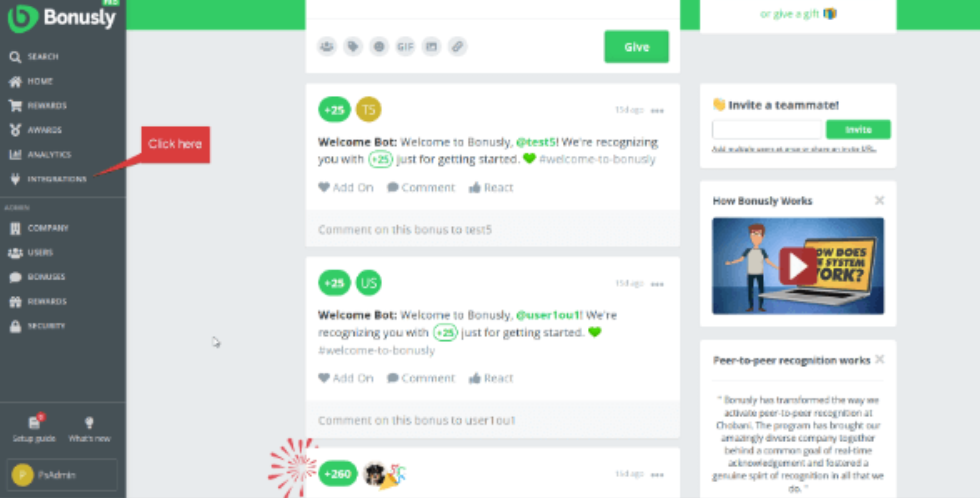
Picture a busy sales floor where nobody has time for yet another login. That’s where Bonusly worked best. A thank-you took about ten seconds: pick a colleague, attach a few points, type a short message, and add a hashtag naming the company value being celebrated. Because it was so quick, people recognized each other several times a day, and new hires caught on without any coaching.
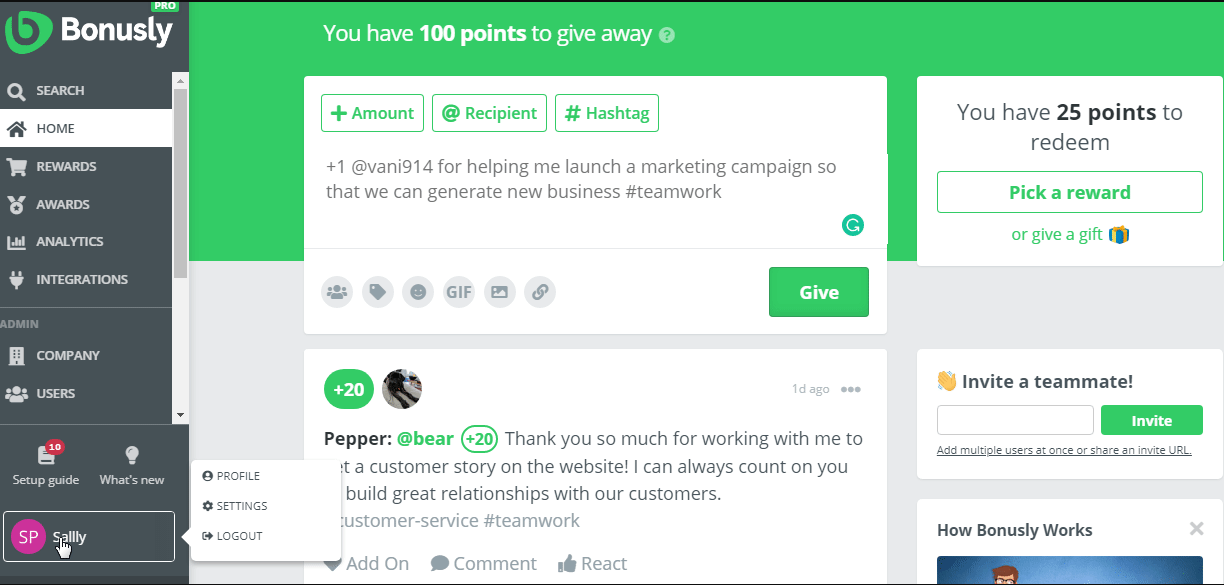
Behind the fun sat genuinely useful reporting. Each hashtag fed a picture of which values were showing up, which departments had gone silent, and which people hadn’t received any appreciation lately. Emojis and GIFs kept messages light. When employees were ready to cash in, their points converted into gift cards and similar rewards, so every kind word carried a little weight.
Since it plugged into Slack and Microsoft Teams, the tool met people inside conversations they were already having, and that convenience drove most of our usage. Pricing started low on the Team plan, though I did have to budget separately for the points themselves.
Pros:
- Give points with a quick note and a company value hashtag.
- Add emojis and GIFs to keep recognition personal.
- Redeem points for gift cards and other rewards.
- Recognize colleagues without leaving Slack or Microsoft Teams.
Cons:
- The reward budget sits on top of the per-seat price.
- It isn’t built for reviews, goals, or development plans.
G2 Rating: 4.7/5
Pricing:
Starts at $3/seat/month.
4. Workhuman: Best for Polished Social Recognition at Large Companies
Scale was the first thing I noticed about Workhuman. During a rollout that spanned several countries, thank-yous appeared in a company-wide feed, so a win in one office could be cheered on by people in another. Everything felt refined and well organized, which makes sense given that the platform is aimed squarely at large enterprises with big, spread-out workforces.
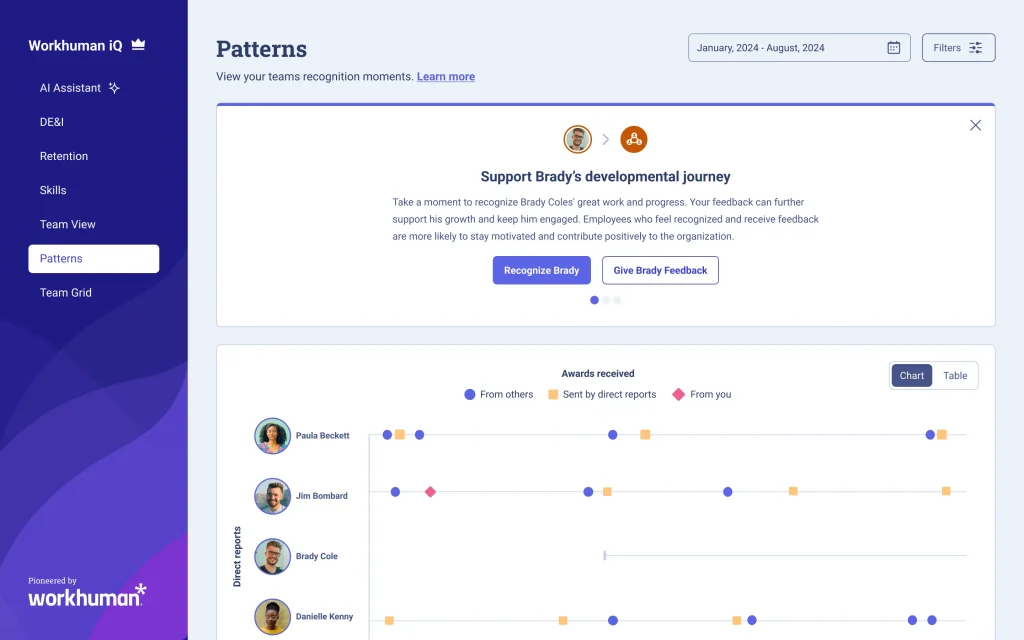
Big career moments were covered too. Service anniversaries and other life events kicked off celebrations automatically, and employees spent their points through a dedicated rewards portal. Blending small daily compliments with major milestones kept appreciation steady all year. Managers could also see who had been recognized lately and who hadn’t, which helped them reach out to overlooked teammates.
Buying it took more effort than I’d hoped. No prices were published, so a sales call was unavoidable, and new users needed a little time to find their way around. A few customers also wish for more automated workflows. Next to Achievers, both target big companies, so the decision usually comes down to the rewards experience and the final cost.
Pros:
- Share public thank-yous in a company-wide social feed.
- Celebrate service anniversaries and other milestones.
- Let employees redeem points through a rewards portal.
- Support large organizations with a proven, enterprise-ready program.
Cons:
- It leans enterprise, so smaller teams may find it heavy.
- Some reviewers say it needs more automation and takes time to learn.
G2 Rating: 4.7/5
Pricing:
Custom quote.
5. Motivosity: Best for Recognition With Real Monetary Bonuses
What sets Motivosity apart is money. When a manager or peer sent thanks, they could attach a small cash bonus, and you could practically watch people light up. Notes got read aloud in stand-ups, and colleagues began appreciating each other more often. When a bonus felt like overkill, a gift card option handled the smaller gestures.
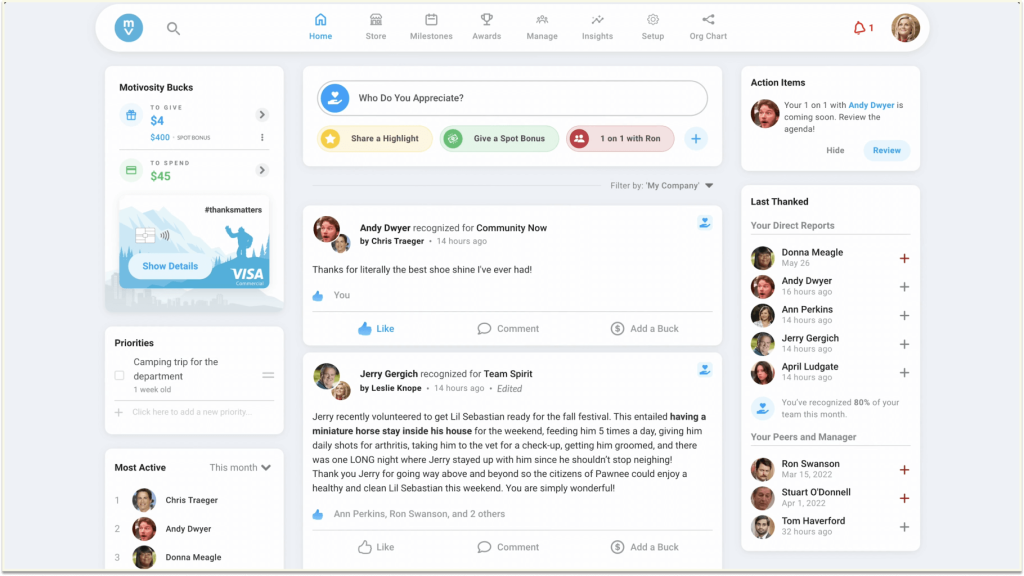
Around that core sat a lively company feed where wins stayed visible all week, plus a social space for hobbies and interests. Leaders also got tools for one-on-ones, goals, and shared to-do lists, giving managers reasons to log in beyond handing out praise. That variety kept the platform from feeling like a prize site, and activity stayed consistent for months.
Engagement surveys connected back to recognition data, so I could compare team mood against how often people were thanked. Planning mattered more than expected, particularly for bonus budgets and approvals, so I invited finance in early.
Pros:
- Send peer-to-peer recognition with small monetary bonuses attached.
- Browse a company feed that keeps appreciation visible.
- Use leadership tools for 1:1s, goals, and shared to-dos.
- Run engagement surveys connected to recognition insights.
Cons:
- Administration feels less straightforward than it does with Awardco.
- Bonus spending adds to the license cost.
G2 Rating: 4.7/5
Pricing:
Custom quote.
6. Kudos: Best for Instant Peer and Manager Recognition
Kudos is built for speed. A thank-you took a few taps with no menus to dig through, so nobody put it off until later. One platform handled friendly peer notes, manager-to-employee recognition, and structured incentive programs, which meant I didn’t need separate tools for casual and formal appreciation.
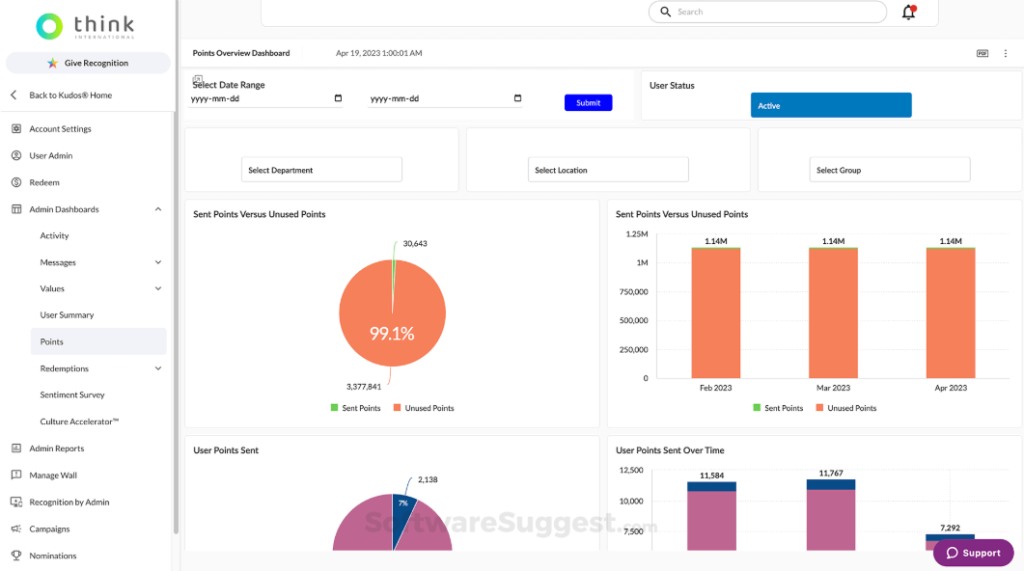
Points added a game-like layer. Employees stacked them up and later swapped them for gifts, giving small acts of kindness a bit of extra pull. I also noticed praise crossing departmental lines, with people thanking colleagues they rarely spoke to, which strengthened ties across the company in a way I hadn’t expected.
Help was easy to reach whenever I had questions during setup. Where it lagged was reward variety: the catalog is smaller than Awardco’s, so I’d call it ideal for teams that prize simplicity over choice. Pricing is quote-based.
Not sure what to write in a note? These positive feedback examples can spark ideas.
Pros:
- Give instant recognition in a few clicks.
- Send peer-to-peer and top-down recognition from managers.
- Run incentive programs alongside everyday praise.
- Let employees collect points and trade them for gifts.
Cons:
- Its rewards catalog is less extensive than Awardco’s.
- Goals, reviews, and development plans aren’t part of the platform.
G2 Rating: 4.8/5
Pricing:
Custom quote.
7. Nectar: Best for Mid-Sized Teams That Want Flexible Points and Rewards
A mid-sized operations team gave Nectar its toughest test, and it handled the job gracefully. Employees earned points for good work, gave points to others, and browsed a rewards store full of gift cards and treats. Letting people choose their own reward made the program feel personal, and participation climbed as balances grew.
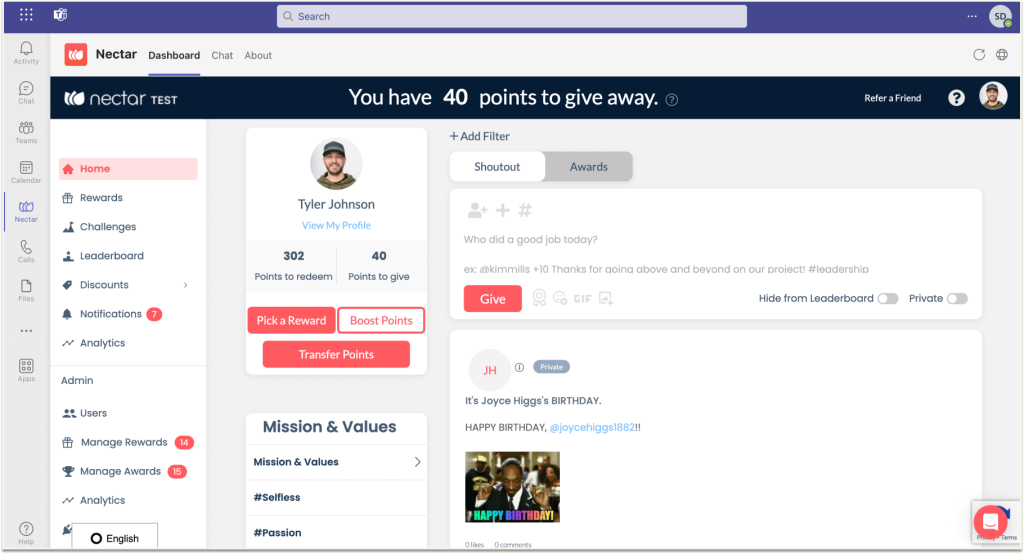
Praise happened right inside the chat tools where conversations were already flowing, so sending one took a handful of clicks. I designed custom badges around values like teamwork and customer care, then watched the dashboards reveal who was giving, who was receiving, and which teams needed a gentle push.
Onboarding went smoothly because the vendor’s support team answered quickly whenever I got stuck. One lesson: fund the rewards budget properly, because points only motivate when they buy something worth having.
Need launch inspiration? Browse these employee recognition ideas to get started.
Pros:
- Give and earn points through peer-to-peer recognition.
- Let employees redeem points in a flexible rewards store.
- Create custom badges that reflect company values.
- Recognize people inside chat tools like Slack and Teams.
Cons:
- Goals and reviews aren’t part of the platform.
- It works best once you’ve funded a rewards budget.
G2 Rating: 4.7/5
Pricing:
Custom quote.
8. Workvivo: Best for Recognition Inside a Social Employee App
Expecting a simple recognition app, I instead found a company social network. Employees posted updates, joined spaces built around teams and interests, and shared thanks in one common feed. A mobile app kept people connected away from their desks, which mattered a lot for shift workers and field staff.
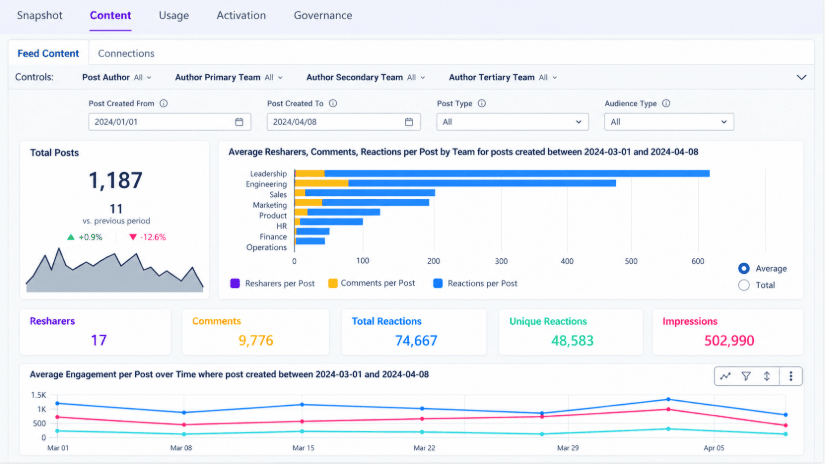
Recognition felt different here. Instead of a one-way note, praise appeared in the feed where coworkers could react and comment and executives could join in, turning appreciation into part of everyday culture. Company news and announcements lived beside it, giving HR a single channel instead of several.
The support team was quick to help during setup. Because the scope is wider than recognition alone, I’d pick it when culture and communication matter as much as rewards; if a giant rewards marketplace is your priority, a rewards-first tool is the better fit. For tips on the communication side, read our guide to improve internal communication.
Pros:
- Share shoutouts in a social feed that colleagues can react to.
- Create spaces for teams, interests, and company news.
- Reach people anywhere with a mobile app.
- Combine employee communication and recognition in one place.
Cons:
- It’s broader than a pure recognition tool, so setup involves more decisions.
- Rewards depth is lighter than on rewards-first platforms.
G2 Rating: 4.8/5
Pricing:
Custom quote.
9. WorkTango: Best for Recognition Paired With Employee Surveys
Employees who spent their days on the floor, not at a desk, led me to WorkTango. Its mobile app let them answer surveys and send recognition from their phones, and response rates jumped in groups that ignored email-based tools. Lifecycle surveys around onboarding and exit supplied steady feedback all year, instead of one big annual push.
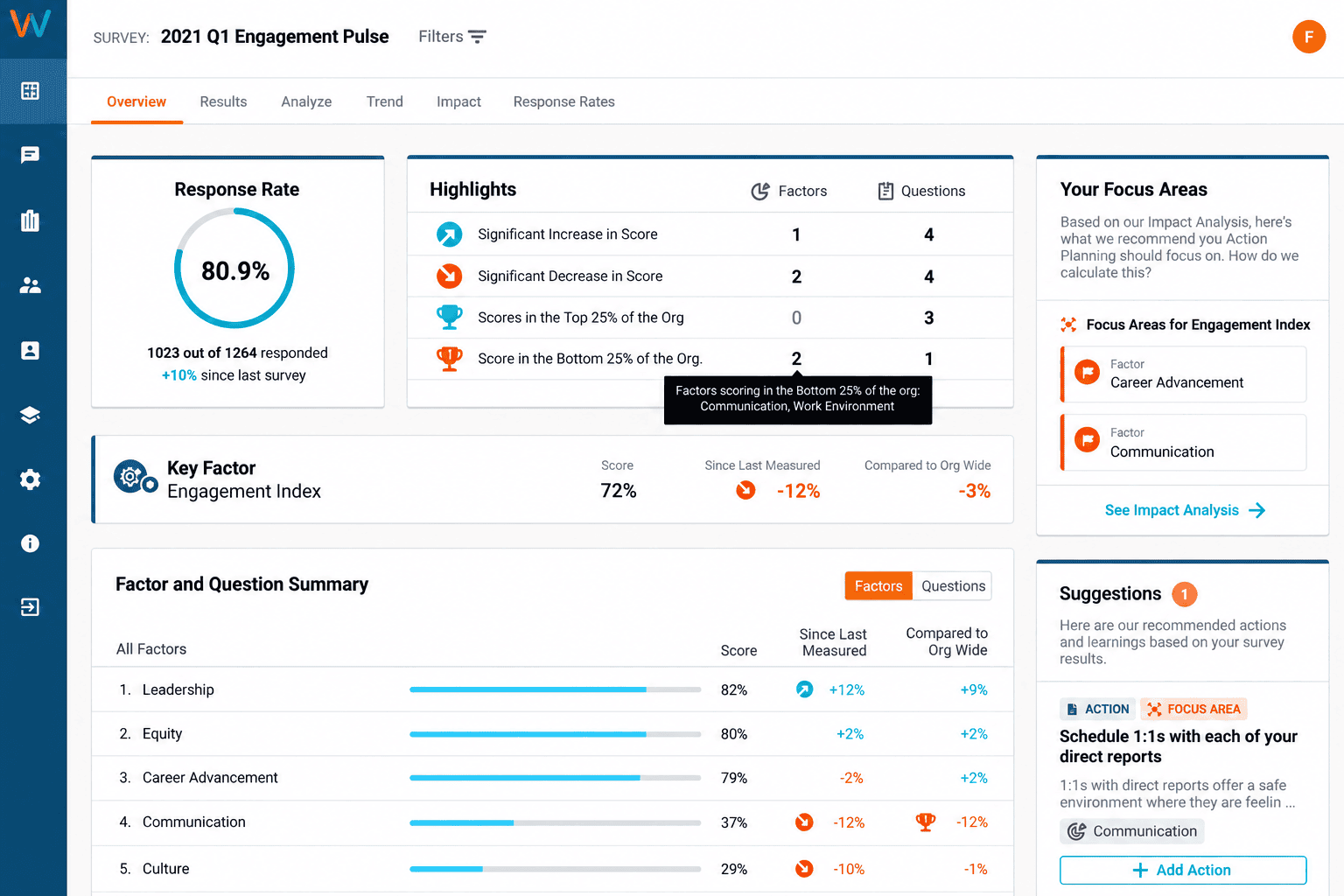
My favorite part was seeing recognition and survey data side by side. Thank-yous linked to company values showed up in the same dashboards as engagement scores, revealing whether teams that praised each other more also felt better about work. DEI analytics added another lens on how different groups experienced the company.
Because recognition arrived after the survey engine, parts of it felt newer, and I leaned on the vendor’s team more than I expected during rollout. Still, it suits anyone who wants insight and appreciation together.
Pros:
- Send recognition and answer surveys from a mobile app.
- Run lifecycle surveys for onboarding, exit, and more.
- See recognition data next to engagement scores.
- Use dashboards and DEI analytics built for HR and managers.
Cons:
- Recognition features are newer than the survey tools.
- Implementation can need hands-on help from the vendor.
G2 Rating: 4.7/5
Pricing:
Custom quote.
10. Reward Gateway: Best for Recognition Combined With Perks and Discounts
Savings, not praise, brought people into Reward Gateway at first. Employees dropped by for discounts, then found recognition and company news waiting on the same site. That built a steady habit, so thank-yous got seen far more often than on tools people only open when someone needs thanking.
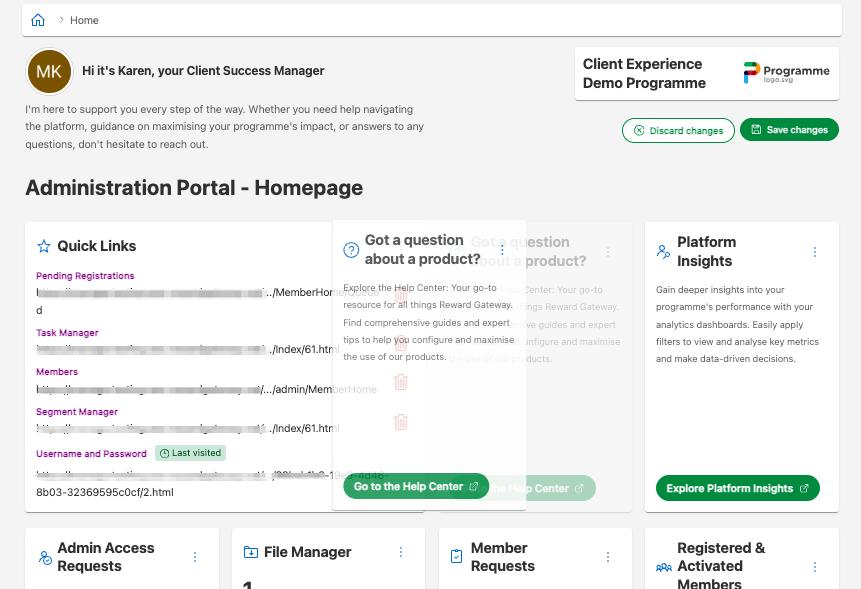
Tailoring was simple once I got going. I adjusted branding, rewards, and messages for different employee groups, and linked the platform to our HR systems so data flowed smoothly. Having announcements, perks, and appreciation in a single place spared staff from checking three separate tools.
Setup asked for more effort than a basic tool, so I set aside extra time and wrote a rollout checklist. Its benefits-style scope can feel like more than a team wanting only recognition requires.
Pros:
- Pair peer recognition with employee discounts and perks.
- Customize branding, rewards, and messaging for different groups.
- Connect with your HR tools through strong integrations.
- Share company news and updates in the same platform.
Cons:
- Some reviewers say it needs more configuration to fit specific workflows.
- The benefits-style approach may be more than a recognition-only team needs.
G2 Rating: 4.6/5
Pricing:
Custom quote.
How I Evaluated These Tools
Picking recognition software is a lot like picking a gym membership. It only pays off if people keep showing up. So instead of ranking tools by feature count, I asked how each one holds up after the launch excitement fades. Here’s what I looked at:
- User Reviews / Ratings: I start with G2 scores and read the complaints, not just the praise, because the dislikes usually show where a tool will frustrate you.
- Core Features & Functionality: I check the basics of recognition software: peer and manager recognition, rewards, reporting, and integrations. Our guide on how to choose performance management software covers the bigger picture.
- Ease of Use: I pay attention to the small moments, like how fast I could send a first shoutout and how easy it was to find a reward.
- Customer Support: I look at how quickly and clearly the vendor answered when I got stuck, not how smooth the sales call sounded.
- Value for Money: I compare what the price page says with what you’ll likely pay once reward budgets, add-ons, and minimums enter the picture.
- Personal Experience / Expert Insights: Wherever I can, I rely on my own hands-on time and on conversations with HR peers who’ve run recognition programs of their own.
My Top 3 Achievers Alternatives
After testing all 10, three stood out as the best Achievers alternatives for most teams. The right one depends on what you want recognition to accomplish after the thank-you is sent.
1. PeopleGoal
PeopleGoal is my top pick because it ties recognition to goals, feedback, and development, so appreciation leads somewhere. A shoutout turned into an OKR update and a follow-up 1-to-1 without leaving the platform, and the published pricing meant no waiting on a quote. With a free plan and paid plans from $4 per user per month, it’s easy to try before you commit.
2. Awardco
Awardco takes the second spot for teams that want the biggest rewards catalog and tight budget control. Its global network, nomination-based awards, and automatic milestone recognition made it simple to include a large, spread-out workforce.
3. Kudos
Kudos is my third pick if speed and simplicity matter most. Instant recognition, manager and peer options, and points that turn into gifts made it one of the easiest tools to get people excited about, and its simple design keeps people coming back.
Find Achievers Alternatives That Boost Engagement
Switching recognition tools isn’t about walking away from what worked. It’s about finding a platform where points are easy to spend, prices are easy to understand, and appreciation connects to the goals people care about.
Think about what your team does after a thank-you lands today. If the answer is “not much,” a tool that links praise to goals and feedback may serve you better. If rewards variety is your top priority, a catalog-first platform could be the right call. Either way, the best alternatives to Achievers are the ones your managers and employees will open every week.
Whatever you choose, run one real recognition cycle before you sign for the year. If you want a tool that bends around the way your team already works, PeopleGoal‘s free plan is a low-effort way to test the fit, and the pricing page shows exactly what you’d pay as you grow.
Build a Recognition Habit That Lasts With a Better Achievers Alternative
Frequently Asked Questions
What Is Achievers Used For?
Achievers is an employee recognition and rewards platform. Teams use it for peer-to-peer and manager recognition, points-based rewards, and milestone celebrations.
What Is the Best Alternative to Achievers?
For recognition connected to goals, reviews, and development, PeopleGoal is my top pick. Awardco is a strong choice for a huge rewards catalog, and Kudos works well for quick, simple recognition.
What Is the Best Free Alternative to Achievers?
PeopleGoal offers a free plan, and Bonusly's Team plan starts at $3 per seat per month. Achievers doesn't publish pricing or offer a free plan.
Is PeopleGoal Cheaper Than Achievers?
Achievers doesn't publish its pricing, so a direct comparison needs a sales call. PeopleGoal has a free plan, and its paid plans start at $4 per user per month.
Which Achievers Competitor Has the Biggest Rewards Catalog?
Awardco says its network covers more than 100 million items in over 160 countries. Reward Gateway also pairs rewards with perks and discounts.
Which Achievers Alternative Works Best for Mid-Sized Teams?
Bonusly, Nectar, Motivosity, and Kudos all draw a large share of their G2 reviews from mid-market companies. PeopleGoal also suits growing teams, and our guide to performance management software for small business goes deeper.
Can One Tool Handle Recognition and Performance Management?
Yes, but few do both well. PeopleGoal pairs peer recognition with OKRs, reviews, 360-degree feedback, and development plans, while most other tools on this list focus on recognition and rewards.
How Long Does It Take to Switch From Achievers?
PeopleGoal's pricing page says implementation takes about 1 to 6 weeks, depending on company size and needs. Lighter tools like Bonusly can be up and running within days.
What Should I Look for in an Achievers Alternative?
Look for clear pricing, a rewards catalog that's easy to search, fair point rules, and chat integrations your team already uses. Also check whether recognition ties into goals and feedback, as our look at the employee recognition tool explains.
Ready to 3x Your Teams' Performance?
Use the best performance management software to align goals, track progress, and boost employee engagement.