
The fastest way to lose confidence in planning is to open three spreadsheets and get three different answers. That is when enterprise performance management software starts to feel necessary.
I learned this while defending a planning stack to a CFO. Nothing reconciled, assumptions lived in different files, and nobody trusted the numbers. According to the AFP FP&A Benchmarking Survey in 2025, 61% of finance professionals cited unreliable data as a challenge, while 60% pointed to inaccessible data.
This guide compares 10 EPM tools by best fit, pricing, pros, and cons. I also cover what EPM software does, evaluation criteria, my top three picks, when to leave spreadsheets, how EPM works across departments, and the key questions to include in your buyer’s checklist and RFP (Request for Proposal).
What Is Enterprise Performance Management Software?
Enterprise performance management software connects planning, reporting, and performance tracking so leaders can decide on live numbers instead of stale files. Here is how I explain it to colleagues, and where it helps most.
- Faster Closes: Consolidation, reconciliation, and close automation replace copy-paste across entities, so my team spends month-end on analysis instead of rebuilding files.
- Reliable Forecasts: Driver-based planning and scenario modeling let me answer a CFO’s what-if in minutes, with every assumption visible and owned.
- One Source: A connected enterprise performance management system pulls ERP, HRIS and sales data into one governed view, so finance, HR and operations debate decisions instead of whose file is right.
- Workforce Visibility: Headcount and workforce cost plans tie into the budget instead of living in separate HR files that finance cannot reconcile.
- Goal Alignment: A plan only pays off when goals are reached by people. Enterprise employee performance software like PeopleGoal cascades OKRs from company to team to individual, so every owner sees how their work rolls up.
- People Performance: Pairing planning with enterprise employee performance management tools that run 360-degree feedback, reviews, and development plans gives finance a consistent view of how people support the plan. PeopleGoal connects through HRIS integrations such as Workday and ADP.
10 Best Enterprise Performance Management Software to Streamline Your Planning
I looked at each tool by how it fits real finance and people workflows, not by specs alone. Ratings and pricing come from public sources, so confirm both before you buy.
| Tool | Best For | Starting Price | User Rating |
| PeopleGoal | Fully Customizable Performance Reviews, OKRs & Employee Development | FREE 7-day trial. Paid starts at $4/user/month | 4.5/5 (G2) |
| Oracle Fusion Cloud EPM | Large Enterprises Running Oracle ERP | $250/user/month | 4.0/5 (G2) |
| OneStream | Unified Consolidation, Close, and Planning | Custom quote | 4.6/5 (G2) |
| Anaplan | Connected Planning Across Functions | Custom quote | 4.6/5 (G2) |
| Workday | Teams Already on Workday HCM and Financials | Custom quote | 4.2/5 (G2) |
| Vena | Excel-Native Finance Teams | Custom quote | 4.5/5 (G2) |
| Lattice | Performance, Goals, and Engagement in One Platform | $10/seat/month | 4.6/5 (G2) |
| 15Five | Continuous Performance Conversations | Custom quote | 4.6/5 (G2) |
| BambooHR | Mid-Market HRIS With Built-In Performance | Custom quote | 4.4/5 (G2) |
| SAP SuccessFactors | SAP-Centric Global Enterprises | Custom quote | 4.1/5 (G2) |
1. PeopleGoal – Best for a Fully Customizable Platform for Performance Reviews, OKR & Employee Development
I started using PeopleGoal when I needed one place to connect company goals to individual performance, and it handled that better than anything else I tested. I built OKRs at the company, team, and individual levels, then cascaded them down so every owner could see how their work rolled up.
The 360-degree feedback surveys let multiple managers evaluate one employee, with weighted scores that kept ratings balanced. What won me over was the no-code Customizable Workflows. I shaped review cycles, participants, and rules around our process without waiting on IT.
Live dashboards showed goal completion, progress, and overdue items, and I could send the data into our own BI tools. Our security team liked the SSO support, role-based access, and audit logging. Implementation was quick, too, since the team helped me import users and trained admins and employees. If people’s performance sits inside your planning cycle, I would start here first.
Pros:
- OKRs and SMART goals at the company, team, and individual levels, with cross-functional goal linking
- 360-degree feedback with weighted competency scoring and multiple managers evaluating one employee
- No-code Customizable Workflows with defined states, participants, and custom rules
- Real-time dashboards and reports for goal completion, progress, alignment, and overdue goals, with scheduled reports and export
- Enterprise controls, including SSO (SAML, Okta, OneLogin, Azure), role-based access, and full audit logging
- 500+ integrations, including Workday, ADP, BambooHR, Slack, Microsoft Teams, Jira, and Asana, plus SFTP and API access
Cons:
- No downloadable or on-premise version
- Dark UI mode is not available
User Rating: 4.5/5 (G2)
Pricing: FREE 14-day trial. Paid starts at $4/user/month.
Check how iQmetrix replaced scattered forms and SharePoint with one transparent, trackable process using PeopleGoal.
2. Oracle Fusion Cloud EPM – Best for Large Enterprises Running Oracle ERP
Quarter-end used to swallow the finance team I worked with, until they moved to Oracle Fusion Cloud EPM. The suite covers planning, financial consolidation and close, account reconciliation, tax reporting, and narrative reporting, so most of the close lived in one connected place. Planning is driver-based, with scenario modeling and long-range plans sitting next to budgets.
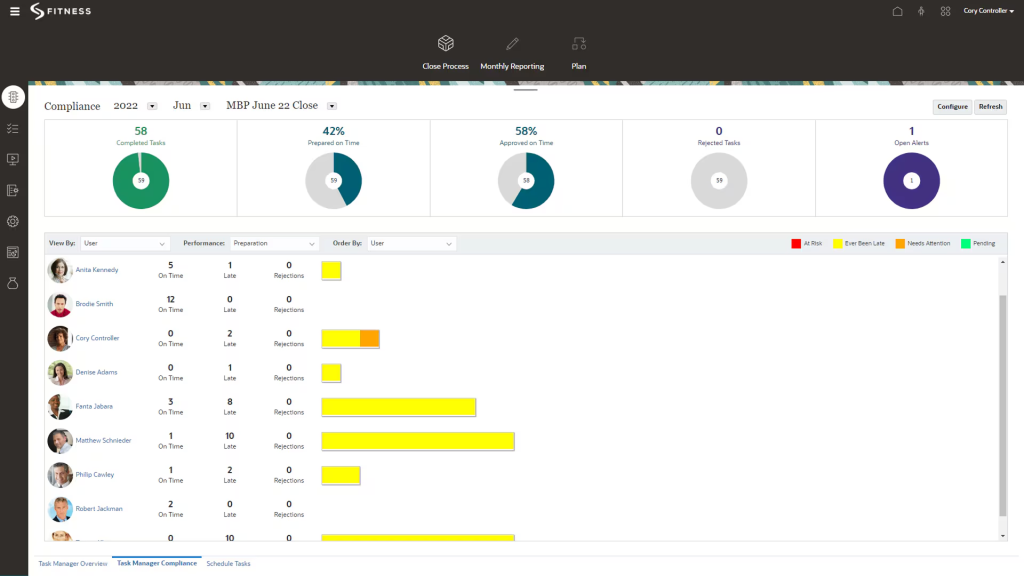
Strategic Workforce Planning, Sales Planning, and Transaction Matching round it out, which finally tied headcount cost directly into the plan. Narrative Reporting let the team write board and management packs together instead of pasting charts into slides. Those packs cover financial, management, and regulatory reporting, so one source of truth feeds every audience.
The part I would warn you about is the setup. It runs deep, so agree on scope and bring a capable partner before you commit. Businesses already running Oracle ERP will usually find the fit natural and the rollout noticeably faster overall.
Pros:
- Planning, financial consolidation, close, and account reconciliation in one connected suite
- Driver-based planning with scenario modeling and long-range planning
- Account Reconciliation with automated transaction matching
- Tax reporting that includes country-by-country reporting
- Strategic Workforce Planning for headcount and compensation
Cons:
- Setup is complex, so implementation demands a clear scope and a capable partner
- Narrative Reporting is less user-friendly than some competing tools
User Rating: 4/5 (G2)
Pricing: EPM Standard is listed at $250/user/month and EPM Enterprise at $500/user/month.
3. OneStream – Best for Unified Consolidation, Close, and Planning
A group controller I know chose OneStream because multiple entities and ERPs kept breaking her consolidation every month. The platform pulls consolidation, planning, reporting, analytics, and financial close into one unified platform, so she stopped reconciling between tools. Governance felt tight, with clear workflows that show exactly who owns each step of the monthly close.
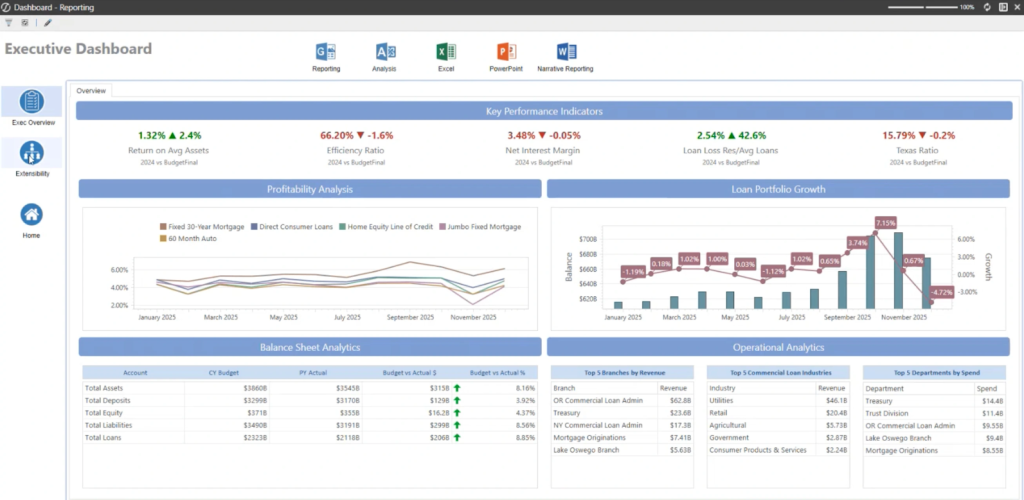
She liked the flexible business rules, the strong governance, and the fact that most workflows need very little coding. Data integration worked across SAP, Oracle, Workday, and other source systems, which left the underlying ERPs untouched. Her team used it for operational planning as well as finance, giving leadership one view of plan versus actual.
Expect a steady learning curve, though. A broad platform asks for a proper implementation plan and a well-trained admin team. When people ask me who should shortlist it, my answer is enterprises with complex consolidation and several source systems.
Pros:
- Consolidation, planning, reporting, analytics, and financial close in one unified platform
- Flexible business rules with strong governance
- Intuitive workflows that need minimal coding
- Financial and operational planning and forecasting in the same place
- ERP-agnostic integration with SAP, Oracle, Workday, and others
Cons:
- Broad functionality can overwhelm new users and stretch implementation timelines
- Budget hierarchy handling is less flexible than Oracle’s
User Rating: 4.6/5 (G2)
Pricing: Custom Quote
4. Anaplan – Best for Connected Planning Across Functions
I first saw Anaplan in a workshop where finance and HR were arguing over two different headcount files. It ended the argument by connecting planning across finance, HR, sales, and supply chain, so a change in one plan flowed into the others. The modeling engine handled driver-based scenarios and what-if analysis, and I compared several scenarios side by side before a budget review.
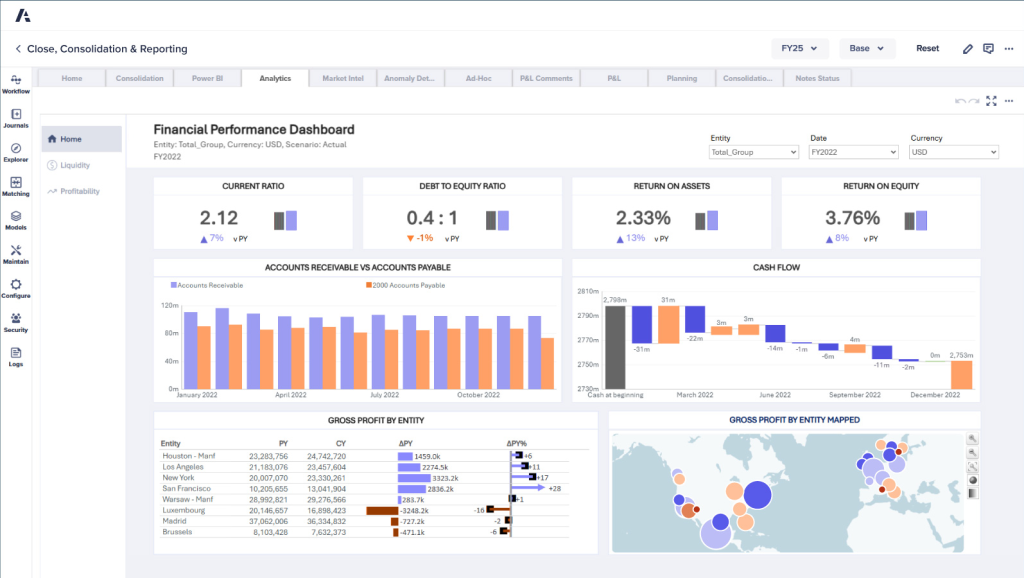
Collaboration stood out because planners from different departments contributed to the same model, with approval processes and task assignments built into each planning cycle. It connects with Microsoft 365, Power BI, Informatica, MuleSoft and Dell Boomi, which helped our data team. Variance analysis and real-time reporting kept leadership reviews honest.
Be honest about capacity, though. Teams moving from Excel need time to learn the modeling approach, and many lean on dedicated model builders or an implementation partner. For one flexible planning backbone across the enterprise, shortlist it.
Pros:
- Connected planning across finance, HR, sales, and supply chain
- Multi-dimensional modeling with driver-based what-if scenarios
- Collaborative planning with approval processes and task assignments
- Integrations with Microsoft 365, Power BI, Informatica, MuleSoft, and Dell Boomi
- Operational Workforce Planning app for positions, requisitions, and workforce costs
Cons:
- Steep learning curve, especially for teams moving from spreadsheets, and a frequent need for dedicated model builders
- Highly transactional use cases and very large models have limits
User Rating: 4.6/5 (G2)
Pricing: Custom Quote
5. Workday – Best for Teams Already on Workday HCM and Financials
Because our people and financial data already lived in Workday, adding Adaptive Planning felt like extending a system I trusted rather than buying a new one. It covers budgeting, forecasting, workforce planning, consolidation, analytics, and reporting, and the connection to Workday HCM and Financial Management keeps headcount and cost data current.
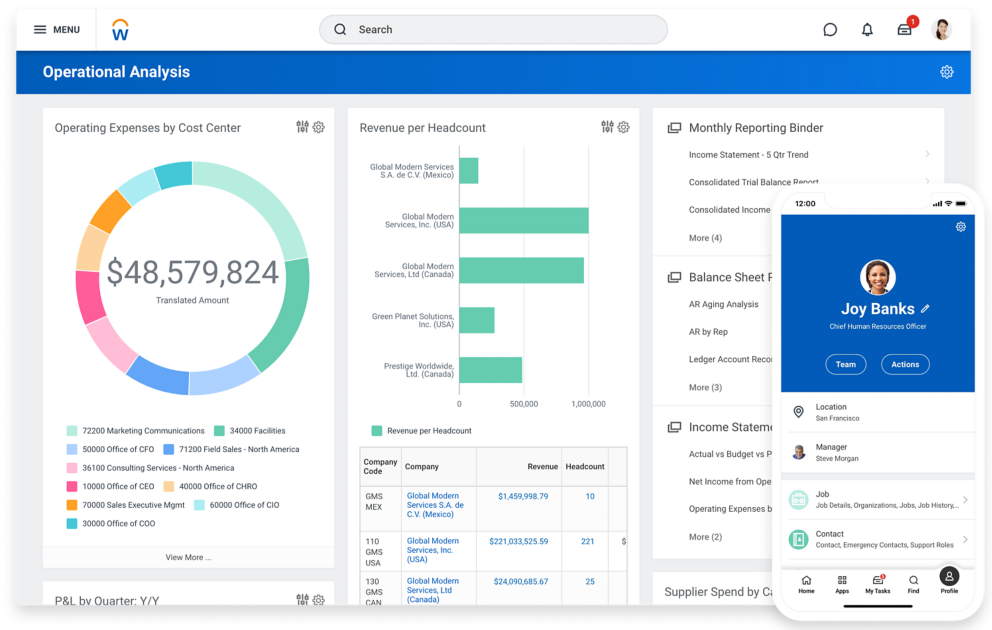
Collaborative scenario modeling lets my managers test hiring plans without touching the master file. The 2026R1 release added a sandbox for organizational modeling, where I compared scenarios side by side and watched workforce cost, headcount, and span of control update as I moved boxes around.
Our analysts liked building detailed reports that showed profit and loss across different business lines. I also liked how it manages data across multiple levels. Setup is the catch, since configuration takes effort and rollouts commonly run four to six months. For mid-to-large teams already on Workday, I think it is the safest route.
Pros:
- Budgeting, forecasting, and workforce planning on one platform
- Native connection to Workday HCM and Financial Management
- Collaborative scenario modeling for hiring and cost plans
- Planning, consolidation, analytics, and reporting in one place
- Organizational modeling sandbox with side-by-side scenario comparison
Cons:
- Setup and configuration are more challenging than with some rivals
- Implementation typically runs four to six months
User Rating: 4.2/5 (G2)
Pricing: Custom Quote
6. Vena – Best for Excel-Native Finance Teams
Our analysts refused to give up Excel, which is why Vena was the least disruptive upgrade I could pick. It runs on an Excel-native interface, so people kept familiar formulas and layouts while the platform added governance and a single source of truth. Planning, consolidation, and reporting live together, and consolidation pulls data from multiple source systems into one view.
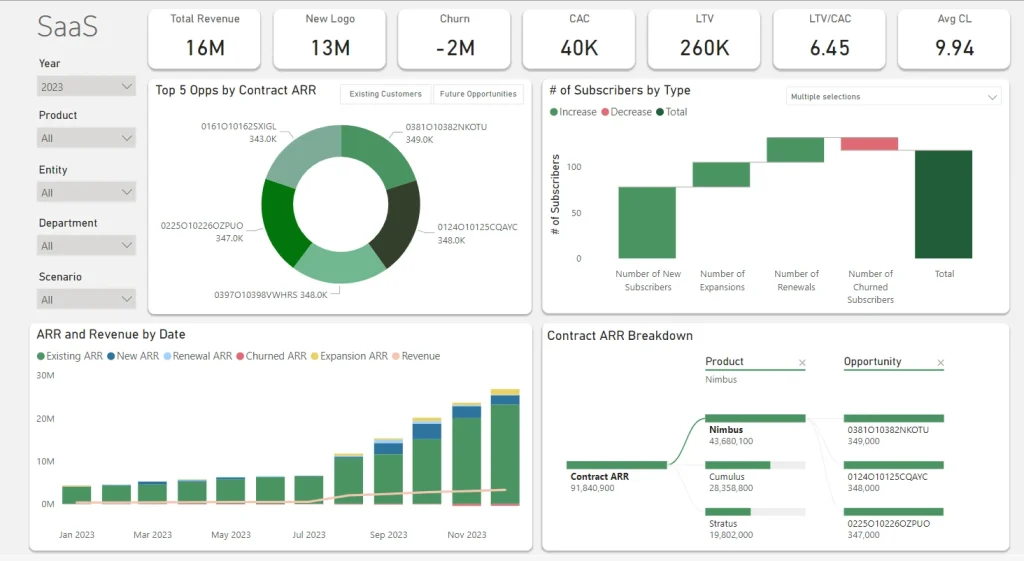
I used scenario planning to compare actuals against several plan versions without cloning whole models. Workforce planning and operating expense planning are also connected, which closed a gap that used to cost us hours every cycle.
Onboarding and support were strong during my own rollout, and the team stayed responsive. My one caution: initial configuration can be more involved than the friendly interface suggests, and juggling several planning cycles at once takes care. For mid-market finance teams that want adoption without a culture fight, I would put it on the list.
Pros:
- Excel-native interface that keeps familiar formulas and layouts
- Planning, consolidation and reporting in one platform
- Scenario planning without cloning full models
- Connected workforce planning and operating expense planning
- Consolidation across multiple source systems
Cons:
- Initial configuration is more involved than the Excel-style interface suggests
- Cross-border consolidation can need extra configuration, and GAAP features are lighter than specialized consolidation tools
User Rating: 4.5/5 (G2)
Pricing: Custom Quote
7. Lattice – Best for Performance, Goals, and Engagement in One Platform
When her executives wanted reviews, goals, and engagement in one place, a people-ops lead I know picked Lattice. Performance reviews arrive with calibration, succession planning, promotions, PIPs, and talent reviews, so leaders see ratings in context before making decisions.
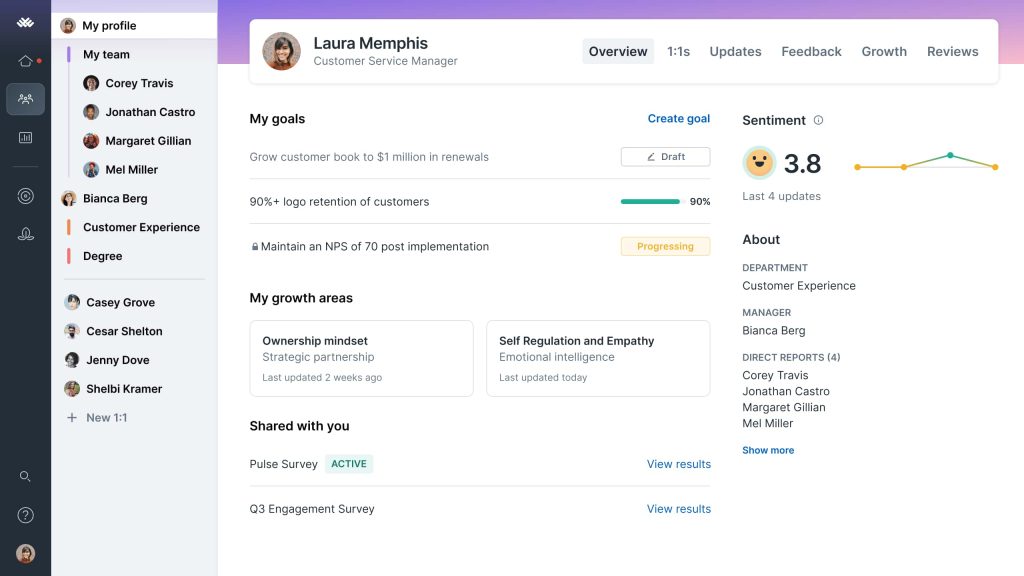
Goals and OKRs cascade through the company, with progress tracking and integrations for Salesforce and Jira. Engagement surveys sit beside reviews, while manager tools such as 1:1s, weekly updates, and feedback keep managers in a steady rhythm. Managers also get 1:1 agendas and Q&A boards that make check-ins easier to run well.
and growth modules plug into the same system, and recent releases have kept adding calibration and compensation context. The tradeoff is flexibility, because in my experience, it adapts less easily to unusual workflows than specialist tools. Anyone wanting a polished, all-around people platform with an intuitive interface should take a serious look at it before making any decision.
Pros:
- Performance reviews with calibration, succession planning, promotions, PIPs, and talent reviews
- Goals and OKRs with cascading goals, progress tracking, and Salesforce and Jira integrations
- Engagement surveys alongside reviews and goals
- 1:1s, weekly updates, feedback and Q&A boards for managers
- Compensation and growth modules in the same system
Cons:
- Customization is less flexible than with specialist tools
- Time, attendance, and compliance depth trails full HCM suites
User Rating: 4.6/5 (G2)
Pricing: Performance module starts at $10/seat/month, billed annually.
8. 15Five – Best for Continuous Performance Conversations
Weekly check-ins are what sold me on 15Five long before I opened a single dashboard. Managers answer short reflections, run guided 1-on-1s, and keep goals and OKRs visible between formal cycles. When review season arrives, it supports self, peer, upward, and manager reviews, including 360-degree cycles and calibration, plus AI-assisted drafting.
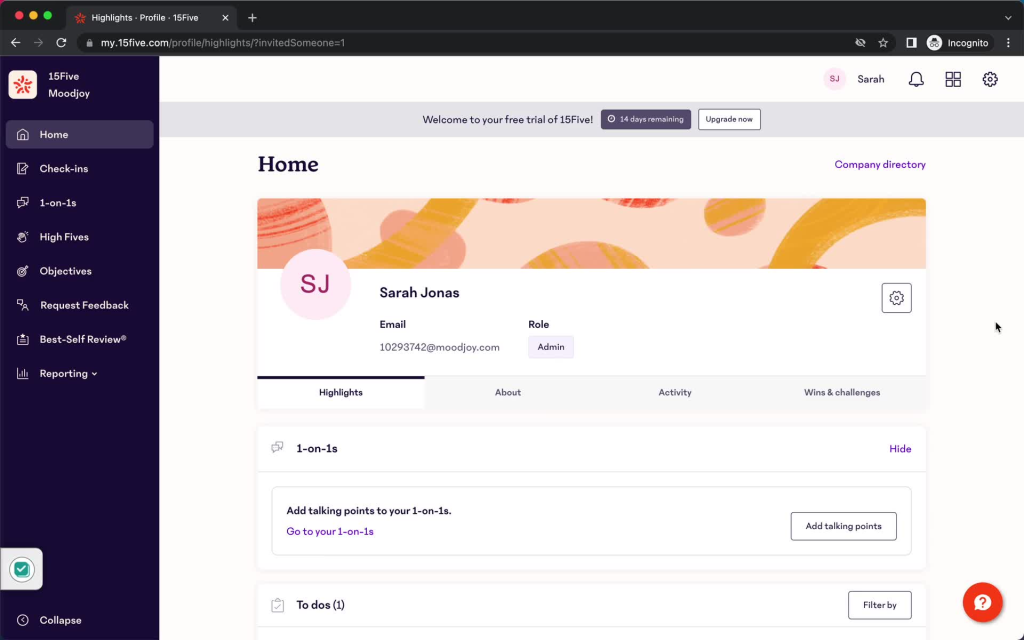
Engagement surveys with eNPS, heat maps, and benchmarks show which teams are slipping, and action planning turns those scores into next steps. Demographic breakdowns helped me explain engagement trends to leadership without building any extra charts.
The AMAYA assistant answers plain-language questions across performance, engagement, and retention data, while Kona AI coaching nudges managers inside Slack.
A friend running HR at a growing company told me the unified view saved her from stitching three-point tools together. The downside is customization, since I found the options limited and notifications plentiful. For continuous performance conversations at scale, I recommend it.
Pros:
- Weekly check-ins and guided 1-on-1s
- Configurable self, peer, upward, and manager reviews with 360-degree cycles and calibration
- Engagement surveys with eNPS, heat maps, demographic breakdowns, and benchmarks
- AMAYA AI assistant for plain-language questions across performance, engagement, and retention data
- Kona AI coaching and meeting assistant for managers
Cons:
- Customization options are limited
- Notifications can get excessive
User Rating: 4.6/5 (G2)
Pricing: Custom Quote
9. BambooHR – Best for Mid-Market HRIS With Built-In Performance
Like many mid-sized companies, we started with the HRIS and discovered BambooHR already had performance tools waiting. Employee records, time off, onboarding, hiring, and reporting sit in one place, so performance data never needs re-keying. The performance module lets managers set goals, run reviews, and track employee progress, while customizable reports and dashboards help finance and HR read the same numbers.
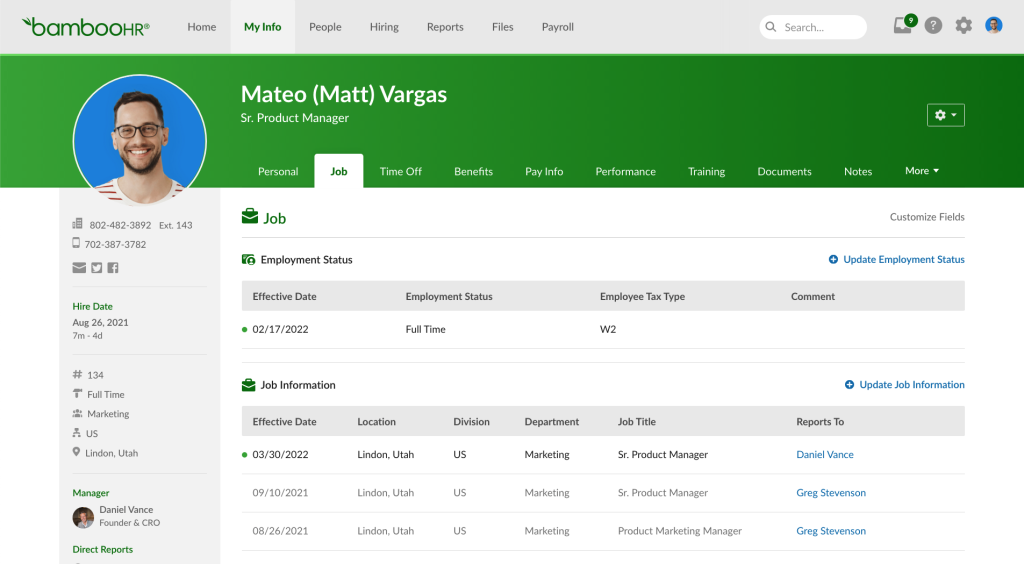
I liked the intuitive layout, the mobile app, and a quick, straightforward implementation, which matters when you have no spare IT capacity. User, role, and access management is solid too, which protects sensitive records. The time off calendar even syncs with Outlook, and employees can handle many routine requests through self-service.
Where it falls short is depth. Advanced performance tracking is thinner than specialist tools, and I found customization a bit limited for specific needs. It works especially well as a dependable HR core that has performance built in.
Pros:
- Performance tools for goals, reviews and employee progress tracking
- Applicant tracking and onboarding in the same system
- Time tracking and a time off calendar that syncs with Outlook
- Customizable reports and dashboards
- Mobile app and employee self-service
Cons:
- Advanced performance tracking is limited compared with specialist tools
- Customization can feel limited for specific needs
User Rating: 4.4/5 (G2)
Pricing: Custom Quote
10. SAP SuccessFactors – Best for SAP-Centric Global Enterprises
On projects where SAP already ran finance, SuccessFactors was the people suite that kept showing up beside it. Goals and performance management connect to compensation, succession planning, and calibration, so ratings, pay, and talent decisions draw on one system. Managers can leave comments on performance reviews, which strengthens the quality of feedback during busy review cycles.
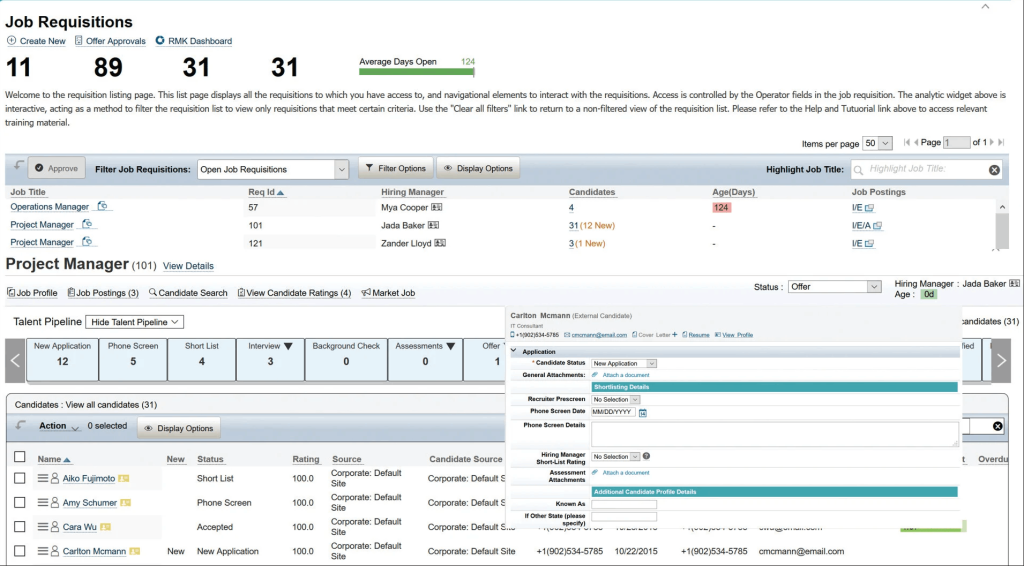
Calibration sessions let leadership review ratings against set distributions, and the 9-box helps identify high-potential employees for succession. Learning, onboarding, and recruiting modules sit alongside, which suits global enterprises managing many countries. Its data-driven approach also helps standardize processes across large global organizations, and its integration with SAP ERP supports enterprise-wide data management.
I will be straight about the challenges. Implementation is lengthy and resource-intensive, and some customization needs additional SAP modules. If you are an SAP-centric enterprise that wants performance, pay, and succession in one connected suite, it is a safe, integrated choice.
Pros:
- Goals and performance management tied to compensation and succession planning
- Calibration sessions with rating distributions
- 9-box for identifying high-potential employees
- Learning, onboarding, and recruiting modules
- Integration with SAP ERP for enterprise-wide data management
Cons:
- Implementation is lengthy and resource-intensive
- Customization may require additional SAP modules
User Rating: 4.1/5 (G2)
Pricing: Custom Quote
How I Chose These Enterprise Performance Management Tools
When I evaluate enterprise performance management software for this list, I don’t just rely on feature lists or marketing claims. I look at how these tools actually perform in real-world scenarios. Here’s the framework I used to make sure every recommendation is practical, reliable, and worth considering:
- User Reviews / Ratings: I start by looking at real user feedback from platforms like G2 and Gartner Peer Insights. This gives me a clear picture of how teams actually experience the tool day to day, what they love, and where it falls short.
- Core Features & Functionality: I focus on what truly matters in enterprise performance management software. This includes planning and forecasting, consolidation and close, reporting, scenario modeling, goal alignment, and integrations. If a tool cannot handle these well, it does not make the cut.
- Ease of Use: I pay close attention to how intuitive the platform feels. A tool might be powerful, but if teams struggle to adopt it, it defeats the purpose. Clean interface, simple navigation, and quick onboarding are non-negotiable for me.
- Customer Support: From my experience, implementation is where many tools fail. I evaluate how responsive and helpful the support team is, especially during setup and ongoing use. Fast, reliable support makes a big difference in adoption.
- Value for Money: I compare pricing with what the tool actually delivers. This is not about picking the cheapest option, but about whether the features, flexibility, and performance justify the cost.
- Personal Experience / Expert Insights: Wherever possible, I rely on my own hands-on experience with these tools. I also consider insights from finance leaders, HR leaders, and IT teams who use EPM systems in real environments. This helps me go beyond surface-level reviews and highlight what actually works.
Top 3 EPM Software Picks
Choosing the wrong platform costs months, not days. These three stood out because they fit different realities, and I would shortlist them first.
1. PeopleGoal
Goals work when they reach the people delivering them, so PeopleGoal is my first pick. I build OKRs, 360 feedback, and review workflows without code, then send the data to our BI tools. SSO and audit logging keep IT comfortable, and most teams go live in one to four weeks.
2. OneStream
Enterprises juggling several entities and source systems are where OneStream earns second place for me. Consolidation, planning, reporting, and closing sit in one platform, so my team stops reconciling between tools. Flexible business rules and strong governance keep it closely controlled, and it integrates with SAP, Oracle, Workday, and others.
3. Vena
For finance teams that live in Excel, Vena takes my third spot. Planning, consolidation, and reporting run in a familiar interface, so adoption never becomes a change fight. Scenario planning compares actuals against several plan versions without cloning models, and workforce planning connects with operating expense planning in one platform.
When Should You Move From Spreadsheets to EPM Software?
Spreadsheets work until the model outgrows the person who built it. These are the signals I watch for, and if three or more are true, I would stop patching and start a shortlist.
- Version Chaos: Several people keep their own copies of the budget file, and nobody can say which one is final.
- Slow Close: Month-end depends on manual reconciliations and copy-paste consolidation across entities.
- Scenario Gaps: A what-if question from the CFO takes days to answer instead of minutes.
- Headcount Blind Spots: Workforce plans live in HR files that finance cannot reconcile to the budget.
- Manual People Data: Reviews and 360s run through forms, Excel, and Power BI. One team I spoke with spent four to ten hours on a single 360 cycle.
- Audit Pain: Reviewers ask for the trail behind a number, and you rebuild it by hand.
How Do EPM Tools Work Across Departments?
One question I rarely see answered in roundups is how a single platform serves different teams. I map departments before I pick a tool, because needs differ.
| Department | How They Use EPM | What They Need in a Tool |
| Finance / FP&A | Budgeting, forecasting, consolidation, close, and board reporting | Scenario modeling, multi-entity consolidation, audit trail, ERP integration |
| HR / People Ops | Headcount planning, plus goals, reviews, and 360 feedback tied to strategy | HRIS integration, anonymous 360s, cascading OKRs, role-based access |
| Sales | Quota, territory, and pipeline planning tied to the revenue plan | Sales planning, CRM data sync, driver-based targets |
| Operations / IT | Capacity and project planning, plus security sign-off | SSO, audit logging, APIs, data export to BI tools |
The key insight: before you pick a tool, list which departments will use it and which integrations they cannot live without. A fit for finance alone often leaves HR and IT improvising.
What Should an EPM Buyer’s Checklist and Request for Proposal Questions Include?
Copy these into your RFP (Request for Proposal) or shortlist doc. I ask every vendor the same questions, so the answers compare cleanly.
- ERP Fit: Which ERPs and HRIS do you integrate with natively, and how often does data refresh?
- Consolidation Depth: How do you handle multi-entity, multi-currency, and intercompany eliminations?
- Scenario Modeling: How many scenarios can I run side by side, and who is allowed to create them?
- Governance Controls: Which approval workflows, audit trails, and role-based access controls ship out of the box?
- People Data: How do headcount plans connect to goals, reviews, and compensation cycles?
- AI Features: Which AI features ship today, and on which subscription? Oracle, for example, limits its AI and GenAI features to EPM Enterprise subscriptions.
- Implementation Plan: What timeline, partner model, and internal effort do you expect from my team?
- Exit Terms: How do I export my data and models if I leave?
Choose EPM Software That Turns Plans Into Performance
The right enterprise performance management software will not fix a weak planning process, but it will make a good one impossible to ignore. If I had to give you one filter, I would pick the tool your finance and people teams will actually use every week, then prove it with a pilot.
For most mid-market and large enterprises, I would pair a finance planning platform with PeopleGoal, so plans reach goals, reviews, and 360-degree feedback.
Get started free, run one team through one cycle, and let the data decide. Or book a demo to see PeopleGoal in action.
Frequently Asked Questions
How is EPM different from CPM, ERP, FP&A, and BI?
CPM (Corporate Performance Management) is typically finance-led, while EPM extends planning and performance tracking across functions such as sales, HR, and operations. ERP (Enterprise Resource Planning) records transactions, FP&A (Financial Planning & Analysis) focuses on budgeting and forecasting, and BI (Business Intelligence) reports historical performance, while EPM connects planning, consolidation, reporting, and performance management.
Who should own an EPM selection project, finance or IT?
Finance should own the business case and requirements, while IT should lead security, integration, and data reviews. If goals, reviews, or workforce planning are included, HR should also be involved from the start.
How long does EPM implementation take, and where do projects stall?
Implementation time varies by platform and complexity, from a few weeks to several months. Projects usually stall because of unclear scope, poor data quality, and weak adoption rather than the software itself.
How to run a fair proof of concept?
Each vendor should receive the same dataset and the same test scenarios, such as a reforecast, headcount change, and month-end consolidation. The evaluation should compare setup time, user effort, accuracy, and feedback from the people who will use the system daily.
How to migrate historical budget and performance data?
Export history to CSV first, document your entity, account, and org hierarchies, and decide how many years you really need. With PeopleGoal, you can import users with Excel or the API, and the team helps configure your account.
How secure is employee performance data in PeopleGoal?
PeopleGoal supports SSO through SAML, Okta, OneLogin, and Microsoft Azure, custom roles and permissions, and full audit logging. Its database is encrypted at rest, with SSL in transit.
Can PeopleGoal work alongside my finance planning tool?
Yes. PeopleGoal covers the people layer: goals, OKRs, 360 feedback, reviews, and development plans. It integrates with Workday and ADP, offers SFTP and API access, and can send data to your own BI tools, so finance can read people data next to plan data.
Ready to 3x Your Teams' Performance?
Use the best performance management software to align goals, track progress, and boost employee engagement.