
I have spent years helping HR leaders, CFOs, and operations teams move off spreadsheets, outdated review forms, and messy workarounds.
Once a company crosses 50 people, things start breaking. Goals sit in shared docs that no one checks. Reviews feel like a yearly ritual. Finance ends up chasing numbers across emails.
This is not just my experience. According to a study by HR Research Institute in 2025, fewer than 45% of organizations feel their performance systems actually support business goals.
That gap is real, and I see it often.
Corporate performance management software is built to fix this. I have tested 30+ tools and helped teams create systems that scale.
PeopleGoal came from this need. A flexible system that HR and leaders can manage without relying on IT.
This guide covers corporate performance management solutions, features, pricing, and how to implement it properly.
What Is Corporate Performance Management (CPM) Software?
It also helps align every level of the organization by translating high-level goals into clear, trackable actions for teams and individuals.
With real-time data and insights, businesses can continuously monitor progress, adjust strategies when needed, and ensure everyone stays focused on outcomes that drive growth.
Who Actually Needs CPM Software?
Not every company needs a CPM platform on day one. But there is a clear tipping point, and most organizations hit it faster than they expect.
If you are managing more than 50 people, running multi-department planning cycles, or trying to connect strategy to individual work, choosing the best performance management software can help centralize goals, reviews, feedback, and employee development without adding unnecessary complexity. Here is where CPM software makes the clearest impact.
| Tool | Best For | Org Size Fit | Primary Focus | Implementation Complexity | Starting Price |
|---|---|---|---|---|---|
| PeopleGoal | Fully Customizable Performance Reviews, OKRs & Employee Development | SMB to Mid-market | People performance | Low | $4/user/month |
| Lattice | HRIS and people strategy in large enterprises | Mid-market to Enterprise | People performance + HRIS | Medium | $11/seat/month |
| 15Five | Continuous feedback for growing teams | SMB to Mid-market | Engagement and check-ins | Low | $4/user/month |
| Kallidus | Learning, performance, and talent development | SMB to Enterprise | Performance + learning | Medium | Custom |
| BambooHR | Core HR with integrated performance | SMB to Mid-market | HR operations + performance | Low-Medium | Custom |
| SAP SuccessFactors | Global enterprises in the SAP ecosystem | Enterprise | Talent management | High | Custom |
| Workday Adaptive Planning | Workforce and financial planning alignment | Mid-market to Enterprise | FP&A and headcount | Medium-High | Custom |
| Oracle EPM Cloud | Multi-entity financial consolidation | Enterprise | Financial management | High | Custom |
| Anaplan | Connected enterprise-wide planning | Enterprise | Cross-functional planning | High | Custom |
| OneStream | Unified FP&A, close, and analytics | Enterprise | Finance consolidation | High | Custom |
| Planful | Agile financial planning off spreadsheets | Mid-market | FP&A modernization | Medium | Custom |
Note: If any of these feel familiar, CPM software isn’t optional anymore.
11 Best Corporate Performance Management Software
Choosing the wrong tool wastes months of implementation time and creates the exact frustration you were trying to escape.
Before diving into the individual corporate performance management solutions, use this comparison table to match your organization’s size and primary need to the right category of platform.
For clarity, we’ve separated the tools into two groups so you can quickly find what fits your needs. The listicle that follows gives you the full details on each one.
| Tool | Best For | Org Size Fit | Primary Focus | Implementation Complexity | Starting Price |
|---|---|---|---|---|---|
| PeopleGoal | Fully Customizable Performance Reviews, OKRs & Employee Development | SMB to Mid-market | People performance | Low | $4/user/month |
| Lattice | HRIS and people strategy in large enterprises | Mid-market to Enterprise | People performance + HRIS | Medium | $11/seat/month |
| 15Five | Continuous feedback for growing teams | SMB to Mid-market | Engagement and check-ins | Low | $4/user/month |
| Kallidus | Learning, performance, and talent development | SMB to Enterprise | Performance + learning | Medium | Custom |
| BambooHR | Core HR with integrated performance | SMB to Mid-market | HR operations + performance | Low-Medium | Custom |
| SAP SuccessFactors | Global enterprises in the SAP ecosystem | Enterprise | Talent management | High | Custom |
| Workday Adaptive Planning | Workforce and financial planning alignment | Mid-market to Enterprise | FP&A and headcount | Medium-High | Custom |
| Oracle EPM Cloud | Multi-entity financial consolidation | Enterprise | Financial management | High | Custom |
| Anaplan | Connected enterprise-wide planning | Enterprise | Cross-functional planning | High | Custom |
| OneStream | Unified FP&A, close, and analytics | Enterprise | Finance consolidation | High | Custom |
| Planful | Agile financial planning off spreadsheets | Mid-market | FP&A modernization | Medium | Custom |
People Performance Tools (#1–6)
This side of CPM is all about people. These tools help you answer questions like: Are teams actually working on the right goals? Is performance improving or just being tracked? From OKRs to feedback and reviews, they bring clarity to everyday work.
I’ve seen teams go from scattered efforts to real alignment just by making goals visible and measurable. These are usually picked by HR leaders and managers who want less guesswork and more direction in how their teams perform.
1. PeopleGoal
Best for Fully Customizable Performance Reviews, OKRs & Employee Development
I have deployed PeopleGoal across companies ranging from early-stage startups to 500-person mid-market firms. What consistently sets it apart is its AI-powered performance management and App Studio: a no-code framework that helps HR leaders summarize feedback, surface performance trends, and build entirely custom performance workflows without touching IT.
At a 200-person consulting firm, we launched goal-tracking, probation assessments, and cascading OKR structures in weeks. We built 360-degree feedback with tailored rater groups and anonymity controls, then connected recognition and reminders through Slack to create a continuous appreciation loop.
In another implementation, we created a talent mapping module with calibration tools for annual reviews, which eliminated rating bias across manager cohorts. Department leads could alter review cycles on their own timeline without waiting for development resources.
I think PeopleGoal is the best business performance management software as it becomes your central employee performance engine: modular, compliant, and built to adapt as your organization evolves.
Pros:
- App Store lets HR design custom performance workflows from OKRs to review forms without writing code
- Cascading goal visualization shows strategic alignment from the company level down to the individuals
- Slack and Microsoft Teams integrations enable real-time recognition and in-the-flow feedback
- Built-in calibration tools reduce manager bias across review cycles
- 360-degree feedback includes configurable anonymity, weighted rater groups, and deadline automation
- Supports employee development with career paths and skill development plans.
Cons:
- No downloadable or on-premise version available
- Dark mode user interface is not currently available
Pricing: FREE 14-day trial. Paid plans start at $4/user/month.
2. Lattice
Best for HRIS in Large Enterprises
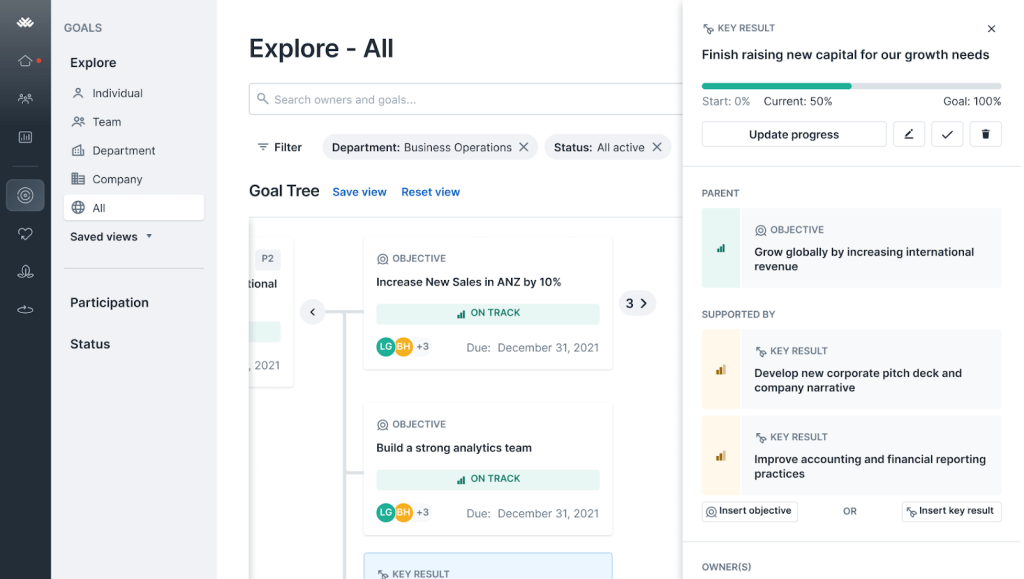
Lattice is one of the most well-rounded CPM platforms I have worked with, particularly in organizations that need to tightly align people strategy with business growth. I helped a global SaaS firm implement Lattice across departments, replacing fragmented tools with a single system for OKRs, reviews, 1-on-1s, and engagement surveys.
What stood out was how its career tracks, check-in prompts, and public praise features create a consistent rhythm of performance conversation rather than isolated events.
During a major product rollout, we used Lattice’s engagement analytics to detect early signs of burnout and deployed corrective initiatives before the team hit a wall. The compensation planning tools also enabled managers to link merit increase discussions directly to performance data, which visibly reduced the perception of bias in salary reviews.
Pros:
- Built-in engagement and pulse surveys give real-time morale insights before issues escalate
- Compensation planning tools align merit increases directly with performance trends
- Guided 1-on-1 meeting templates help managers run coaching conversations with structure
- Customizable career growth tracks employees can self-navigate and update
- Mobile access and modern UI increase adoption across remote and hybrid teams
Cons:
- The compensation module has a steeper learning curve and often requires additional onboarding support
- Survey overuse can cause fatigue if not rolled out with deliberate timing
Pricing: Starts at $11/seat/month for performance and engagement features.
3. 15Five
Best for Enterprise Performance Reviews System
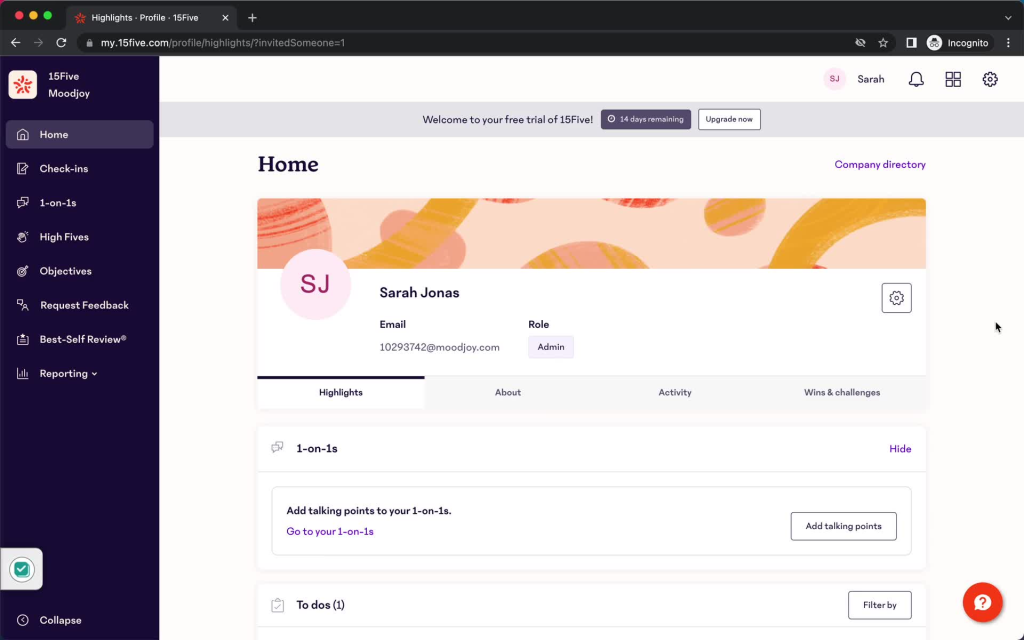
15Five has been my go-to for small to mid-sized teams that want tight, ongoing engagement without over-engineering the process. A 70-person marketing agency I know used it to shift from annual reviews to weekly check-ins and spontaneous peer recognition. They configured “High Fives” to celebrate daily contributions, integrated mood tracking to catch burnout signals early, and used pulse surveys to gauge sentiment after major campaigns.
The 1-on-1 tools generate discussion prompts based on flagged issues and goal progress, turning what used to be casual catch-ups into structured coaching sessions. Team leads began addressing workload concerns before they became turnover risks. 15Five balances structure and simplicity in a way that makes performance feel human rather than mandatory.
Pros:
- Weekly check-ins prompt concise reflections on challenges and wins, keeping communication consistent
- “High Fives” peer recognition builds a culture of acknowledgement across teams
- Pulse surveys capture sentiment in real time so managers can preempt disengagement
- 1-on-1 conversation guides drive meaningful, action-oriented discussions without extra prep
- Highly intuitive design encourages frequent use with minimal training required
Cons:
- Lacks advanced KPI modeling and extensive goal reporting features
- May not scale well for organizations that need formal performance processes and deep analytics
Pricing: Starts at $4/user/month.
4. Kallidus
Best for Learning-Driven Performance Management
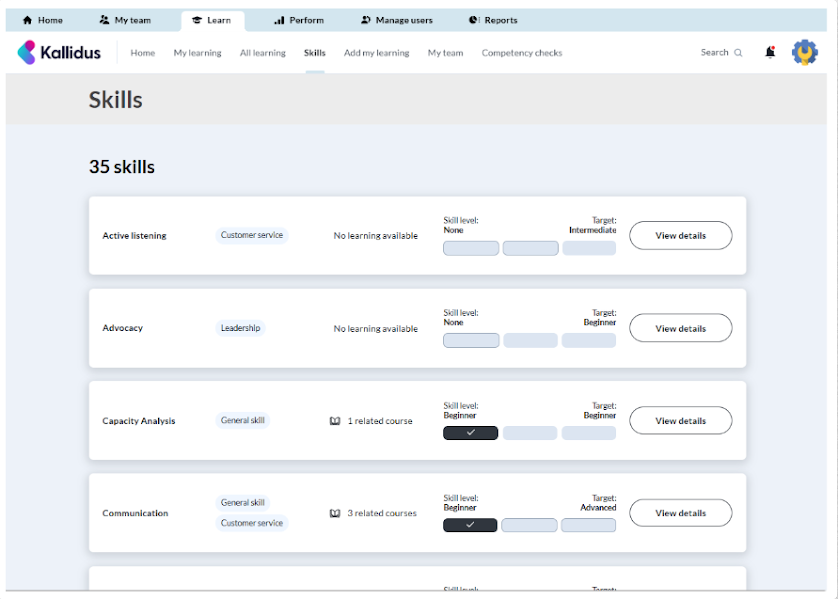
Kallidus is a strong option for organizations that want to connect employee performance with learning and development. I’ve seen companies struggle when performance reviews, skills development, and career planning live in separate systems. Kallidus brings those processes together, helping managers track goals, monitor progress, and support employee growth from a single platform.
One of its biggest strengths is the combination of performance management and learning tools. Managers can identify skill gaps during reviews, assign targeted training, and track development progress without switching systems. The platform also supports continuous feedback, career development planning, and onboarding workflows that help employees stay aligned with business objectives.
In one implementation for a growing professional services company, HR teams used Kallidus to standardize performance reviews and development plans across multiple departments. This improved review consistency while giving employees clearer visibility into career progression opportunities.
Pros:
- Combines performance management with learning and development
- Supports continuous feedback and development conversations
- Strong goal tracking and career planning features
- User-friendly interface with mobile access
- Integrates with HR and talent management systems
Cons:
- Pricing is not publicly available
- Advanced configuration may require implementation support
Pricing: Custom pricing available upon request.
5. BambooHR
Best for Comprehensive HRIS With Payroll Solutions
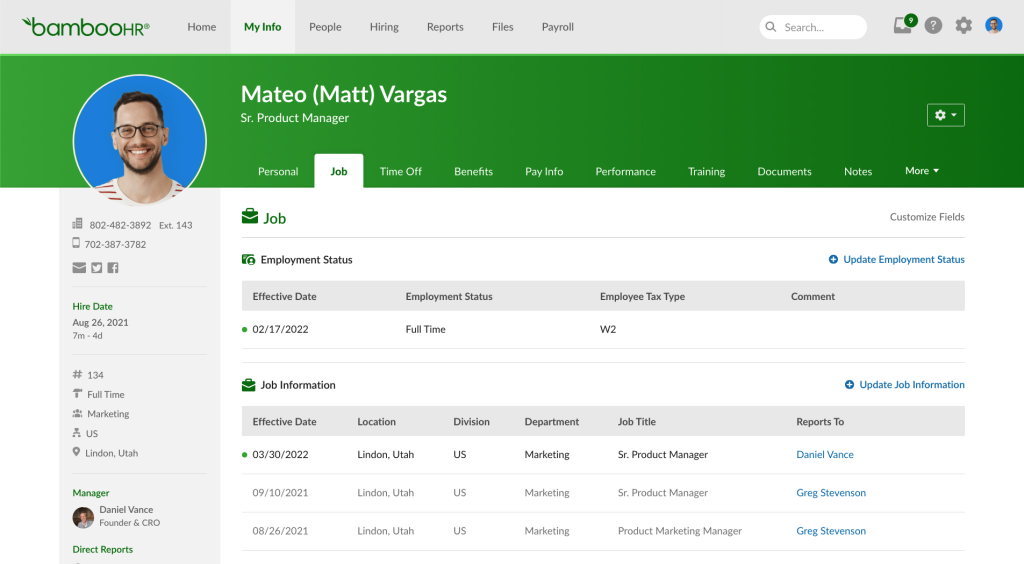
BambooHR excels when performance management needs to tie tightly to core HR processes. I led implementations where onboarding, leave tracking, and performance reviews lived in one ecosystem without stitching together multiple tools. We set up probationary review templates directly linked to hire dates, ensuring timely checkpoints for new employees without manual tracking from HR.
Managers received notifications tied to both tenure and goal achievement, and departments used custom review forms for role-specific competencies: client interaction criteria for sales, project delivery metrics for engineering. The unified employee profile made it easy to correlate time off, training completion, and performance ratings into reliable HR reporting.
Pros:
- Centralized employee profiles integrate performance reviews and HR data for comprehensive visibility
- Self-service options encourage employees to engage actively with their own review and goal-tracking
- Synchronized onboarding and performance check-ins ensure systematic integration of new hires
- Custom review templates help assess role- and department-specific success criteria
- Combined reporting across HR and review data supports strategic people analytics
Cons:
- Reporting capabilities are basic and may require external BI tools for deeper insights
- Goal alignment features are functional but lack the cascading visualization of dedicated CPM solutions
Pricing: Custom pricing.
6. SAP SuccessFactors
Best for SAP Suite users
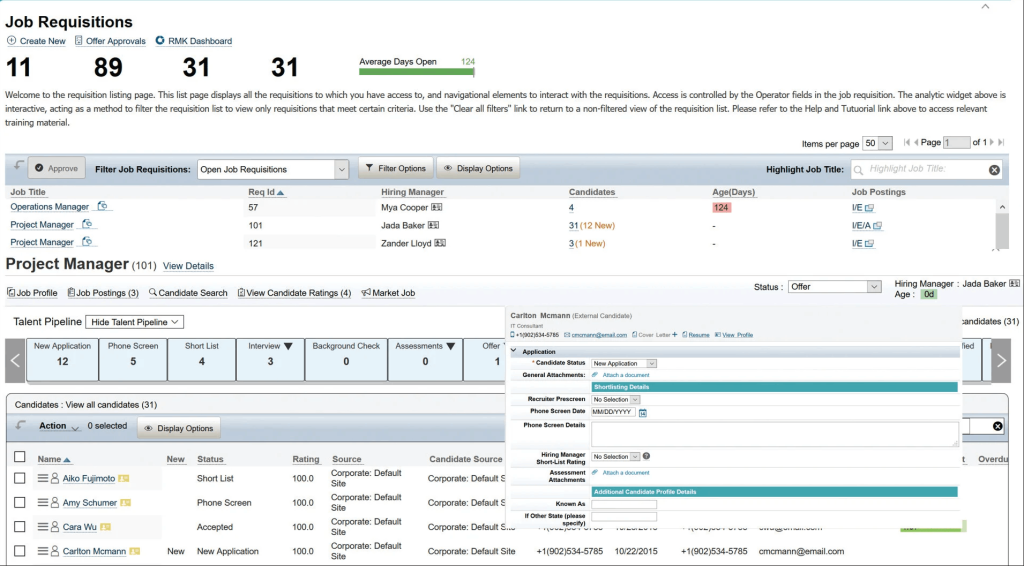
In large-scale environments, SAP SuccessFactors stands out for its depth of configurability. A colleague used it at a 5,000-employee manufacturing firm to create multilingual goal cascades, formal 360-degree reviews, and succession planning paths aligned with development resources.
They integrated learning modules so that performance outcomes directly triggered upskilling courses, removing the gap between evaluation and development.
Compliance reporting was simplified with audit logs suited to multiple regulatory regimes, and mobile feedback capabilities empowered remote workers to participate in the performance culture from anywhere. Its integration with payroll and compensation systems enabled seamless promotion workflows that finance and HR could run in sync.
Pros:
- Supports global performance processes through customizable workflows across languages and locations
- Strong compliance tools including audit logs and calibration controls for governance
- 360-degree feedback with role-based controls and review anonymity configurations
- Learning integrations allow performance-driven skill development to flow into employee growth plans
- Mobile accessibility ensures real-time participation from on-site and remote teams
Cons:
- Implementation complexity typically requires consultant-led projects and extensive planning
- The user interface can feel dated and hinder adoption among more digitally native employees
Pricing: Custom pricing.
Financial Planning Tools (#7–11)
Now zoom out a bit. This category focuses on the numbers behind the business. These tools help finance teams plan budgets, forecast growth, and understand where money is going before it becomes a problem. It’s less about individual performance and more about business health.
When combined with people-focused tools, you start connecting effort with actual results, which is where CPM really starts to make sense.
7. Workday Adaptive Planning
Best for Employee Attendance Management
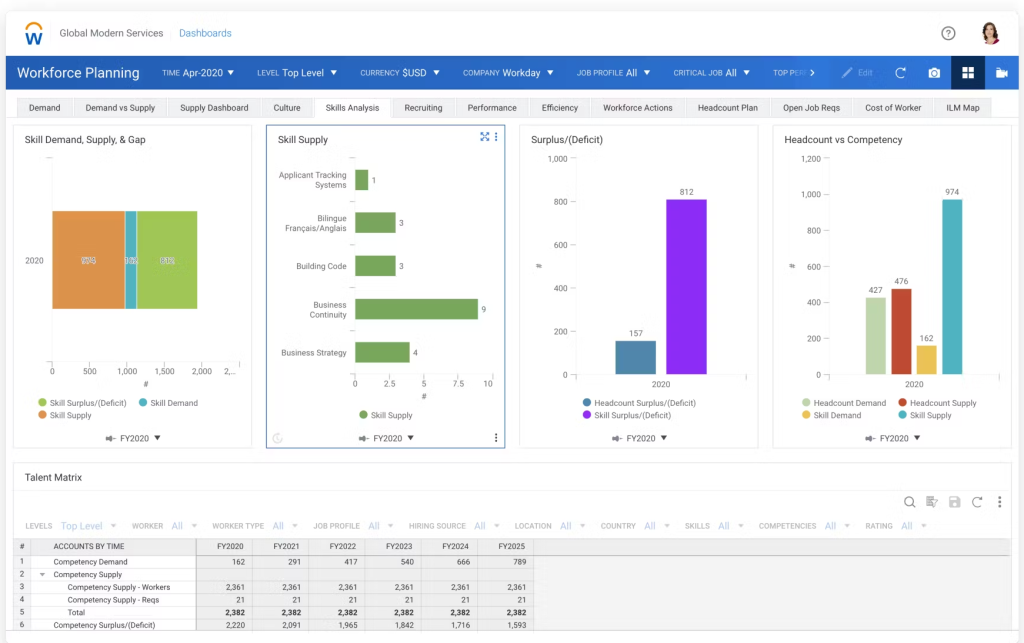
In FP&A-first implementations, Workday Adaptive Planning bridges the planning gap between finance and HR. I led a deployment at a midsize retailer where we combined headcount forecasting with payroll budgets and revenue scenarios.
When hiring plans shifted, the system automatically recalculated costs and variance reports. Integrating performance data allowed talent changes to ripple through cost structures, enabling smarter P&L adjustments.
Its multi-dimensional models supported drivers like headcount, seasonal workflows, and compensation curves. Finance and HR teams leveraged identical data streams to make unified planning decisions, rather than piecing together spreadsheets after the fact.
Pros:
- Seamless connection between workforce requirements and budget forecasts for holistic financial planning
- Rolling forecast models support frequent plan adjustments and real-time cost monitoring
- Scenario modeling enables testing compensation variations and headcount shifts
- Interactive dashboards provide visibility into both financial and staffing trends simultaneously
- Cloud-native infrastructure ensures enterprise-grade security and data integrity
Cons:
- Advanced modeling capabilities require training to prevent configuration errors and to maximize value.
- The investment level can be high for companies with simpler budgeting needs.
Pricing: Custom pricing.
8. Oracle EPM Cloud
Best for Oracle Suite Users
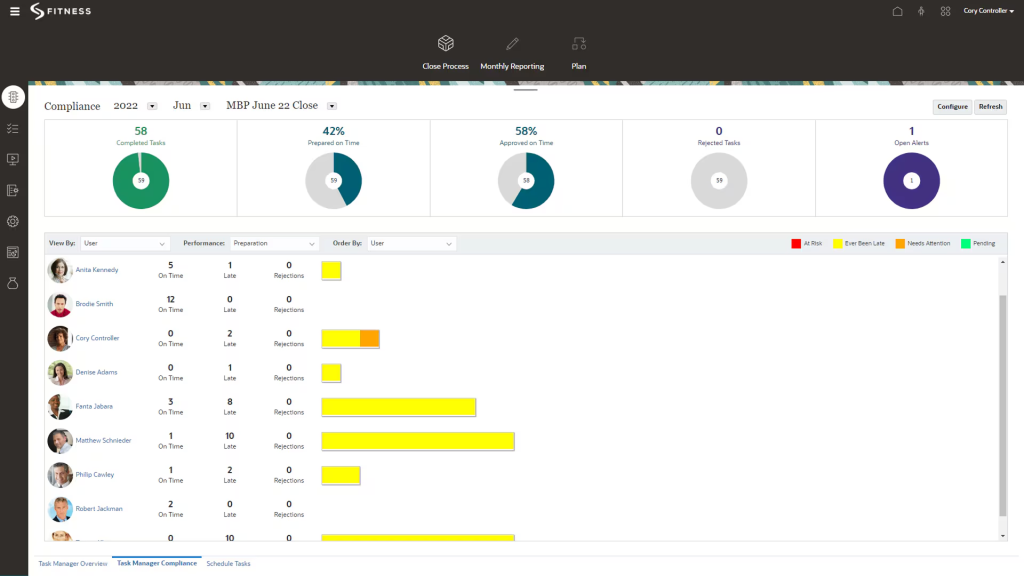
At global corporations, Oracle EPM Cloud has replaced fragmented finance systems with a consolidated, traceable hub. In one implementation, intercompany elimination and currency conversion workflows were built across 50 subsidiaries. Narrative Reporting produced consistent board and regulatory documents directly from the system, and scenario adjustment capabilities allowed finance to test cost controls ahead of budget lock-ins.
An audit trail enabled finance teams to detect discrepancies during monthly close, while automated alerts flagged stale data before it reached reporting. Oracle EPM Cloud brings the rigor needed for high-stakes consolidation and governance at enterprise scale.
Pros:
- Enterprise-grade consolidation with global currency and intercompany elimination across multiple entities
- Narrative Reporting creates comprehensive financial narratives automatically for executive presentations
- Predictive planning modules support complex “what-if” scenario modeling
- Pre-built Oracle ERP integrations reduce manual reconciliation significantly
- Security and audit tracking meet compliance standards for multinational organizations
Cons:
- Significant implementation time and cost often require certified Oracle specialists
- Performance can lag when processing very large datasets or multiple simultaneous global transactions
Pricing: Custom pricing.
9. Anaplan
Best for Connected, Enterprise-level Planning
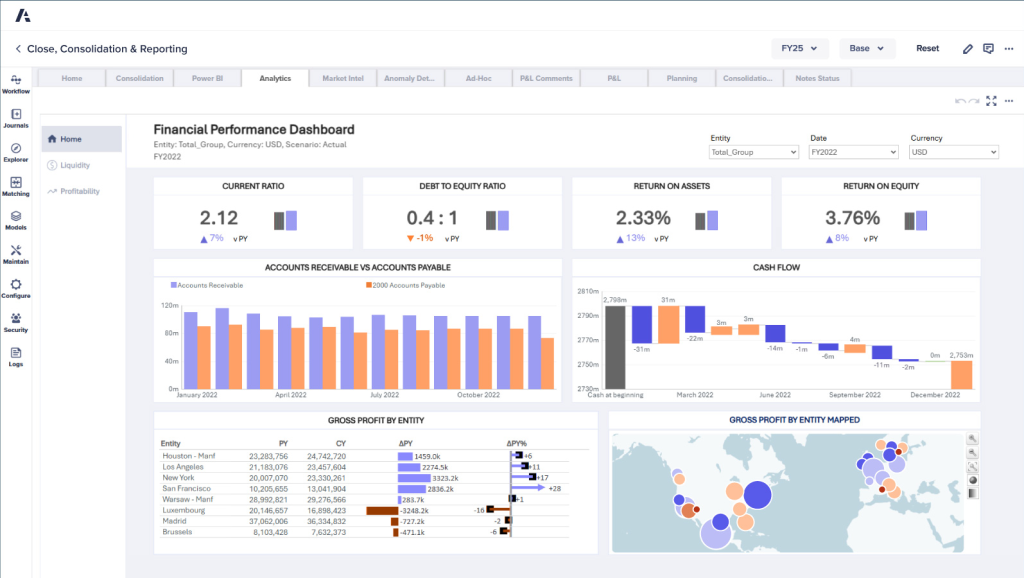
Anaplan’s power comes from connected planning models that let every function work from a shared version of reality. During a global supply chain initiative, we built linked models for sales forecasting, inventory, and labor. As promotional events were scheduled, demand forecasts automatically updated staffing needs and budget scenarios, enabling truly agile operations without manual handoffs between teams.
The Hyperblock engine recalculates instantly as changes are made anywhere in the model. Collaboration widgets allowed cross-functional teams to adjust assumptions live and track who changed what. For companies that move fast across interconnected functions, Anaplan delivers real-time visibility that most planning tools cannot match.
Pros:
- Real-time dynamic modeling lets business units see the ripple effect of changes within seconds
- Predictive analytics modules simulate demand surges, downturns, or capacity shifts using embedded statistical tools
- Unified planning prevents disconnects between revenue goals, workforce capacity, and operational delivery
- Model collaboration tools let multiple stakeholders contribute to assumptions without corrupting calculations
- Granular permission settings protect data integrity and compliance across input layers
Cons:
- Successful deployment requires experienced model builders who understand both business logic and Anaplan architecture
- Licensing structure can be expensive for organizations without strong planning maturity
Pricing: Custom pricing.
10. OneStream
Best for Unified FP&A, Close, and Analytics
OneStream is the go-to solution when a CFO says, “We need one tool to rule them all.”
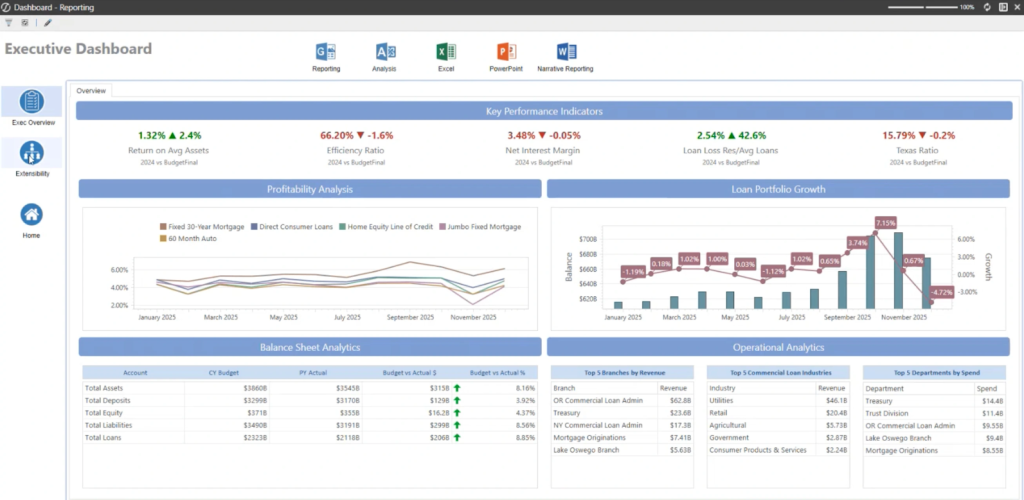
OneStream is the platform I recommend when a CFO says they need one tool to consolidate everything. I helped a multinational financial services firm retire five legacy platforms by moving budgeting, consolidation, and analytics into OneStream. During the transition, MarketPlace add-ons activated lease accounting and intercompany reconciliations without licensing additional systems.
Close workflows flagged anomalies like delayed submissions and missing reconciliations, making the monthly close more predictable. Controllers could work in Excel through OneStream’s Smart View plugin, giving them the familiarity of spreadsheets backed by real-time, governed data. Reporting now flows from one version of truth, saving weeks in board prep cycles.
Pros:
- Unified architecture consolidates budgeting, close, planning, and forecasting into a single governed platform
- AI-powered analytics flag anomalies early so finance leaders can act proactively
- MarketPlace add-ons expand functionality without external integrations
- Dual interface support through Excel plugin and web UI serves diverse finance team preferences
- Scalable design supports multi-entity, multi-currency organizations for complex global consolidations
Cons:
- High total cost of ownership requires a strong ROI justification before commitment
- Customization often requires ongoing vendor support and planned update cycles
Pricing: Custom pricing.
11. Planful
Best for Agile Planning in Mid-to-Large Firms
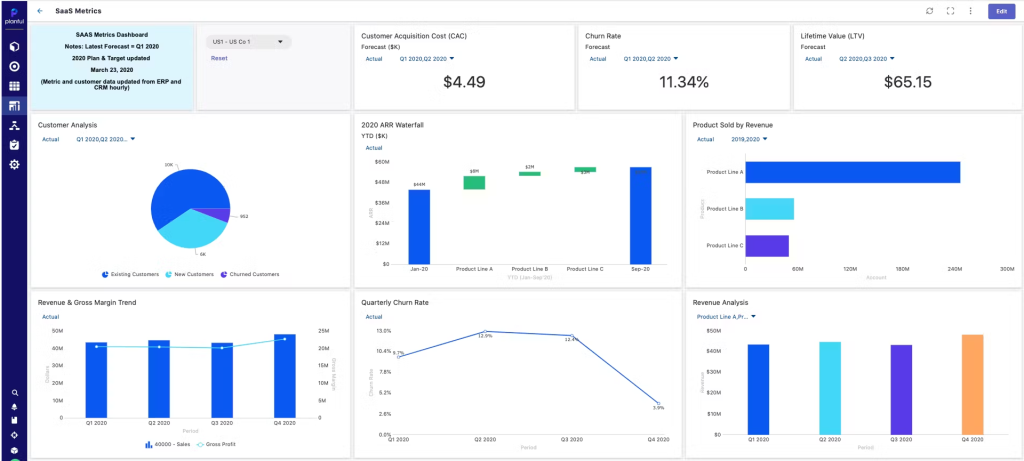
Planful is the right tool for companies moving off spreadsheets but not yet ready for full enterprise complexity. At a growing SaaS company, we used it to replace disconnected Excel files with a centralized, cloud-based planning environment. Driver-based templates modeled hiring costs, marketing ROI, and infrastructure spending, with version control that prevented the planning errors that came with manual file management.
Department heads contributed forecasts through collaborative forms, workflows kept deadlines and approvals on track, and a live KPI dashboard flagged budget drift before it spiraled. What stood out most was usability: teams unfamiliar with FP&A tools were trained and productive within days.
Pros:
- Excel-like planning environment reduces onboarding friction for budget owners transitioning from spreadsheets
- Driver-based forecasting ties plans to real business levers like revenue targets and headcount
- Built-in task workflows add structure and accountability to budget submissions and approval checkpoints
- KPI dashboards deliver real-time visibility into financial performance and budget variance
- Native connectors pull data from ERP and HR systems, eliminating manual uploads
Cons:
- Advanced custom reporting may require external exports for presentation-quality visuals
- Very large or complex datasets may require optimization support from IT or vendor teams
Pricing: Custom pricing.
You must be wondering why I chose only these 11 tools. Why not others? Well, there are reasons, and the next section will give you a better idea.
Evaluation Criteria
Every recommendation in the above list is grounded in real implementation experience, pattern analysis from user communities, and a structured evaluation framework I apply whenever I assess a CPM platform. Here is exactly what shaped the final selection.
1. User Reviews and Ratings: I focused on patterns across G2, Capterra, and TrustRadius reviews, not just ratings. Consistent feedback around usability, flexibility, and support revealed how tools actually perform after implementation.
2. Essential Features and Functionality: I checked whether each tool supports core workflows like goal setting, 360 feedback, review automation, calibration, and reporting. Tools lacking depth here were excluded.
3. Ease of Use: Adoption matters most. I prioritized platforms that are intuitive, require minimal onboarding, and don’t depend heavily on IT or vendor support.
4. Customer Support Quality: I looked at how responsive and helpful support teams are during onboarding and live cycles, where timely help makes a real difference.
5. Value for Money: I compared what each pricing tier actually delivers. The focus was on clear value relative to cost, not just feature lists.
6. Financial Planning Depth and Scalability: For financial tools, I evaluated consolidation, scenario modeling, multi-entity support, and ERP integrations that drive real efficiency.
7. Firsthand and Peer Insights: Some tools come from direct experience, others from trusted peers. Real-world use helped validate what works at scale.
CPM vs. EPM vs. BI vs. HRIS: What Is the Difference?
These four acronyms often get used interchangeably in software discussions, which creates real confusion when you are trying to solve a specific problem.
Understanding what each system actually does, who uses it, and where it fits in your tech stack will save you from buying the wrong tool for the job.
| Category | CPM | EPM | BI | HRIS |
|---|---|---|---|---|
| Primary Purpose | Align strategy with execution and track organizational performance | Handle enterprise-wide financial planning and reporting | Visualize and analyze raw business data | Manage employee data, payroll, and HR operations |
| Focus Area | Performance tracking, goal alignment, continuous improvement | Financial management and compliance at scale | Data analysis and insights | Core HR tasks and compliance |
| Typical Users | HR, Finance, Ops, Executives | CFOs, controllers, enterprise planning teams | Analysts, BI teams | HR teams, payroll managers |
| Key Capabilities | Goal setting, reviews, forecasting, feedback, dashboards | Consolidation, statutory reporting, enterprise budgeting | Dashboards, trend analysis, drill-downs | Payroll, leave tracking, employee records |
| Use Frequency | Ongoing and collaborative, daily to weekly | Periodic and structured, monthly to quarterly | Ad hoc or scheduled | Administrative and operational, daily |
| Best For | Driving accountability and goal-focused execution | Managing complex financial control and long-range planning | Understanding trends, patterns, and performance drivers | Centralizing HR operations and maintaining compliance |
The simplest way to think about it: CPM and EPM manage what you plan and measure. BI tells you what the data means. HRIS manages the people data that sits behind all of it.
Most large organizations eventually need all four in some form, but they do not all need to be separate tools. Many modern CPM platforms now include lightweight BI and HRIS capabilities, which is why tool selection requires a clear-eyed view of your actual gaps.
What Is the Total Cost of Ownership of CPM Software?
Most teams underestimate CPM costs by focusing only on licensing. In reality, the software fee is often the smallest part. Here’s what you should factor in:
1. Licensing Models
- Per-user pricing for people performance tools
- Flat-fee pricing for enterprise platforms
- Module-based pricing for features like budgeting or analytics
2. Implementation and Onboarding
- Mid-market tools: $5,000 to $25,000
- Enterprise tools: $50,000 to $200,000+
- Often not included in base pricing
3. Integration Costs
- Connecting ERP, HRIS, CRM systems
- Native integrations may be included
- Custom API work: $3,000 to $15,000
4. Internal Training Investment
- 40 to 80 hours for a 200-person team
- More for complex enterprise tools
- Includes HR, finance, and managers
5. Ongoing Support and Maintenance
- Basic support usually included
- Premium support: $2,000 to $20,000 annually
6. Hidden Costs to Watch
- Data storage overages
- Additional modules
- SSO setup
- Custom reports
- Annual price increases
7. Typical Annual TCO Ranges
- SMB (20–100 employees): $5,000 to $25,000
- Mid-market (100–500): $20,000 to $80,000
- Enterprise (500+): $75,000 to $500,000+
What Are Common Challenges of Using CPM Tools
Even the best corporate performance management tools underperform when implementation is misaligned with how the organization actually works. These are the pitfalls I have seen most often and what you can do to stay ahead of each one.
1. Poor Goal Clarity
Symptom: After the first review cycle, reports show high completion rates but no real insight. Managers disengage, and leadership cannot act on the data.
Cause: Goals are too vague to measure. “Improve team performance” lacks clarity, while a specific metric with a timeline creates accountability.
Fix: Run a focused goal-setting workshop before launch. Ensure every goal is measurable and time-bound. If you can’t clearly evaluate it within weeks, rewrite it.
2. Low User Adoption
Symptom: Usage drops off after the first two months. HR starts chasing completions again. The platform is live but barely used.
Cause: The system is layered on top of existing workflows instead of being part of them. Employees see it as a task, not a tool.
Fix: Embed it into workflows like project debriefs and 1-on-1s. Add quick actions like 30-second feedback. Assign internal champions to each team.
3. Overcomplicating Setup
Symptom: First month feels chaotic. Managers are unsure what to use, and adoption stays low.
Cause: Too many features launched together, creating multiple behavior changes at once.
Fix: Roll out in phases. Start with goals, then add feedback, then reviews, and finally 360 feedback once users are comfortable.
4. HR-Only Ownership
Symptom: Managers treat CPM as an HR task and only do the minimum required.
Cause: HR drives implementation without involving leadership or department heads.
Fix: Get leadership to connect CPM to business outcomes. Let department heads design their workflows to build ownership.
5. Inconsistent Feedback Culture
Symptom: Feedback appears only during performance review cycles. System remains inactive otherwise.
Cause: No habit of giving feedback during day-to-day work.
Fix: Add simple triggers like project-end feedback, biweekly manager inputs, and monthly peer requests. Keep it quick and consistent.
6. Ignoring the Data
Symptom: Reports are generated but not reviewed. Data has no impact on decisions.
Cause: No routine or accountability for reviewing performance data.
Fix: Add a 15-minute monthly review with key metrics. Assign one action based on insights every time.
7. Underbudgeting Implementation and TCO
Symptom: Budget runs out mid-implementation. Integrations and training get cut.
Cause: Decision made on license cost alone without considering full implementation expenses.
Fix: Get a complete cost breakdown, including setup, integrations, training, and long-term costs. Plan for at least three years.
Drive Performance With Smart Corporate Performance Management Software
Performance management used to feel like a burden: spreadsheet chaos, forgettable goals, and once-a-year reviews nobody looked forward to. With the right CPM software, it becomes the operating system for how your organization executes strategy.
The business performance management software tools in this list cover the full range from people performance platforms to enterprise financial planning systems. The right one for you depends on your team size, your primary pain point, and how much complexity you are ready to manage. Start with the comparison table to narrow your category, then evaluate two or three platforms against your actual workflows before you commit.
If you are building or scaling a people performance system, PeopleGoal gives you the flexibility to design workflows that fit how your organization actually operates, without needing a development team to maintain them. Custom reviews, cascading OKRs, 360-degree feedback, and real-time recognition in one platform your team will actually use.
Start your free 14-day trial and see what a structured performance system looks like in practice.
Frequently Asked Questions

How do I compare Anaplan vs Workday Adaptive Planning?
Anaplan is better for cross-functional, enterprise-wide planning. Workday Adaptive is stronger for workforce and financial planning, especially if you already use Workday. Choose based on whether flexibility or ecosystem fit matters more.
How long does it take to implement CPM software?
People-focused tools can go live in 2 to 4 weeks. Mid-market financial tools take 6 to 12 weeks. Enterprise platforms can take 3 to 9 months depending on complexity and integrations.
Can CPM software integrate with HRIS like Workday or BambooHR?
Yes, most modern CPM tools offer native integrations or APIs. Always confirm whether your required integration is included in your plan or comes as a paid add-on.
What is the difference between CPM software and BI tools?
Corporate performance management tools track performance against goals. BI tools analyze historical data to explain trends. Most companies use both CPM for execution and BI for deeper analysis.
Is CPM software suitable for startups or small businesses?
Yes, lightweight tools work well for 15 to 20 employees. Start with simple goal tracking and feedback. Financial CPM tools usually make sense later, once planning becomes more complex.
How does CPM software support 360-degree feedback?
It lets you collect feedback from peers, managers, and reports, automate reminders, and generate structured insights. Best used for development, not just ratings.
How do I get employee buy-in for a new performance system?
Involve employees early, pilot with engaged teams, and act on feedback. When people see it helps their growth, not just adds work, adoption improves naturally.
Can CPM software replace spreadsheets for financial forecasting?
Yes. It removes version issues, automates consolidation, and adds real-time tracking. Many tools still support Excel inputs, so teams don’t lose familiarity.
How does CPM software help with succession planning?
It builds a data-backed view of performance over time. You can identify high performers, track development, and plan leadership pipelines based on real data, not assumptions.
Ready to 3x Your Teams' Performance?
Use the best performance management software to align goals, track progress, and boost employee engagement.