
A manager once told me they were “pretty sure” their top engineer had a strong year. But when promotion week arrived, they had no documented wins, no record of goals met, and no peer feedback on file. Just a gut feeling and a blank review form. The engineer left three months later.
That situation is not unusual. Most appraisal processes fail not because the people are bad at their jobs, but because the system gives them nothing to work with.
I have spent the last decade reviewing HR tools, testing over 70 platforms, reading more than 1,000 user reviews, and sitting through more demos than I can count.
What I know for certain is this: the right performance appraisal software turns “I think” into “here’s the record.” In this guide, I will walk you through the best options and show you exactly what to look for.
What Is Performance Appraisal Software?
Here is why HR and People Ops teams are moving to it:
- Replaces annual review scrambles with continuous performance records that build throughout the year
- Reduces subjectivity by combining manager ratings, peer input, self-assessments, and goal evidence in one view
- Standardizes the review process across managers, preventing variation in how teams get evaluated
- Connects appraisal outcomes to compensation, promotions, and development plans with documented evidence
- Surfaces early signals on engagement, performance dips, and skill gaps before they become retention problems
- Cuts administrative time on review preparation so HR can focus on decisions, not data gathering
10 Best Performance Appraisal Software Systems
Here’s a detailed review of the best online employee appraisal software system in the market. For each one, I have covered the key features, drawbacks to watch for, pricing, and a real-world take based on personal experience and what I have seen work in actual review cycles.
| Tool | Best For | Pricing | User Rating (G2) |
| PeopleGoal | Fully Customizable Performance Reviews, OKRs & Employee Development | FREE 14-day trial. Paid from $4/user/month | 4.5/5 |
| Empxtrack | 360-Degree Holistic Evaluations | Custom pricing | 4.8/5 (3 reviews) |
| Lattice | Automated Workflow Insights Dashboards | Starts at $11/seat/month | 4.7/5 |
| HiBob | Objective Alignment and Growth Paths | Custom pricing | 4.5/5 |
| Primalogik | Multi-Rater Coaching via AI | Custom pricing | 4.7/5 |
| Workleap | Context-Connected Cycles and Smart Reminders | Starts at $4,999/year | 4.3/5 |
| LutherOne | Praise Bubbles Powering Engagement | Custom pricing | 4.5/5 |
| Teamflect | Teams-Native OKR-Linked Reviews | From $7/user/month | 4.5/5 |
| LanteriaHR | SharePoint Competency Mapping Appraisals | Custom pricing | 4.7/5 |
| Namely | Continuous Results Measurement Check-Ins | $9/month/employee | 3.9/5 |
1. PeopleGoal – Best for Fully Customizable Performance Reviews, OKRs & Employee Development
I used PeopleGoal during a quarter when our goals kept drifting after the second week. We set crisp OKRs, and the AI-powered performance management features helped summarize feedback and surface performance trends while tying each key result to weekly check-ins and the performance journal.
The payoff came on a Friday 1:1. I opened the goal timeline, pointed to a slipped milestone, and asked what had changed. We had an answer, a plan, and a documented decision in about ten minutes.
When review time arrived, I filtered journal notes by goal, pulled peer comments, and turned them into concrete feedback in minutes. No blank-page panic. No memory test. The check-in history even revealed a pattern of Monday blockers and Thursday recoveries, which made coaching feel specific rather than vague.
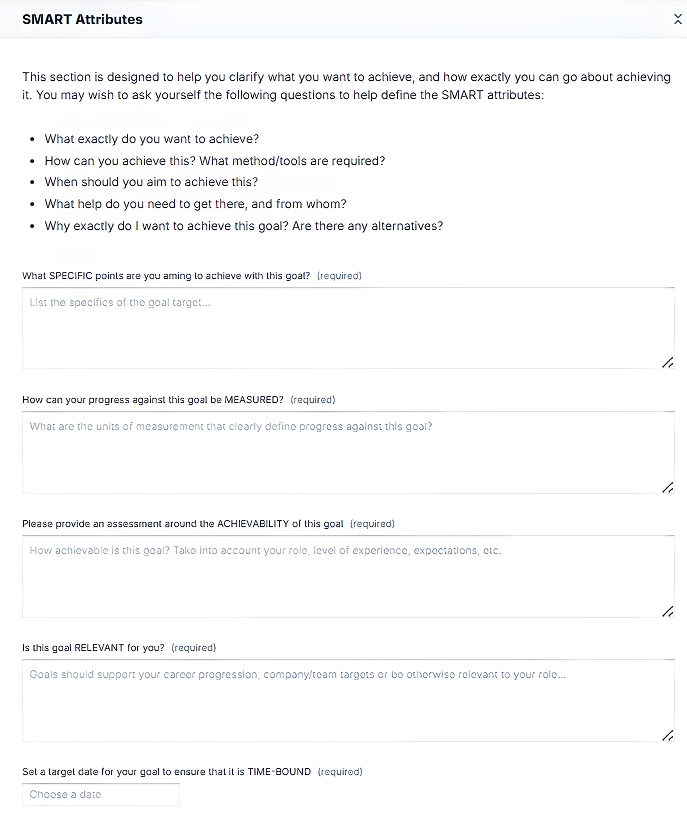
What makes PeopleGoal genuinely strong for appraisals is the combination: configurable review forms, structured check-ins, 360-degree feedback, OKR alignment, and built-in pulse surveys all sit inside the same system. There is no stitching between tools. If you want performance and engagement to move together, this is the platform I would start with.
Pros:
- Fully configurable appraisal cycles, review forms, and workflows tailored to how your organization already runs
- Continuous performance conversations through structured check-ins, not just end-of-cycle forms
- Supports employee development with career plans and skill development.
- Goal tracking with OKRs and SMART goals, connecting employee performance and growth directly to business priorities
- 360-degree feedback tools with weighted rater groups, automated reminders, and response tracking
- Built-in engagement measurement via pulse surveys to contextualize appraisal outcomes with real sentiment data
- Real-time dashboards covering goal completion, engagement, and workflow progress without manual exports
- 500+ platform integrations including Workday, BambooHR, Slack, and Jira
Cons:
- No downloadable or on-premise version
- Dark UI mode is not available
User Rating: 4.5/5 (G2)
Pricing: FREE 14-day trial. Paid starts at $4/user/month.
Check how iQmetrix replaced scattered forms and SharePoint with one transparent, trackable process using PeopleGoal.
2. Empxtrack – Best for 360-Degree Holistic Employee Evaluations
I first saw Empxtrack in a services firm where manager-only ratings were creating quiet resentment. Project teams changed every month, so no single manager had the full picture. Empxtrack let them collect input from peers, direct reports, and project leads, then weight each rater group by role.
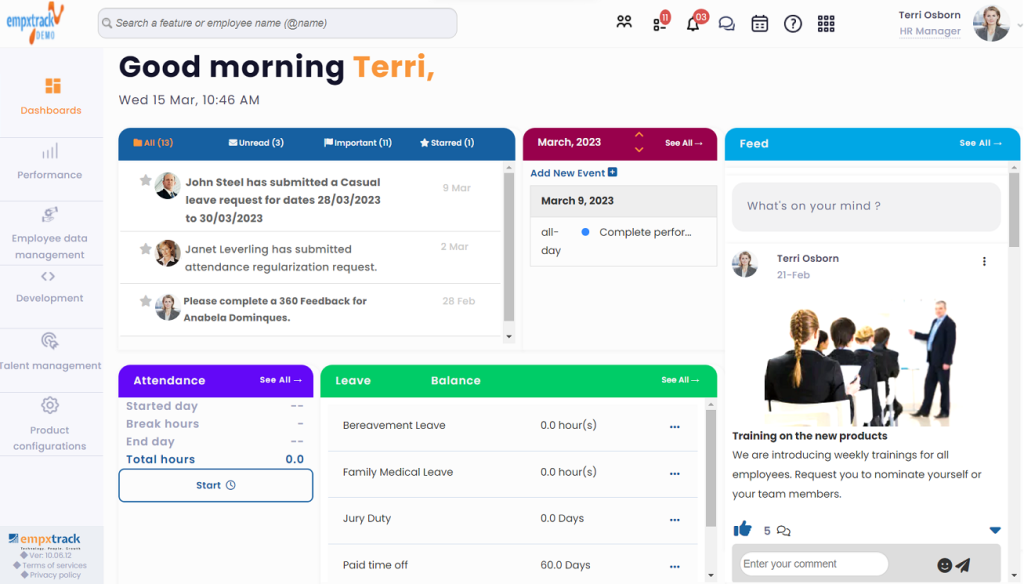
In one cycle, a senior analyst looked average on her manager’s form until peers described how she rescued a client account after a late-night escalation. That full story is what changed her rating.
For appraisals, the practical win is traceability. You can see who gave feedback, when they worked with the person, and whether the same themes appear across raters. That turns feedback into evidence, and evidence into decisions people can accept.
Pros:
- Highly customizable appraisal forms, rating scales, and approval workflows for policy-driven organizations
- Detailed 360-degree feedback involving peers, managers, and subordinates in a single cycle
- Strong goal alignment features linking individual objectives to departmental outcomes
- Rule-based automation for review reminders, approvals, and escalation without technical setup
- Works well for organizations needing both performance appraisals and basic HR digitization in one system
Cons:
- No dedicated mobile application, limiting ease of use for managers working away from desktops
- User interface feels dated compared to newer platforms focused on modern employee experience
User Rating: 4.8/5 (3 reviews) (G2)
Pricing: Custom pricing.
3. Lattice – Best for Automated Workflow Insights Dashboards
A VP of People I know ran Lattice for almost two years, and her favorite line became, “Let the dashboard tell the story.” Managers were drowning in unfinished review steps and last-minute scrambling.
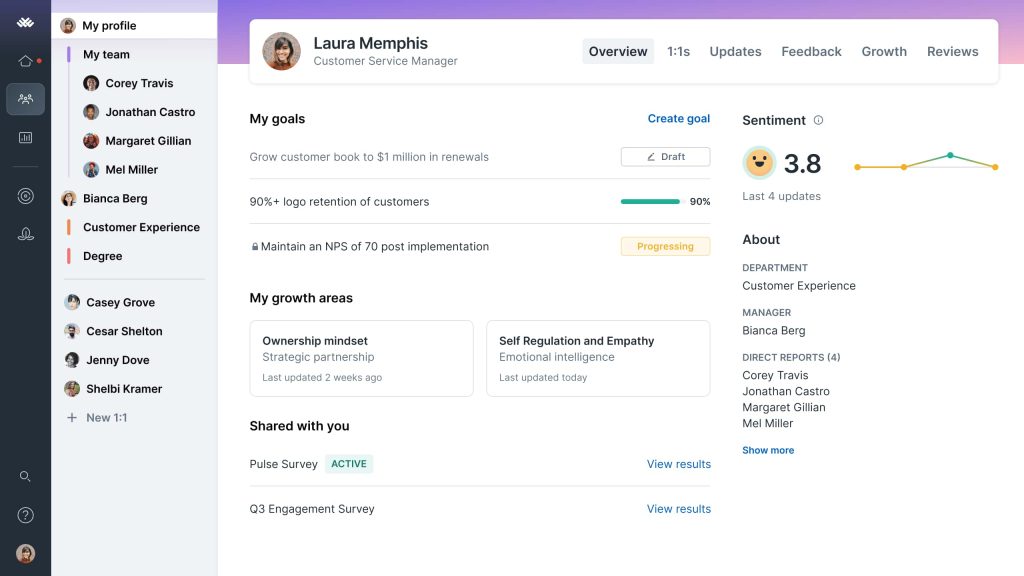
Lattice’s automated task sequences, well-timed reminders, and visibility dashboards solved that problem without adding more process. During promotion week, a manager said they had no time to write feedback while staring at a blank form.
Lattice surfaced recent peer notes, goal progress, and check-in themes, so the summary got written in minutes. Calibration meetings became calmer because everyone arrived with the same data instead of competing memories.
Pros:
- Combines performance reviews, feedback, goals, and one-on-ones into a single unified platform
- Continuous feedback culture through real-time comments and structured check-ins throughout the year
- Goal tracking tightly integrated with performance discussions
- Clean, intuitive review templates that reduce administrative friction during appraisal cycles
- People analytics dashboards surfacing performance trends and participation rates across teams
Cons:
- Customization options for review templates and rating logic are more limited than workflow-heavy platforms
- Advanced analytics may not satisfy organizations with complex performance data needs
User Rating: 4.7/5 (G2)
Pricing: Starts at $11/seat/month, billed annually.
4. HiBob – Best for Objective Alignment and Growth Paths
HiBob works best when your org chart changes faster than your handbook. I watched a regional company use it as product, sales, and support scaled at different speeds. They mapped company objectives to teams, then connected roles to growth paths with skill expectations and check-in prompts.
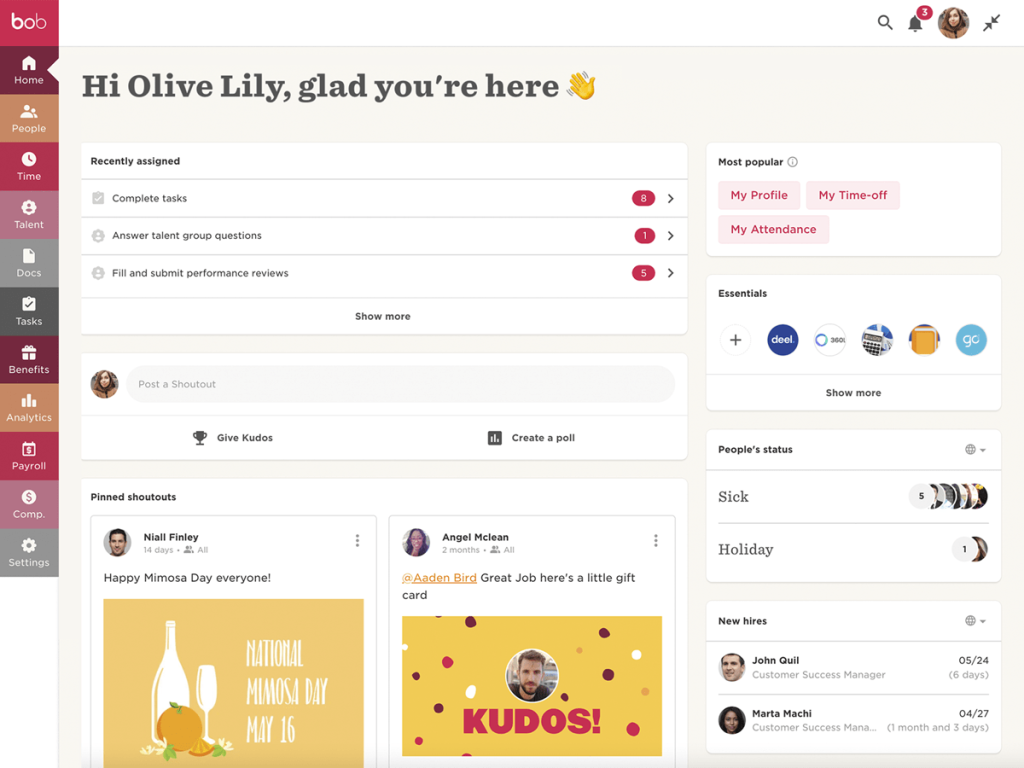
A new manager asked how to set goals that connect to the business, and HiBob answered by showing how team objectives roll up to company metrics and what strong performance looks like at each level.
Reviews started reflecting both outcomes and role readiness. Instead of “you seem ready,” managers pulled the growth path, checked evidence against skill markers, and agreed on two stretch assignments. The conversation got sharper, and employees stopped guessing what “next level” meant.
Pros:
- AI-generated summaries condensing large volumes of peer and manager feedback into readable appraisal insights
- Talent calibration tools including nine-box grids to compare performance and potential across teams
- Goal tracking integrated with organizational structures for alignment across departments and regions
- Structured one-on-one meeting tools feeding directly into appraisal history and development conversations
- Designed for global organizations with localized workflows and consistent performance processes
Cons:
- Performance management customization is limited for organizations with highly specialized appraisal methodologies
- Customer support response times can vary during peak onboarding or large-scale rollout phases
User Rating: 4.5/5 (G2)
Pricing: Custom pricing.
5. Primalogik – Best for Multi-Rater Coaching via AI
A leadership coach I know from HR consulting called Primalogik “the mirror with manners.” They used it with a small leadership team that wanted multi-rater feedback but also needed it to translate into coaching, not confusion.
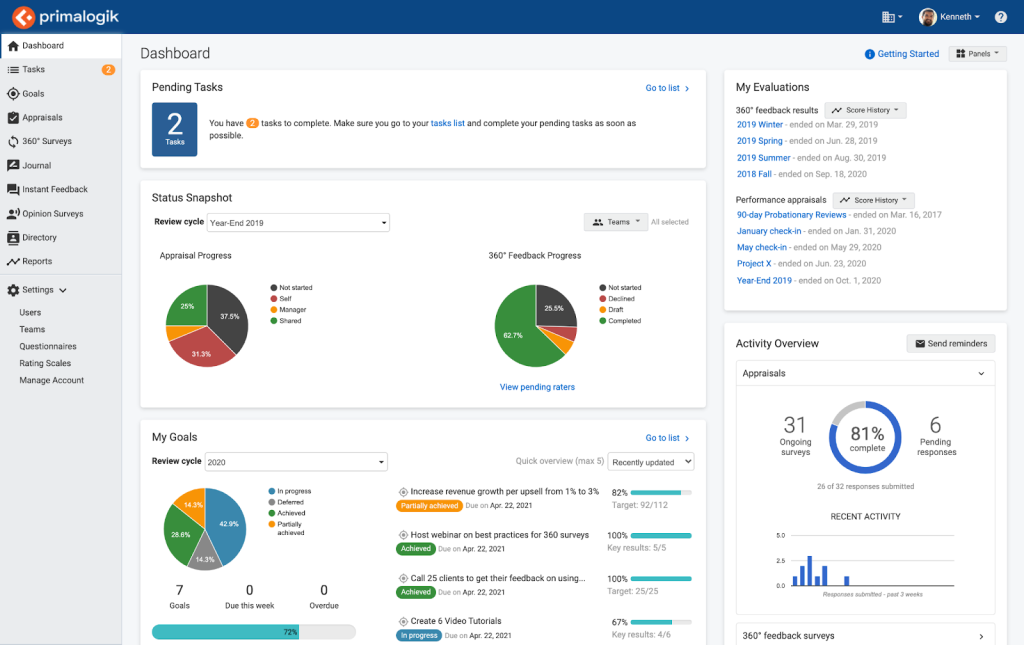
Primalogik’s AI-assisted theme summaries helped them spot patterns across raters. After a tense sprint retro, one manager asked why everyone thought they had dismissed ideas. The coach opened the theme view, clicked into supporting comments, and found three moments where the manager cut off discussion to chase the clock. That specificity is what made the coaching conversation land.
Instead of a wall of text, you get consistent behavior themes you can rate, discuss, and turn into a development plan. Anonymity stays intact, which keeps feedback honest without turning it harsh.
Pros:
- Straightforward appraisal system combining reviews, goals, feedback, and engagement surveys
- 360-degree feedback that is easy to launch and manage without overwhelming administrators
- Customizable review schedules and automated reminders to keep appraisal cycles running
- Engagement surveys linking performance outcomes with employee morale and satisfaction
- Well-suited for organizations seeking simplicity over complex, enterprise-heavy platforms
Cons:
- Integrations with third-party HR and productivity tools are limited compared to larger platforms
- Reporting depth may fall short for organizations needing highly granular performance analytics
User Rating: 4.7/5 (G2)
Pricing: Custom pricing
6. Workleap – Best for Context-Connected Cycles and Smart Reminders
Workleap is strong when review cycles need context and structure. I watched a distributed team use it to connect feedback to real moments including launches, escalations, and customer wins. Instead of asking people to remember the quarter, they tagged feedback to events and conversations.
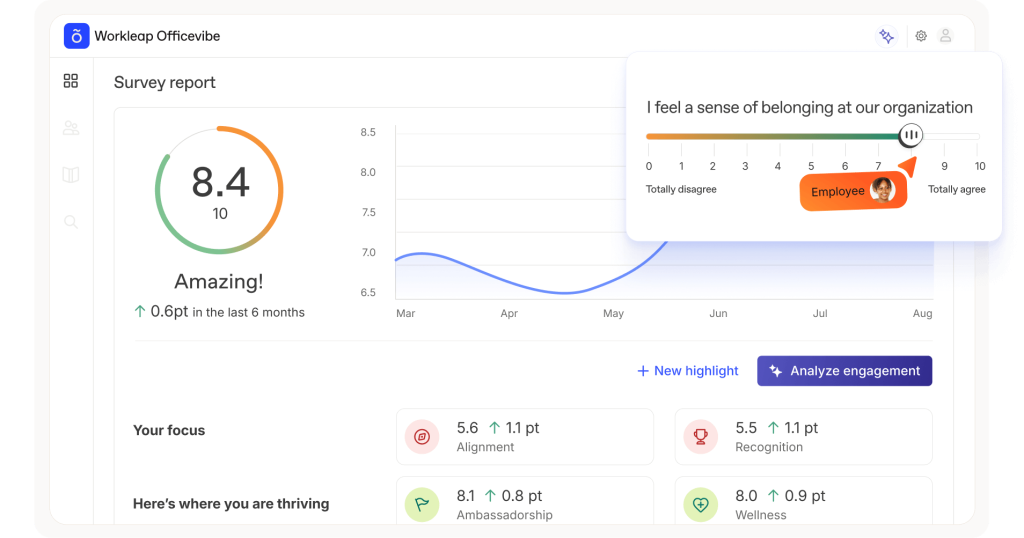
One manager told me, “I finally stopped guessing,” and you could hear the relief. The smart reminders were well-timed too: if someone had not given feedback in a while, Workleap nudged them right after a milestone, not at midnight on deadline day.
Dated, contextual notes create a credible review record. In a cycle recap, the team pulled a context thread for one employee and saw consistent patterns of calm incident handling. That became a development plan, not a surprise.
Pros:
- AI assists managers by generating structured review cycles, summarizing feedback, and highlighting performance patterns
- Consolidates goals, feedback, engagement signals, and review history into one centralized workspace
- Dynamic goal updates that adjust as roles, priorities, and projects evolve throughout the cycle
- Smooth integration with collaboration tools and HR systems to reduce duplication across workflows
- Promotes continuous performance conversations instead of limiting feedback to fixed annual review moments
Cons:
- Does not function as a full HRIS, requiring integration with other systems for core HR tasks
- Initial configuration may require effort to align AI-driven workflows with internal processes
User Rating: 4.3/5 (G2)
Pricing: Starts at $4,999/year
7. LutherOne – Best for Praise Bubbles Powering Engagement
LutherOne is built for recognition that becomes usable evidence. I saw it lift morale on a team that delivered great work but rarely celebrated it. Leaders started sending praise bubbles tied to specific behaviors, like mentoring a new hire or saving a difficult customer call.
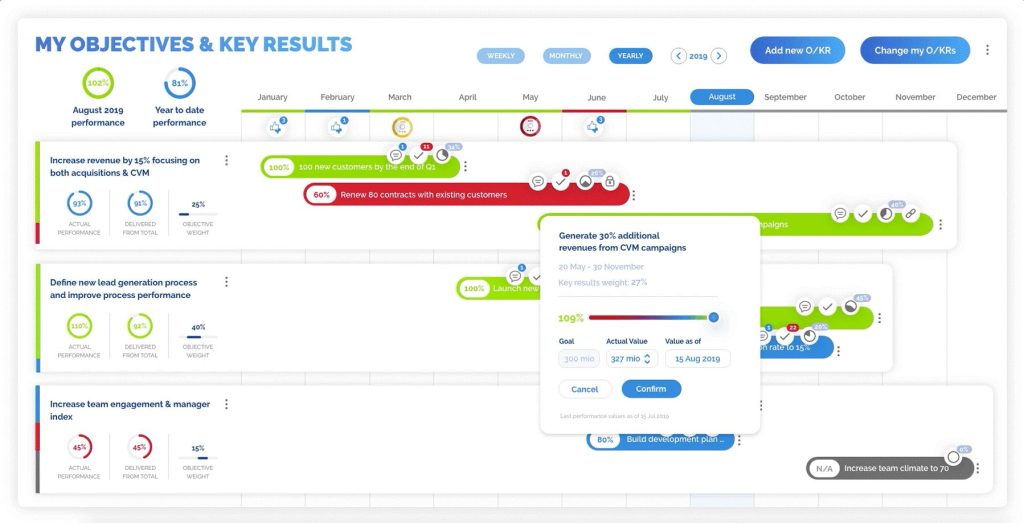
An engineer laughed and said they had not known anyone noticed, then started praising others the same week. By review time, managers could pull praise entries that named the action, date, and impact, and reference them directly in feedback conversations.
The tool adds warmth without turning recognition into a forced ceremony. When engagement is the goal, small specific moments stack up fast.
Pros:
- Real-time performance tracking is moving organizations away from static, retrospective appraisal models
- Advanced analytics dashboards combining engagement, goal progress, and performance signals into actionable insights
- Social-style interface encouraging frequent participation and reducing resistance to performance-related interactions
- Supports complex organizational goal structures across teams, departments, and enterprise hierarchies
Cons:
- Reporting formats offer limited customization when exporting or sharing appraisal results
- Pricing is positioned at the higher end, making it less accessible for smaller organizations
User Rating: 4.5/5 (G2)
Pricing: Custom pricing.
8. Teamflect – Best for Teams-Native OKR-Linked Reviews
A People Ops manager at a Microsoft-heavy enterprise used Teamflect inside Teams and loved that reviews finally lived where work already happened. Their company ran OKR-linked reviews, and Teamflect turned that into a Teams-native flow with prompts, approvals, and 1:1 agendas right in chat.
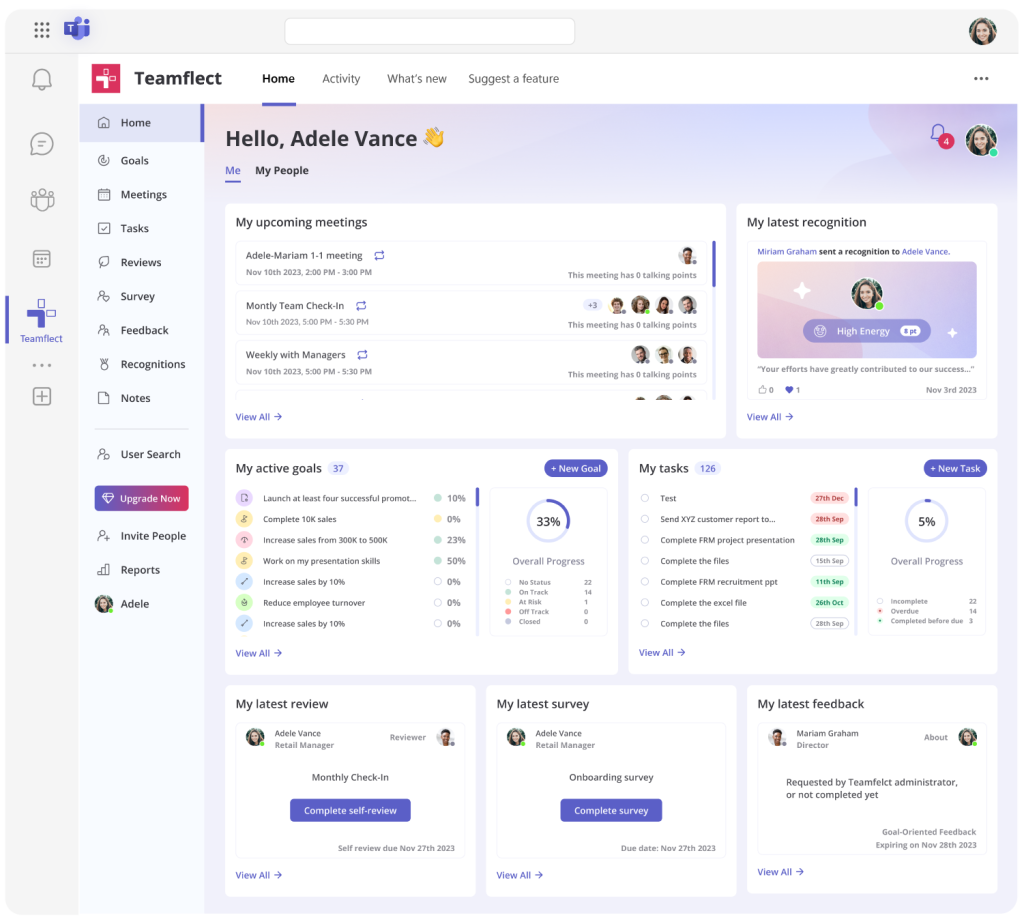
The most vivid story was a Monday message asking whether they could finish reviews that day. Teamflect surfaced pending tasks, pulled OKR progress, and showed recent check-in notes, so the manager wrote reviews without hunting through folders.
Ratings do not float away from outcomes because the OKR record is right there. If your managers live in Teams, this removes friction and raises completion rates quietly.
Pros:
- Operates fully inside Microsoft Teams, embedding appraisals directly into everyday collaboration workflows
- Reviews, goals, feedback, recognition, and one-on-ones without switching between platforms
- AI assistant helps managers summarize feedback and draft balanced performance review comments
- Integrates with hundreds of HR systems to automatically synchronize employee data and reporting structures
- Fast to deploy with high adoption for organizations already standardized on Microsoft 365
Cons:
- Limited value for organizations not actively using Microsoft Teams
- Engagement survey capabilities are simpler than specialized survey platforms
User Rating: 4.5/5 (G2)
Pricing: Starts at $7/user/month, billed annually.
9. LanteriaHR – Best for SharePoint Competency Mapping Appraisals
LanteriaHR is the right call if you live in SharePoint and want competency mapping built into evaluations. I have reviewed setups where HR stored policies, forms, and org data in SharePoint, but appraisals were trapped in PDFs.
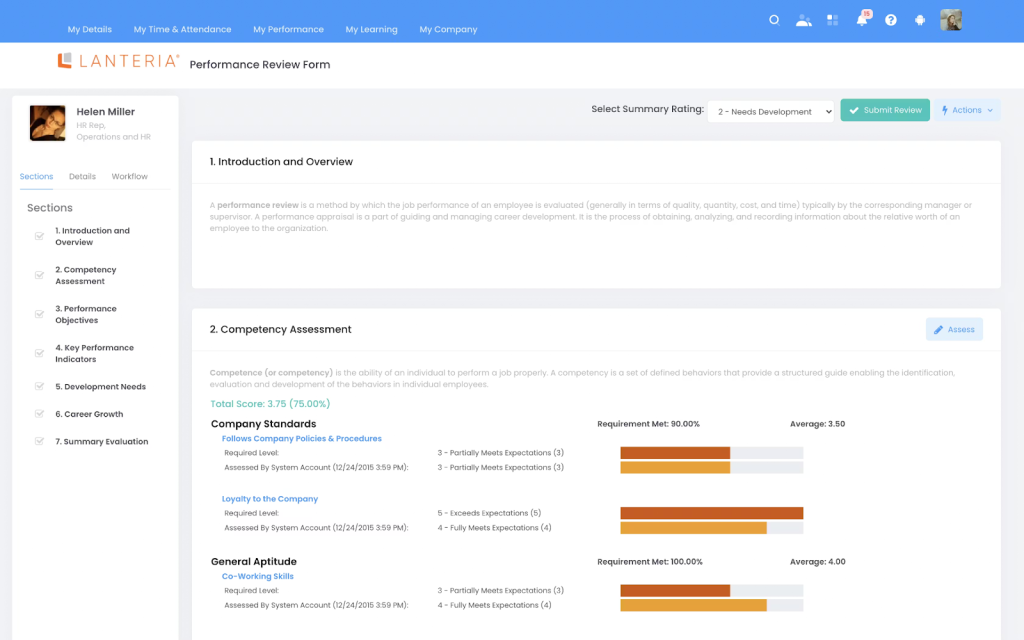
LanteriaHR brings competencies into a structured model so managers can rate skills against role expectations and build development plans from the gaps. In one case, an HR lead mapped competencies for inside sales and field reps, then linked training to the lowest-scoring skills.
Coaching sessions stopped being generic and became specific conversations about discovery calls and client handling. A shared competency matrix reduces manager-to-manager variation, and notes stay attached to each rating for audits or calibration.
Pros:
- Built on Microsoft SharePoint, well-suited for organizations deeply embedded in Microsoft IT environments
- Structured performance appraisals closely tied to competency models and long-term career development planning
- Supports succession planning using appraisal outcomes to identify and prepare future leaders
- Role-based appraisal templates across departments, job families, and organizational levels
Cons:
- SharePoint dependency can reduce flexibility for organizations using non-Microsoft ecosystems
- User interface feels less modern compared to newer appraisal-focused platforms
User Rating: 4.7/5 (G2)
Pricing: Custom pricing.
10. Namely – Best for Continuous Results Measurement Check-Ins
A senior HR generalist at a mid-market services company used Namely for continuous results measurement and described it as “check-ins that do not feel like homework.” Managers kept skipping traditional check-ins because the process felt heavy.
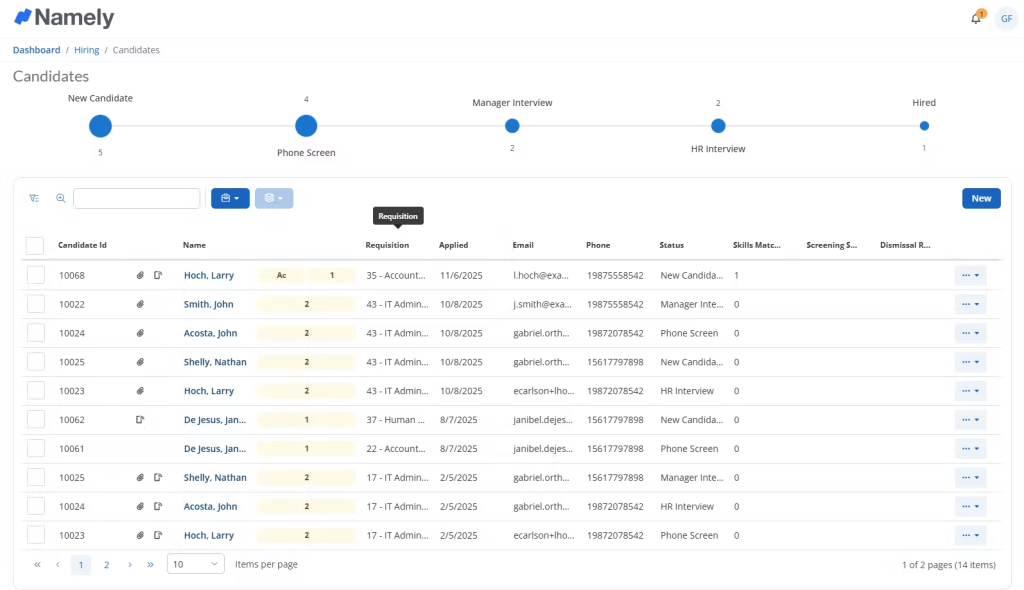
Namely’s structure with simple prompts made it easier to keep conversations regular and documented. After a tough month, an employee asked if they were still on track. The manager opened the check-in history, reviewed goals, and showed progress trends with notes from prior weeks.
That turned anxiety into an action list. Year-end reviews stop being a memory test because the outcomes, course corrections, and wins are already captured.
Pros:
- Integrates performance appraisals with payroll, benefits, and employee records for centralized HR decision-making
- Supports goal-based reviews that directly inform compensation, promotion, and workforce planning discussions
- Manager-driven appraisal workflows suitable for compliance-focused and documentation-heavy organizations
- Centralizes historical employee data for continuity across multiple review cycles and managers
- Designed specifically for mid-sized companies seeking unified HR and performance appraisal management
Cons:
- Performance management features lack depth compared to specialized appraisal platforms
- Reporting flexibility is limited without exporting data into external tools
User Rating: 3.9/5 (G2)
Pricing: Starts at $9/month/employee
How I Chose these Performance Appraisal Software
When evaluating online employee appraisal software for this list, I don’t rely solely on feature lists or marketing claims. I look at how these tools actually perform in real-world appraisal cycles.
Here’s the framework I used to make sure every recommendation is practical, reliable, and worth considering:
1. User Reviews / Ratings: I start by looking at real user feedback from platforms like G2, Capterra, and Software Advice. This helps me understand how HR teams, managers, and employees experience the employee appraisal software in day-to-day performance reviews, from setup and adoption to reporting and ongoing use.
2. Core Features & Functionality: I focus on the capabilities that matter most in employee performance appraisal software. This includes review cycle management, goal tracking, self-assessments, manager evaluations, 360-degree feedback, competency assessments, performance ratings, reporting, and employee development planning. If a tool cannot support the complete appraisal process effectively, it does not make the cut.
3. Ease of Use: Performance reviews already require significant time and coordination. I pay close attention to how intuitive the platform feels for HR teams, managers, and employees. A clean interface, simple workflows, and minimal training requirements are essential for successful adoption.
4. Customer Support: Even the best software can become frustrating without proper guidance. I evaluate how responsive and helpful the support team is during implementation, customization, and ongoing use. Strong onboarding and accessible support often make the difference between a successful rollout and a failed one.
5. Value for Money: I compare pricing against the overall value delivered. This includes appraisal features, customization options, reporting capabilities, scalability, and the administrative time saved. A higher-priced tool can still offer better value if it significantly improves efficiency and review quality.
6. Personal Experience / Expert Insights: Wherever possible, I rely on my own hands-on experience with these platforms. I also consider insights from HR leaders, people operations teams, and managers responsible for running performance reviews. Their experiences help me understand what works in practice, not just what looks good on a product page.
My Top 3 Employee Performance Appraisal Software Picks
If the full list feels like too many options, here is where I would focus, depending on your situation.
1. PeopleGoal
PeopleGoal is my top recommendation for most mid-sized HR teams. The combination of configurable review cycles, structured check-ins, OKR alignment, 360-degree feedback, and built-in pulse surveys means you are not stitching together three platforms. This staff appraisal software handles the full performance cycle from goal-setting to appraisal to development plan in one place.
2. Lattice
Lattice earns its place for teams where review workflow discipline is the primary problem. If your cycles routinely fall apart due to missing inputs, late reminders, and managers writing vague summaries, Lattice’s automated sequences and dashboards address exactly that.
3. Teamflect
Teamflect is the right call for organizations deeply standardized on Microsoft 365. If your managers already live in Teams, removing the context switch to a separate HR platform raises completion rates without any additional training.
What Does a Modern Performance Appraisal Process Actually Look Like?
This is the question I see HR teams wrestling with more than any other. The short answer is that modern appraisals are not events; they are ongoing systems. Here is what the shift looks like in practice.
1. Continuous Conversations Replace Annual Surprises
The most effective organizations don’t wait until year-end to discuss performance. Instead, managers and employees meet regularly through weekly, biweekly, or monthly check-ins to review progress, address challenges, and document achievements.
As a result, formal review cycles become a summary of ongoing conversations rather than a stressful exercise in trying to remember what happened over the past 12 months.
2. Multiple Perspectives Create Better Evaluations
Relying solely on a manager’s opinion often provides an incomplete picture of employee performance. Modern appraisal processes incorporate feedback from multiple sources, including peers, direct reports, project stakeholders, and employees themselves.
This broader perspective helps organizations identify strengths, uncover blind spots, and create more balanced evaluations.
3. Documented Evidence Reduces Bias
One of the biggest frustrations employees have with performance reviews is the perception that they’re subjective. Modern organizations address this by grounding evaluations in measurable evidence.
Goals achieved, project outcomes, manager notes, feedback records, and check-in histories provide a clear performance trail. This makes review discussions more objective and helps reduce recency bias and personal opinions.
4. Development Becomes Part of the Process
High-performing organizations view appraisals as the starting point for growth, not the finish line. Performance discussions are connected to development plans, skill-building opportunities, career progression, and succession planning.
When employees can clearly see how appraisal outcomes influence their future growth, reviews become more meaningful and valuable for everyone involved. For a practical breakdown of how different appraisal formats support development goals, my overview of types of performance appraisal is worth reading alongside this guide.
How AI Is Changing Performance Appraisals
I want to be direct about this because there is a lot of noise in the market. AI in performance management is genuinely useful in specific areas. It is not a substitute for good judgment, fair process, or honest conversation.
- Where AI actually helps in appraisals right now: Summarizing large volumes of feedback into readable themes, flagging review language for potential bias, generating first-draft feedback from check-in history, and surfacing patterns in engagement data that a manager might miss across a large team.
- Where it falls short: AI cannot decide whether someone deserves a promotion. It cannot weigh context the way a manager who has worked alongside someone can. It cannot replace calibration conversations between leaders who know the business.
The best tools on this list use AI to remove administrative friction, not to replace human judgment. If you want a deeper look at how AI is being applied across the performance management cycle, I have written a full breakdown of AI in performance management that covers both the opportunities and the risks worth watching.
5 Common Mistakes That Make Appraisal Software Fail
I have seen well-intentioned HR teams buy good staff appraisal software and still end up with messy review cycles. The tool is almost never the problem. Here is what actually goes wrong.
1. Launching company-wide before testing with one team
Rolling out a new appraisal system to 500 people before a single manager has used it live is how you create resistance and incorrect data from day one. Start with one department, run one full cycle, learn what breaks, then expand.
2. Skipping template and rating scale alignment
If three managers are all using different rating scales or interpreting “meets expectations” differently, your calibration data is meaningless before you even start. Templates and rating logic need to be agreed on before the first review opens.
3. Treating check-ins as optional
Every platform on this list works significantly better when check-ins happen consistently. The tools that surface the best review data are the ones where managers and employees have been logging notes, blockers, and wins every week. If check-ins are optional, they will be skipped, and the review will revert to a memory exercise.
4. Ignoring engagement data alongside performance data
A high performer with declining engagement scores is a flight risk. A struggling employee with high engagement scores is a coaching opportunity. Staff appraisal software that separates these signals gives you half the picture. The best decisions come from looking at both.
5. Choosing the most feature-rich tool instead of the most-used one
Community research across Reddit and Quora consistently shows the same pattern: over-engineered tools become ghost towns within 90 days. The tool your managers will actually open every week will always outperform the tool with the longest feature list that no one logs into.
Stop Guessing, Start Deciding: The Case for Getting Appraisals Right
After reviewing dozens of performance appraisal tools, one thing stands out: successful performance management depends more on process than software. The organizations that get the most value from appraisals are the ones that document performance consistently, gather feedback regularly, and use review outcomes to guide employee development, compensation, and growth decisions.
That said, the right software makes this process far easier. Instead of relying on memory during review season, managers have access to goal progress, check-in notes, peer feedback, and performance history in one place.
Among the tools I evaluated, PeopleGoal stood out for its flexibility and focus on continuous performance management. Features like customizable review cycles, structured check-ins, 360-degree feedback, and performance journals help teams build a reliable record of performance throughout the year.
If you’re evaluating options, start with the 14-day free trial and run a real appraisal cycle with one team before making a decision.
Frequently Asked Questions
How often should performance appraisals be conducted?
Most organizations run formal appraisals quarterly or annually, but ongoing check-ins matter more than the review schedule itself. Regular feedback creates a reliable performance record, making formal evaluations more accurate and productive. For many companies, quarterly reviews supported by continuous check-ins strike the right balance.
What is the difference between a performance appraisal and a performance review?
A performance appraisal is typically a formal evaluation tied to ratings, goals, compensation, or promotions. A performance review is often broader and more focused on feedback, development, and future planning. Modern performance management systems usually support both within the same process.
How do I make performance appraisals less biased?
The best way to reduce bias is to rely on documented evidence rather than opinions. Combine manager evaluations with peer feedback, self-assessments, and ongoing check-in records. Calibration discussions among managers can further improve consistency and fairness across teams.
What features should small businesses prioritize in appraisal software?
Small businesses should focus on simplicity and adoption. Look for configurable review templates, goal tracking, automated reminders, feedback collection, and check-in documentation. A straightforward system that managers use consistently is often more valuable than a feature-heavy enterprise platform.
How do I get managers to actually complete performance reviews on time?
Keep the process simple and structured. Automated reminders, pre-filled review forms, and manager dashboards showing completion status help improve participation. Managers are more likely to finish reviews when supporting data and past feedback are already organized for them.
Can performance appraisal software replace compensation planning tools?
Not completely. While appraisal software provides the performance data needed for pay decisions, dedicated compensation tools often handle budgeting, salary planning, and pay modeling. The strongest approach is connecting performance outcomes with compensation processes rather than managing them separately.
What should I look for when evaluating 360-degree feedback tools?
Look for customizable reviewer groups, anonymity controls, automated reminders, and actionable reporting. The best tools summarize patterns across feedback sources and integrate directly with performance reviews and goal tracking, eliminating the need to manage data across multiple systems.
How does performance appraisal software support promotion decisions?
Employee performance appraisal software creates a documented history of goals, feedback, achievements, and ratings. This gives leaders objective evidence when evaluating promotion readiness and reduces recency bias. It also helps connect employee development progress to long-term career growth opportunities.
Ready to 3x Your Teams' Performance?
Use the best performance management software to align goals, track progress, and boost employee engagement.