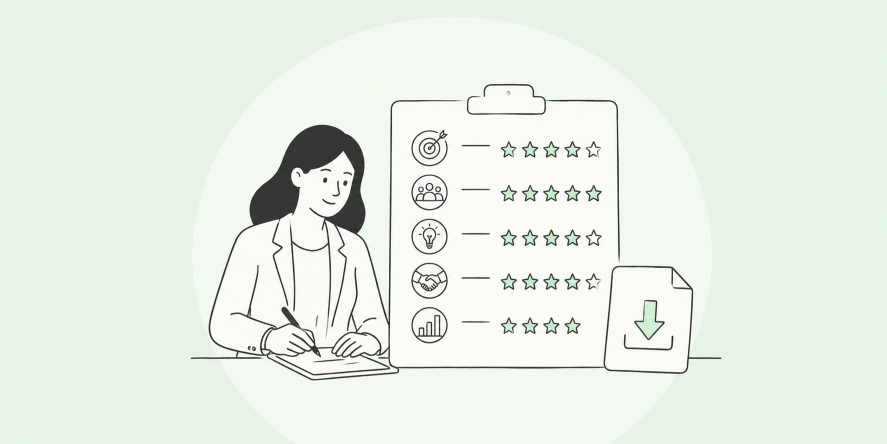

Every review cycle, I watch the same thing happen. Managers stare at a blank form, trying to remember what an employee did eight months ago, and HR ends up chasing half-finished reviews for weeks.
I have been there, refreshing a Google Sheet at 11 pm, hoping the last three managers finally submitted their comments.
AI has changed that equation, but only when I use it the right way. Used carelessly, it produces generic, corporate-speak reviews that employees can spot from a mile away.
Used well, it turns a manager’s rough check-in notes into a strong first draft in minutes, leaving more time for the conversation that actually matters.
This guide walks you through exactly how to do that, step by step, prompt by prompt.
What Is a Performance Review
Here is why using AI in this process matters right now:
- Most HR teams are still stitching together Google Sheets, Excel, PDFs, and manual forms to pull this evaluation together, and it does not scale as the team grows.
- Managers spend hours searching for “the right words,” especially when dealing with very high performers or difficult conversations.
- AI can summarize feedback from multiple sources (manager, peers, self, 360 feedback) into a single coherent draft rather than five disconnected documents.
- Done properly, it standardizes review quality across managers without making every review sound the same.
How to Use AI to Write Performance Reviews (Step-by-Step)
Here is exactly how to use AI to write a performance review, starting with the one setup step that makes every review after it faster: building a reusable workspace instead of starting from a blank prompt each time. If you are writing reviews for an entire team or company, you do not want to rebuild your instructions from zero for every single person.
Both Claude and ChatGPT let you build a persistent “Project,” a dedicated workspace that remembers your instructions and reference material across every conversation you have in it. Set it up once, and it works for any employee, on any team, at any level, from then on.
Step 1: Create the Project
In Claude, click “Projects” in the left sidebar, then “Create Project,” and give it a specific name like “Performance Reviews, Q3.”
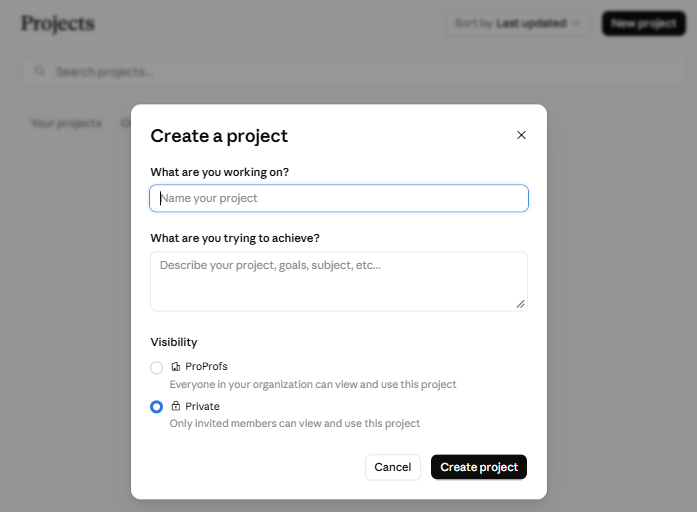
In ChatGPT, create a Project the same way from the sidebar. Either way, this becomes the one home for all your review-writing conversations.
Step 2: Write the Project Instructions
This is the part that does the real work. Inside the project’s instructions field, define:
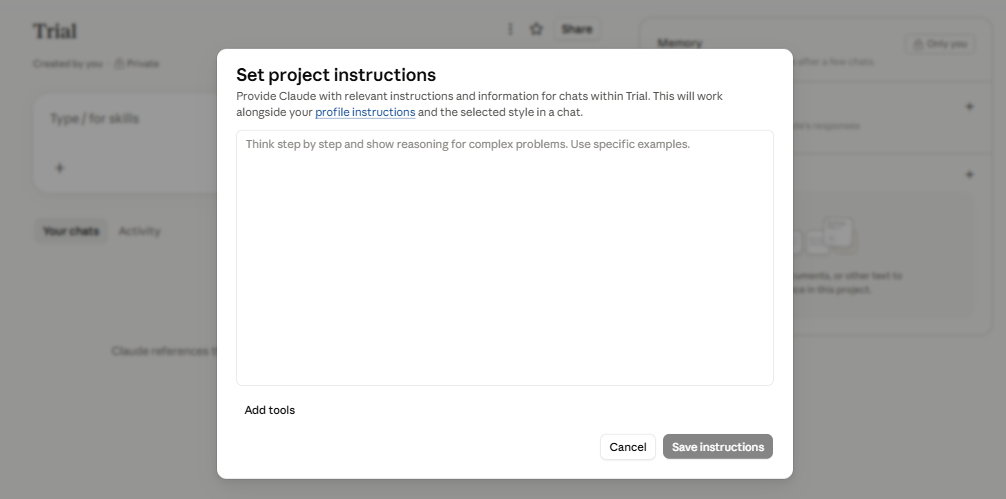
- Role: “You help me draft first-person, constructive performance reviews from manager notes.”
- Required structure: strengths, one growth area, two specific next steps.
- The non-negotiables: never invent facts not in the notes provided, flag inconsistent or biased language, keep tone constructive rather than harsh.
- Masking rule: remind yourself, every time, to strip employee names and client names before pasting notes in.
Write this once, and every review you draft in the project follows the same rules automatically, no matter who wrote the underlying notes.
Step 3: Upload Your Knowledge Base
Add reference material to the project’s knowledge section, so Claude or ChatGPT has real context to draw from instead of generic defaults.
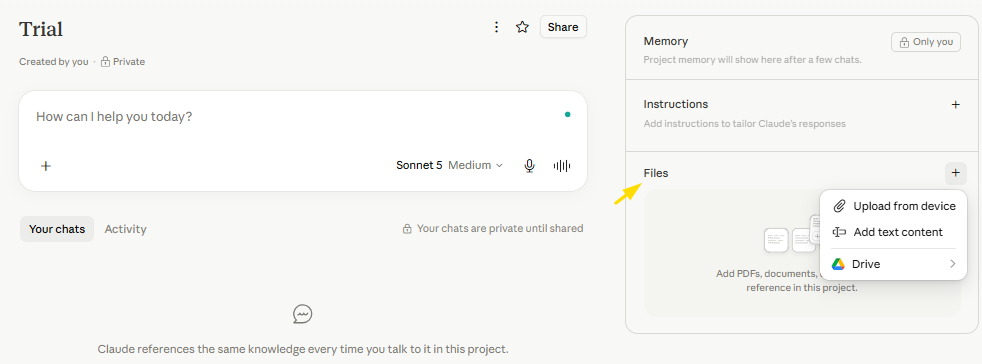
- Your competency definitions or review rubric
- A few past reviews you consider strong examples of tone and depth
- Your company’s review template or format
This is what lets the same project handle an engineer’s review and a salesperson’s review without you re-explaining what “good” looks like each time.
Step 4: Test It With One Real Employee
Paste in masked notes for a single employee and see what comes back. Check it against the final review checklist below. If the tone or structure is off, go back and tighten the instructions rather than fixing it draft by draft.
Step 5: Reuse It for Every Review, Every Role
Once the instructions and knowledge base feel right, every new review is just a new conversation inside the same project.
Paste in that employee’s masked notes, and the project already knows your format, your tone rules, and your non-negotiables, whether the employee is in engineering, sales, support, or HR. This is what actually saves time at scale; you are not rewriting your setup for every single person you review.
7 Best Practices for Turning Notes Into a Finished Review
Once your project is set up, here is the core workflow I walk every manager through inside it, from a blank page to a review that is ready to share.
1. Gather Your Inputs
Pull together everything that actually happened this cycle before you open any AI tool.
- Goal progress and OKR updates
- 1:1 and check-in notes
- Self-assessment
- Peer or 360-degree feedback
The more specific and dated this is, the stronger the draft. A prompt with no real notes behind it always produces generic, forgettable output, no matter how good the tool is.
2. Mask Identifying Data
Before pasting anything into a public AI tool, strip out what you would not want to leave the building.
- Employee name
- Client or project names
- Anything proprietary or confidential
Replace each one with a placeholder like “the employee” or “Project A.” This single habit removes most of the data privacy risk people worry about.
3. Write a Specific Prompt
Tell the AI the employee’s role and level, the review period, and paste in the real notes from point 1. Name the competencies or role-specific evidence you want it to weigh, not just “write a review.” A vague prompt gets you filler text, a specific one gets you a usable draft. Here are three templates you can copy, paste, and fill in for your own use case.
For a standard review:
| Write a performance review for a [role, e.g., mid-level marketing manager] for [review period, e.g., Q2 2026].Here are my notes: [paste check-in notes, goal progress, and any peer feedback].Draft three sections: strengths, one growth area, and two specific next steps. Keep the tone constructive and specific, avoid generic phrases like “great job” or “works well with others.” |
For a high performer up for promotion:
| Write a performance review for a [role and level] being considered for promotion to [next level].Here are my notes: [paste goal outcomes, leadership moments, and peer or 360 feedback].Highlight evidence of readiness for the next level, note one area to develop further, and suggest two growth actions for the next cycle. |
For an underperforming employee:
| Write a performance review for a [role] who missed [specific goals or deadlines] this cycle.Here are my notes: [paste missed deadlines, manager 1:1 notes, and any context on causes].Be direct and factual, not harsh. Include what went well, if anything did, what specifically needs to change, and two measurable next steps with a timeframe. |
4. Generate Two Drafts and Blend Them
Ask for one version that leans more direct and one that leans more developmental in tone, then combine the two. This keeps the final review from reading too harsh or too soft in either direction.
5. Fact-Check and Bias-Check
Read the draft against your original notes line by line.
- Confirm every name, metric, and date actually happened
- Watch for language applied inconsistently across genders or roles
- Flag anything that sounds plausible but was never in your notes
AI can confidently invent details that sound completely real. This check is not optional.
6. Edit Until It Sounds Like the Manager
Replace generic lines with real specifics: “communicates well” becomes “walked the finance team through the Q3 model changes in plain language.” Cut corporate phrases like “leverages synergies.” Read the final version aloud; if it does not sound like something the manager would actually say in a 1:1, rewrite it.
7. Run a Final Check Before It Reaches the Employee
The manager, not the AI tool, is accountable for what gets shared, so treat this as your last line of defense before anything goes out.
- Voice: Does it sound like the manager, or like a generic template?
- Bias: Any language, “abrasive,” “emotional,” “not a team player”, applied inconsistently across people?
- Facts: Does every name, metric, and date check out against the original notes?
- Tone: Is the same competency rated generously in one line and criticized in another without explanation?
Review Comments by Competency and Roles
Different competencies and roles require different evidence to support the prompt. Here is what I feed AI for each one, and what a solid output looks like.
| Competency | Feed AI This | Good Output Looks Like |
| Communication | Specific meeting or presentation examples | “Consistently explains technical decisions in terms non-technical stakeholders understand, though written updates could be more concise.” |
| Leadership | Examples of influencing a decision or supporting a teammate | “Stepped up to mentor two junior hires this quarter, but delegation could improve.” |
| Teamwork | Peer feedback, pasted in verbatim | “Peers consistently mention reliability in cross-team projects, particularly during the Q2 launch.” |
| Ownership | Moments the person caught or fixed a problem unprompted | “Identified a reporting error before it reached leadership and corrected it without being asked.” |
| Engineering | Code review comments, sprint velocity, and incident postmortems, not vague adjectives | “Shipped the migration two sprints early while flagging two edge cases in review that the team had missed.” |
| Sales | Quota attainment, deal complexity, and specific client feedback | “Exceeded quota by 12 percent while carrying the two most complex enterprise accounts on the team.” |
| Customer Support | Resolution time, CSAT scores, and specific escalation handling | “Maintained a 95 percent CSAT while cutting average resolution time by a day, without escalating routine tickets.” |
| HR and People Ops | Process improvements, stakeholder feedback, and confidentiality handling | “Redesigned the onboarding checklist after noticing repeated new-hire questions, cutting time-to-productivity by a week.” |
Building an AI Usage Policy for Reviews
If more than a handful of managers are using AI for reviews, put it in writing rather than leaving it to individual judgment.
- Define What’s Allowed: Spell out exactly which tools are approved, general LLMs, purpose-built HR tools, or both, and what tasks AI can and cannot be used for in a review cycle.
- Set Data Rules: Require that employee names, client names, and proprietary details be masked before pasting anything into a public AI tool. Make this a hard rule, not a suggestion.
- Require Human Sign-Off: State explicitly that no AI-generated review reaches an employee without a manager review and edit. Put this in writing so it survives a change in leadership.
- Train Your Managers: Run a short session on what a good prompt looks like and what the human-in-the-loop checklist requires. Most bad AI reviews come from managers who were never shown how to prompt well, not from the technology itself.
Choosing the Right AI Tool: A Quick Buyer’s Guide
Not every AI tool is built for this job, and the right pick depends on your size and your existing systems.
| General LLMs | Purpose-Built HR Tools | |
| Connects to your goals and feedback data | No, notes are pasted in manually | Yes, pulls from what is already tracked |
| Starting point for a draft | Blank prompt | Real, dated goal progress and feedback history |
| Best fit for | Small teams, occasional use | Teams running structured review cycles at scale |
Note: An AI-generated review is only as good as the data behind it, garbage in, garbage out. PeopleGoal‘s OKR software keeps goals updated weekly rather than setting them once and forgetting them; its 360 Feedback software pulls in structured input from managers, peers, and stakeholders rather than scattered emails.
On top of that, real-time analytics & reports give you a benchmarked view of performance, rather than a manual export. Feed AI clean, centralized data like this, and the first draft comes out dramatically stronger.
Turn AI Into a Better Performance Review Partner
I hope now you understand how to write a performance review using AI. Remember, AI will not replace the judgment a manager brings to a performance conversation, but it will save you the hours spent staring at a blank page trying to find the right words.
Feed it real, specific, well-organized data, run every draft through the human-in-the-loop checklist, and you will consistently ship reviews that are faster to write and more useful to read.
If your reviews are only as strong as the data behind them, start there. PeopleGoal keeps goals, check-ins, and 360 feedback centralized and current, so whatever AI workflow you build on top of it has something real to work with.
Get started free or book a demo to see it with your own team’s data.
Frequently Asked Questions
Is it ethical to use AI to write performance reviews?
Yes, as long as a human reviews, fact-checks, and takes accountability for the final content. The ethical line is using AI as an unreviewed autopilot rather than a drafting assistant.
What data privacy laws should you worry about?
Depending on your region, GDPR or similar data protection rules may apply if you paste employee data into a public AI tool. Masking names and identifying details before pasting reduces this risk significantly.
Can AI completely replace the performance review process?
No. AI can draft the written document, but the coaching conversation, judgment calls, and accountability still sit with the manager and HR team.
Should every manager use the exact same AI tool?
Ideally, yes, for consistency and easier data governance, but what matters more is that everyone follows the same masking rules and human sign-off step, regardless of which tool they use.
What's the biggest mistake HR teams make with AI reviews?
Skipping the fact-check step. AI can confidently include details that never happened, so every specific claim needs to be checked against real notes before it reaches an employee.
Can AI-written performance reviews create legal or compliance risks?
Yes. AI-generated reviews should always be reviewed by a manager before use. Avoid biased language, base feedback on documented performance, and never rely on AI alone for promotion or termination decisions. Keep records of inputs and approvals, and have legal or HR review your AI policy before company-wide adoption.
Do I need to tell employees an AI was involved in their review?
You do not need to announce "an AI wrote this," but you do need a consistent, honest answer if an employee asks. Disclosure can sometimes lower how employees rate the quality of feedback even when the content is identical, so weigh that before broadcasting your workflow company-wide. Either way, the follow-up conversation builds or breaks trust far more than the document does, so protect that 1:1 time regardless of how the draft was written.
Can AI help beyond the annual review cycle?
Yes. Use it to summarize monthly or quarterly check-ins into short progress notes so the eventual annual draft is grounded in real, ongoing data. Scanning those same notes for missed deadlines, disengagement, or a drop in peer feedback also turns a backward-looking review into an early warning system for burnout, and it shortens how much scrambling happens when the official review window opens.
Ready to 3x Your Teams' Performance?
Use the best performance management software to align goals, track progress, and boost employee engagement.