
The first Rippling quote almost never matches the third one. Rippling pulls payroll, benefits, devices, apps, and spend into a single employee record, which is exactly why teams buy it. It is also why people start searching for Rippling alternatives: a module gets added, a renewal lands, or a simple report takes six clicks to find.
Comparing Rippling competitors fairly is harder than finding them. Vendors file the same feature under different names, pricing pages end at “talk to sales,” and a platform that suits a 40-person startup can feel heavy for a 400-person company hiring in three countries.
This guide sorts 10 options by the job each one does best: payroll-first tools, global hiring platforms, PEO-style support, mid-market suites, and software for teams whose real gap is performance reviews, goals, and development. I checked each vendor’s current pricing page and latest user rating, then wrote down who every tool fits and where it falls short. Whether you want a full replacement or a stronger layer on top of what you already run, you will finish with a shortlist and the questions to ask each vendor.
Why Are Teams Looking for Rippling Alternatives?
Teams look for Rippling alternatives mainly because module costs stack up, settings are hard to find in a dense interface, and support routing can feel inconsistent. Others want simpler US payroll, stronger performance reviews, or a more focused global hiring tool. Match your own trigger to the list below before you shop.
Rippling is not a poorly rated product. G2 reviewers give it 4.7 out of 5 across more than 15,000 reviews and praise its connected HR, payroll, IT, and finance workflows. The complaints cluster around a few recurring themes:
- Cost that grows by module: Rippling’s pricing FAQ says each HR, IT, and finance product is bought separately on top of a required core platform, mostly per employee per month. G2 reviewers also raise the added cost of modules and features.
- Dense navigation: G2 reviewers describe a broad platform where some settings are hard to find.
- Support routing: Reviewers describe support as inconsistent or hard to reach when an issue needs specialized help.
- Implementation effort: Reviewers in head-to-head G2 comparisons mention onboarding hurdles and a complex rollout.
- More platform than the job needs: This one is my read, not a reviewer finding. A team that wants only payroll and HR records pays for breadth it may never use.
- Review depth: Teams that mainly need custom review cycles, OKRs, and development plans often add a specialist tool.
These are patterns, not universal facts. One team’s dealbreaker is another team’s non-issue, so match the list to your own pain point.
Vendor friction is common across the whole category. A study by Gartner in 2025 found that 79% of HR technology leaders experience issues with tech providers when purchasing HR software. Ask every vendor to put what a plan includes in writing before you commit.
Rippling covers several jobs in one record, so decide which job you actually want to replace before you shop. This table maps common problems to the capability to look for:
| Problem | Capability to Look For | Tools That Fit |
| Module costs keep climbing | Published, bundled pricing | Gusto, Justworks, BambooHR |
| Hiring people in other countries | Employer of record and global payroll | Deel |
| Slow admin tasks and buried settings | Simple self-service and clear screen layout | BambooHR, Paylocity |
| Rigid review templates | Custom rating scales, OKRs, and 360 feedback | PeopleGoal |
| Benefits and compliance load on a small team | PEO co-employment | Justworks, Paychex |
| Manual payroll corrections | Employee-entered data on a single database | Paycom |
| Hourly schedules tied to pay | Scheduling and time tracking linked to payroll | UKG Ready |
10 Best Rippling Alternatives for 2026
The best Rippling alternatives are HR, payroll, and performance platforms that match your team size, hiring footprint, and budget. I included tools with published pricing or a clear quote model, strong G2 ratings, and real overlap with Rippling’s HR, payroll, or people features. Compare pricing model, payroll depth, global coverage, and review tools first.
| Tool | Best For | Pricing | User Rating (G2) |
| PeopleGoal | Custom review cycles, OKRs, and 360 feedback in one workflow | Free plan available. Paid plans start at $4/user/month. | 4.5/5 |
| Gusto | Published per-person payroll and benefits for small US teams | Starts at $49/month plus $6/person | 4.6/5 |
| Deel | Global payroll, contractor payments, and employer of record hiring | Global payroll starts at $29/employee/month; contractors start at $49/month | 4.7/5 |
| BambooHR | Clean employee records and self-service HR for mid-sized teams | Starts at $10/employee/month | 4.4/5 |
| Paylocity | Unified payroll, HR, and spend tools for mid-market employers | Custom pricing | 4.4/5 |
| Paycom | Employee-driven payroll on a single database | Custom pricing | 4.7/5 |
| Justworks | PEO co-employment with benefits and compliance support | Payroll starts at $8/employee/month plus $50 monthly base fee; PEO starts at $79/employee/month | 4.6/5 |
| HiBob | People-first HR for distributed mid-market teams | Custom pricing | 4.5/5 |
| UKG Ready | Scheduling, time, and payroll for small hourly teams | Custom pricing | 4.4/5 |
| Paychex | Payroll tax compliance and bundled HR for small businesses | Custom pricing | 4.1/5 |
1. PeopleGoal: Best Fully Customizable Platform for Performance Reviews, OKRs & Employee Development
Review season used to mean chasing managers through spreadsheets. In PeopleGoal, I run the whole performance review cycle from one place: I pick the rating scale, write the questions, add competency models, and decide who signs off at each stage. Multi-manager assessments sit inside the same template, so I do not maintain separate forms for different teams.
Goals and conversations share that workflow. I set SMART goals or OKRs and link individual targets to team and company objectives, run one-on-ones from shared agendas, and collect 360 and peer feedback inside the same review. Pulse surveys, eNPS, and culture surveys run alongside, and development plans, career paths, and succession planning keep growth conversations in one system.
PeopleGoal suits HR teams that want reviews, goals, surveys, and development plans in a tool they can shape themselves, either as a replacement for an HR suite’s talent module or as a layer beside it. It does not run payroll, so pair it with the payroll provider you trust. Employee data arrives through HRIS integrations or SFTP file transfer.
Pros:
- Review cycles use custom questions, rating scales, and sign-off steps built from scratch.
- Multi-manager assessments let several managers rate the same employee in one review.
- SMART goals and OKRs link individual targets to team and company objectives.
- 360 and peer feedback, one-on-ones, and development plans sit in the same system as reviews.
- Employee data syncs from ADP Workforce Now, BambooHR, Workday, and Namely, with Slack and Microsoft Teams connections.
Cons:
- No downloadable or on-premise version
- Dark user interface option not available
G2 Rating: 4.5/5
Pricing:
Free plan available. Paid plans start at $4/user/month.
2. Gusto: Best for Predictable Payroll and Benefits in Small US Teams
The new-hire flow was where Gusto made its case. I walked through it as an admin: I entered a name, salary, and email, and the employee completed tax forms, direct deposit, and benefits enrollment on their own, so the record moved into payroll without re-entry.
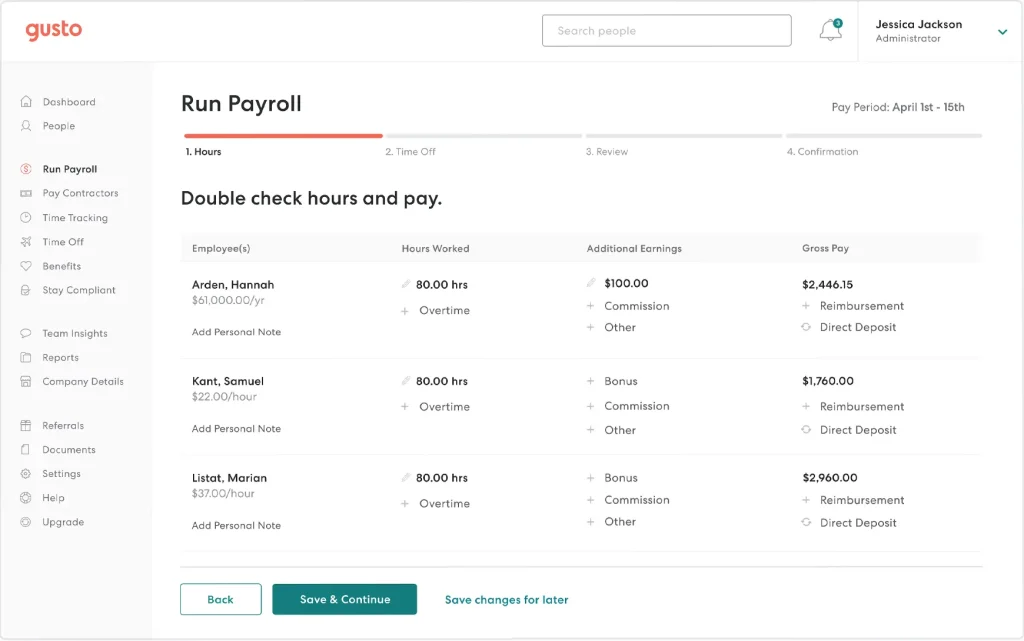
Payroll calculated, filed, and paid federal, state, and local taxes automatically. Performance management, with review cycles, 360 feedback, and OKR goal tracking, was available inside the platform, and benefits administration covered medical, dental, vision, and 401(k) options through licensed advisors. International contractor payments reached more than 120 countries.
Gusto fit US-based small businesses that wanted payroll, benefits, and basic HR in one place. It was built for US employers, so hiring full-time staff abroad would need a second tool, and reviewers I read asked for more flexible reporting and timekeeping.
Pros:
- Custom roles and payroll approvals give growing teams control over who changes what.
- New hires self-onboard with e-signed tax forms, direct deposit, and benefits enrollment.
- Payroll calculates, files, and pays federal, state, and local taxes automatically.
- Benefits administration offers more than 3,500 plan options and syncs deductions with payroll.
Cons:
- Gusto serves US employers, so full-time hiring abroad needs another provider.
- Advanced OKR, weekly check-in, and recognition programs rely on third-party tools.
G2 Rating: 4.6/5
Pricing:
Starts at $49/month plus $6/person.
3. Deel: Best for Global Payroll, Contractors, and Employer of Record Hiring
A hiring plan with a developer in Poland and a designer in Brazil was where Deel earned its place on this list. It was built around the country problem: who legally employs the person, how they get paid, and which local rules apply. I looked at how it handled that through employer of record hiring, global payroll for entities you already own, contractor management, and a US PEO.
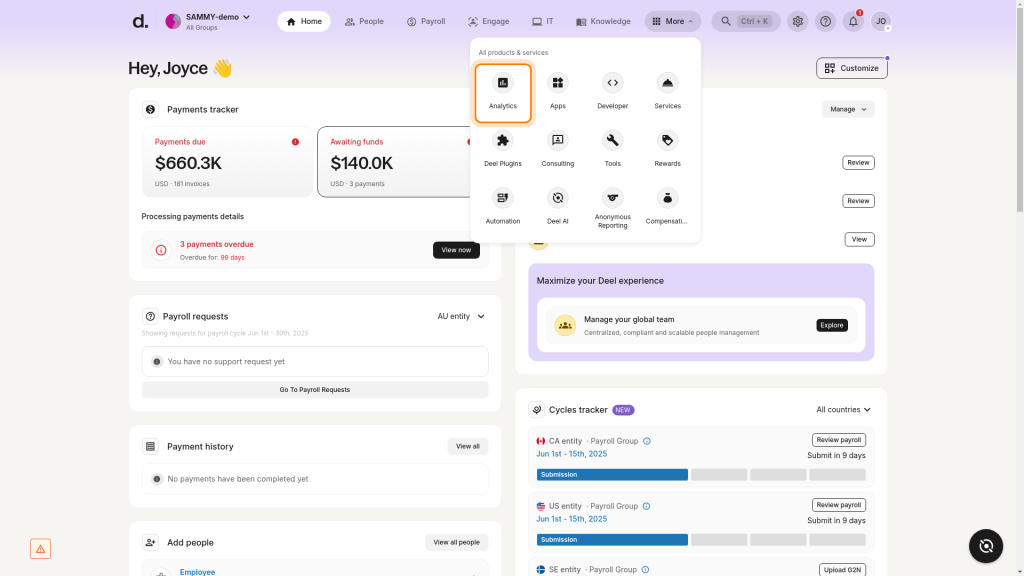
Deel sold each service separately: global payroll, contractor management, a US PEO, employer of record hiring, and applicant tracking and talent tools. Each ran as its own workflow, so a team could start with contractors and add employment later.
Deel fit companies hiring across several countries that wanted contractors, payroll, and employment under one vendor. For teams that employ people in one country, it felt like coverage they would not use, and employer of record hiring seemed heavy for a single hire. I would compare country coverage and service scope before signing.
Pros:
- Employer of record hiring covers more than 130 countries.
- Contractor management handles onboarding and payments for international contractors.
- Global payroll runs for entities you already own.
- A US PEO option covers benefits and compliance for US hires.
Cons:
- Each service runs as its own workflow, so admin spreads across modules and countries.
- Teams that employ people in one country pay for global coverage they do not use.
G2 Rating: 4.7/5
Pricing:
Starts at $29/employee/month.
4. BambooHR: Best for Clean Employee Records and Self-Service HR
The employee directory was the first screen I opened in BambooHR, and it explained the product’s appeal. Records were easy to search, time-off requests and personal detail updates ran through self-service, and the interface felt clean. Reviewers described setup as quick, and compared with Rippling they called it simpler to administer.
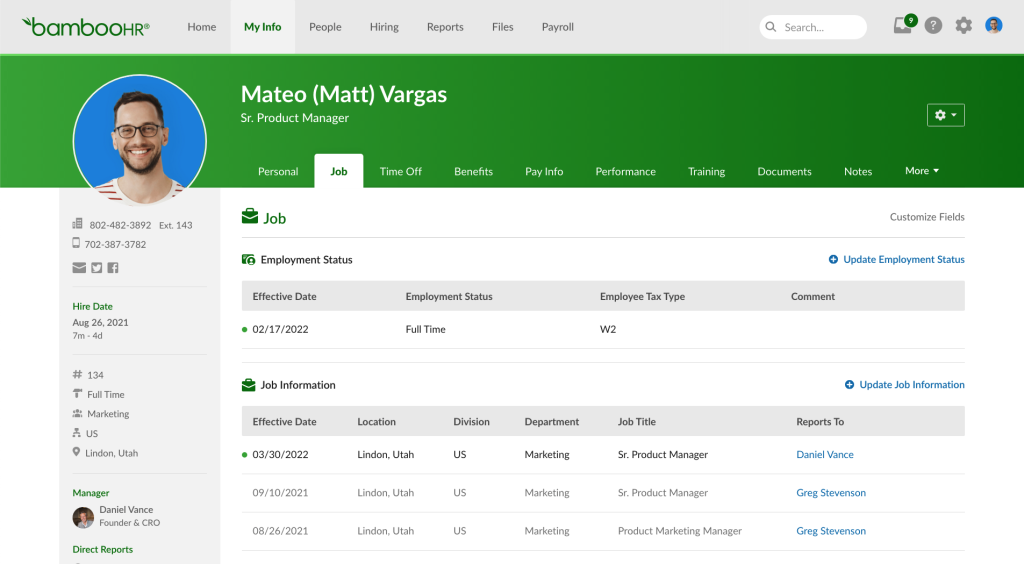
BambooHR organized its plans in tiers, and payroll, benefits administration, and time tracking were add-on modules. The trade I noticed was depth. Reviewers said reporting, workflow customization, and integrations felt limited next to broader platforms.
BambooHR fit small and mid-sized teams that wanted tidy records and smooth self-service more than complex automation. It did not offer device or app provisioning, so teams that valued that part of Rippling would need another tool.
Pros:
- Searchable employee records keep job details, documents, and org data in one place.
- Employee self-service covers time-off requests and personal detail updates without HR.
- A mobile app gives employees access to time off and company information.
- Payroll, benefits administration, and time tracking attach to the same employee records as add-ons.
Cons:
- Reporting depth and workflow customization are limited for complex needs.
- Payroll, benefits administration, and time tracking are separate modules.
G2 Rating: 4.4/5
Pricing:
Starts at $10/employee/month (teams above 25 employees).
5. Paylocity: Best for Unified Payroll, HR, and Spend Tools in the Mid-Market
Paylocity asked how much of payroll, benefits, time, and talent one vendor could carry for a mid-sized employer, and the answer was most of it. Reviewers described a user-friendly platform with straightforward payroll processing, employee self-service, mobile access, and strong reporting, and they praised responsive support.
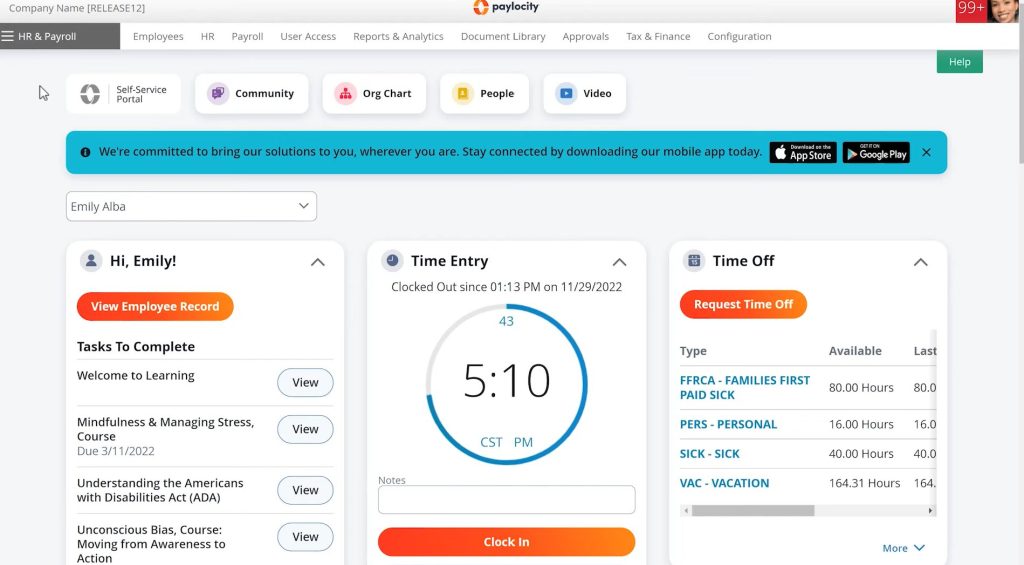
The suite spanned benefits, core HR, payroll, talent, and workforce management, and its spend management and AP automation tools overlapped with Rippling’s finance side. The catch sat between modules. Reviewers reported updating HR, payroll, and time-and-labor areas separately for some changes, and advanced reports or cross-functional workflows sometimes needed manual workarounds or a support request.
Paylocity fit mid-market employers that wanted one vendor for payroll and people operations and had someone to own configuration. Before signing, I would ask how payroll, time, and benefits data sync in your own setup.
Pros:
- Payroll, benefits, core HR, talent, and workforce management share one platform.
- Payroll processing is straightforward, according to reviewers.
- Employee self-service and a mobile app cover pay, time off, and profile access.
- Spend management and AP automation extend the platform into finance tasks.
Cons:
- Reviewers report manual updates between HR, payroll, and time-and-labor areas.
- Advanced reports and cross-functional workflows can need workarounds or support help.
G2 Rating: 4.4/5
Pricing:
Custom pricing.
Link OKRs, One-on-Ones, and Reviews in One Workflow Instead of Three Tabs
6. Paycom: Best for Employee-Driven Payroll on a Single Database
Paycom put the employee to work before payroll ran. Its employee-driven approach had staff review and enter their own data, and reviewers described the employee portal as straightforward: check pay, request time off, track hours, and review benefits in one place. Underneath, payroll, talent acquisition, time and labor, talent management, and HR ran on one database, so a change in one area showed up everywhere without an integration step.
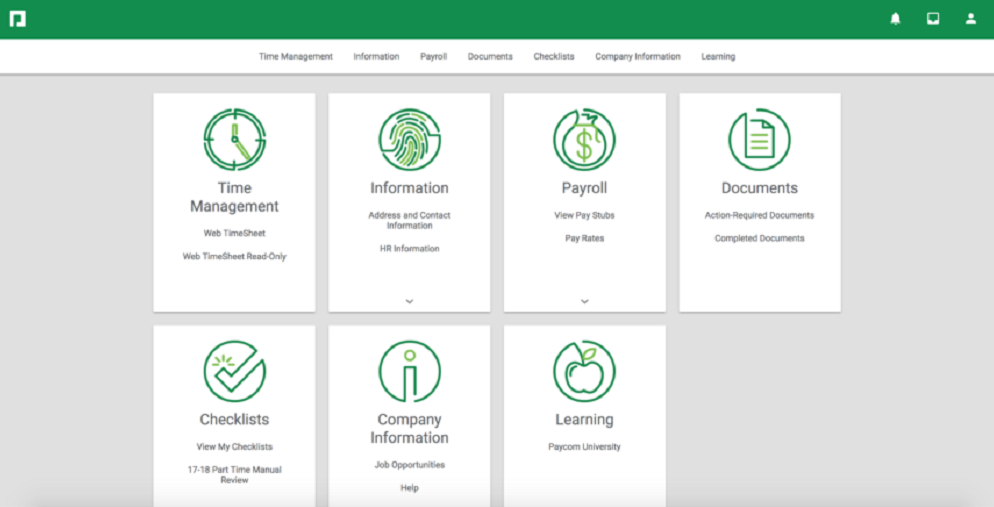
Reviewers praised Paycom’s support and its ability to scale across business sizes. They also noted that manager workflows, such as time-card corrections, onboarding, and less frequent tasks, needed extra navigation or learning, and they rated it slower to show a return than Rippling.
Paycom fit mid-market and larger employers that wanted one system of record and were comfortable with a sales-led buying process. In a demo, I would ask to see your hardest payroll scenario instead of the standard walkthrough, since manager-side tasks were where reviewers reported friction.
Pros:
- A single database holds payroll, talent acquisition, time and labor, talent management, and HR data.
- Employee-driven payroll lets staff review and enter their own data before pay runs.
- The employee portal covers pay, time off, hours, and benefits in one place.
- The platform scales across small, mid-sized, and large employers, according to reviewers.
Cons:
- Manager time-card corrections and less frequent tasks need extra navigation.
- The buying process is sales-led.
G2 Rating: 4.7/5
Pricing:
Custom pricing.
7. Justworks: Best for PEO Benefits and Compliance in Small Companies
Justworks split its offer into four options, which shaped how I read it: a payroll plan, PEO Basic, PEO Plus, and employer of record hiring for teams abroad. They were different products, not tiers of one.
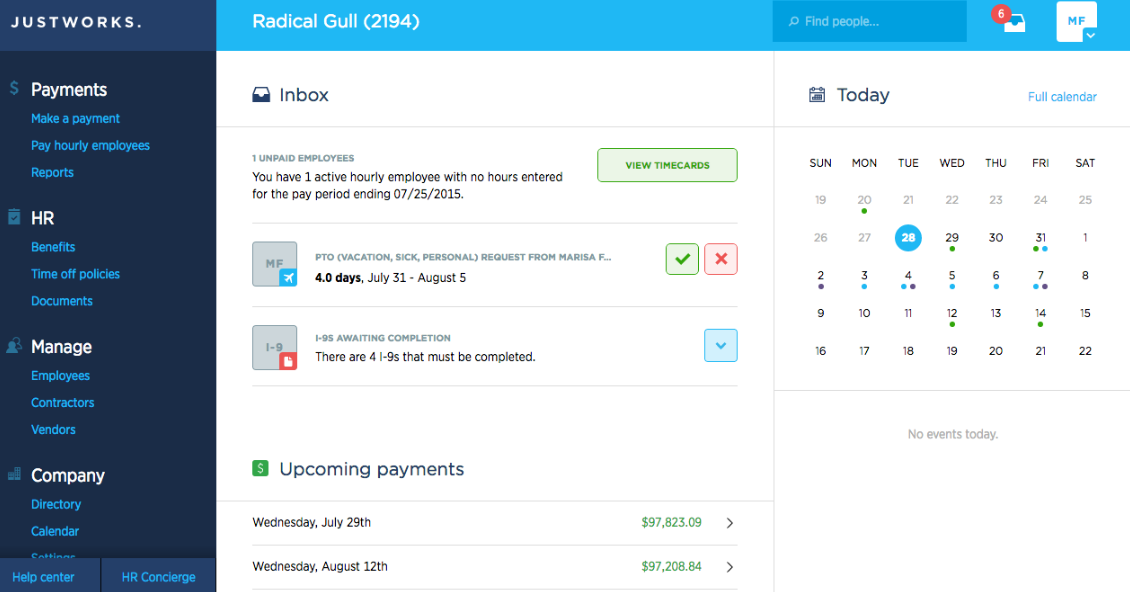
A PEO meant co-employment: Justworks acted as a co-employer, handling payroll, tax filings, compliance support, and access to group-rate benefits. PEO Plus added medical, dental, and vision administration and HSA and FSA accounts. Teams that wanted to skip co-employment could use the payroll plan, and international contractors could be paid as an add-on.
Justworks fit small US employers that wanted hands-on compliance help. Co-employment also meant sharing certain HR decisions and liability with the PEO, so I would involve legal or finance before switching. Reviewers flagged support that lacked expertise on complex issues, along with payroll issues, so I would ask who handles escalations before signing.
Pros:
- Separate payroll, PEO Basic, PEO Plus, and employer of record options fit different team needs.
- PEO plans bundle payroll, tax filings, and compliance support.
- PEO Plus adds medical, dental, and vision administration and HSA and FSA accounts.
- International contractor payments are available as an add-on.
Cons:
- Co-employment means sharing certain HR decisions and liability with Justworks.
- Reviewers report support that lacks expertise on complex issues.
G2 Rating: 4.6/5
Pricing:
Starts at $8/employee/month plus a $50 monthly base fee.
8. HiBob: Best for People-First HR in Distributed Mid-Market Teams
My first step with HiBob was reading what the product bundled. Its platform, Bob, managed the full employment lifecycle and automated routine HR tasks, with performance management, compensation management, and employee surveys beside core HR. Mid-market employers made up most of its reviewer base, and reviewers highlighted easy leave requests, team updates, and integrations with other systems.
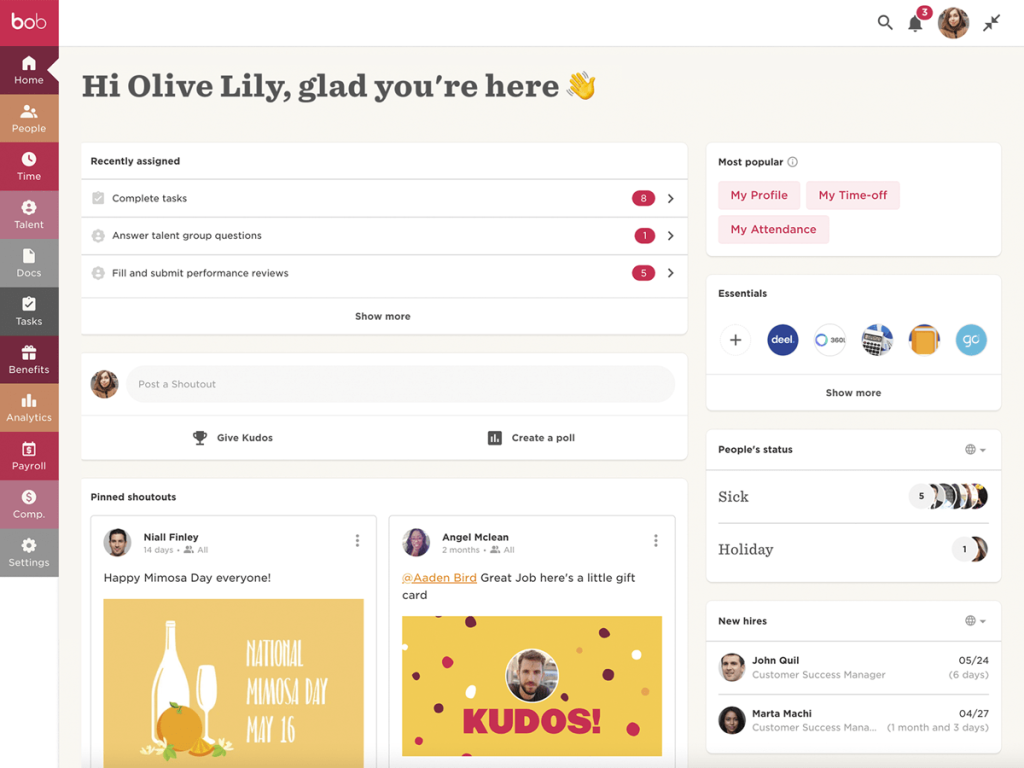
Some reviewers said payroll and applicant tracking integrations still needed manual workarounds, and others described the survey and recognition tools as limited or the feature set as overwhelming. I would confirm in the demo how each module fits your process instead of assuming the full suite is in scope.
HiBob fit mid-market companies with distributed teams that wanted an employee-friendly HR hub. It was a weaker fit if your payroll provider connected only through manual steps, so I would ask which payroll connections are native in each country you hire in.
Pros:
- Core HR tracks the employment lifecycle from onboarding to offboarding.
- Time-off requests, team updates, and company information live in one employee hub.
- Performance management, compensation management, and employee surveys sit beside core HR.
- Mid-market teams make up most of its reviewer base, so the feature set targets companies of 51 to 1,000 employees.
Cons:
- Some reviewers report manual workarounds for payroll and applicant tracking integrations.
- Reviewers describe survey and recognition tools as limited and some features as complex.
G2 Rating: 4.5/5
Pricing:
Custom pricing.
9. UKG Ready: Best for Scheduling, Time, and Payroll in Small Hourly Teams
UKG Ready listed employee scheduling among the categories it shared with Rippling, so scheduling was where I started. The product was designed for small businesses where everyone wears multiple hats, with HR, payroll, talent, and time in one application. Reviewers described access as easy and simple.
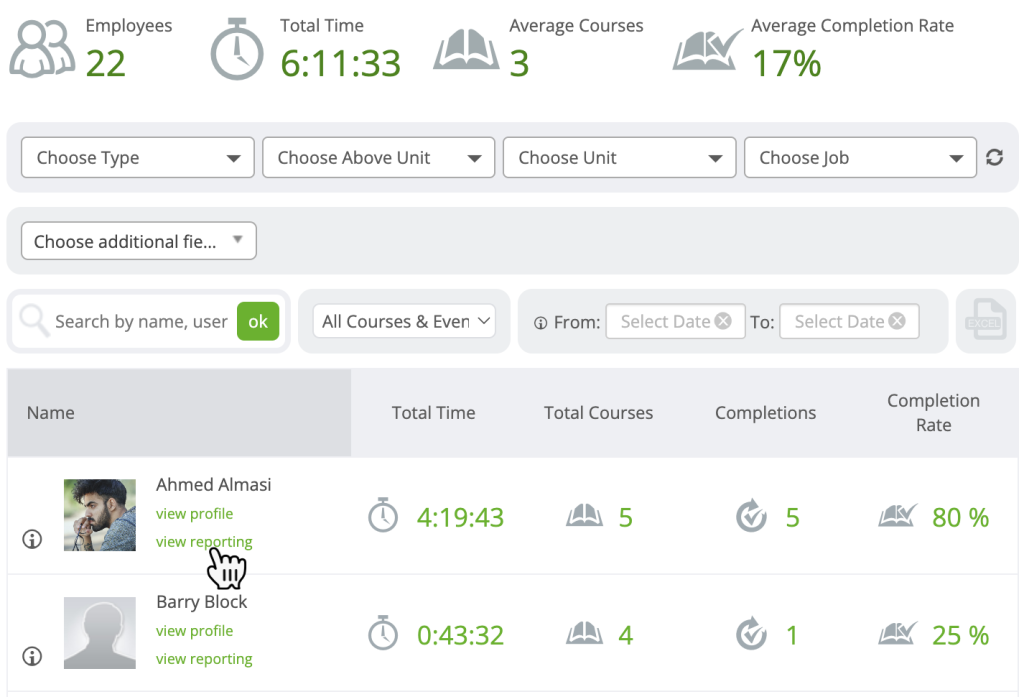
Scheduling, time, and payroll sat together, so hours worked connected to pay without a second system. The platform also covered recruiting tools, benefits administration, and HR analytics. Reviewers rated it slower to reach ROI than Rippling.
UKG Ready fit small employers with hourly staff that wanted scheduling, time, payroll, and HR from one vendor. It was a weaker fit if my main reason for choosing Rippling had been cross-system workflow automation.
Pros:
- HR, payroll, talent, and time tools share one application.
- Employee scheduling supports hourly teams.
- Recruiting and benefits administration tools sit in the same platform.
- HR analytics give managers reporting on workforce data.
Cons:
- Its all-in-one scope may exceed what teams without hourly staff need.
- Fit depends on how much scheduling your team needs.
G2 Rating: 4.4/5
Pricing:
Custom pricing.
10. Paychex: Best for Payroll Tax Compliance and Bundled HR in Small Businesses
Paychex was the most familiar name on my list, and the portal felt familiar too. The company positioned itself around reducing the complexity and risk of running your own payroll, with up-to-date tax rates and regulatory information behind each run. Reviewers described a practical choice for small businesses that wanted straightforward payroll, tax filing, time tracking, reporting, and bundled HR tools, with easy onboarding.
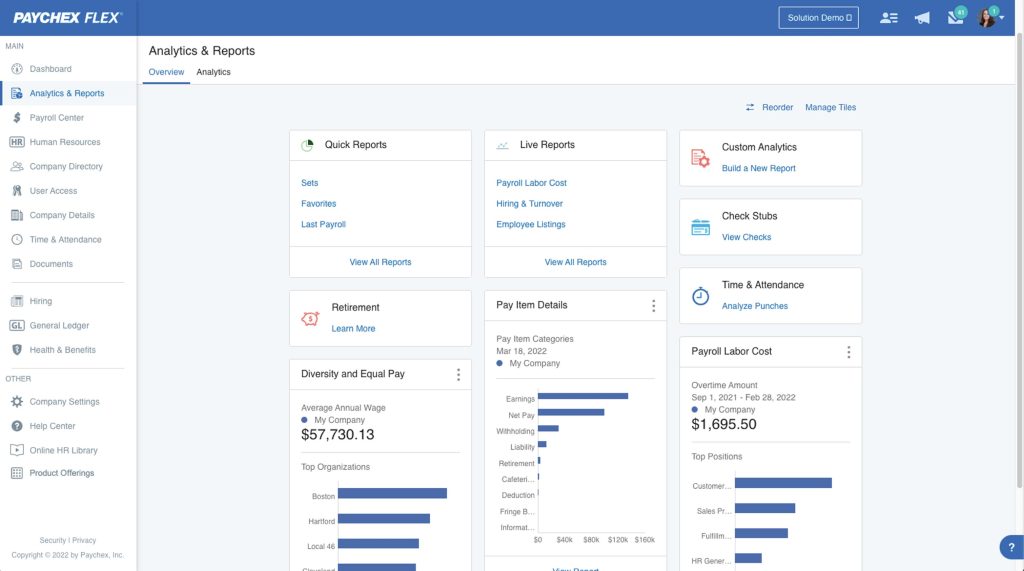
It overlapped with Rippling in PEO services, benefits administration, and HR analytics. The friction showed up around the edges. Reviewers described support that routed through changing representatives or departments, add-on sales, and inconsistent integrations.
Paychex fit small US businesses that valued payroll compliance over workflow automation. It was a weaker fit for global employees or contractors, which one reviewer said the platform did not suit. I would ask what the initial package includes and which add-ons you would need.
Pros:
- Payroll uses up-to-date tax rates and regulatory information to reduce filing risk.
- Tax filing, time tracking, and reporting come with bundled HR tools.
- Onboarding is straightforward, according to reviewers.
- A PEO option serves teams that want co-employment.
Cons:
- Reviewers report add-on sales and inconsistent integrations.
- Reviewers say it is less suited to global employees and contractors.
G2 Rating: 4.1/5
Pricing:
Custom pricing.
How Did I Evaluate These Rippling Alternatives?
The evaluation of products or tools chosen for this article follows an unbiased, systematic approach that ensures a fair, insightful, and well-rounded review. This method uses six key factors:
- User Reviews / Ratings: Direct experiences from users, including ratings and feedback from reputable sites such as G2, provide a ground-level perspective. This feedback helps identify overall satisfaction and recurring problems.
- Essential Features & Functionality: Evaluate the core features and determine how effectively each tool handles the main use cases associated with Rippling alternatives, such as HR records, payroll, global hiring, and performance reviews.
- Ease of Use: Assess the interface, navigation, setup requirements, learning curve, and day-to-day usability for the intended audience.
- Customer Support: Examine support channels, documentation, onboarding resources, response options, and assistance during setup and ongoing use.
- Value for Money: Compare pricing with features, limits, scalability, and practical value to determine whether the product offers reasonable value for its intended users.
- Personal Experience / Experts’ Opinions: Include observations from practical evaluation where available, along with credible expert commentary and recurring user feedback.
If reviews and goals are your biggest gap, this guide on how to choose performance management software expands on each factor.
What Are My Top 3 Picks for the Best Rippling Alternatives?
Each of these Rippling competitors fits a different need, so no single tool is the right answer for everyone. Pick based on whether your biggest gap is review depth, simpler payroll and benefits pricing, or global hiring.
1. PeopleGoal
PeopleGoal is the best fully customizable platform for performance reviews, OKRs & employee development, and it suits HR teams that want to design their own review cycles instead of adapting to a fixed template. Shortlist it if reviews, goals, surveys, and development plans live in too many places, or if you want a talent layer beside whichever payroll provider you keep. The tradeoff is that it does not run payroll, so pair it with a payroll system.
2. Gusto
Gusto is the simplest fit for a small US team that wants payroll, benefits, and basic HR in one place. Shortlist it if a layered setup was your main frustration and your employees work in the United States. The tradeoff is that hiring abroad needs a second provider, and advanced performance tools rely on integrations.
3. Deel
Deel is the strongest option here for companies that hire in several countries and want contractors, global payroll, and employer of record hiring from one vendor. Shortlist it if the number of countries on your team is growing faster than your legal entities. The tradeoff is scope: employer of record hiring is heavy for a single hire, and each service runs as its own workflow.
Choose From the Best Rippling Alternatives to Simplify HR, Payroll, and Reviews
Leaving Rippling is rarely about one feature. It usually means deciding which of its jobs you want to hand to someone else: payroll, HR records, global hiring, device management, or performance reviews. Some teams want one new system to replace all of it. Others keep the parts that work and fix a single weak spot.
The right choice depends on your use case, team size, budget, integrations, and growth plans. Small US teams often do well with published-price tools such as Gusto and Justworks, mid-market buyers should weigh support, reporting, and how modules sync, and companies hiring abroad should confirm country coverage first.
If customization is the gap you feel most, PeopleGoal is worth a look as the best fully customizable platform for performance reviews, OKRs & employee development. A simple next step is to build one review cycle with your own rating scale and sign-off steps, see whether it fits how your managers actually work, and keep your current payroll provider in place while you test.
Pilot Your Own Rating Scale and Sign-off Steps During a 14-Day Free Trial
Frequently Asked Questions
How Much Does Rippling Cost?
Rippling publishes a starting price of $8 per employee per month plus a monthly base fee. Payroll, benefits, IT, and finance products are separate modules, so total cost depends on headcount and the modules you add. Ask for a written quote that lists every module before comparing vendors.
Is There a Free Alternative to Rippling?
Free options are limited. PeopleGoal offers a 14-day free trial, while Gusto, Justworks, BambooHR, and Deel publish entry prices. Check exactly what a free trial or entry plan includes before you rely on it for a full HR and payroll workflow.
What Are the Best Rippling Alternatives for Small Businesses?
Gusto, BambooHR, and Justworks suit small teams. Gusto offers published per-person payroll pricing, BambooHR focuses on clean records and self-service, and Justworks adds PEO benefits support. Teams that mainly need reviews and goals can add a dedicated tool, covered in our guide to performance management software for small business.
Which Rippling Alternative Works Best for Global Teams?
Deel is built for global hiring, with employer of record coverage in more than 130 countries from $599 per employee per month, global payroll from $29, and contractors from $49. Rippling also sells global payroll and EOR as modules, so confirm country coverage and pricing for each location.
Can Another Platform Replace Rippling's IT and Device Management?
Few alternatives match Rippling's IT layer natively. Check each vendor's device and app management coverage before you switch, and plan to pair an HR and payroll platform with a dedicated IT tool when it falls short. Decide first whether IT management was a reason you chose Rippling.
How Long Does It Take to Switch From Rippling?
Timelines depend on payroll complexity, headcount, and data cleanup. PeopleGoal lists an average implementation of one to six weeks, and Gusto reviewers most often report going live in under a month. Start before your renewal date and run both systems in parallel for one payroll cycle.
Can I Keep Rippling and Add a Performance Tool?
Yes. Many teams keep one system for payroll and HR records and add a dedicated tool for reviews, OKRs, and development. Confirm that the tool imports employee data through an HRIS integration or file transfer so managers avoid double entry.
Is Rippling Better Than Gusto?
It depends on the job. Gusto suits small US teams that want published per-person pricing, while Rippling suits teams consolidating HR, IT, and finance workflows on one employee record. Compare headcount, hiring locations, and whether IT management matters before you choose.
Should I Choose a PEO or HR Software Instead of Rippling?
Choose a PEO such as Justworks if you want a co-employer to handle benefits, compliance, and payroll taxes. Choose HR software if you want to remain the sole employer. Co-employment shares certain HR decisions and liability, so involve legal or finance first.
Ready to 3x Your Teams' Performance?
Use the best performance management software to align goals, track progress, and boost employee engagement.