
Finding the right performance management software for accounting firms became urgent for me the night a talented senior associate quietly handed in his notice. The problem was not his workload or compensation. Nobody had consistently told him he was doing great work.
That moment stuck with me because poor performance management often stays invisible until a good employee decides to leave. According to the State of Company Culture Report in 2025, more than 70% of employees say they need to feel engaged at work to stay with an organization long term.
If you are the firm administrator or HR manager holding review season together with PDF forms, spreadsheets, and a shared inbox, this guide is for you. I break down 10 tools built around how accounting firms actually operate, how I evaluated them, and which ones make the most sense for different firm sizes and review structures.
What Is Performance Management Software for Accounting Firms?
Once that manual process gets digitized, the actual payoff of switching to dedicated accounting firms performance management software shows up fast:
- You stop losing hours to manually emailing forms to different managers and chasing signatures
- Review cycles can align with your firm’s actual cadence, whether that is January to June and July to December, or tied to audit and tax season
- Managers can evaluate staff who work across more than one engagement or report to more than one partner
- HR gets a single dashboard instead of pulling data from five different files
- New hires get a structured onboarding checklist instead of a folder of paperwork handed over on day one
10 Best Accounting Firms Performance Management Software
I compared these 10 tools specifically on how well they handle matrixed reporting, busy season timing, and evaluator tracking, the three things generic HR software usually gets wrong for an accounting firm. Here is the quick comparison before I break down each one.
| Tool | Best For | User Rating | Price |
| PeopleGoal | Fully customizable performance reviews, OKRs, and employee development | 4.5/5 (G2) | Free 14-day trial; starts at $4/user/month |
| PerformYard | Running concurrent review cycles across audit, tax, and advisory teams | 4.7/5 (G2) | Starts at $5–$15/person/month |
| Synergita | Continuous performance appraisals with 360-degree feedback tied to goals | 4.6/5 (G2) | Starts at $2/user/month |
| 15Five | Continuous feedback and manager coaching beyond annual reviews | 4.6/5 (G2) | Starts at $4/user/month, billed annually |
| Trakstar | Deep, customizable review templates for firms of any size | 4.4/5 (Capterra) | Custom quote |
| Engagedly | Bundling performance reviews, OKRs, and learning in one platform | 4.3/5 (G2) | Starts at $5–$8/user/month |
| Lattice | Connecting performance reviews with OKRs and compensation | 4.6/5 (G2) | Starts at $13/user/month, billed annually |
| Betterworks | Multi-office firms needing performance calibration at scale | 4.4/5 (G2) | Starts at $8/user/month |
| ClearCompany | Combining hiring, onboarding, and performance management | 4.6/5 (G2) | Custom quote |
| BambooHR | Basic performance reviews within an existing HRIS | 4.4/5 (G2) | Starts at $10/employee/month |
1. PeopleGoal – Best for Fully Customizable Performance Reviews, OKRs, and Employee Development
When it comes to performance management software for accounting firms, most options force you into a rigid template, and that is exactly where PeopleGoal earns its spot at the top of this list. Every workflow inside the platform is no-code customizable, so I could design a review cycle matching our firm’s actual reporting lines instead of forcing audit, tax, and advisory teams into one identical template.
The multi-dimensional org chart feature was a genuine surprise. It captures the “n:n” reality of engagement teams where staff report to more than one manager, how most accounting firms are structured day to day. Layer in 360 feedback with adjustable anonymity, OKRs, and SMART goals side by side, and real-time dashboards replacing manual exports, plus automated onboarding.
Integrations with BambooHR, ADP, Workday, and Slack kept our HR stack intact. For a firm administrator juggling multiple engagement cycles without dedicated IT, this flexibility drives adoption.
Pros:
- No-code workflows let you build any review cycle without needing IT help
- Adjustable anonymity settings encourage more honest 360-degree feedback
- OKRs and SMART goals together keep every goal-setting style in one place
- Multi-dimensional org charts capture staff who report to more than one manager
- Built-in App Store offers ready-made apps, workspaces, and templates for faster setup.
- Real-time dashboards replace manual data exports with instant visibility
- Automated employee onboarding gets new hires productive faster
- Integrations with BambooHR, ADP, Workday, and Slack keep your existing HR stack connected
Cons:
- No downloadable or on-premise version
- Dark UI mode is not available
User Rating: 4.5/5 (G2)
Pricing: FREE 14-day trial. Paid starts at $4/user/month
Ataway consolidated performance management for 300+ employees into a single system with PeopleGoal, giving HR a clearer view of goals, progress, and overall performance.

2. PerformYard – Best for Running Concurrent Review Cycles Across Audit, Tax, and Advisory Teams
PerformYard was the first tool that made me stop dreading review season entirely. It is built specifically for matrix-style organizations, which is exactly what an audit, tax, and advisory practice looks like on paper. I could actually run concurrent review cycles for different departments on completely different timelines instead of forcing everyone onto one fiscal-year clock.
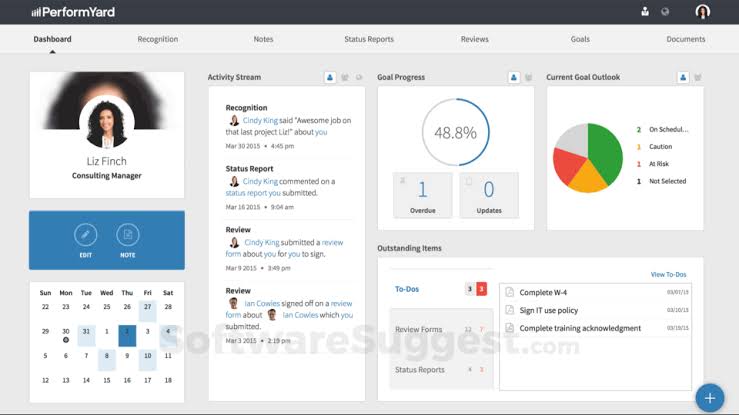
The platform ties review timing to project or engagement completion rather than to a fixed calendar, so evaluations reflect actual client work rather than a generic annual window. 360-degree feedback, project-based reviews, and self-assessments fall within the same cycle, and every customer gets a dedicated success manager for onboarding and the first-cycle launch.
Goal management connects directly to outcome review, and continuous feedback shortens the lag between doing good work and hearing about it. If your firm runs on busy-season timing rather than a plain calendar year, this is genuinely worth a serious, close look.
Pros:
- Matrix-style structure supports staff who report to more than one manager
- Cycles tied to engagement timelines mean reviews reflect real client work
- Built-in 360 and project-based reviews cover more than one review type without add-ons
- A dedicated success manager makes onboarding and rollout easier
- Continuous feedback tools cut the lag between good work and recognition
Cons:
- Broader HR functionality, like payroll or benefits, is not included
- Pricing requires a custom demo rather than published self-serve rates
User Rating: 4.7/5 (G2)
Pricing: Starts at $5–15/person/month
3. Synergita – Best for Continuous Performance Appraisals With 360 Feedback Tied to Goals
I brought Synergita in for a team that had let annual reviews turn into a checkbox exercise, and the same fix applies neatly to an accounting firm setting. Instead of a single form filled out once a year, employees log key results continuously, while peers, managers, and cross-functional reviewers weigh in throughout each engagement.
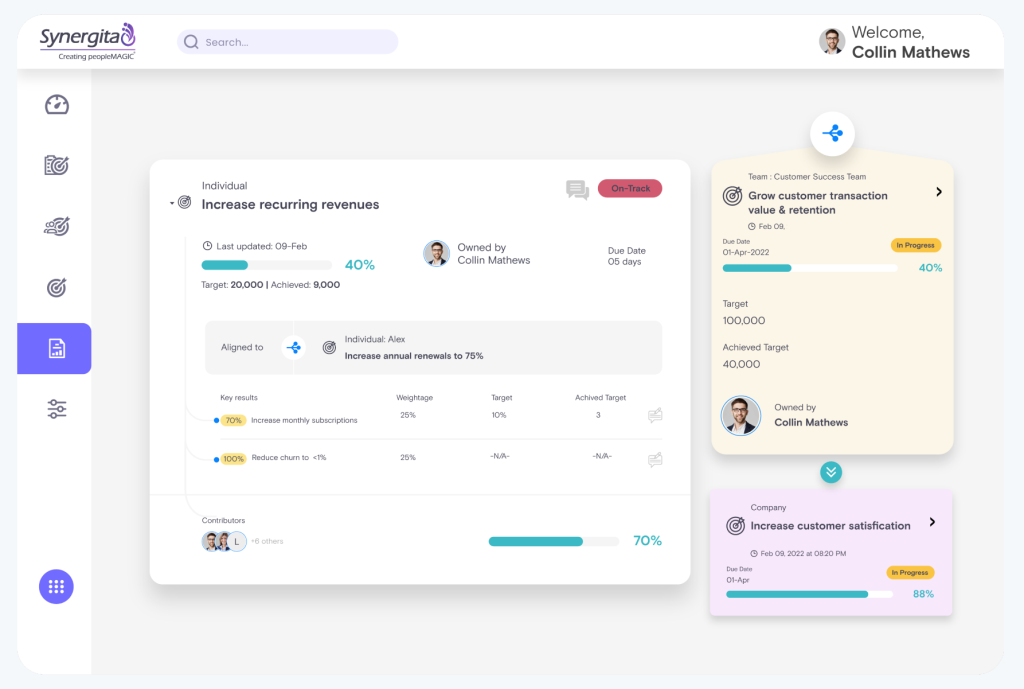
By review season, you are working from real, documented input rather than a blank form and guesswork. Customizable review templates and rating scales mean a tax team and an advisory team do not have to share identical forms, and calibration sessions flatten the rating bias that creeps in when different partners grade their own people differently.
Automated review cycles keep everyone compliant with your firm’s cadence, whether that is quarterly or tied to busy season. Built-in analytics surface who is ready for more responsibility and where skill gaps are forming before they turn into a staffing problem.
Pros:
- 360 feedback tied to logged goals grounds reviews in real, documented input
- Customizable forms let different teams use different rating criteria
- Calibration sessions flatten out inconsistent ratings across partners
- Built-in analytics flag high performers and skill gaps early
- Automated cycles keep every review on schedule without manual chasing
Cons:
- Interface feels dated compared to newer platforms
- Best suited to HR-led rather than manager-led rollouts
User Rating: 4.6/5 (G2)
Pricing: Starts at $2/user/month
4. 15Five – Best for Continuous Feedback and Manager Coaching Over Annual Only Reviews
Nobody on our team looked forward to the once-a-year review conversation, and that is the exact problem 15Five is built to solve. Weekly check-ins replace the long silence between reviews, giving managers a running record of wins, blockers, and confidence levels rather than having to reconstruct 12 months from memory.
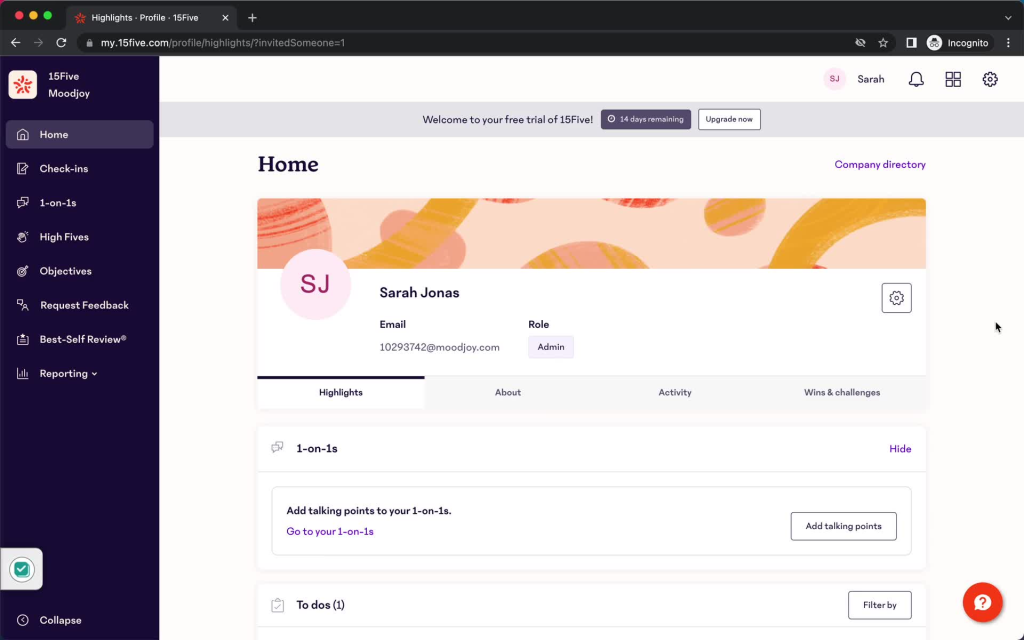
Goal and OKR tracking sits right alongside the check-in flow, so alignment stays visible instead of being buried in a spreadsheet nobody opens. One-on-one meeting tools give managers a shared agenda and a history of notes, which matters when juggling several client engagements at once.
Engagement surveys run on the same platform, so you are not stitching together separate tools for sentiment tracking. Slack and Microsoft Teams integrations place reminders where staff already work, rather than adding another login to check. For firms trying to shift away from a single annual review toward an ongoing conversation, this makes that transition far less painful.
Pros:
- Weekly check-ins build a running record instead of relying on year-end memory
- Goal and OKR tracking inside the check-in flow keeps alignment visible week to week
- Structured one-on-one tools give managers a shared agenda and notes history
- Built-in engagement surveys mean no separate sentiment tool to manage
- Slack and Microsoft Teams integrations put reminders where staff already work
Cons:
- Costs can add up once coaching or compensation add-ons are included
- Deeper structural customization is limited compared to review-first platforms
User Rating: 4.6/5 (G2)
Pricing: Starts at $4/user/month, billed annually.
5. Trakstar- Best for Deep, Customizable Review Templates for Firms of Any Size
When a firm tells me they need real structure in their review forms, weighted competencies, multiple reviewer types, and a rating scale that matches how partners actually evaluate staff, Trakstar is usually where I point them.
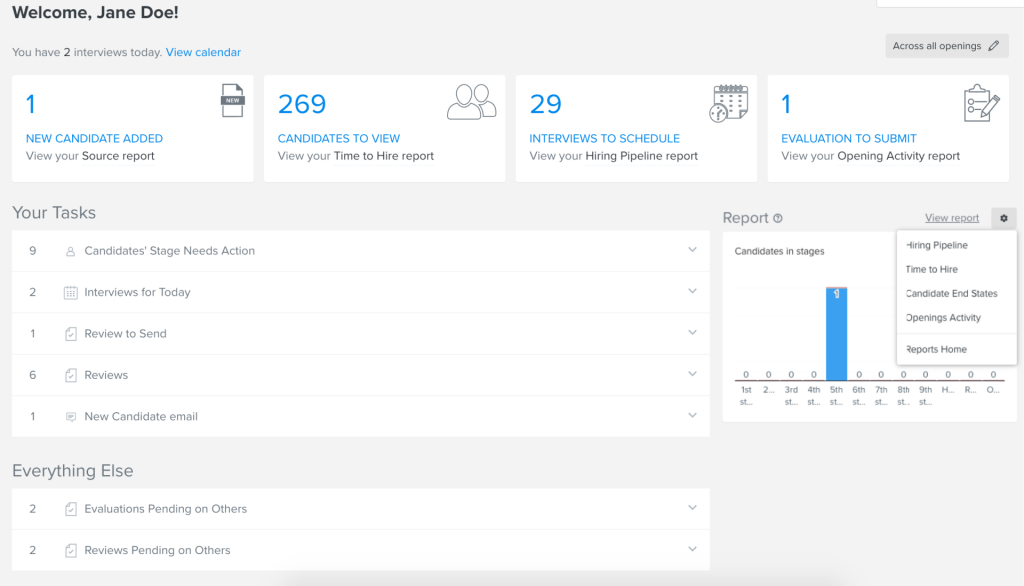
The review templates go deeper than most tools on this list, letting you build competencies, weighted sections, and multi-reviewer support so a tax associate and an audit senior are not graded on identical criteria. Review cycles can run annually, semi-annually, quarterly, or tied to a project, fitting the uneven rhythm of client-facing accounting work better than a fixed calendar.
Manager calibration views catch the inconsistency that happens when partners rate their own teams differently. 360-degree feedback layers on top with configurable anonymity, and automated email reminders keep a manual, paper-driven review process from quietly falling apart. It works well for firms under roughly five hundred employees wanting review depth without a heavier continuous-feedback platform.
Pros:
- Weighted competencies let you grade different roles on different criteria
- Flexible cycle types fit the uneven rhythm of client-facing work
- Calibration views catch inconsistent ratings across partners
- Configurable anonymity in 360-degree feedback encourages more honest input
- Automated email reminders keep a paper-driven process from falling apart
Cons:
- Continuous feedback and one-on-one tools are not built in
- Third-party integrations are more limited than larger suites
User Rating: 4.4/5 (Capterra)
Pricing: Custom Quote
6. Engagedly – Best for Bundling Performance Reviews, OKRs, and Learning in One Contract
I have recommended Engagedly to firms that were tired of paying for three separate contracts to cover performance reviews, goal tracking, and staff training. Everything genuinely sits inside one single subscription: 360-degree reviews, OKR tracking, a built-in learning management system, and Marissa, an AI coaching tool that gives first-time managers conversation starters instead of leaving them to wing a review conversation alone.
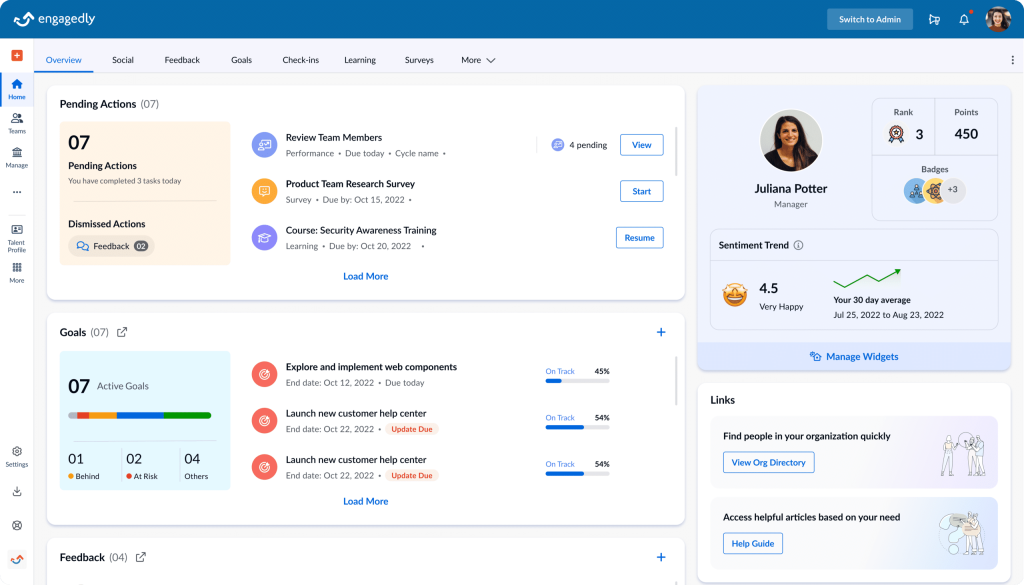
Goal alignment cascades from firm-wide objectives down to individual staff, with progress tracked in real time so nobody is surprised at review time. Configurable review templates and OKR cycles mean a growing firm can adjust the process as headcount changes without switching vendors entirely.
The interface is not the sleekest on this list, and setup takes real effort upfront, but for a mid-sized firm that wants performance management and learning and development handled by one platform instead of three separate logins, the value is genuinely hard to match.
Pros:
- One subscription for reviews, OKRs, and an LMS cuts vendor sprawl
- AI coaching gives first-time managers ready-made conversation starters
- Goal cascading keeps individual work tied to firm-wide objectives
- Configurable templates adapt as headcount grows without switching vendors
- Responsive customer success support smooths out a genuinely complex setup
Cons:
- Interface feels less polished than newer competitors
- Platform carries a minimum spend that can price out very small firms
User Rating: 4.3/5 (G2)
Pricing: Starts at $5-$8/user/month
7. Lattice – Best for Tying Performance Reviews Tightly to OKRs and Compensation
For a firm large enough to run compensation cycles alongside performance reviews, Lattice is the platform I bring up first. Review cycles, from project-based to 360-degree, connect directly to goals and OKRs staff have already logged, so managers work from real context instead of trying to recall a year of work from memory.
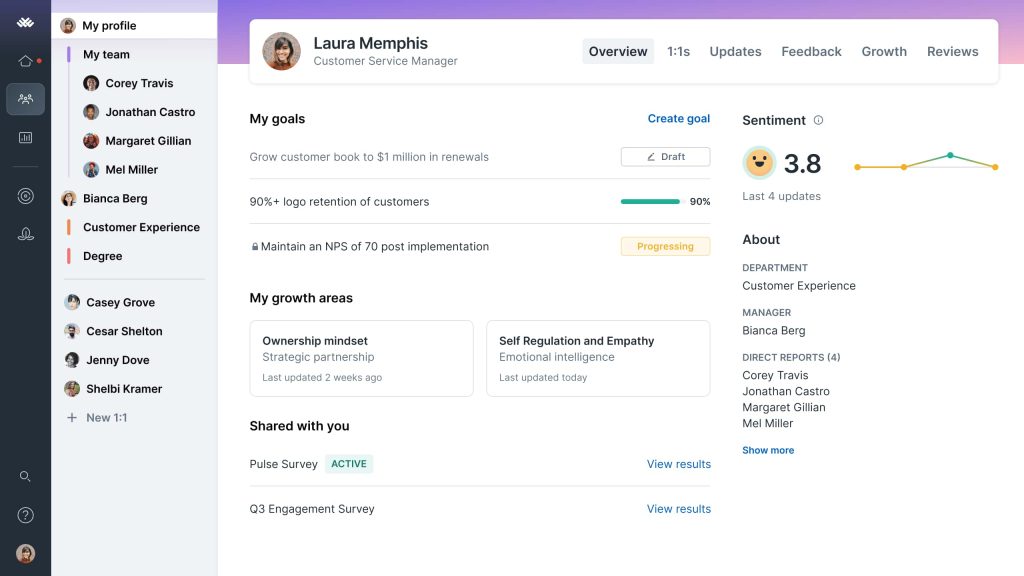
Continuous feedback and structured one-on-one tools keep the conversation going between formal cycles, and compensation planning ties merit decisions back to actual performance data instead of a spreadsheet built separately by finance. The AI layer can draft review summaries and coaching prompts, saving real time during a busy review season.
Fifty-plus native integrations mean it slots into an existing tech stack without much friction. It is priced and built for firms with real headcount and a dedicated HR function, so a five-partner practice will likely find it heavier and pricier than what it needs day to day.
Pros:
- Reviews pull directly from logged goals, so managers work from real context
- Continuous feedback keeps the conversation going between formal cycles
- Compensation planning ties pay decisions to actual performance data
- AI-drafted review summaries save real time during the busy season
- Fifty-plus integrations slot into an existing tech stack with little friction
Cons:
- Entry pricing carries a minimum annual spend
- Better suited to firms with a dedicated HR function than very small practices
User Rating: 4.6/5 (G2)
Pricing: Starts at $13/user/month, billed annually.
8. Betterworks – Best for Multi-Office Firms Needing Calibration at Scale
A friend of mine runs HR for a firm with offices in three states, and calibration was her biggest headache before Betterworks. Its calibration module gets everyone on the same page once multiple offices rate staff differently, turning inconsistent ratings into sessions leadership could finally trust.

Cascading OKRs gave her firm visibility into how goals roll up to strategy, and continuous check-ins captured signals as they happened instead of waiting for a formal cycle. The AI-powered insights surfaced patterns across teams that would have taken her team weeks to spot manually.
She calls it a genuinely enterprise-grade platform, built for organizations managing performance at real scale rather than one office running a review cycle a year. Implementation took real effort, and the sales process stayed consultative rather than self-serve. For a firm with a handful of partners and a lean admin team, this is more platform than needed right now.
Pros:
- Calibration gets every office rating staff on the same page
- Cascading OKRs show how individual goals roll up to firm strategy
- Continuous check-ins catch performance signals before the formal cycle
- AI insights surface patterns that a manual review would take weeks to find
- Built for multi-location firms managing performance at real scale
Cons:
- No published self-serve pricing
- Implementation and rollout require more time than smaller platforms
User Rating: 4.4/5 (G2)
Pricing: Starts at $8/user/month
9. ClearCompany – Best for Firms That Want Hiring, Onboarding, and Performance in One System
A colleague of mine handles both recruiting and performance reviews for her firm, and ClearCompany was genuinely built for exactly that kind of dual role. The platform covers the full lifecycle: applicant tracking for hiring seasonal or year-round staff, digital onboarding with e-signatures, and a performance module with goal setting and 360-degree feedback once someone joins the team.
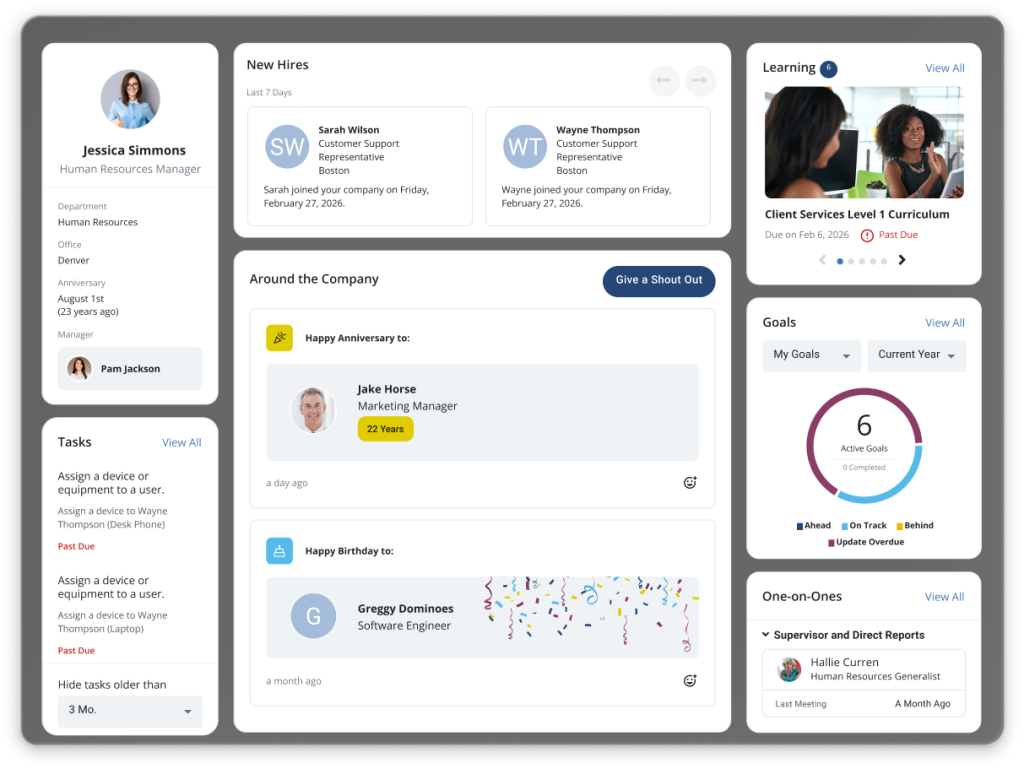
Because recruiting and performance data live in one place, a candidate’s hiring notes and skills carry straight through into their first review cycle instead of getting lost between separate systems. She uses its customizable reporting to track everything from time-to-hire to review completion rates in one dashboard.
Integrations connect with common payroll and HR systems, so she is never re-entering the same employee data twice. For a smaller admin team handling hiring and performance without separate specialists for each, having both together under one login genuinely cuts down on the daily busywork.
Pros:
- Applicant tracking and onboarding on one platform cut hiring busywork
- Goal setting and 360-degree feedback carry a new hire’s data into their first review
- Customizable reporting tracks time-to-hire and review completion in one dashboard
- Integrations with payroll and HR systems stop duplicate data entry
- E-signature support speeds up onboarding paperwork sign-off
Cons:
- Does not include payroll or benefits administration
- Pricing is quote-based rather than published
User Rating: 4.6/5 (G2)
Pricing: Custom Quote
10. BambooHR – Best for Firms That Want Basic Performance Reviews Bundled Into an Existing HRIS
A firm administrator I know already runs BambooHR for employee records and time off, so adding its performance module was genuinely the path of least resistance rather than bringing in a whole new vendor. Performance reviews, goal tracking, and peer feedback are available in the Pro and Elite tiers, letting her launch a review cycle without leaving the same login staff already use for PTO requests.
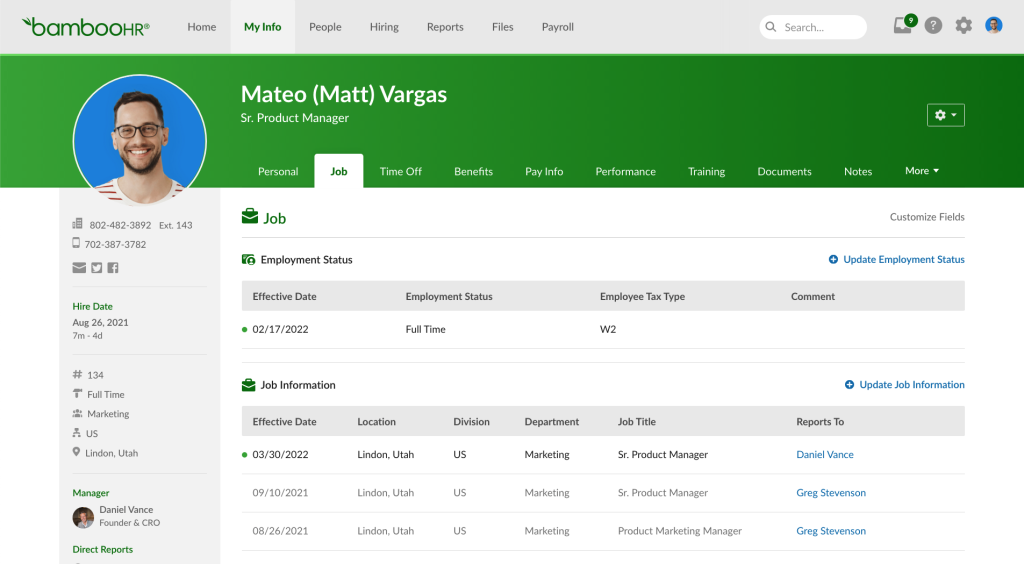
She found the interface genuinely easy to pick up, which mattered since her reviewers are partners and managers with zero patience for a clunky HR tool. E-signature collection sped up sign-off on completed reviews, and its integrations connected to most payroll and benefits tools her mid-sized firm already ran.
Where it genuinely fell short was depth. Her firm eventually needed weighted competencies and multi-rater 360 feedback across departments, and this add-on module felt thin next to a dedicated performance platform built for that exact purpose.
Pros:
- Reviews sit inside your existing HRIS, so there is no new login to learn
- Peer feedback and e-signature collection round out reviews and speed up sign-off
- Wide integrations connect to payroll and benefits tools you already run
- A simple interface makes adoption easy for partners with zero patience for clunky tools
- Time-off and employee records live in the same system as reviews
Cons:
- Performance features are an add-on rather than the core product
- Lacks weighted competencies or deep 360 feedback found in dedicated tools
User Rating: 4.4/5 (G2)
Pricing: Starts at $10/employee/month
How I Chose These Performance Management Software
When I evaluate the best performance management software for accounting options for this list, I don’t just rely on feature lists or marketing claims. I look at how these tools actually perform in real-world firm settings. Here is the framework I used:
- User Reviews / Ratings: I start by looking at real user feedback from platforms like G2. This gives me a clear picture of how firm administrators and managers actually experience the tool day to day, what they love, and where it falls short.
- Core Features & Functionality: I focus on what truly matters for an accounting firm’s review process. This includes 360-degree feedback, customizable review cycles, goal tracking, evaluator assignment, and reporting. If a tool cannot handle these well, it does not make the cut.
- Ease of Use: I pay close attention to how intuitive the platform feels. A tool might be powerful, but if partners and managers with no patience for extra clicks struggle to adopt it, it defeats the purpose. Clean interface and quick onboarding are non-negotiable.
- Customer Support: From my experience, implementation is where many tools fail, especially for a firm with no dedicated IT team. I evaluate how responsive and helpful the support team is during setup and ongoing use.
- Value for Money: I compare pricing with what the tool actually delivers for a firm’s size and budget. This is not about picking the cheapest option, but whether the features and flexibility justify the cost for a firm of your size.
- Personal Experience / Expert Insights: Wherever possible, I rely on hands-on experience with these tools, plus insights from HR leads and firm administrators who run performance management at real accounting and professional services firms.
Top 3 Performance Management Software
If I had to narrow this list down to just three, and I get asked this by every firm administrator running a best performance management tools for accounting firms search, here is where I would point them first.
1. PeopleGoal
I keep coming back to PeopleGoal as my top pick because it does not force your firm into someone else’s idea of how reviews should run. The no-code workflows and multi-dimensional org charts mean a firm with staff spread across audit, tax, and advisory engagements can build a process that actually matches its structure instead of a generic template. Layer in OKRs, 360 feedback, and integrations with tools you likely already run, and it earns the top spot on flexibility alone.
2. PerformYard
For a firm whose review cycle needs to bend around busy season rather than the calendar year, PerformYard is the most purpose-built option on this list. Concurrent review cycles across departments, timing tied to engagement completion, and a dedicated success manager for every account make it the strongest fit specifically for audit, tax, and advisory practices juggling multiple engagement teams at once.
3. Synergita
If budget is a real constraint and you still want more than a single annual form, Synergita earns its place here. Continuous appraisals, calibration sessions, and 360-degree feedback tied to logged goals give a growing firm most of what a pricier enterprise platform offers, starting at a fraction of the cost.
Choose a Performance Management System That Fits Your Firm
Choosing the right performance management software comes down to how well it fits your firm’s review structure, reporting lines, goals, and busy-season cadence. The strongest tools simplify evaluator tracking, support flexible review cycles, improve visibility, and reduce manual follow-up.
PeopleGoal stands out because its no-code workflows, multi-dimensional org charts, 360-degree feedback, OKRs, SMART goals, and HR integrations can adapt to complex accounting teams without forcing a rigid process.
For firms that want flexibility without heavy IT involvement, it is the strongest overall fit. Start with the 14-day free trial, map one review workflow, and test it with a small team.
Frequently Asked Questions
Is performance management software the same as accounting practice management software?
No, and this trips up almost every firm administrator researching this topic. Practice management tools like TaxDome or Karbon organize client work: deadlines, documents, and billing. Performance management software organizes your people: reviews, goals, and feedback for the staff who serve those clients. If your pain point is a manager forgetting who they still owe a review to, you need the tools on this list, not a client workflow platform.
How long does it typically take to implement performance management software at a small accounting firm?
Most small to mid-sized firms report going live within one to four weeks, depending on how much customization the review forms need. Firms replacing simple PDF-based processes tend to move faster since there is less legacy data to migrate.
Can performance management software handle a biannual review cycle instead of an annual one?
Yes. Most tools on this list, including PeopleGoal, support fully customizable cycle timing, so you can run reviews every six months, quarterly, or tied to project completion rather than being locked into a single annual window.
Do I need a separate tool for OKRs if I already have performance review software?
Not necessarily. Several tools on this list, including PeopleGoal, Lattice, and Engagedly, combine OKR tracking and performance reviews in the same platform, which avoids paying for and maintaining two separate systems.
What happens to historical review data when switching from paper or Excel to software?
Most platforms allow bulk import of past review data through Excel or CSV upload. It helps to document your current evaluator assignments and rating scales before migrating, so the historical structure carries over cleanly into the new system.
Is it worth paying more for a tool with calibration features if my firm only has one office?
Usually not right away. Calibration matters most once multiple managers or offices are rating staff independently. A single-office firm with fewer than fifty employees rarely needs it and can save budget by choosing a simpler tool.
How do I get partners and senior staff to actually use a new performance management tool?
Adoption improves significantly when the interface requires minimal clicks and the rollout includes a short training session rather than assuming people will figure it out. Community feedback consistently shows that partners abandon tools that feel like extra administrative burden rather than a time saver.
Can these tools support both quarterly check-ins and a formal annual review in the same platform?
Yes. Tools like 15Five, PeopleGoal, and Synergita are built specifically to run continuous, lightweight check-ins alongside a more formal structured review cycle, so you are not forced to pick one approach over the other.
Ready to 3x Your Teams' Performance?
Use the best performance management software to align goals, track progress, and boost employee engagement.