
I once sat across from a plant HR manager who told me her “performance review process” was really three separate spreadsheets. One for corporate staff, one for supervisors, and one nobody had opened since last January. That’s not unusual.
Office teams get modern OKRs and structured reviews, while shop floor operators get a paper form once a year, if that. Performance management software for manufacturing exists to close that exact gap, connecting production goals, cross-training, and employee development into one system that works whether someone sits at a desk or stands on a line.
In this guide, I’m walking through what this software actually needs to do for a manufacturer, how I’d evaluate it, and ten tools worth putting on your shortlist.
What Is Performance Management Software for Manufacturing?
Here’s why this matters more in manufacturing than in almost any other industry.
- Deskless access: Most HR performance management software for manufacturing assumes everyone has a company email and a desk. On a shop floor, that’s rarely true.
- Multiple review cycles: Production, sales, and corporate teams often need different review timelines running side by side.
- Role-specific scorecards: An operator and a plant manager should never be measured against the same template.
- HRIS lock-in: Many manufacturers run Workday or ADP for payroll and can’t replace it, so the performance tool needs to sit alongside it, not fight it.
- Multilingual rollout: Global manufacturers with plants across regions need review forms that work in more than one language.
10 Best Manufacturing Performance Management Software
I’ve put together the best performance management software for manufacturing I could find, weighing deskless access, HRIS fit, and real manufacturing use cases over marketing claims. Here’s how each one stacks up.
| Tool | Best For | User Rating | Price |
| PeopleGoal | Fully customizable performance reviews, OKRs & employee development | 4.5/5 (G2) | Starts at $4/user/month; 14-day free trial |
| StaffCircle | Deskless, multi-site manufacturing teams | 4.3/5 (G2) | Custom quote |
| Sprad | Reaching shop-floor workers without email | Not specified | Starts at €3/user/month |
| Synergita | Production-synced continuous appraisals | 4.6/5 (G2) | Starts at $2/user/month |
| Engagedly | Reviews paired with skills-based learning | 4.3/5 (G2) | Starts at $5–$8/user/month |
| Lattice | Deep HRIS and payroll integrations | 4.6/5 (G2) | Starts at $13/user/month |
| Betterworks | Multi-plant calibration cycles | 4.4/5 (G2) | Starts at $8/user/month |
| Profit.co | Linking daily tasks to OKRs | 4.7/5 (G2) | Custom quote |
| Perdoo | Visualizing goal alignment across plants | 4.4/5 (G2) | Starts at €6.40/user/month |
| 15Five | Lightweight weekly check-ins | 4.6/5 (G2) | Starts around $4/user/month |
1. PeopleGoal – Best for Fully Customizable Performance Reviews, OKRs & Employee Development
I started using PeopleGoal when our plant-level reviews were scattered across three different spreadsheets, and nobody trusted the final scores anymore. What changed things was how easily I could build our own review workflow without touching a line of code.
I cascaded OKRs from the plant level down to individual operators, then layered in 360-degree feedback that actually pulls input from more than one manager, something most tools I’d tried before simply couldn’t handle.
The BambooHR and Workday sync meant I no longer had to re-enter employee data by hand every quarter. Real-time dashboards now show me exactly which goals are on track and which teams need attention, without waiting on someone to export a report.
Pros:
- Fully customizable, no-code workflows for reviews, onboarding, and goal cycles
- Built-in App Store offers ready-made apps, workspaces, and templates for faster setup.
- Cascading OKRs and SMART goals from the company level down to individual employees
- 360-degree feedback that supports multiple managers evaluating one employee
- Real-time dashboards and custom reports for goal completion and alignment
- Integrations with BambooHR, Workday, ADP, Slack, and 500+ other platforms
- Multi-dimensional org charts for complex, multi-plant reporting structures
Cons:
- No downloadable or on-premise version
- Dark UI mode is not available
User Rating: 4.5/5 (G2)
Pricing: FREE 14-day trial. Paid starts at $4/user/month
2. StaffCircle – Best for Deskless, Multi-Site Manufacturing Teams
StaffCircle came onto my radar because of how many manufacturing logos show up in their customer list, and after digging into the product, I understood why. It’s built as a mobile-first progressive web app, which matters enormously when half your workforce is on the shop floor without a company laptop.
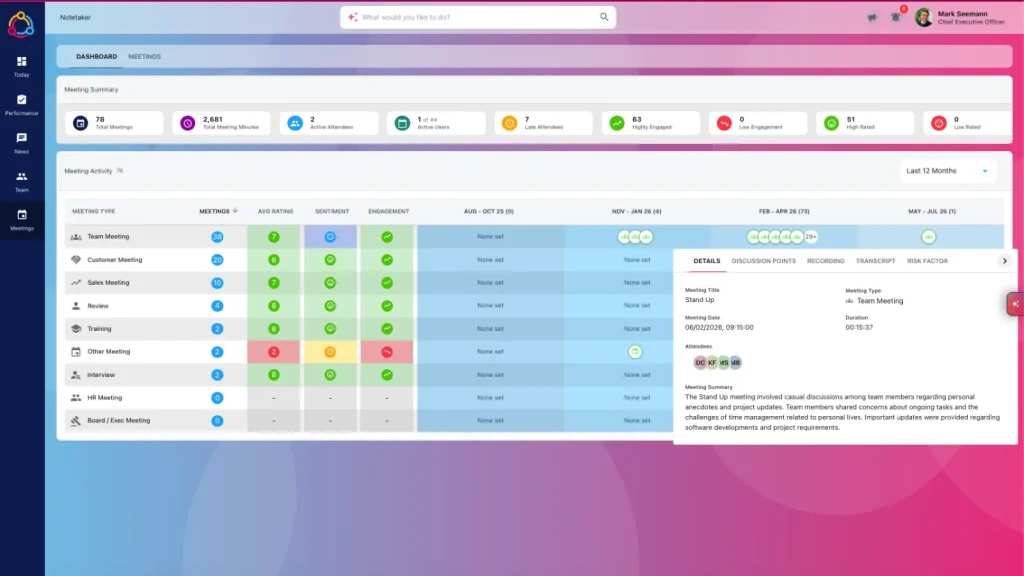
Supervisors can run OKRs, One2Ones, Smart Goals, and 360 appraisals from a phone, and the news feed lets teams share recognition and awards across shifts without email. What stood out to me is how it unifies performance, engagement, and development data automatically instead of asking HR to stitch three systems together.
Reported customer outcomes include higher engagement and lower turnover after rollout, tracking with what I’d expect once a workforce starts using the tool. If your biggest headache right now is genuinely getting shop floor employees engaged with any formal review process, this is built specifically for that problem.
Pros:
- Mobile-first progressive web app built for non-desk and office employees together
- OKRs, One2Ones, Smart Goals, and 360 appraisals in one platform
- Automated performance, engagement, and development data collection
- News feed for cross-shift recognition, awards, and internal communication
- Customizable dashboards and reports for multi-site operations
- Role-based access control for supervisors and HR admins
Cons:
- Interface can feel busy or overwhelming for brand-new users
- Some navigation challenges reported around certain engagement features
User Rating: 4.3/5 (G2)
Pricing: Custom Quote
3. Sprad – Best for Reaching Shop Floor Workers Without Email
Sprad solved a problem for me that most performance tools completely ignore: how do you actually run check-ins with someone who doesn’t have an inbox? It reaches line workers directly through Microsoft Teams, WhatsApp, or SMS, so there’s no login wall between a supervisor’s check-in and the employee actually seeing it.
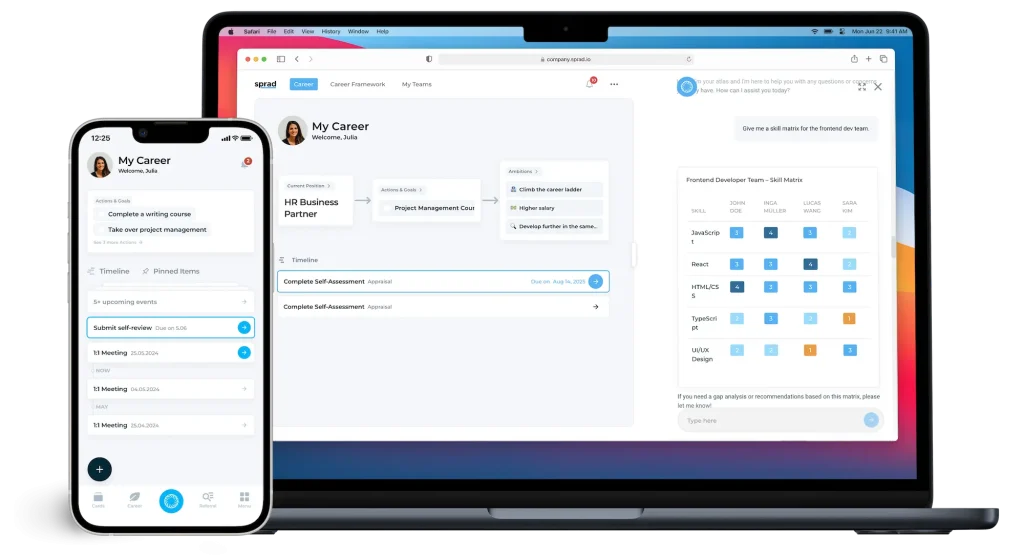
I liked that it turns performance conversations into short, guided touchpoints tied to real work orders instead of a long annual form nobody wants to fill out. The skills taxonomy is genuinely deep, mapping competencies by role and station so a manager can see who’s qualified to run a specific machine or cover a shift during a staffing gap.
It also plugs into existing HR and scheduling systems, so none of this data lives in a separate silo. If your reviews keep failing because people never open them, this fixes the access problem first and the process problem second.
Pros:
- Multi-channel reach through Teams, WhatsApp, and SMS for non-desk workers
- Guided check-ins tied to real work orders instead of generic forms
- Skills taxonomy mapping competencies and certifications by role and station
- Privacy-compliant workflows with role-based permissions and SSO support
- Automated nudges and coaching agendas for supervisors
- Real-time dashboards showing engagement, skill gaps, and risk by shift or plant
Cons:
- Newer platform is still building out its public review presence
- Less proven yet at a very large, multi-country enterprise scale
Pricing: Starts at €3/user/month
4. Synergita – Best for Production-Synced Continuous Appraisals
If you want individual review scores to genuinely reflect quality and production numbers, Synergita is worth a hard look. It’s used across IT, pharma, automotive, and general manufacturing, and the review structure reflects that, letting you weigh quality benchmarks and competency mapping alongside standard goals.
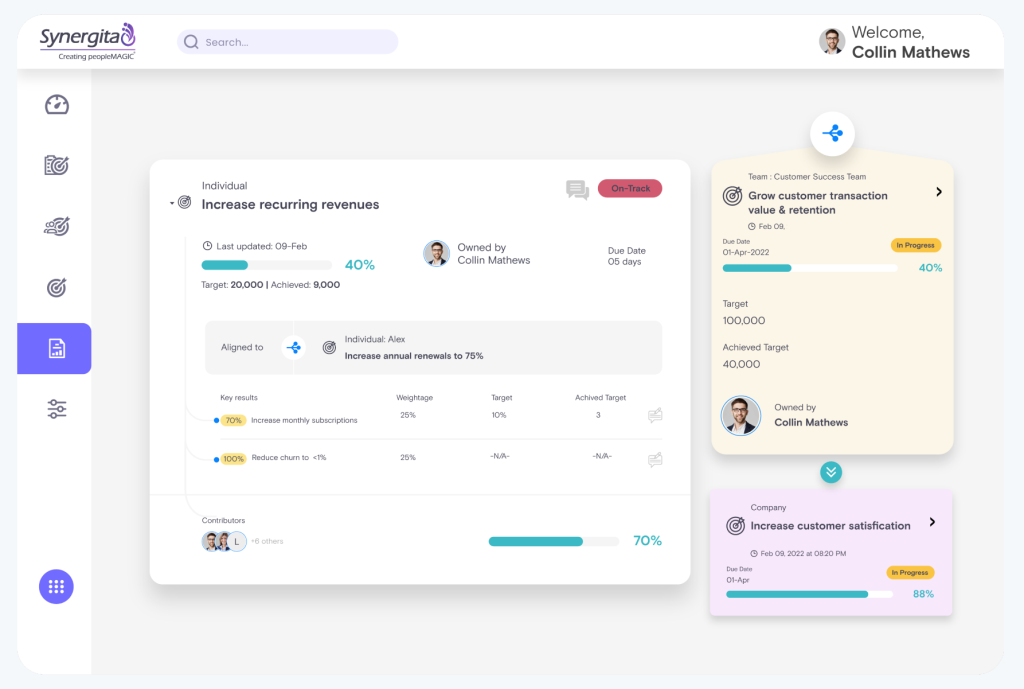
What I found genuinely useful is the AI-powered sentiment analysis on written feedback, which flags tone and consistency issues before a supervisor even submits a review. The automated appraisal letter distribution also removes a task that HR teams in this space still do manually more often than you’d expect.
It supports multilingual, mobile access too, which matters if your plants sit across more than one country and shift patterns. There’s also a lightweight OKR module you can launch to a single functional team first, which makes it easier to pilot before rolling it out company-wide across every plant and shift pattern you run.
Pros:
- Goal setting, self-feedback, and manager feedback in one continuous cycle
- AI-powered sentiment analysis on written feedback for consistency
- Automated appraisal letter generation and distribution
- Competency mapping benchmarked against quality and production standards
- Multilingual and mobile-friendly access for distributed plant teams
- Lightweight OKR module that can launch to specific teams independently
Cons:
- UI feels dated compared to newer platforms
- Not ideal for non-HR-led OKR environments
User Rating: 4.6/5 (G2)
Pricing: Starts at $2/user/month
5. Engagedly – Best for Reviews Paired With Skills-Based Learning
Engagedly earned its spot on this list because it’s one of the few tools I’ve seen explicitly positioned for manufacturing, connecting employee achievements directly to operational goals and safety standards. I like that it runs 360, 180, self-assessment, and project-based review cycles from a single dashboard, which matters when your operators, supervisors, and corporate staff all need different review formats.
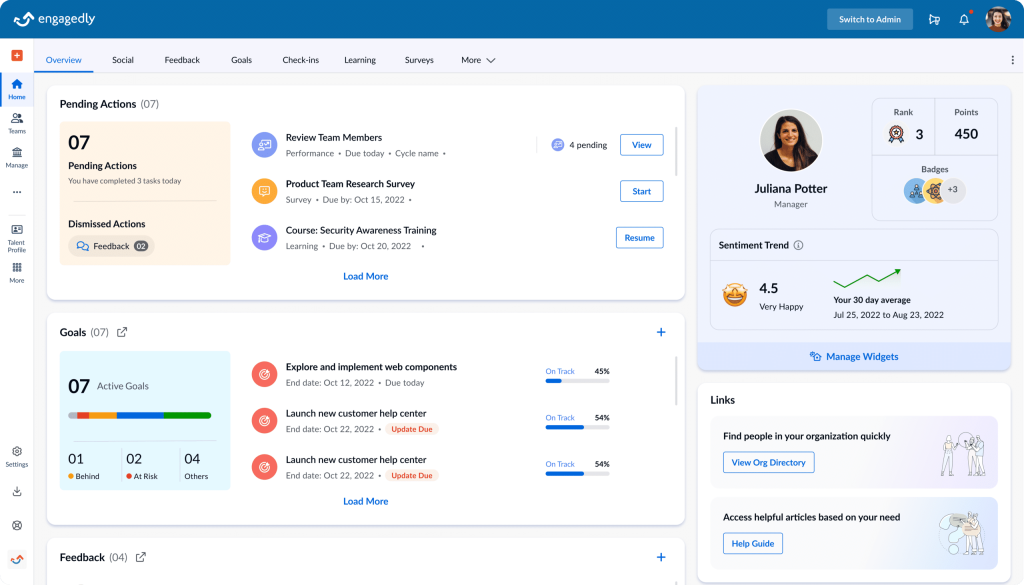
The built-in AI coaching feature provides first-time supervisors with conversation starters and actionable development suggestions they can use during a shift change, rather than generic HR advice. Because the learning management system is built into the same platform, cross-training and certification tracking occur without a second login.
Custom templates let you weight competencies by role, so a technician and a corporate analyst are never scored the same way. For a manufacturer, reducing turnover in physically demanding roles while maintaining documented compliance is hard to beat.
Pros:
- Full review cycle support, including 360, 180, self, and project-based reviews
- Built-in AI coaching for first-time managers and supervisors
- Learning management system bundled with performance tracking
- Continuous feedback tools tied to safety and compliance standards
- Custom review templates with weighted competency frameworks
- Multi-rater review support across sales, production, and corporate teams
Cons:
- Can require configuration work to match specific workflow needs
- Interface could use a refresh compared to newer competitors
User Rating: 4.3/5 (G2)
Pricing: Starts at $5 to $8/user/month
6. Lattice – Best for Deep HRIS and Payroll Integrations
Lattice is the tool I’d point a larger manufacturer toward if performance data absolutely has to sit inside a broader HR ecosystem. It connects goals, performance reviews, engagement, growth, and compensation into one repeatable system, which matters once you’re running calibration across multiple plants and need consistent data flowing into pay decisions.
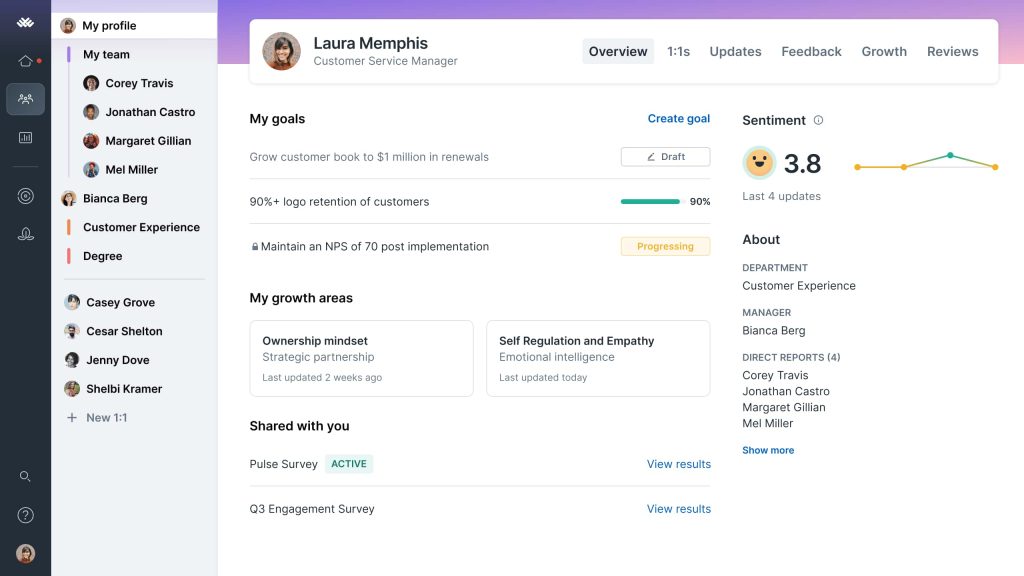
The interface is genuinely clean, and new managers pick it up fast, though I’ll be upfront that mastering every module does take time. With 50-plus native integrations and an AI agent that answers employee questions directly, it removes a lot of manual admin work that would otherwise sit squarely on the shoulders of a stretched HR team.
Review comment sentiment analysis also helps HR spot inconsistent or biased language across managers before a cycle closes. It’s priced as a premium investment rather than a budget tool, so I’d only recommend it once you’ve genuinely outgrown lighter platforms.
Pros:
- Unified goals, performance reviews, engagement, growth, and compensation in one system
- 50-plus native integrations with existing HR and payroll tools
- In-product calibration workflows for multi-site review consistency
- AI agent for answering employee questions and surfacing insights
- Customizable review templates and rating scales
- Sentiment analysis on performance review comments
Cons:
- Steep learning curve before teams use every module effectively
- Can feel heavier than necessary if you only need core OKR tracking
User Rating: 4.6/5 (G2)
Pricing: Starts at $13/user/month
7. Betterworks – Best for Multi-Plant Calibration Cycles
Betterworks is built for the kind of enterprise manufacturer that’s running performance calibration across a thousand-plus employees and multiple sites, and it shows in how the platform is structured. Managers propose ratings, then HR facilitates a formal calibration process before anything is finalized, which is exactly the workflow larger manufacturers already run informally through spreadsheets.

Key result completion data flows straight into performance reviews alongside 360 feedback and AI-generated themes, so nobody’s manually compiling data from three systems before a review meeting. I’ll be honest, implementation takes real change management effort, typically a few months, and there’s no self-serve trial, so you’re committing to a sales process before you see it live.
Reporting depth is more limited than some competitors, which is worth knowing if your team leans heavily on custom exports. For a manufacturer already past the spreadsheet stage that needs enterprise-grade rigor, it delivers.
Pros:
- Formal calibration workflows connecting manager ratings to HR oversight
- OKR completion data feeds directly into performance reviews
- AI-generated themes surfaced from continuous feedback
- Cascading goals built for complex, multi-site hierarchies
- Continuous conversation tools replacing single annual review events
- Customizable performance review forms for different employee groups
Cons:
- No self-serve trial, so you can’t test it without a sales call
- Reporting capabilities are more limited than some competitors
User Rating: 4.4/5 (G2)
Pricing: Starts at $8/user/month
8. Profit.co – Best for Linking Daily Tasks to OKRs
I used Profit.co during a multi-department rollout, and the thing that stuck with me was how cleanly it closed the gap between a plant’s strategic objectives and what someone was actually doing on the floor that day. I could take any objective, break it into key results, and map those directly to assignable tasks without switching tools.
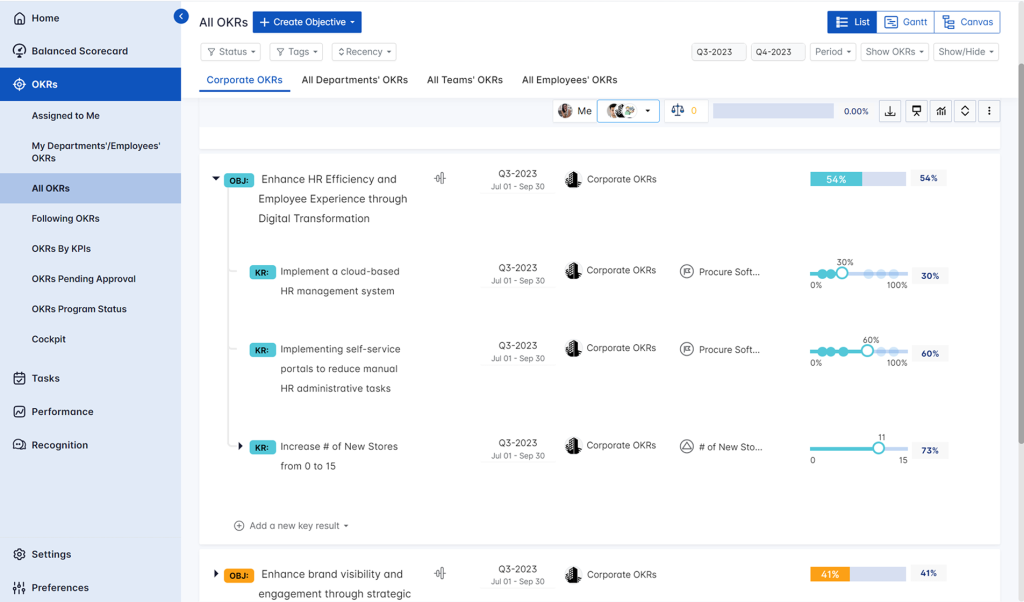
The built-in performance layer adds appraisals, scorecards, and one-on-ones, so a manufacturer isn’t stitching together three separate systems to get goals, tasks, and reviews working together. Pulse surveys give early signals on shop floor morale before problems show up in turnover numbers.
Sprint-based updates work well if part of your operation runs on an agile improvement cycle, and executives get a live view of how each department is contributing without needing a manual status update. Role-based dashboards make it easy to see execution across every site at once.
Pros:
- Maps strategic objectives directly to assignable daily tasks
- Built-in performance management with appraisals, scorecards, and one-on-ones
- Pulse surveys and recognition tools for early engagement signals
- Sprint-based updates suited to continuous improvement cycles
- Centralized role-based dashboards across departments and plants
- Custom reporting for execution visibility at every level
Cons:
- Custom reports may need admin support to configure
- Mobile app has limited feature parity with desktop
User Rating: 4.7/5 (G2)
Pricing: Custom Quote
9. Perdoo – Best for Visualizing Goal Alignment Across Plants
What sold me on Perdoo was the Strategy Map, which is genuinely useful once you’re running goals across more than one plant site and can’t easily see how they connect. A plant manager, a regional director, and a corporate executive can all open the same view and see exactly how a production goal rolls up into a company objective, which cuts down on duplicated effort across sites.
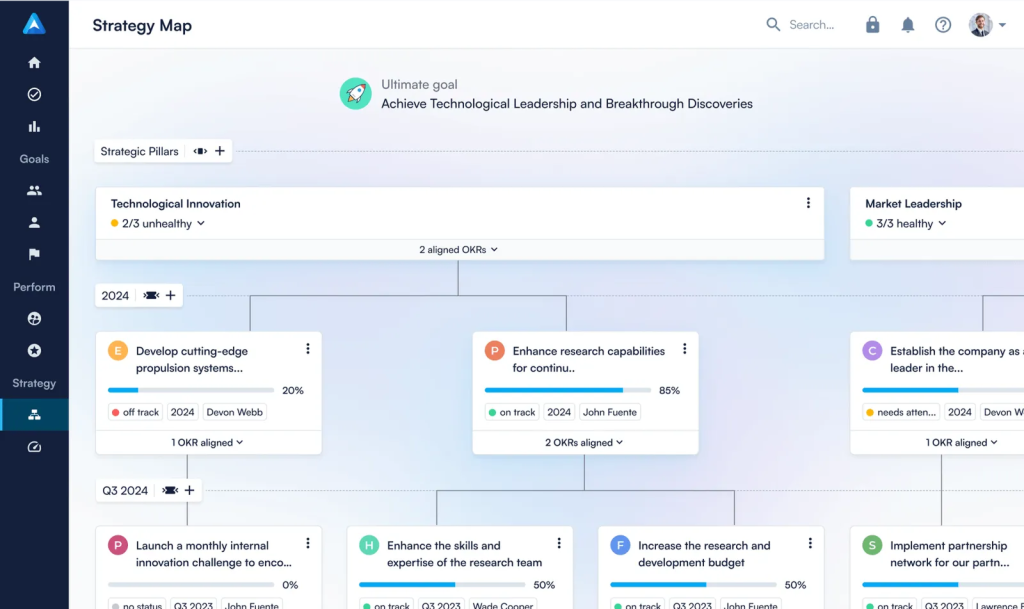
Data-driven alerts flag weak alignment and overdue objectives before they quietly derail a quarter, and the templates built for people and operations teams speed up adoption compared to starting from a blank page.
Weekly check-in prompts keep confidence ratings current, so nobody’s guessing whether a plant-level goal is on track between formal reviews. It’s a strong fit if your biggest problem is that different plants are working toward goals nobody else can see, and you need one shared picture of progress.
Pros:
- Strategy Map visualizing goal alignment from company level to plant level
- Data-driven alerts for weak alignment and overdue objectives
- Templates built for operations and people teams to speed adoption
- Regular check-in prompts with confidence ratings
- Admin controls over visibility, timelines, and scoring standards
- Free tier available for smaller teams to test the framework
Cons:
- Admin setup could use better onboarding guidance
- Requires upfront configuration to fully set up Strategy Maps
User Rating: 4.4/5 (G2)
Pricing: Starts at €6.40/user/month
10. 15Five – Best for Lightweight Weekly Check-ins
I’d put 15Five on this list for a different reason than most tools here: it’s genuinely strong at getting supervisors into the habit of regular, documented check-ins before anything more complex. It builds a real paper trail of feedback and coaching notes, which HR teams tell me is the single biggest gap when someone finally needs to be put on a performance improvement plan.
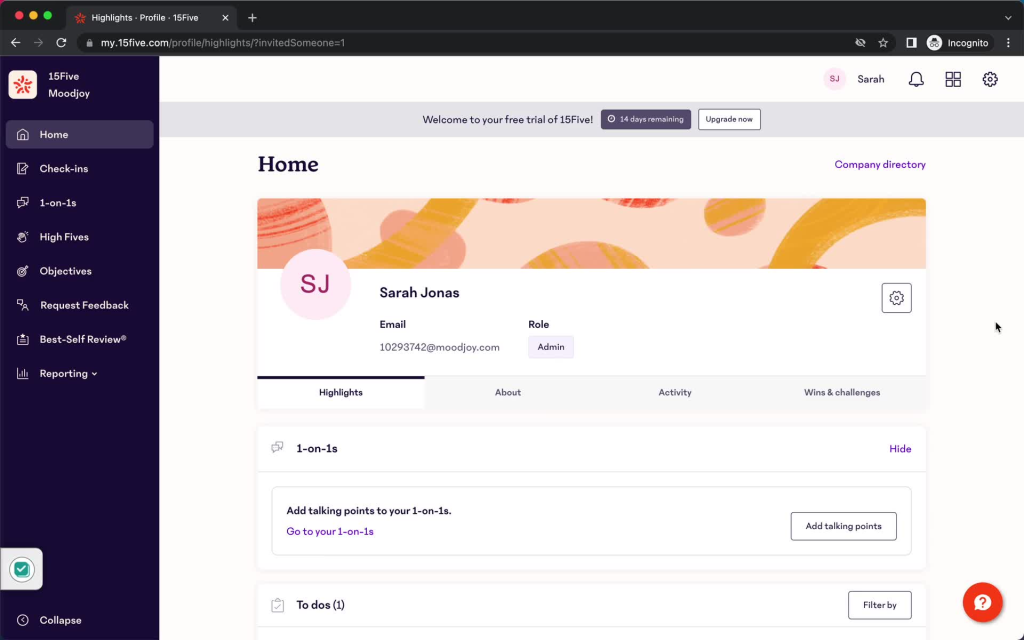
That said, I’ve also seen manufacturers outgrow it once their needs get more complex, since the full platform can feel like more than a smaller team actually needs to use day to day. The AI manager coaching add-on is a nice touch for training first-time supervisors, though it adds to the overall cost once layered in.
If you’re earlier in the journey and just need managers to have consistent, well-documented conversations with their teams, it’s a solid starting point before you need something more manufacturing-specific.
Pros:
- Weekly check-ins and structured 1-on-1 meeting agendas
- Documented feedback history for performance improvement plan support
- AI-powered manager coaching add-on for first-time supervisors
- Engagement surveys alongside performance and goal tracking
- Slack and Microsoft Teams integration for check-in reminders
- Data export for deeper reporting in BI tools
Cons:
- Full platform can feel like more than a smaller team actually needs day to day
- Best suited to teams still building the check-in habit, not complex calibration needs
User Rating: 4.6/5 (G2)
Pricing: Starts around $4/user/month
How I Chose These Manufacturing Performance Management Software
When it comes to how to choose performance management software for manufacturing, I don’t rely on feature lists or marketing claims. I look at how these tools perform in real manufacturing settings, and here’s the framework I used to keep every recommendation practical, reliable, and worth considering.
- User Reviews / Ratings: I start with real user feedback from platforms like G2. This gives me a clear picture of how HR teams and supervisors actually experience the tool day to day, what they love, and where it falls short.
- Core Features & Functionality: I focus on what actually matters for a manufacturing workforce. This includes role-based scorecards, deskless access, goal cascading, check-ins, and HRIS integrations. If a tool can’t handle these, it doesn’t make the cut.
- Ease of Use: I pay close attention to how intuitive the platform feels for a line supervisor, not just an HR admin. A tool might be powerful, but if frontline managers struggle to adopt it, it defeats the purpose.
- Customer Support: Implementation is where many manufacturing rollouts fail. I evaluate how responsive the support team is during multi-site setup and ongoing use.
- Value for Money: I compare pricing against what the tool actually delivers for a mixed office and shop floor headcount, not just the cheapest sticker price.
- Personal Experience / Expert Insights: Wherever possible, I rely on hands-on experience with these tools, plus insights from HR leaders and plant operations teams who use them in real environments.
Top 3 Manufacturing Performance Management Software
If you only read one section of this guide, make it this one. These are the three tools I’d shortlist first for a mixed office and shop floor team.
1. PeopleGoal
PeopleGoal is my top pick because it doesn’t force you into someone else’s idea of a review cycle. I built cascading OKRs down to plant level, layered in multi-manager 360 feedback, and synced it straight into BambooHR and Workday without a single manual export. For a manufacturer that wants one flexible system instead of three rigid ones, this is where I’d start.
2. StaffCircle
StaffCircle is the pick when your biggest blocker is actually getting shop floor employees to engage with a review process at all. The mobile-first design and unified engagement data mean supervisors aren’t chasing paper forms across shifts. It’s built with manufacturing workforces in mind, and it shows in the product.
3. Synergita
Synergita earns its spot because it ties individual scores back to real production and quality benchmarks instead of generic office competencies. The AI sentiment analysis on feedback and automated appraisal letters removes two tasks that HR teams in this space still handle by hand. If quality and output need to show up in the review itself, this is built for that.
How to Support a Deskless, Multilingual Workforce?
Knowing what to look for isn’t the same as knowing how to actually set it up. Here’s how I’d implement each piece, using PeopleGoal where it directly applies.
- Share a link, not a login: In PeopleGoal, generate a shareable web form for any survey or review so shop floor employees can respond without creating an account. Turn that link into a QR code with any free generator and post it on a shift board.
- Keep responses anonymous: Turn on PeopleGoal’s per-review anonymity setting so retail and production staff can give honest feedback without their name attached to it.
- Build a template per plant: Use PeopleGoal’s no-code workflow builder to duplicate your review form for each location, then translate the questions before assigning it to that plant’s employees.
- Test on a real phone: Before launch, open the web form on an actual phone screen rather than a shrunk-down desktop view, since that’s how most shop floor employees will complete it.
How to Run Review Cycles Across Multiple Plants?
This is one of the areas where the setup matters as much as the tool itself, so here’s how I’d actually build it out.
- Set up separate cycles per department: In PeopleGoal, create a distinct, tailored review cycle for production, sales, and corporate teams, each with its own timeline and custom questions, running concurrently without interfering with each other.
- Route goal changes through a manager: Use PeopleGoal’s workflow states and custom rules to require manager approval whenever an employee edits a goal, so cascading goals stay accurate across departments.
- Confirm true concurrency before you commit: If you’re evaluating a different platform, ask for a live demo showing two active cycles running at once, not just a description of the feature.
- Centralize reporting across cycles: Pull a single dashboard view that shows completion rates across all active cycles, so corporate doesn’t have to check each department separately.
Common Challenges in Manufacturing Performance Management
Picking the right tool is only half the job. Here’s where manufacturing rollouts actually run into trouble, and how I’d fix each one.
1. Low Adoption on the Shop Floor
Even with mobile access solved, supervisors often skip the tool once daily production pressure kicks in, and employees stop trusting the process if their first review disappears into a black hole with no follow-up.
- Pilot with a few supervisors first: Run it with two or three teams before a full rollout, so early issues get caught before hundreds of employees see them.
- Automate the nudges: Use PeopleGoal’s workflow rules to trigger reminder emails automatically instead of HR chasing overdue reviews by hand.
- Show a quick win early: Share one visible result, like a resolved goal or a completed cross-training plan, within the first month.
2. Migrating Years of Spreadsheet History
Manufacturers often have years of appraisal data sitting in Excel files with inconsistent formats across plants, and losing that history makes it hard to track an employee’s full development record.
- Standardize before you import: Clean up your goal hierarchy and scoring format in one master file before touching any migration step.
- Ask about import support: Check whether your PeopleGoal onboarding includes historical data import, so your team isn’t manually re-keying years of reviews.
- Train the team before go-live: Walk supervisors through the new structure first, so historical data lands in the right fields from day one.
3. Fitting Around an HRIS You Can’t Replace
Many manufacturers run Workday or ADP for payroll under corporate policy and can’t swap it out, so a performance tool that tries to replace the whole HR stack becomes a hard no from IT.
- Position it as a layer, not a replacement: Frame the rollout to IT and leadership as adding a performance module, not migrating core HR data.
- Confirm the sync works both ways: Check that PeopleGoal’s HRIS system integrations keep employee records updated automatically instead of requiring manual entry in two systems.
- Start with one plant: Prove the integration works cleanly at a single site before asking IT to greenlight it company-wide.
Give Your Whole Workforce One Performance System
Manufacturing performance reviews break down when generic office tools ignore shift work, deskless access, and multiple review cycles running across plants at once. The right platform needs role-based scorecards, mobile access without a company email, and a way to sit alongside the HRIS you already run.
PeopleGoal fits because it lets you build cascading OKRs down to plant level, layer in multi-rater 360 feedback, and sync employee data with BambooHR, Workday, and ADP without manual re-entry.
If you’re ready to replace scattered spreadsheets with one connected system, go start your free PeopleGoal trial today with a single team first.
Frequently Asked Questions
How long does it take to roll out performance management software across multiple plants?
Most vendors quote 1 to 4 weeks for a single site, but a multi-plant rollout with translated forms and HRIS syncing usually takes longer. Build in extra time for training supervisors at each location separately.
Can performance management software support union or works council requirements?
Most platforms let you customize review criteria and consultation steps to match union agreements, but you'll need to confirm this directly with the vendor since requirements vary heavily by country and contract.
Do these tools work offline for plants with poor connectivity?
Some mobile-first platforms cache forms for offline completion and sync once a connection is available. Ask specifically about offline support if any of your sites have unreliable internet.
What's the difference between OKRs and KPIs for manufacturing roles?
KPIs measure ongoing operational health like defect rate or downtime. OKRs set time-bound, ambitious goals on top of that baseline. Manufacturing roles usually need both running side by side, not one replacing the other.
Can I run performance reviews in multiple languages within the same platform?
Yes, most enterprise-grade platforms support multilingual templates, though the depth varies. Confirm during a trial that translated forms keep the same rating scales and reporting structure as the English version.
How much should a mid-sized manufacturer budget for this software?
Expect somewhere between $2 and $15 per user per month, depending on features, with enterprise-grade calibration tools sitting at the higher end. Get pricing at your actual headcount rather than a demo tier estimate.
Can performance data feed into pay and promotion decisions?
Yes, most platforms let you connect review scores to compensation or promotion workflows, though this usually requires an additional module or integration rather than being built in by default.
Is there a way to migrate historical Excel review data into a new platform?
Most vendors support bulk import through CSV or Excel files. Document your current goal hierarchy and review structure first so historical data lands in the right format from day one.
Should safety incidents be part of an employee's performance score?
Many manufacturers do include safety metrics, but keep them as a distinct, clearly weighted category rather than blending them into a general performance number, since safety needs its own visibility.
Can shift workers complete reviews without a company email address?
Yes, look specifically for QR code access, shareable links, or SMS and messaging app integration, since this is the single biggest access barrier for manufacturing deskless workforces.
What's the ROI timeline for switching from spreadsheets to dedicated software?
Most HR teams see reduced admin time within the first review cycle, with fuller ROI from better retention and faster decision making showing up over two to three cycles.
Do these platforms integrate with time and attendance systems?
Some do directly, others require a middle integration layer. Ask the vendor for a specific list of time and attendance systems they've integrated with in manufacturing environments before assuming compatibility.
How do I get supervisor buy-in on a new performance system?
Start with a pilot team, keep the interface as simple as possible for non-desk managers, and show supervisors early how much administrative time it saves them, not just what it adds to their workload.
Can I run different review templates for union vs non-union roles?
Most customizable platforms support role-based templates, which makes this possible, but confirm the specific workflow with your vendor since union agreements sometimes require additional consultation steps built into the process.
What happens to historical performance data if I switch vendors later?
Ask about data export options before you sign a contract, not after. Most platforms allow full data export, but the format and ease of migration to a new system varies significantly.
Ready to 3x Your Teams' Performance?
Use the best performance management software to align goals, track progress, and boost employee engagement.