
Many HR teams invest significant time collecting ratings and feedback, only to end up with limited visibility into what is actually driving employee performance.
In conversations I’ve had with HR leaders, People Ops managers, and department heads across growing organizations, the same challenges come up repeatedly: disconnected spreadsheets, inconsistent feedback, poor goal visibility, and review cycles that create more work than value.
The urgency to fix this is growing. According to Deloitte’s 2025 Global Human Capital Trends survey, 72% of workers and 61% of managers do not fully trust their organization’s performance management process.
That is exactly why cloud-based performance management software has become a priority for modern HR teams. In this guide, I’ll walk you through the best platforms available today, what features actually matter, and how to choose a solution that helps managers coach better, employees grow faster, and organizations make smarter talent decisions.
What is Cloud-Based Performance Management Software?
It replaces manual processes like spreadsheets, Google Forms, and disconnected tools with an integrated system that handles goal setting, continuous feedback, performance reviews, 360-degree feedback, development planning, and reporting in one place.
Because it is cloud-based, there is no server maintenance, no IT overhead, and your team can access it whether they are in the office, remote, or hybrid.
Why it matters for HR teams:
- Replaces spreadsheets, PDFs, and disconnected systems with one centralized platform
- Automates review cycles, reminders, and reporting so HR spends less time on admin
- Gives managers real-time visibility into goal progress and team performance
- Enables continuous feedback instead of once-a-year reviews that no one remembers
- Supports 360-degree feedback so evaluations reflect multiple perspectives, not just one manager’s view
- Aligns individual goals to team and company objectives so everyone works toward the same priorities
- Provides analytics that help HR leaders make data-backed decisions on talent, promotions, and development
10 Best Cloud-Based Performance Management Tools
I have reviewed each of these cloud-based performance management tools based on how they perform in real HR environments, not just what their marketing pages say. This list reflects my own experience, community research, and verified ratings from platforms like G2.
| Tool | Best For | User Rating | Pricing |
| PeopleGoal | Fully Customizable Performance Reviews, OKRs & Employee Development | 4.5/5 (G2) | Starts at $4/user/month |
| Lattice | Building a Continuous Performance and Engagement Culture | 4.7/5 (G2) | Starts at $11/seat/month |
| 15Five | Manager-Led Performance Conversations and Weekly Check-ins | 4.6/5 (G2) | Starts at $4/user/month |
| Leapsome | Connecting Performance Management With Employee Learning | 4.8/5 (G2) | Custom Quote |
| Betterworks | Enterprise-Scale OKR and Performance Alignment | 4.3/5 (G2) | Custom Pricing |
| Engagedly | Multirater Feedback and Gamified Performance Engagement | 4.3/5 (G2) | $5–$8/user/month |
| ClearCompany | Connecting Performance Management to Hiring and Onboarding | 4.6/5 (G2) | Custom Pricing |
| Trakstar | Structured Appraisal Management and Review Compliance | 4.2/5 (G2) | Custom Pricing |
| Synergita | Continuous Performance Appraisals Tied to Real OKR Data | 4.6/5 (G2) | Starts at $2/user/month (billed annually) |
| Profit.co | Aligning Daily Work Directly to Strategic Objectives | 4.7/5 (G2) | Custom Pricing |
1. PeopleGoal – Best for Fully Customizable Performance Reviews, OKRs & Employee Development
Before using PeopleGoal, my team was running performance reviews across three different tools, exporting data into Excel for analysis, and manually sending reminders every review cycle. It was unsustainable. The moment I switched to PeopleGoal, I realized how much time I had been losing to admin work that the platform now handles automatically.
The thing that stands out immediately is how configurable everything is without needing an IT team. I built our entire review cycle, goal structure, and 360-degree feedback workflow directly inside the platform using no-code tools that actually make sense.
Goal cascading works the way organizational hierarchies actually work, so every individual contributor can see how their work connects to the bigger picture. Real-time dashboards give me live visibility into completion rates and goal progress, so I am never walking into a leadership meeting without data.
Pros:
- Fully configurable appraisal cycles, review forms, and workflows tailored to how your organization already runs
- No-code app builder and template App Store for custom HR workflows
- Continuous performance conversations through structured check-ins, not just end-of-cycle forms
- Goal tracking with OKRs and SMART goals, connecting employee performance and growth directly to business priorities
- 360-degree feedback tools with weighted rater groups, automated reminders, and response tracking
- Built-in engagement measurement via pulse surveys to contextualize appraisal outcomes with real sentiment data
- Real-time dashboards covering goal completion, engagement, and workflow progress without manual exports
- 500+ platform integrations, including Workday, BambooHR, Slack, and Jira
Cons:
- No downloadable or on-premise version available
- Dark UI mode is not currently available
User Rating: 4.5/5 (G2)
Pricing: FREE 14-day trial. Paid starts at $4/user/month.
Check how iQmetrix replaced scattered forms and SharePoint with one transparent, trackable process using PeopleGoal.
2. Lattice – Best for Building a Continuous Performance and Engagement Culture
I introduced Lattice at a 150-person company that had been running annual reviews on paper forms. In the first quarter, managers were having actual coaching conversations rather than scrambling to recall what happened six months ago.
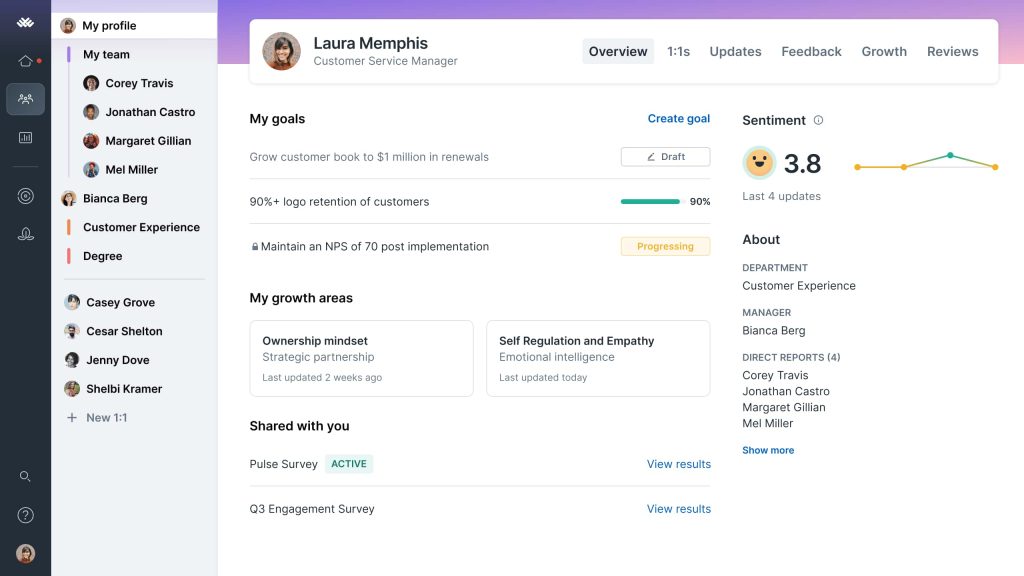
What I appreciate most about Lattice is that it connects performance reviews, goal tracking, engagement surveys, and one-on-ones in a single workflow, so the data actually informs each part. When a manager completes a one-on-one, the notes carry into the review. When a goal slips, the manager sees it before the quarter ends, not after.
The engagement module runs pulse surveys automatically and surfaces trends that help me spot retention risks early. It is one of the few platforms where the performance and engagement data genuinely speak to each other rather than living in separate modules with no connection, which is the most common failure I see in HR tool stacks.
Pros:
- Connects performance reviews, goals, and engagement data in one unified flow
- One-on-one meeting templates that feed directly into review cycles
- Automated pulse surveys with trend tracking for early engagement signals
- Compensation benchmarking module to tie pay to performance outcomes
- Strong manager analytics dashboard with actionable coaching prompts
Cons:
- Pricing increases significantly as you add modules beyond core performance
- Reporting customization can require admin-level configuration for complex queries
User Rating: 4.7/5 (G2)
Pricing: Starts at $11/seat/month
3. 15Five – Best for Manager-Led Performance Conversations and Weekly Check-ins
I worked with an HR team at a fast-growing startup that had a real manager engagement problem. Managers knew they were supposed to be having regular conversations with their teams, but kept deprioritizing them. 15Five fixed that by turning weekly check-ins into a two-minute habit rather than a calendar meeting.
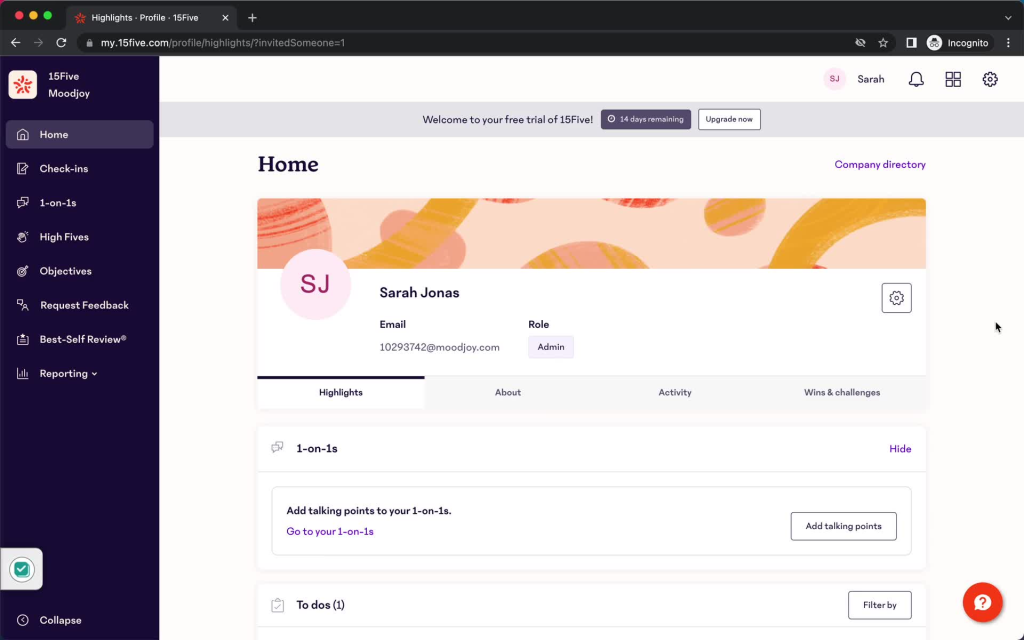
Employees log a quick update every week, managers respond with feedback or coaching notes, and the whole exchange is visible across the quarter, so performance conversations have actual context when review time arrives. The OKR module fits well into this rhythm, and the engagement scoring gives HR a signal on team morale without requiring a separate survey tool.
What I found most useful is the Best-Self Review process, which prompts managers and employees to reflect on impact rather than just activities. It is one of the most adoption-friendly platforms I have used because the weekly check-in is genuinely low-friction and managers actually complete it.
Pros:
- Weekly check-in format that builds a continuous feedback habit with minimal effort
- Best-Self Review framework focused on impact and growth rather than just task completion
- OKR and goal tracking are integrated directly into the weekly rhythm
- Manager effectiveness scores to help HR identify coaching gaps
- Engagement surveys are built into the same platform as performance data
Cons:
- Some advanced analytics features are limited to higher-tier plans
- Interface can feel simplistic for organizations with complex multi-tier structures
User Rating: 4.6/5 (G2)
Pricing: Starts at $4/user/month.
4. Leapsome – Best for Connecting Performance Management With Employee Learning
“We identify the gap, and then nothing happens.” That was the exact phrase I used to describe my performance process to a consultant who asked me why I was looking for a new tool. Reviews would surface skill gaps, development plans would get written, and those documents would sit untouched until the next cycle, when someone noticed nothing had changed.
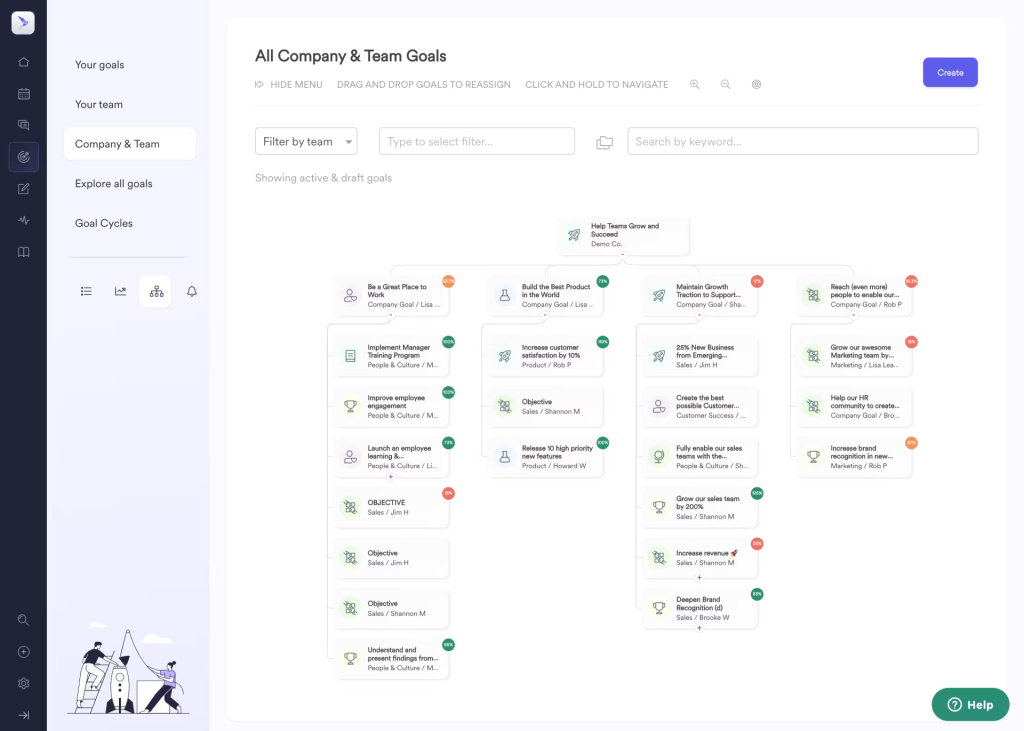
What shifted with Leapsome was that the review outcome directly triggered a learning path the following week, not a note in a folder. The calibration feature was what I brought up most when recommending it to others, specifically because two managers on my team were rating on completely different standards, and I had no diplomatic way to address it.
Leapsome made the inconsistency visible with data in a structured session, turning a conversation I had been avoiding for two quarters into one that was resolved in an afternoon.
Pros:
- Learning and development plans connect directly to performance review outcomes
- Strong compensation benchmarking tied to performance cycles and goal achievement
- Calibration tools to reduce rating bias and standardize manager evaluations
- Competency-based review frameworks that go beyond simple rating scales
- Goal cascading and alignment features with real-time progress dashboards
Cons:
- Implementation can take longer than simpler tools, especially for custom workflows
- Pricing scales up quickly for smaller teams with limited HR budgets
User Rating: 4.8/5 (G2)
Pricing: Custom Quote
5. Betterworks – Best for Enterprise-Scale OKR and Performance Alignment
My organization had 2,000 people working hard in completely different directions. Leadership had a strategy, departments had their own priorities, and I had no real way to show anyone how the two connected. Every all-hands presentation about company goals lasted 45 minutes and changed nothing by Tuesday.

What made Betterworks the right call was cross-functional OKR ownership. When sales and product both contributed to a shared objective, both teams could track their piece without creating duplicate entries or version conflicts that made the data useless.
The moment that stuck with me was when someone from customer success pulled up a dashboard and saw, for the first time, exactly how a task they had been doing for two years connected to a company-level goal. No strategy deck had ever managed to make that click. A dashboard that updated in real time did it in about thirty seconds.
Pros:
- Enterprise OKR framework with multi-level cascading and cross-functional goal visibility
- The conversation and feedback module is integrated directly with goal tracking
- Continuous performance framework replacing annual review cycles
- Analytics dashboard showing alignment health across departments and teams
- Strong integrations with Workday, SAP, and enterprise HRIS platforms
Cons:
- Pricing and implementation complexity make it best suited for larger organizations
- Smaller teams may find the platform more feature-heavy than their use case requires
User Rating: 4.3/5 (G2)
Pricing: Custom pricing.
6. Engagedly – Best for Multirater Feedback and Gamified Performance Engagement
I worked with a People Operations team that had a very specific problem: they had all the right processes in place, but nobody was engaging with the platform. Check-ins were skipped, feedback was sparse, and review quality was inconsistent.
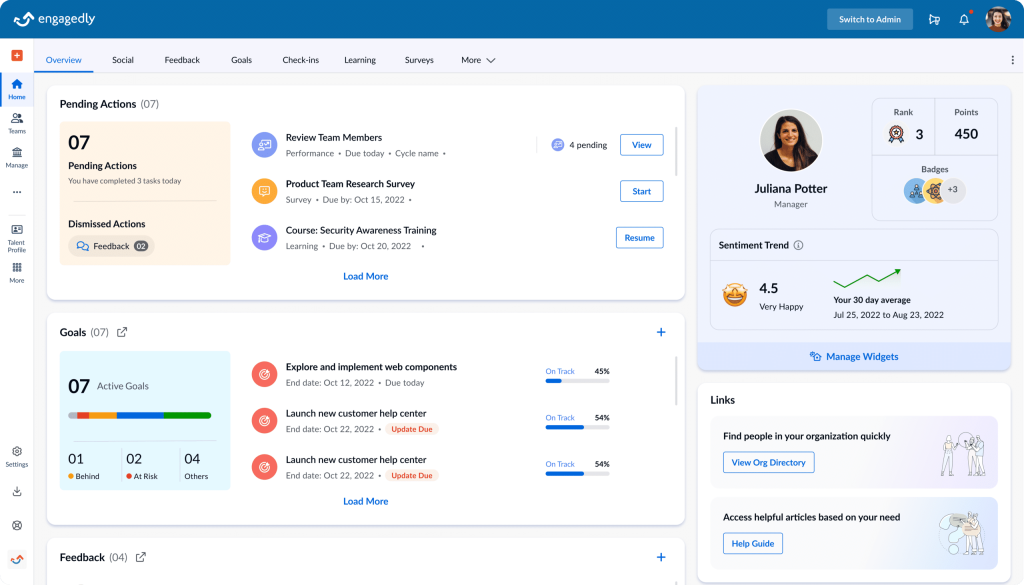
Engagedly tackled this with a gamified engagement layer that made participating in performance processes feel genuinely rewarding rather than obligatory. Employees earn points for completing check-ins, submitting feedback, and logging goal updates. The multirater feedback module is genuinely flexible.
I could configure who provides feedback for each employee, set anonymity levels differently by feedback type, and customize the question banks by role. The social recognition feed gives managers and peers a visible way to acknowledge contributions between review cycles, which created a noticeable shift in how teams talked about performance day to day.
Pros:
- Gamification layer with points and rewards to drive platform adoption
- Flexible multirater feedback with role-specific question banks and anonymity controls
- Social recognition feed to keep performance conversations ongoing between review cycles
- Learning management system integration for development planning post-review
- Goal alignment module with visual dashboards for team and company-level progress
Cons:
- The gamification layer can feel out of place in more formal or senior-level environments
- Reporting dashboards require some configuration to surface the most useful insights
User Rating: 4.3/5 (G2)
Pricing: Starts at $5-$8/user/month
7. ClearCompany – Best for Connecting Performance Management to Hiring and Onboarding
Most performance management tools I have used start at the goal-setting stage, assuming the employee is already onboarded and settled in. ClearCompany starts earlier. It connects the performance system to the recruiting and onboarding process so the expectations set during hiring translate directly into the goals and review framework an employee encounters on day one.
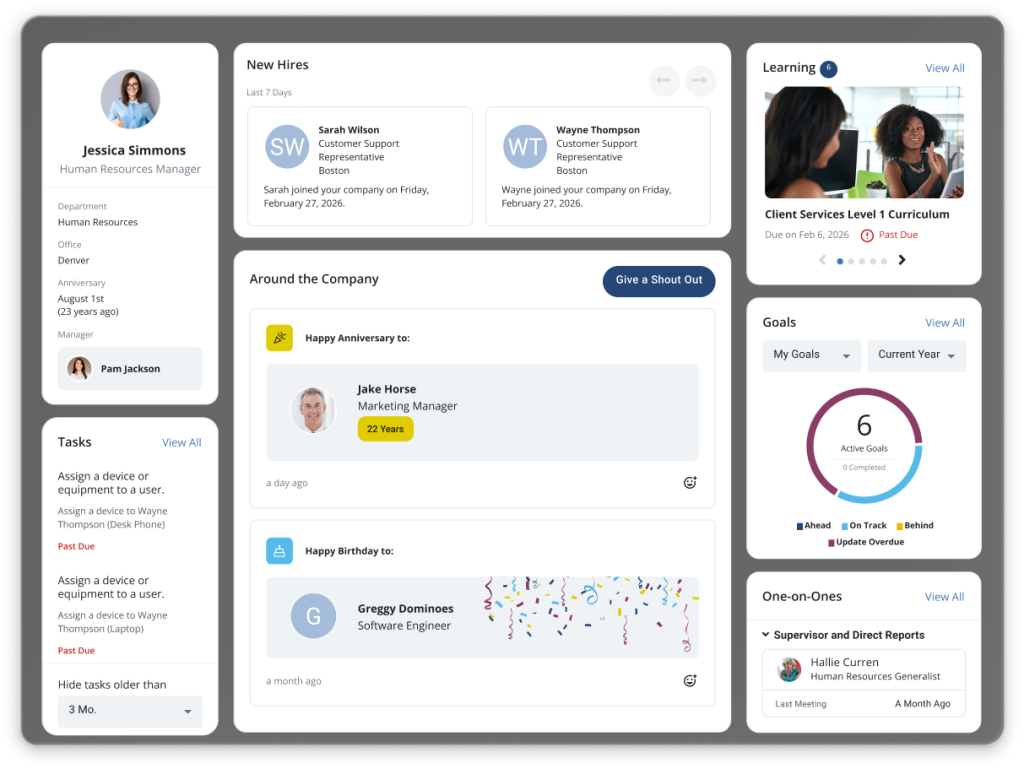
I implemented this at a company with high turnover in the first six months, and the ability to run structured 30-60-90-day performance check-ins within the same system as the offer letter and onboarding checklist made a measurable difference. Managers knew exactly what to evaluate and when. New hires understood what success looked like from the start.
The ongoing performance module handles review cycles, goal tracking, and peer feedback effectively, and the talent alignment maps help HR visualize how individual performance connects to organizational health. It is the right tool if your biggest performance challenge starts in the hiring and onboarding process.
Pros:
- Performance management connected end-to-end with recruiting and onboarding workflows
- Structured 30-60-90 day review templates built for new hire performance tracking
- Talent alignment maps showing how individual performance connects to workforce planning
- Goal management with department and company-level alignment visibility
- Reporting tools that connect hiring quality to downstream performance outcomes
Cons:
- The performance module is most valuable when used alongside the recruiting module
- Interface has more complexity than tools focused purely on performance management
User Rating: 4.6/5 (G2)
Pricing: Custom pricing.
8. Trakstar – Best for Structured Appraisal Management and Review Compliance
I introduced Trakstar at a healthcare organization where performance reviews had to meet strict documentation requirements, and the old paper-based system was creating compliance headaches. Trakstar is purpose-built for structured appraisal management, and it handles the documentation, scheduling, and completion tracking better than most tools I have tested.
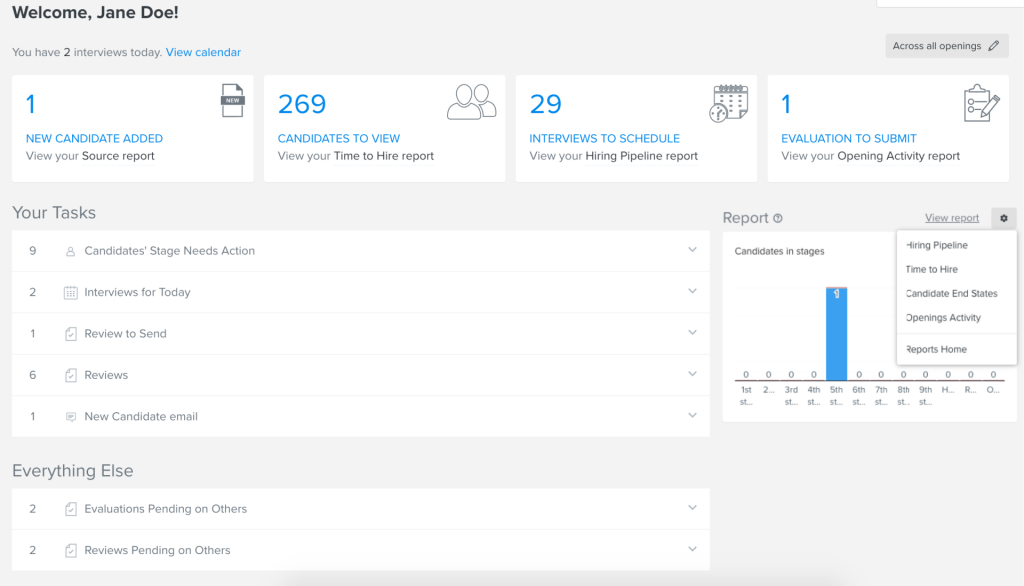
Every review is logged, timestamped, and stored in a way that makes audit trails straightforward. The customizable rating scales let me build appraisal forms that matched the organization’s existing competency framework without forcing everyone into a generic template.
The automated reminders significantly improved manager completion rates without requiring HR to manually follow up. Where Trakstar stands out most is in organizations that need appraisal compliance as a hard requirement, not just a nice-to-have. If your performance process needs to meet HR audit standards consistently and at scale, this is a strong platform to consider.
Pros:
- Strong appraisal documentation with full audit trails and completion tracking
- Customizable rating scales and review forms that adapt to existing competency frameworks
- Automated reminders for manager completion to reduce HR follow-up overhead
- Goal tracking integrated with the appraisal cycle for performance-aligned evaluations
- 360-degree feedback module with configurable reviewer selection and anonymity settings
Cons:
- Analytics and reporting are more limited compared to platforms focused on real-time insights
- Interface feels dated and may require adjustment for teams used to modern UX design
User Rating: 4.2/5 (G2)
Pricing: Custom pricing.
9. Synergita – Best for Continuous Performance Appraisals Tied to Real OKR Data
I worked with an HR team at a 300-person company where appraisals had become meaningless because they were disconnected from employees’ actual accomplishments. Managers were scoring based on impressions, and employees felt the process was unfair.
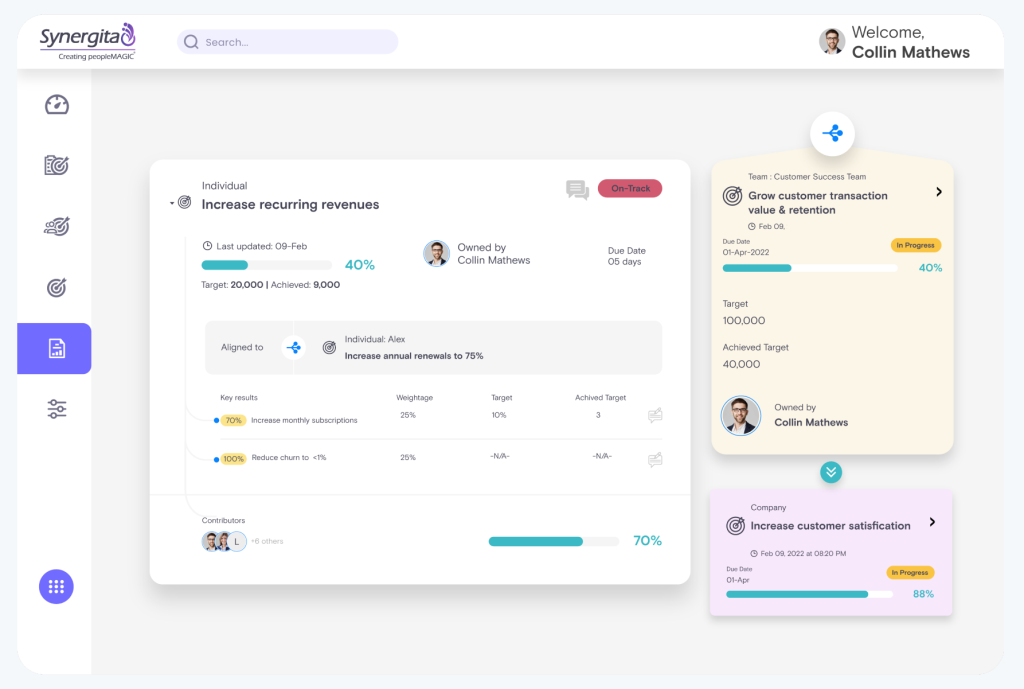
Synergita fixed this by tying 360-degree feedback directly to OKR milestones so every appraisal conversation is grounded in documented outcomes rather than memory or bias. By the time review season arrived, there was actual data from the quarter to discuss.
The calibration sessions help normalize manager ratings across departments, which significantly reduced the perception of favoritism that had been a recurring complaint in employee surveys. The customizable review forms work across roles without forcing every team into the same evaluation structure.
Pros:
- 360-degree feedback tied directly to OKR milestones for evidence-based appraisals
- Team calibration sessions to normalize ratings and reduce manager bias
- Customizable review forms and rating scales that work across different role types
- Built-in analytics to surface high performers and skill gaps before they become retention risks
- Automated review cycle scheduling to maintain appraisal compliance timelines
Cons:
- Interface design feels less modern compared to newer platforms on this list
- Less suited for organizations where OKRs are not the primary goal framework
User Rating: 4.6/5 (G2)
Pricing: Starts at $2/user/month, billed annually.
10. Profit.co – Best for Aligning Daily Work Directly to Strategic Objectives
When I used Profit.co, I found that it did much more than simply let me set objectives and track key results. It allowed me to take any key result and break it down into assignable tasks that individual contributors could manage day to day.
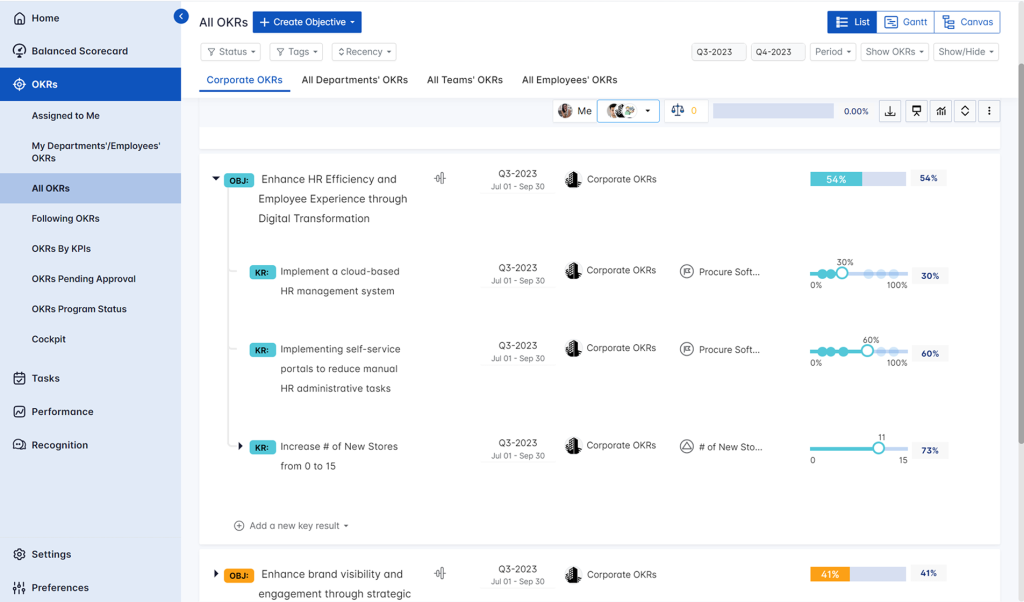
I could see executives getting a live view of how each team’s work contributed to the overall launch strategy, while employees could clearly understand how their daily tasks connected to broader business goals. That visibility genuinely changed how teams prioritized their work.
I also liked that the appraisal module runs alongside OKRs on the same platform. I didn’t have to connect multiple tools just to move from strategy execution to performance reviews. The built-in pulse surveys gave me early insights into team morale, preventing small issues from growing into larger performance challenges.
Pros:
- Maps daily tasks directly to strategic objectives for end-to-end execution visibility
- Built-in performance appraisals, scorecards, and one-on-ones alongside OKR tracking
- Pulse surveys and an employee recognition module within the same platform
- Sprint-based OKR updates for agile and product development teams
- Role-based dashboards for executives, managers, and individual contributors
Cons:
- Custom reports may require admin support to configure for non-standard queries
- Mobile app has limited feature parity compared to the desktop experience
User Rating: 4.7/5 (G2)
Pricing: Custom pricing.
How I Chose These Tools
I do not just go by feature lists or vendor demos. When I evaluate a cloud-based performance management system, I look at how these tools hold up in real HR environments with real adoption challenges. Here is the framework I used:
- User Reviews and Ratings: I start with G2, Capterra, and community forums like Reddit HR and Quora. Real user feedback tells me what the sales pitch does not: where adoption fails, what managers actually complete, and where the UI creates friction that kills rollout.
- Core Features and Functionality: The non-negotiables are goal setting, continuous feedback, performance reviews, 360-degree feedback, manager dashboards, and reporting. If a tool cannot handle these reliably, it does not belong on this list, regardless of how impressive the rest of the platform looks.
- Ease of Use: A tool can have every feature imaginable and still fail if managers do not use it. I pay close attention to how quickly a new user can complete a check-in, log feedback, or update a goal without help documentation. Adoption rate is the real measure of the success of performance management software.
- Integration Depth: Performance data only becomes useful when it connects to the systems your team already uses. I evaluate whether the tool integrates meaningfully with HRIS platforms such as Workday and BambooHR, as well as daily work tools such as Slack, Microsoft Teams, Jira, and Asana.
- Customer Support Quality: Implementation is where most HR software rollouts stall. I look for platforms with responsive onboarding support, available training resources, and a track record of quickly acting on customer feedback.
- Value for Money: This is not about finding the cheapest option. It is about whether the features, flexibility, and performance outcomes justify the cost for the team size and complexity you are managing.
My Top 3 Cloud-Based Performance Management Software Picks
After working across dozens of cloud-based HRMS solutions for employee performance management and team environments, these are the three I return to most consistently, depending on what an organization actually needs.
1. PeopleGoal
PeopleGoal is my top choice for HR teams that need a configurable performance management system without relying on IT. The no-code workflow builder makes it easy to customize reviews, goals, and 360-degree feedback processes. With support for OKRs, SMART goals, cascading goals, real-time dashboards, and 500+ integrations, it helps organizations replace disconnected tools with a single platform.
2. Lattice
Lattice is ideal for mid-sized organizations focused on building a continuous feedback culture. Performance reviews, goals, one-on-ones, and engagement surveys work together in a single system, providing managers with ongoing context rather than periodic snapshots. I especially like its manager analytics, which help HR evaluate coaching effectiveness rather than just review completion rates.
3. Leapsome
Leapsome stands out for organizations that prioritize employee development alongside performance management. It connects review outcomes directly to learning paths, making skill development more actionable. Its calibration tools are particularly strong, helping HR teams reduce rating inconsistencies and create fairer performance evaluations across multiple managers and teams.
When Should You Move From Spreadsheets to Cloud-Based Performance Management Software?
This is the most common question I hear from HR leaders still running reviews in Excel. The honest answer: You are probably already past the point where a spreadsheet is serving you well.
Here are the signals that tell me it is time to make the move:
- Review cycles take more than a week to coordinate: If you are spending significant time chasing completions, sending reminders, consolidating scores, or reformatting data for leadership, that is time the software should be handling automatically.
- Managers have no visibility between review cycles: If a manager cannot see whether their team’s goals are on track without asking, you do not have a performance system. You have a documentation system that runs twice a year.
- Feedback is only flowing during formal review periods: The research is detailed that annual or biannual reviews are not enough to drive performance improvement. If feedback only happens when the cycle opens, you are missing most of the year.
- Your goal data lives somewhere separate from your feedback data: When goals, feedback, reviews, and development plans are in different places, patterns become invisible. You cannot connect a goal completion rate to a manager’s coaching frequency if the data never talks to each other.
- You are managing a remote or hybrid team: Cloud-based performance management software was built for distributed teams. If your team is not all in one office, the informal alignment that used to happen organically is no longer happening. A system replaces it.
What to Look for in Cloud-Based Performance Management Software
Before you start evaluating vendors, you need to know exactly what capabilities your team actually needs. Based on what HR managers consistently tell me they are searching for, here are the features that matter most and why.
| Feature | What to Look For | Why It Matters |
| Goal Alignment & OKR Tracking | Support for OKRs and SMART goals, cascading goals, real-time progress dashboards, and automatic updates. | Prevents goals from becoming a once-a-year exercise. Keeps employees aligned with company priorities and gives everyone visibility into progress. |
| Continuous Feedback Tools | Peer feedback, manager feedback, self-assessments, regular check-ins, and integrations with Slack or Microsoft Teams. | Encourages ongoing performance conversations instead of relying solely on annual reviews. Helps managers address issues and recognize wins in real time. |
| 360-Degree Feedback | Customizable questionnaires, reviewer anonymity controls, automated reviewer selection, and individual/team reporting. | Provides a broader and more accurate view of employee performance than manager-only feedback. Supports leadership development and fairer evaluations. |
| Performance Review Workflows | Automated scheduling, reminders, completion tracking, customizable review forms, and calibration tools. | Reduces HR administration while ensuring reviews stay consistent, role-specific, and fair across departments. |
| Analytics & Reporting | Custom dashboards, performance trends, goal completion tracking, skill-gap analysis, high-performer identification, and retention insights. | Gives HR and leadership actionable data without manual reporting, helping them make better talent decisions faster. |
| HRIS & Workplace Integrations | Native integrations with Workday, BambooHR, ADP, Slack, Microsoft Teams, payroll systems, and other HR tools. | Improves adoption by fitting into existing workflows and eliminating duplicate data entry across systems. |
| Employee Development & Career Planning | Development plans, career pathing, skill tracking, learning recommendations, and growth goal management. | Turns performance management into a growth strategy by helping employees build skills and prepare for future roles. |
| Security & Compliance | SOC 2 Type II certification, GDPR compliance, data residency options, and role-based access controls | Protects sensitive performance and feedback data, and keeps HR compliant with regional privacy regulations as your team grows or goes global |
Build a Performance System That Drives Real Outcomes
Choosing the right cloud-based performance management software is not about finding the platform with the longest feature list. It is about solving the problems that slow your team down today. If you are still managing reviews through spreadsheets, disconnected tools, or manual follow-ups, the biggest gains often come from better visibility, automation, continuous feedback, and goal alignment.
The tools in this guide approach those challenges differently, whether your priority is employee development, manager coaching, OKR tracking, or enterprise-wide alignment. For organizations that need flexibility and want reviews, goals, feedback, and engagement data working together in one system, PeopleGoal is worth a closer look because it adapts to existing processes rather than forcing teams into rigid workflows.
Start by auditing your current process, identifying the biggest bottlenecks, and testing your top choices with a real pilot group before making a final decision.
Frequently Asked Questions
What is the difference between cloud-based and on-premise performance management software?
Cloud-based software is hosted online and accessed through a browser, requiring no internal infrastructure. On-premise software runs on your organization's servers and needs ongoing IT maintenance. Cloud solutions offer faster deployment, automatic updates, lower upfront costs, and easier access for remote and hybrid teams.
How long does it take to implement cloud-based performance management software?
Implementation typically takes one to four weeks, depending on team size, integrations, and workflow complexity. Simpler platforms can be deployed in days, while configurable systems may require additional setup, data migration, and user training before launch.
Can cloud-based performance management software support remote and hybrid teams?
Yes. Cloud platforms help remote and hybrid teams stay aligned through shared goals, automated check-ins, continuous feedback, and real-time visibility into performance. Integrations with collaboration tools like Slack and Microsoft Teams make adoption easier and keep conversations within existing workflows.
How do I get manager buy-in for a new performance management platform?
Focus on the time and effort managers save. Show how automation reduces administrative work, how dashboards eliminate manual tracking, and how better visibility supports coaching conversations. Involving managers in a pilot program can also improve adoption across the organization.
What is the difference between OKR software and performance management software?
OKR software focuses on setting and tracking goals, while performance management software covers reviews, feedback, one-on-ones, development planning, and employee growth. Some platforms combine both capabilities, allowing organizations to connect goals directly with performance conversations and evaluations.
How do I evaluate cloud-based performance management software before committing?
Start by identifying the biggest weaknesses in your current process. Prioritize the features that solve those problems, request a focused product demo, and test the software with a real team during the trial period to assess usability and adoption.
Is cloud-based performance management software suitable for small businesses?
Yes. Small businesses can benefit from streamlined reviews, goal tracking, and feedback processes without investing in complex infrastructure. The best choice depends on team size, budget, and whether the organization needs a lightweight solution or a more scalable platform.
Is cloud-based performance management software secure and compliant with data privacy regulations?
Most established platforms run on SOC 2 Type II certified infrastructure and support GDPR compliance, including data residency options and role-based access controls. Before committing, ask any vendor directly about their certifications, where your data is hosted, and how they handle deletion requests. If a vendor can't answer clearly, that tells you something on its own.
Ready to 3x Your Teams' Performance?
Use the best performance management software to align goals, track progress, and boost employee engagement.