
OKR software for small businesses can make a big difference when you run a company of 10 to 200 people, and nobody formally owns the OKR process. Otherwise, goals often end up sitting in a spreadsheet that nobody opens after week two. I have been there.
Updates stall, managers chase people for numbers, and the quarter ends with a shrug. That disconnect shows up in broader performance management, too. The Betterworks 2024 State of Performance Enablement Report found that 90% of leaders believe their performance management systems work, but only 55% of employees agree.
This guide fixes that. I tested each tool the way a busy founder would, with real goals, a short setup window, and no time for training.
I also added the practical parts most roundups skip: a shortlist by team size, common rollout mistakes, a spreadsheet exit checklist, a goal alignment view comparison, sample OKRs by team, a 30-day rollout, and straight answers to the questions founders ask most often when they start.
What Is OKR Software for Small Business & What Are Its Benefits?
OKR software is a goal-tracking platform where you set objectives, attach measurable key results, and run weekly check-ins in one place. Think of small business OKR software as the lighter version: quick to set up, simple for managers who are not HR experts, and built for teams without a dedicated OKR owner.
Here is what you actually gain:
- Clear Priorities: Everyone sees how their work connects to company goals, so teams stop chasing different targets.
- Weekly Visibility: Goals get updated weekly instead of being set once and forgotten, so I can spot an at-risk key result in week three, not week twelve.
- Less Chasing: Automated nudges and smart check-ins replace the reminder emails and status meetings I used to run by hand.
- Live Dashboards: Progress shows up at a glance, so you stop pulling numbers from scattered docs before every leadership meeting.
- Fairer Reviews: When results are tied to measurable goals, performance conversations feel less subjective.
- Room To Grow: The same system should carry you from 10 to 200 people without a rebuild.
10 Best OKR Software for Small Business
I reviewed each tool by how it works for a small team with no OKR specialist, not just by specs. This list combines my hands-on use with what founders, operations leads, and HR managers told me after rolling these out.
| Tool | Best For | Starting Price | User Rating |
| PeopleGoal | Fully Customizable Performance Reviews, OKRs & Employee Development | $4/user/month | 4.5/5 (G2) |
| Synergita | Continuous Performance Appraisals | Free for up to 3 users; paid from $3/user/month | 4.6/5 (G2) |
| Tability | Building a Weekly OKR Habit From Scratch | $6/user/month | 4.6/5 (G2) |
| Mooncamp | Team-Driven OKR Collaboration | About €7/user/month | 4.8/5 (G2) |
| Perdoo | Visualizing Company-Wide OKRs | Free for up to 5 users; paid from €7.20/user/month | 4.4/5 (G2) |
| Weekdone | Weekly OKR Check-Ins | Free for up to 3 users; paid from ~$10.80/user/month | 4.2/5 (G2) |
| Profit.co | Aligning Tasks With Strategy | Custom quote | 4.7/5 (G2) |
| Teamflect | Running OKRs Inside Microsoft Teams | Free for up to 10 users; paid from $7/user/month | 4.5/5 (G2) |
| Lattice | OKRs Inside a Full People Platform | $13/person/month | 4.6/5 (G2) |
| OKRs Tool | Simplicity and AI-Powered Alignment | $49/month flat | 4.6/5 (G2) |
1. PeopleGoal – Best for a Fully Customizable Platform for Performance Reviews, OKRs & Employee Development
When I set up OKRs for an operations team that had never run them, I wanted objectives at the company, team, and individual levels without the admin pile-up. PeopleGoal delivered that.
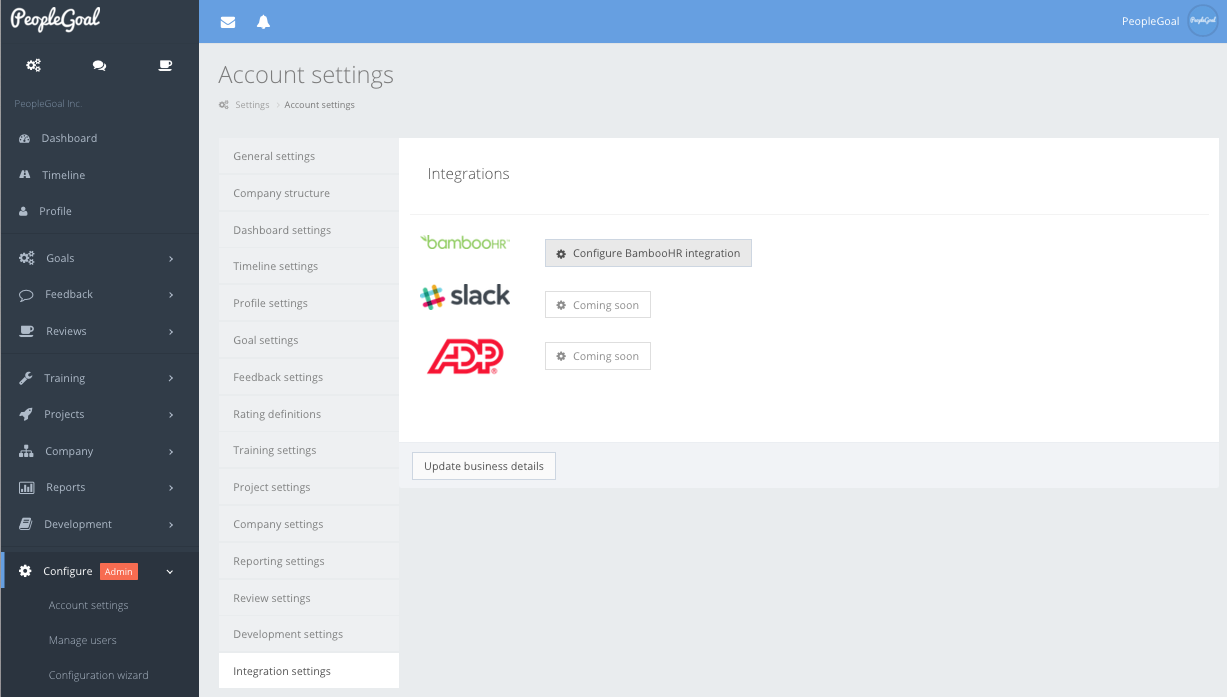
Every objective had an owner, key results rolled into department goals, and the whole cascade showed up across the org chart, so overlapping goals were very obvious right away. It also lets people link goals across functions, which cuts duplicate work.
Weekly check-ins are what keep everything alive. Auto-reminders nudged people, each update carried an on track or at risk status plus comments and progress notes, and I stopped chasing anyone by email. Slack, Teams, and email delivery meant updates landed where the team already worked.
If you are a founder or director with no dedicated OKR owner, this is the setup I would copy, because it keeps goals visible, current, and connected to reviews without needing one full-time administrator.
Pros:
- Runs OKRs and SMART goals side by side, so company bets and individual development goals live in one place
- Built-in 360 Feedback with anonymous responses, weighted scoring, and reusable review forms
- Customizable Workflows with no code, plus roles and permissions that control who sees what
- Standard reports such as Goals Alignment, Progress, and Overdue Goals, plus custom dashboards by role or team
- Multi-dimensional teams and custom org charts that reflect how your company really works
- Links with Jira, imports Asana tasks as goals, and maps key results to sprint deliverables for agile teams
Cons:
- No downloadable or on-premise version
- Dark UI mode is not available
User Rating: 4.5/5 (G2)
Pricing: 14-day free trial. Paid starts at $4/user/month.
Check how iQmetrix replaced scattered forms and SharePoint with one transparent, trackable process using PeopleGoal.
2. Synergita – Best for Continuous Performance Appraisals
A colleague in HR at a growing software company told me their reviews had become meaningless: people filled forms, managers signed them, and nothing changed. Synergita fixed that by putting OKRs and appraisals into one system. Employees tracked key results while peers, managers, and cross-functional partners left feedback through the quarter, so review day brought real data instead of memory.
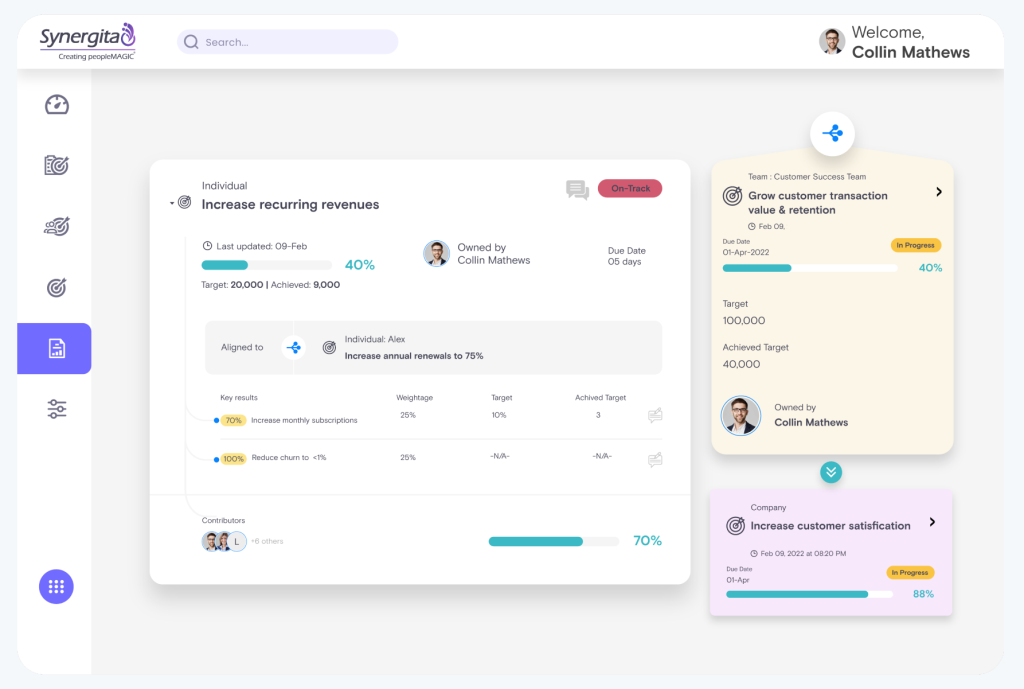
Its 360-degree feedback connects to OKR milestones, and review forms and rating scales can differ by department. Calibration sessions reduce rating bias across managers, and analytics surface high performers and skill gaps early. An AI feature also drafts OKRs, which helps first-time writers.
My colleague did mention that the interface looks dated next to newer tools. Still, the OKR Starter plan is free for up to three users, so a tiny team can safely try the approach first, then carefully judge the fit using real goals and real managers involved, too.
Pros:
- Automated review cycles that keep appraisals on schedule
- Visual OKR hierarchy tree for quick alignment checks
- Auto-synced Jira check-ins that cut manual updating
- Cascading OKRs with a dedicated dashboard
- Engagement features that sit alongside goal tracking
Cons:
- UI feels dated compared to newer platforms
- Not ideal for non-HR-led OKR environments
User Rating: 4.6/5 (G2)
Pricing: Free OKR Starter for up to 3 users. Paid starts at $3/user/month, billed annually.
3. Tability – Best for Building a Weekly OKR Habit From Scratch
A friend who runs a small agency kept losing her OKRs right after the planning meeting, so she tried Tability on my suggestion. What stood out to her was how fast the first plan came together. Weekly check-ins arrive as light prompts, and a confidence rating sits beside every key result, so a stalled goal shows up early.
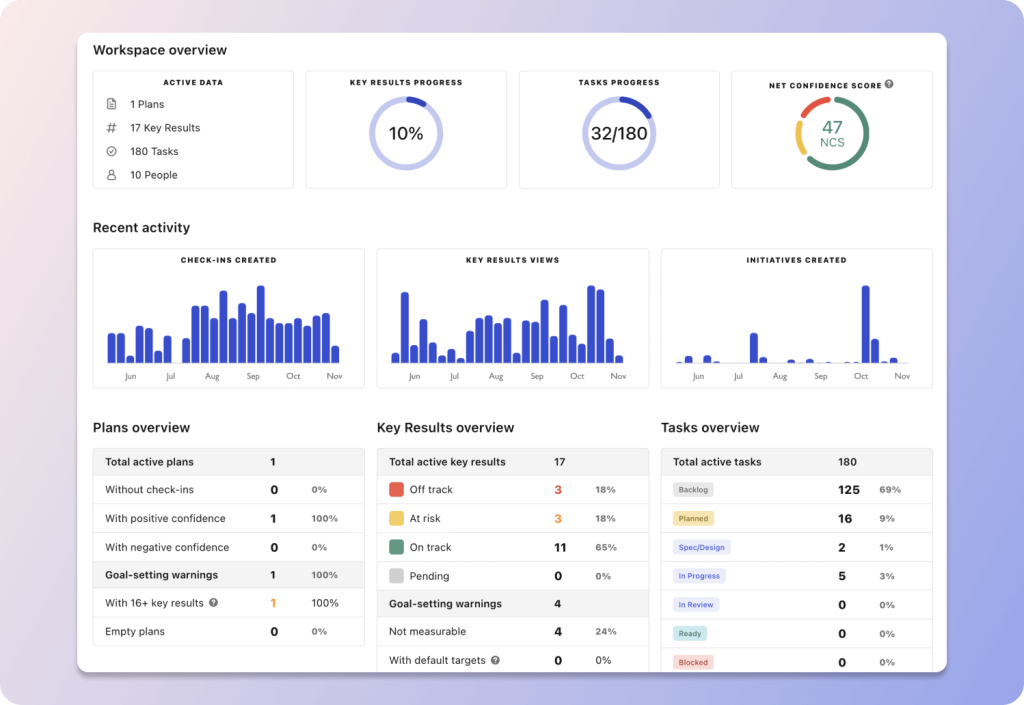
Her team had never touched OKRs, yet the interface did not scare anyone. The AI support helped her tighten vague key results, and the dashboards gave her a clean snapshot before each Monday sync. Pulling numbers from connected project tools also cut her manual updating.
When she compared it with heavier platforms, she told me it felt like the first OKR tool her team opened voluntarily. If your main worry is getting people to update goals every week, put it on your shortlist and run one real quarter of goals through it.
Pros:
- Bulk import to move OKRs out of spreadsheets quickly
- Tree view that shows how goals connect across the company
- Permission control over who can create OKRs
- Board and timeline views for initiatives under each key result
- Customizable dashboards that G2 reviewers say help them visualize progress
Cons:
- Reporting and alignment depth are lighter than on larger platforms
- A handful of G2 reviewers report slow support replies
User Rating: 4.6/5 (G2)
Pricing: Starts at $6/user/month, billed annually. Free trial available.
4. Mooncamp – Best for Team-Driven OKR Collaboration
Check-ins are where Mooncamp won me over. A small product and marketing group I know used to post updates alone, then wonder why nothing lined up. Inside Mooncamp, each check-in becomes a conversation, so teammates react to one another’s progress instead of filing silent reports.
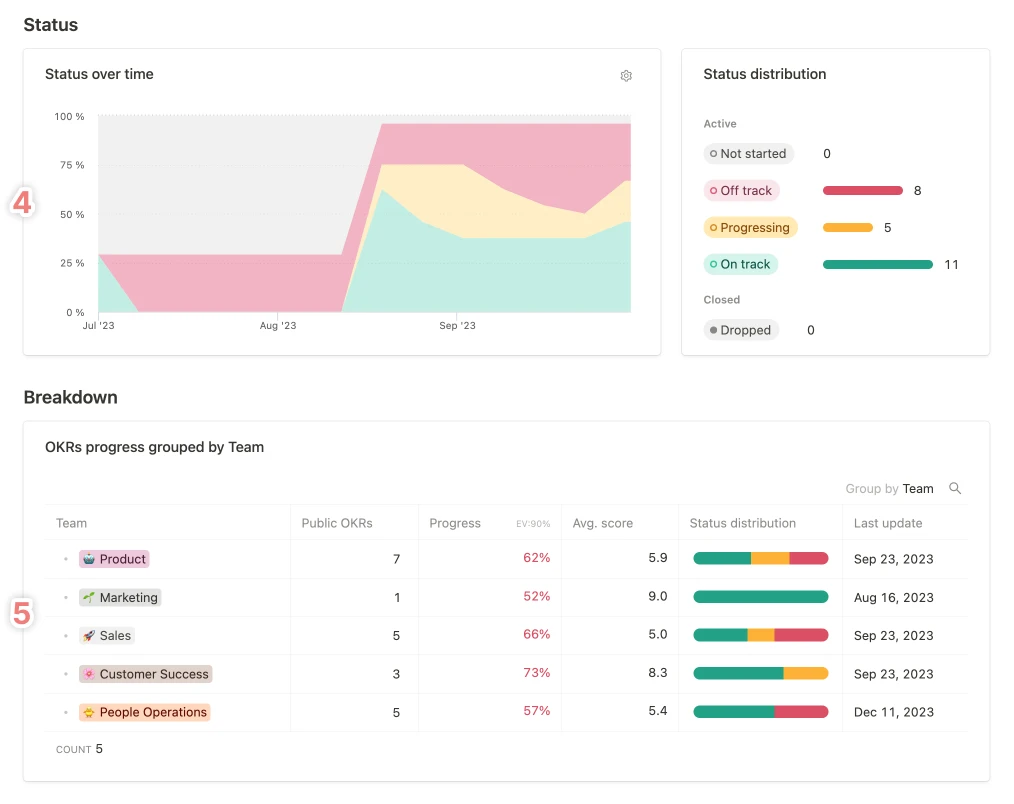
The structure helped them most. They could view goals as a cascade, a tree, or a network, depending on who was asking, and custom fields plus tagging let them organize objectives by project and owner. Slack and Microsoft Teams integrations pulled updates into the daily chat.
The setup felt calm, which mattered because nobody on that team wanted a long rollout. G2 reviewers praise the same ease, and more than half of them come from small businesses. For a team that wants alignment without enterprise weight, I would call this a safe bet for small teams. Within two quarters, that group stopped finding alignment gaps in retrospectives.
Pros:
- Cascade, tree, and network views for the same set of goals
- Custom fields and tagging for flexible goal organization
- Reporting dashboards filtered by team, owner, and time period
- Flexible goal frameworks that adapt to your team’s structure
- Reviewers describe setup and administration as easy
Cons:
- Smaller integration library compared to enterprise platforms
- G2 reviewers say it can be less adaptable for very unique workflows
User Rating: 4.8/5 (G2)
Pricing: Starts at about €7/user/month. Free trial available.
5. Perdoo – Best for Visualizing Company-Wide OKRs
Picture twelve people on a call, and not one of them can explain how their goal connects to anyone else’s. That was a transformation project I watched, and Perdoo’s Strategy Map cleared the fog. Leaders, department heads, and individual contributors opened the same view and saw how each key result fed an objective and how each objective tied back to the company vision.
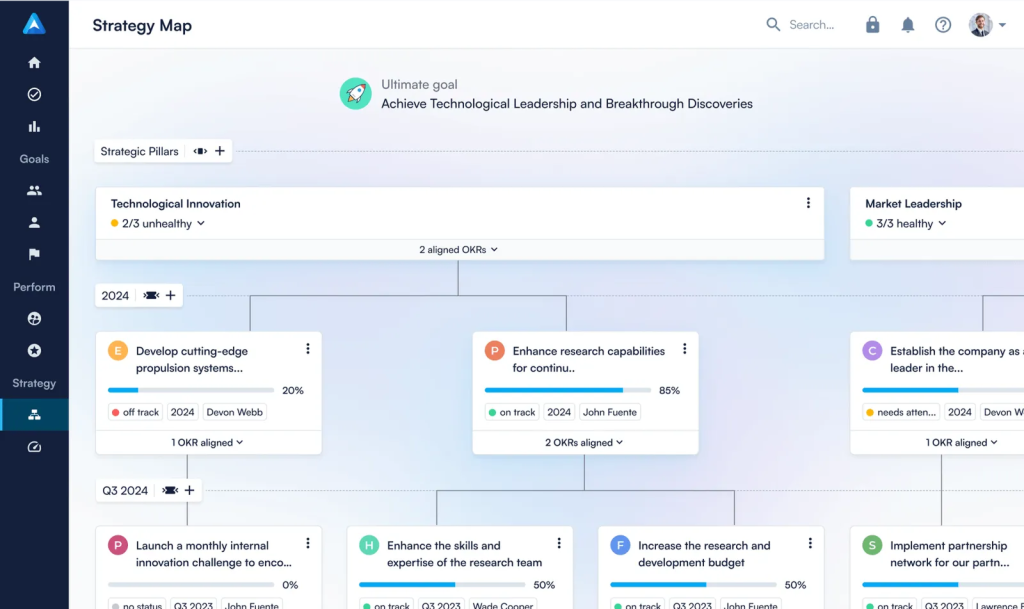
Prompts for weekly check-ins and confidence ratings kept the rhythm steady, while data-driven alerts flagged weak alignment and overdue objectives before they derailed a quarter. Ready-made templates for marketing, product, and people teams helped newcomers avoid a blank page.
I also like that Perdoo keeps OKRs and KPIs separate, which stops ongoing metrics from cluttering ambitious goals. Teams of up to five people can try the full workflow without paying anything, and that free start also really makes testing painless for tiny teams and early-stage companies alike.
Pros:
- Keeps OKRs and KPIs separate on one platform
- Data-driven alerts for weak alignment and overdue objectives
- Templates for marketing, product, and people teams for fast adoption
- Admin controls over visibility, timelines, and scoring standards
- Connects to thousands of business apps through Google Sheets or Zapier
Cons:
- Admin setup could use better onboarding guidance
- The interface can feel dated to some users
User Rating: 4.4/5 (G2)
Pricing: Free for up to 5 users. Paid starts at €7.20/user/month, billed annually.
6. Weekdone – Best for Weekly OKR Check-Ins
Ten minutes every Friday is all Weekdone asks from each person. I watched a startup adopt it after leadership said no to more meetings, and the routine stuck. People log plans, progress, and problems, add a confidence score, and by Monday, an automatic summary is waiting for the founders.
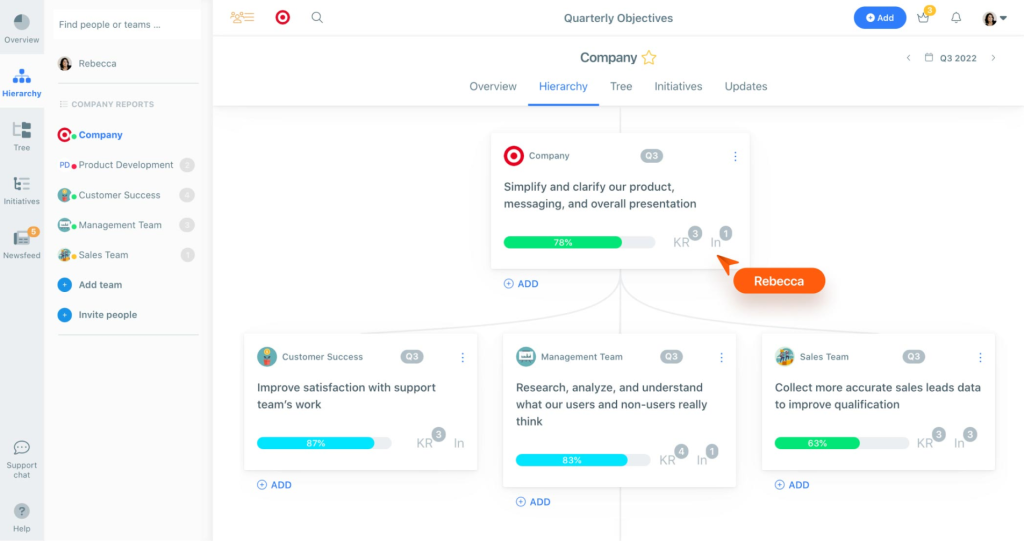
New OKR writers get help, too. The goal suggestion tools nudge vague aspirations toward measurable key results, which saved that team a few awkward planning debates. Slack reminders show up where people already chat, so check-ins never feel like homework.
Quarterly goals stayed in front of everyone every week instead of fading after January. If your team tried OKRs before and follow-through collapsed around February, the weekly structure here is usually the missing piece. A group of up to three people can start free and see whether the habit holds, which makes the whole experiment low risk and easy to judge.
Pros:
- OKR hierarchy tree that shows company-wide alignment
- KPI tracking right next to your OKRs
- TV mode for showing progress during team meetings
- Mobile app for check-ins away from a desk
- Pulse surveys and exportable custom reports for early engagement signals
Cons:
- Not ideal for large hierarchical organizations needing deep role mapping
- Limited customization in reporting dashboards
User Rating: 4.2/5 (G2)
Pricing: Free for up to 3 users. Paid starts at roughly $10.80/user/month, billed annually.
7. Profit.co – Best for Aligning Tasks With Strategy
Strategy and daily tasks normally live in different tools, which is why Profit.co caught my eye. During a multi-department product launch, I took an objective, split it into key results, and linked those straight to assignable tasks without switching screens. Executives could see how every function contributed, and individual contributors finally saw where their work fit.
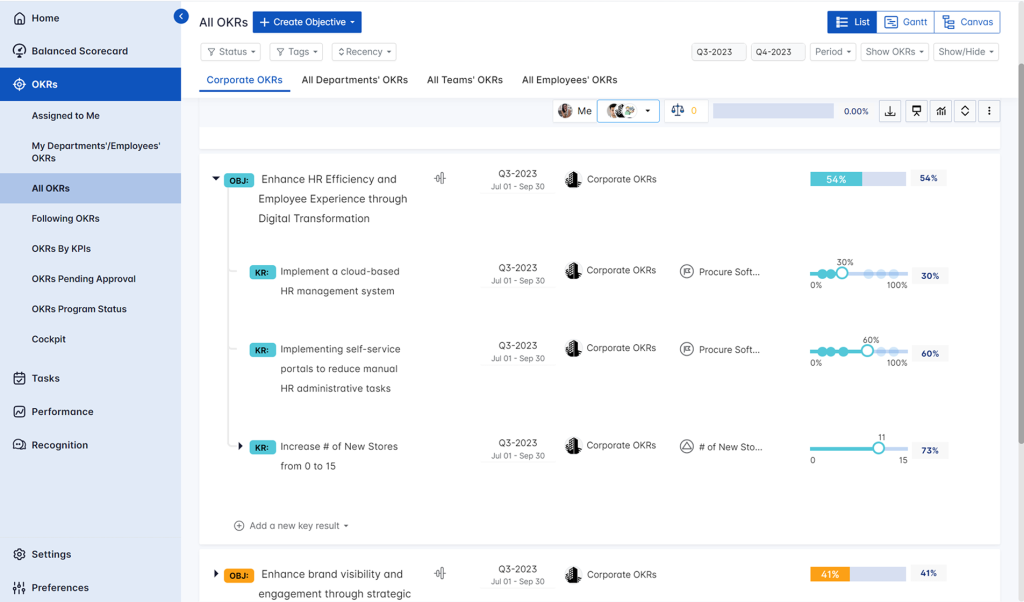
A built-in performance layer covers appraisals, scorecards, and one-on-ones, so you avoid stitching three systems together. Sprint-based updates suit agile groups, and pulse surveys give early engagement signals before trouble spreads. It also supports Balanced Scorecard and Hoshin Kanri styles if your leadership prefers those frameworks.
Expect a bit of setup time and some admin help for custom reports, since this platform does far more than basic tracking. For an operations director who wants goals, tasks, and reviews connected together in a single place, the depth is worth the extra effort every single time.
Pros:
- Role-based dashboards that give each department its own view
- Built-in OKR templates to speed up your first cycle
- AI-powered goal creation for teams that struggle to write key results
- PowerPoint report generation for leadership updates
- Recognition tools sit alongside the engagement modules
Cons:
- Custom reports may need admin support to configure
- Mobile app has limited feature parity with the desktop
User Rating: 4.7/5 (G2)
Pricing: 30 Days Free Trial. Custom Quote
8. Teamflect – Best for Running OKRs Inside Microsoft Teams
If your whole company lives in Microsoft Teams, Teamflect deserves a look before anything else. A manager I know hated logging into yet another website, so he tried it, and the OKRs, one-on-ones, and reviews all sat inside the Teams window his people already used. Adoption took almost no convincing.
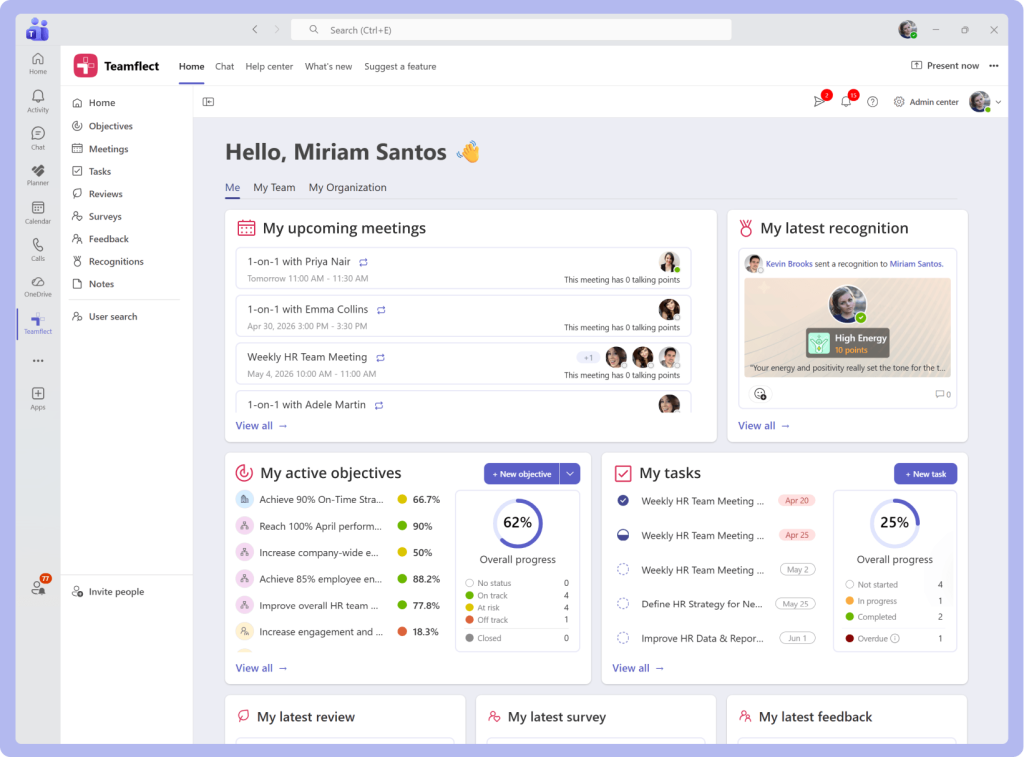
He built goals with custom labels and types, linked them in a cascade, and relied on automated check-ins to prompt updates. Outlook Calendar support meant reviews and meetings landed on real schedules. Teams that lost Viva Goals found the one-step OKR migration especially handy.
The free plan for up to 10 users lets his group test the core modules without entering a card. G2 reviewers love the Microsoft fit, though they also warn that adoption gets harder if your company is not a Teams shop. Check which chat and meeting tools your people actually open every day before you commit.
Pros:
- Recurring one-on-ones with notes and tasks
- Performance reviews with file attachments
- Engagement surveys inside the same app
- Peer feedback and recognition without leaving chat
- An OKR feed that shows progress updates across the company
Cons:
- Fully dependent on Microsoft Teams, so adoption is harder elsewhere
- Reporting and benchmarking are lighter than larger HR suites
User Rating: 4.5/5 (G2)
Pricing: Free for up to 10 users. Paid plans start at $7/User/Month
9. Lattice – Best for OKRs Inside a Full People Platform
Lattice shows up on almost every shortlist I see, so I made sure to test it properly. It started life as a performance review product and later added OKR tracking, which explains why the strongest parts are reviews, one-on-ones, and pulse surveys with visual engagement dashboards. Goals connect to company impact, so managers can see whose work moves the needle.
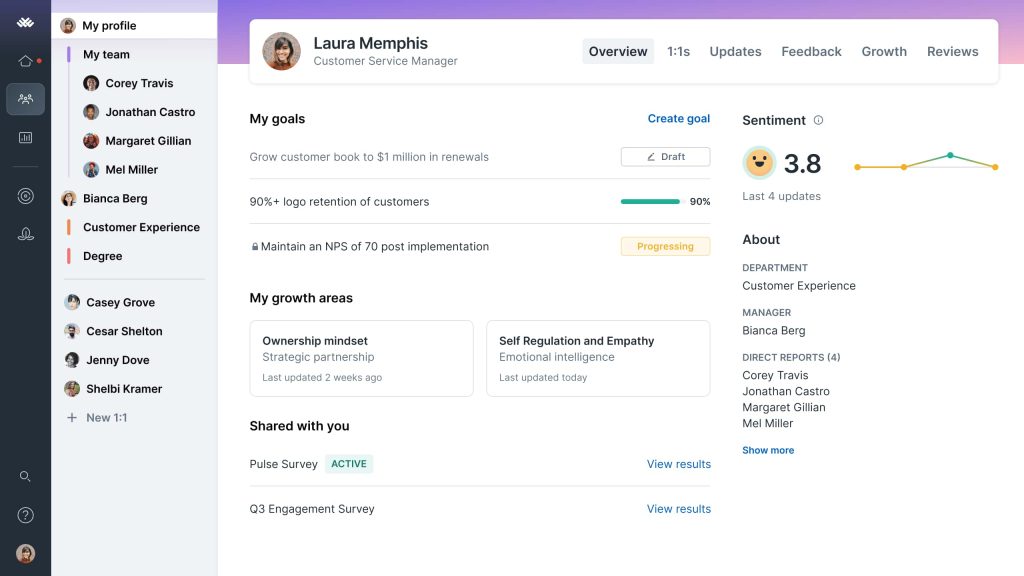
A founder I advise liked that everything people-related lived in a single place. Her managers ran one-on-ones, tracked goals, and checked engagement scores without bouncing between apps. G2 reviewers also rate its support highly, which helps during rollout.
The catch is size. Most of its reviewers come from mid-market companies, and a very small team can end up paying for features it will not touch. If you are closer to 100 people and want OKRs wrapped inside a full people platform, it fits well enough for that growth stage today.
Pros:
- Performance reviews and OKRs tied to the same employee record
- Structured one-on-one meeting tools for managers
- Pulse surveys with visual engagement scores
- Goal alignment that links individual work to company impact
- Support that G2 reviewers rate highly
Cons:
- May include more features than a very small team needs
- Reviewer base skews mid-market, so tiny teams may find it heavy
User Rating: 4.6/5 (G2)
Pricing: Starts at $13/person/month.
10. OKRs Tool – Best for Simplicity and AI-Powered Alignment
I tested the OKRs Tool with a small operations team that had already quit two other platforms because the setup felt like a project. Everyone understood OKRs in theory, but nobody knew how to link personal goals to company objectives, and the rollout stalled. The AI alignment engine tackled exactly that by reading team structure and existing objectives, then suggesting how to cascade them.
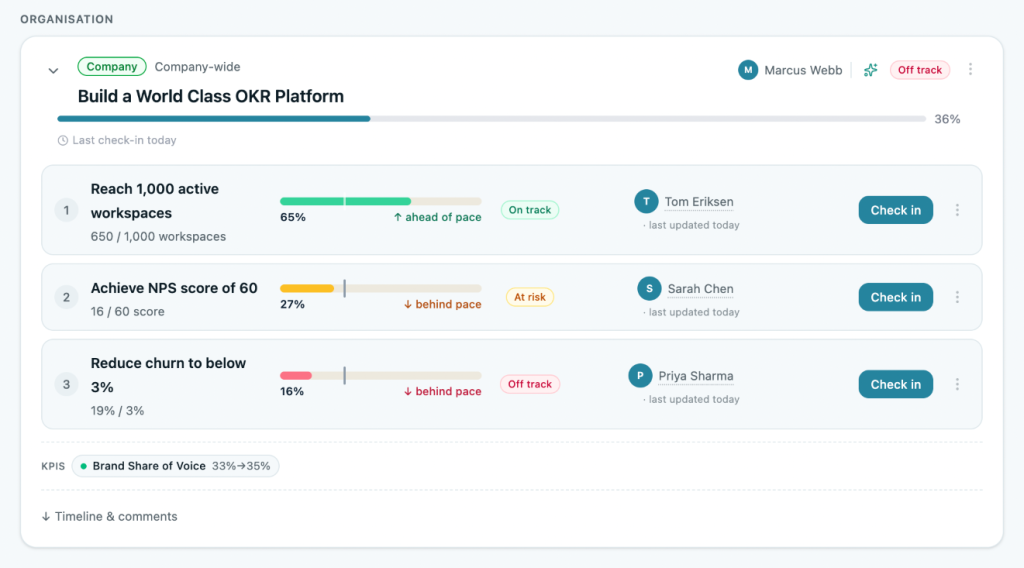
They had a working setup in a single session. Weekly nudges kept check-ins moving without manual follow-up, and the confidence score plus alignment score gave a fast read on whether goals were connected or floating alone.
Newer releases added KPIs, reports, and built-in AI, so it is growing quickly. Flat-fee billing also clearly appeals to tight budgets. Treat it as the lean choice when you want guided cascading, a fast start, and almost no training time for managers who are not technical or already deeply experienced with OKRs.
Pros:
- Built-in OKR templates across common team functions
- Simple interface that non-technical users can navigate without training
- Slack integration for check-in reminders
- Ten live integrations, including Jira
- Live alignment map linking every team’s key results to company objectives
Cons:
- Limited integrations compared to more established platforms
- Analytics depth lags behind enterprise tools
User Rating: 4.6/5 (G2)
Pricing: Starts at $49/month flat. 14-day trial for up to 5 users.
How I Chose These OKR Software
When I evaluate OKR tracking software for small business teams, I don’t just rely on feature lists or marketing claims. I look at how these tools actually perform in real-world scenarios. Here’s the framework I used to make sure every recommendation is practical, reliable, and worth considering:
- User Reviews / Ratings: I start by looking at real user feedback from platforms like G2. This gives me a clear picture of how small teams actually experience the tool day to day, what they love, and where it falls short.
- Core Features & Functionality: I focus on what truly matters in OKR tracking software for a team of 10 to 200. This includes goal setting, key result tracking, alignment views, check-ins, reporting, and integrations. If a tool cannot handle these well, it does not make the cut.
- Ease of Use: I pay close attention to how intuitive the platform feels. A tool might be powerful, but if teams struggle to adopt it, it defeats the purpose. Clean interface, simple navigation, and quick onboarding are non-negotiable for me, because a small team has no dedicated OKR owner to babysit adoption.
- Customer Support: From my experience, implementation is where many tools fail. I evaluate how responsive and helpful the support team is, especially during setup and ongoing use. Fast, reliable support makes a big difference in adoption.
- Value for Money: I compare pricing with what the tool actually delivers at your headcount. This is not about picking the cheapest option, but about whether the features, flexibility, and performance justify the cost.
- Personal Experience / Expert Insights: Wherever possible, I rely on my own hands-on experience with these tools. I also consider insights from founders, HR leaders, operations teams, and product managers who use OKR systems in real environments. This helps me go beyond surface-level reviews and highlight what actually works.
Top 3 OKR Software Picks
Choosing the right software can make or break your execution. I have seen small teams with a solid OKR framework fail simply because the tool did not fit how they work. These three stand out because they help teams follow through, not just track.
1. PeopleGoal
PeopleGoal is my pick for the best OKR software for small businesses, because it does not stop at goal tracking. I can build OKRs at the company, team, and individual levels, run SMART goals next to them, add 360 feedback, and tie it all to performance reviews and development plans without buying a second tool. Most teams go live within 1 to 4 weeks, and the PeopleGoal team helps configure the account, import users, and train admins and employees.
2. Tability
Tability is the lightest path to a weekly habit. Check-in prompts, confidence ratings, and AI help with key results, so a first-time team can launch in an afternoon. With a 4.6/5 rating on G2, I recommend it when you only need goals, and your people are new to OKRs.
3. Mooncamp
Mooncamp holds a 4.8/5 rating on G2, and more than half of its reviewers are small businesses. Collaborative check-ins and flexible cascade, tree, and network views make it easy to keep a growing team aligned without enterprise complexity.
When Should You Move From Spreadsheets to OKR Software?
Spreadsheets work for a founder and two co-founders. They stop working once you add people, quarters, and managers. These are the signals I watch for:
- Ten-Plus Owners: More than 10 people are tracking goals in separate files.
- Dead Goals: Goals get set in January, and nobody looks at them until December.
- Report Hunting: Review meetings are spent gathering data instead of making decisions.
- Blind Managers: Managers cannot see how individual goals connect to team objectives.
- Cycle Change: You are moving from biannual reviews to quarterly OKR cycles.
- Scattered Data: Goals, reviews, and feedback live in completely different systems.
If three or more of these are true, I would start shortlisting OKR tools for small businesses from the list above and run a trial this month.
Which Goal Alignment View Should You Look For?
Cascading was the make-or-break feature in the conversations I have had with teams switching tools. Before you buy, open the alignment view and check it against your own org chart.
| Tool | Alignment view |
| PeopleGoal | Alignment visualized across the org chart, plus a Goals Alignment Report |
| Mooncamp | Cascade, tree, or network view |
| Perdoo | Strategy Map from key result to company vision |
| Weekdone | OKR hierarchy tree |
| Tability | Tree view |
| Synergita | Visual OKR hierarchy tree |
| Teamflect | Cascading goals with linked progress statuses |
| OKRs Tool | Live alignment map plus an alignment score |
- Use Real Goals: Build one company objective, two team objectives, and three individual ones, then see if the view makes sense without explanation.
- Check The Roll-Up: Update a key result and confirm progress flows up to the company objective automatically.
- Open As Employee: Log in as a regular team member and see if they can find how their goal fits in under a minute.
What Do Good OKRs Look Like for Each Team?
A good objective is a short, inspiring sentence, and each key result is a number you can measure. These examples are illustrative, so swap in your own baselines:
- Sales Team: Objective: win more repeat business. Key results: raise repeat purchase rate from 22% to 30%, close 12 upsell deals, cut average sales cycle from 30 to 24 days.
- Operations Team: Objective: deliver orders faster without extra headcount. Key results: cut order-to-delivery time from 5 days to 3, keep the error rate under 1%, and document 10 core processes.
- People Team: Objective: make performance conversations routine. Key results: complete 100% of quarterly check-ins, reach 90% review completion, run a first 360 pilot for 5 managers.
- Support Team: Objective: Solve problems the first time. Key results: lift first-contact resolution from 65% to 80%, keep CSAT above 4.5, publish 15 help articles.
- Marketing Team: Objective: build a steady pipeline. Key results: generate 150 qualified leads, raise demo conversion from 8% to 12%, and publish 12 pieces of content.
How Do You Roll Out OKRs in 30 Days?
I rarely see a team fail with OKR management software for small businesses because of the tool itself. They fail because nobody owns the rollout. This is the plan I follow, built around the five-step OKR cycle: define, cascade, set individual goals, track, and review.
- Week 1 Setup: Name one OKR owner, even if it is a rotating role. Write no more than three company objectives and start a trial with your real goals loaded.
- Week 2 Cascade: Turn key results into team goals and assign an owner to each. Import users through Excel or your HR system so nobody is typing names.
- Week 3 Launch: Have each person set a few individual OKRs tied to a team goal, then hold your first check-in.
- Week 4 Review: Look at what is on track and at risk, drop weak key results, and decide whether to expand beyond the pilot team.
- Friday Check-In: I ask for 10 minutes: log progress, add a status, and flag one blocker. Automated reminders keep it painless.
- Monthly Reset: Spend 30 minutes reviewing the dashboard with managers and adjust targets before they drift.
What Mistakes Do Small Teams Make With OKRs?
After helping a few teams roll this out, I keep seeing the same errors. Avoid these and you are ahead of most:
- Too Many OKRs: Three to five objectives per team is plenty. More dilutes focus and kills updates.
- No Owner: If nobody owns the process, check-ins quietly stop in week three.
- Skipped Check-Ins: Goals set once and forgotten are the number one reason OKRs fail. Weekly beats monthly.
- Tasks As Key Results: A key result measures an outcome, not a to-do. If you can tick it off in a day, it is a task.
- Big-Bang Rollout: Start with one team, learn, then expand. Rolling out company-wide too quickly overwhelms managers.
- Tool Overkill: Pick the lightest tool that covers your reviews and reporting needs, or you pay for features no one opens.
Choose OKR Software Your Team Will Open Every Week
The right software will not rescue a weak strategy, but it will make a good one hard to ignore. My one filter is simple: choose the platform your team will actually open every week, not the one with the longest feature list.
For most founders and operations directors I talk to, PeopleGoal is the answer, because OKRs, SMART goals, 360 feedback, and performance reviews sit in one customizable platform. If you want to see how it connects to your reviews, take a look at my guide to performance management software.
Start with a pilot team, load three real OKRs, and run one full check-in cycle. The results will tell you more than any ranking I could write.
Get Started Free and see PeopleGoal with your own goals.
Frequently Asked Questions
Which OKR software fits my team size?
Under 10 people, I start with a free plan and test real goals: Perdoo covers 5 users, Weekdone and Synergita 3, and Teamflect 10. With 10 to 25 people, Tability or Mooncamp gives you a light weekly rhythm. Past 25, you need cascading, and reports managers will read, so I look at PeopleGoal, which has a free plan, org chart alignment, and a Goals Alignment Report, then adds HRIS connections and SSO as you grow toward 200 people.
How are OKRs different from KPIs, and does it change which tool I choose?
KPIs track the ongoing health of your business, while OKRs set ambitious, time-bound goals with measurable key results. It matters because OKR-native tools give you check-ins, cascading, and alignment views that plain KPI dashboards lack. If you track both, look for a tool that keeps them separate but visible side by side.
Should every employee have personal OKRs?
No. I usually start with company and team OKRs, then add individual ones once check-ins feel natural. Personal OKRs help when people need clear ownership, but they add admin work early on. Use SMART goals for individual development, and keep OKRs for the bigger bets your team shares.
How do I score key results at the end of the quarter?
Most teams use a 0 to 1.0 scale or 0 to 100%. A score around 0.7 on a stretch goal is generally a healthy result, while hitting 1.0 every time suggests your targets were too safe. Score honestly in your review meeting, then note what you learned before setting next quarter's goals.
What should I do if priorities change mid-quarter?
Do not silently ignore the old goal. Update or retire the key result, leave a note explaining why, and tell the team in your next check-in. Keeping that history visible protects trust and gives you better data when you review the quarter.
What security and access controls should I expect?
At a minimum, look for role-based permissions, single sign-on, and an activity log. PeopleGoal supports role-based access control, SSO through providers such as Okta, OneLogin, and Microsoft Azure, audit logging, and an encrypted database at rest. Ask every vendor how they handle access for managers versus regular employees.
How do I include contractors and part-time staff?
Decide whether they own key results or only contribute to team ones. Most small teams give contractors view access or tie their work to a team key result, which avoids paying for full seats. Check each vendor's seat rules, since per-user pricing can add up quickly.
Ready to 3x Your Teams' Performance?
Use the best performance management software to align goals, track progress, and boost employee engagement.