
Here’s something nobody tells you: When you’re an HR manager juggling 80 employees, the spreadsheet you built for performance reviews in Year 1 becomes your worst enemy by Year 3. I’ve spoken with dozens of HR leaders, People Ops managers, and even CEOs running HR solo, and the story is almost always the same.
Reviews live in PDFs, onboarding checklists are in someone’s inbox, engagement surveys happen once a year “by accident,” and 360 feedback turns into a chaotic email thread nobody wants to follow up on.
If that sounds familiar, you’re already experiencing a broken employee lifecycle management system or the lack of one. And you’re not alone. Across industries, the #1 trigger for searching for a lifecycle management tool isn’t budget approval. It’s a breaking point: someone quits, a review cycle falls apart, or a new HR hire inherits a Google Drive full of “homemade creations.”
This blog is for you; whether you’re an HR Director formalizing your first review process, a CHRO replacing a tool you’ve outgrown, or a founder who’s been wearing the HR hat for too long. I’ve put together the 10 best tools for 2026, mapped to real use cases, with honest pros, cons, and pricing so you can stop researching and start deciding.
What Is an Employee Lifecycle Management System?
An employee lifecycle management system is a structured, workflow-driven approach and often a software stack that helps organizations manage every major stage of employment. From attraction and recruitment through onboarding, development, retention, and offboarding, it creates consistent processes, automation, and reporting at every touchpoint.
Think of it this way: every employee has a journey with your organization. That journey either feels intentional and supported, or disjointed and chaotic. A lifecycle management system makes it intentional by turning every stage into a repeatable workflow with owners, deadlines, reminders, and reporting.
Most high-performing teams use an employee lifecycle management platform that covers:
HR-side pillars:
- Attraction and recruitment (ATS handoffs, employer brand)
- Onboarding (checklists, role-based tasks, document management)
- Development and performance (goals, reviews, 360 feedback, one-on-ones)
- Engagement and retention (pulse surveys, recognition, analytics)
- Offboarding and alumni (exit workflows, compliance records)
IT-side pillars (often overlooked):
- Provisioning and access (day-0 account setup and app access)
- Role changes (preventing privilege creep)
- Deprovisioning (immediate access removal on exit)
- Access reviews and audit trails (compliance evidence for SOC 2, etc.)
Top 10 Employee Lifecycle Management System Tools for Growing Teams
Here are the best employee lifecycle management software options this year, each mapped to a specific use case so you can find your fit faster.
| Tool | Best For | Pricing |
|---|---|---|
| PeopleGoal | Employee Performance & Engagement | FREE 14-day trial. Paid starts at $4/user/month |
| Rippling | Automating Technical HR Tasks | Custom pricing. |
| BambooHR | Comprehensive HRIS With Payroll Solutions | Starts at $10/user/month |
| Zoho People | Time & Attendance Optimization | Starts at $1.50/user/month |
| Personio | Structured Onboarding Automation | Custom pricing. |
| Deel | Automated Payroll Support | Starts at $29/user/month |
| HiBob | Customizing Onboarding Flows | Custom pricing. |
| 15Five | Enterprise Performance Reviews System | Starts at $4/user/month |
| Lattice | Enterprise Performance Reviews System | Starts at $11/user/month |
| PerformYard | Flexible Review Cycles | Starts at $5/user/month |
1. PeopleGoal – Best for Boosting Employee Performance & Improving Engagement
PeopleGoal is a flexible employee lifecycle management system for growing teams that want performance, feedback, and engagement workflows without enterprise complexity. The first thing I notice about PeopleGoal is how genuinely workflow-driven the platform is. I can build out performance reviews, 360 feedback cycles, onboarding workflows, and engagement surveys with the structure my team actually follows. That configurability is rare at this price point.
What I appreciate most right now is how PeopleGoal keeps things practical for SMBs. I keep onboarding workflows, pulse surveys, and performance tracking in the same system where I’m managing goals and feedback. When a new hire joins, I trigger their onboarding checklist right from the platform. When review season approaches, the reminders go out automatically, and no one needs a nudge from me.
The Slack integration is also a real difference-maker. Notifications and action prompts meet people where they already are, instead of sending them into yet another HR portal nobody bookmarks. For growing teams stuck between “too big for spreadsheets” and “too small for Workday,” PeopleGoal sits in exactly the right space.
Pros:
- Supports fully customizable onboarding workflows and role-based templates
- Includes structured 360° feedback flows with anonymity controls for reviewers
- Tracks goals via OKRs and SMART goals in the same system as performance reviews
- Offers engagement surveys and admin dashboards for tracking completion and trends
- Direct Slack integration for notifications and action prompts within existing workflows
Cons:
- No on-premise or offline version is available
- No dark mode option
Pricing:
FREE 14-day trial. Paid starts at $4/user/month
2. Rippling – Best for Automating Technical HR Tasks
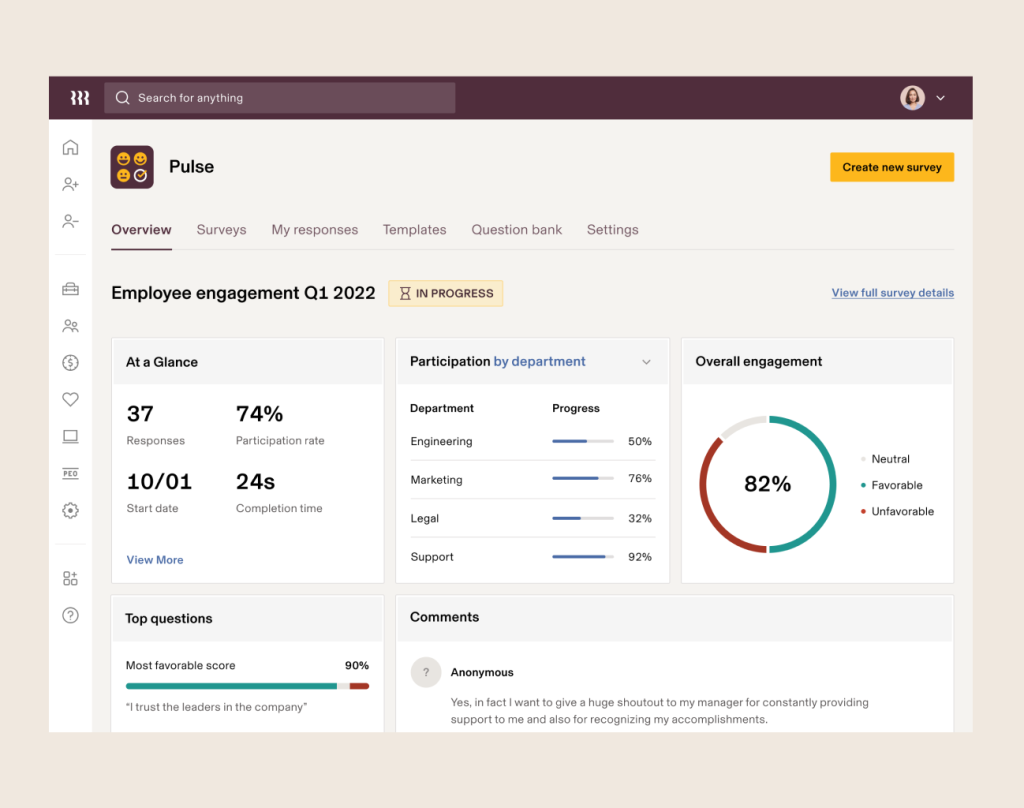
Image source: Rippling
When I evaluated Rippling as a lifecycle option, it stood out immediately because it treats HR, IT, and finance as parts of one unified workforce system. That’s exactly the operational gap SMBs run into around 100 employees, what IT managers describe as needing “workflow chaining” across HRIS, identity access management, device management, and app inventory. Rippling handles all of that in one platform.
A colleague of mine at a 90-person SaaS company switched to Rippling after two years of onboarding chaos. They told me the first month after switching, their IT team went from spending half a day on each new hire to under 20 minutes.
The modular build-as-you-grow approach also made the transition easier. They didn’t have to rip and replace everything on day one.
Pros:
- Unifies HR, IT, and finance in a single platform with shared employee data
- Automates onboarding app provisioning and offboarding access revocation
- Modular structure allows teams to start small and add capabilities as they scale
- Strong fit for the IT side of lifecycle management with device management, SSO, software lifecycle
Cons:
- Teams needing only performance and engagement may find the breadth heavier than necessary
- Planning the right module mix adds decision complexity versus single-purpose tools
Pricing:
Custom pricing.
3. BambooHR – Best for Comprehensive HRIS With Payroll Solutions
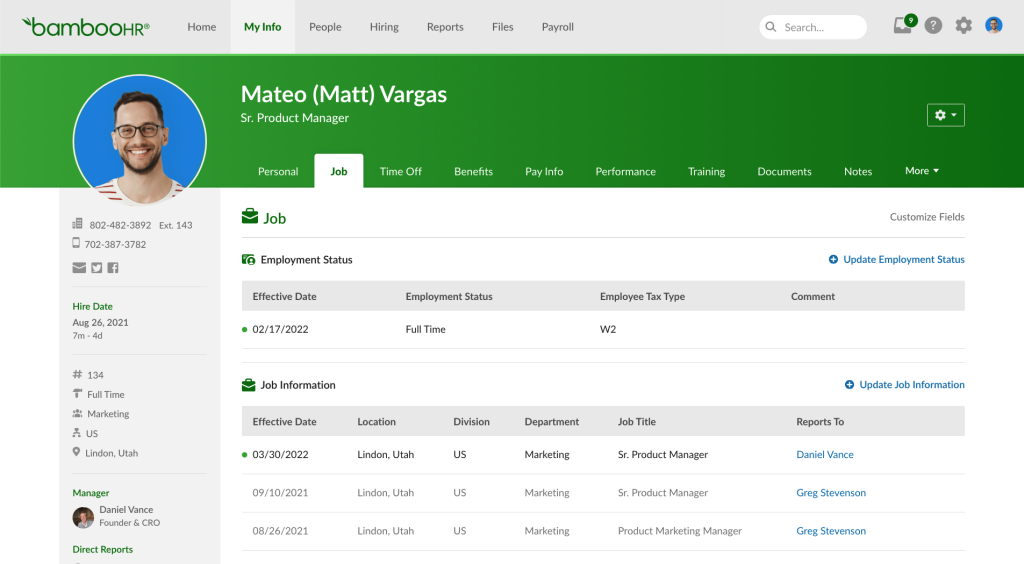
When I reviewed BambooHR’s approach to managing employee lifecycle, the value was easy to see: a clean, organized HRIS designed specifically for small and mid-sized businesses, with onboarding workflows, performance reviews, and people data all in one place. For teams transitioning off Google Docs or manual PDFs, it’s a natural first step.
I found BambooHR particularly useful for teams that want to stop thinking about “where do I file this?” and start thinking about “how is my team actually doing?”
The onboarding module turns a new hire setup into a checklist with task assignments instead of a flurry of emails. That alone saves hours per new hire for HR teams that don’t have the bandwidth for chaos.
Pros:
- Designed specifically for small and mid-sized businesses with clean UI and minimal learning curve
- Includes onboarding and offboarding workflows with task tracking and reminders
- Supports 360° feedback and custom review cycle configurations
- Centralizes employee records, time tracking, and performance data in one system
Cons:
- Some advanced features (time tracking, payroll) are add-ons depending on plan and region
- Teams needing deep engagement analytics or extensive 360 customization may outgrow its performance module
Pricing:
Starts at $10/user/month.
4. Zoho People – Best for Time & Attendance Optimization
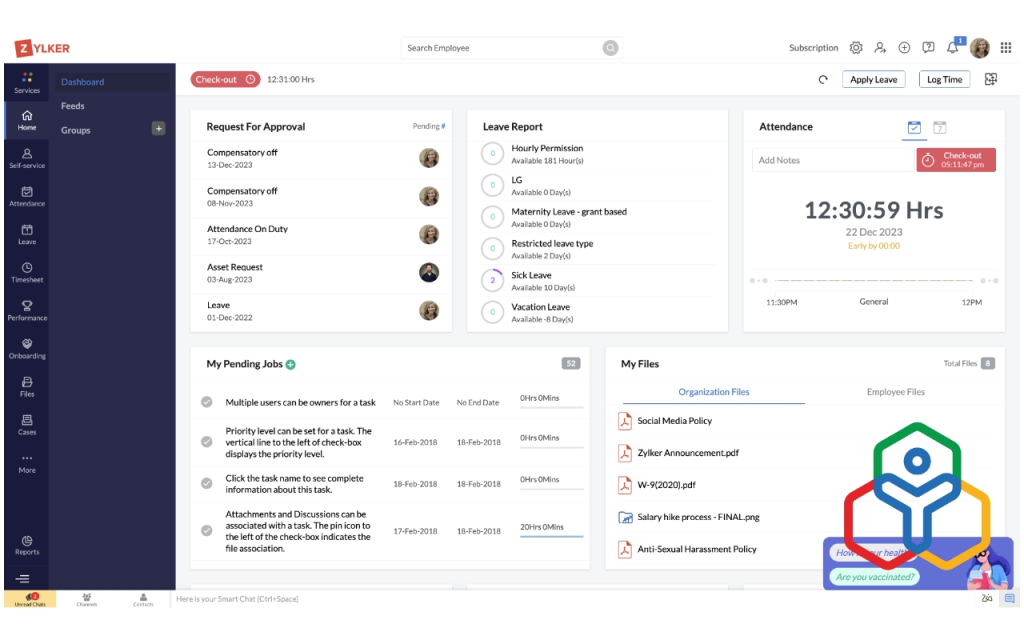
Image source: Google Workspace
Zoho People is the smart choice when you want an affordable HR platform with onboarding and offboarding workflows, an AI assistant for self-service, and a low entry price that doesn’t sacrifice core functionality.
For teams already using the Zoho ecosystem, the integration advantages were even more obvious, everything from Zoho CRM to Zoho Recruit plugs in cleanly.
A friend managing HR at a consulting firm told me Zoho People was the first tool that made their employees stop calling HR for basic requests. The Zia AI assistant handled common questions like time off balances, policy lookups, and onboarding steps, which freed up her hours every week. That kind of self-service adoption is what makes a lifecycle tool actually stick.
Pros:
- One of the lowest entry price points of any full-featured HR platform on the market
- Includes an AI assistant (Zia) that handles employee self-service queries and common HR tasks
- Supports onboarding and offboarding workflow automation with task assignments
- Integrates natively with other Zoho products (Recruit, CRM, Payroll) for a connected stack
Cons:
- Advanced lifecycle analytics and deeper engagement tooling may require additional modules
- For complex HR + IT provisioning, you’ll still need a separate IAM or IT lifecycle layer
Pricing:
Starts at $1.50/user/month.
5. Personio – Best for Structured Onboarding Automation
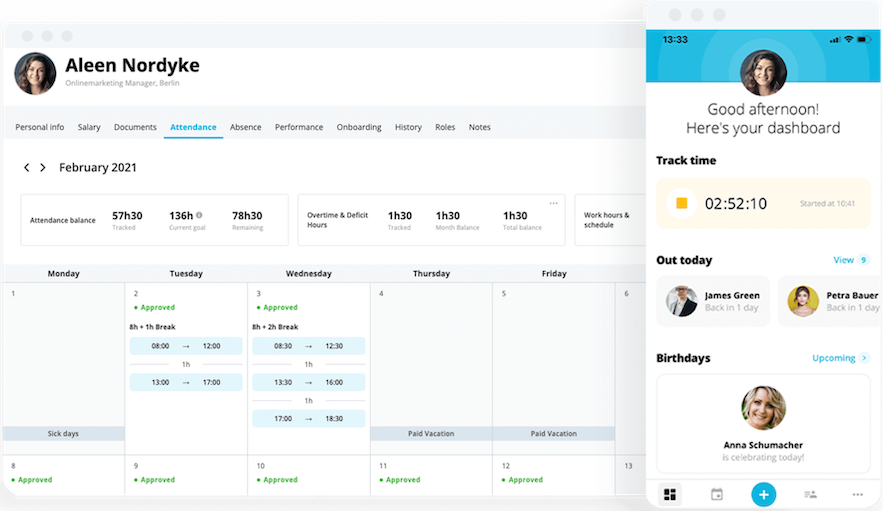
Image source: Personio
Personio is purpose-built for turning onboarding and offboarding into structured, automated workflows with assigned responsibilities, deadlines, and real-time progress visibility.
When I reviewed Personio’s onboarding approach, what struck me was how it treats every new hire as a project with a defined workflow, role-assigned tasks, and a dashboard that shows exactly what’s done and what’s overdue. That “nothing falls through the cracks” structure is what HR teams desperately need once headcount starts rising fast.
The experience felt like the difference between onboarding a new hire through a checklist and onboarding them through a system. With Personio, I wasn’t chasing down the IT team, resending forms, or wondering if the manager had scheduled the Day 1 meeting. It was all tracked, visible, and automated.
Pros:
- Turns onboarding and offboarding into automated workflow templates with owners and reminders
- The central dashboard shows real-time progress
- Strong fit for teams standardizing HR operations formally for the first time
- Covers multiple HR functions (performance, absence, compensation) depending on package
Cons:
- Some lifecycle capabilities depend on add-on apps within the package
- Global HR teams often pair it with a separate global payroll or EOR tool for international coverage
Pricing:
Custom pricing.
6. Deel – Best for Automated Payroll Support
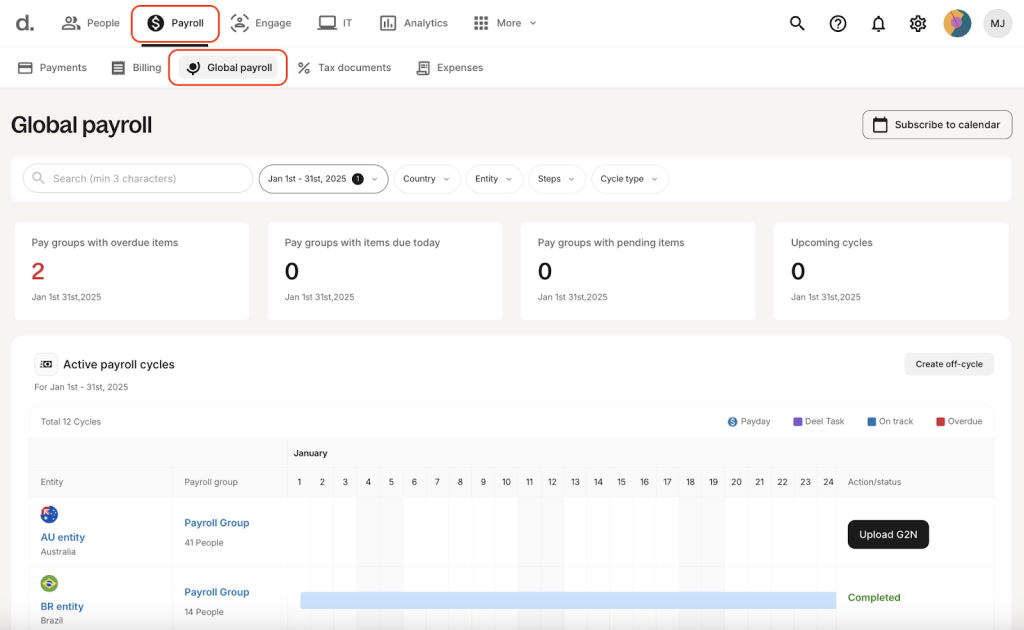
Image source: Deel
Deel is the practical choice when “employee lifecycle” means managing cross-border onboarding, contracts, payroll, and compliance especially across contractors and full-time global hires.
When I evaluated Deel for lifecycle coverage, it read less like a classic HR platform and more like a global ops layer and that’s exactly what distributed companies need. The emphasis on compliant onboarding, global payments, and contractor classification safeguards filled gaps that standard HRIS tools simply couldn’t.
A colleague running People Ops at a remote-first company with employees across 14 countries used Deel to consolidate what had been six different tools for contracts, payroll, and compliance into one. The relief in how she talked about it told the whole story: “I used to spend half my week on compliance paperwork. Now it’s one dashboard.”
Pros:
- Manages both contractors and full-time employees in one system with compliant onboarding
- Supports global payroll, local tax compliance, and contractor classification protections
- Includes self-service portals for employees and contractors (contracts, payments, documents)
- Strong fit for remote-first companies managing distributed hiring workflows
Cons:
- Not designed as a deep performance management or employee engagement suite
- Costs scale by worker type and service (payroll vs EOR vs contractor management)
Pricing:
Starts at $29/user/month.
7. HiBob – Customizing Onboarding Flows
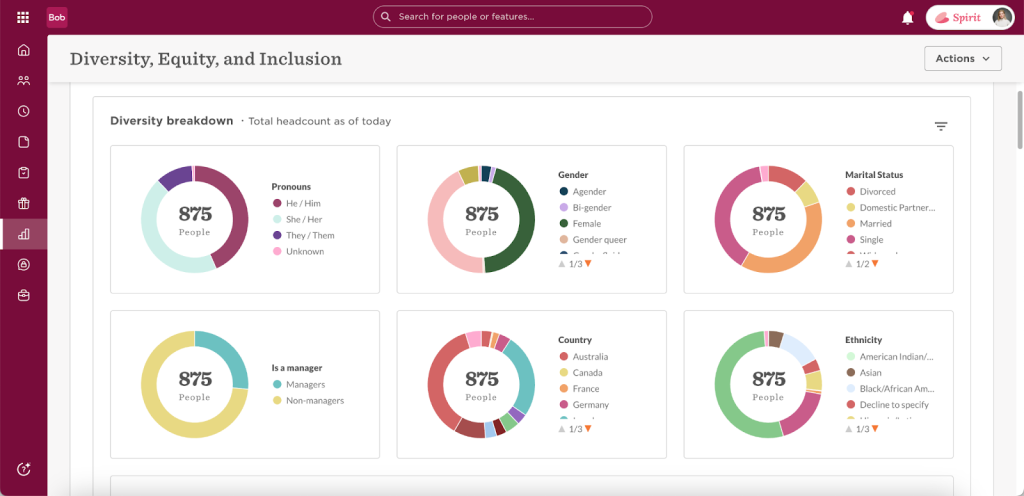
Image source: HiBob
HiBob (Bob) is widely recognized as the “employee experience-first HRIS” built for modern, fast-growing companies that want culture, adoption, and HR operations to feel like one seamless system.
When I reviewed HiBob’s positioning, it came across as the tool for companies that want HR to feel less like admin and more like culture. The interface is modern and people-first, which matters a lot when you’re trying to get 150 employees to actually log in and use the platform instead of ignoring it.
I found HiBob’s compensation planning tools and people analytics particularly strong. They gave managers real context for performance decisions rather than just a score on a form. For mid-sized companies that have outgrown startup-style HR but don’t want to go full enterprise, HiBob sits in a very comfortable space.
Pros:
- Built as an all-in-one HR platform with a strong emphasis on employee experience and adoption
- Modular add-on structure supports scaling by adding features as the company grows
- Includes compensation planning, goal setting, and performance reviews in one system
- People analytics give HR leaders and managers real workforce insights for decision-making
Cons:
- SMBs at the lower end (under 35 employees) may find the platform heavier than needed
- Full lifecycle breadth depends on which modules are included in the selected package
Pricing:
Custom pricing.
8. 15Five – Best for Enterprise Performance Reviews System
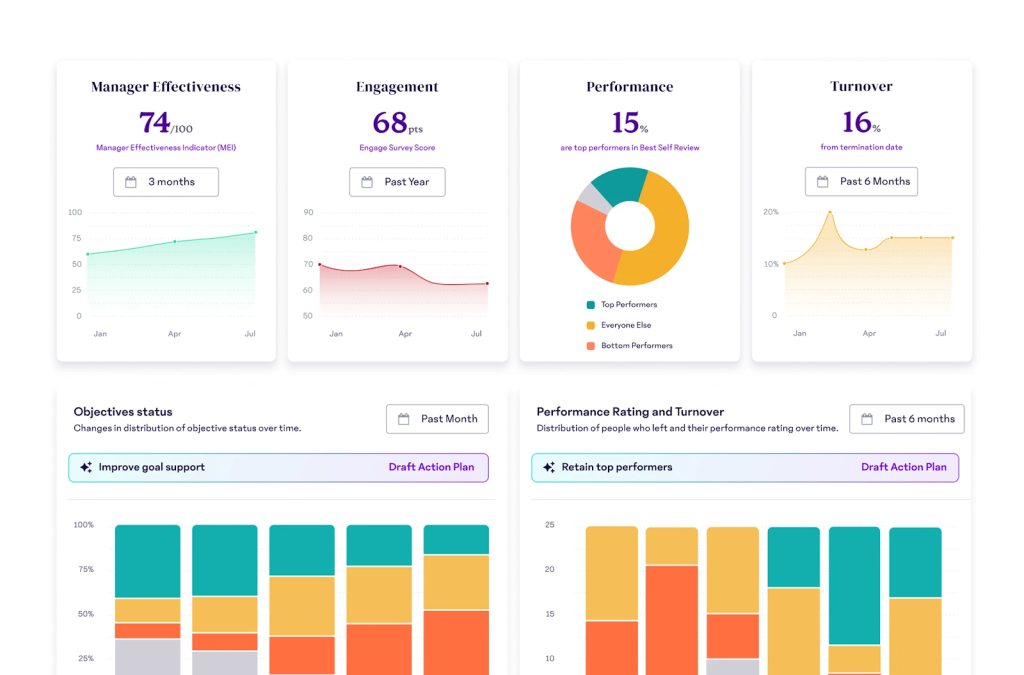
Image source: 15Five
15Five is the ideal tool when your lifecycle pain sits specifically in the retention stage, manager effectiveness, employee engagement, structured check-ins, and performance workflows tied to outcomes.
When I examined 15Five as an employee lifecycle management software option, it was refreshingly direct about outcomes. Rather than promising to “transform HR,” it focused on the mechanics of engagement: surveys, action planning, performance reviews, OKRs, and 360 feedback in clear, separate plans you can mix and match.
What stood out from talking to teams who had used it was how deliberately it is built around manager effectiveness. The platform treats managers as the primary variable in retention and builds their workflow around that premise. Check-ins, coaching prompts, and engagement results all flow into a system that helps managers act, not just measure.
Pros:
- Includes engagement surveys, eNPS, action planning, and benchmarking in one module
- Performance plans include structured reviews, OKRs/goals, and 360° feedback
- Positions manager effectiveness as a measurable, trackable system priority
- Strong fit for teams formalizing retention workflows and engagement cadence
Cons:
- Not a full HRIS; hiring, payroll, and core employee records require a separate system
- Teams may still need separate onboarding/task tracking depending on their existing stack
Pricing:
Starts at $4/user/month.
9. Lattice – Best for Enterprise Performance Reviews System
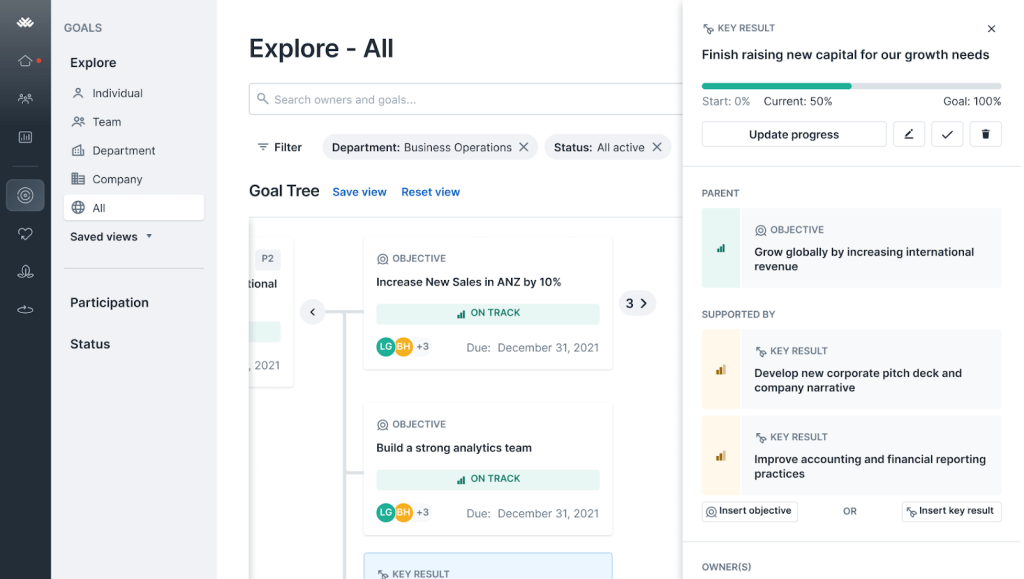
Lattice is the right choice when you need structured performance management, reviews, OKRs, feedback, and engagement, all under one brand, with modular pricing that scales as your needs grow.
When I studied Lattice’s positioning and feature set, it behaved like a “system of cadence” for people operations, giving HR and managers a consistent rhythm of reviews, goal check-ins, 1:1s, feedback, and engagement in one place. For teams where the pain is “everything is happening, but nothing is connected,” Lattice solves that.
A People Ops leader I know at a 200-person company had been running reviews in one tool, OKRs in another, and engagement surveys via email. Lattice brought all three into one system within a month of going live. She told me the biggest win wasn’t even the features; it was that managers finally had one place to go.
Pros:
- Clear entry price point across common pricing directories
- Covers reviews, OKRs/goals, 360 feedback, 1:1s, and engagement in one platform
- Native integrations with Slack and Microsoft Teams for workflow-level access
- Modular product structure allows lifecycle features to scale by adding products over time
Cons:
- Very small teams (under 20 people) may find the platform more than they need
- Full HRIS coverage (payroll, hiring, records) requires pairing with a separate system
Pricing:
Starts at $11/seat/month.
10. PerformYard – Best for Flexible Review Cycles
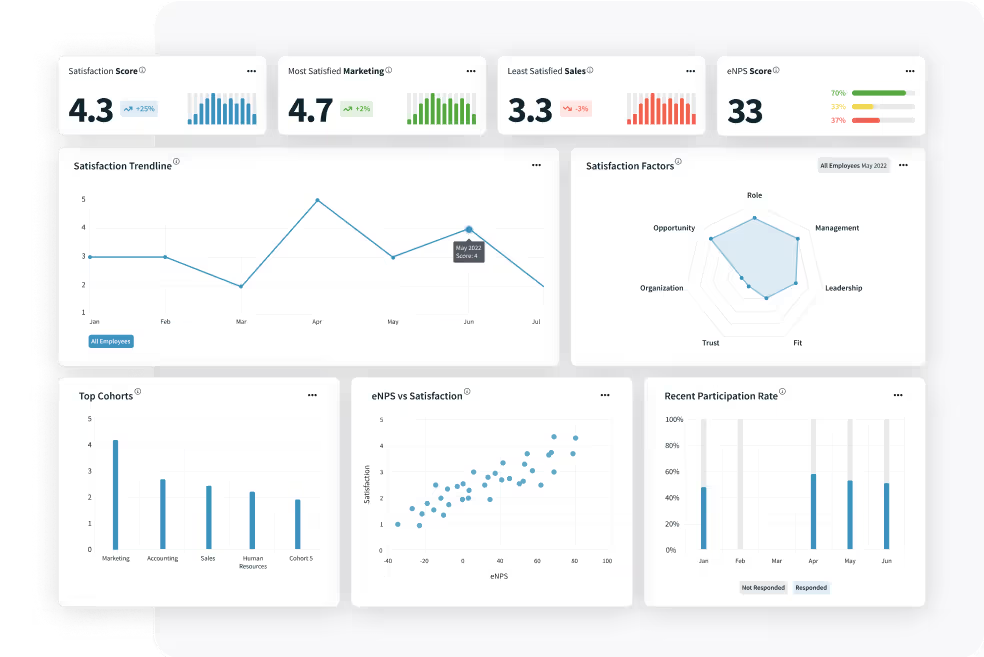
PerformYard is built around one thing: formalizing performance review processes for teams that are doing it seriously for the first time with transparent pricing and onboarding/training included at no extra cost.
When I reviewed PerformYard, the strongest trust signal was their claim that onboarding and training are included, no additional fees. For teams that have been burned by surprise implementation costs after signing, that commitment matters. The platform is purpose-built for performance management, which means it does that one thing very well rather than spreading across 12 features it can’t fully support.
The platform fits the buyer who is doing a formal performance cycle for the first time and wants a system that guides them through it, not one that expects them to figure it out alone. If your biggest pain point right now is “we’ve never done structured reviews and we need to start,” PerformYard is a low-friction starting point.
Pros:
- Purpose-built for performance management with deep feature set without unnecessary breadth
- Supports structured review workflows (annual, mid-year, quarterly) with customization
- Strong fit for organizations formalizing reviews for the first time and moving off spreadsheets
- Clear onboarding support reduces the risk of low adoption after launch
Cons:
- Teams needing a full HRIS lifecycle (hire-to-payroll) will need a separate system alongside it
- Not designed as a broad employee lifecycle platform
Pricing:
Starts at $5/user/month.
My Top 3 Picks for the Best Employee Lifecycle Management Software
After going through dozens of tools, sitting through demos, and talking to HR managers and People Ops leads across different industries, these are the three that consistently stood out.
1. PeopleGoal
PeopleGoal is the tool I keep coming back to when someone asks what to use for performance reviews and 360-degree feedback without the enterprise price tag. I can build review cycles, set up 360-degree feedback workflows, run engagement surveys, and track goals all inside the same system. For teams who are done with spreadsheets, PeopleGoal is the right fit.
2. Rippling
Rippling is the pick for teams where HR and IT are both drowning in manual work every time someone joins or leaves. When a new hire comes on board, Rippling can provision their apps, add them to payroll, and trigger their onboarding checklist all from one place. For a growing team that needs HR and IT to finally work together instead of operating in silos, this is the one.
3. BambooHR
BambooHR is what I recommend when a team is formalizing HR for the first time and needs something that just works without a steep learning curve. It covers the basics well, including employee records, onboarding workflows, and performance reviews. For a company moving off Google Docs and shared folders, it is a clean and reliable starting point.
How Did I Evaluate These Employee Lifecycle Management Systems?
Every tool on this list went through the same review process. No tool was paid to be included, and no tool was added just because it has a big marketing budget. Here is exactly how I assessed each one:
- User Reviews and Ratings: I looked at real feedback from HR managers, People Ops leads, and business owners on platforms like G2, Capterra, and Trustpilot. I paid special attention to reviews from teams in the 35 to 150 employee range since that is the audience this blog is written for.
- Core Features for Lifecycle Management: I evaluated each tool against the features that actually matter for managing employee lifecycle: customizable review cycles, 360-degree feedback, onboarding workflows, engagement surveys, goal tracking, and offboarding automation. Tools that covered more of these in one place scored higher than tools that required me to bolt on five separate products.
- Ease of Use: A tool that takes three months to implement and requires a dedicated admin to maintain is not practical for most growing teams. I assessed how quickly an HR manager or even a founder with no HR background could get up and running, and how little hand-holding the day-to-day use actually requires.
- Customer Support: I looked at how responsive and helpful each vendor’s support team is, especially during onboarding and setup. For smaller teams that do not have an internal IT department, good support is not a nice-to-have. It is the difference between a tool that gets adopted and one that gets abandoned after 60 days.
- Value for Money: I compared what each tool offers against what it charges. A higher price point is fine if the feature depth justifies it. A lower price point scores well if the tool genuinely covers the essentials without nickel-and-diming you on add-ons. I also flagged tools where the headline price does not reflect the real cost after implementation fees and required upgrades.
- Personal Experience and Expert Input: Several tools on this list were evaluated through direct use, demos, or conversations with HR professionals who have used them in real work environments. Where I could not test a tool directly, I drew on verified user experiences and input from people managing HR at growing companies.
What Are the 7 Stages of the Employee Lifecycle?
Understanding the stages is the foundation of managing the employee lifecycle effectively. Here’s a quick breakdown:
1. Attraction: Building Employer Brand Awareness Before Candidates Apply
Building employer brand awareness before candidates apply. This is how people first hear about you through your careers page, social media, or word of mouth. If your brand doesn’t stand out, the best candidates never apply in the first place.
2. Recruitment: Sourcing, Screening, and Selecting the Right Fit
Sourcing, screening, and selecting the right fit. This is the process of finding the right person for the right role. A structured hiring process means fewer bad hires and a better experience for every candidate who walks through your door.
3. Onboarding: Getting New Hires Integrated, Productive, and Culturally Aligned Fast
Getting new hires integrated, productive, and culturally aligned fast. The first 30 to 90 days make or break an employee’s decision to stay. A proper onboarding process gives new hires clarity on their role, their team, and what success looks like from day one.
4. Development: Supporting Growth Through Goals, Feedback, Learning, and Performance Reviews
People stay where they feel they are growing. Regular check-ins, clear goals, and honest feedback give employees a reason to invest in their work and in your company. Development is not a once-a-year conversation; it is an ongoing commitment to helping people build skills and move forward in their careers.
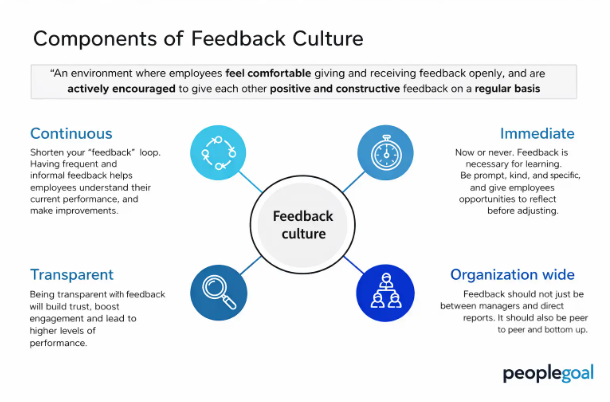
5. Retention: Keeping People Engaged Through Recognition, Surveys, and Career Paths
Keeping people engaged through recognition, surveys, and career paths. Retention is not just about pay. Employees stay when they feel heard, valued, and like there is a future for them at the company. Pulse surveys and recognition programs are the tools that tell you how people are really feeling before they hand in their notice.
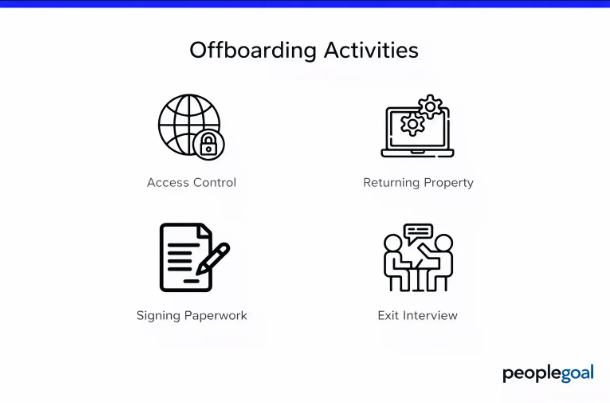
6. Offboarding: Managing Departures With Structured Workflows and Knowledge Transfer
Managing departures with structured workflows and knowledge transfer. When someone leaves, the goal is a smooth transition, not a scramble. A proper offboarding process protects company knowledge, maintains relationships, and ensures nothing important falls through the cracks.
7. Advocacy/Alumni: Turning Past Employees Into Brand Champions
Turning past employees into brand champions. A well-handled exit can turn a former employee into one of your best recruiters. People who leave on good terms often refer candidates, become clients, or even return as boomerang hires.
Each stage needs its own workflow. Without software, most teams manage 2 to 3 stages well and drop the rest.
How Does an Employee Lifecycle Management System Work Step-by-Step?
An employee lifecycle management system works by turning each stage of the employee journey into a repeatable workflow with defined owners, deadlines, automated reminders, and measurable reporting. Instead of relying on someone’s memory or a shared spreadsheet, the system keeps everything moving automatically.
1. Attract and Recruit
Define role requirements, set hiring stages, and track pipeline and time-to-hire metrics. You start by setting up the role, the hiring criteria, and the steps a candidate moves through. The system tracks where every candidate is in the process, so nothing gets lost and no one is left waiting for a response for three weeks.
2. Hire and Onboard
Trigger onboarding templates by role and location, and assign tasks to HR, IT, and managers with a centralized progress dashboard. The moment someone accepts an offer, a checklist automatically kicks off. HR handles paperwork, IT sets up accounts and devices, and the manager schedules the first week. Everyone knows what they are responsible for and when it is due, without a single coordination email.
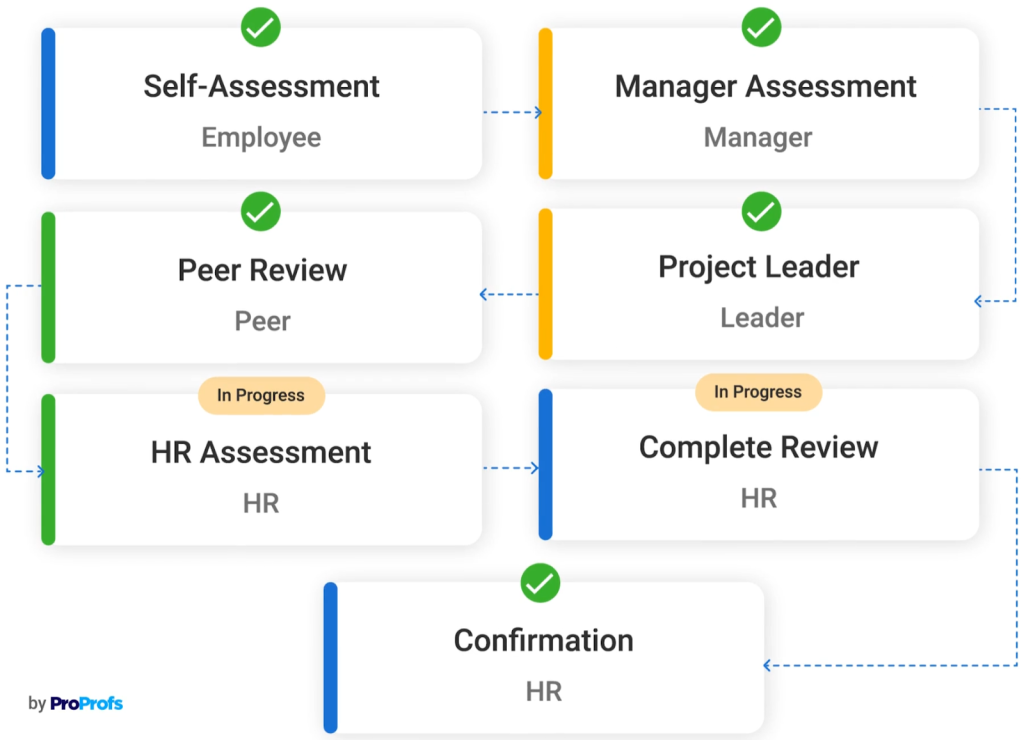
Here’s a quick look at how the onboarding workflow works:
3. Develop and Manage Performance
Set goals and OKRs, collect continuous feedback, and run review cycles with automated reminders. Employees and managers agree on goals at the start of the cycle. Throughout the year, feedback is collected and check-ins happen on a schedule.
When review season comes, the system sends reminders, collects responses, and compiles everything in one place so no one is starting from scratch.
4. Engage and Retain
Run pulse and eNPS surveys, build manager-owned action plans, and track retention and mobility trends. Short surveys go out regularly to ask employees how they are actually feeling.
The results do not just sit in a report. Managers get their team’s data and are expected to create an action plan. This is how you catch disengagement early, before someone quietly updates their resume.
5. Offboard and Secure Access
Trigger exit checklists, revoke app access and licenses, and store audit-ready compliance records. When someone resigns, the system automatically starts an exit workflow.
Knowledge gets documented, the farewell process is handled properly, and on the last day, every app, tool, and system access is removed. No loose ends, no security risks, and a clean record if anyone ever needs to audit it.
What Problems Does Employee Lifecycle Management Software Actually Solve?
If any of these sound like your reality, you need an employee lifecycle management platform:
1. Manual Review Chaos: Performance Cycles Running on Spreadsheets and Email Threads
Most teams have a review process in name only. In practice, it means someone in HR is hunting down 80 filled-out PDF forms, chasing managers who forgot to send theirs, and manually compiling results in a spreadsheet at midnight before a leadership meeting. It is not a process. It is a fire drill that happens twice a year.
ELM software eliminates this by automating the entire review cycle. Templates launch on schedule, reminders go out automatically, and results compile in a single dashboard. No chasing. No spreadsheets. No midnight panic.
2. No Formal Review System: Reviews That Get Pushed, Skipped, or Forgotten
There is a big difference between “we do performance reviews” and “we have a system that runs them.” Without a proper system, reviews get pushed, skipped, or rushed, and employees stop taking them seriously because nothing ever changes afterward.
A lifecycle management platform puts reviews on a fixed schedule with automated triggers, deadlines, and escalation paths. Every employee gets reviewed. Every manager stays accountable. And the results feed directly into development plans, so follow-through actually happens.
3. 360 Feedback That Becomes Email Ping-Pong: No Structure, No Visibility, No Action
Asking for peer feedback over email sounds simple until you are three weeks in, chasing eight people, getting responses in six different formats, and trying to compile it all manually. Without a structured workflow, 360-degree feedback creates more work than insight.
ELM platforms centralize the entire process. Requests go out automatically, responses come back in a standardized format, and managers get a consolidated view without lifting a finger. Feedback becomes a workflow, not a weekly follow-up task.
4. Outgrowing Single-Purpose Tools: When Your HRIS Starts Fighting You
Many teams start with a basic HRIS and stretch it beyond what it was designed for. At some point the tool starts fighting you: limited templates, no customization, no way to run multiple review cycles at once.
That is not a tool problem. That is a scaling problem. An employee lifecycle management system is built to handle complexity from day one, with configurable workflows, multi-cycle support, and role-based access that grows with your headcount.
5. Onboarding and Offboarding Bottlenecks: The Access and Accountability Gap Around 100 Employees
When a company is small, onboarding happens through tribal knowledge and Slack messages. Once you cross 50 to 100 employees, that approach breaks. Things get missed, new hires feel lost on day one, and when someone leaves, no one is sure if all their system access was actually removed.
ELM software replaces tribal knowledge with automated checklists triggered by role, location, and start date. Every stakeholder, HR, IT, and the hiring manager, gets their tasks assigned automatically. Offboarding follows the same logic so nothing falls through the cracks when someone exits.
6. Access and Audit Gaps: Compliance Exposure From Poor Lifecycle Tracking
Without proper lifecycle automation, companies end up with ex-employees who still have login access, or no clear record of who approved what. This becomes a serious problem during a security audit or a SOC 2 review.
A lifecycle management platform creates a complete audit trail for every employee from hire to exit. Access provisioning and deprovisioning are tied directly to lifecycle events, so IT always knows what was granted, what was removed, and when.
A study by Gallup in 2025 shows that global employee engagement fell from 23% to 21% in 2024, costing the world economy US$ 438 billion in lost productivity. The primary driver was not frontline burnout; it was a drop in manager engagement, which fell from 30% to 27%.
A structured employee lifecycle management system reduces that load by making recurring people-work like check-ins, reviews, feedback cycles, surveys, automatic, trackable, and consistent. Less manual chaos for managers means more time for the conversations that actually drive engagement.
What Features Should You Compare When Choosing an Employee Lifecycle Management Platform?
Not all tools are built the same. Some look great in a demo but fall apart the moment you try to customize them for your actual process. Before you sign anything, run every tool through this checklist.
1. Customizable Review Forms and Cycles
You should be able to build review forms that match your actual process, not squeeze your process into someone else’s template. Look for the ability to run multiple review cycles at the same time, assign different templates to different teams or roles, and set your own timelines.
If a tool only lets you do one annual review with a fixed set of questions, it will slow you down within six months.
2. 360-Degree Feedback
A proper 360-degree feedback setup lets employees receive input from their manager, peers, and direct reports, all in one structured flow. Anonymity controls matter here too. If reviewers are not protected, the feedback you get will be polite and useless.
Look for tools that let you configure who sees what and keep reviewer identities hidden from the person being reviewed.
3. Automated Workflows and Reminders
This is the feature that saves HR the most time. Instead of manually emailing people to complete their reviews or fill out onboarding tasks, the system does it for you on a schedule.
Look for tools where you can set up automatic reminders, escalation nudges, and deadline alerts without having to configure anything from scratch every single time.
4. Goal Setting and Tracking
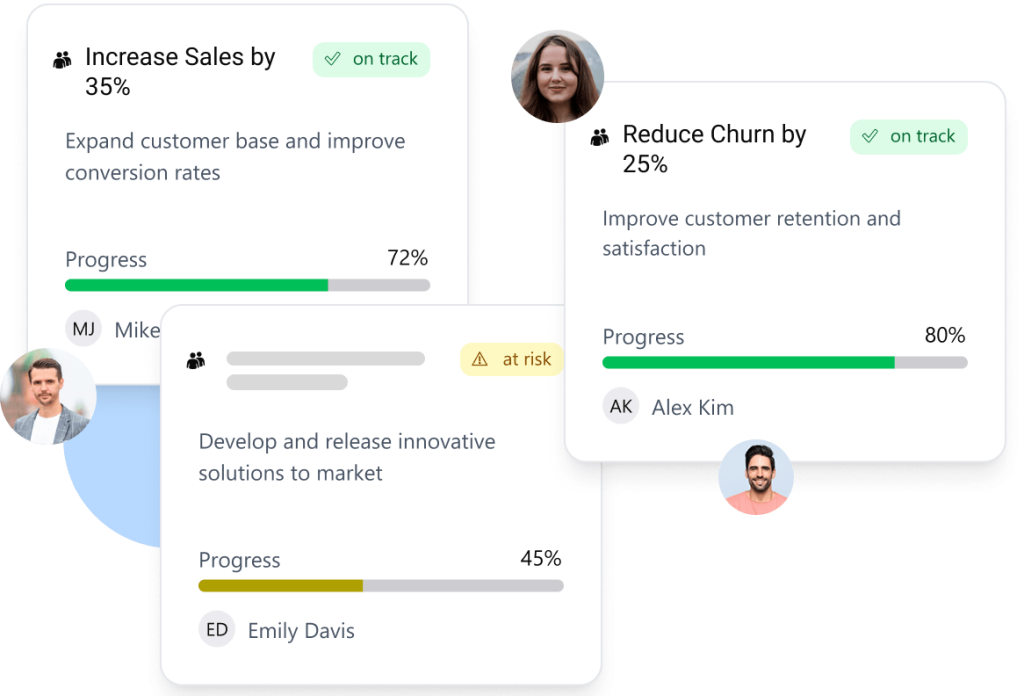
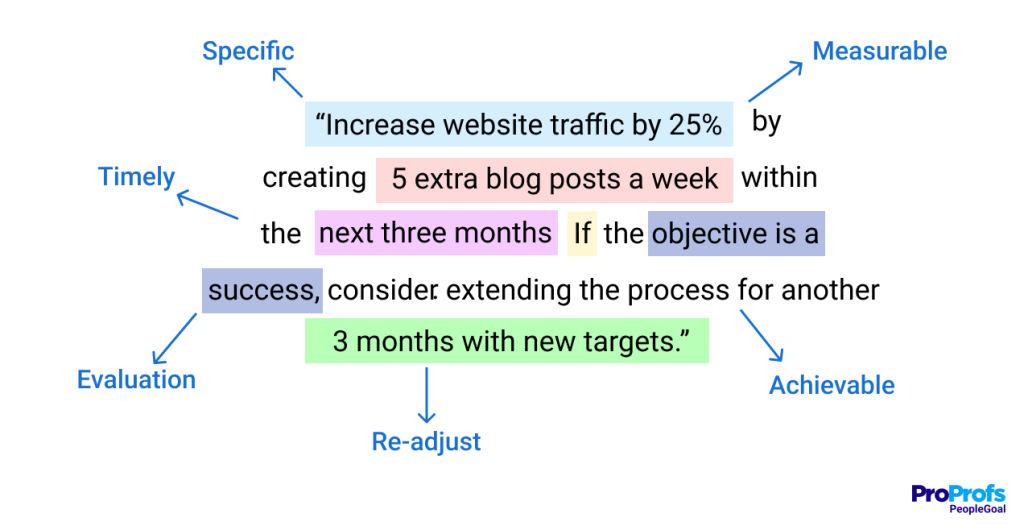
Whether your team works with OKRs, SMART goals, or a simple quarterly target system, the platform should support it.
Goals should live in the same place as performance reviews so that when review time comes, both the manager and employee can look back at what was set, what was achieved, and have an honest conversation grounded in actual data.
5. Engagement Surveys With Action Planning
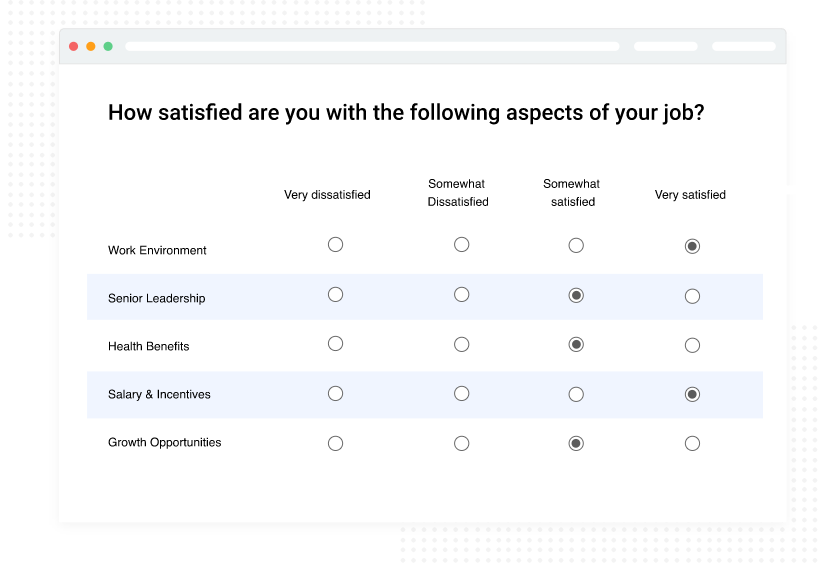
Sending a survey is the easy part. The hard part is doing something with the results. Look for tools that not only run pulse surveys and eNPS checks but also give managers a dashboard with their team’s results and a structured way to create action plans.
A survey that ends in a PDF report nobody reads is not engagement. It is just box-ticking.
6. Integrations
Your lifecycle platform does not exist in a vacuum. It needs to talk to the tools your team already uses. At minimum, look for Slack or Microsoft Teams for notifications, HRIS sync with tools like BambooHR or ADP for employee data, and SSO for easy login.
Bonus points for tool integrations with project tools like Jira or Asana if your team tracks work there.
7. Reporting and Analytics
You should be able to open a dashboard and immediately see who has completed their review, which goals are on track, how engagement scores are trending, and where the bottlenecks are.
If getting a basic completion report requires exporting data to Excel and building your own pivot table, the reporting is not good enough.
8. Offboarding and Audit Trail
When someone leaves, the system should trigger a structured exit workflow automatically. This includes knowledge transfer tasks, an exit survey, and, critically, a record of when access was removed from each system.
For companies working toward SOC 2 compliance or any kind of security audit, this audit trail is not optional. It is evidence.
How Is an Employee Lifecycle Management System Different from HRIS, ATS, and User Lifecycle Management?
These terms get mixed up all the time, even by people who have been in HR for years. Here is a simple breakdown of what each one means, what it actually does, and how it fits into the bigger picture of managing your workforce.
| Term | What It Means | What It Actually Does | How It Fits Into Lifecycle Management |
|---|---|---|---|
| Employee Lifecycle Management System | The full picture. A connected set of workflows that covers every stage of the employee journey from the day they apply to the day they leave and beyond. | Orchestrates hiring, onboarding, performance reviews, goal setting, engagement surveys, and offboarding in one structured, repeatable system. | This is the umbrella. HRIS, ATS, and ULM are all components that feed into or sit alongside it. |
| HRIS (Human Resource Information System) | Your HR database. The place where all your employee records, payroll data, and compliance documents live. | Stores and manages employee data including headcount, job titles, salary, benefits, and time off. It keeps the lights on for day-to-day HR operations. | HRIS is the data foundation. A lifecycle platform sits on top of it or integrates with it to turn that data into actionable workflows. |
| ATS (Applicant Tracking System) | Your hiring tool. The system that manages job postings, candidate pipelines, and interview stages until someone signs an offer letter. | Tracks candidates from application to hire. Helps recruiters manage sourcing, screening, scheduling, and offers without losing anyone in the process. | ATS covers Stage 1 and Stage 2 of the lifecycle only. Once a candidate becomes an employee, the lifecycle management system takes over. |
| ULM (User Lifecycle Management) | The IT version of lifecycle management. Instead of tracking the employee experience, it tracks system access and digital permissions throughout someone's time at the company. | Creates user accounts when someone joins, updates permissions when they change roles, and removes all access the moment they leave. It also maintains audit trails for compliance reviews. | ULM is the IT-side companion to HR lifecycle management. Without it, offboarding is incomplete, access gaps create security risks, and compliance audits become a nightmare. |
The simplest way to think about it is this. Your HRIS holds the data. Your ATS manages hiring. Your ULM handles IT access. Your employee lifecycle management system ties all of it together into one consistent experience for every person at every stage of their time with your company.
Start Managing Your Employee Lifecycle the Right Way
Most HR problems that feel big are actually just lifecycle problems in disguise. Reviews that never happen, onboarding that falls apart, feedback that goes nowhere, managers who are overwhelmed. These are not people’s problems. They are process problems. And process problems have solutions.
The good news is you do not need a massive budget or a six-month implementation to fix this. The tools on this list are proof that growing teams can have structured, automated, and actually useful people workflows without turning HR into a full-time IT project. Pick the tool that matches your biggest pain point right now, get it running, and build from there.
And if you are not sure where to start, start simple. A tool that covers performance, feedback, and engagement in one place without overwhelming your team is almost always the right first move. That is a box PeopleGoal quietly checks for a lot of growing teams, and once the chaos clears, everything else becomes a lot easier to figure out.
Frequently Asked Questions
Why should IT care about employee lifecycle management?
Onboarding and offboarding directly drive access grants and removals. Without automation and audit trails, teams are exposed to security risks (orphaned accounts, privilege creep) and compliance gaps (SOC 2, HIPAA evidence requirements).
What is the difference between an employee lifecycle management system and HRIS?
An HRIS stores employee data and manages HR operations. An employee lifecycle management system orchestrates end-to-end workflows across all stages. It layers on top of or integrates with HRIS.
How do access reviews fit into lifecycle management?
Access reviews validate who has access and what permissions they hold, and produce an audit history for compliance reporting. They are a critical part of the IT-side lifecycle, especially during role changes and offboarding.
When do companies typically need an employee lifecycle management system?
Most teams hit a breaking point around 50–100 employees, when manual onboarding and offboarding become unmanageable for a small HR or IT team. That's when structured, automated lifecycle workflows go from "nice to have" to operationally necessary.
What is the simplest starter stack for a 35–150 employee team?
A core HRIS for employee records and onboarding, paired with a performance and engagement platform that handles goals, reviews, feedback, and surveys, is the most common scalable approach. PeopleGoal covers the performance and engagement side; BambooHR, Zoho People, or Personio typically cover the HRIS side.
What is an AI agent platform for employee lifecycle management?
AI agent platforms for employee lifecycle management are tools that use AI to automate repetitive HR tasks drafting review summaries, surfacing engagement insights, suggesting next steps from 360 feedback, and triggering onboarding or offboarding workflows based on HRIS data changes. Tools like PeopleGoal and 15Five are increasingly building these AI capabilities into their core workflow engines.
Ready to 3x Your Teams' Performance?
Use the best performance management software to align goals, track progress, and boost employee engagement.