
The first time I sat down to run a 1-on-1 with someone on my team, I opened a blank notebook page and just started talking. No agenda, no notes from last time, nothing to follow up on. Three weeks later, I could not remember what I had promised to fix for them.
I know I am not the only manager who has lived this. Notes get scattered across Google Docs, spreadsheets, and half-remembered Slack threads.
Action items get said out loud and never written down. Monthly check-ins never make it into the actual performance review. Here I want to fix that, starting with the right 1-on-1 meeting software. In this guide, I will help you:
- Understand what 1-on-1 meeting software actually does and why it matters
- Compare the 10 best tools with honest pros, cons, and pricing
- Figure out the exact signals that mean it is time to leave spreadsheets behind
- Choose the right tool based on your team size, tech stack, and management style
- Get a clear framework for keeping these meetings human, not just another HR chore
What Is 1-on-1 Meeting Software?
Here is why that actually matters for you as a manager:
- Documented Conversations: Every 1-on-1 leaves a written trail, so you are never trying to remember what you promised three meetings ago
- Consistent Cadence: Built-in reminders mean 1-on-1s do not quietly get cancelled and forgotten during a busy sprint
- Action Item Accountability: Commitments get assigned and tracked, not just said out loud and lost
- Coaching Over Status Updates: A shared agenda means the meeting is not just you asking “what did you do this week”
- Review-Ready History: Months of documented 1-on-1s make performance review season faster and far less subjective
- Lower Admin Load: You stop copying notes between three different tools just to keep track of one relationship
10 Best 1-on-1 Meeting Software
I have used or evaluated each of these tools in real teams, not just read the feature page. This list combines hands-on use with what other managers and HR leads consistently report across G2, Reddit, and Quora threads on running better 1-on-1s.
| Tool | Best For | Pricing | User Rating |
| PeopleGoal | Fully Customizable Performance Reviews, OKRs & Employee Development | Starts at $4/user/month (14-day free trial) | 4.5/5 (G2) |
| Fellow | Template-Driven 1-on-1 Agendas & Action Items | Free for up to 10 users. Team plan starts at $7/user/month (billed annually) | 4.7/5 (G2) |
| Lattice | Tying 1-on-1s Directly to Performance Reviews & Goals | Starts at $13/user/month (Performance + OKRs bundle) | 4.7/5 (G2) |
| 15Five | Weekly Check-ins That Feed Directly Into 1-on-1s | Starts at $4/user/month | 4.6/5 (G2) |
| Leapsome | Connecting 1-on-1s to Learning & Development Plans | Custom quote | 4.8/5 (G2) |
| Hypercontext (by Spinach AI) | AI-Assisted Meeting Prep Tied to OKRs | Starts at $2.90 per meeting hour (contact sales for current plans) | 4.4/5 (G2) |
| Teamflect | Microsoft Teams-Native 1-on-1s | Free for up to 10 users. Paid plans start at $7/user/month (billed annually) | 4.5/5 (G2) |
| Officevibe (by Workleap) | Pairing 1-on-1s With Engagement Pulse Surveys | Starts at $4.99/user/month | 4.3/5 (G2) |
| Small Improvements | Engineering & Technical Team 1-on-1s | Starts at $3/user/month (billed annually) | 4.3/5 (G2) |
| Betterworks | Enterprise-Scale OKR Alignment With Structured 1-on-1s | Custom pricing | 4.3/5 (G2) |
1. PeopleGoal – Best for Fully Customizable Performance Reviews, OKRs & Employee Development
My team’s 1-on-1s stopped feeling disconnected from everything else the day I moved them into PeopleGoal. Every check-in sits right next to the goals we set, the OKRs we are tracking, and the 360 feedback that already came in that quarter, so I walk into the meeting already knowing what to talk about instead of guessing.
What I like most is how customizable the whole workflow is. I built our 1-on-1 templates around how my team actually works, not a generic structure someone else designed.
The real-time dashboards mean I show up to every check-in already knowing who is on track and who needs support, so the conversation becomes coaching instead of a status update. It plugs into Slack and BambooHR too, so nothing feels bolted on.
Pros:
- Connects 1-on-1 conversations directly to OKRs, goals, and 360-degree feedback in one system
- Fully customizable workflows and templates, no generic one-size-fits-all structure
- Real-time dashboards show goal progress before every check-in
- Skill development and career plan tools turn 1-on-1s into growth conversations, not just status updates
- Seamless integrations with Slack, BambooHR, and Workday
- Clean interface with 24/7 customer support
Cons:
- No downloadable or on-premise version
- Dark UI mode is not available
User Rating: 4.5/5 (G2)
Pricing: 14-day free trial. Paid starts at $4/user/month
2. Fellow – Best for Template-Driven 1-on-1 Agendas & Action Items
Five direct reports and a mess of Google Docs is what pushed me toward Fellow in the first place. The shared agenda is the whole point of the tool. My reports and I both add talking points before the meeting starts, so I stop walking in cold.
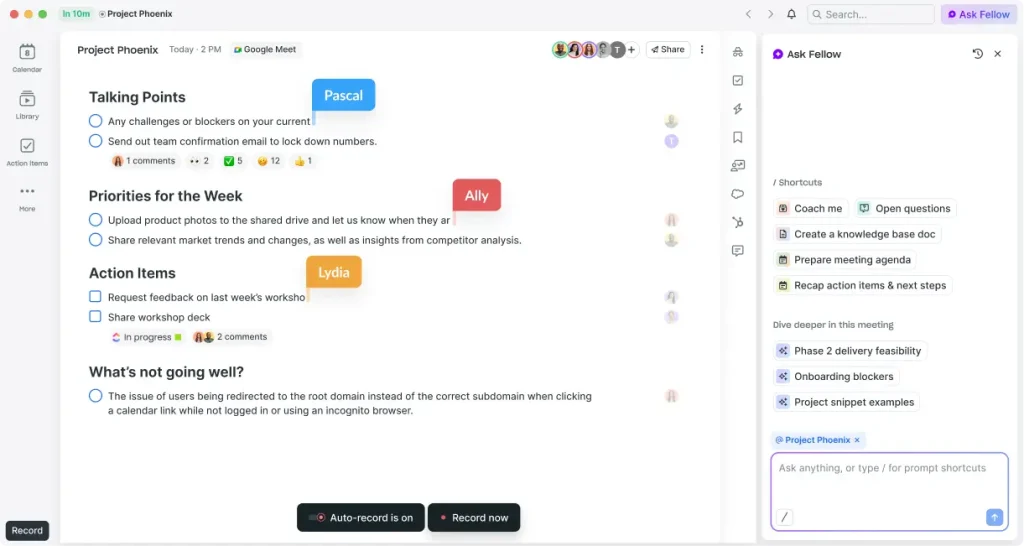
Action items get assigned right inside the notes, and Fellow chases the follow-up so I do not have to remember who owes me what. I lean on the template library too, since building a 1-on-1 structure from scratch every time gets old fast.
The free plan works fine for a small team, but I moved to the Team plan once I needed private notes I did not want visible to my reports. It connects with Slack and Google Calendar, so agendas show up right where I already work.
Pros:
- Shared, asynchronous agendas that both manager and report can edit before the meeting
- Automatic action item tracking and follow-up reminders
- Large library of pre-built 1-on-1 and team meeting templates
- Private notes visible only to the manager
- Integrates with Slack, Google Calendar, Jira, and Microsoft 365
Cons:
- Free plan AI features are capped for the lifetime of the account, not monthly
- Not built to replace a full performance management or OKR system
User Rating: 4.7/5 (G2)
Pricing: Free for teams up to 10 people. Team plan starts at $7/user/month, billed annually.
3. Lattice – Best for Tying 1-on-1s Directly to Performance Reviews & Goals
Leadership wanted proof that our 1-on-1s connected to something bigger than a weekly chat, and that is exactly why we brought Lattice into the picture. Every check-in sits inside the same system as goals, feedback, and review cycles, so when review season comes around, I am not trying to remember what we discussed six months ago.
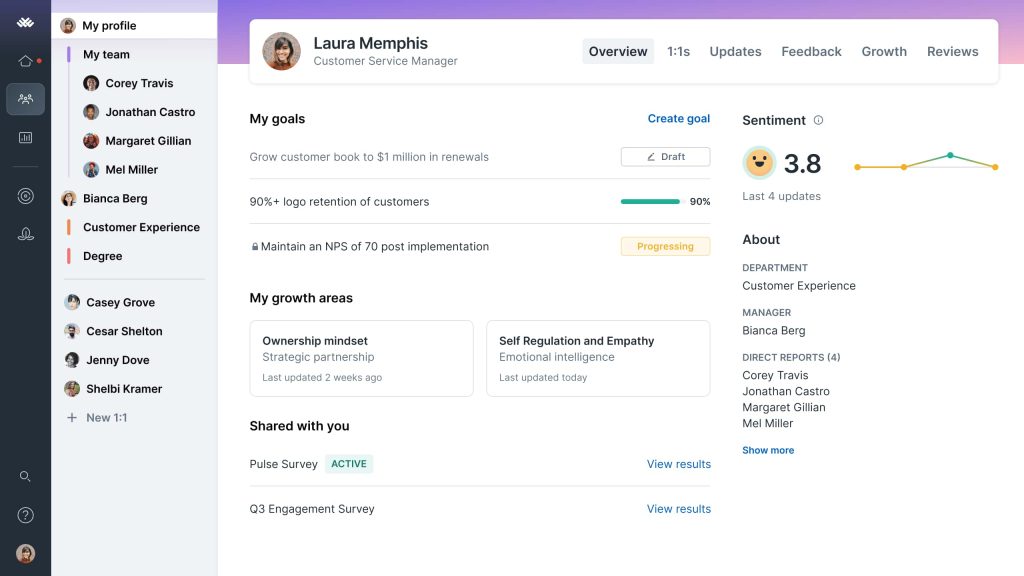
The structured 1-on-1 templates keep conversations from turning into pure status updates, nudging me toward development and coaching questions instead. I can pull up a running history of every conversation with a report before I write their review, which alone saves me hours.
The catch is the price. Lattice is modular, so you pay separately for performance, engagement, and growth, and it adds up fast for larger teams.
Pros:
- 1-on-1s are tied directly into the same system as goals, reviews, and feedback
- Structured meeting templates nudge conversations toward coaching, not just status updates
- Full history of past 1-on-1 conversations feeds directly into performance review writing
- Strong reporting for HR and leadership visibility
- Established integrations with HRIS and communication tools
Cons:
- Modular, per-user pricing adds up quickly once you add multiple product areas
- No self-serve free trial, requires a sales conversation to get started
User Rating: 4.7/5 (G2)
Pricing: Starts at $13/user/month for the Performance Management and OKRs bundle, billed annually. Additional modules priced separately.
4. 15Five – Best for Weekly Check-ins That Feed Directly Into 1-on-1s
Our Friday check-ins and our actual 1-on-1s used to be two completely disconnected conversations until 15Five tied them together. Each person logs their wins, blockers, and a confidence score every week, and that update auto-populates my 1-on-1 agenda, so I never start from a blank page.
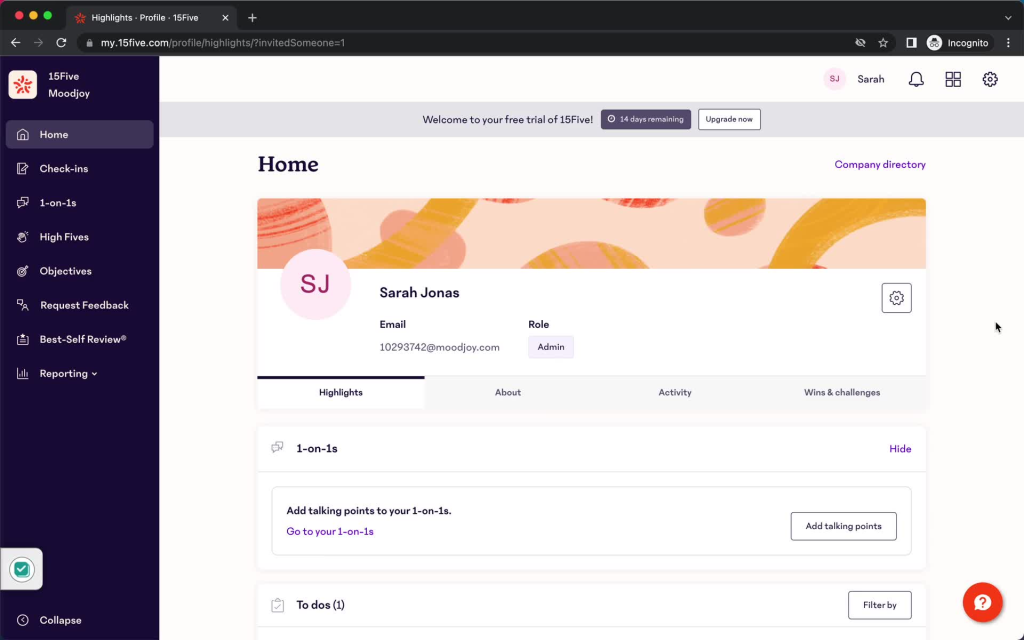
I get an early signal on burnout or disengagement before it shows up in a formal review, which has genuinely changed how early I step in. The High Fives recognition feature is a small thing, but my team actually notices when I use it during our 1-on-1s.
My only real complaint is that once you add OKRs, reviews, and engagement modules on top of the base check-in feature, the cost climbs fast for a mid-sized team.
Pros:
- Weekly check-ins auto-populate 1-on-1 agendas so managers never start cold
- Early signals on disengagement or burnout before formal review cycles
- Built-in recognition tools keep 1-on-1s from feeling purely transactional
- Manager coaching and AI-assisted prep tools
- Integrates with Slack, Microsoft Teams, and Google Workspace
Cons:
- Feature-rich interface can overwhelm teams wanting a simple 1-on-1 tool only
- Costs increase significantly once you stack OKR, review, and engagement modules
User Rating: 4.6/5 (G2)
Pricing: Starts at $4/user/month.
5. Leapsome – Best for Connecting 1-on-1s to Learning & Development Plans
Career development kept slipping through the cracks between annual reviews on my team, and Leapsome is what finally closed that gap. What sold me is that 1-on-1s, goals, feedback, and learning paths all sit in the same platform, so a development conversation in a 1-on-1 can turn straight into an assigned learning path without switching tools.
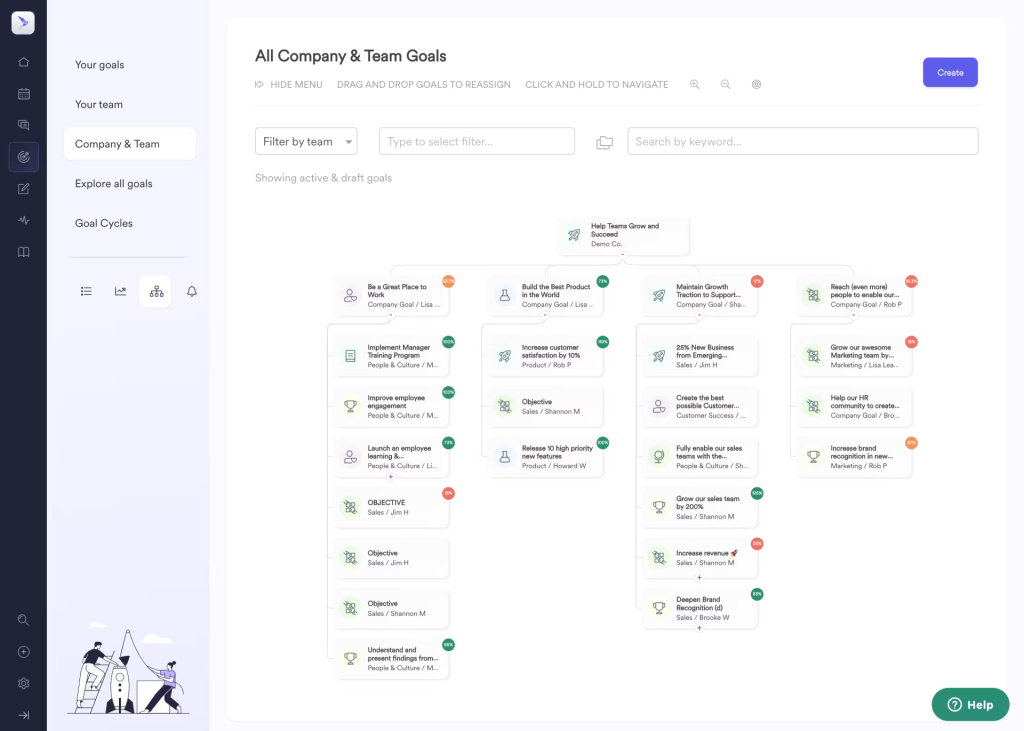
The guided 1-on-1 templates keep me from just running through status updates every week, nudging toward actual growth conversations. Review cycles pull directly from what was discussed in prior check-ins, so nothing feels disconnected.
It is a genuinely strong pick for HR-led teams that want performance and development tied together, though pricing is modular and not always transparent upfront.
Pros:
- 1-on-1s, goals, feedback, and learning paths live in one connected system
- Guided 1-on-1 templates push conversations toward development, not just status
- Review cycles pull directly from documented 1-on-1 history
- Strong fit for HR-led teams prioritizing employee growth
- High user satisfaction scores relative to category peers
Cons:
- Modular pricing that is not always transparent without a sales conversation
- Best suited for larger, HR-led rollouts rather than very small teams
User Rating: 4.8/5 (G2)
Pricing: Custom Quote
6. Hypercontext (by Spinach AI) – Best for AI-Assisted Meeting Prep Tied to OKRs
What sold me on Hypercontext is how directly it ties a 1-on-1 agenda back to the OKRs my team is actually chasing, so a check-in never turns into just a status meeting. Shared agendas mean my reports add their own talking points ahead of time, and I am not the only one deciding what gets discussed.
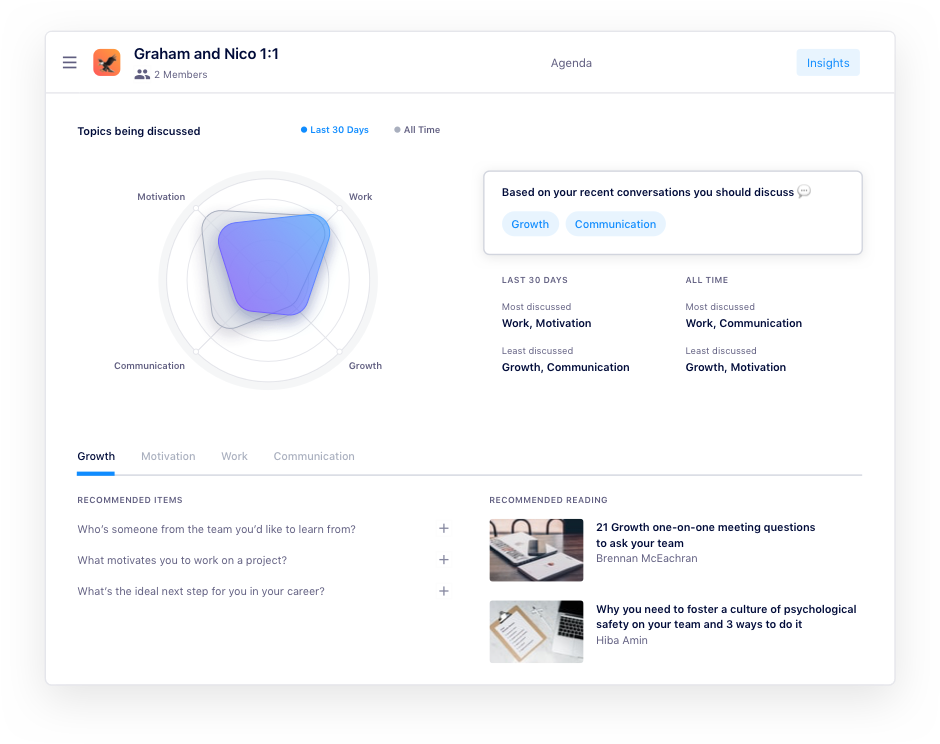
The conversation-starter library got me out of the habit of asking the same three questions every week, since it surfaces genuinely different prompts depending on what we are working through. Next Steps get assigned right in the meeting and I do not have to chase them down afterward.
It plugs into Jira, Asana, and Figma, which matters if your team lives in project tools more than email.
Pros:
- Shared, collaborative agendas tied directly to individual and team OKRs
- Large library of conversation-starter prompts to avoid repetitive check-ins
- Next Steps assigned in-meeting with built-in follow-up tracking
- Integrates with Jira, Asana, Figma, and other project tools
- Focused specifically on manager-employee meetings rather than a broad HR suite
Cons:
- Customization options are more limited than full performance platforms
- Reporting and analytics are lighter than dedicated HR systems
User Rating: 4.4/5(G2)
Pricing: Plans start at $2.90/meeting hour. Contact the vendor for current tiers.
7. Teamflect – Best for Microsoft Teams-Native 1-on-1s
Our whole company runs on Microsoft Teams, so Teamflect was the only tool that did not ask my managers to open yet another app just to run a 1-on-1. It genuinely lives inside Teams and Outlook, so the agenda, notes, goals, and action items are right there in the chat window my team already has open all day.
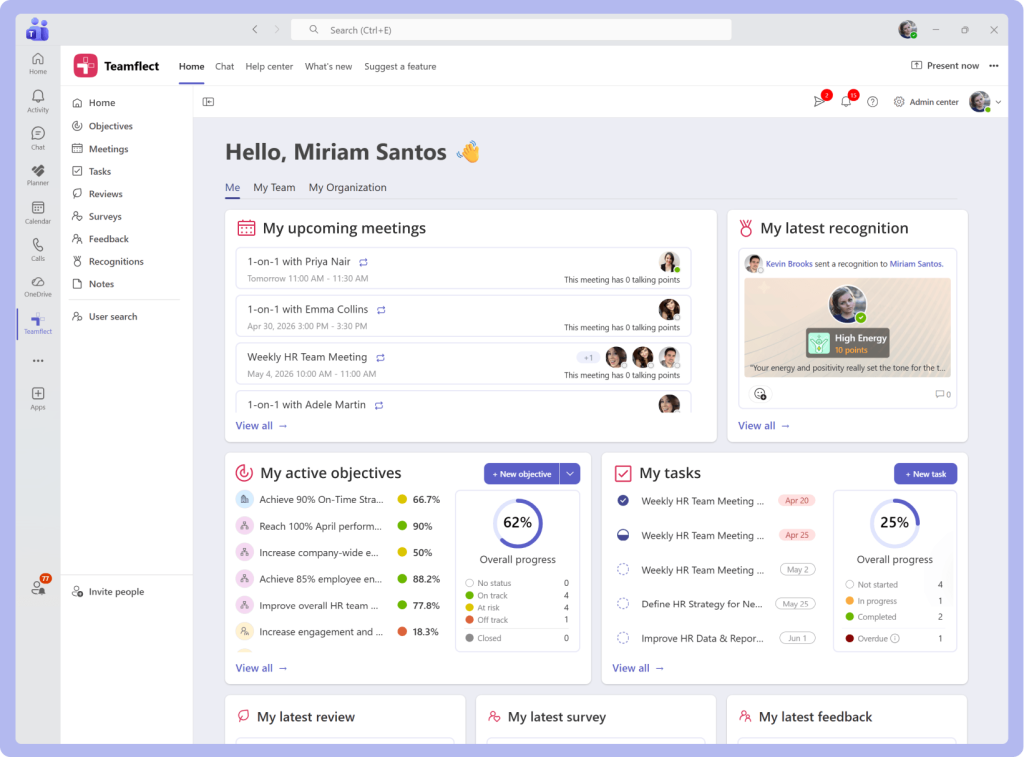
That alone solved our adoption problem, since nobody had to be reminded to log in somewhere new. I can run 1-on-1s, track OKRs, gather 360 feedback, and handle recognition without leaving Teams once.
It is completely free for teams under 10 people with full features, which made it an easy first step before I had budget approved.
Pros:
- Fully native to Microsoft Teams and Outlook, no separate login required
- Free with full functionality for teams under 10 people
- Combines 1-on-1s, OKRs, 360 feedback, reviews, and recognition in one place
- High adoption rates since it lives where employees already work
- Quick rollout without heavy IT involvement
Cons:
- Out-of-the-box reporting and data export options are limited
- Value drops significantly for teams not already built around Microsoft 365
User Rating: 4.5/5 (G2)
Pricing: Free for up to 10 users. Paid plans start at $7/user/month, billed annually.
8. Officevibe (by Workleap) – Best for Pairing 1-on-1s With Engagement Pulse Surveys
Between one-on-1 and the next, I genuinely had no read on how my team was feeling, and that blind spot is what Officevibe closed for me. The weekly pulse surveys give me a temperature check every single week, and the anonymous feedback channel means people tell me things in writing that they would never bring up face-to-face in a check-in.
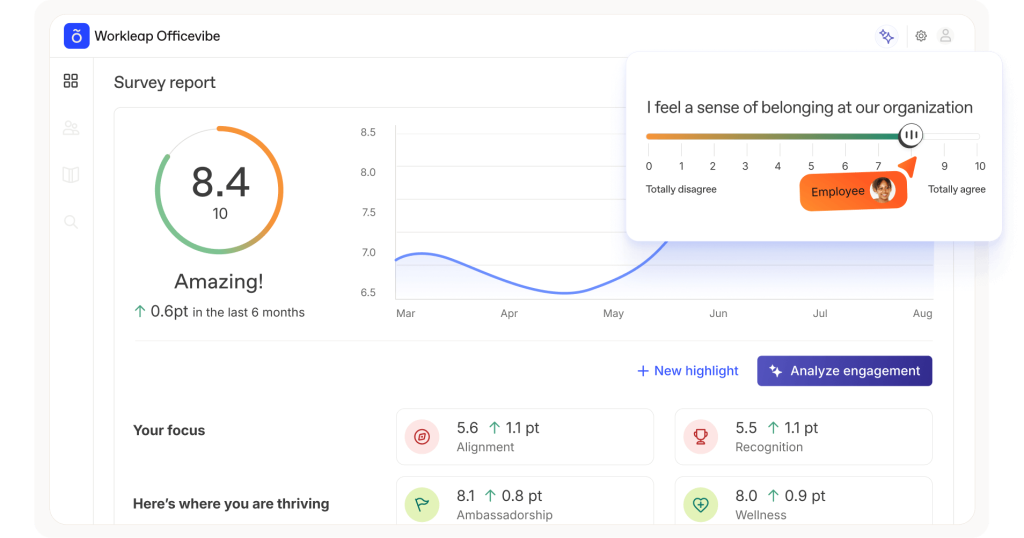
I use that signal to walk into 1-on-1s already knowing what to ask about instead of guessing. The one-on-one templates are simple, not flashy, but they get the job done for a team that mainly wants engagement data plus basic 1-on-1 structure. It is noticeably cheaper than Lattice or Culture Amp for the engagement piece alone.
Pros:
- Weekly automated pulse surveys give managers an engagement signal between 1-on-1s
- Anonymous feedback channel surfaces things employees will not say in a meeting
- Simple, affordable single-plan pricing with no complicated tier shopping
- Built-in 1-on-1 templates and manager coaching content
- Integrates with Slack, Teams, and BambooHR
Cons:
- Not a full performance management platform, no deep OKR or review cycle tools
- Advanced analytics and manager effectiveness features require the Pro tier
User Rating: 4.3/5 (G2)
Pricing: Starts at $4,999
9. Small Improvements – Best for Engineering & Technical Team 1-on-1s
My engineering team needed a 1-on-1 tool that felt built for developers instead of handed down from sales, and that is exactly what Small Improvements delivers. The Jira integration lets me link a development ticket directly to a goal we discussed in a 1-on-1, so when an engineer shows me their impact, the proof is already connected instead of something I have to dig up.
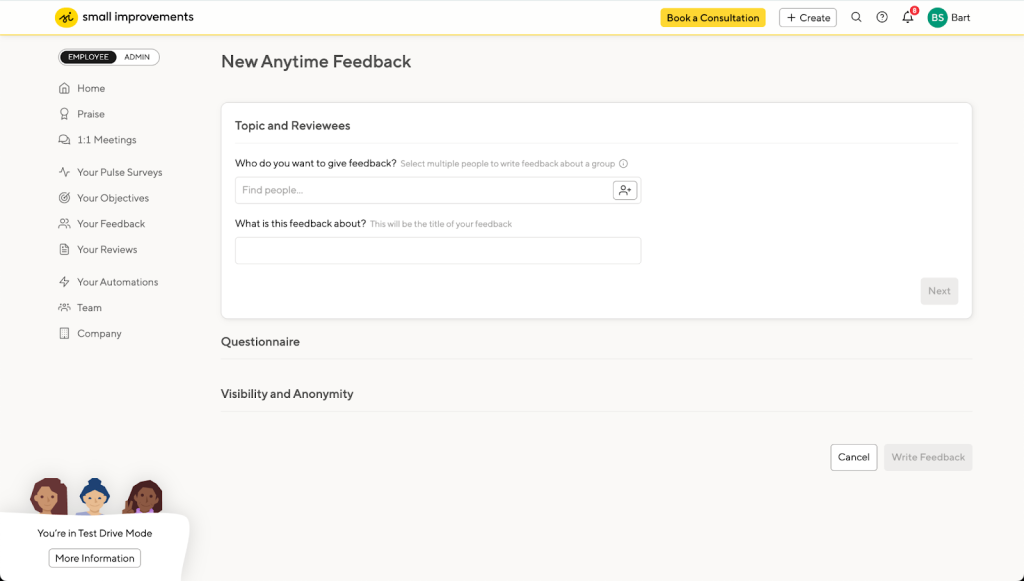
Meeting notes persist across every session, building a running record that feeds straight into performance reviews later. The Slack integration means I can drop an agenda item into our 1-on-1 the moment something comes up in a channel conversation, instead of waiting for the next meeting to remember it.
Pros:
- Deep Jira and GitHub integrations connect code contributions to goals and 1-on-1s
- Persistent meeting notes create a running record that feeds performance reviews
- Slack integration for adding agenda items in real time
- Shared agendas and talking point templates for structured conversations
- Well suited to remote engineering teams needing more structure
Cons:
- Custom, quote-based pricing makes upfront budgeting harder
- Interface feels less modern compared to newer entrants on this list
User Rating: 4.3/5 (G2)
Pricing: Starts at $3/user/month, billed annually
10. Betterworks – Best for Enterprise-Scale OKR Alignment With Structured 1-on-1s
Cascading OKRs across dozens of teams was the real problem at a larger organization I worked with, and Betterworks is what finally made our 1-on-1s reflect that bigger structure.

Every check-in ties back to the goals that roll up to company objectives, so a 1-on-1 with a junior report and a 1-on-1 with a department head both feel connected to the same strategy instead of existing in isolation.
The AI-generated insights flag when someone’s goals are drifting off track before it becomes obvious in a review. Continuous feedback and recognition tools keep the conversation going between formal check-ins instead of everything piling up quarterly. It is built for scale, so a five-person team is going to feel like it is paying for machinery it does not need yet.
Pros:
- Cascading OKR structure keeps every 1-on-1 tied to company-wide objectives
- AI-generated insights flag goal drift before it surfaces in a formal review
- Continuous feedback and recognition tools between formal check-ins
- Built for large, complex organizational structures
- Strong analytics for workforce-level insights
Cons:
- Pricing is not published, and implementation tends to be heavier than lighter tools
- Can feel like overkill for small or early-stage teams
User Rating: 4.3/5 (G2)
Pricing: Starts at $1/user/month
Evaluation Criteria
When I evaluate 1-on-1 meeting software for this list, I do not just rely on feature lists or marketing claims. I look at how these tools actually perform in real-world scenarios. Here is the framework I used to make sure every recommendation is practical, reliable, and worth considering:
- User Reviews / Ratings: I start by looking at real user feedback from platforms like G2. This gives me a clear picture of how managers actually experience the tool day to day, what they love, and where it falls short
- Core Features & Functionality: I focus on what truly matters in 1-on-1 meeting software. This includes shared agendas, action item tracking, goal and OKR integration, meeting history, and reporting. If a tool cannot handle these well, it does not make the cut
- Ease of Use: I pay close attention to how intuitive the 1-on-1 meeting platform feels. A tool might be powerful, but if managers and employees struggle to adopt it, it defeats the purpose. Clean interface, simple navigation, and quick onboarding are non-negotiable for me
- Customer Support: From my experience, implementation is where many tools fail. I evaluate how responsive and helpful the support team is, especially during setup and ongoing use. Fast, reliable support makes a big difference in adoption
- Value for Money: I compare pricing with what the tool actually delivers. This is not about picking the cheapest option, but about whether the features, flexibility, and performance justify the cost
- Personal Experience / Expert Insights: Wherever possible, I rely on my own hands-on experience with these tools. I also consider insights from HR leaders and other people managers who use these systems in real environments. This helps me go beyond surface-level reviews and highlight what actually works
My Top 3 Picks
Choosing the right 1-on-1 meeting software can make or break how consistently your team actually has these conversations. I have worked with managers who had good intentions but abandoned the habit simply because the tool made it more work, not less. The tools below stand out because they make the ritual easier to keep, not harder.
1. PeopleGoal
PeopleGoal is my go-to for managers who want 1-on-1s that are not floating on their own. It ties every check-in to goals, OKRs, and 360 feedback, and lets you build the workflow around how your team actually operates instead of a rigid template. Ideal for HR-driven environments that want performance, development, and 1-on-1s connected in one place.
2. Fellow
Fellow works brilliantly if your priority is a genuinely great meeting experience without a heavy HR system attached. The shared agenda and action item tracking alone solve the two biggest 1-on-1 failure points: nobody prepping and nothing getting followed up on.
3. Teamflect
Teamflect is built for teams that live inside Microsoft 365. If your managers already spend their whole day in Teams, this removes the single biggest barrier to adoption: asking people to open one more app. Free for small teams, and genuinely useful even before you pay for anything.
When Should You Move From Docs to 1-on-1 Software?
This is the question I get asked most. The honest answer is sooner than you think. A shared doc is fine for one or two direct reports. It stops working the moment you add more people, more cadence, or any real accountability requirement.
Here are the clear signals it is time to move on:
- You manage more than 3 to 5 people and cannot remember what you discussed in each of their last 1-on-1s
- Action items get mentioned out loud and then quietly disappear
- Your 1-on-1 notes never make it into the actual performance review
- HR has no visibility into whether check-ins are happening consistently across your team
- Your team is remote or hybrid, and async agenda-building would genuinely help
- You are tired of copying goals and feedback between three different tools by hand
If two or more of these are true for you right now, a shared doc is already costing you more time than the software would.
Keep the Human in Human Management
The right 1-on-1 software will not save a bad manager. But it will make a good manager’s job noticeably easier. If I had to give you one decision filter: choose the 1-on-1 meeting tool your team will actually keep using every single week, not the one with the longest feature list. Adoption beats functionality every time.
Community research across Reddit and Quora consistently confirms this. Tools that feel like corporate surveillance become ghost towns within a quarter. 1-on-1 meeting tools that stay simple, live inside existing workflows, and protect the honesty of the conversation are the ones that survive past the first three months.
For managers who want their 1-on-1s connected to a bigger performance picture, without three separate tools stitched together, PeopleGoal is worth starting with. You can start with a 14-day free trial and run it through one full round of 1-on-1s with your team. You will know within a few weeks whether it fits how you actually manage.
Frequently Asked Questions
How long does it take to roll out 1-on-1 meeting software to a team?
Most standalone 1-on-1 tools like Fellow or Teamflect can be live within a day, since setup is mostly connecting a calendar and inviting your team. Full performance platforms like PeopleGoal or Lattice that tie 1-on-1s to goals and reviews typically take one to four weeks, depending on how much historical data you are importing and how many integrations you need configured.
Can I use a dedicated 1-on-1 tool alongside my existing project management software?
Yes. Most 1-on-1 meeting tools are built to sit alongside Jira, Asana, or Slack rather than replace them. Hypercontext and Small Improvements specifically link goals or action items to existing project tickets, so you are not duplicating work between systems.
Is dedicated 1-on-1 software worth it for a very small team?
If you manage two or three people, a shared doc can genuinely work fine. Once you are managing five or more people, or once action items start slipping, the free tiers of tools like Fellow or Teamflect give you real structure without any cost, which makes the decision fairly low risk to test.
What is the difference between 1-on-1 meeting software and full performance management software?
1-on-1 meeting software focuses specifically on the agenda, notes, and follow-up for recurring manager-employee check-ins. Performance management software is broader, covering formal reviews, competency assessments, and development plans. 1 on 1 meeting platforms like PeopleGoal and Lattice combine both, so your day-to-day 1-on-1s directly inform formal reviews without extra manual work.
Can I migrate my old 1-on-1 notes from spreadsheets or docs into new software?
Most tools support a bulk import through CSV or a direct integration, though the more important step is deciding on your goal and note structure before migrating, so historical conversations land in a consistent format rather than a dump of unstructured text.
What is the ROI of paying for 1-on-1 meeting software over just using free docs?
The main return is time saved on prep and follow-up, fewer dropped commitments, and performance reviews that take a fraction of the time to write because the history already exists. For a team of ten, the hours saved across a year on manager admin alone typically outweigh a modest per-seat subscription cost.
Do these tools work for remote and hybrid teams?
Yes, and remote teams often benefit the most. Async agenda-building means a report can add a talking point before the meeting even starts, which matters more when you are not running into each other in a hallway to raise something informally.
Ready to 3x Your Teams' Performance?
Use the best performance management software to align goals, track progress, and boost employee engagement.