
The first time I sat down with a hospital HR director to map her performance review process, she pulled out three spreadsheets, a shared drive folder, and a stack of printed evaluation forms for nurses on different shift cycles. Nothing talked to anything else.
According to the Betterworks 2024 State of Performance Enablement Report, 90% of leaders believe their performance systems work, but only 55% of employees agree. In healthcare, that gap gets worse.
Clinical staff run on different schedules than administrative teams, credentialing never stops, and a missed review cycle can turn into a compliance problem, not just a missed conversation.
In this guide, I will help you:
- Understand what healthcare performance management software actually does and why generic HR tools fall short
- Compare 10 tools built for or adapted to hospitals, clinics, and healthcare organizations
- Know exactly when to move off spreadsheets and manual reviews
- Evaluate tools against the compliance, EHR integration, and burnout realities unique to healthcare
- Choose the right fit for your specific organization, whether you run one clinic or a multi-facility health system
What Is Healthcare Performance Management Software?
Here is why this matters for you:
- You are not running one workforce; you are running several. Nurses, physicians, billing staff, and administrators all need different review cadences, forms, and competencies tracked in one place.
- Audits are not hypothetical. Joint Commission surveys, credentialing checks, and Magnet reviews need documentation that is already organized, not assembled the week before.
- Burnout is a retention problem you can see coming. Structured performance and engagement data flags disengagement before it becomes a resignation letter.
- Manual tracking does not scale past a few departments. Once you are coordinating reviews across multiple units or facilities, spreadsheets become the risk, not the safety net.
10 Best Healthcare Performance Management Software
I reviewed each of these not just on paper, but on how they hold up for HR teams juggling performance management in healthcare and non-clinical performance management at once.
| Tool | Best For | Pricing | User Rating |
| PeopleGoal | Fully customizable performance reviews, OKRs, and employee development | FREE 14-day trial. Paid starts at $4/user/month. | 4.5/5 (G2) |
| PerformYard | Running concurrent review cycles for clinical and non-clinical staff | From $5/user/month | 4.7/5 (G2) |
| symplr Performance | Compliance-first performance reviews built for healthcare | Custom pricing | Not publicly rated on G2 |
| HealthStream Competency Suite | AI-driven clinical competency development | Custom pricing | 4.2/5 (G2, HealthStream aggregate) |
| Kahuna | Real-time competency and skills tracking for nursing teams | Custom pricing | Not publicly rated on G2 |
| Dossier | Magnet-ready clinical competency management | Custom pricing | Not publicly rated on G2 |
| Vastian Competency (MediaLab) | Competency assessments tied to accreditation | Custom pricing | Not publicly rated on G2 |
| Xapify | Verifying clinical competencies without pulling nurses off the floor | Custom pricing | Not publicly rated on G2 |
| Engagedly | AI-powered performance, engagement, and learning in one platform | From $5 to $8/user/month | 4.3/5 (G2) |
| Synergita | Continuous appraisals for non-clinical and administrative staff | From $3/user/month | 4.6/5 (G2) |
1. PeopleGoal – Best for Fully Customizable Performance Reviews, OKRs & Employee Development
I remember sitting with a hospital HR director who was manually copying goals from one spreadsheet into another every quarter, once for nurses and once for admin staff, because her old system could not tell the difference. Switching her team to PeopleGoal changed that within the first week.
I built one review workflow for clinical staff and a completely different one for billing and administration, without writing a single line of code. The multi-dimensional teams feature let us map how nurses actually report, through unit managers, clinical educators, and department heads, instead of forcing everyone into one straight line that never matched reality.
What surprised me most was the 360-degree feedback setup, where one employee could be evaluated by three different shift supervisors in the same cycle without any confusion. Real-time analytics meant leadership no longer asked me to export data to Excel before every meeting. For any HR Director tired of running two disconnected systems, this closes that gap fast.
Pros:
- No-code workflows build separate review processes for clinical and non-clinical teams, no developer needed.
- Multi-dimensional org charts map real reporting lines, so alignment reports reflect how your hospital actually runs.
- 360-degree feedback supports multiple raters per employee, so no single supervisor carries the whole review.
- Real-time analytics cut manual Excel exports, saving hours before every leadership meeting.
- Integrations with BambooHR, Workday, and Azure AD sync employee data automatically, no double entry.
- Full audit logging tracks every form and workspace action, ready for any compliance question.
- Encrypted data at rest and role-based access protect employee records with no extra setup.
Cons:
- No downloadable or on-premise version.
- The dark user interface option is not available.
User Rating: 4.5/5 (G2)
Pricing: 14-day free trial. Paid starts at $4/user/month
2. PerformYard – Best for Concurrent Review Cycles Across Clinical and Non-Clinical Staff
A nurse manager once told me her biggest frustration was not the reviews themselves, but the calendar. Her team and the billing department were stuck on the same review cycle, even though nothing in their work matched up. PerformYard was the first tool I set up that stopped being a problem.
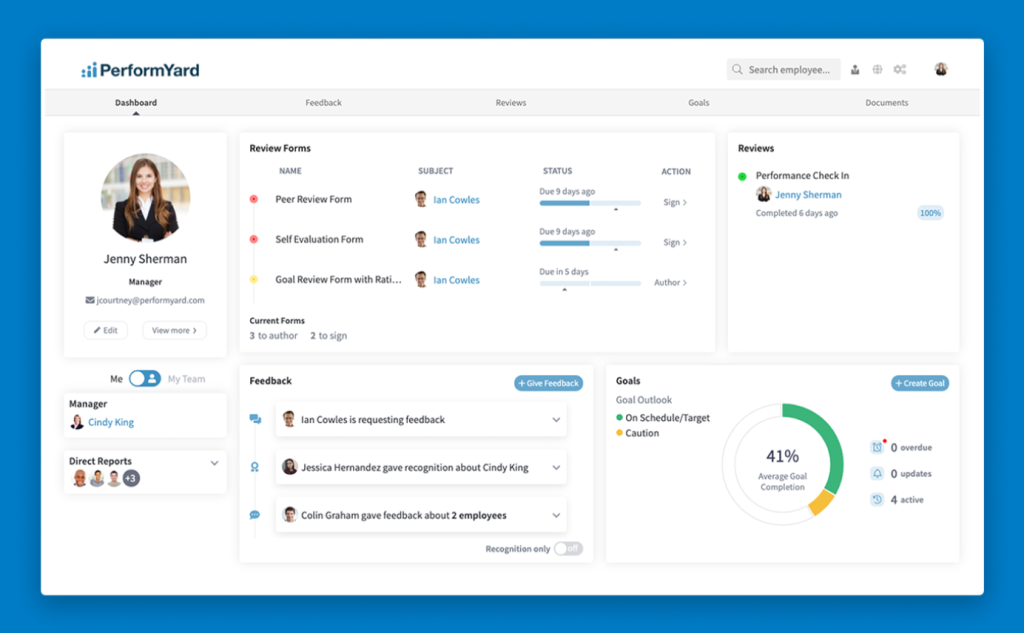
I ran different forms, different participant groups, and different timings for clinical and non-clinical staff, all from one platform, without maintaining two separate systems. Every review, goal, and check-in became a structured record I could search in seconds, which mattered enormously the week a credentialing audit request landed on my desk unannounced.
The integrations with ADP, BambooHR, Workday, and Paylocity meant I was not re-entering employee data by hand across systems that should already be talking to each other. What I appreciated most was having a dedicated success manager during rollout, someone who understood healthcare review cycles instead of treating us like any other office.
Pros:
- Concurrent review cycles let clinical and non-clinical staff run separate forms and timelines at once.
- Structured, searchable records store every review and check-in, so audit prep is never a scramble.
- Sentiment surveys track engagement by department and tenure, flagging disengaged units before turnover hits.
- A dedicated success manager guides rollout, shortening setup time for teams new to structured reviews.
- HRIS integrations with ADP, BambooHR, and Workday keep data synced, cutting manual double entry.
Cons:
- AI Insights, Meetings, and Engagement modules are priced as separate add-ons
- Some users report limited customization in certain reporting views
User Rating: 4.7/5 (G2)
Pricing: Starts at $5-10/person/month
3. symplr – Best for Compliance-First Performance Reviews Built for Healthcare
I brought symplr into a health system that was already using other symplr modules for credentialing, and the difference was immediate. Instead of performance data living in its own silo, it connected straight into the same ecosystem already tracking licensure and scheduling.
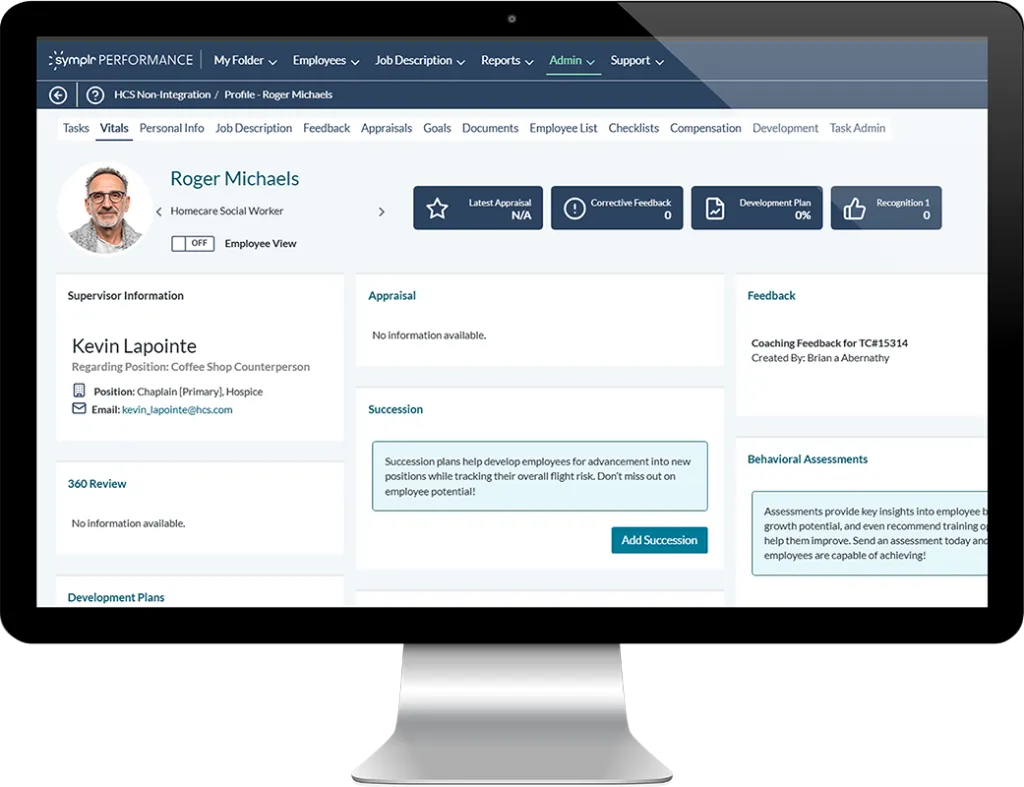
The role-based evaluation templates were built around actual healthcare job structures, not a generic office hierarchy someone tried to bend into shape. When we integrated it with symplr Learning and Assessments, reviews stopped being a standalone form and started feeding directly into training plans and competency development for every employee on staff.
Automated workflows and reminders meant managers no longer had to chase overdue evaluations every cycle, a constant headache before this. What sold me was the documentation itself, built around Joint Commission, CMS, and Magnet expectations from day one, instead of being scrambled together the week before a survey. If your organization already lives inside the symplr world, this is the natural next step.
Pros:
- Role-based templates align with real healthcare job structures, ensuring fair evaluations across departments.
- Documentation aligns with Joint Commission, CMS, and Magnet from day one, easing audit prep.
- Automated workflows and reminders reduce missed reviews without HR having to chase every cycle manually.
- Integration with symplr Learning ties reviews directly to training, turning feedback into a real plan.
Cons:
- Best value comes from adopting the broader symplr ecosystem, not as a standalone tool
- Pricing is not publicly listed, requiring a sales conversation for every quote
User Rating: 4.3/5 (G2)
Pricing: Custom Quote
4. HealthStream Competency Suite –Best for AI-Driven Clinical Competency Development
I was skeptical the first time a clinical educator told me an AI engine named Jane would build development plans for her nursing staff. Then I watched it happen. Jane analyzed each clinician’s knowledge, performance, and role, then curated a learning path that matched where each person was struggling, rather than assigning the same generic module to everyone on the unit.
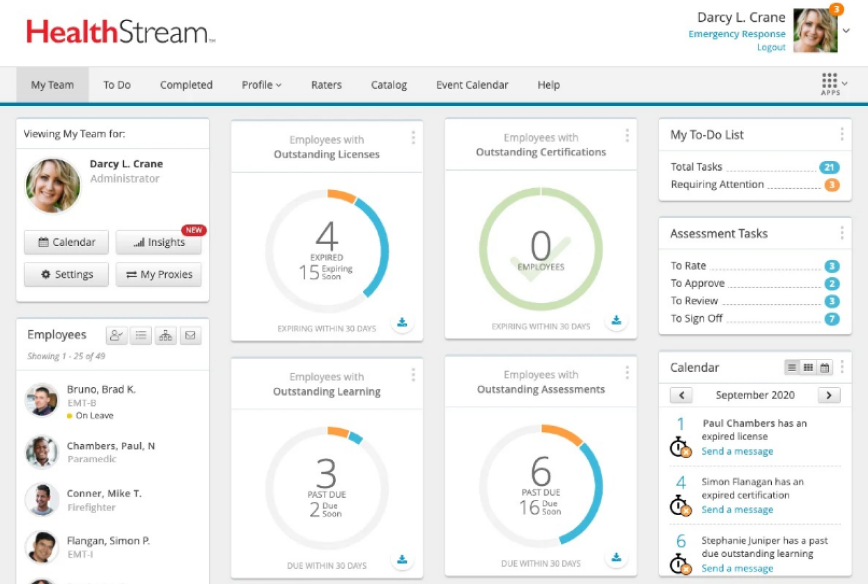
What impressed me most were the immersive clinical scenarios, over five thousand of them, spanning eight core competencies, replacing basic multiple-choice quizzes that never told us much about real judgment under pressure.
The flexibility to score using Likert scales, novice-to-expert ratings, or method validation allowed departments to keep their own evaluation style rather than a rigid format. Automated reporting benchmarked our staff against national standards, which gave leadership something concrete to act on.
Pros:
- Jane, the built-in AI, builds personalized learning paths based on each clinician’s actual gaps.
- Over 5,000 immersive scenarios replace basic quizzes, testing real clinical judgment, not memorized facts.
- Flexible scoring, Likert, novice-to-expert, or method validation, lets each department keep its own style.
- Automated benchmarking compares staff to national standards, giving leadership a clear case for investment.
Cons:
- Primarily focused on clinical competency and learning, with less depth on general HR performance workflows
- Pricing requires direct contact with HealthStream
User Rating: 4.3/5 (G2)
Pricing: Custom Quote
5. Kahuna – Best for Real-Time Nursing Skills and Competency Tracking
I once watched a nurse educator flip through a three-inch binder just to confirm which nurses were cleared for a specific procedure before building the week’s schedule. Kahuna replaced that binder entirely. Real-time dashboards showed skills progression and gaps at the individual, team, or system level, so staffing decisions stopped being guesswork based on memory and outdated paper records.
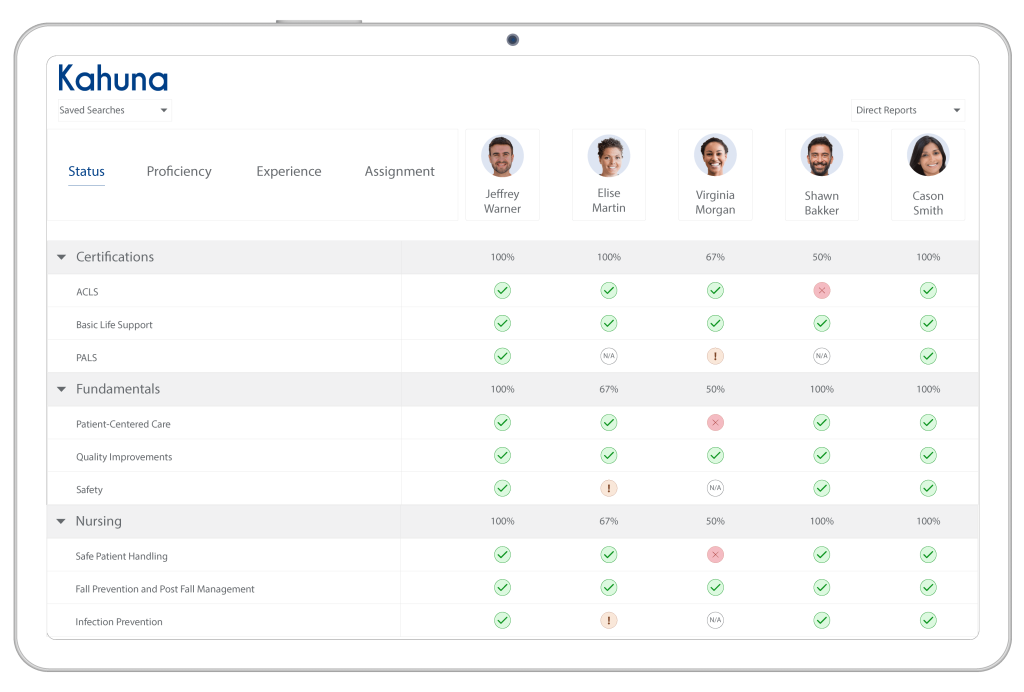
What stood out to me was how automatically it handled reassessment cycles and certification expirations, tasks that used to eat hours of an educator’s week without anyone noticing until something lapsed. Because it integrates with existing HRIS, LMS, LXP, and EHR platforms, we did not have to manually re-enter role or training data across four systems every time someone changed units.
It also directly supports Joint Commission, Magnet, and state board requirements, which means audit prep stopped being a fire drill. If your biggest headache is knowing who is actually qualified for what, right now, this solves it.
Pros:
- Real-time dashboards show skills gaps at the person, team, or system level, replacing guesswork with current data.
- Automated reassessment and certification tracking removes a recurring manual task from educators’ plates.
- Integration with HRIS, LMS, LXP, and EHR systems automatically syncs role and training data.
- Support for Joint Commission and Magnet requirements keeps audit-ready records up to date before a survey.
Cons:
- Focused specifically on clinical competency, not general performance reviews for non-clinical staff
- No published pricing or independent rating available
User Rating: 4.9/5 (G2)
Pricing: Custom Quote
6. Dossier – Best for Magnet-Ready Clinical Competency Management
A hospital education director once told me Magnet accreditation season used to mean weeks of pulling competency records together from scattered files and half-updated spreadsheets. Dossier changed that timeline completely.
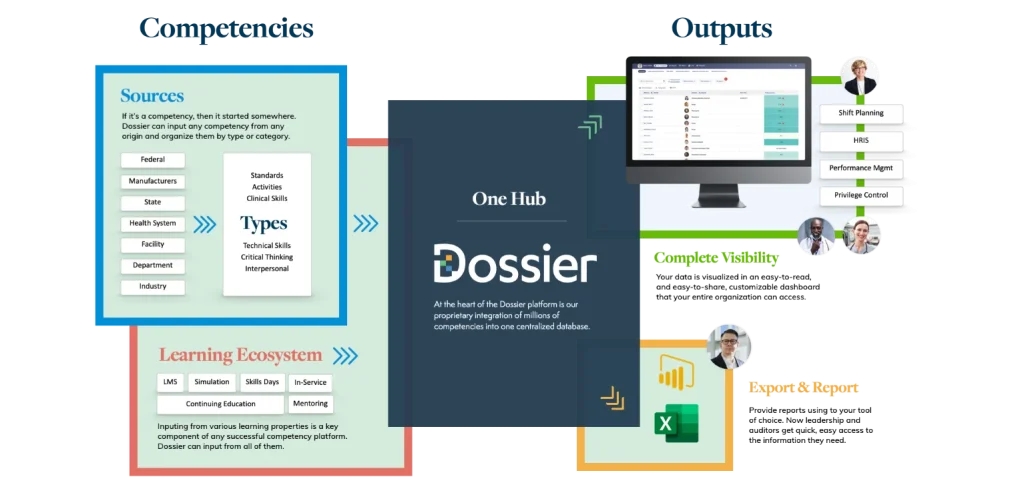
Every skills tracking dashboard update was visible in real time to nursing leaders, clinical educators, and quality teams at once, so nobody was waiting on someone else to compile a report before a decision could be made. Records came timestamped, secure, and instantly exportable, which meant a surveyor’s request no longer triggered a scramble through old files.
What I valued most was how purpose-built it felt for nursing and allied health specifically, without the generic corporate HR language that never quite fit a hospital’s actual workflow. It is not trying to be everything for everyone, and that focus is exactly why it works so well for organizations chasing accreditation.
Pros:
- Real-time skills dashboards update instantly for educators and quality teams, no waiting on reports.
- Timestamped, exportable records mean a surveyor’s request never triggers a scramble through old files.
- Purpose-built workflows for nursing and allied health skip the generic corporate HR clutter.
- Strong US hospital adoption means workflows are already shaped around real Magnet readiness needs.
Cons:
- Limited applicability outside clinical settings
- Weaker support for broader talent management or non-clinical performance reviews
User Rating: 4.6/5 (G2)
Pricing: Custom Quote
7. Vastian Competency (MediaLab) – Best for Competency Assessments Tied to Accreditation
An HR director once handed me a printed list of Joint Commission standards and asked how our current system would ever prove compliance against every line item. Vastian Competency, formerly MediaLab, was built to answer that question exactly. I could build custom competency profiles for each role, then map assessments directly to specific requirements like HR.01.06.01 and HR.01.07.01, rather than hoping our documentation covers them.
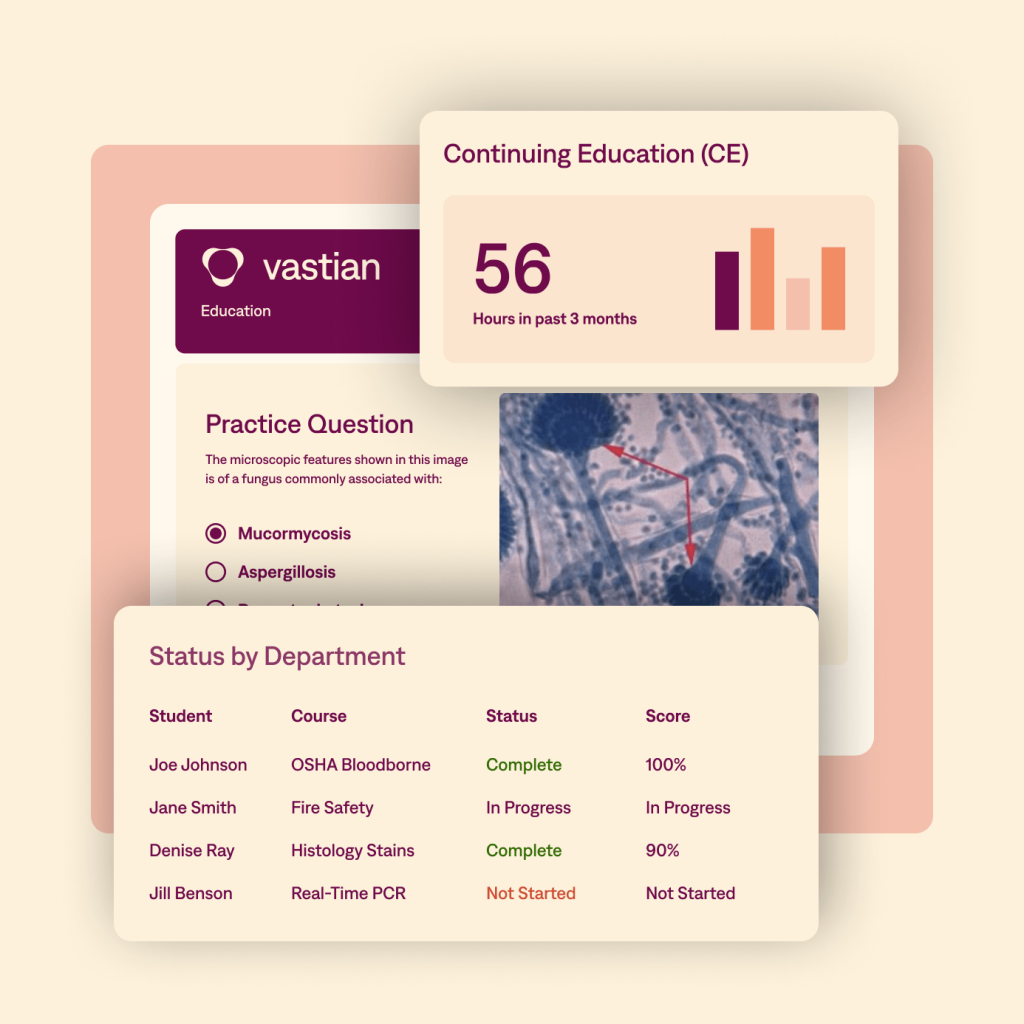
Automated scheduling handled assessment frequency across departments and locations, eliminating the need for anyone to manually track due dates in a shared calendar. Real-time analytics flagged gaps well before the survey date, giving leadership time to close them rather than discovering problems during the visit itself.
Importing data from skill fairs or manual observations kept legacy records from getting lost during the switch. For any organization where the accrediting body’s checklist is the real deadline driving every decision, this tool speaks that exact language fluently.
Pros:
- Custom competency profiles map directly to Joint Commission requirements, proving compliance, not just claiming it.
- Automated scheduling handles assessment frequency by department, removing manual due-date tracking.
- Real-time analytics flag gaps well before survey day, giving leadership time to actually fix them.
- Importing data from skill fairs keeps legacy competency records intact during the switch.
Cons:
- Best suited for organizations already using or considering the broader Vastian compliance suite
- Not designed for general non-clinical employee performance management
User Rating: 4.6/5 (G2)
Pricing: Custom Quote
8. Xapify – Best for Verifying Clinical Competencies Without Pulling Staff Off the Floor
A clinical educator once told me the worst part of competency season was pulling nurses off the floor just to check a box that proved they still knew what they were already doing well. Xapify solved that specific problem for her team.
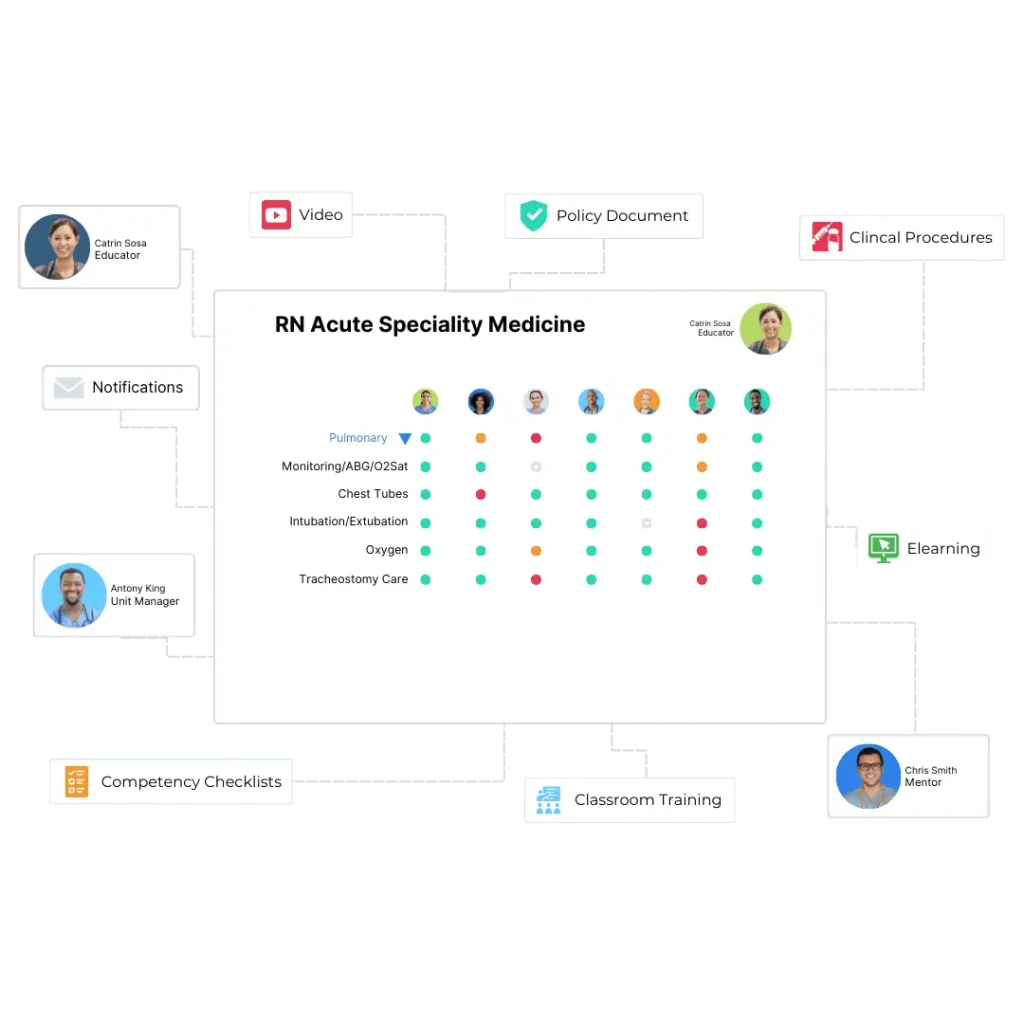
Verifications happened through return demonstrations, quizzes, and daily work evidence collected during actual shifts, so nurses were validated through the work they were already doing, not through an extra interruption. Every completion was timestamped and instantly exportable, which made audit prep something we could hand over in minutes rather than days.
Dashboards showed exactly who was competent, who was overdue, and where educators needed to focus their limited time next. It synced automatically with our existing HR system, pulling in role and location data without manual setup for every new hire. For any team trying to protect patient care hours while still proving competency, this earns real trust quickly.
Pros:
- Verification methods like return demonstrations and daily work evidence validate skills without pulling nurses off the floor.
- Instant, timestamped records turn audit prep into minutes instead of days of gathering paperwork.
- Dashboards show who is competent, who is overdue, and where educators should focus next.
- Automatic HR system syncing gives new hires personalized requirements with zero manual setup.
Cons:
- Focused on clinical competency verification rather than full performance management
- No published independent rating available
User Rating: 5/5 (1 Review on G2)
Pricing: Custom Quote
9. Engagedly – Best for AI-Powered Performance, Engagement, and Learning in One Platform
I brought Engagedly into a mid-sized health system that wanted performance reviews, engagement surveys, and learning all in one place, rather than three logins and three vendors to manage. The modular structure meant we started with performance management and added engagement tools later without a full replatform.
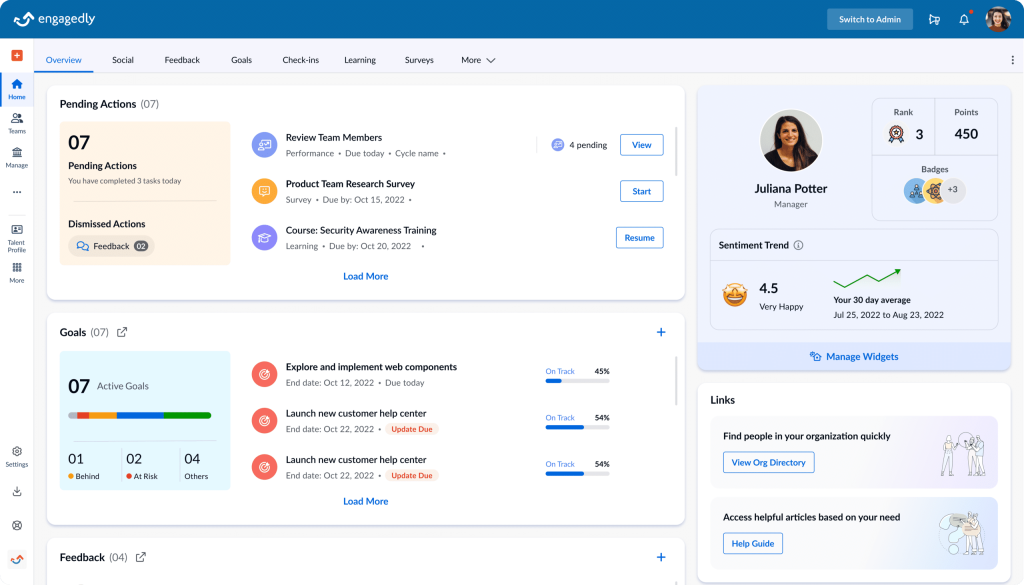
Marissa, an AI agent, surfaced recommendations from review data that our HR team would have taken weeks to spot manually across departments. The nine-box matrix helped us identify high-potential staff for succession planning, which was important as several senior nurse leaders approached retirement that year.
Gamified learning modules kept compliance training from feeling like a chore, with certifications automatically tracked rather than chased down by email. Integrations with ADP, BambooHR, and Azure AD ensured employee data remained up to date without duplicate entries. For a health system consolidating scattered HR tools into a single, flexible platform, this gave us room to grow without starting over.
Pros:
- Modular suites let you start with performance management and add engagement or learning later.
- Marissa, the built-in AI agent, surfaces recommendations automatically, saving HR weeks of manual review.
- The nine-box matrix flags high-potential staff, useful for succession planning as leaders retire.
- Integrations with ADP, BambooHR, and Azure AD keep employee data current without duplicate entry.
Cons:
- Some users report a learning curve for new admins
- Reporting depth can feel limited for complex, multi-facility analysis
User Rating: 4.3/5 (G2)
Pricing: Starts at $5 to $8/user/month
10. Synergita – Best for Continuous Appraisals Across Non-Clinical and Administrative Teams
An HR generalist at a hospital once described her annual appraisal process to me as a form nobody remembered filling out until the deadline reminder arrived. Synergita fixed that by making appraisals continuous rather than an annual scramble for administrative and back-office staff. Employees logged progress against goals throughout the quarter, so review day involved real data rather than vague impressions from memory.
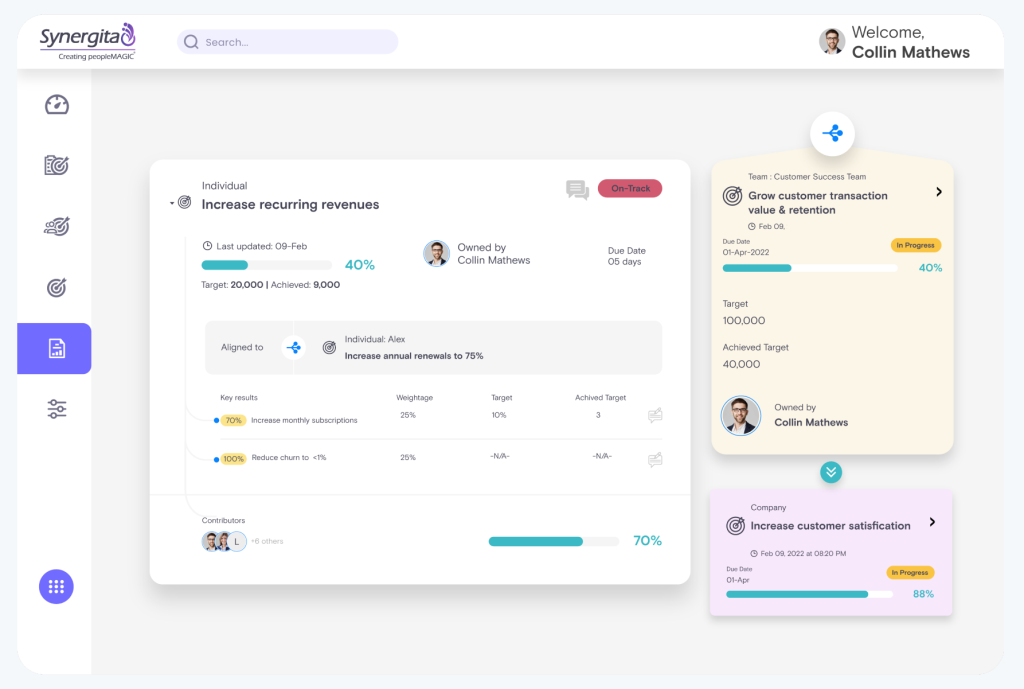
The 360-degree feedback was tied directly to goal milestones, which gave conversations real substance rather than generic praise or criticism that nobody remembered a month later. Calibration sessions helped reduce rating bias across different department managers, something that became obvious once we started comparing evaluations across facilities side by side.
Customizable review forms let each department keep its own rating scale, rather than forcing a single format on teams with very different jobs and expectations. For non-clinical and administrative healthcare teams specifically, this brought a structure that finally stuck well past the first quarter.
Pros:
- Continuous appraisals replace the once-a-year form nobody remembers, keeping reviews grounded in real progress.
- 360-degree feedback ties to goal milestones, giving every conversation real substance rather than vague praise.
- Calibration sessions reduce rating bias among managers, which is useful when comparing performance across facilities.
- Customizable review forms let each department use its own rating scale rather than a single rigid format.
Cons:
- UI feels dated compared to newer platforms
- Better suited for non-clinical and administrative teams than clinical competency tracking
User Rating: 4.6/5 (G2)
Pricing: Starts at $2/user/month, billed annually.
My Top 3 Healthcare Performance Management Software
If you wish to get a quick review of some of my favorite healthcare performance management software, here are the top 3 tools I love:
1. PeopleGoal
A hospital HR director once told me she managed separate review spreadsheets for nurses and administrative staff because every team worked differently. PeopleGoal replaced that with customizable no-code workflows, multi-rater feedback, and real-time dashboards, making reviews simpler while keeping everyone aligned without relying on manual spreadsheets.
2. PerformYard
If flexibility is your priority, PerformYard focuses on structure. One nurse manager finally stopped forcing every department onto the same review calendar because the platform supported separate review cycles, forms, and timelines while keeping every review and goal searchable from one place.
3. symplr Performance
When review cycles become compliance exercises instead of HR tasks, symplr Performance shines. Built specifically for healthcare, it connects performance reviews with competency development, automates reminders, and helps organizations stay aligned with Joint Commission, CMS, and Magnet requirements without extra administrative effort.
How I Chose These Healthcare Performance Management Software
I do not rely on feature lists or marketing pages alone. Here is the framework I used to evaluate every healthcare enterprise performance management tool on this list:
- User Reviews / Ratings: I start with real user feedback from platforms like G2 and Capterra, focused specifically on healthcare and hospital reviewers where available. This tells me how the tool actually holds up for HR teams managing clinical and non-clinical staff, not just a generic office environment.
- Core Features & Functionality: I look at whether the tool supports concurrent review cycles, goal setting, competency tracking, credentialing documentation, and reporting built around healthcare’s unique staffing structure. Generic goal-setting alone does not make the cut.
- Ease of Use for Frontline and Admin Staff: A nurse educator managing 80 direct reports and an HR generalist running annual reviews both need to use this without a training marathon. Clean navigation and quick onboarding are non-negotiable.
- Compliance and Audit Readiness: I check whether the platform keeps documentation organized enough to support Joint Commission, Magnet, or credentialing audits without a scramble.
- Integration With Existing Healthcare Systems: I look at whether the tool connects with HRIS, payroll, and, where relevant, EHR or LMS platforms already in use at most hospitals and clinics.
- Value for Money: I compare pricing to what the tool actually delivers for a healthcare-specific use case, not the cheapest option, but the one that justifies its cost for your workforce structure.
When Should You Move From Manual Reviews to Healthcare Performance Management Software?
This is the question I get asked most, and the honest answer is sooner than you think. Here are the clear signals it is time to move on:
- You are managing performance reviews for more than one staff type using the same spreadsheet or form
- Credentialing, licensure, or competency deadlines live in someone’s personal tracker instead of a shared system
- Your last Joint Commission or Magnet survey required a scramble to pull documentation together
- Managers are spending review season chasing paperwork instead of having development conversations
- You cannot see engagement or burnout trends until turnover has already happened
- HR and clinical education are using two disconnected systems to track the same employees
Clinical vs. Administrative Staff: Different Needs, One System
| Staff Type | How They Use Performance Management | What They Need in a Tool |
| Clinical Staff (nurses, physicians) | Competency validation, credentialing, shift-based multi-rater reviews | Concurrent review cycles, EHR integration, and mobile access at the point of care |
| Administrative and Billing Staff | Goal setting, annual or continuous appraisals, and career development | Standard review templates, engagement surveys, and career pathing tools |
| HR and Talent Development | Aligning performance with strategy, tracking compliance across departments | Centralized dashboards, audit logging, cross-department reporting |
| Nurse Educators and Clinical Trainers | Skills verification, onboarding competency tracking | Real-time skills dashboards, LMS integration, mobile-friendly assessments |
Choose Software That Fits How Your Teams Actually Work
The best tools for healthcare performance management will not fix a broken review culture on their own. But it will make a good process impossible to ignore and a bad one impossible to hide.
If I had to give you one filter: choose the platform your managers will actually use every cycle, not the one with the longest feature list on a sales deck.
For healthcare HR teams managing both clinical and non-clinical performance in one system, PeopleGoal gives you customizable workflows, multi-rater 360 feedback, and real-time reporting without forcing every department into the same rigid process.
Start with the 14-day free trial and run one department through a full review cycle before you commit further.
Frequently Asked Questions
Is healthcare performance management software the same as clinical quality analytics software?
No. Performance management software focuses on employee reviews, goals, and competency tracking. Clinical quality analytics platforms like Health Catalyst or Strata Decision Technology focus on patient outcomes, financial performance, and population health data. Some organizations use both for different purposes.
Does this software replace our EHR system?
No. It works alongside your EHR by integrating for staffing and census data where supported. It manages employee performance and development, not patient records or clinical documentation.
Can a small clinic use enterprise-focused tools like PerformYard or symplr?
Yes, though pricing and implementation support vary by vendor size. Smaller clinics often find better initial value in tools with transparent per-user pricing rather than fully custom enterprise contracts.
Does using this software guarantee HIPAA compliance?
No single software guarantees compliance on its own. What you should verify is whether the vendor uses encryption at rest, role-based access, and non-invasive data practices that support your organization's broader HIPAA compliance program.
How long does implementation typically take for a mid-sized healthcare organization?
Most platforms report going live within a few weeks to a month, depending on how many departments and review types you are configuring simultaneously. Vendors offering a dedicated implementation contact, like PerformYard and PeopleGoal, tend to move faster.
Can these tools support multiple facilities under one health system?
Yes, most enterprise-focused tools on this list support multi-facility structures with department and location-level reporting. Confirm this specifically during your demo, since some smaller platforms are built for a single-site clinic instead.
Ready to 3x Your Teams' Performance?
Use the best performance management software to align goals, track progress, and boost employee engagement.