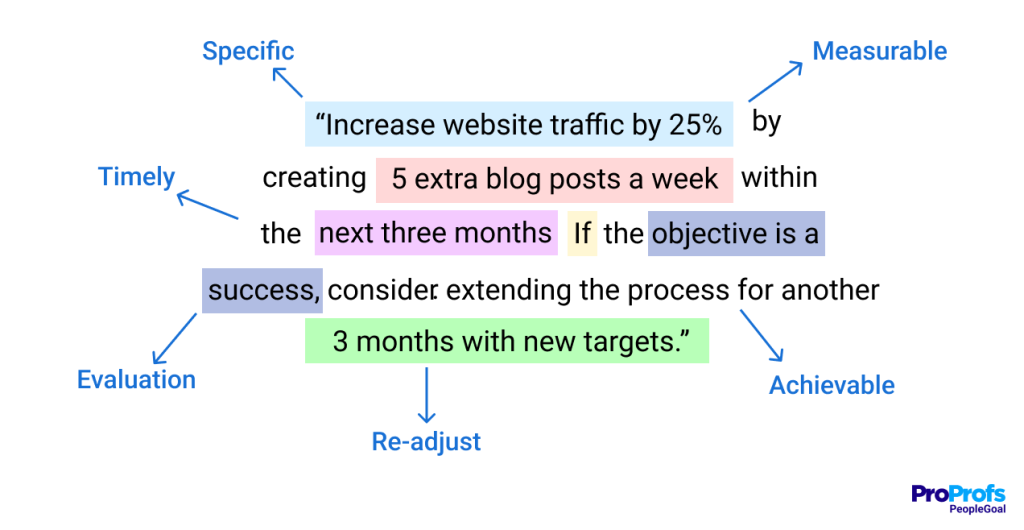

When employees cannot see how their work connects to company strategy, even the best goals start to feel like busywork. That is where enterprise OKR software becomes critical, especially when hundreds or thousands of employees are working across teams.
Gallup found in 2025 that only 32% of U.S. employees strongly agreed that their company’s mission or purpose made their job feel important. For large organizations, that disconnect can quickly turn into misaligned priorities, inconsistent updates, and goals that look good on paper but go nowhere.
In this guide, I compare 10 enterprise OKR software platforms for 2026, including their pros, cons, pricing, and best use cases. I also cover evaluation criteria, when to move from spreadsheets, migration from Viva Goals, and how OKR tools work across departments.
What Is Enterprise OKR Software?
Enterprise OKR software is a goal-tracking platform that cascades company objectives to departments, teams, and individuals, then tracks key results, check-ins, and reviews at scale. Think of it as enterprise OKR management software that adds what large organizations need on top: permissions, SSO, HRIS sync, and executive reporting.
Here are the benefits that matter most once you pass 500 employees:
- Goal Alignment: Every employee sees how their goal rolls up to a company objective. Ask each vendor to cascade your real org chart during the trial.
- Real-Time Visibility: Weekly updates replace quarter-end surprises. Look for on-track and at-risk statuses that leaders can filter by department.
- Controlled Access: Permissions, SSO, and audit trails keep sensitive goals visible only to the right people. Map your roles before the first demo.
- Built-in Accountability: Automated reminders turn check-ins into a routine, so managers stop chasing updates. Pick one check-in day for every team.
- Executive Reporting: Live dashboards replace slide decks in business reviews. List the three reports your leadership team reads every quarter.
- Lower Admin Work: HRIS sync and automated cycles cut manual uploads. Write down every system you update by hand today.
10 Best Enterprise OKR Software to Streamline Performance
I have reviewed each of these tools not just by specs, but by how they work in real-world settings. This list combines my hands-on experience with insights from other professionals who have used these platforms to align goals, boost focus, and drive execution at scale.
| Tool | Best For | Starting Price | User Rating |
| PeopleGoal | Fully Customizable Performance Reviews, OKRs & Employee Development | $4/user/month (14-day free trial) | 4.5/5 (G2) |
| Profit.co | Linking OKRs to Tasks and Performance Management | Custom quote | 4.7/5 (G2) |
| WorkBoard | Strategy Execution at Large-Enterprise Scale | Custom quote | 4.6/5 (G2) |
| Betterworks | HR-Led OKRs With Rating Calibration | $4.40/user/month | 4.3/5 (G2) |
| Lattice | OKRs Inside an All-in-One People Platform | $13/user/month | 4.6/5 (G2) |
| Leapsome | Connecting Goals, Reviews, and Learning | €4/employee/month | 4.8/5 (G2) |
| Mooncamp | Collaborative OKR Rollouts Across Teams | $7/user/month | 4.8/5 (G2) |
| Teamflect | Microsoft Teams and Outlook Organizations | Free for up to 10 users; paid from $7/user/month | 4.5/5 (G2) |
| Perdoo | Visualizing Company-Wide Strategy and OKRs | €6.40/user/month | 4.4/5 (G2) |
| Synergita | Linking 360 Feedback to OKR Milestones | $2/user/month | 4.6/5 (G2) |
1. PeopleGoal – Best for Fully Customizable Platform for Performance Reviews, OKRs & Employee Development
I tested PeopleGoal the way an enterprise buyer would: I wanted company objectives, department goals, and individual OKRs in one system, and it delivered. Goals cascade across the org chart, OKRs and SMART goals live side by side, and weekly check-ins arrive with auto-reminders and on-track or at-risk statuses.
Self, manager, and 360 reviews follow no-code workflows I shaped myself, with anonymous answers, weighted competencies, and several managers rating one employee. For larger organizations, the plumbing won me over. SSO, role-based access, and audit logging are built in, and users sync from Workday, BambooHR, ADP, or Excel.
Slack and Teams carry reminders, overdue goal reports arrive on schedule, and support answers by phone, chat, or email. One-to-ones, development plans, and career paths connect to review results, while its App Store speeds setup. Custom charts make performance reports easy to present. Most organizations go live within one to four weeks.
Pros:
- OKRs and SMART goals that cascade from company to team to individual, with org chart alignment views, weekly check-ins, and automated reminders
- Fully customizable 360 feedback with weighted competency scores, anonymous responses, and multiple managers evaluating one employee
- Customizable no-code Workflows to shape review stages, participants, and rules, plus a built-in App Store that speeds up setup
- Reports for performance reviews, goal completion, and overdue goals, with scheduled delivery and custom charts
- One-to-ones, development plans, and career paths linked to review results
- SSO, role-based access, and audit logging, with integrations for Workday, BambooHR, ADP, Slack, Microsoft Teams, and Excel import
Cons:
- No downloadable or on-premises version
- Dark UI mode is not available
User Rating: 4.5/5 (G2)
Pricing: Starts at $4/user/month (14-day free trial).
Check how iQmetrix replaced scattered forms and SharePoint with one transparent, trackable process using PeopleGoal.
2. Profit.co – Best for Linking OKRs to Tasks and Performance Management
Profit.co is the one I recommend when someone tells me their OKRs keep drifting away from daily work. A friend running operations at a multi-department business used it to break each objective into key results and map them straight to assignable tasks, so nobody needed a second tool for project work.
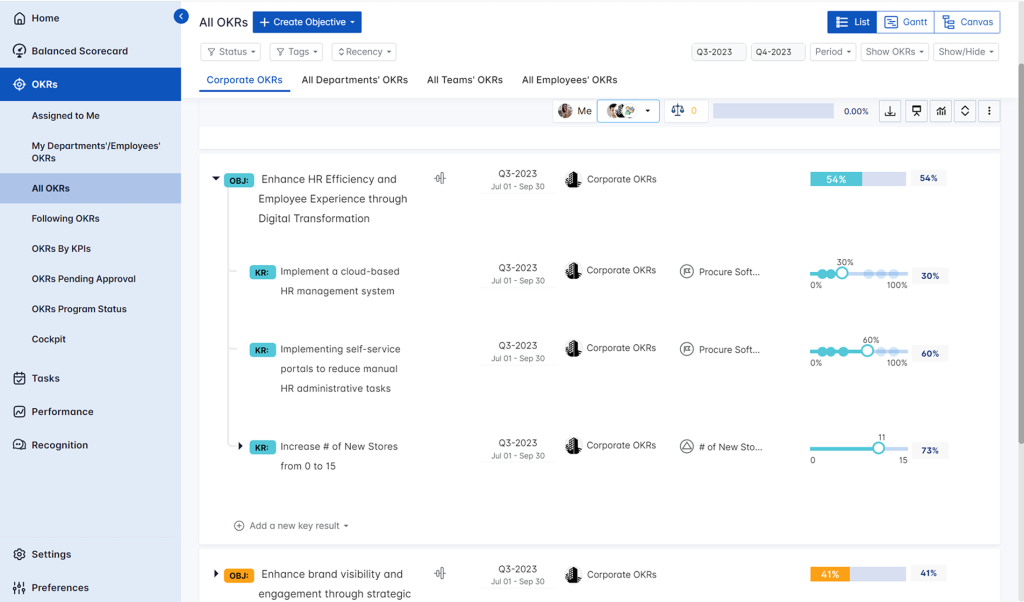
Leadership got live role-based dashboards across departments, while individual contributors could see where their tasks fit. The built-in performance layer covers appraisals, scorecards, and one-on-ones, and pulse surveys plus recognition sit alongside it. Agile groups can log progress in sprint cycles instead of waiting for quarter end.
Beyond OKRs, it includes 300+ built-in KPIs and cascading views, so strategy and metrics stay connected. Portfolios, projects, and tasks link natively to key results, and reviews, 360s, and pulse surveys tie back to OKR outcomes. Because custom reports can need admin help, plan some real time for setup before rollout day.
Pros:
- Maps key results to assignable tasks for full execution visibility
- Built-in appraisals, scorecards, and one-on-ones in the performance layer
- Sprint-based updates that suit agile teams
- Pulse surveys and recognition modules for early engagement signals
- Centralized role-based dashboards across departments
Cons:
- Custom reports may need admin support to configure
- Mobile app has limited feature parity with desktop
User Rating: 4.7/5 (G2)
Pricing: Custom Quote
3. WorkBoard – Best for Strategy Execution at Large-Enterprise Scale
Picture a quarterly business review where the numbers are already on screen. That was my experience watching a distributed sales and customer success group run on WorkBoard. Dashboards refresh as updates land, and data arrives through connections to Microsoft Power BI, Workday, and Salesforce, so people spend less time retyping figures.
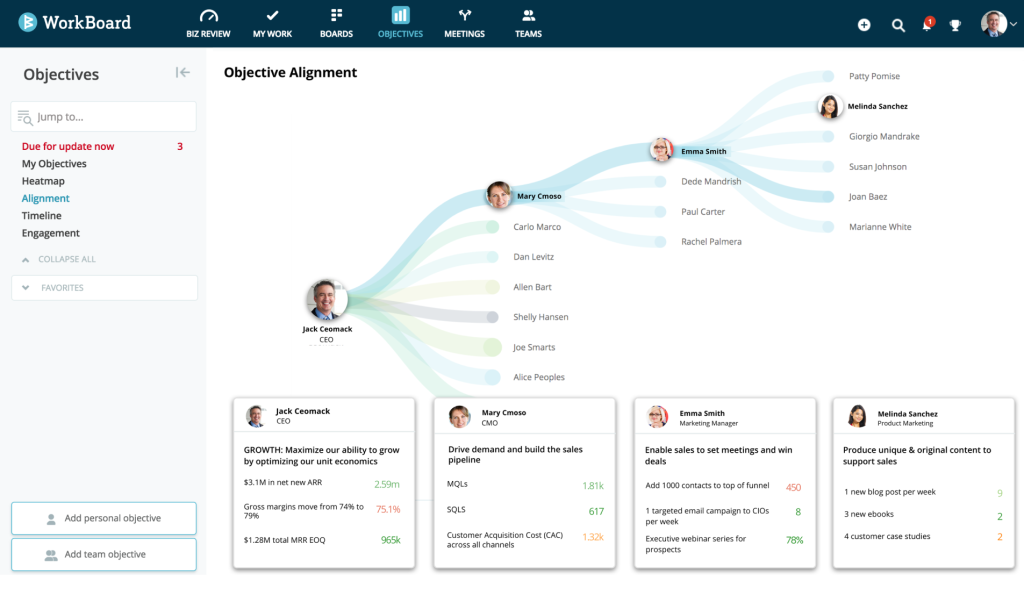
Reports include trending graphs, dependency maps, and forecast projections, which helped leaders spot risk before a miss. Action Items and Meeting Agendas tie each OKR to the weekly work that moves it, and role-specific templates give product, sales, marketing, and engineering a head start.
WorkBoard also offers AI agents, business reviews, and scorecards for strategy execution. OKR heatmaps show progress across departments at a glance, and built-in OKR coaching helps newer teams write stronger objectives and key results from the first quarter. Plan for a learning curve, since the depth that suits large organizations can overwhelm a smaller team.
Pros:
- Real-time dashboards with trending graphs, dependency maps, and forecast projections
- Connects with Microsoft Power BI, Workday, and Salesforce so data flows in
- Action Items and Meeting Agendas link OKRs directly to tactical execution
- Role-specific OKR templates for product, sales, marketing, and engineering
- AI agents, business reviews, and scorecards built for strategy execution
Cons:
- Interface is best suited to enterprise users, not small teams
- Steep learning curve due to deep functionality
User Rating: 4.6/5 (G2)
Pricing: Custom Quote
4. Betterworks – Best for HR-Led OKRs With Rating Calibration
If your CHRO owns the OKR rollout, Betterworks deserves a look. I reviewed it alongside an HR team that cared less about pretty dashboards and more about fair ratings across a large workforce. Its calibration module puts side-by-side performance data and fairness rules in front of managers, which shortens long rating debates.

Goals cascade through the organization, and the same platform handles career development, 360 feedback, and customizable review forms. Continuous feedback and manager coaching tools sit beside goals, so check-ins feed the same record that reviews use later. An advanced analytics module gives HR a clear data view ahead of calibration, so ratings start from evidence rather than opinion.
Key results carry confidence levels, which give executives an early read on risk, and messaging integrations carry nudges into daily tools. Because it is built for large rollouts, expect a structured implementation with a dedicated owner on the HR side.
Pros:
- Calibration module with side-by-side performance data and fairness rules
- Goal cascade built for large, distributed workforces
- 360 feedback and customizable review forms alongside goals
- Continuous feedback and manager coaching tools alongside goals
- Advanced analytics and confidence levels for early risk visibility
Cons:
- Built for large rollouts, so lighter teams may find setup heavy
- Focus leans toward HR performance management more than pure strategy execution
User Rating: 4.3/5 (G2)
Pricing: Starts at $4.4/user/month
5. Lattice – Best for OKRs Inside an All-in-One People Platform
My colleague runs people operations at a growing mid-sized company, and she chose Lattice because she wanted goals sitting next to reviews instead of in a separate OKR app. The goals and OKRs module lives inside a wider platform covering manager, peer, and 360 reviews, custom question templates, performance reporting, and pulse surveys.
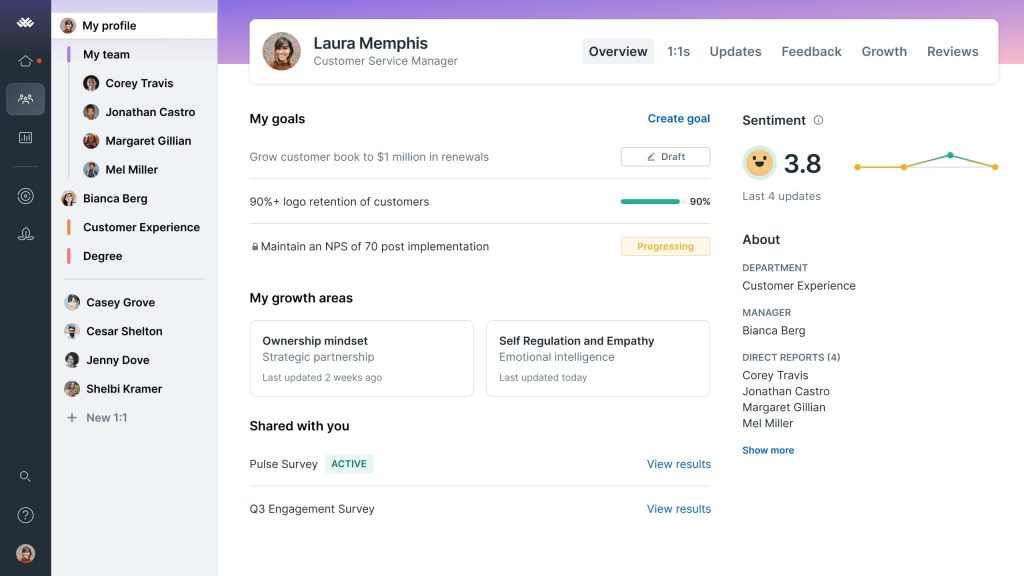
It also bundles career management, HR analytics, and compensation planning, so the same data can support promotion and pay conversations later. Goal setting stays simple for managers, with team and individual OKRs living side by side. Continuous feedback sits next to company goals, so progress updates land in one place.
The trade is depth. Dedicated OKR platforms go further on strategy views, so I would pick Lattice when performance and engagement data matter more than complex cascades. It fits mid-sized organizations best, so very large, multi-region structures should test how far its goal hierarchy stretches before signing.
Pros:
- Goals and OKRs sit alongside manager, peer, and 360 reviews
- Custom question templates for review cycles
- Performance reporting and analytics in one platform
- Pulse surveys for ongoing engagement feedback
- Career management and compensation planning in the same suite
Cons:
- OKRs are one module in a wider suite, so strategy views are lighter than dedicated tools
- Best suited to mid-sized organizations, so very large hierarchies may need more depth
User Rating: 4.6/5 (G2)
Pricing: From $13/user/month.
6. Leapsome – Best for Connecting Goals, Reviews, and Learning
I came across Leapsome when a learning and development lead described how her team finally linked goals, reviews, and growth plans without juggling three tools. OKRs follow the familiar framework, so individual and team objectives connect to company goals and appear on visual dashboards.
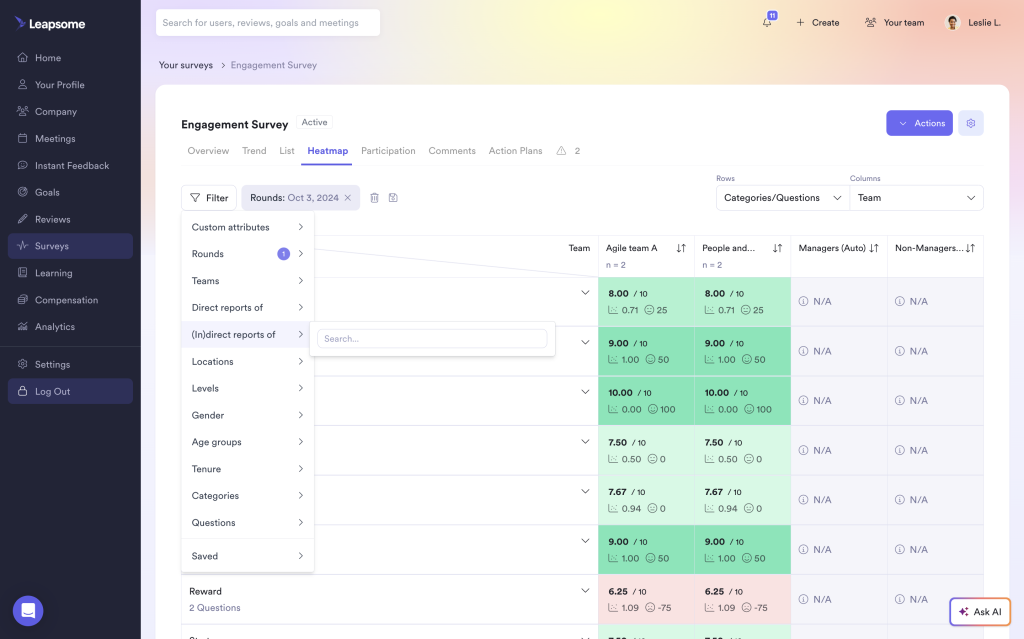
The same platform runs 360 reviews, engagement surveys, one-on-one meetings, and learning paths, giving managers one place to discuss progress and development together. Mind mapping helps teams plan how goals connect before they commit to a cycle, and skill gaps found in reviews can point straight to learning paths.
If your OKR updates come from engineering work, a Jira connection can feed them. Without it, expect manual updating. Action item creation turns key results into concrete next steps. Open API automation is more limited than some enterprise suites, and Leapsome is built mainly for growing and mid-sized companies, so test it against your headcount before committing.
Pros:
- Individual, team, and company OKRs with visual dashboards
- Mind mapping to plan how goals connect
- 360 reviews, engagement surveys, and one-on-one meeting tools in one hub
- Learning paths linked to skill gaps found in reviews
- Jira connection for goal updates
Cons:
- Goal tracking needs manual updates unless connected to tools like Jira
- Built mainly for growing and mid-sized companies, so complex enterprise structures may need more
User Rating: 4.8/5 (G2)
Pricing: Starts at €4 /employee /month
7. Mooncamp – Best for Collaborative OKR Rollouts Across Teams
Mooncamp entered my shortlist when a colleague wanted OKRs that felt like team conversations instead of reporting chores. The OKR tree view makes cascading obvious, so you can trace a personal goal up through team objectives to company priorities. Check-ins work as shared discussions instead of solo form-filling, and Slack and Microsoft Teams integrations keep updates inside daily tools.
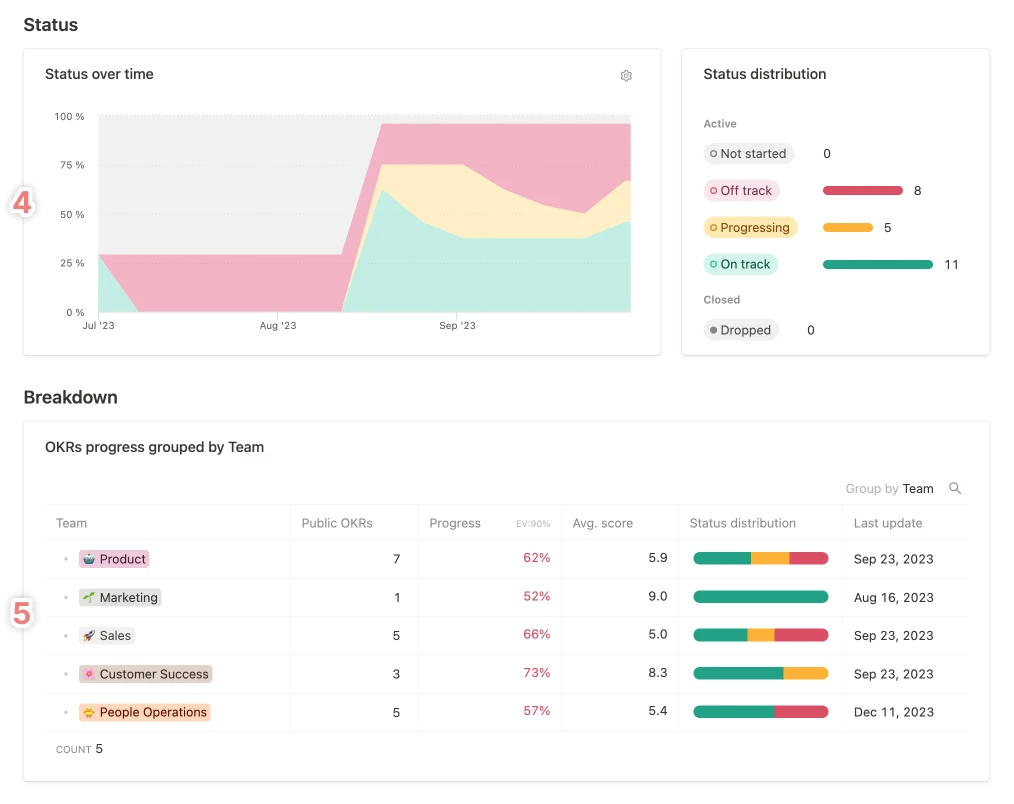
Custom fields and tagging let you organize goals around how your business is structured, and dashboards filter by team, owner, and time period. You can also tailor properties, terminology, and metrics, so the platform adopts your company’s language rather than forcing a new one.
Planning and execution connect in one place, which helps leaders see whether initiatives actually move key results. Personalized dashboards show each person their own goals first, while shared progress views keep teammates informed without needing extra status meetings. Compare its integration library against your HRIS before committing.
Pros:
- Collaborative check-ins that encourage team discussion instead of isolated updates
- Clean OKR tree view showing full cascading alignment
- Slack and Microsoft Teams integrations for check-ins inside daily workflows
- Custom fields and tagging for flexible goal organization
- Dashboards filtered by team, owner, and time period
Cons:
- Smaller integration library compared to enterprise platforms
- Flexible structure means teams must agree on their own conventions early
User Rating: 4.8/5 (G2)
Pricing: Starts at $7/user/month
8. Teamflect – Best for Microsoft Teams and Outlook Organizations
When Microsoft retired Viva Goals on 31 December 2025, I watched several Teams-first organizations scramble for a replacement, and Teamflect kept landing on shortlists. It lives inside Microsoft Teams and Outlook, so goals, OKRs, reviews, and continuous feedback happen where people already work.
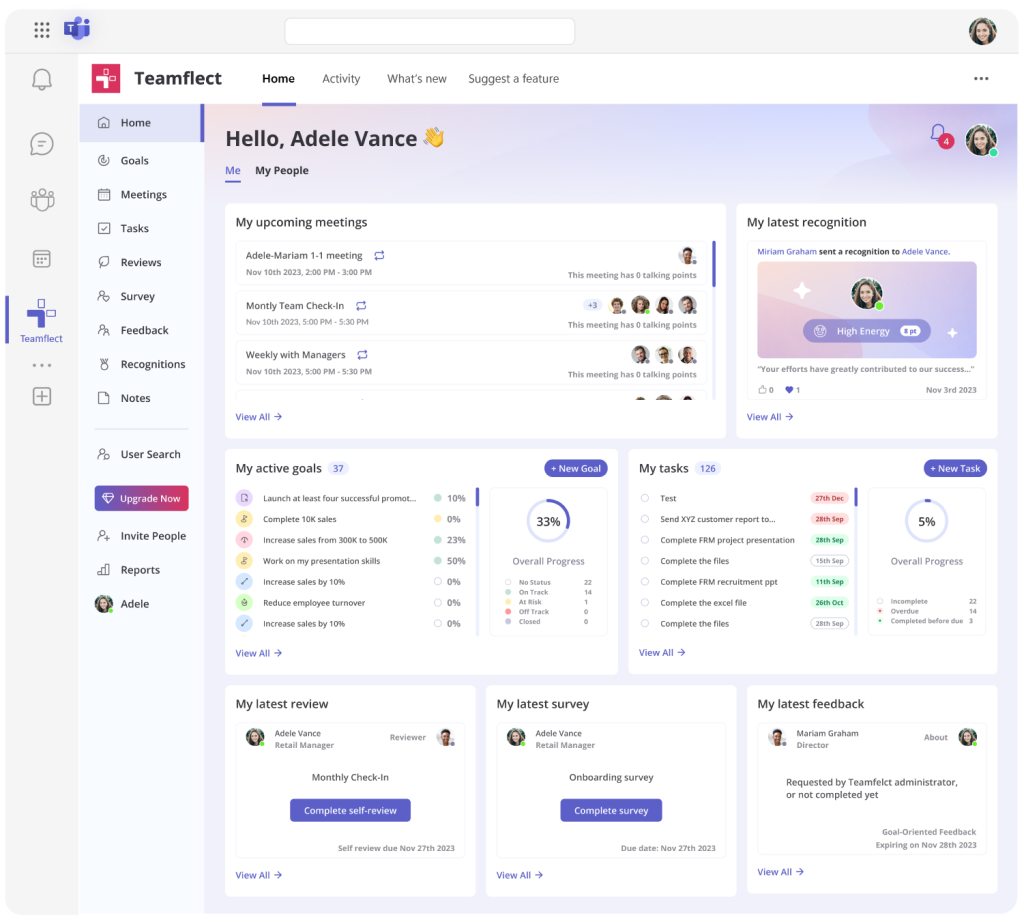
Reviews support self, peer, upward, and downward feedback, with automated reminders and deadline escalations that cut the chasing. Customizable templates and configurable rating scales let HR shape each cycle, and managers can capture action items from one-on-one meetings next to the goals they relate to. Employees see progress at a glance, which keeps OKRs connected to daily work.
Goals, feedback, and results appear together on review forms, so managers and employees see the full picture in one place. Engagement pulses and career progression tracking extend it well beyond OKRs for HR teams. Be honest about fit: if your company barely uses Teams, much of the value disappears.
Pros:
- Works natively inside Microsoft Teams and Outlook
- OKR tracking, reviews, and continuous feedback in one workflow
- Multi-directional feedback covering self, peer, upward, and downward
- Automated reminders and deadline escalations that cut HR chasing
- Customizable templates and configurable rating scales for each review cycle
Cons:
- Built around Microsoft 365, so it fits less well outside that ecosystem
- Preset dashboards can feel limiting for heavy custom reporting
User Rating: 4.5/5 (G2)
Pricing: From $7/user/month (free for up to 10 users).
9. Perdoo – Best for Visualizing Company-Wide Strategy and OKRs
Visual thinkers on my team gravitated to Perdoo almost immediately. Its Strategy Map puts the CEO, department leads, and individual contributors in front of the same picture, showing how each key result rolls into an objective and how objectives tie back to company vision.
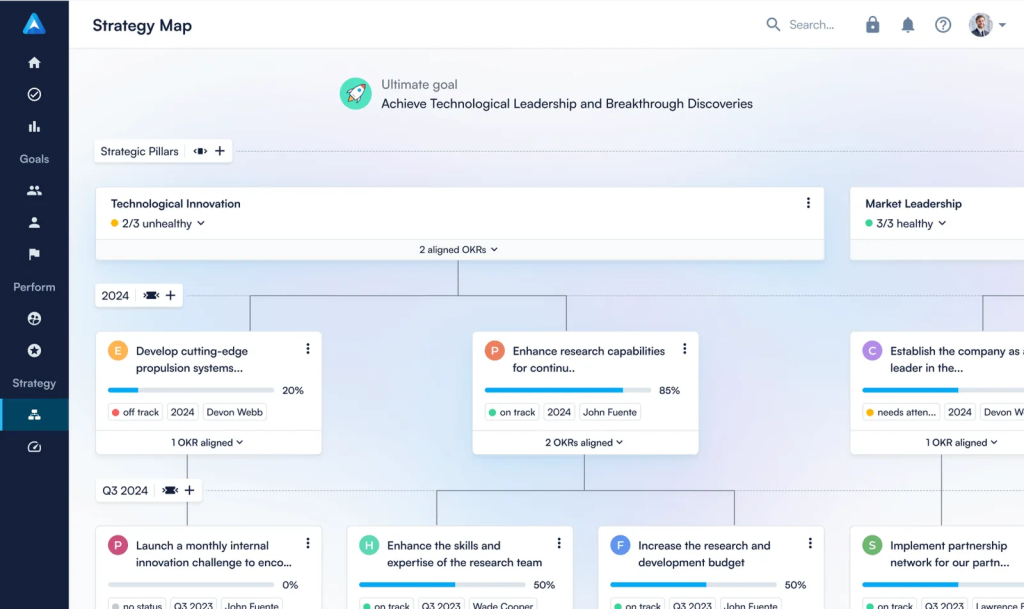
Perdoo separates OKRs from KPIs, supports weighted key results, and rolls sub-goals up automatically, which helps when strategy has several pillars. KPI boards sit beside OKRs for easier metric tracking. Data-driven alerts flag weak alignment and overdue objectives early, and prompts keep weekly check-ins and confidence ratings on schedule.
Beyond goals, it includes one-on-ones, performance reviews, pulse surveys, and Kudos, so recognition and feedback stay connected to strategy. Templates for marketing, product, and people teams speed up adoption, while admin controls manage visibility, timelines, and scoring standards. Fair warning: deep goal hierarchies can take extra clicks to navigate, so pilot it with your real structure first.
Pros:
- Strategy Map visualizes alignment from company level to individual on one page
- OKRs and KPIs tracked as separate goal types with weighted key results
- Data-driven alerts for weak alignment and overdue objectives
- Prompts for weekly check-ins and confidence ratings
- One-on-ones, reviews, pulse surveys, and Kudos built in
Cons:
- Navigating deep goal hierarchies can take extra clicks
- Admin setup could use better onboarding guidance
User Rating: 4.4/5 (G2)
Pricing: Starts at €6.40/user/month
10. Synergita – Best for Linking 360 Feedback to OKR Milestones
Performance reviews had become paperwork at a company I know, and Synergita is what changed that. It connects OKRs and appraisals in one system, so employees track key results while peers, managers, and cross-functional collaborators give feedback throughout the quarter. Review time then starts with data instead of impressions, because 360 feedback ties to OKR milestones.
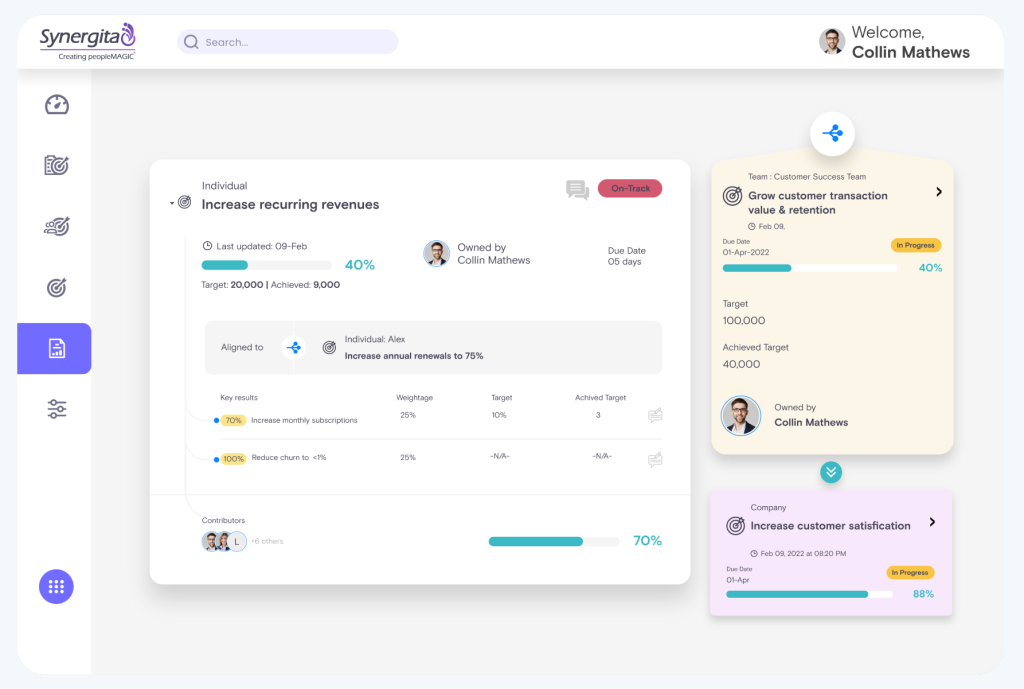
Customizable review forms and rating scales let different departments keep their own structure, and calibration sessions help reduce rating bias across managers. Analytics highlight high performers and skill gaps before they become retention problems, and automated review cycles keep everyone on timeline.
OKR Pilot, its AI assistant, helps draft stronger objectives, and regular check-ins keep key results moving between reviews. Performance review integration keeps appraisal scores connected to live OKR progress. Two caveats from my notes: the interface feels dated next to newer platforms, and it works best when HR leads the OKR program.
Pros:
- 360-degree feedback tied directly to OKR milestones
- Customizable review forms and rating scales across departments
- Team calibration sessions to reduce rating bias
- Built-in analytics highlighting high performers and skill gaps
- Automated review cycles to keep performance timelines on track
Cons:
- UI feels dated compared to newer platforms
- Not ideal for non-HR-led OKR environments
User Rating: 4.6/5 (G2)
Pricing: Starts at $2/user/month
How I Chose These Enterprise OKR Software
When I evaluate OKR software for enterprise use, I don’t just rely on feature lists or marketing claims. I look at how these tools actually perform in real-world scenarios. Here’s the framework I used to make sure every recommendation is practical, reliable, and worth considering:
- User Reviews / Ratings: I start by looking at real user feedback from platforms like G2. This gives me a clear picture of how teams actually experience the tool day-to-day, what they love, and where it falls short. I also note how many reviews come from companies with over 1,000 employees.
- Core Features & Functionality: I focus on what truly matters in enterprise OKR tools. This includes goal setting, key result tracking, cascading alignment views, check-ins, reporting, SSO, permissions, and HRIS integrations. If a tool cannot handle these well, it does not make the cut.
- Ease of Use: I pay close attention to how intuitive the platform feels. A tool might be powerful, but if managers struggle to update goals every week, it defeats the purpose. Clean interface, simple navigation, and quick onboarding are non-negotiable for me.
- Customer Support: From my experience, implementation is where many tools fail. I evaluate how responsive and helpful the support team is, especially during setup, migration, and ongoing use. Fast, reliable support makes a big difference in adoption.
- Value for Money: I compare pricing with what the tool actually delivers. This is not about picking the cheapest option, but about whether the features, flexibility, and performance justify the cost at your headcount.
- Personal Experience / Expert Insights: Wherever possible, I rely on my own hands-on experience with these tools. I also consider insights from HR leaders, operations teams, and product managers who use OKR systems in real environments. This helps me go beyond surface-level reviews and highlight what actually works.
Top 3 Enterprise OKR Software Picks
Choosing the right platform can make or break your execution. I have seen strong OKR frameworks fail simply because the tool did not fit how the organization actually operated. These three stand out because they help teams follow through consistently.
1. PeopleGoal
PeopleGoal is my pick for HR-led rollouts where OKRs, reviews, and development need to live together. It cascades goals across your org chart, adds SSO and audit logging, and syncs with Workday and BambooHR, so it fits an enterprise stack without forcing a rigid process.
2. WorkBoard
WorkBoard works best when a strategy office owns the program. Live dashboards, dependency maps, and connections to Power BI, Workday, and Salesforce give executives the business-review view they expect, as long as you can support the learning curve.
3. Profit.co
Profit.co suits organizations that want OKRs connected to daily tasks and performance management in one place. Key results map to assignable tasks, while appraisals, scorecards, and one-on-ones keep reviews tied to results.
When Should You Move From Spreadsheets to Enterprise OKR Software?
Spreadsheets work for a handful of teams. Past a few hundred employees, they break quietly: version control fails, updates stall, and nobody trusts the numbers. Here are the signals I look for:
- Scattered Files: Goals live in separate spreadsheets across departments, and nobody owns the master version.
- Set and Forget: Goals get written in January, and nobody looks at them until year-end.
- Data Chasing: Quarterly reviews are spent collecting numbers instead of making decisions.
- No Line of Sight: Managers cannot see how individual goals connect to team and company objectives.
- Cadence Shift: You are moving from biannual reviews to quarterly OKR cycles and need automation to keep up.
- Disconnected Systems: HR, performance, and goal data sit in different tools, so every report needs a manual merge.
If three or more of these are true, you have outgrown spreadsheets and need enterprise goal management software. Run a one-week audit first: count the files, owners, and hours your current process takes, then compare that against a vendor trial.
How to Migrate From Spreadsheets or Viva Goals
A migration goes wrong when you copy a messy structure into a new tool. These six steps protect your history, whether you are leaving Excel, Word documents, or Viva Goals, which retired on 31 December 2025.
- Export Everything: Pull goals, owners, statuses, and history into CSV or Excel before your old access ends.
- Map Hierarchy: Write company objectives, department goals, team goals, and individual targets on one tab. Fix duplicates now.
- Standardize Wording: Clean up objective and key result phrasing, owners, and cycle dates before importing.
- Import Users: Sync users from your HRIS or import by file. PeopleGoal supports Excel and API imports, plus Workday, BambooHR, and Azure AD syncs.
- Pilot First: Run one department through one full cycle before going company-wide. Fix templates and reminders based on what breaks.
- Cut Over: Announce the go-live date, freeze the old files, and keep one read-only copy for audit and history.
How Do OKR Tools Work Across Different Departments?
One question I rarely see addressed in OKR software roundups is how the tool works for different teams inside the same organization. OKRs are not one-size-fits-all, and the way each function uses them is meaningfully different.
| Department | How They Use OKRs | What They Need in a Tool |
| Strategy Office | Own company priorities, business reviews, and cross-functional alignment | Cascade views, executive dashboards, scheduled reports |
| Product Teams | Focus on shipping velocity, feature adoption, and user retention | Integration with Jira/Asana, real-time sync with sprint data, no manual updates |
| Marketing Teams | Track pipeline contribution, lead quality, and brand performance | Campaign-level tracking, team dashboards, collaborative check-ins |
| HR / People Ops | Align goals with performance reviews, 360 feedback, and engagement metrics | Integration with performance management, review cycles, feedback systems |
| Operations / Finance | Monitor execution, efficiency, and goal completion | Automation, alerts, escalation workflows, role-based access |
Choose Enterprise OKR Software That Reinforces the Mindset
The right platform will not save a bad strategy. But it will make a good strategy impossible to ignore. If I had to give you one decision filter, it would be this: choose the platform your managers will actually update every week, not the one with the longest feature list. Adoption beats functionality every time.
For most HR-led organizations, PeopleGoal is the best enterprise OKR software on this list because it combines cascading OKRs, performance reviews, 360 feedback, and employee development in one place, backed by SSO, role-based access, audit logging, and 500+ integrations. Start with a free trial, run one department through one quarter, and let the data tell you the rest.
Frequently Asked Questions
How do OKRs differ from KPIs, and does OKR software need to track both?
KPIs track ongoing business health, while OKRs set ambitious, time-bound objectives with measurable key results. Most enterprises need both. Some platforms, such as Perdoo, handle them as separate goal types, so buyers should check how each shortlisted tool treats them and whether KPI data can feed key results.
Can organizations run OKRs and SMART goals in the same platform?
Yes, with some platforms. PeopleGoal supports both OKRs and SMART goals, so HR can run OKRs for strategic objectives while keeping SMART goals for individual development plans. This helps organizations moving away from traditional goal setting without disrupting existing performance processes.
Can different teams run different review cycles at the same time?
They can on platforms with configurable cycles. PeopleGoal lets admins tailor review cycles and launch 360 cycles by team, role, or project, which helps when Sales, Support, and Corporate need different timelines. Buyers should confirm this in a trial using real cycle dates.
How can OKRs be managed across multiple regions or business units?
The best approach starts with one global process, then allows local variations. Buyers should look for custom naming, flexible team structures, and role-based permissions. PeopleGoal supports multi-dimensional teams and org charts, custom naming conventions, and cascading permissions, so regions can adapt without breaking company-wide alignment.
What should happen when teams never hit their OKRs?
The issue is usually calibration. Leaders should run a retrospective after each cycle, check whether targets were realistic, and rely on frequent check-ins so a miss is never a surprise. Many teams also set threshold, target, and stretch levels so progress stays visible even when the stretch goal is missed.
How many OKRs should each person have?
Fewer is better. Most OKR guidance suggests a handful of objectives per person per cycle, often three to five, with a few key results each. If everything is a priority, nothing is. Platform reports can help managers spot people carrying too many goals.
Can OKR software pull in work from Jira or Asana?
Often, yes. PeopleGoal links Jira with its goal management apps and imports Asana tasks as goals and objectives, and Leapsome can take goal updates from Jira. Buyers should ask every vendor whether the sync is one-way or two-way, and how often it refreshes.
What does enterprise OKR software cost?
Pricing models vary. WorkBoard, Betterworks, and Leapsome use custom quotes, while others publish per-user rates, such as Lattice from $11 per user per month on G2. Buyers should request a total cost that includes onboarding, training, support, and every needed module, then compare it at real headcount.
How can organizations get managers to update OKRs?
Strong programs start with a manager workshop on writing objectives and key results, then name one OKR champion per department. Weekly check-ins stay to five minutes with automated reminders, dashboards get reviewed in leadership meetings, and teams react to OKRs before they lock. Updates stick when people see them used.
Should OKRs feed performance reviews?
They should connect to reviews without merging into them. OKR results work best as evidence in review conversations, not as the rating itself, because tying goals straight to ratings pushes people to play safe. Adding 360 feedback, calibrating across managers, and rewarding learning on stretch goals also keeps reviews fair.
Ready to 3x Your Teams' Performance?
Use the best performance management software to align goals, track progress, and boost employee engagement.