
You may not believe it, but one missed comment can cost you your best employee. Sounds dramatic?
I have watched it happen during review week, when a quiet win never makes it into the final conversation. In that moment, employee appraisal software becomes the difference between “I think” and “Here’s the record.”
Over the last decade, I have reviewed several HR tools, comparing over 70 platforms, reading more than 1,000 user reviews, and attending dozens of demos. That work taught me which systems keep appraisals fair and which ones create fresh problems right when deadlines hit.
In this blog, I will share:
- The best online employee appraisal systems on the market
- Features, cons, and pricing so you can compare quickly
- Practical notes from real usage, not sales talk
Here’s a sneak peek at these tools:
| Tool | Best For | Pricing |
|---|---|---|
| PeopleGoal | Boosting Employee Performance & Improving Engagement | FREE 14-day trial. Paid starts at $4/user/month. |
| Empxtrack | 360-degree Holistic Employee Evaluations | Custom pricing. |
| Lattice | Automated Workflow Insights Dashboards | Starts at $11/seat/month. |
| HiBob | Objective Alignment and Growth Paths | Custom pricing. |
| Primalogik | Multi-Rater Coaching via AI | Start at $3-$6/user/month for a minimum of 25 users. |
| Workleap | Context-Connected Cycles & Smart Reminders | Starts at $5/user/month for a minimum of 10 users. |
| LutherOne | Praise Bubbles Powering Engagement | Custom pricing. |
| Teamflect | Teams-Native OKR-Linked Reviews Workflow | Start at $7/user/month. |
| LanteriaHR | SharePoint Competence Mapping Appraisals | Custom pricing. |
| Namely | Continuous Results Measurement Check-Ins | Custom pricing. |
10 Best Employee Appraisal Software Systems
Here’s a detailed review of the best employee appraisal software system in the market. For each one, I have covered the key features, drawbacks to watch for, pricing, and a real-world take based on personal experience and what I have seen work in actual review cycles.
1. PeopleGoal
Best for Boosting Employee Performance & Improving Engagement
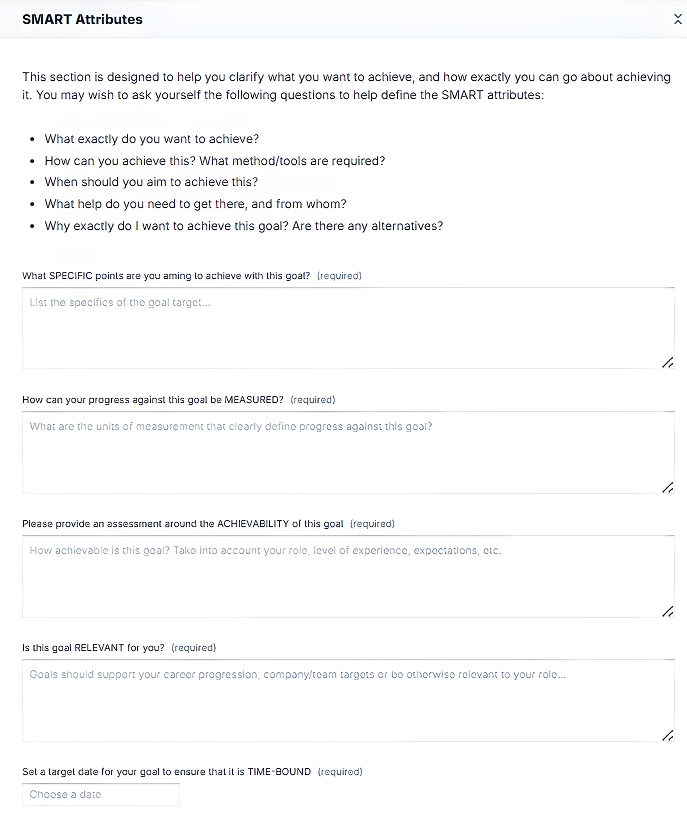
I used PeopleGoal during a quarter when our goals kept drifting after the second week. It is one of the best employee appraisal software because we set crisp OKRs, tied each key result to weekly check-ins, and used the performance journal to log wins and blockers in plain language.
The payoff came in a Friday 1:1. I opened the goal timeline, pointed to a slipped milestone, and asked, “What changed on Tuesday?” The answer was a vendor delay, so we reassigned the dependency, adjusted the due date, and captured the decision on the spot. Ten days later, the key result was back on track.
When review time arrived, I filtered journal notes by goal, pulled two peer comments, and turned them into concrete feedback in minutes. The check-in history also revealed a pattern of Monday blockers and Thursday recoveries, which made coaching feel specific. If you want employee performance and engagement to move together, this is one of the best employee appraisal systems to consider.
Pros:
- Allows fully configurable appraisal cycles, review forms, and workflows tailored precisely to how your organization already manages performance.
- Supports continuous performance conversations through structured check-ins instead of relying solely on annual or quarterly review cycles.
- Combines goal tracking with OKRs and development plans to directly connect employee growth with business priorities.
- Includes peer recognition and feedback tools that reinforce appreciation and accountability across teams, not just manager-led evaluations.
- Offers built-in engagement measurement like pulse surveys to contextualize appraisal outcomes with real employee sentiment data.
Cons:
- No downloadable or on-premise version.
- A dark user interface is not available.
Pricing: FREE 14-day trial. Paid starts at $4/user/month.
2. Empxtrack
Best for 360-degree Holistic Employee Evaluations
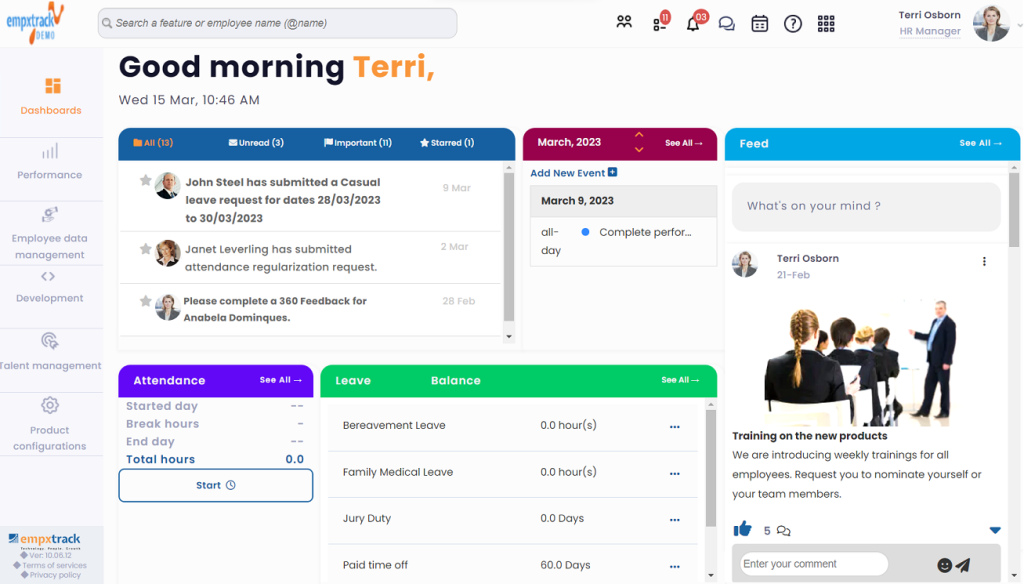
I first saw Empxtrack in a services firm where “manager-only” ratings were brewing quiet resentment. They needed 360-degree evaluations that felt fair, not frantic, because project teams changed every month. Empxtrack let them collect input from peers, direct reports, and project leads, then weight each rater group by role.
In one cycle, a senior analyst looked average on her manager’s form, but peers described how she rescued a client account after a late-night escalation. The HR lead pulled the compiled comments into the calibration meeting and asked, “Are we rating results, or proximity?” That question landed, and the final rating reflected the full story.
For you, the practical win is traceability: you can see who said what, when they worked together, and how themes repeat. It also nudges raters so timelines stay humane. It turns feedback into evidence, and evidence into decisions that people can accept without rolling their eyes.
Pros:
- Provides highly customizable appraisal forms, rating scales, and approval workflows suited to structured, policy-driven organizations.
- Enables detailed 360-degree feedback collection involving peers, managers, and subordinates in a single appraisal cycle.
- Offers strong goal alignment features linking individual objectives directly to departmental and organizational outcomes.
- Supports rule-based automation for review reminders, approvals, and escalation without requiring technical configuration.
- Works well for organizations needing both performance appraisals and basic HR process digitization in one system.
Cons:
- Lacks a dedicated mobile application, which limits ease of use for managers frequently working away from desktops.
- User interface feels dated compared to newer appraisal platforms focused on modern employee experience.
Pricing: Custom pricing.
3. Lattice
Best for Automated Workflow Insights Dashboards
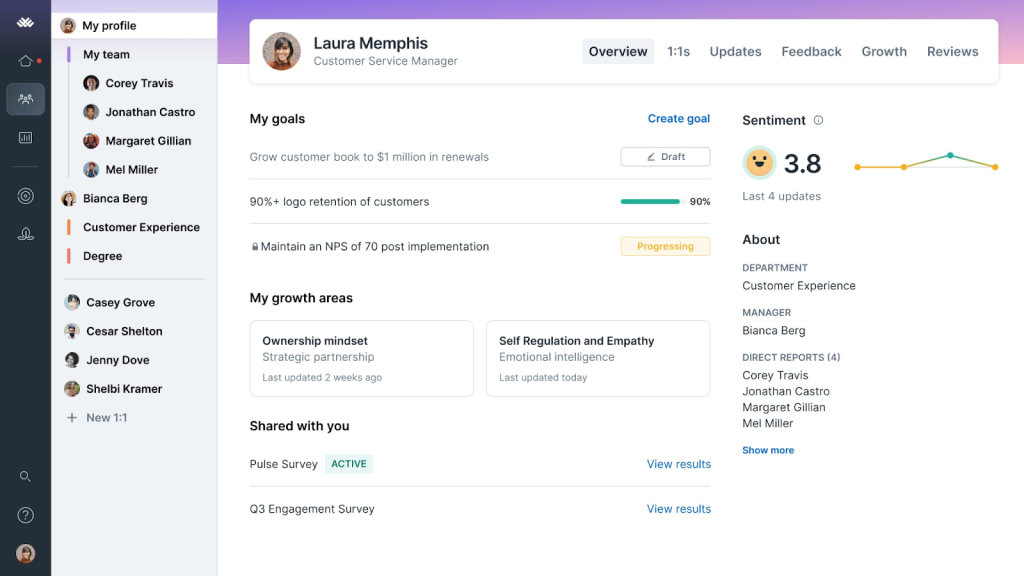
A VP of People I worked with in the SaaS world ran Lattice for almost two years, and their favorite line became, “Let the dashboard tell the story.” Managers were drowning in unfinished review steps, missing inputs, and last-minute scrambling.
Lattice’s strength is the review workflow itself: automated task sequences, reminders that hit at the right time, and dashboards that show what is blocked and why. During promotion week, a manager said, “I have no time to write feedback,” while staring at a blank form. Lattice surfaced recent peer notes, goal progress, and prior check-in themes so the manager could write a grounded summary fast.
That is the appraisal win: fewer blank-page reviews, more decision-ready evidence. My contact said calibration meetings became calmer because everyone came with the same data, not competing memories.
Pros:
- Combines performance reviews, feedback, goals, and one-on-ones into a single, unified employee experience platform.
- Emphasizes a continuous feedback culture by enabling real-time comments and structured check-ins throughout the year.
- Provides goal tracking tightly integrated with performance discussions, keeping objectives visible during appraisal conversations.
- Offers clean, intuitive review templates that reduce administrative friction for managers during appraisal cycles.
- Includes people analytics dashboards that surface performance trends and participation rates across teams.
Cons:
- Customization options for review templates and rating logic are more limited than workflow-heavy appraisal platforms.
- Advanced analytics and reporting flexibility may not satisfy organizations with complex performance data needs.
Pricing: Starts at $11/seat/month, billed annually.
4. HiBob
Best for Objective Alignment and Growth Paths
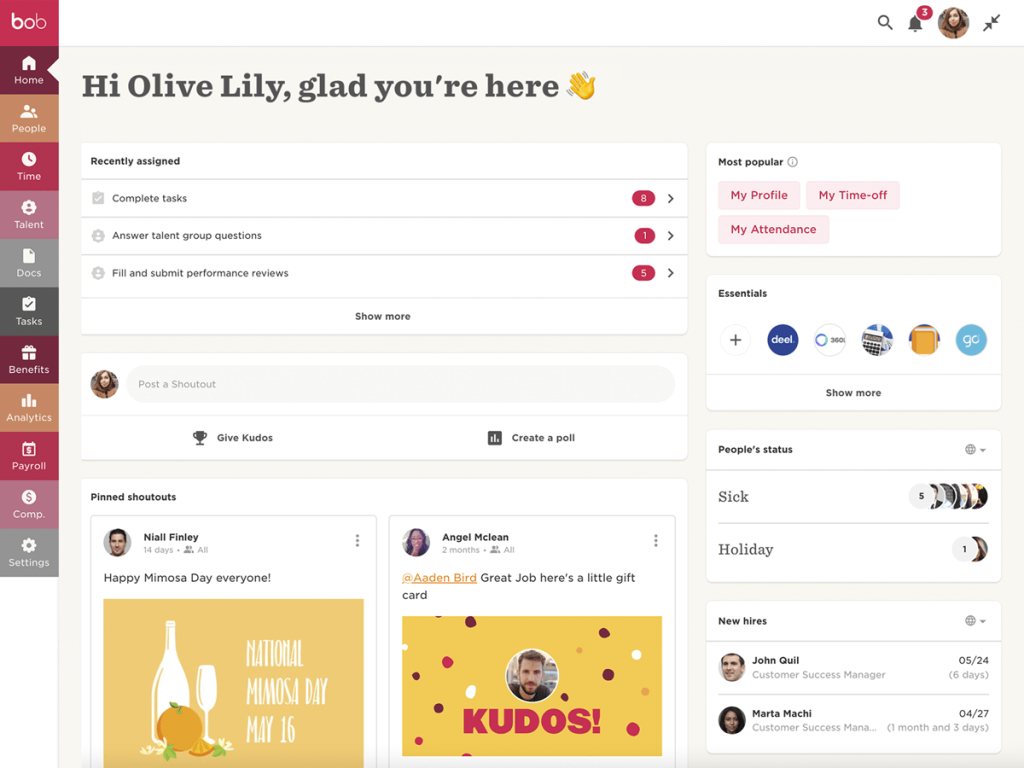
HiBob works best for objective alignment and growth paths when your org chart changes faster than your handbook. I watched a regional company use it as a product, sales, and support scaled at different speeds. They mapped company objectives to teams, then connected roles to growth paths with skill expectations and check-in prompts.
A new manager asked, “How do I set goals that connect to the business?” HiBob answered by showing how team objectives roll up to company metrics, and what strong performance looks like at each level.
The appraisal benefit is that reviews can reflect both outcomes and role readiness. Instead of “you seem ready,” the manager pulled the growth path, checked evidence against skill markers, and agreed on two stretch assignments. The conversation got sharper, and employees stopped guessing what “next level” meant.
Pros:
- Uses AI-generated summaries to condense large volumes of peer and manager feedback into readable appraisal insights.
- Offers talent calibration tools like nine-box grids to compare performance and potential across teams objectively.
- Integrates goal tracking with organizational structures, allowing performance alignment across departments and regions.
- Includes structured one-on-one meeting tools that feed directly into appraisal history and development conversations.
- Designed for global organizations with localized workflows and consistent performance processes across geographies.
Cons:
- Performance management customization is limited for organizations with highly specialized appraisal methodologies.
- Customer support response times can vary during peak onboarding or large-scale rollout phases.
Pricing: Custom pricing.
5. Primalogik
Best for Multi-Rater Coaching via AI
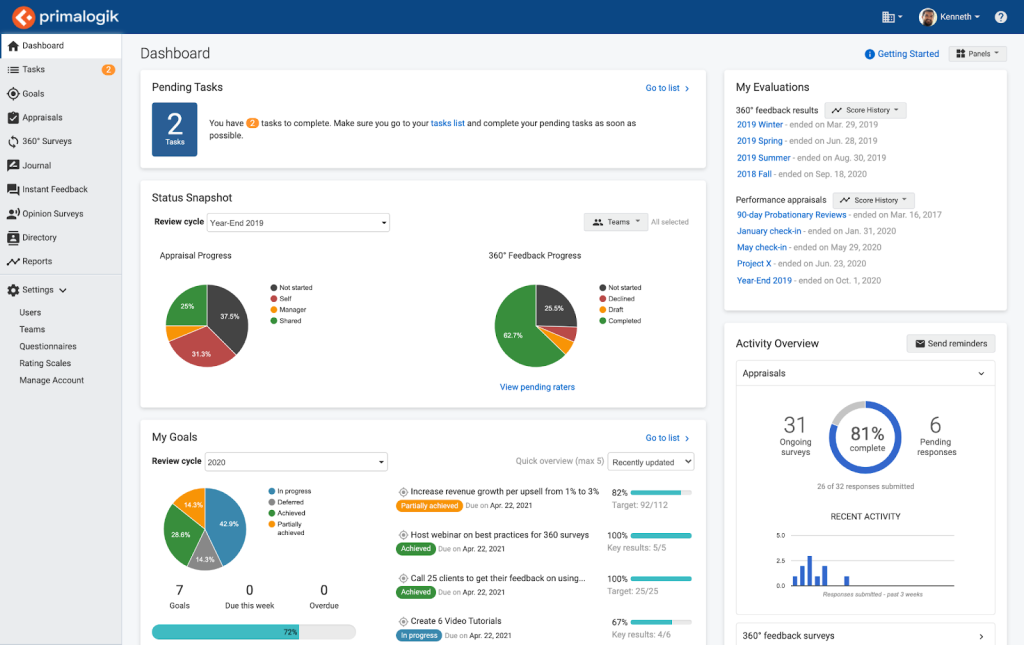
A leadership coach I know from the HR consulting space used Primalogic with a small leadership team and called it “the mirror with manners.” They wanted multi-rater feedback, but they also wanted it to translate into coaching, not confusion. Primalogic’s AI-assisted theme summaries helped them spot patterns across raters, like “decisive under pressure” paired with “too quiet in planning meetings.”
After a tense sprint retro, one manager asked, “Why does everyone think I dismiss ideas?” The coach opened the theme view, clicked into supporting comments, and found three moments where the manager cut off discussion to chase the clock.
The appraisal advantage here is synthesis. Instead of reading a wall of text, you get consistent behavior themes you can rate, discuss, and turn into a plan. Anonymity stays intact, which keeps feedback honest without turning it harsh.
Pros:
- Offers a straightforward performance appraisal system combining reviews, goals, feedback, and engagement surveys.
- Makes 360-degree feedback easy to launch and manage without overwhelming users or administrators.
- Provides customizable review schedules and automated reminders to keep appraisal cycles running smoothly.
- Includes engagement surveys that help link performance outcomes with employee morale and satisfaction.
- Well-suited for organizations seeking simplicity over complex, enterprise-heavy appraisal systems.
Cons:
- Integrations with third-party HR and productivity tools are relatively limited compared to larger HR platforms.
- Reporting depth may fall short for organizations seeking highly granular performance analytics.
Pricing: Start at $3-$6/user/month for a minimum of 25 users.
6. Workleap
Best for Context-Connected Cycles & Smart Reminders
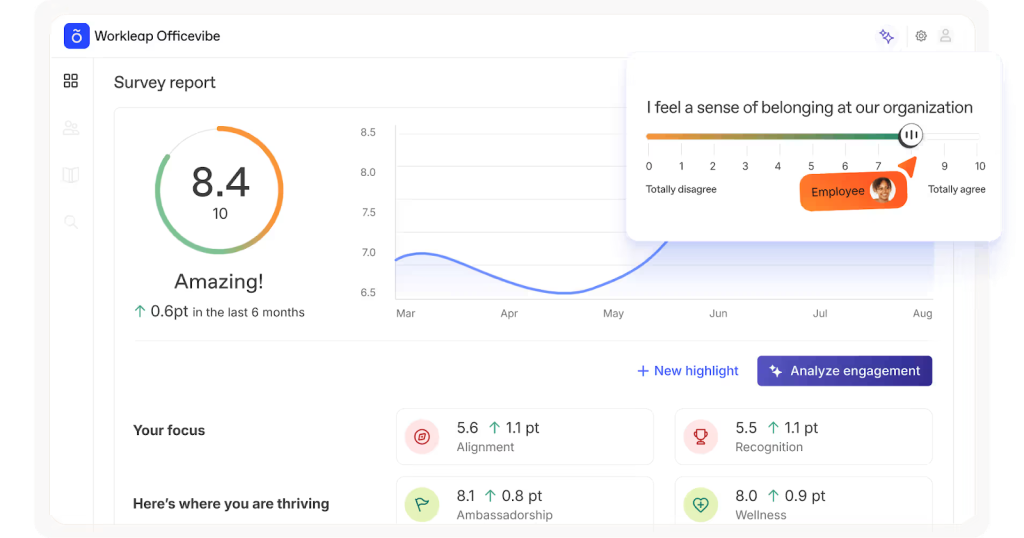
Workleap is strong when review cycles need context and gentle structure. I watched a distributed team use it to connect feedback to real moments, like launches, escalations, and customer wins. Instead of asking people to remember the quarter, they tagged feedback to events and conversations, which made reviews less fuzzy.
One manager told me, “I finally stopped guessing,” and you could hear the relief. The smart reminders were well-timed: if someone had not given feedback in a while, Workleap nudged them right after a milestone, not at midnight on deadline day.
The appraisal value is simple: dated, contextual notes create a credible review record. In a cycle recap, the team pulled a context thread for one employee and saw consistent patterns of calm incident handling. That became a development plan, not a surprise.
Pros:
- Uses AI to assist managers by generating structured review cycles, summarizing feedback, and highlighting performance patterns automatically.
- Consolidates goals, feedback, engagement signals, and review history into one centralized workspace for clearer appraisal decisions.
- Enables dynamic goal updates that adjust as roles, priorities, and projects evolve throughout the performance cycle.
- Designed to integrate smoothly with collaboration tools and HR systems, reducing duplication across performance workflows.
- Actively promotes continuous performance conversations instead of limiting feedback to fixed annual review moments.
Cons:
- Does not function as a full HRIS, requiring integration with other systems for core HR tasks.
- Initial configuration may require effort to align AI-driven workflows with internal processes.
Pricing: Starts at $5/user/month for a minimum of 10 users. Billed annually.
7. LutherOne
Best for Praise Bubbles Powering Engagement
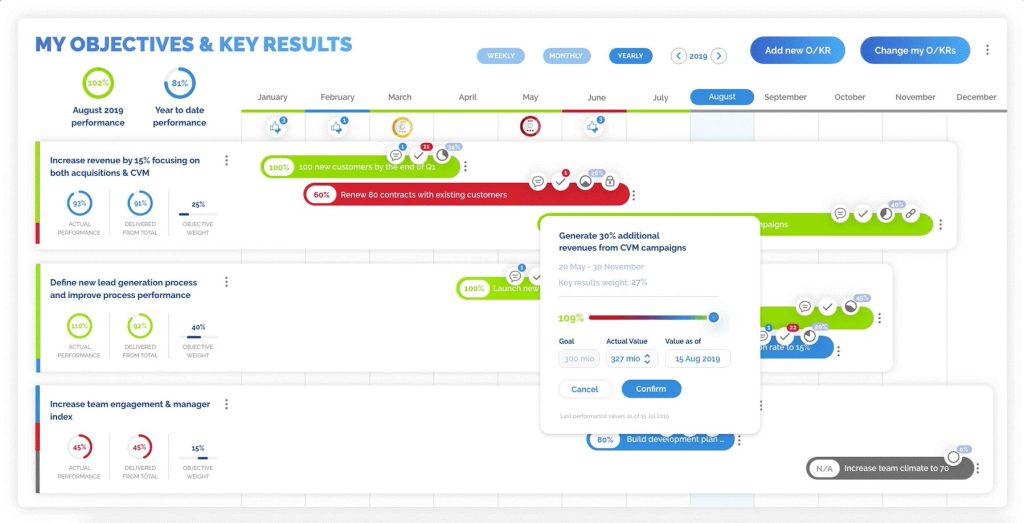
Lutherone is built for praise bubbles that power engagement, and it does it with a light touch. I saw it lift morale on a team that delivered great work but rarely celebrated it. Leaders began sending praise bubbles tied to specific behaviors, like mentoring a new hire or saving a difficult customer call.
An engineer laughed and said, “I did not know anyone noticed,” and then started praising others the same week. The practical appraisal benefit is that recognition becomes usable evidence. Instead of vague compliments, managers can pull praise entries that name the action, date, and impact, then reference them during review conversations.
One team even used bubbles as prompts in retros, asking, “What should we repeat next sprint?” It adds warmth without turning recognition into a forced ceremony. When engagement is the goal, small, specific moments stack up fast.
Pros:
- Focuses on real-time performance tracking, allowing organizations to move away from static, retrospective appraisal models.
- Provides advanced analytics dashboards combining engagement, goal progress, and performance signals into actionable managerial insights.
- Designed as a unified employee activation platform connecting feedback, recognition, development, and performance data together.
- Uses a social-style interface that encourages frequent participation and reduces resistance to performance-related interactions.
- Supports complex organizational goal structures across teams, departments, and enterprise-wide hierarchies.
Cons:
- Reporting formats offer limited customization when exporting or sharing appraisal results.
- Pricing is positioned at the higher end, making it less accessible for smaller organizations.
Pricing: Custom pricing.
8. Teamflect
Best for Teams-Native OKR-Linked Reviews Workflow
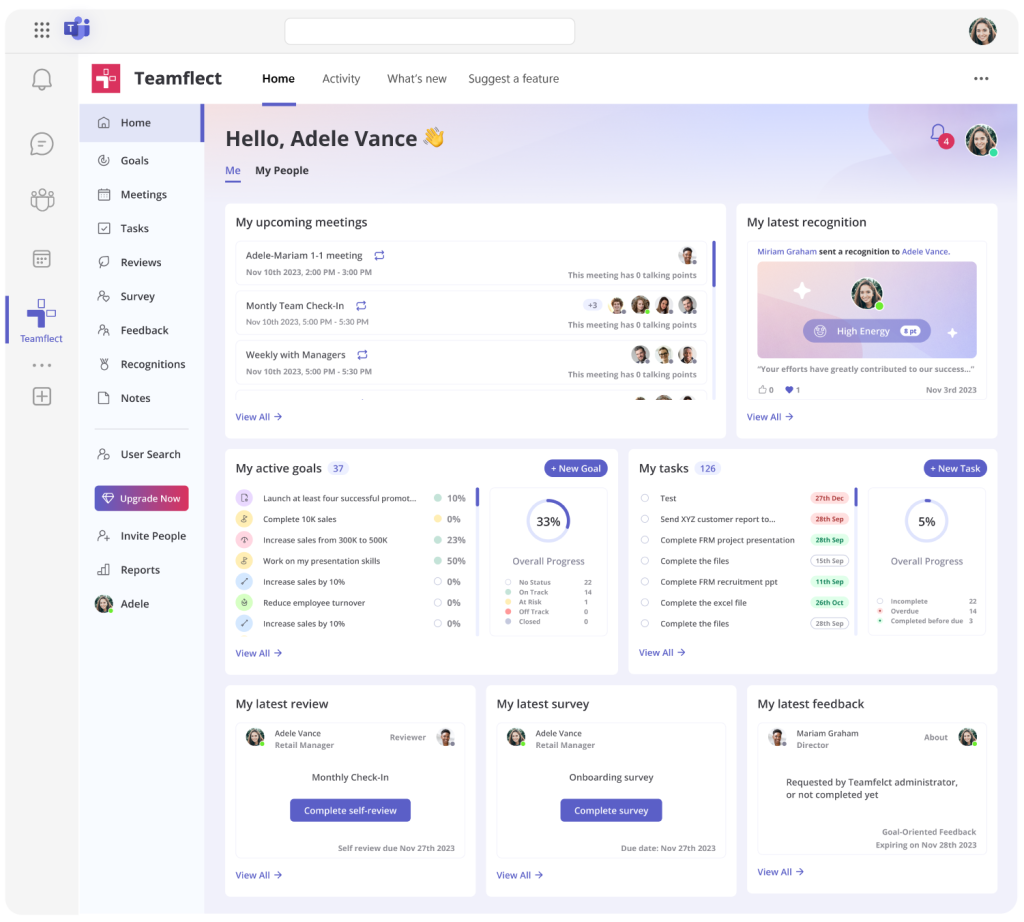
A People Ops manager I know from a Microsoft-heavy enterprise used Teamflect inside Teams and loved that reviews finally lived where work already happened. Their company ran OKR-linked reviews, and Teamflect turned that into a Teams-native flow with prompts, approvals, and 1:1 agendas right in chat.
The most vivid story was a Monday message: “Can we finish reviews today?” Teamflect surfaced pending tasks, pulled OKR progress, and showed recent check-in notes, so the manager wrote reviews without hunting through folders. The appraisal advantage is the tight linkage between goals and evaluation.
Ratings do not float away from outcomes because the OKR record is right there. My contact also liked how 1:1 cards kept coaching notes organized between hectic weeks. If your managers live in Teams, this removes friction and raises completion rates quietly.
Pros:
- Operates fully inside Microsoft Teams, embedding employee appraisals directly into everyday communication and collaboration workflows.
- Enables performance reviews, goals, feedback, recognition, and one-on-ones without switching between multiple external platforms.
- Includes an AI assistant that helps managers summarize feedback and draft balanced performance review comments.
- Integrates with hundreds of HR systems to automatically synchronize employee data and reporting structures.
- Extremely fast to deploy, resulting in high adoption for organizations already standardized on Microsoft 365.
Cons:
- Limited value for organizations not actively using Microsoft Teams.
- Engagement survey capabilities are simpler than specialized survey platforms.
Pricing: Start at $7/user/month. Billed annually.
9. LanteriaHR
Best for SharePoint Competence Mapping Appraisals
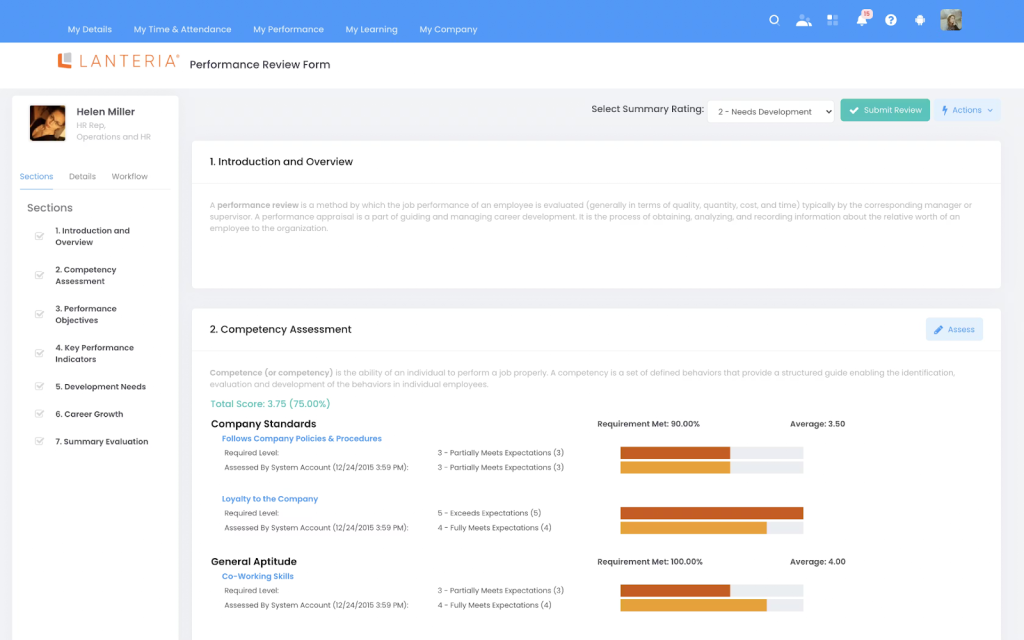
LanteriaHR is ideal if you live in SharePoint and want competency mapping within evaluations. I have reviewed setups where HR stored policies, forms, and org data in SharePoint, but appraisals were trapped in PDFs.
LanteriaHR brings competencies into a structured model, so managers can rate skills against role expectations and build development plans from the gaps. In one case, an HR lead said, “Our sales path is guesswork.” They mapped competencies for inside sales and field reps, then linked training to the lowest-scoring skills. The next quarter, coaching sessions stopped being generic and became “Let’s practice discovery calls,” not “Improve communication.”
The appraisal win is consistent. A shared competency matrix reduces manager-to-manager variation, and notes stay attached to each rating for later audits or calibration. SharePoint stops being a filing cabinet and becomes a performance workspace.
Pros:
- Built on Microsoft SharePoint, making it well-suited for organizations deeply embedded in Microsoft-based IT environments.
- Offers structured performance appraisals closely tied to competency models and long-term career development planning.
- Supports succession planning processes that use appraisal outcomes to identify and prepare future leaders.
- Enables role-based appraisal templates across departments, job families, and organizational levels.
- Fits organizations that want performance management tightly integrated with broader HR operations.
Cons:
- SharePoint dependency can reduce flexibility for organizations using non-Microsoft ecosystems.
- User interface feels less modern compared to newer, appraisal-focused platforms.
Pricing: Custom pricing.
10. Namely
Best for Continuous Results Measurement Check-Ins
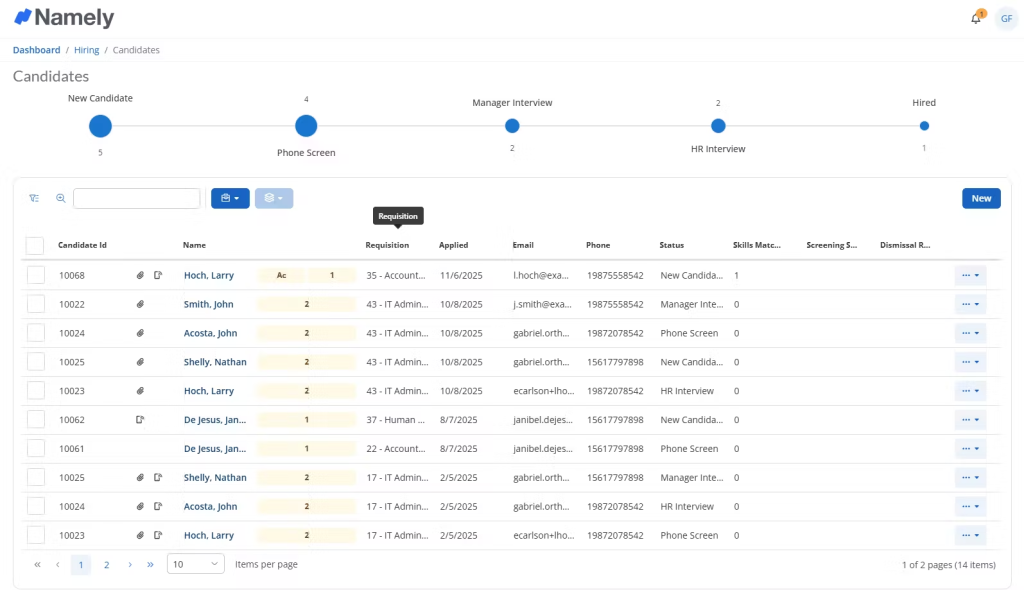
A senior HR generalist I know from a mid-market services company used Namely for continuous results measurement and described it as “check-ins that do not feel like homework.” Their HR team wanted frequent touchpoints, but managers kept skipping them because the process felt heavy.
Namely’s check-in structure, paired with simple prompts, made it easier to keep conversations regular and documented. After a tough month, an employee asked, “Am I still on track?” The manager opened the check-in history, reviewed goals, and showed progress trends with notes from prior weeks. That turned anxiety into an action list: remove one blocker, set one micro-deadline, revisit in seven days.
The appraisal advantage is the running record. Year-end reviews stop being a memory test because the outcomes, course corrections, and wins are already captured. My contact said trust improved because surprises faded.
Pros:
- Integrates performance appraisals with payroll, benefits, and employee records for consistent, centralized HR decision-making.
- Supports goal-based reviews that directly inform compensation, promotion, and workforce planning discussions.
- Provides manager-driven appraisal workflows suitable for compliance-focused and documentation-heavy organizations.
- Centralizes historical employee data to maintain continuity across multiple review cycles and managers.
- Designed specifically for mid-sized companies seeking unified HR and performance appraisal management.
Cons:
- Performance management features lack depth compared to specialized employee appraisal software platforms.
- Reporting flexibility is limited without exporting performance data into external tools.
Pricing: Custom pricing.
How I Chose These Employee Appraisal Software/My Evaluation Criteria
Before I finalized this list of employee appraisal software, I ran the shortlist like a real purchase decision. I looked for tools that keep appraisal cycles on track, help managers stay consistent, and build a reliable performance record without turning reviews into paperwork marathons. Here is the checklist I used.
User Reviews and Ratings
I read long-term user feedback on reputable software directories and looked for patterns, not hype. When multiple reviewers pointed to the same pain point, I treated it as a real product trait.
Essential Features and Day-to-Day Functionality
I checked whether each tool covers the basics of appraisals: configurable cycles, rating logic, goal alignment, feedback capture, and a searchable history of check-ins. I also watched how well these parts work together inside one workflow.
Ease of Use for Managers and Employees
I judged usability the way a busy manager does. Can you run a check-in fast, pull last month’s notes during a review, and finish the form without opening a help article? If the interface slowed people down, it lost points.
Customer Support and Onboarding Help
I looked for vendors that help you set up templates, cycles, and permissions without confusion. In appraisal tools, weak onboarding creates messy cycles, so support quality mattered.
Value for Money
I compared pricing to what the plan actually includes. I also weighed time saved, because a tool that cuts admin work often delivers better value than a cheaper platform that creates extra steps.
Personal Experience and Expert Input
I leaned on my own experience with tools like PeopleGoal, plus feedback from HR and People Ops professionals I trust. If a tool helped them reduce bias, keep documentation clean, and raise completion rates across cycles, it earned a spot.
My Top 3 Employee Appraisal Software Choices
If the list of ten tools feels like too much at once, here is the simpler path. I narrowed it down to my top three picks based on what helps you run cleaner appraisal cycles with less chasing and better evidence.
1. PeopleGoal
PeopleGoal sits at the top because it keeps employee appraisals tied to real work. Goal timelines, structured check-ins, and the performance journal create a clear record of progress, blockers, and decisions across the year. When review time arrives, I can pull goal-linked notes and peer inputs quickly, then write feedback that feels specific and fair. It also connects development plans to OKRs, so appraisals lead to growth, not just ratings.
2. Lattice
Lattice makes the list for its workflow discipline and visibility. The review process stays organized through automated task sequences, timely reminders, and dashboards that show what is pending and where reviews get stuck. It also surfaces goal progress and feedback themes, which help managers avoid vague summaries and produce consistent evaluation narratives.
3. Teamflect
Teamflect earns the spot because it removes friction from appraisals by living inside Microsoft Teams. Reviews, OKRs, 1:1 agendas, and feedback stay in the same daily workspace, which improves participation without extra training. The tight linkage between goals and evaluation keeps ratings anchored to outcomes, while the built-in prompts help managers stay regular with check-ins.
Ready to Pick the Best Employee Appraisal Software?
After checking all these tools, I can tell you one thing with confidence: the right employee appraisal software system does more than produce ratings. It helps you run reviews on time, capture feedback while it is fresh, and turn performance conversations into clear decisions and coaching plans.
As you shortlist tools, focus on what will improve consistency across managers, reduce end-of-cycle scrambling, and preserve a searchable record of goals, outcomes, and development steps. If possible, test-drive your top options with one team first, then expand once templates, timelines, and expectations feel stable.
If you ask me to pick one single tool, I would go with PeopleGoal for its configurable review cycles, structured check-ins, goal and OKR tracking, and a performance journal that keeps evidence organized. Those features make it strong employee appraisal software for fair, well-documented evaluations.
Frequently Asked Questions

How does an online employee appraisal system improve performance reviews?
An online employee appraisal system allows managers and employees to track goals, feedback, and progress throughout the year. Reviews become based on real data rather than last-minute recall. It also supports remote teams, speeds up cycles, and keeps appraisal records accessible for future decisions.
What features should I look for in an employee appraisal management system?
A strong employee appraisal management system should include configurable review cycles, goal and OKR tracking, continuous feedback, peer input, and detailed performance history. Ease of use matters, along with reporting, reminders, and the ability to link appraisals to development and compensation decisions.
What are the different types of employee appraisal systems?
Common types of employee appraisal systems include traditional annual reviews, continuous performance management systems, 360-degree feedback platforms, OKR-based appraisal tools, and competency-based systems. Many modern tools combine multiple approaches to give a more balanced and ongoing view of employee performance.
Can small and mid-sized companies benefit from employee appraisal system software?
Yes. Employee appraisal system software is especially useful for growing teams that need structure without heavy admin work. Even small organizations benefit from consistent reviews, clear documentation, and goal alignment. Many online employee appraisal systems offer flexible pricing and features designed specifically for smaller teams.
Ready to 3x Your Teams' Performance?
Use the best performance management software to align goals, track progress, and boost employee engagement.