
You wouldn’t believe how many teams stay loyal to the Workday HR tool until they finally see what the right Workday Alternatives can unlock for them.
The shift is almost instant, and it usually begins when someone steps back and compares what they have with what is actually possible.
I have spent years studying HR and performance platforms across 100+ real-world deployments, giving me a front-row view of which systems create genuine progress and which ones quietly slow it down.
So in this blog, I will help you learn:
- The best Workday Alternatives worth exploring this year
- How each tool behaves in practical, day-to-day situations
- Which platforms outperform Workday for different business needs
By the end, you will know exactly which direction will give your team better control, clarity, and long-term confidence.
Here’s a sneak peek at these tools, along with their best use cases:
| Tool Name | Best Use Case | Pricing |
|---|---|---|
| PeopleGoal | Boosting employee performance and improving engagement | FREE 7-day trial. Paid starts at $4/user/month. |
| Rippling | Automating technical HR tasks | Custom pricing |
| SAP SuccessFactors | SAP suite users managing large-scale HR | Custom pricing |
| UKG Pro | Managing complex payroll and workforce data | Custom pricing |
| Gusto | Payroll and compliance support | Starts at $49/month + $6/person |
| Paylocity | Online payroll solutions | Custom pricing |
| Oracle Cloud HCM | Unifying global HR, payroll and talent management | Custom pricing |
| Zoho People Plus | Time and attendance optimization | Starts at $4/user/month |
| Engagedly | Combining performance management with engagement tools | Starts at $5-$8/user/month |
| Betterworks | Structured check-ins and continuous performance cycles | Custom pricing |
10 Best Workday Alternatives and Competitors in 2026
Here is a list of Workday alternatives that offer practical and dependable solutions for teams seeking smoother HR operations. Each option has been chosen for its real-world performance and the way it supports everyday work without adding complexity.
1. PeopleGoal
Best for Boosting Employee Performance & Improving Engagement
I’ve used PeopleGoal myself, and it changed the way I think about performance management. Before it, reviews in my team felt like a necessary ritual—organized but uninspiring. Once we began using the tool, that energy shifted.
The platform made it easy to connect individual OKRs with company-wide goals, and suddenly everyone could see how their progress fit into the larger picture.
I remember one review session where a quiet team member received recognition through the peer feed for completing a leadership course. It started a ripple effect—others began sharing wins and appreciation in ways that felt genuine, not staged.
PeopleGoal doesn’t just track employee performance; it creates an environment where improvement feels collaborative rather than evaluative. It’s rare for software to make culture feel lighter, but this one did.
Why PeopleGoal Is One of the Best Workday Alternatives
- Regular coaching becomes effortless with PeopleGoal’s one-on-one meeting tracker that structures conversations, records action items, and builds a culture of feedback. Workday doesn’t include a specific one-on-one tool, which leaves managers juggling notes across emails or spreadsheets.
- Collaboration feels natural because PeopleGoal connects directly with Slack and Microsoft Teams, turning feedback into part of everyday communication. Workday lacks this out-of-the-box integration, so companies need add-ons or manual work to bring performance dialogue into chat apps.
- Performance reviews no longer feel boxed in—PeopleGoal lets HR teams tailor workflows for annual, quarterly, or continuous feedback models without technical help. By contrast, Workday’s rigid setup can be slow to adapt, often requiring IT support to make even simple structural changes.
- Employee recognition happens in real time with PeopleGoal’s data-driven awards that trigger automatically when goals are achieved. Workday offers no comparable feature, so organizations must plug in separate tools just to celebrate employee wins.
- As a company grows, PeopleGoal scales right along with it, supporting both lean startups and sprawling enterprises. Workday, however, tends to feel heavy and overengineered for smaller teams, often making implementation costlier than the problem it aims to solve.
Pricing: FREE 7-day trial. Paid starts at $4/user/month.
2. Rippling
Best for Automating Technical HR Tasks
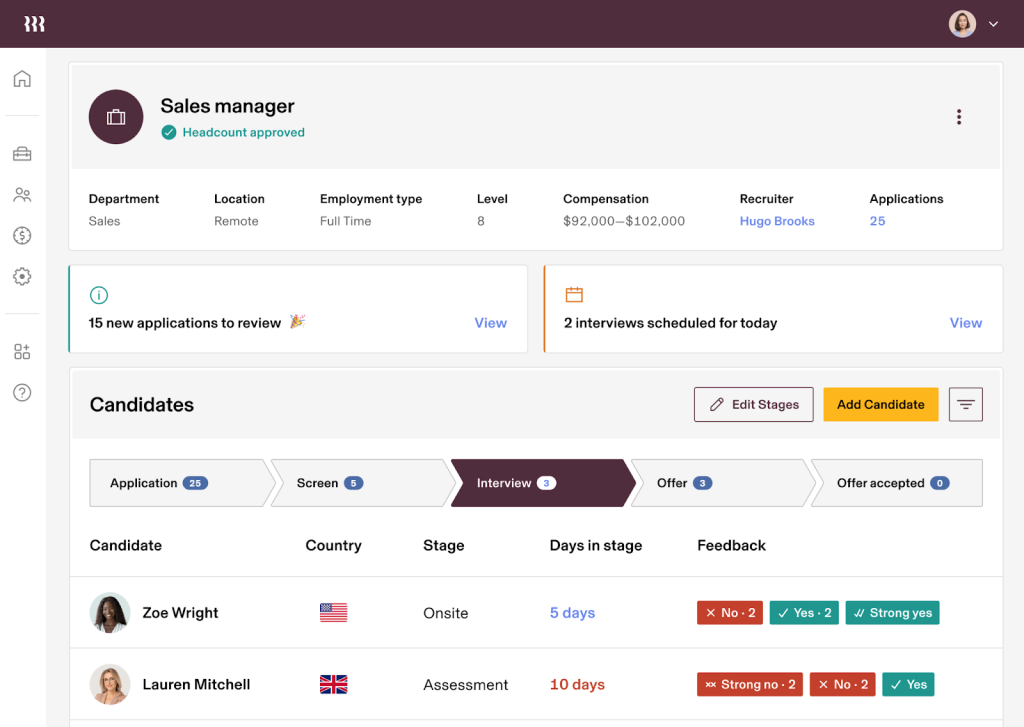
The first time I watched Rippling in action, I actually laughed, and it was out of relief. I had just added a new hire’s email, and before I could blink, their laptop was configured, access granted, and payroll data synced. It felt like watching dominoes fall perfectly into place.
A friend who runs operations at a small tech firm once joked that Rippling “has better timing than most of my employees.” The automation builder is the secret sauce here. You can create rules like, “When a new employee joins, auto-add them to Slack and payroll, then notify IT.” Everything executes without manual oversight.
It’s a rare platform that merges HR, IT, and finance into one synchronized rhythm. If you’ve ever lost hours repeating the same onboarding tasks, Rippling feels like the moment someone switched the lights on.
Why Rippling Is One of the Best Workday Alternatives
- Managing HR and IT together saves time—Rippling handles payroll, app accounts, and devices in a single workflow. Workday focuses only on HR, meaning IT teams must rely on different systems for device and access control.
- Integrations are refreshingly easy, with more than 500 prebuilt connectors and an open API that lets data flow freely between tools. Workday’s integrations, though reliable, require far more technical setup and rarely offer one-click simplicity.
- Automations feel futuristic: when someone is hired, Rippling can create accounts, ship equipment, and enroll benefits automatically. Workday’s processes rarely extend beyond HR, so similar onboarding magic often needs multiple tools stitched together.
- The platform’s interface is as sleek as any consumer app, helping users breeze through updates without training. Workday’s interface, while comprehensive, often overwhelms first-time users with its enterprise-style complexity.
- Rippling’s modular platform grows with you, allowing teams to add finance, IT, or device management as needed. Workday, though powerful, stays confined to HR and financials, offering little beyond its set ecosystem.
Pricing: Custom pricing.
3. SAP SuccessFactors
Best for SAP Suite Users
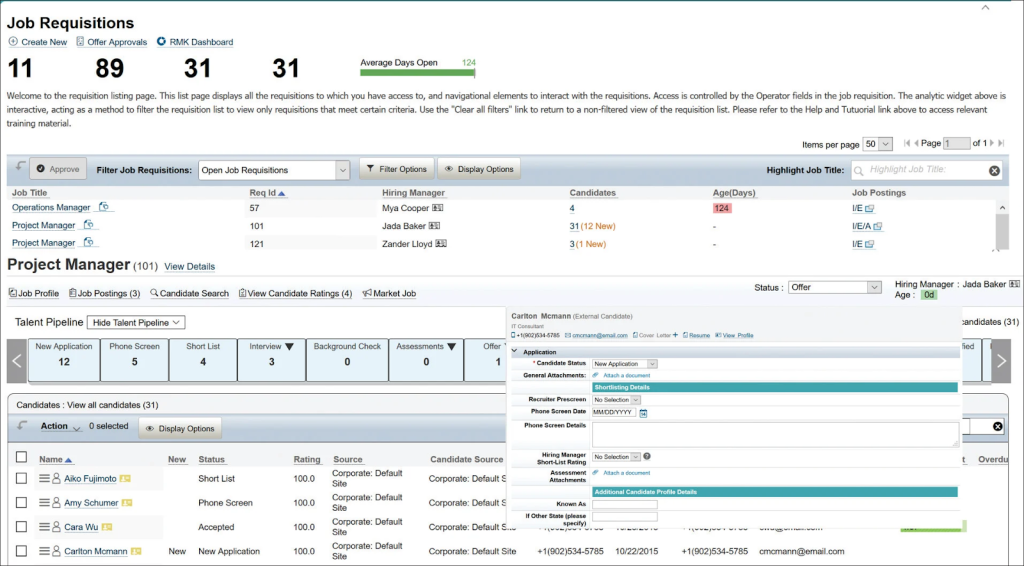
A colleague of mine, Priya, managed HR analytics for a multinational manufacturing company. She used SAP SuccessFactors, and I still remember her calling it “the nerve center of our global HR.” Before adopting it, her team worked across three systems that barely spoke to each other.
SuccessFactors fixed that in weeks. The most dramatic moment came during a quarterly review when the platform auto-generated skill development recommendations for underperforming teams. “It was eerie,” she told me, “like the system already knew our next move.” The connection with the SAP ecosystem made every data point traceable—from finance to workforce planning.
When I asked her if it was worth the effort, she said, “Absolutely. It’s the difference between managing data and understanding people.” For large enterprises, that insight is priceless.
Why SAP SuccessFactors Is One of the Best Workday Alternatives
- Recruiting feels modern with branded career portals, mobile-friendly applications, and candidate self-service dashboards that keep applicants engaged. Workday handles recruiting efficiently but lacks the polish and brand personalization built into SuccessFactors.
- Employees can see exactly how their goals tie to company strategy, thanks to cascading goal alignment and live bonus tracking. Workday doesn’t natively support cascading objectives, leaving visibility gaps in how individual efforts impact business outcomes.
- For sales-driven organizations, SuccessFactors goes a step further by managing territories, quotas, and incentive pay directly within HCM. Workday doesn’t offer sales performance automation, forcing teams to look for third-party tools.
- Onboarding users is painless with WalkMe’s digital guidance built right into the interface. Workday users must rely on external training materials or admins to explain tasks that SuccessFactors simply walks them through.
- Integration with the SAP ecosystem lets HR, payroll, and finance share data seamlessly across departments. Workday requires customized connectors to achieve that level of real-time sync.
Pricing: Custom pricing.
4. UKG Pro
Best for Managing Complex Payroll & Workforce Data
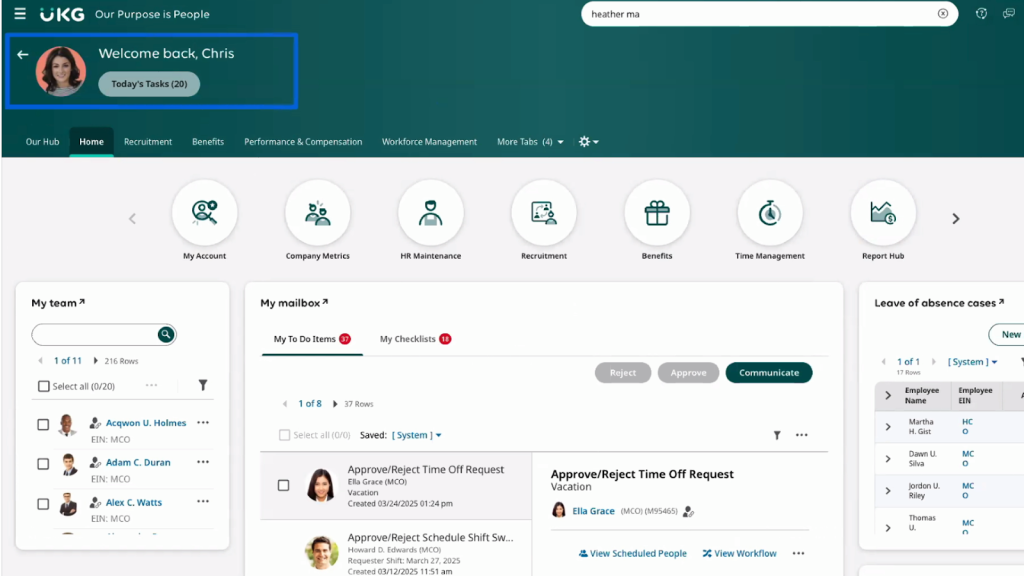
UKG Pro isn’t a flashy system—it’s a steady hand that never falters. I once helped a finance lead who had to manage payroll across several states, each with maddening compliance differences.
She’d nearly lost hope until UKG entered the scene. The first test run produced perfect results, right down to every tax code. The data visualization tools later helped predict overtime costs and staffing needs weeks ahead. “It’s like having a payroll analyst that doesn’t sleep,” she said.
My own takeaway was that UKG Pro isn’t just software—it’s discipline coded into a system. Once implemented, it smooths chaos into order and gives HR leaders back something precious: time to think strategically.
Why UKG Pro Is One of the Best Workday Alternatives
- Scheduling and time tracking shine here—UKG Pro manages complex shifts, compliance rules, and overtime policies automatically. Workday’s time tracking works fine for basic use but struggles with advanced shift scenarios.
- Payroll feels effortless even in complex situations like union rules or multi-country pay runs. Workday’s payroll engine is narrower in coverage and demands customization for specialized pay structures.
- Succession and development planning tools keep future leaders visible, helping companies grow talent from within. Workday offers similar tools, yet many users find them less intuitive and more process-heavy.
- Compliance worries fade thanks to built-in dashboards for FLSA, ACA, and labor-law tracking. Workday supports compliance, but not with the same granular rules that UKG Pro automates out of the box.
- Mid-market firms benefit most because UKG integrates easily with accounting tools like QuickBooks. Workday’s integrations lean toward enterprise-scale systems, making it less friendly to smaller, fast-moving businesses.
Pricing: Custom pricing
5. Gusto
Best for Payroll & Compliance Support
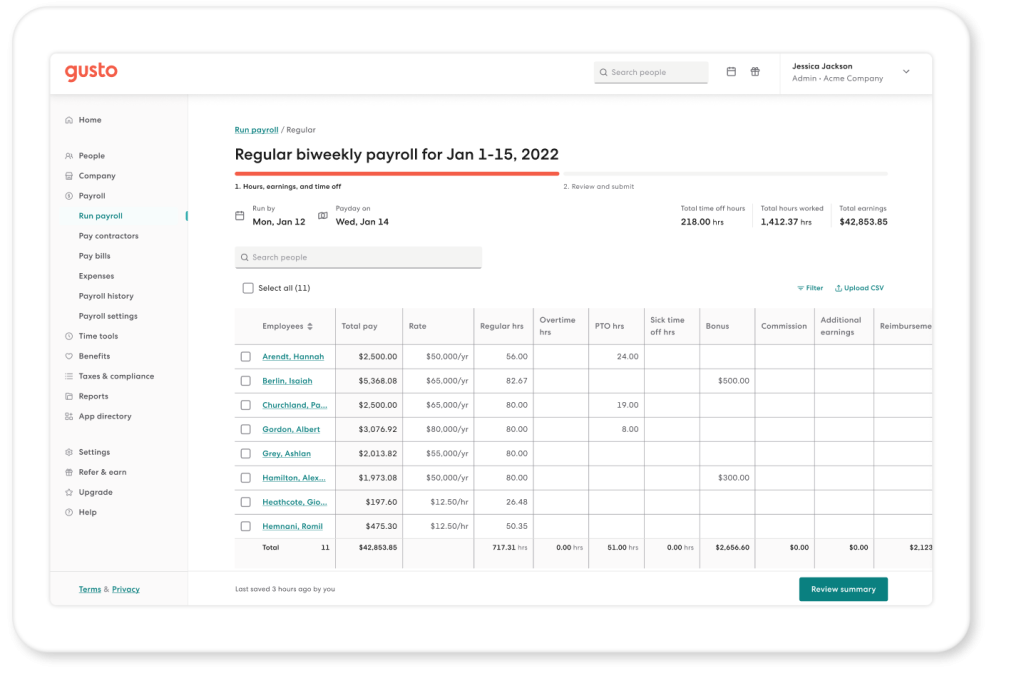
My friend Olivia runs a boutique design studio with a small but busy team. For years, she dreaded payday—manual calculations, delayed filings, endless corrections. Then she switched to Gusto, and everything changed.
I remember her calling me after the first automated payroll run: “I didn’t have to touch a single spreadsheet, and it even filed the taxes!” What impressed her most was how the platform explained compliance in plain English, showing what needed attention before it became urgent.
Her new hires completed onboarding forms online, and Gusto handled the rest. Payroll stopped being a stress event. Olivia told me that the tool didn’t just save her time—it gave her confidence to grow her business without fearing administrative overload.
Why Gusto Is One of the Best Workday Alternatives
- Payroll runs itself—tax calculations, filings, and year-end forms happen automatically with no HR intervention. Workday’s payroll stops short of this full-service model, leaving compliance chores to the employer.
- Benefits like health insurance, 401(k), and workers’ comp are bundled directly into the system and managed seamlessly. Workday handles benefits administration, too, but it assumes an enterprise setup with external brokers and consultants.
- Paying freelancers is as easy as paying employees, and Gusto even takes care of 1099 generation automatically. Workday can store contractor data, but it doesn’t streamline contractor payments in the same way.
- The interface is bright, friendly, and practically foolproof—business owners can run payroll in minutes without any HR background. Workday, though feature-rich, feels corporate and often requires onboarding just to master simple tasks.
- New hires enjoy a warm welcome through digital offer letters, e-signatures, and automated reminders that handle compliance behind the scenes. In Workday, these same workflows need more manual configuration and effort.
Pricing: Starts at $49/month + $6/month/person.
6. Paylocity
Best for Online Payroll Solutions
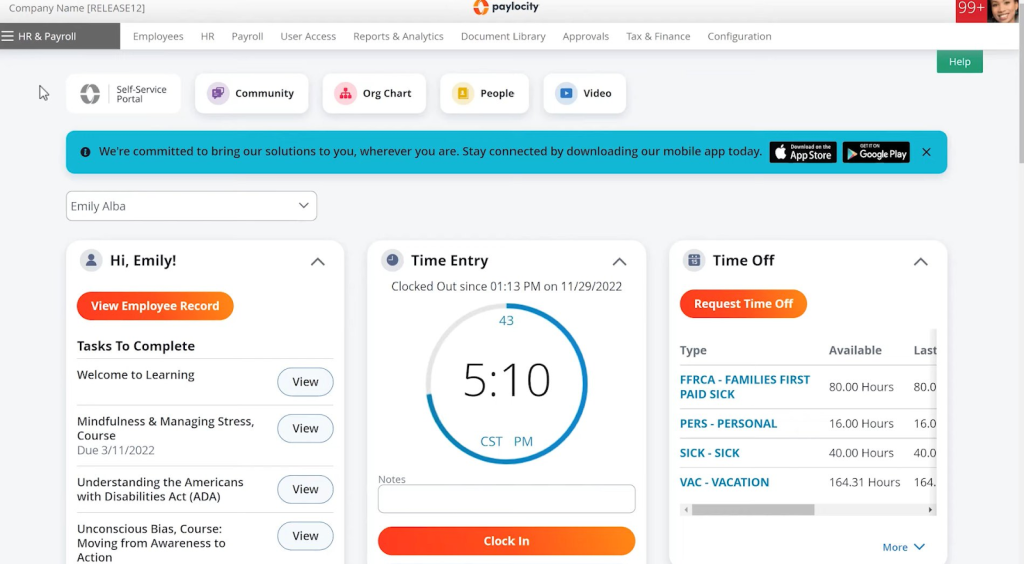
Paylocity feels like that reliable coworker who never misses a detail. I remember one case where a client’s payroll included complex benefit adjustments and bonuses in the same week. Every system we tried before it stumbled somewhere, but Paylocity ran it smoothly on the first attempt.
Later, the platform even flagged a small deduction error before payout—a quiet hero moment that saved us from messy corrections. Employees loved its mobile app, where they could check pay history or request leave instantly.
A finance controller I know summed it up perfectly: “It just works, and that’s all I ever wanted payroll to do.” Paylocity doesn’t chase attention; it earns trust through consistency, and in payroll, that’s worth more than flair.
Why Paylocity Is One of the Best Workday Alternatives
- The built-in Community feed brings a social media vibe to HR, where announcements, polls, and celebrations appear in one live space. Workday doesn’t include a social feed, keeping communication confined to static updates or emails.
- Recognition becomes contagious through badges, emojis, and shout-outs that everyone can see and respond to. Workday’s feedback system feels formal and misses this sense of fun and public appreciation.
- On-demand pay means employees can tap into part of their earned wages early—no waiting for payday. Workday offers no native earned wage access and relies on external vendors for such flexibility.
- Video messages make communication feel personal, whether it’s a CEO update or a quick tutorial shared right inside the app. Workday supports formal learning videos but not spontaneous internal broadcasts.
- Text-based notifications keep HR connected with employees in real time, perfect for urgent alerts or quick updates. Workday’s communication channels remain email-focused and less immediate.
Pricing: Custom pricing.
7. Oracle Cloud HCM
Best for Unifying Global HR, Payroll & Talent Management
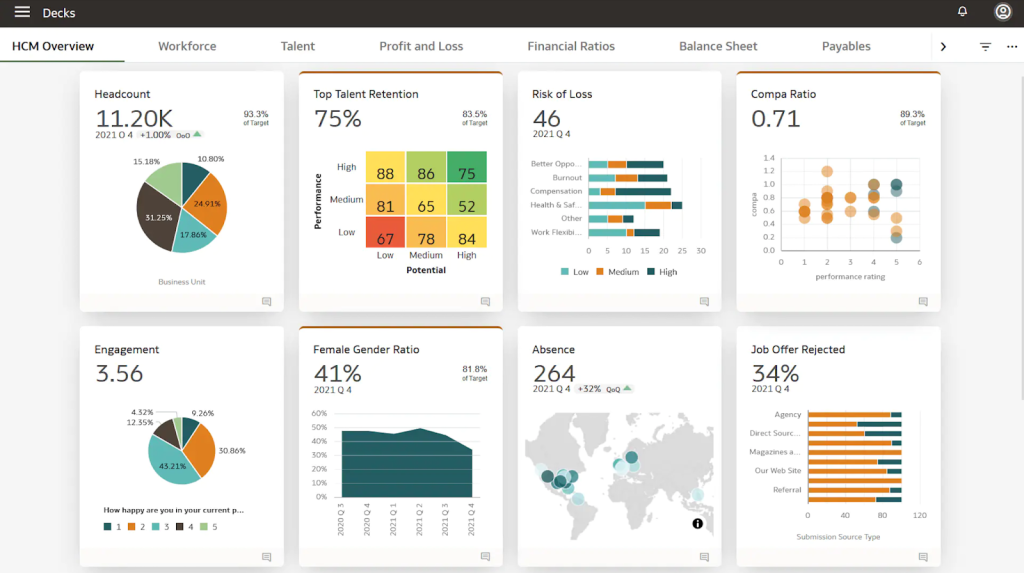
Oracle HCM is the definition of scale in motion. I once worked with a company managing teams across Asia, Europe, and North America. The HR head told me that before Oracle, running payroll across borders felt like assembling a puzzle with missing pieces. After implementation, it became one synchronized process.
The system even predicted hiring needs and flagged departments with potential attrition risks. “It feels like the platform knows our people better than we do,” she admitted half-jokingly. What stood out to me was its ability to link recruitment, learning, and performance under a single narrative.
Oracle HCM is demanding at first, but when it settles, it turns global chaos into clarity. It’s not just managing data—it’s managing direction.
Why Oracle Cloud HCM Is One of the Best Workday Alternatives
- Conversational AI handles everything from checking PTO balances to updating addresses, all via chat or voice. Workday’s assistant is still in development and is currently limited to basic queries within a smaller scope.
- With payroll native to over a dozen countries, Oracle simplifies global operations for multinational firms. Workday supports only a few core markets natively, requiring integrations with local providers in other markets.
- Safety tracking becomes second nature thanks to Oracle’s built-in Workforce Health and Safety module. Workday users must rely on entirely separate systems for similar monitoring.
- AI-powered compliance tools keep a vigilant eye on data, flagging conflicts or potential fraud automatically. Workday maintains strong security but lacks this proactive risk detection layer.
- Oracle ME ties everything together—guided onboarding journeys, recognition, and targeted communications—all in one employee experience suite. Workday spreads these functions across separate modules that don’t connect as seamlessly.
Pricing: Custom pricing.
8. Zoho People Plus
Best for Time & Attendance Optimization
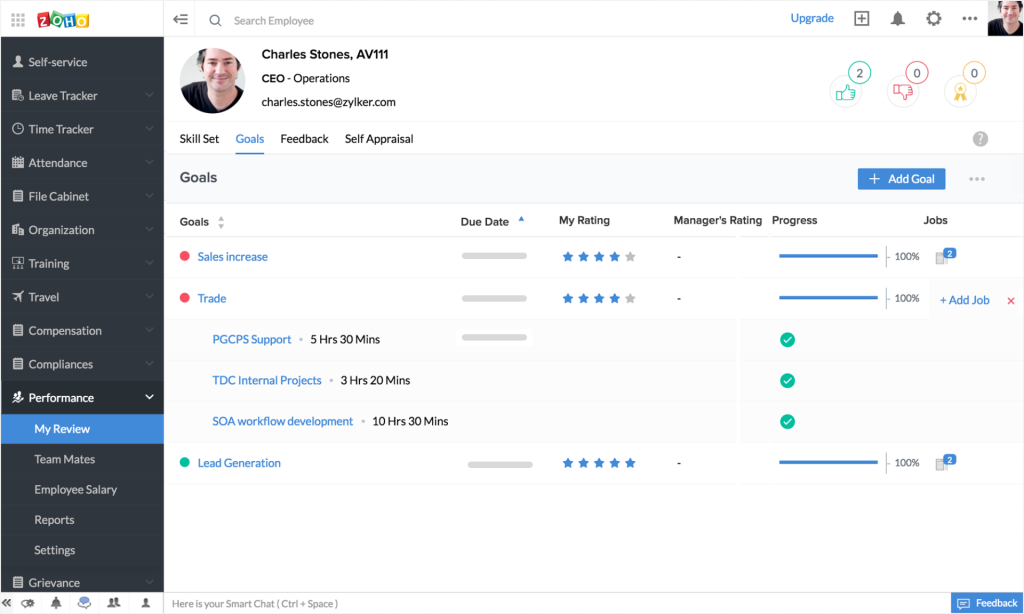
My former colleague Ethan ran a distributed customer support team that struggled with attendance consistency. When he moved to Zoho People Plus, the transformation was instant. “For the first time, I actually know who’s working when,” he told me. The geolocation check-in made tracking field teams effortless.
Once, during payroll week, the system flagged missing clock-ins that would have skewed pay—Ethan caught it just in time. He loved that the system synced with Zoho Payroll and Projects, so hours automatically reflected across systems.
The tool also made shift planning less of a guessing game. “I can finally take a weekend off without worrying someone forgot to clock in,” he laughed. Zoho People Plus turns time management into a quiet, predictable routine, which in HR is pure gold.
Why Zoho People Plus Is One of the Best Workday Alternatives
- Multi-rater 360° feedback lets employees get a complete, well-rounded view of their performance, creating balanced evaluations. Workday lacks built-in support for such reviews, requiring customization or third-party help.
- Reporting feels like a breeze—drag, drop, and visualize data instantly without relying on analysts. Workday’s reports, though powerful, often demand training and take more time to build.
- A single subscription covers everything from recruitment and performance to expenses and collaboration. Workday offers similar breadth, but only through costly modular add-ons and integrations.
- Its minimalist interface keeps navigation simple while offering full mobile parity, so employees can do everything on the go. Workday’s mobile experience remains more cluttered and harder to navigate casually.
- Custom notifications and low-code workflows give HR teams complete control over automations. Workday supports automation, too, but it usually requires more technical configuration to achieve comparable results.
Pricing: Starts at $4/user/month. Billed annually.
9. Engagedly
Best for Combining Performance Management With Engagement Tools

I’ve seen many performance systems, but Engagedly has a spark. It’s professional, yet it understands human emotion. In a consulting firm I advised, recognition used to be rare. Once Engagedly came in, it became part of the daily conversation.
The first time an employee got a shoutout on the social feed, the entire office joined in with reactions. Suddenly, feedback wasn’t awkward; it was energizing. The 360-degree reviews felt natural because appreciation was already woven into the workflow.
One HR manager said, “It’s the only tool that makes people smile while talking about performance.” That stuck with me. Engagedly manages to make engagement measurable without making it mechanical, and that’s a rare balance.
Why Engagedly Is One of the Best Workday Alternatives
- Work becomes a game with points, badges, and leaderboards that make engagement exciting and competitive. Workday’s design is more utilitarian, offering no gamified motivation elements.
- The AI assistant Marissa acts like a digital performance coach, flagging patterns and suggesting coaching actions before issues escalate. Workday’s analytics are capable but reactive, not conversational or advisory.
- Continuous feedback flows naturally through smart reminders that nudge teams to share thoughts regularly. Workday’s review cycles are structured and tend to miss these organic touchpoints.
- Employee sentiment is tracked through built-in engagement surveys that feed directly into performance data. Workday uses separate survey tools that don’t connect as seamlessly to daily performance metrics.
- Goals and learning recommendations align automatically with business priorities through AI insight. Workday relies on manual alignment, leaving more room for inconsistency or human oversight.
Pricing: Starts at $5-$8/user/month. Billed annually.
10. Betterworks
Best for Structured Check-ins

My friend Daniel, a sales director at a mid-size SaaS company, once told me he used to dread 1:1 meetings. “They always turned into complaint sessions,” he said. Then his company adopted Betterworks.
Within a month, his meetings had structure, goals, and accountability. He showed me the check-in template that guided every session: What’s working? What’s stuck? What’s next? It was simple but transformative. Daniel said, “Now my team comes prepared, and I leave those meetings feeling like we moved the needle.”
Betterworks also syncs progress automatically, so updates never go missing. Watching his team shift from firefighting to planning was the best proof of its value. Structured feedback stopped being a calendar task—it became a habit everyone wanted to keep.
Why Betterworks Is One of the Best Workday Alternatives
- Goal alignment feels alive with OKRs that connect across teams, making progress visible in real time. Workday’s goal module works but lacks the dynamic OKR transparency that drives accountability.
- A culture of coaching thrives through continuous feedback tools that keep employees and managers in regular conversation. Workday’s structure, by contrast, is still rooted in mid-year and annual review cycles.
- Real-time progress updates sync automatically with tools like Salesforce or Jira, ensuring leaders always see current data. Workday’s manual update process often leaves performance information outdated.
- Smart AI insights recommend goals, surface at-risk projects, and even help draft performance summaries. Workday’s AI still lags behind, offering limited proactive suggestions.
- Many organizations use Betterworks alongside Workday to fill gaps in engagement and agility. While Workday remains a strong system of record, Betterworks injects life into the process with transparency, speed, and a sense of momentum.
Pricing: Custom pricing.
How I Selected these Workday Alternatives/Evaluation Criteria
When I put this list together, I wanted the selection process to feel as practical as the tools themselves. I relied on a mix of hands-on use, real conversations with teams, and careful study of how each platform performs in the real world.
Here is the lens I used while deciding which products deserved a place on this list.
1. User Reviews and Ratings
I always start by listening to people who already live with the software. I spent time reading through verified reviews, paying attention to trends that show up across industries. These patterns helped me understand where users feel supported and where they run into trouble. The goal was to capture that ground-level reality you only notice after months of daily use.
2. Essential Features and Functionality
A tool may look polished at a glance, but its real value appears only when you dig through its core features. I explored how well each platform handles performance, HR tasks, reporting, and day-to-day workflows. The tools that made the cut proved themselves not through promises but through consistent, dependable function.
3. Ease of Use
I gave special attention to how quickly someone could learn the system. Clean design, clear menus, and predictable navigation matter more than most people realize. If a tool slowed me down or felt cluttered, I set it aside. The platforms that stayed on this list are the ones that help you work without forcing you to relearn your habits.
4. Customer Support
I have seen great software fall apart because the support behind it was slow or unhelpful. For this list, I looked at how each vendor responds during setup, how they handle technical concerns, and how quickly they resolve operational issues. Strong support often signals a company that stands behind its product.
5. Value for Money
Price alone never tells the full story. I compared each tool’s cost with the quality of features, the level of automation, and the kind of business it serves best. My aim was simple. I wanted to help you understand whether the investment feels justified once your team starts using the platform every day.
6. Personal Experience and Expert Opinions
Finally, I pulled from my own experience using these tools, along with insights from HR leaders, consultants, and colleagues who manage teams of different sizes. These conversations helped me see how each product behaves under real pressure, not just during demos.
My Top 3 Choices as Workday Alternatives
Now, after you have seen how I evaluated these tools, here are my top 3 tools from the list above:
1. PeopleGoal
I placed PeopleGoal at the top because it consistently turns performance management into a collaborative practice rather than a checklist. It brings clarity to goals and gives teams a shared sense of progress without adding administrative weight. Most importantly, I have seen it lift engagement in ways that feel authentic rather than staged.
2. Rippling
Rippling earned a spot here because its automation removes more manual work than any platform I tested. It handles HR and IT with the same steady rhythm, which saves entire teams from repeating the same tasks week after week. The experience feels smooth, predictable, and rare for a system managing so many moving parts.
3. UKG Pro
I chose UKG Pro because of its reliability with complex payroll and workforce data, especially in multi-state or compliance-heavy environments. It brings order to situations where errors can be costly, and it does so without drawing attention to itself. The platform frees leaders to think strategically instead of wrestling with calculations.
Choose the Perfect Workday Alternatives for Best Results
To wrap it up, I would say that the right Workday alternative depends on what your team needs most, whether it is stronger performance management, smoother automation, or more dependable payroll support.
Each tool on this list brings its own personality and strengths, and the best choice is the one that matches your everyday rhythm. Start with a clear view of your priorities, test the features that matter most, and trust the platform that removes friction rather than adding to it.
When the system supports your people instead of slowing them down, you know you have chosen well.
Ready to 3x Your Teams' Performance?
Use the best performance management software to align goals, track progress, and boost employee engagement.