

I once sat across from an L&D director who told me the biggest win of her year was getting managers to stop emailing her for training records in Excel.
Before that, her days looked a lot like mine used to, chasing completions across a shared drive full of PDFs, a half-updated spreadsheet, and reminder emails nobody actually read. That conversation has stuck with me because it is not a one-off story; it is the norm for most L&D teams I talk to.
According to LinkedIn’s Workplace Learning Report, 88% of organizations are concerned about retention and rank learning opportunities as their top retention strategy, and 94% of employees say they would stay longer at a company that invests in their growth.
That gap between intent and execution is exactly where the right employee training software for small business steps in. In this guide, I will help you understand what employee training software does, how it differs from a traditional LMS, and compare the 11 best employee training systems with honest pros, cons, pricing, and ratings.
What Is Employee Training Software?
Here is why this matters more than it sounds:
- Replaces manual, spreadsheet-driven training tracking with automated enrollment, reminders, and completion records
- Turns onboarding, compliance, and skills training into repeatable processes instead of one-off scrambles
- Gives you actual data on what is working, so you stop guessing whether training is making a difference
- Scales with you, so training does not fall apart the moment you cross 20, 50, or 500 employees
11 Best Employee Training Software to Streamline Learning
I have used some of these employee training solutions myself and researched the rest through real user reviews and hands-on demos, so here is my honest take on the 11 top employee training software for small businesses that are actually worth your shortlist.
| Tool | Best For | Pricing | User Rating |
| PeopleGoal | Customizable employee development, performance management, OKRs, and learning plans | Starts at $4/user/month (14-day free trial) | 4.5/5 (G2) |
| ProProfs Training Maker | World’s Easiest LMS & Course Builder for Employee Training, Compliance & Skill Assessment | Starts at $1.99/active learner/month | 4.6/5 (G2) |
| TalentLMS | Quickly launching employee training programs | Starts at $119/month | 4.6/5 (G2) |
| Docebo | AI-powered enterprise learning at scale | Custom quote | 4.3/5 (G2) |
| Absorb LMS | Personalized learning paths and advanced analytics | Custom quote | 4.6/5 (G2) |
| iSpring Learn | Creating courses from PowerPoint presentations | Starts at $3.97/user/month | 4.5/5 (G2) |
| 360Learning | Collaborative course creation and peer learning | Starts at $8/user/month | 4.6/5 (G2) |
| WorkRamp | Employee onboarding, sales enablement, and customer education | Custom quote | 4.4/5 (G2) |
| Trainual | SOP documentation and employee onboarding | Custom quote | 4.7/5 (G2) |
| Continu | Modern, mobile-first enterprise learning | Custom quote | 4.6/5 (G2) |
| SC Training (formerly EdApp) | Mobile microlearning for frontline and deskless employees | Starts at $5/learner/month (billed annually) | 4.7/5 (G2) |
1. PeopleGoal – Best for Fully Customizable Performance Reviews, OKRs & Employee Development
I brought PeopleGoal in when I got tired of training sitting in its own silo, disconnected from how people were actually performing. Training & Learning Plans changed that.
Instead of assigning generic courses, I use PeopleGoal as employee training and development software to build personalized development roadmaps for each employee, backed by a competency library, so learning maps directly to the skills and business needs behind it.
1-to-1 development is where real progress happens. These bridge performance management with training, so managers and employees can sit down, talk through career aspirations, and walk away with a clear plan rather than a vague “keep learning” note.
From there, I use Career & Succession Plans to define long-term paths, align them with employee goals, and identify next-generation leaders early. And when a team’s needs don’t fit the standard setup, the no-code workflow builder lets me design a custom development process from scratch, with no developer required.
Pros:
- Training & Learning Plans build personalized employee development roadmaps backed by a competency library
- Development 1-to-1s bridge performance and training, driving real career development conversations
- Career & Succession Plans define long-term paths and identify future leaders early
- Custom development processes with a no-code workflow builder, adjustable in real time
- 500+ integrations, including BambooHR, Workday, Slack, and Microsoft Teams
Cons:
- Course authoring is lighter than what you get in a dedicated LMS built purely for content creation
- Best suited for teams that also want performance management in the same system, not a standalone course library
User Rating: 4.5/5 (G2)
Pricing: 14-day free trial. Paid starts at $4/user/month
2. ProProfs Training Maker – World’s Easiest LMS & Course Builder for Employee Training, Compliance & Skill Assessment
ProProfs Training Maker is one of the employee training tools I’ve been using the longest, and it’s the one I reach for when I need a cloud LMS that just works without a steep learning curve for skills and compliance training.
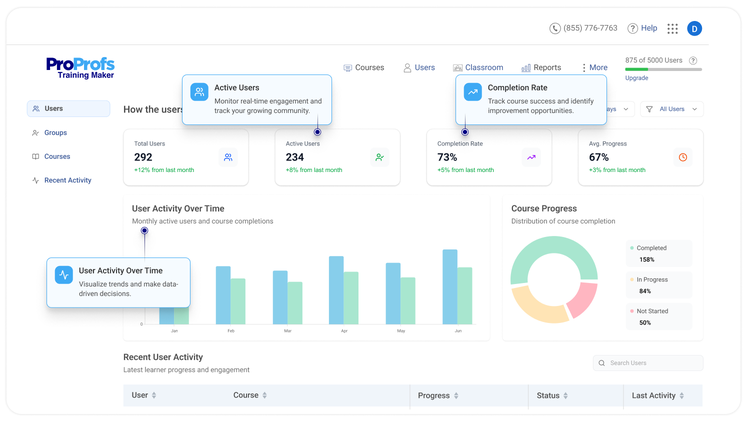
What keeps me coming back is the built-in catalog of ready-to-use, customizable courses on employee skills and compliance, complete with relatable scenarios, handouts, worksheets, flashcards, and end-of-chapter assessments, so I’m not building everything from a blank page.
Organizing, deploying, and tracking these courses is straightforward, and when I need something custom, I can generate a full course from a single AI prompt or import materials I already have, then layer in multimedia, company policies, quizzes, assessments, and surveys.
The Q&A forum, discussion board, and virtual classroom add a collaborative layer that keeps learners engaged with peers and trainers instead of working in isolation. And since the platform is mobile-friendly, my team can pick up training from any device, whenever it fits their schedule.
Pros:
- Large catalog of ready-to-use, AI-editable courses on skills and compliance
- Build a full course from a single AI prompt or import existing materials
- Collaborative learning through Q&A forums, discussion boards, and virtual classrooms
- Mobile-friendly access from any device, anytime
- Secure by design, with password-protected courses, user roles and permissions, GDPR compliance, and full data ownership
- Automatic grading and granular reports, with AI flagging learners who are falling behind
Cons:
- Free version caps out at 10 learners and excludes premium courses
- No dark mode option yet
User Rating: 4.6/5 (G2)
Pricing: Forever free for up to 10 learners, with a 15-day money-back guarantee. Paid plans start at $1.99/active learner/month for large teams, with unlimited courses, admins, instructors, and storage.
3. TalentLMS – Best for Getting a Course Live in an Afternoon
A friend of mine runs L&D solo at a 30-person marketing agency, and when she finally ditched her training spreadsheet, TalentLMS had a real course built and assigned before lunch. She always says the course builder is the reason it stuck, simple enough that nobody needed a manual to figure it out.
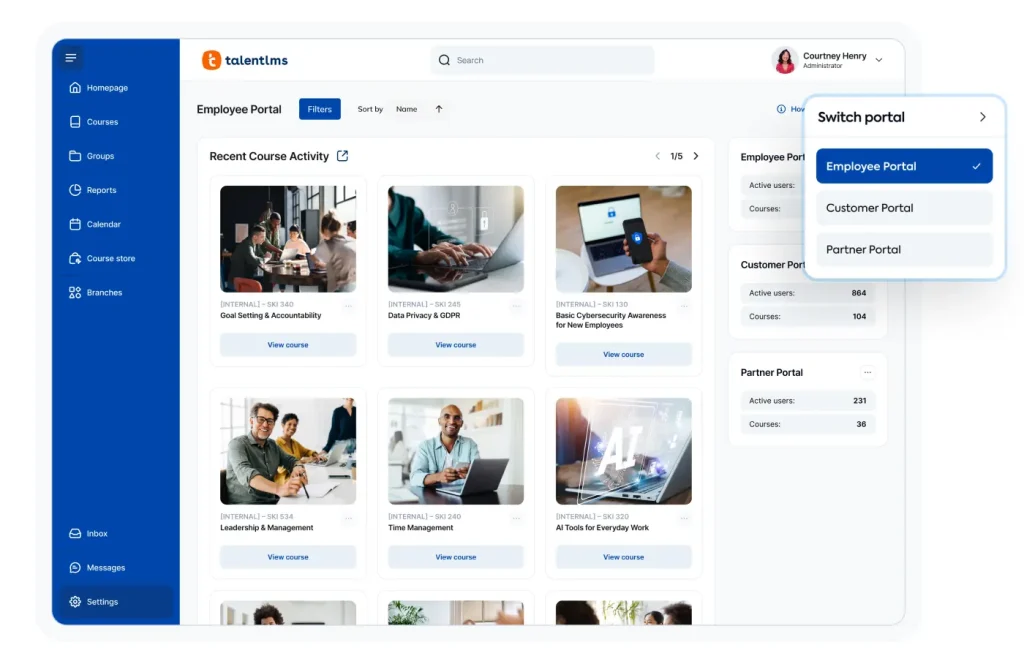
The gamification, badges, levels, points, and a leaderboard are what actually got her team opening courses instead of ignoring another reminder email. What she likes most is the flexibility to mix live in-person sessions with fully online modules on the same platform.
The analytics give her clean visibility into completion and engagement without needing a separate reporting tool bolted on. And when she has hit a setup snag, support has answered fast enough that it never turned into a lost afternoon.
Pros:
- Course creation is fast and does not require any technical background
- Gamification with badges, levels, points, and leaderboards genuinely boosts learner engagement
- Supports both live in-person and online training sessions from one platform
- Mobile accessible, so learners are not tied to a desk
- 24/7 customer support and a transparent, budget-friendly pricing model
Cons:
- The free plan caps out at 5 users, so it only works for very small teams
- Report exporting gets restrictive on the lower-priced tiers
- Gamification can feel out of place for more formal, compliance-heavy training cultures
User Rating: 4.6/5 (G2)
Pricing: Starts at $119/month
4. Docebo – Best for AI-Powered Enterprise Learning at Scale
Scale is where most training platforms start to creak, and Docebo is the one I have watched hold up under real pressure. I brought it into a company running training across employees, partners, and customers at once, and it did not buckle the way smaller tools would have.
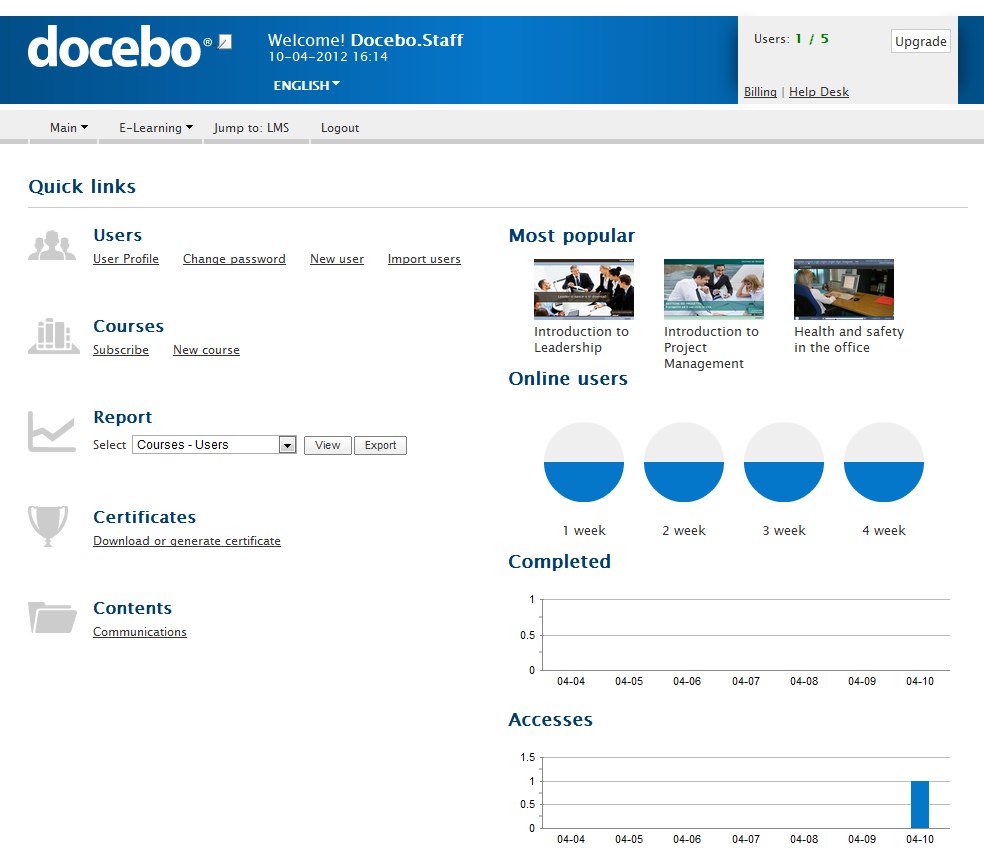
The AI content tools turned pages of compliance documentation into short, digestible micro-courses in days instead of months, which alone justified the switch. Structured learning paths and automated enrollment kept different departments aligned on required training without anyone manually chasing completions.
The reporting goes deep enough to show real skill and completion trends across the whole organization, not just surface numbers. Setup takes genuine investment, and pricing sits on the higher end, so this is built for larger teams, not a five-person startup testing the waters.
Pros:
- AI-assisted content creation turns existing documents into structured courses quickly
- Structured learning paths and automated enrollment keep large, distributed teams aligned
- Supports employee, partner, and customer training from a single platform
- Deep reporting and analytics built for enterprise-scale decision-making
- Mobile app with offline access for distributed and remote teams
Cons:
- Pricing is quote-based and steep, commonly starting well into five figures annually
- Requires real setup investment and admin training to configure properly
- Better suited to larger teams training 250+ learners than small businesses
User Rating: 4.3/5 (G2)
Pricing: Custom Quote
5. Absorb LMS – Best for Analytics-Driven, Personalized Learning Paths
Reporting was the one gap I could never forgive in our old training setup, so Absorb landed on the shortlist for that reason alone. Its AI-powered engine personalizes learning paths based on each employee’s actual progress, so people are not sitting through content they have already mastered.
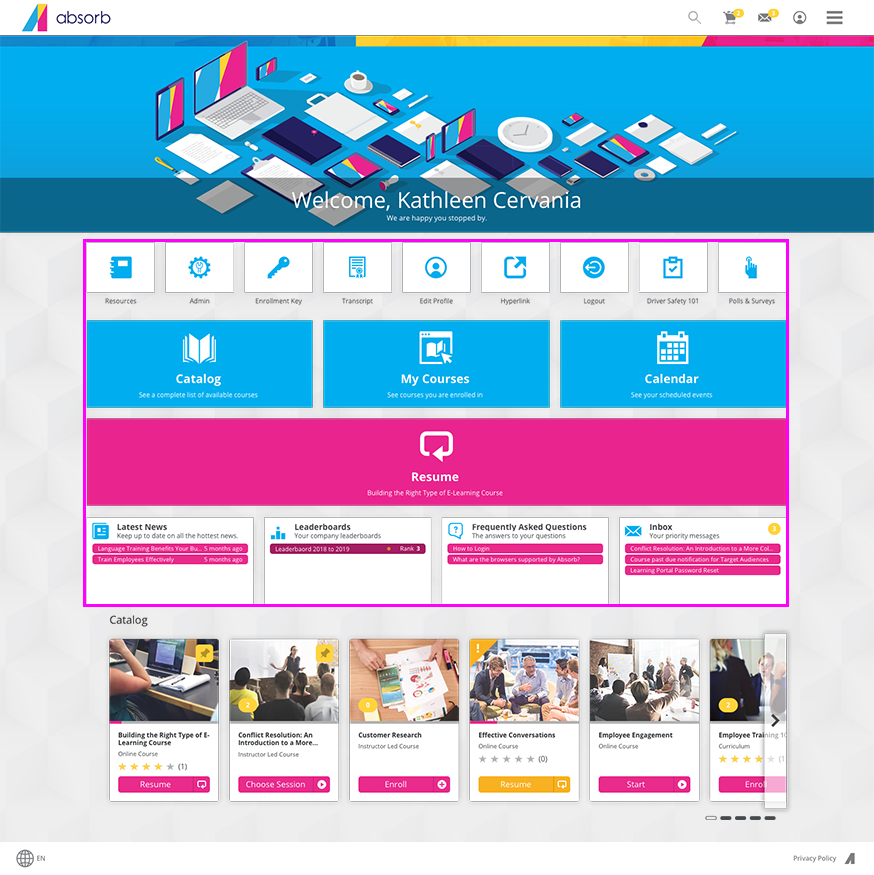
The dashboards give me insight I actually act on, not just a completion percentage that tells me nothing about whether anyone got better at their job. The offline mode turned out to be the quiet hero for our field employees, allowing them to download content and complete courses even without reliable connectivity.
Content formats stay flexible enough to mix multimedia, assessments, and certifications without feeling clunky. The admin side has a real learning curve once you get into advanced customization, so budget for the ramp-up time before you expect to move fast.
Pros:
- AI-powered personalization tailors learning paths to individual progress
- Strong reporting and analytics dashboards built for real decision-making
- Offline mode keeps learning uninterrupted for remote or field-based employees
- Supports diverse content formats, including multimedia, assessments, and certifications
- Automation reduces admin workload on user management and course assignments
Cons:
- Advanced features come with a learning curve for admins
- Pricing is not published and requires a custom quote
- Some advanced functionality sits behind higher-tier plans
User Rating: 4.6/5 (G2)
Pricing: Custom Quote.
6. iSpring Learn – Best for Turning PowerPoint Decks into Courses Fast
There is a shortcut most L&D teams stumble onto eventually: the training content you need already exists in your slide decks. iSpring Learn is built entirely around that shortcut, and it is why I reached for it when I needed to launch company-wide training fast, without hiring an instructional designer.
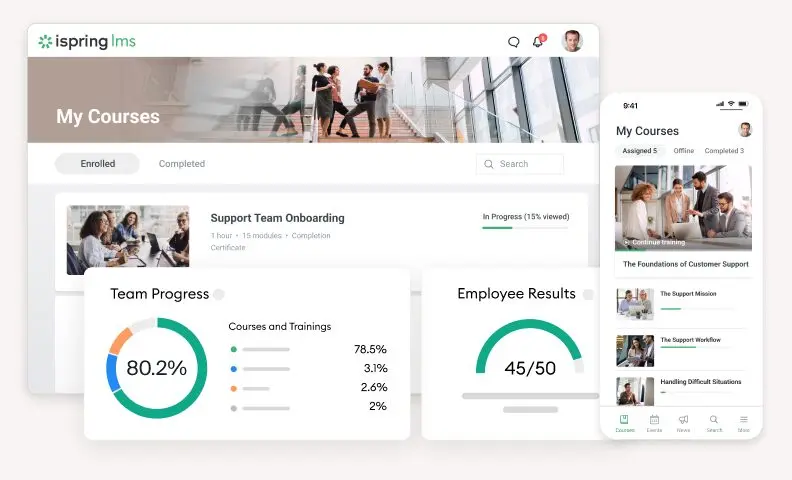
The authoring tools felt instantly familiar to anyone who has built a PowerPoint deck, and I had quizzes, simulations, and video-based modules ready within the same afternoon. Training and user management automation handles the routine assignment and tracking work in the background, and customizable roles and permissions let me control exactly who sees what.
The reports give clear visibility into completion rates and assessment results without digging around for numbers. Support answered quickly whenever setup questions came up, and pricing stayed reasonable even as we added more users.
Pros:
- Course, quiz, and training program creation is genuinely fast, especially from existing PowerPoint content
- Automates user management and routine training assignment tasks
- Customizable roles and permissions for tighter access control
- Detailed training reports and analytics on learner progress
- Scales well and stays cost-effective as headcount grows
Cons:
- Advanced, highly specialized training needs may outgrow its feature set
- Some functionality depends on browser compatibility
- Higher-tier features require a bigger investment as you scale
User Rating: 4.5/5 (G2)
Pricing: Starts at $3.97/user/month
7. 360Learning – Best for Peer-Driven, Collaborative Course Creation
A colleague of mine leads L&D at a fast-growing fintech, and her biggest complaint before 360Learning was that only two people on her entire team ever built training content. Everyone else just consumed it. Its collaborative authoring model flipped that.
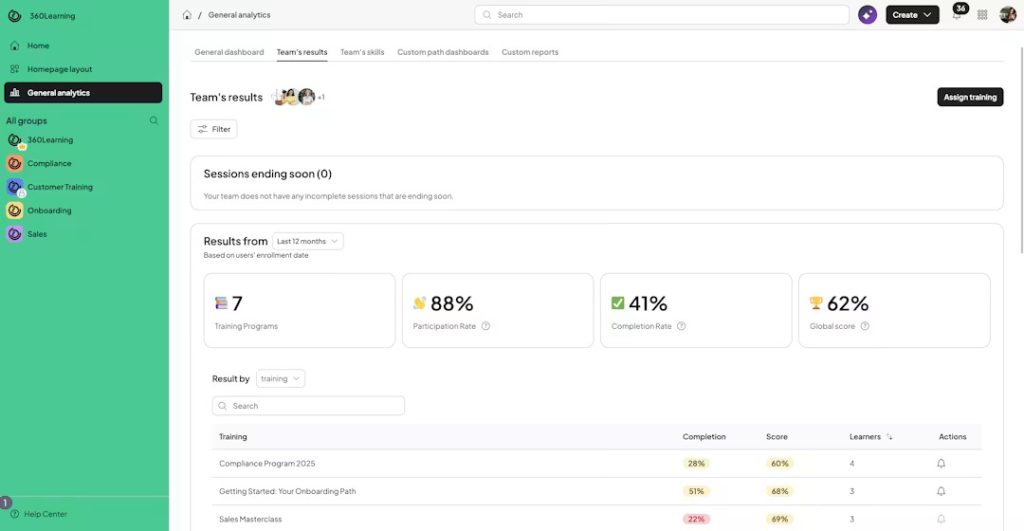
Subject matter experts across her org started co-creating courses in minutes rather than waiting on a single instructional designer, and her course creation time dropped from months to minutes for most modules.
What she values most is that learners can comment, ask questions, and upvote what is useful directly in a course, so content stays relevant rather than going stale the moment a process changes.
It integrates cleanly with systems like Workday and SAP, so training never sits disconnected from the rest of the HR stack. Some of the more advanced reporting and admin settings require additional configuration to get the detail she wants.
Pros:
- Collaborative, AI-assisted authoring lets any subject matter expert build a course quickly
- In-course commenting and upvoting keep content relevant and current
- Combines LMS and LXP capabilities in one platform
- Deep integrations with systems like Workday and SAP
- Mobile-friendly, built for busy or operational teams
Cons:
- Advanced reporting and admin functions often need extra setup to get full detail
- Content quality depends on how well teams are trained to use the collaborative model
- Pricing moves to a custom quote once you go beyond the entry-level plan
User Rating: 4.6/5 (G2)
Pricing: Starts at $8/user/month
8. WorkRamp – Best for Onboarding and Enablement in One Learning Cloud
Enablement teams rarely get the luxury of training just employees, and that is exactly why WorkRamp earned its spot here. I brought it in for a team that needed to train its own staff and also stand up a customer-facing academy, without running two separate systems side by side.
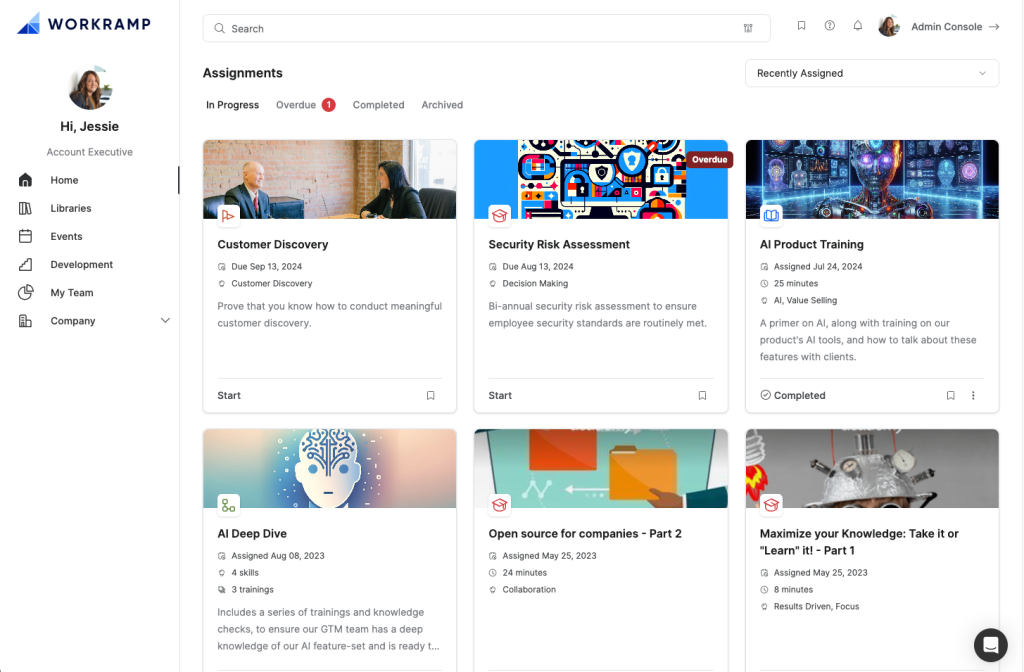
The course authoring is straightforward enough that non-technical team members were building structured onboarding paths within their first week. Where it really earns its place is bridging employee onboarding, sales enablement, and customer or partner education from a single Learning Cloud.
Integrations with Salesforce, Microsoft, and Zoom kept enablement content connected to the tools reps already use daily, and support stayed responsive at every step of setup. Reporting is the one area I would flag, honestly. It works, but it is not detailed enough for tracking skill-level progress the way I would like.
Pros:
- Easy course authoring, including SCORM support for existing content
- Bridges employee onboarding, revenue enablement, and customer or partner education in one platform
- Strong customer support during setup and ongoing use
- Integrates with Salesforce, Microsoft, and Zoom
- Intuitive interface that most teams pick up quickly
Cons:
- Reporting is consistently flagged as the weakest area of the platform
- Customization options are more limited compared to some competitors
- Pricing is opaque and typically requires a five-figure annual commitment for full features
User Rating: 4.4/5 (G2)
Pricing: Custom Quote
9. Trainual – Best for Turning Tribal Knowledge into SOPs
Most small teams do not actually have a training problem, they have a documentation problem, and that is the gap Trainual closed for a client of mine whose entire process knowledge lived in one person’s head.
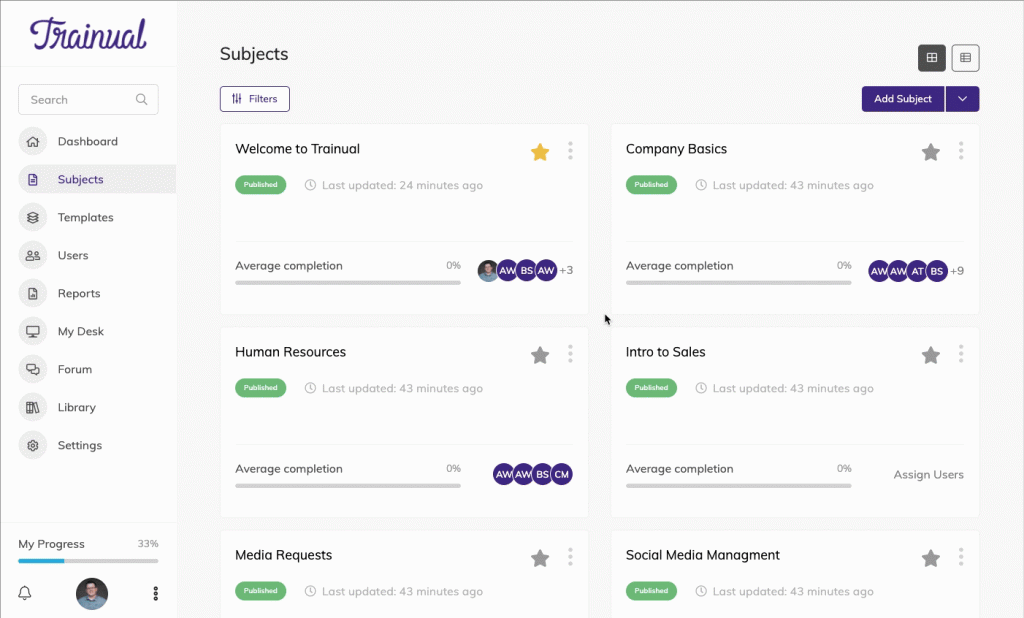
The AI-assisted documentation tools let her team build out playbooks and training paths without starting from a blank page, and role-based sequences made it obvious to new hires exactly what to complete and in what order.
It genuinely shines for onboarding and keeping SOPs current across multiple locations, since updating one document flows through to everyone assigned to it. It is not trying to be a full-blown LMS with course marketplaces or video authoring suites, and it never pretends to be.
For a small business that needs structured onboarding and process documentation without standing up an entire training department, it does exactly what it promises.
Pros:
- AI-assisted documentation and built-in screen recording speed up content creation
- Role-based sequences make the onboarding order clear for new hires
- Keeps SOPs and process documentation centralized and easy to update
- Strong for standardizing training and process consistency across locations
- High G2 satisfaction, particularly around usability and ROI
Cons:
- No free trial or free plan, unlike most LMS competitors
- Mobile experience is less polished than the desktop version
- Not built to scale into a full enterprise LMS with advanced course authoring
User Rating: 4.7/5 (G2)
Pricing: Custom Quote
10. Continu – Best for a Modern, Mobile-First Learning Experience
Switching learning platforms rarely goes smoothly, but a mid-sized team I consulted for made the jump to Continu after outgrowing a clunkier legacy LMS, and the difference in day-to-day usability showed up within the first week.
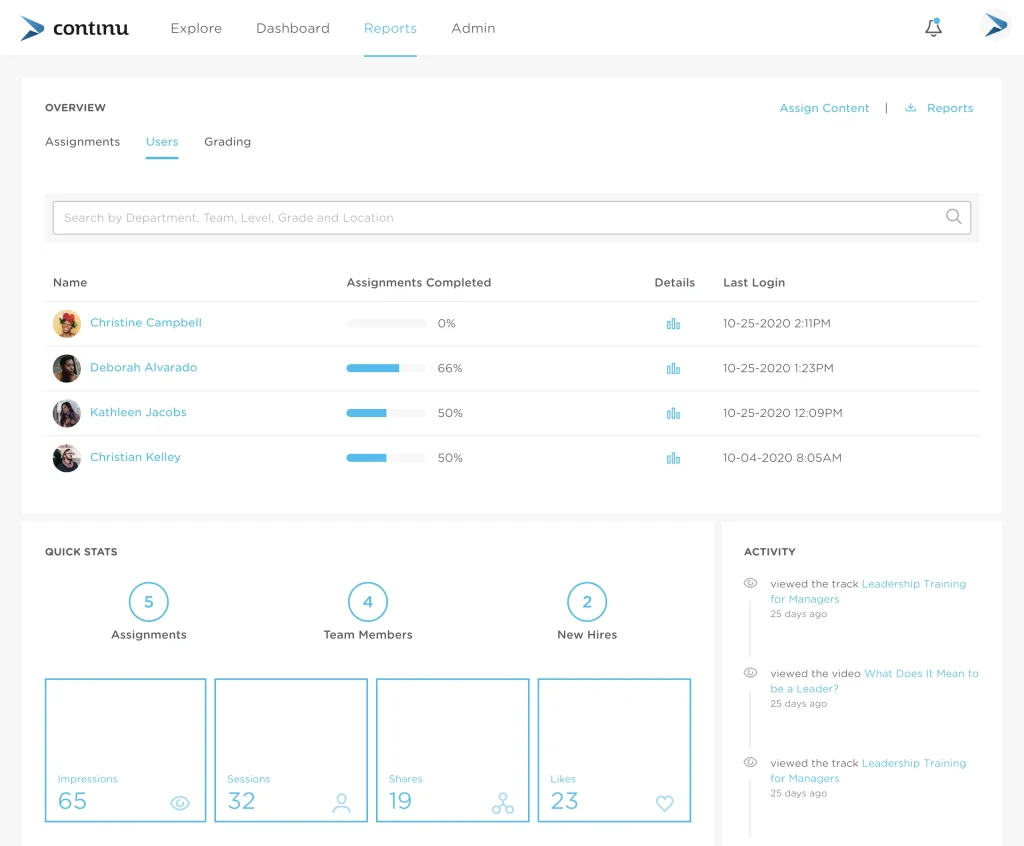
Content creation stayed flexible enough to mix formats, and the AI features cut down the admin time needed to keep courses updated and learners engaged. Everyday tools like Slack, Google Workspace, and Zoom are plugged in cleanly, so training never felt like a separate app nobody opened.
Where it genuinely stands out is in administrative simplicity at scale. Managing enrollments, tracking completions, and updating content across a growing team did not require adding headcount just to keep the system running. It is built for mid-to-large organizations, though, so a five-person team would likely find it more platform than they need right now.
Pros:
- Modern, mobile-first interface that learners actually enjoy using
- AI features reduce admin time on content updates and learner engagement
- Clean integrations with Slack, Google Workspace, and Zoom
- Built to scale administration without proportional headcount growth
- Strong customer satisfaction scores around ROI and implementation speed
Cons:
- Requires a minimum of 500 users on most plans, so it is not built for small teams
- Some users find navigation for course creation and assessments less intuitive than expected
- Pricing is not published and requires a custom quote
User Rating: 4.6/5 (G2)
Pricing: Custom Quote
11. SC Training (formerly EdApp) – Best for Mobile Microlearning with Deskless Teams
Not every workforce sits at a desk, and SC Training exists for exactly the employees who do not: retail staff, field technicians, and hospitality workers. I reached for it on a project where courses needed to be short, mobile-first microlessons that people could genuinely finish on a break instead of blocking out an hour they did not have.
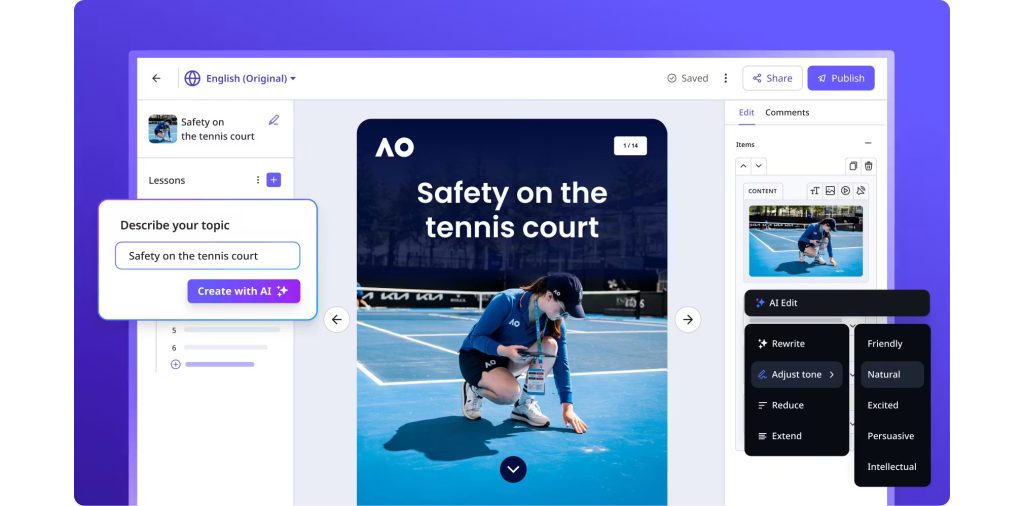
I had a customized course, built from one of their existing templates, live and assigned to a small team within a single day. The built-in AI content tools speed up course creation, though I will be honest, the AI-generated drafts needed real editing before they were good enough to publish as-is.
It works well beyond its safety-training roots as a general-purpose LMS, too. For distributed, frontline, or deskless workforces specifically, this is one of the most practical options on this list.
Pros:
- Bite-sized, mobile-first microlearning built for on-the-go learners
- Free plan available for individuals and small teams
- Wide library of templates across safety, compliance, and general training
- Genuinely easy to customize and launch a course within a day
- Well-suited for distributed, frontline, and deskless workforces
Cons:
- AI-generated content often needs real editing before it is publish-ready
- Analytics and reporting are lighter than dedicated enterprise LMS platforms
- Best fit for microlearning use cases, not deep, multi-week certification programs
User Rating: 4.7/5 (G2)
Pricing: Starts at $5/learner/month, billed annually
How I Chose The Employee Training Software
When I evaluate employee training software for a list like this, I do not just rely on feature lists or marketing claims. I look at how these development software for workforces actually perform in real-world settings. Here is the framework I used to make sure every recommendation is practical, reliable, and worth considering:
- User Reviews / Ratings: I start with real user feedback from platforms like G2 and Capterra. This gives me a clear picture of how teams actually experience the tool day to day, what they love, and where it falls short.
- Core Features & Functionality: I focus on what truly matters in training software. This includes course creation, assessments, certifications, mobile access, reporting, and integrations. If a tool cannot handle these well, it does not make the cut.
- Ease of Use: I pay close attention to how intuitive the platform feels for both admins and learners. A tool might be powerful, but if teams struggle to adopt it, it defeats the purpose. Clean interface, simple course creation, and quick onboarding are non-negotiable for me.
- Customer Support: From my experience, implementation is where many tools fail. I evaluate how responsive and helpful the support team is, especially during setup and ongoing use.
- Value for Money: I compare pricing with what the tool actually delivers. This is not about picking the cheapest option, but about whether the features, flexibility, and scalability justify the cost.
- Personal Experience / Expert Insights: Wherever possible, I rely on hands-on experience with these tools, along with insights from L&D leaders and HR teams who use them in real environments, to go beyond surface-level reviews.
Top 3 Employee Training Software Picks
Overwhelmed with all these choices? To make things simpler, here are my preferred employee training software choices:
1. PeopleGoal
If you want training tied directly to performance, career growth, and skill gaps rather than sitting in its own silo, PeopleGoal is my starting point. It turns training into a system that actually shows you who needs what and why, instead of a checklist of completed courses.
2. TalentLMS
For teams that need to get a course live fast, without a steep learning curve or a big budget, TalentLMS is the lowest-friction way onto this list. I have seen teams go from zero to a fully assigned course in a single afternoon.
3. Docebo
When you are training employees, partners, and customers at real scale and need AI to keep content fresh without adding headcount, Docebo earns its place. It is an investment, but for large, multi-audience training programs, it delivers.
Core Problems L&D Managers Run Into (And What to Watch For)
Before you shortlist anything, know the pain points that show up again and again in community discussions and real deployments:
- Clunky admin experience: Powerful back end, but it takes a dedicated specialist to run it
- Low learner engagement: Employees treat it like a box-ticking exercise instead of something useful
- Integration headaches: Training data does not sync with your HRIS or communication tools, so you end up re-entering data
- Hidden per-user costs: Pricing looks affordable until you scale past your starter tier
- Mobile unfriendliness: A dealbreaker if you have deskless or field workers
- Weak reporting: You get completion percentages, but no real signal on skill improvement
- Content decay: Training materials go stale the moment your processes change, and nobody updates them
When Should You Move From Spreadsheets to Training Software?
This is the question I get asked most. The honest answer: sooner than most people think. A spreadsheet works fine for five people. It stops working the moment complexity shows up.
Here are the clear signals it is time to move on:
- You have more than 10 people whose training records live in separate files or folders
- New hires are not consistently trained the same way across locations or managers
- Compliance training gets tracked manually, and you are not fully confident your records would hold up in an audit
- You have no visibility into whether training actually improved anyone’s skills, only whether they clicked “complete”
- Onboarding takes weeks instead of days because materials are scattered
- You are spending more time chasing completions than actually coaching people
How to Migrate Without Losing Your Training Records
Moving off spreadsheets or a legacy tool feels riskier than it actually is if you do it in order. Most organizations go live within 1 to 4 weeks, depending on team size and how much historical data needs importing.
- Export what you have first: Pull existing training records into a structured CSV before you touch anything else
- Document your current training hierarchy: Company-wide requirements, department-specific training, and individual development plans, so nothing gets flattened during import
- Use bulk import tools: Most platforms on this list, including PeopleGoal, support bulk import via Excel, CSV, or API
- Run a short admin and employee training session on the new system before going live, so historical data lands in the right structure from day one
- Pilot with one team first: Roll it out to one department or location before pushing it company-wide
Choose Training Software That Builds the Habit
The best training software will not fix a weak training strategy on its own. But it will make a good strategy impossible to ignore. If I had to give you one filter to decide with: choose the platform your managers and employees will actually open every week, not the one with the longest feature list on the sales page. Adoption beats functionality every time.
For most growing organizations, especially those that want training tied directly to real performance and career growth instead of sitting in its own disconnected silo, PeopleGoal gives you training, feedback, and development planning in one place without needing three separate tools.
Start with the 14-day free trial and run one team through their first learning cycle. The data will tell you the rest.
Frequently Asked Questions
What is the ROI of employee training software?
ROI shows up as reduced admin time on manual tracking, faster onboarding, fewer compliance gaps, and better retention. With 94% of employees saying they would stay longer at a company that invests in their development, the retention impact alone often outweighs the subscription cost within the first year.
Is there a free employee training software for startups?
Yes. TalentLMS and SC Training both offer genuinely usable free plans for small teams, and PeopleGoal offers a 7-day free trial to test a full training cycle before committing to a paid plan.
Can employee training software integrate with our existing HR tools?
Most platforms on this list integrate with HRIS systems like BambooHR and Workday, along with Slack, Microsoft Teams, and SSO providers. PeopleGoal specifically supports over 500 platform integrations.
How long does it take to see results from new training software?
Most teams see improved completion rates and clearer reporting within the first month. Meaningful skill improvement typically shows up within 60 to 90 days, especially with consistent weekly or biweekly check-ins built into the rollout.
Is employee training software good for remote or deskless workforces?
Absolutely, and in some cases it matters more for these teams than office-based ones. Mobile-first platforms like SC Training and Continu were built specifically to reach employees who are not sitting at a desk all day.
Do I need technical or coding knowledge to set this up?
No. Every platform on this list is built for no-code course creation and workflow setup. Some, like PeopleGoal and Trainual, go further with fully no-code custom workflows for onboarding and process documentation.
Can training software scale as my company grows from 20 to 500 employees?
Yes, if you choose correctly from the start. Platforms like PeopleGoal, Docebo, and Continu are built to support multi-level departments, cross-location reporting, and growing headcount without needing a full re-implementation later.
What security standards should I look for if we handle sensitive training content?
Look for SOC 2 Type II certification, ISO 27001 compliance, AES-256 encryption at rest, and role-based access controls. Most enterprise-focused platforms on this list, including PeopleGoal, Docebo, and Absorb, publish these standards clearly.
Why do companies still avoid investing in dedicated training software?
The most common reasons are cost concerns for smaller teams, hesitation about adding another tool to an already crowded stack, and past failed rollouts using spreadsheets or the wrong software. Once teams experience a clean, automated system, adoption almost always improves.
Ready to 3x Your Teams' Performance?
Use the best performance management software to align goals, track progress, and boost employee engagement.