
If you asked ten managers about employee performance, you would get ten different answers. Some rely on instinct built over the years. Some trust dashboards and reports.
That uncertainty between effort and evidence is where most performance systems quietly fail.
I have spent nearly a decade reviewing, implementing, and observing performance evaluation tools across growing startups, regulated organizations, and distributed teams. With this experience, I truly understand what happens once the novelty of a new system wears off.
In this guide, I will help you get an idea of the best employee performance evaluation software through a practical, experience-driven lens.
This includes:
- Which performance tools suit different organizational goals
- Where evaluation systems usually go wrong in real environments
- How teams actually use these platforms after implementation
Here’s a sneak peek into these tools with their best use case and pricing info:
| Tool | Best for | Pricing |
|---|---|---|
| PeopleGoal | Boosting Employee Performance & Improving Engagement | FREE 14-day trial. Paid starts at $4/user/month.$4/user/month |
| ThriveSparrow | Automated Employee Recognition | Starts at $2/employee/month. |
| PerformYard | Flexible Review Cycles | Starts at $5/person/month. |
| Leapsome | Personalized Learning Paths | Custom pricing. |
| Workable HR | Employee Data Management | Starts at $299/month for up to 20 employees. |
| Lattice | Best for Performance Management in Large Enterprises | Starts at $11/seat/month. |
| HiBob | Customizing Onboarding Flows | Custom pricing. |
| Rippling | Automating Technical HR Tasks | Custom pricing. |
| Sage HR | Structured Performance Reviews for Small Teams | Starts at £4.60/employee/month. |
| Kudos | Recognition-Driven Employee Evaluations | Starts at $2–$5/user/month. |
10 Best Performance Evaluation Software
Now, let us check out the best performance evaluation software in a bit of detail to understand how they stand out. Each one solves a slightly different problem, and I have explained where each tool excels and where it may frustrate you a bit.
1. PeopleGoal
Best for Boosting Employee Performance & Improving Engagement
I used PeopleGoal personally in an organization where performance reviews had become disconnected from actual work. Managers struggled to recall specifics. Employees felt reviews were subjective and inconsistent. With this smart employee performance evaluation software, the changes were immediately visible.
We started by setting cascading goals that linked individual objectives to team and company priorities. Within weeks, managers began referencing goals naturally during one-on-ones. Performance management stopped being abstract. One manager said, “This is the first time I feel like I’m reviewing progress, not personalities.”
What I liked most was how the evidence accumulated over time. Employee feedback, goal updates, and check-in notes were already there when review cycles began. During one quarterly review, a manager realized the conversation was already half written by the system. That reduced stress and improved fairness.
PeopleGoal does not force rigid ratings. Instead, it encourages better judgment by giving context. Performance feels continuous, not episodic, which is exactly how real work happens.
Pros:
- Enables organizations to track employee performance through OKRs, SMART goals, and custom goal frameworks, allowing managers to evaluate progress based on clearly defined outcomes.
- Supports continuous feedback, 360-degree feedback, and structured check-ins, ensuring performance conversations stay current, well-rounded, and informed by multiple perspectives.
- Maintains full alignment between individual, team, and company goals through connected goal hierarchies, helping employees understand how their work contributes to broader priorities.
- Centralizes goals, feedback, reviews, employee development plans, and performance history in one place, significantly reducing administrative effort and making review cycles faster.
- Encourages development-focused performance discussions by combining performance data with skill development plans, career paths, and engagement insights.
Cons:
- No downloadable or on-premise version available for the tool.
- It does not support a dark user interface.
Pricing: FREE 14-day trial. Paid starts at $4/user/month.
2. ThriveSparrow
Best for Automated Employee Recognition
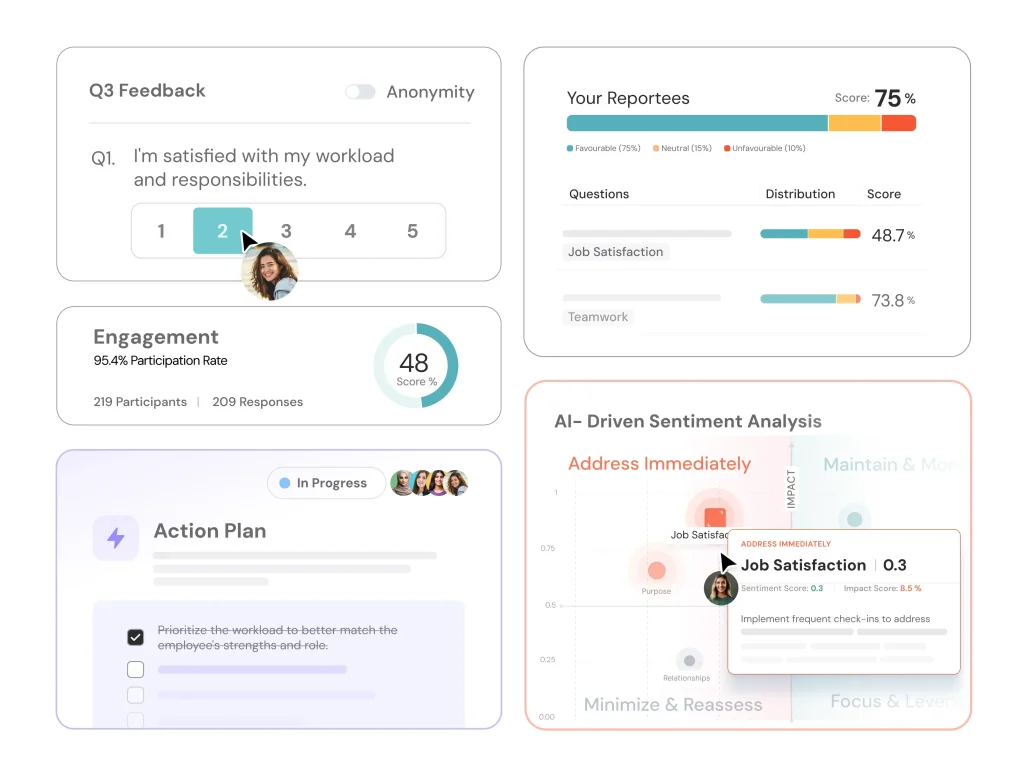
I worked closely with an HR leader who introduced ThriveSparrow during a rapid hiring phase. Performance was not the issue. Consistency was. Some managers gave regular feedback. Others avoided it entirely. ThriveSparrow, as a performance evaluation tool, brought balance.
What stood out was how engagement data informed evaluation. Pulse surveys revealed early signs of confusion around expectations in one department. Instead of waiting for performance to drop, managers clarified goals and roles immediately. Reviews later reflected improvement rather than surprise.
One particularly effective moment came when a manager used engagement trends to contextualize performance challenges during a review. The conversation shifted from blame to problem-solving. That changed how feedback was received.
ThriveSparrow works best when organizations believe performance is shaped by environment, clarity, and morale, not just output alone.
Pros:
- Integrates performance evaluation with engagement insights, allowing managers to understand how clarity, motivation, and sentiment influence employee performance outcomes.
- Enables continuous feedback loops through surveys and check-ins, reducing the risk of performance issues going unnoticed until formal review periods.
- Helps HR teams identify performance risks early by highlighting disengagement or confusion before productivity declines.
- Encourages balanced evaluation conversations that include recognition, well-being signals, and constructive development feedback.
- Supports people-first performance cultures that value transparency, listening, and proactive management intervention.
Cons:
- Organizations seeking strictly metrics-driven or score-heavy evaluation systems may find the approach too qualitative.
- Requires consistent employee participation in surveys and feedback tools to deliver reliable performance insights.
Pricing: Starts at $2/employee/month (billed annually).
3. PerformYard
Best for Flexible Review Cycles
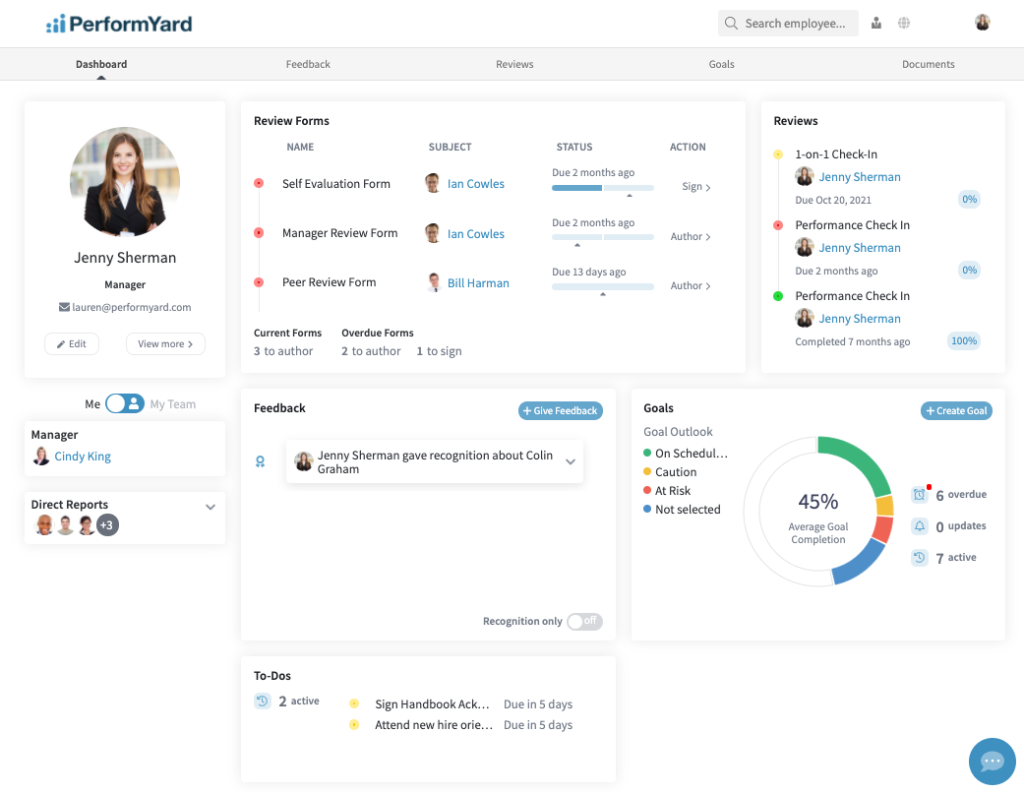
PerformYard is frequently chosen by organizations that want order. I worked with a company that adopted it after years of uneven review practices across departments. Some managers ran detailed evaluations. Others submitted three sentences and moved on.
PerformYard enforced structure by acting as a consistent performance evaluation system. Review cycles, deadlines, and rating frameworks were standardized. HR finally had comparable data. During calibration meetings, leaders were discussing performance with shared language instead of conflicting interpretations.
One manager admitted they initially resisted the rigidity. Six months later, they said reviews felt fairer and easier to justify. That shift mattered.
PerformYard excels where consistency is non-negotiable, and performance needs to be documented clearly and defensibly.
Pros:
- Enforces consistent review structures across teams, reducing variability and perceived unfairness in employee performance evaluations.
- Supports standardized rating systems that help leadership compare performance outcomes meaningfully across departments and roles.
- Centralizes all performance documentation, ensuring reviews are complete, auditable, and accessible when needed.
- Helps HR teams maintain control over timelines, workflows, and compliance requirements during review cycles.
- Reduces reliance on informal or ad hoc evaluation practices that often undermine trust and clarity.
Cons:
- Teams accustomed to informal feedback cultures may initially find the structured workflows restrictive or overly procedural.
- Less emphasis on lightweight, continuous feedback compared to more modern performance platforms.
Pricing: Starts at $5/person/month.
4. Leapsome
Best for Personalized Learning Paths
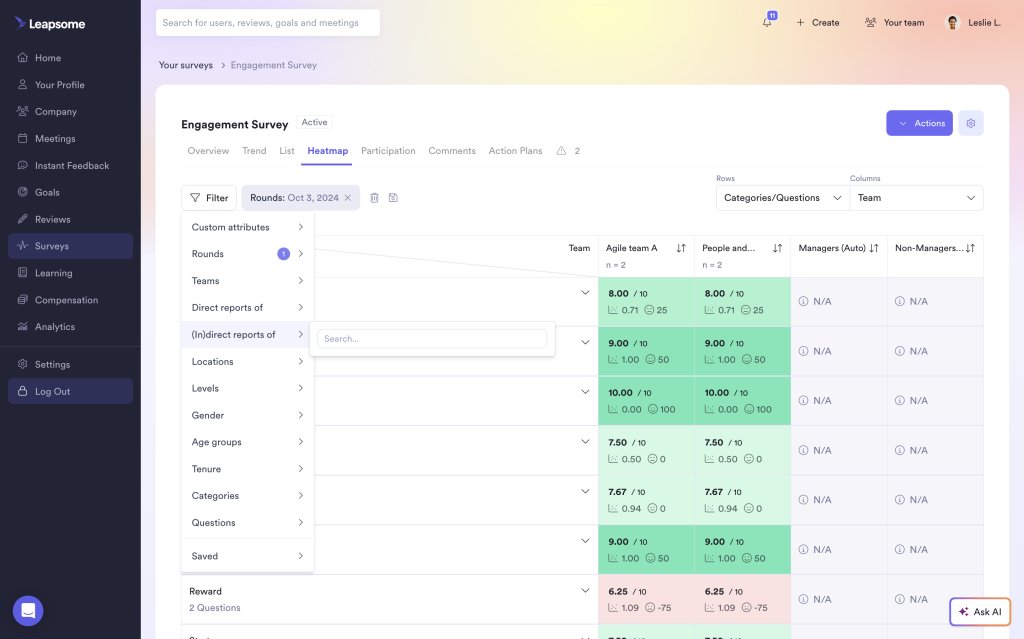
I have observed Leapsome in a product-led organization where leadership had one persistent complaint: “Reviews are happening, but nothing changes afterward.” They wanted an evaluation to produce momentum, not paperwork.
Leapsome helped because it made performance feel like a loop: reflect, learn, improve, repeat. Managers used structured reviews to document strengths and gaps, then immediately converted those insights into development actions and revised goals. One specific incident stuck with me.
A high-performing engineer was rated strongly on delivery but weak on cross-functional influence. Instead of vague advice, their manager mapped a targeted development plan tied to collaboration habits, mentorship, and stakeholder feedback. In the next cycle, peer feedback showed clear improvement, and the employee described the process as “the first review that actually changed my week-to-week behavior.”
Pros:
- Connects performance reviews to structured development planning, helping managers translate feedback into specific learning actions and measurable growth outcomes.
- Supports ongoing feedback and goal tracking in the same environment, making performance evaluation feel continuous rather than limited to annual review season.
- Enables more balanced evaluations by combining input from multiple sources, so employees receive a fuller picture than a single manager’s perspective.
- Encourages forward-looking performance conversations that focus on “what will improve next” instead of only documenting past results and mistakes.
- Helps organizations reinforce a coaching culture by making progress on development goals visible, trackable, and revisitable in future cycles.
Cons:
- Feature breadth can feel heavy for teams that only want simple review forms and minimal configuration overhead.
- Without clear internal guidance, managers may over-engineer review workflows and create more processes than the organization needs.
Pricing: Custom pricing.
5. Workable HR
Best for Employee Data Management
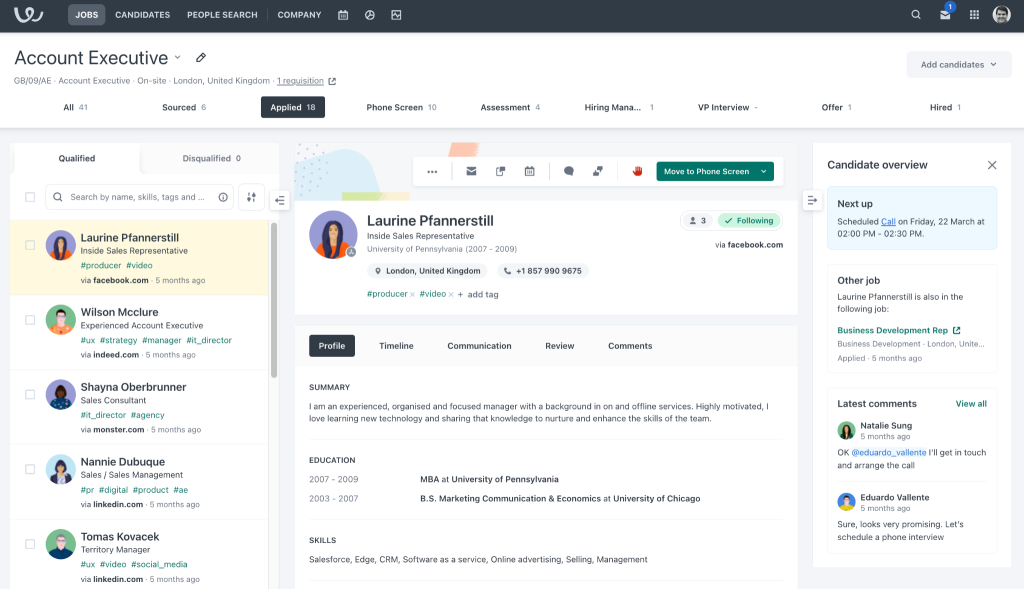
I worked with a talent and HR team that already relied on Workable for recruiting, and they wanted performance evaluations to feel connected to the reality of roles, not disconnected HR theory. Their strongest use case was expectation alignment. Managers could reference role descriptions, core responsibilities, and even hiring intentions when structuring review conversations.
That helped reduce the “moving target” problem, where employees feel standards shift without warning. A memorable example: a newly promoted team lead was struggling with prioritization, and the manager kept framing it as a personal efficiency issue. When they revisited the role expectations documented in Workable, it became clear the problem was unclear delegation boundaries, not effort.
The evaluation conversation shifted from criticism to role design, and performance improved quickly once responsibilities were clarified. Workable HR fits organizations that want performance reviews to sit naturally within broader HR workflows and remain anchored to what the job actually requires.
Pros:
- Ties performance evaluation back to documented role expectations, helping managers assess employees against clear responsibilities rather than subjective or shifting standards.
- Centralizes employee lifecycle information, making it easier to connect performance outcomes to onboarding, role changes, and workforce planning decisions.
- Reduces administrative friction by keeping performance processes in the same ecosystem many teams already use for hiring and HR coordination.
- Helps managers create fairer evaluations by referencing the original job intent and competency expectations instead of relying on vague impressions.
- Works well for growing organizations that want structured performance conversations without adopting a completely separate, standalone platform.
Cons:
- Organizations seeking advanced performance calibration tools or deep analytics may find evaluation features less robust than specialist platforms.
- Best value typically appears when Workable is already central to HR operations, not added solely for performance evaluations.
Pricing: Starts at $299/month for up to 20 employees. Billed annually.
6. Lattice
Best for Performance Management in Large Enterprises
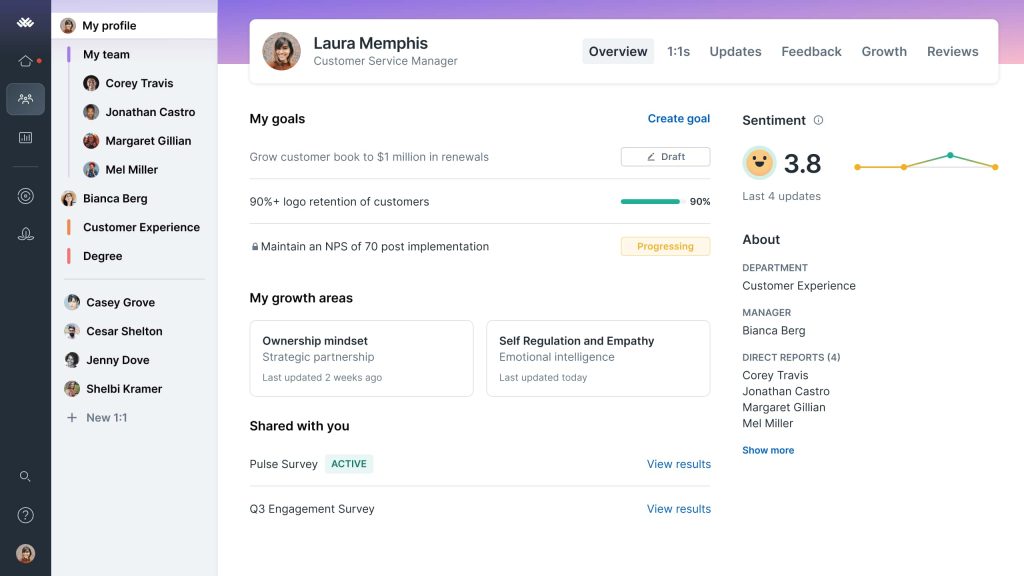
I have seen Lattice used in organizations that were trying to solve a familiar problem: managers only gave feedback when something went wrong, and employees entered review cycles nervously because they had no signal all year. Lattice helped normalize ongoing performance conversations by making check-ins and feedback a routine, lightweight habit.
One team introduced quarterly growth conversations alongside annual reviews. Within two cycles, managers reported fewer tense discussions because feedback had already been shared in smaller, digestible pieces.
A specific incident comes to mind: an employee believed they were underperforming because they were quiet in meetings. Their manager used peer feedback collected through Lattice to show that colleagues valued their written clarity and follow-through, which changed the employee’s self-perception and improved confidence.
Pros:
- Encourages regular check-ins and feedback habits that reduce surprises, making formal performance evaluations calmer and more evidence-based.
- Centralizes goals, feedback, and review documentation so managers can reference real examples rather than reconstructing performance from memory.
- Helps organizations build a transparent performance culture by making expectations and progress visible to both employees and managers.
- Supports early performance correction by prompting frequent conversations, preventing small issues from becoming end-of-year “big reveals.”
- Strengthens fairness by capturing broader input and consistent records, reducing the influence of recency bias and isolated incidents.
Cons:
- Organizations with highly compliance-driven, documentation-heavy evaluation requirements may need additional structure beyond what Lattice typically emphasizes.
- Outcomes depend heavily on manager consistency, and uneven participation can reduce the quality of performance data over time.
Pricing: Starts at $11/seat/month.
7. HiBob
Best for Customizing Onboarding Flows
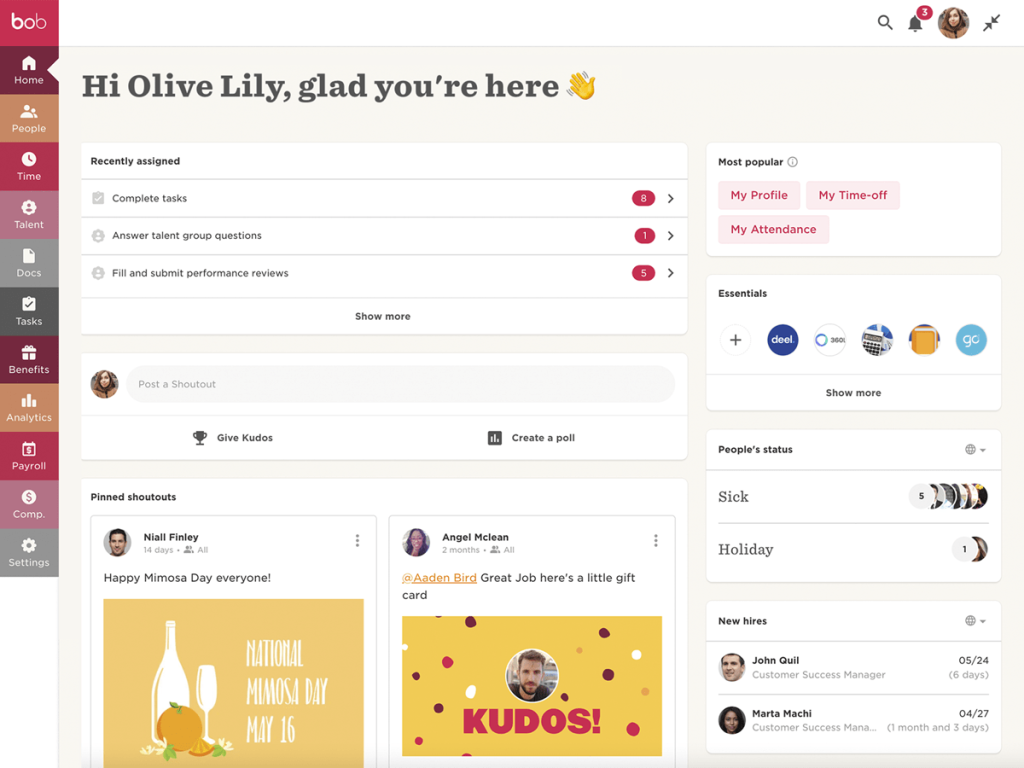
A friend of mine in the HR sector led the implementation of HiBob in a multinational organization with teams across multiple regions, each with different cultural norms around feedback. Their biggest challenge was getting comparable performance information without forcing everyone into a single rigid process.
HiBob helped by providing a common framework while allowing regional differences in how reviews were conducted. During the first company-wide cycle, leadership finally had a coherent view of performance trends by function and region, which had been nearly impossible when every location used different templates and timing.
One moment they described was almost comedic: leaders realized three regions were using the same rating labels to mean completely different things. HiBob made it easier to standardize definitions and expectations, which improved calibration conversations and reduced conflict.
Pros:
- Supports scalable performance evaluation across regions and departments, enabling leadership to compare trends while respecting local operating differences.
- Connects performance information to broader workforce data, helping HR contextualize evaluations with role history, tenure, and organizational changes.
- Helps standardize evaluation language and definitions across locations, reducing confusion and improving the quality of calibration discussions.
- Useful for organizations that need a unified people system where performance is integrated with broader HR processes and analytics.
- Enables clearer organizational insight by surfacing patterns across teams, making it easier to identify talent risks and development opportunities.
Cons:
- Smaller organizations may find the platform broader than necessary if they only need lightweight performance reviews.
- Implementation benefits depend on careful alignment of evaluation frameworks, otherwise regional inconsistency can persist in new forms.
Pricing: Custom pricing.
8. Rippling
Best for Automating Technical HR Tasks
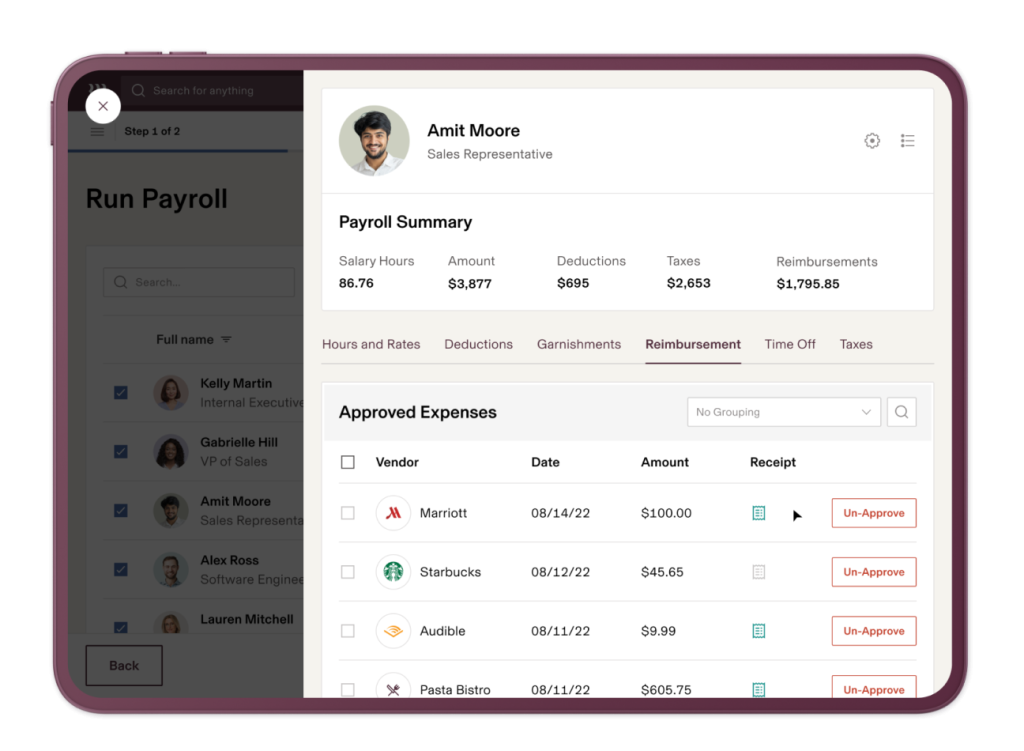
I have observed Rippling used in an organization that was frankly tired of juggling systems. They wanted a performance evaluation to connect directly to pay decisions, role changes, and internal mobility rather than living in a separate HR tool. Rippling’s appeal was operational coherence.
During review cycles, managers discussed performance outcomes while HR could immediately connect decisions to compensation planning and employment records. One specific scenario stood out: a department completed reviews and identified two employees ready for expanded scope.
In the past, that would trigger a messy chain of spreadsheets and approvals. With Rippling’s consolidated setup, role updates and related changes happened faster and with fewer errors. The HR lead described it as “finally getting out of the copy-paste business.”
Pros:
- Integrates performance evaluation with operational HR workflows, allowing review outcomes to connect naturally to role changes, compensation actions, and employee records.
- Reduces tool sprawl by consolidating HR processes, which lowers administrative errors and speeds up decisions after performance cycles conclude.
- Helps leaders act on performance insights quickly by keeping relevant people data accessible during evaluation and planning discussions.
- Supports organizations that want performance decisions to translate into concrete changes, rather than remaining as isolated review documents.
- Improves consistency by centralizing employee lifecycle information, making performance evaluation less fragmented across multiple disconnected systems.
Cons:
- Organizations wanting highly specialized performance features may find the evaluation components less deep than dedicated performance platforms.
- Custom performance frameworks may require workarounds if the organization expects extremely nuanced review workflows and calibration models.
Pricing: Custom pricing.
9. Sage HR
Best for Structured Performance Reviews for Small Teams
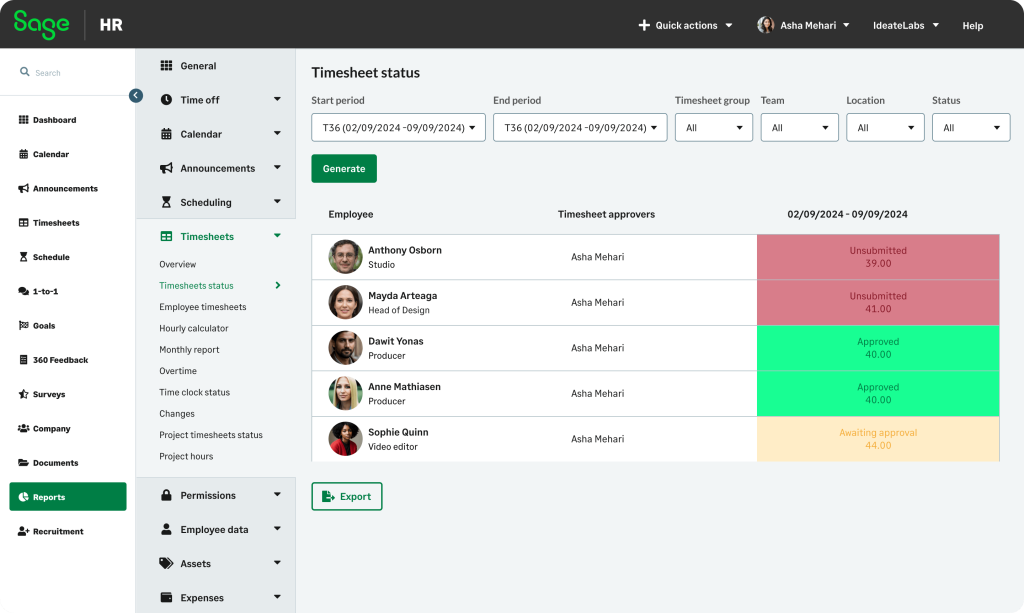
Almost 5 years back, a colleague introduced me to Sage HR in a small organization that had reached the “spreadsheet breaking point.” Reviews were inconsistent, stored across email threads, and often completed late because nobody owned the process end-to-end.
Sage HR provided a simple structure that made performance reviews easier to run and harder to forget. Managers appreciated having clear steps, while employees appreciated knowing when feedback was coming and what it would cover.
One incident they shared was surprisingly revealing. A manager assumed an employee was “not proactive,” but the review process prompted them to document examples. They realized the employee had been proactive, just in ways not visible in meetings, such as process improvements and internal documentation. That changed the evaluation outcome and improved the manager’s awareness of different working styles.
Pros:
- Provides structured performance review workflows that replace inconsistent spreadsheets and reduce missed deadlines across managers and teams.
- Keeps performance documentation centralized, making it easier for HR to track completion, consistency, and historical evaluation records.
- Supports straightforward adoption with minimal training, which helps smaller organizations implement reviews without creating process fatigue.
- Encourages clearer evaluation conversations by prompting managers to document evidence and examples rather than vague impressions.
- Helps organizations formalize performance practices quickly, creating stability before introducing more advanced performance strategies later.
Cons:
- Organizations requiring sophisticated analytics, calibration tools, or complex performance frameworks may outgrow the platform over time.
- Limited customization may frustrate teams that want highly tailored review forms and advanced competency mapping features.
Pricing: Starts at £4.60/employee/month.
10. Kudos
Best for Recognition-Driven Employee Evaluations
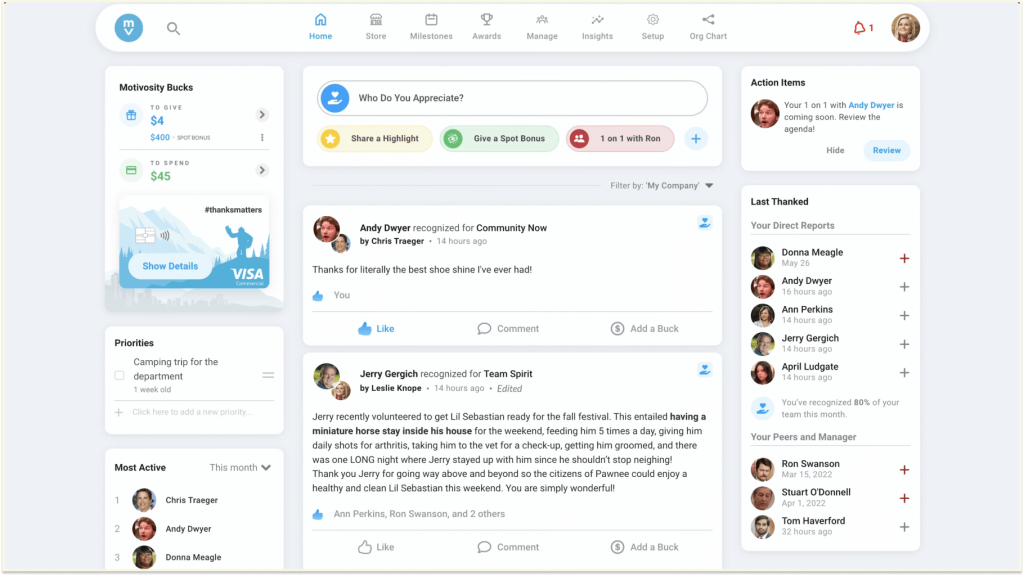
A colleague of mine in the SaaS industry used Kudos to offer feedback that tend to be corrective and rare. As per his feedback, earlier the performance reviews felt like a list of issues, even when employees were doing great work. Kudos changed the tone because recognition became visible and searchable.
Over time, managers started entering evaluations with real examples of positive impact already documented by peers. One story made me smile. A quiet operations specialist rarely self-promoted and was repeatedly overlooked during review discussions. When the manager reviewed Kudos recognition, they found multiple peer notes describing how this person prevented errors and saved hours each week.
The manager said, “I had no idea they were carrying this much invisible work.” That recognition changed the evaluation and resulted in a role adjustment with more ownership. Kudos is not a standalone performance evaluation platform, but it is a strong companion.
Pros:
- Captures peer recognition as lightweight evidence that can enrich performance evaluations with specific, timely examples of real workplace impact.
- Helps balance review conversations by ensuring strong contributions are documented, not forgotten, especially for quieter employees.
- Strengthens culture by reinforcing positive behaviors consistently, which can indirectly improve performance outcomes over time.
- Enables managers to enter reviews with a richer narrative, reducing overfocus on negative feedback or recent events only.
- Complements formal evaluation systems by adding contextual signals about collaboration, support, and everyday excellence that metrics miss.
Cons:
- Not designed as a complete performance evaluation platform, so organizations still need a structured review system for ratings and outcomes.
- Value depends on participation, and low recognition activity can limit the usefulness of insights during evaluation periods.
Pricing: Starts at $2–$5/user/month.
How I Chose These Performance Evaluation Software
I used a consistent, practical framework to evaluate every tool in this list. The focus was not on popularity or feature volume, but on how well each platform supports real performance evaluation conversations and how reliably performance evaluation systems hold up across different team sizes, cultures, and maturity levels.
Below is the exact approach I followed.
1. User Reviews and Long-Term Adoption Signals
I analyzed verified user reviews to understand how these tools perform after the initial rollout phase. I looked for patterns around sustained usage, manager buy-in, and employee acceptance. Tools that users described as “helpful over time” ranked higher than those praised only during onboarding.
2. Performance Evaluation Features That Influence Real Decisions
I examined whether each platform actually helps managers make better performance decisions. This included goal alignment, quality of feedback, review structure, and development planning. Tools that simply collected data without improving judgment or clarity were deprioritized.
3. Ease of Use for Managers and Employees
I assessed how intuitive each tool feels in daily use. Performance software must fit naturally into workflows. Platforms that required heavy training, constant reminders, or complex setup scored lower than those managers and employees could use confidently with minimal friction.
4. Quality of Customer Support and Implementation Experience
I considered how well vendors support organizations during setup and ongoing use. Performance processes evolve, and responsive support matters. Tools with strong onboarding guidance and reliable customer assistance proved far more sustainable as teams scaled or changed direction.
5. Value for Money in a Performance Context
I evaluated pricing against real impact. A tool is valuable only if it improves clarity, fairness, or efficiency in performance evaluation. I prioritized platforms where the investment clearly aligned with better reviews, stronger alignment, or reduced administrative burden.
6. Personal Experience and Trusted Expert Perspectives
I grounded my evaluation in direct experience and insights from HR leaders and managers I trust. Their long-term observations helped confirm how these tools behave outside demos, especially during challenging review cycles or organizational change.
My Top 3 Performance Evaluation Software Choices
When you step back and look at all the tools on this list, three of them consistently stand out for one simple reason: they improve the quality of performance conversations without adding unnecessary complexity. Each of these tools supports clarity, fairness, and action in a slightly different way, but all three proved reliable in real organizational settings.
1. PeopleGoal
PeopleGoal earns the top spot because it keeps performance evaluation grounded in goals, evidence, and ongoing feedback. I have seen it turn vague, memory-based reviews into clear, development-focused conversations. It helps managers evaluate progress over time rather than react to isolated moments, which makes reviews feel fair and genuinely useful.
2. Lattice
Lattice makes performance evaluation feel normal rather than intimidating. Its strength lies in continuous feedback and regular check-ins that reduce surprises during formal reviews. Teams using Lattice tend to have calmer, more honest performance conversations because expectations and feedback are shared consistently throughout the year, not saved for review season.
3. Leapsome
Leapsome stands out for turning evaluation into action. Performance reviews flow directly into learning plans and updated goals, which helps employees understand exactly how to improve. It is ideal for organizations that want reviews to shape future behavior and skill growth instead of simply summarizing past performance.
Ready to Pick the Best Employee Performance Evaluation Software?
Choosing performance evaluation software is really about answering one question: what will actually make performance clearer for your managers and employees?
Some teams need stronger structure, others need better feedback habits, and some simply need goals to stay visible throughout the year. The right tool does not add complexity. It removes guesswork. When performance evaluation systems work, they make expectations clearer, conversations easier, and decisions more consistent across teams.
Now, if I had to pick one tool, it would be PeopleGoal. It keeps performance evaluation focused on goals, progress, and ongoing feedback without turning the process into paperwork. Managers get clarity, employees understand what matters, and performance discussions feel fair, practical, and grounded in real work.
Ready to 3x Your Teams' Performance?
Use the best performance management software to align goals, track progress, and boost employee engagement.